
Ultimate Guide to Key Backup for PHI Encryption
Post Summary
Losing encryption keys can cripple healthcare operations. Without proper key backups, encrypted patient data becomes inaccessible, risking compliance violations and operational shutdowns. This guide explains how to securely back up encryption keys for Protected Health Information (PHI) to meet HIPAA and HITECH requirements while minimizing risks.
Key Takeaways:
- Why Key Backup Matters: Encryption protects PHI, but losing keys makes data permanently unreadable. Backup ensures recovery in emergencies.
- Legal Compliance: HIPAA and HITECH mandate secure key backup as part of contingency planning. Keys must be stored and managed securely.
- Best Practices:
- Encrypt backup keys at rest and in transit.
- Use Hardware Security Modules (HSMs) for tamper-resistant key storage.
- Align key backups with Recovery Point Objectives (RPO) and Recovery Time Objectives (RTO).
- Test recovery processes annually to ensure readiness.
- Roles and Governance: Assign responsibilities (e.g., Key Management Officer, auditors) to avoid single points of failure.
- Tools and Technology: Use services like AWS CloudHSM or Azure Managed HSM for secure key management.
Action Steps:
- Write a Key Management and Backup Policy aligned with HIPAA. This should include third-party risk management for vendors handling your keys.
- Use encrypted, geographically redundant backups.
- Regularly test recovery processes and rotate keys per NIST guidelines.
- Monitor access with detailed logs and implement strict access controls.
This guide provides a detailed roadmap for healthcare organizations to safeguard encryption keys, ensuring data availability and compliance.
Core Principles for PHI Key Backup Design
Confidentiality, Integrity, and Availability of Backup Keys
Backup keys need to be protected with the same level of care as Protected Health Information (PHI) itself. If a backup key is stolen, the security of the data it protects is compromised. Similarly, a corrupted key is just as detrimental as losing the original.
- Confidentiality: Backup keys must be encrypted both at rest and during transit. They should be stored separately from the data they protect and only accessible to authorized personnel.
- Integrity: It's crucial to verify that the key remains untampered before relying on it during recovery.
- Availability: Backup keys must be accessible quickly in emergencies, such as ransomware attacks or system failures.
To reduce exposure risks, use out-of-band methods for transferring keys. These principles serve as the foundation for aligning key backup processes with recovery objectives.
Aligning Key Backup with RPO and RTO in Healthcare
Effective key backup strategies must align with two critical recovery metrics: Recovery Point Objective (RPO) and Recovery Time Objective (RTO).
- RPO: This determines how much data loss is acceptable. Backup keys must be updated frequently enough to decrypt the most recent data.
- RTO: This defines how quickly systems need to be restored. The key recovery process must be fast and efficient, avoiding slow, manual retrieval methods.
Healthcare organizations should tailor their key backup schedules and storage strategies to meet these objectives. For example, the backup needs of a billing system may differ significantly from those of a real-time clinical application.
Governance and Role Assignments for Key Backup
Once secure storage and recovery protocols are in place, governance ensures the reliability of key backup operations. Without clear role assignments, critical tasks can be overlooked, especially if one person holds all the recovery knowledge.
Assigning roles and responsibilities is essential:
- Key Management Officer (KMO): Oversees all key lifecycle activities and ensures proper execution.
- ISSO / DevSecOps Member: Handles the technical aspects of key management and often serves as the KMO.
- Independent Auditor: Conducts regular reviews, ensuring separation of duties by staying uninvolved in daily key management tasks.
- Secret Manager: Manages the lifecycle of specific keys, from creation to retirement.
- On-Call Team: Responds to key compromises or recovery incidents immediately.
The Centers for Medicare & Medicaid Services (CMS) emphasizes the importance of separating duties and avoiding single points of failure:
"To ensure separation of duties, audits should be conducted by individuals or teams who are not directly involved in key management activities." - CMS Key Management Plan Template [1]
"To ensure operational continuity, key generation responsibilities should not be limited to a single individual." - CMS Key Management Plan Template [1]
The table below summarizes these roles:
| Role | Responsibility |
|---|---|
| Key Management Officer (KMO) | Oversees all key lifecycle activities and ensures execution |
| ISSO / DevSecOps Member | Handles technical implementation; often serves as KMO |
| Independent Auditor | Conducts monthly log reviews and annual audits |
| Secret Manager | Manages a key's lifecycle from creation to retirement |
| On-Call Team | Responds to key compromises or recovery incidents |
CMS policies also require cryptographic keys to be rotated at least annually [1], with manual usage logs reviewed monthly [1]. The Key Management Plan should remain a dynamic document, updated annually or whenever significant changes occur in the system.
sbb-itb-535baee
PKI 101: private encryption key storage and use
Technical Methods for PHI Key Backup
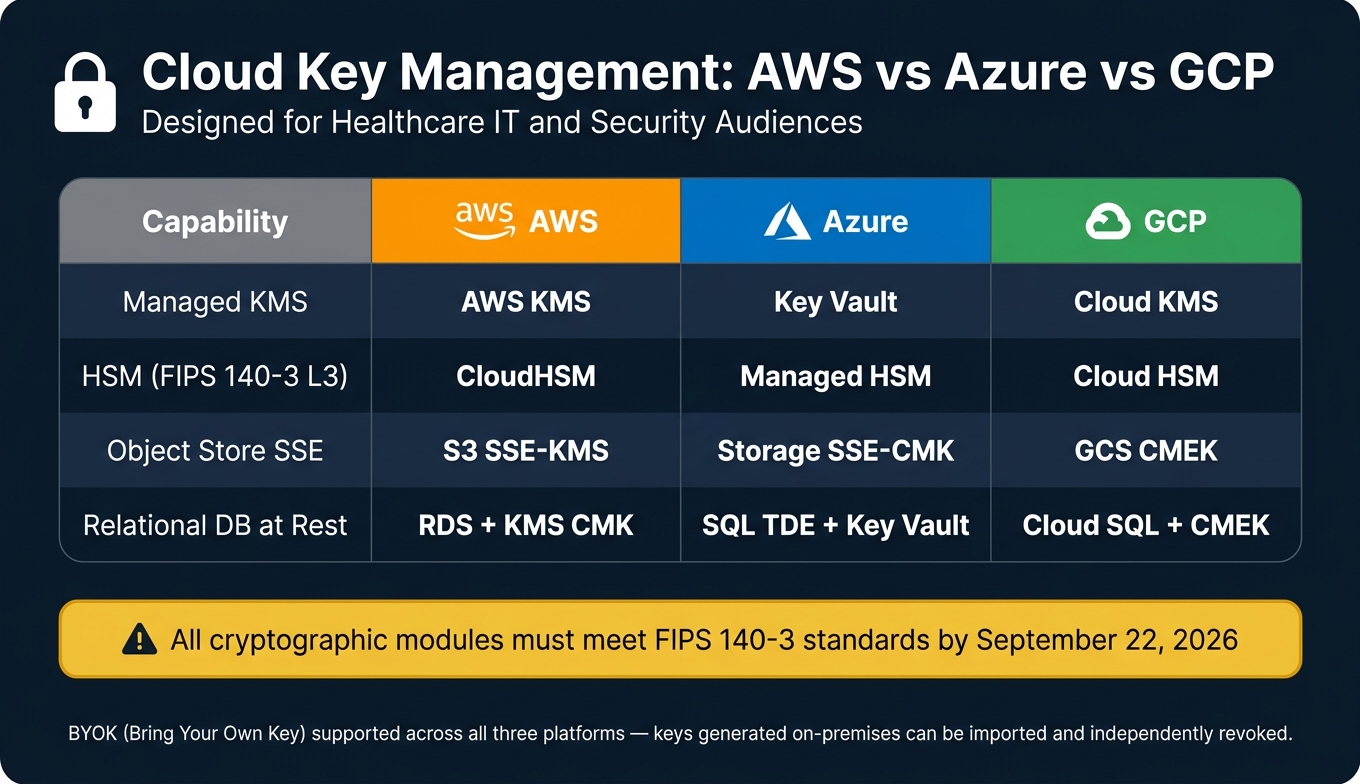
Cloud KMS & HSM Comparison: AWS vs Azure vs GCP for PHI Key Management
Centralized Key Management and Hardware Security Modules (HSMs)
A strong key management strategy starts with a secure hardware foundation. A Hardware Security Module (HSM) is designed to generate and store cryptographic keys within tamper-resistant hardware, ensuring they are never exposed in plaintext to application memory.
"A Hardware Security Module (HSM) provides a tamper-resistant root of trust that generates, stores, and uses cryptographic keys without exposing them to application memory." - Kevin Henry, HIPAA Expert [2]
This approach uses a hierarchy of keys: root keys, Key-Encryption Keys (KEKs), and Data-Encryption Keys (DEKs). KEKs encrypt and protect DEKs, which are responsible for encrypting Protected Health Information (PHI). KEKs should always remain inside the HSM and never be exported in plaintext. When backing up DEKs, they should be exported in their encrypted (or "wrapped") form using envelope encryption. This allows re-encryption of DEKs with a new KEK without the need to re-encrypt large datasets.
For optimal security, choose HSMs with FIPS 140-3 Level 3 validation, which include tamper-response mechanisms. Use M-of-N quorum approval for sensitive actions like key export or restoration. This requires multiple authorized custodians to provide their credential fragments before the operation can proceed. Credential fragments should be stored in tamper-evident containers at separate geographic locations.
Cloud-based HSM services like AWS CloudHSM or Azure Managed HSM are gaining traction in healthcare. These services eliminate the operational burden of maintaining on-premises HSMs while supporting Bring Your Own Key (BYOK) models. With BYOK, organizations can generate keys on-premises and import them into a cloud Key Management Service (KMS), retaining the ability to revoke them independently [3].
Here's how major cloud platforms match up with key management requirements:
| Need | AWS | Azure | GCP |
|---|---|---|---|
| Managed KMS | AWS KMS | Key Vault | Cloud KMS |
| HSM (FIPS 140-3 L3) | CloudHSM | Managed HSM | Cloud HSM |
| Object Store SSE | S3 SSE-KMS | Storage SSE-CMK | GCS CMEK |
| Relational DB at Rest | RDS + KMS CMK | SQL TDE + Key Vault | Cloud SQL + CMEK |
Hardware-based protection is just one layer. Application and database-level strategies are equally critical.
Application and Database-Level Key Backup
In healthcare databases, encryption is often layered. A Service Master Key (SMK) protects a Database Master Key (DMK), which in turn secures the certificates or asymmetric keys that wrap the Database Encryption Key (DEK). While Transparent Data Encryption (TDE) simplifies storage-layer encryption, it doesn’t cover all vulnerabilities.
"Encrypting data without a key management story is theater. If the keys live in the same database as the ciphertext, an attacker who reads the database reads the keys." - Garvita Amin, Healthcare Technology Expert [3]
For sensitive data like Social Security Numbers or Medical Record Numbers (MRNs), field-level encryption provides an additional layer of protection, mitigating risks from over-privileged accounts or SQL injection attacks.
One operational challenge arises during disaster recovery. If an encrypted database is restored to a new instance, the new instance’s SMK cannot automatically decrypt the restored DMK. The DMK must be manually re-encrypted with the new SMK to restore functionality. This process should be documented and tested regularly to prevent downtime.
For secure backup storage, consider solutions like AWS Secrets Manager for passwords and metadata and Amazon S3 with Cross-Region Replication (CRR) for certificates and private keys. These backups should always use SSE-KMS encryption [4].
Endpoint devices also require dedicated encryption key backup strategies.
File and Endpoint Encryption Key Backup
Healthcare organizations must extend encryption practices to endpoint devices, ensuring full compliance with PHI protection standards. Devices accessing PHI should use full-disk encryption (FDE) solutions like Microsoft BitLocker (Windows) or Apple FileVault (macOS). Recovery keys from these tools must be securely escrowed and access-controlled.
- BitLocker recovery keys can be backed up to Active Directory or Azure AD (Microsoft Entra ID), with access logs for auditing.
- FileVault recovery keys can be escrowed via Apple Business Manager or a Mobile Device Management (MDM) platform.
Backup files from these devices must also be encrypted both at rest and during transit to meet HIPAA’s audit safe harbor requirements [3]. Additionally, HIPAA mandates that HSM and application audit logs be retained for at least six years [2].
To align with healthcare’s stringent data recovery needs, encryption keys for sensitive workloads should be rotated every 90 days, although NIST Special Publication 800-57 recommends at least annual rotation [3]. Automating key rotation reduces human error and ensures consistent compliance across all systems.
Controls and Risk Management for Key Backup
Access Control, Authentication, and Monitoring
Protecting key backups starts with strict access management. Assign at least two specific key custodians to oversee key management and backup processes [3]. Use Role-Based Access Control (RBAC) to limit backup access to only those with proper authorization [1]. To maintain accountability, ensure audits are conducted by individuals outside the key management team, reinforcing separation of duties [1][5].
Multi-Factor Authentication (MFA) is essential for all accounts interacting with encryption keys, especially root access keys [5]. Root keys should either be disabled or have stringent MFA policies applied. Keep detailed logs of all key-related activities - including user identity, timestamps, key IDs, and associated resources - and retain these logs for six years to meet HIPAA requirements [3]. Automate monitoring of key operations and supplement it with monthly manual log audits to detect anomalies, such as access at odd hours or from unexpected locations [1].
For real-time detection of unusual activity, tools like AWS Security Hub and CloudWatch Alerts are invaluable. With these access controls in place, it's critical to maintain consistent backup schedules and regularly test recovery procedures to ensure readiness.
Backup Schedules and Testing Procedures
Setting up a backup schedule is straightforward, but ensuring it works when needed is where many organizations falter. Rotate high-sensitivity encryption keys every 90 days and configure automated alerts to flag keys nearing expiration [3][1]. Quarterly, verify the "last rotated" date in your Key Management Service (KMS) console to confirm that automated processes are running smoothly [3].
Testing is the real measure of a backup strategy’s effectiveness. The Key Management Officer (KMO) should conduct an annual walkthrough of recovery procedures to identify any gaps or outdated instructions [1]. Pair this with an annual tabletop exercise that simulates a key compromise or loss scenario, allowing the security team to practice their response in a controlled environment [1].
| Testing Activity | Frequency | Purpose |
|---|---|---|
| Procedure Walkthrough | Annual | Verify recovery documentation is accurate and actionable |
| Tabletop Exercise | Annual | Test team response to key compromise or loss |
| Manual Log Audit | Monthly | Detect anomalies or insider threats |
| Automated Monitoring | Continuous | Provide real-time alerts on key usage and status |
| KMP Document Review | Annual | Ensure compliance with NIST SP 800-57 and HIPAA |
"The Key Management Plan (KMP) is a living document, and should be reviewed and updated annually, or upon any significant system or cryptographic change." - CMS Key Management Plan Template [1]
Your Key Management Plan should include detailed, step-by-step instructions for retrieving keys from backups or archival storage - not just a note stating that backups exist [1].
Connecting Key Backup to Enterprise Risk Management
Key backup controls should be integrated into your broader risk management framework. Once access controls and testing procedures are in place, assess key backup risks alongside other enterprise risks. Treat key availability as a formal risk category, assigning likelihood and impact scores to ensure it gets the attention it deserves.
Key backup risks shouldn’t exist in isolation. A backup failure that leads to a PHI breach is not just a technical issue - it becomes an organizational crisis, affecting compliance, vendor relationships, and public trust. Evaluate third-party vendors, such as cloud KMS providers or HSM vendors, for their key backup practices as part of your vendor risk assessment. If a vendor cannot demonstrate compliance with FIPS 140-3 standards or lacks adequate backup controls, consider this a material risk. Keep in mind that all cryptographic modules must meet FIPS 140-3 standards by September 22, 2026 [5].
Also, consider the HIPAA Audit Safe Harbor: if PHI is encrypted using NIST standards (e.g., AES-256) and keys are securely managed, the loss of ciphertext might not qualify as a reportable breach under the Breach Notification Rule [3]. This makes a well-documented and thoroughly tested key backup program not just a technical safeguard, but a powerful tool for reducing regulatory risks.
Using Censinet RiskOps™ to Manage Key Backup Risk
When it comes to integrating key backup risk into your enterprise risk management program, traditional tools like spreadsheets and manual checklists just don't cut it. That's where Censinet RiskOps™ steps in. Designed specifically for healthcare organizations, this platform helps identify, assess, and manage encryption key backup risks across both internal systems and third-party vendors.
Running Risk Assessments for Key Backup Solutions with Censinet RiskOps™
If you're evaluating a vendor handling PHI - whether it's a cloud EHR host, a PACS provider, or a backup storage service - their key backup controls are just as critical as their overall security measures. Censinet RiskOps™ uses structured assessment questionnaires aligned with regulations to uncover gaps in areas like key escrow, HSM usage, backup access control, and recovery testing.
For instance, when assessing a cloud-based PACS vendor, the platform can pinpoint details like the use of FIPS 140-2 validated HSMs, backup frequency, geographic redundancy, and recovery testing protocols. Responses are scored automatically and linked to risk records, giving your team a clear view of the likelihood and impact of key loss or unavailability on PHI access and care delivery. You can filter findings by application, vendor, clinical use case, or system type, making it easier to prioritize remediation efforts.
Common vulnerabilities often include single-location key storage, unencrypted backup copies stored alongside PHI, and a lack of formal recovery procedures. When such issues are identified, RiskOps™ immediately triggers corrective actions, such as implementing semiannual restore tests observed by an independent party. Progress is tracked until evidence of resolution is provided, ensuring accountability at every step.
This detailed evaluation also lays the groundwork for benchmarking your practices against industry peers.
Benchmarking Key Backup Practices with Censinet RiskOps™
Knowing your current key backup posture is important, but understanding how it compares to similar organizations can offer valuable insights. Censinet RiskOps™ aggregates anonymized data from healthcare customers, allowing you to benchmark your encryption and key backup practices against others of similar size, specialty, or complexity.
For example, an integrated delivery network (IDN) can compare its key rotation intervals, HSM adoption, and recovery testing frequency with peers. If 75% of similar organizations conduct key recovery testing annually and your practice is "on-demand only", RiskOps™ flags this gap as an area for improvement. These benchmarks are then integrated into executive dashboards and board reports, translating technical gaps into language that resonates with clinical and financial leaders.
Continuous Monitoring and Governance with Censinet RiskOps™
Benchmarking is just the start - continuous monitoring ensures that risks are managed as they evolve. Censinet RiskOps™ provides ongoing oversight tailored for healthcare environments. Its Cybersecurity Data Room™ maintains a longitudinal risk record, keeping security and compliance teams updated on encryption and key backup practices for internal governance and external audits.
The platform also automates corrective action plans (CAPs), assigning owners and deadlines to ensure findings are addressed promptly. Real-time breach and ransomware alerts notify stakeholders if a vendor involved in PHI storage or key management experiences an incident, enabling an immediate governance response. Additionally, nth-party risk monitoring extends visibility to cloud sub-vendors and other fourth parties critical to a vendor's key backup infrastructure.
RiskOps™ includes features like risk tiering, which categorizes vendors based on their PHI exposure and business impact. For example, vendors supporting mission-critical systems - like a primary EHR or ICU monitoring platform - are given higher priority. This means that if a key restore procedure is missing, it triggers an immediate escalation instead of being treated as a routine issue. Delta-based reassessments further streamline vendor risk updates, reducing completion time to under a day [6].
"Censinet is the first and only third-party risk management solution exclusively for healthcare providers." - American Hospital Association [9]
Because Censinet RiskOps™ is built exclusively for healthcare, its scoring, questionnaires, and benchmarking data are tailored to PHI-specific risks rather than generic frameworks. For organizations managing dozens - or even hundreds - of vendors interacting with encrypted PHI, this focus makes a real difference in the quality and usability of key backup risk findings.
Conclusion: Building a Reliable Key Backup Strategy for PHI Encryption
Key Takeaways for Healthcare Organizations
Having a reliable key backup strategy is critical for protecting patient safety and ensuring smooth operations. Losing encryption keys can lock clinicians out of essential systems like EHRs, imaging archives, and clinical decision support tools, which can delay diagnoses and disrupt workflows. Between 2018 and 2022, ransomware attacks impacted over 42 million patients, with average downtime reaching 18.7 days when backups failed [11][12].
Encrypted PHI is completely inaccessible without the proper keys. Backup strategies must align with clinical Recovery Point Objectives (RPO) and Recovery Time Objectives (RTO). Systems like EHRs, PACS, and pharmacy platforms require quicker recovery times compared to administrative systems.
Compliance is also a must. HIPAA’s contingency planning and access control requirements, along with guidelines from NIST SP 800-57 and SP 800-66, mandate secure and recoverable key backups. These standards emphasize the need for documented processes, clear ownership, and detailed audit trails [7][8]. Failing to meet these expectations can lead to regulatory investigations, financial penalties, and damage to an organization’s reputation.
With these insights in mind, here are practical steps to establish and maintain an effective key backup strategy.
Steps for Putting Key Backup Best Practices in Place
Developing a strong key backup program can take anywhere from 3 to 12 months. Here’s a roadmap to get started:
- Create a comprehensive Key Management and Backup Policy: Begin by cataloging all systems that encrypt PHI and ensure your policy aligns with HIPAA and NIST standards. Clearly document who is responsible for managing keys and where backups are stored.
- Define clear roles and responsibilities: Assign accountability to roles like the Chief Information Security Officer (CISO) and security engineering leads. Address gaps in technical controls by adopting centralized key management solutions or hardware security modules (HSMs).
- Regularly test your backup processes: Conduct annual tests in controlled, non-production environments. Simulate scenarios such as ransomware attacks or hardware failures, and evaluate whether restore times meet your organization’s RTO goals [7][10][13].
- Integrate key backup into your risk management program: Make key backup a priority at the executive and board levels. Tools like Censinet RiskOps™ can help assess vendor backup controls, benchmark practices, and provide continuous oversight.
FAQs
What’s the safest way to back up encryption keys without storing them with PHI?
To ensure maximum security, it's crucial to store encryption keys separately from PHI (Protected Health Information). Using secure tools like hardware security modules (HSMs) or cloud-native key management services (KMS) with geographic redundancy is highly recommended.
Key management best practices include:
- Encrypting backup keys with distinct master keys.
- Implementing 'break glass' emergency access protocols for critical situations.
- Enforcing strict access controls and maintaining detailed audit logs.
Additionally, regular key rotation and using tamper-resistant hardware add another layer of protection, boosting both security and system resilience.
How do I set key backup frequency to meet my RPO and RTO for clinical systems?
To achieve your RPO (Recovery Point Objective) and RTO (Recovery Time Objective), it's essential to match your backup frequency to the importance of your data and how critical the operations are. For systems with higher stakes, like Electronic Health Records (EHRs), consider rotating encryption keys every 90 days. On the other hand, systems with lower risks might only need annual key rotations. Perform a thorough risk analysis to understand how much data loss and downtime is acceptable. Automating key rotations and routinely testing recovery processes will help ensure you stay on track with your RPO and RTO goals.
What recovery tests should we run to prove key backups work during ransomware or disaster recovery?
If you want to be prepared for ransomware attacks or disaster scenarios, regular testing of your key backups is essential. Here's how you can stay ready:
- Quarterly Disaster Recovery Tests: Simulate real-world events like ransomware attacks every three months. These exercises should take place in isolated environments to verify that your data remains intact and accessible under stress.
- Annual Full Recovery Drills: Once a year, conduct a complete recovery test. This includes confirming that you can retrieve encryption keys, decrypt sensitive data, and meet your Recovery Time Objectives (RTO).
These tests are critical to ensuring that encrypted Protected Health Information (PHI) can be fully restored and decrypted when emergencies strike. Regular practice not only builds confidence but also ensures your systems are ready when it matters most.

