
If a vendor still has access after the work ends, you still have risk. That is the core point. In healthcare, insider risk and vendor risk meet at one place: the identity layer. If you do not check who has access, why they have it, and when it should end, stale accounts, shared logins, service accounts, and fourth-party access can sit in your systems for months.
I see the article making a simple case: third-party vendor risk management is not enough if live access is not reviewed. The data backs that up. Business associates were tied to 30% of major HHS OCR breaches in 2024, and 72% of healthcare insider-threat case studies reviewed by HHS involved third parties with elevated permissions. In short, a vendor can pass procurement review and still leave behind risky access inside your EHR, cloud apps, devices, and PHI systems.
Here’s the article in plain English:
- The main risk is stale or overbroad access, not just weak contract language
- Human and nonhuman identities both matter: user accounts, service accounts, API keys, OAuth tokens, and federated logins
- Common gaps include dormant accounts, excess privilege, shared credentials, weak federation controls, and subcontractor access that never makes it into the inventory
- A clean audit starts with live access data, pulled from directories, SSO, PAM, VPN, EHRs, cloud platforms, SaaS apps, and legacy clinical systems
- Each third-party identity needs three basics: an owner, a business purpose, and an end date
- Good controls include SSO, MFA, PAM, least privilege, secret rotation, session logging, segmentation, and alerts for off-hours or out-of-scope use
- The process must tie back to procurement and contract records, since vendors do not flow through normal HR joiner-mover-leaver steps
- Proof matters: timestamped provisioning, inactivity logs, offboarding records, and remediation tickets matter more than policy text alone
A few numbers stand out:
- 30% of major HHS OCR breaches in 2024 involved business associates
- 72% of HHS-reviewed insider-threat case studies involved vendors with elevated permissions
- 70% of third-party breaches involved overly permissive accounts
- Accounts inactive for 30+ days should be flagged for review
- More than 30% of organizations take over three days to revoke access after a worker leaves
My takeaway: if you are only auditing vendors at onboarding or renewal, you are missing the part that causes harm. The article pushes for a simple model: inventory every third-party identity, tie it to a named owner and contract, review use against current need, and shut off access fast when the work ends.
That is the whole issue in one line: the vendor may be approved, but the access still has to be watched.
Managing Third-Party Identity Risks in Healthcare
sbb-itb-535baee
Identity exposures healthcare organizations commonly miss
These gaps tend to show up in a handful of repeat identity patterns.
Dormant accounts, excessive privileges, and shared credentials
One of the most common misses is an account that should've been turned off months ago. JML workflows usually tie back to HR systems. So if a contractor or vendor doesn't sit in HR records, they can slip outside that process. That's how orphaned accounts stick around.
Too much access makes the problem worse. Contractors often get broad, just-in-case access to EHRs, billing systems, and PHI databases instead of the narrow permissions their job calls for. That leaves more sensitive systems exposed than necessary.
Shared credentials create another weak spot. If a vendor's support team signs in through a shared "Support" or "Admin" account, it's hard to tell who actually did what. Once access is shared, attribution goes out the window.
Federated access, unmanaged service accounts, and unmonitored sessions
Single sign-on and federated identity can hide risk when governance is loose. An external identity that comes in through federation may look fine at first glance. But if it isn't tied to a named person, contract, or approved role, it can sit outside normal access reviews. And if session activity isn't logged or checked, a valid login can still mask risky behavior.
The same issue shows up with service accounts and tokens.
Nonhuman identities are another major blind spot. Integration service accounts, API tokens, and OAuth credentials issued to vendors usually aren't managed with the same lifecycle controls as human users. Many identity governance tools only cover SCIM-enabled apps, while healthcare still depends on legacy clinical apps, PACS systems, and niche SaaS tools that don't support SCIM. Those identities can drift past review.
Fourth-party access that never appears in the inventory
Your main vendor may be in scope, but its subcontractor may still have access. That's the fourth-party problem. It often shows up when a primary vendor hands work to a support partner or subcontractor through shared credentials, delegated admin rights, or access to a hosted environment. Because that access sits downstream of the primary vendor, it may never show up in your inventory or contract records.
These exposures tend to stick around when ownership, scope, or expiration aren't defined.
How to audit third-party identities in a repeatable way
Those exposures only matter if they appear in live access data. So the next step is simple: check every third-party identity against what’s happening in your systems right now. A repeatable audit compares live identity data with approved access.
Build a complete identity-access inventory
Start by pulling records from your directory, SSO/federation, PAM, VPN, EHR, clinical apps, cloud platforms, SaaS tools, service accounts, APIs, and OAuth connections. Then match that list against your vendor register.
That’s where things usually get interesting. The gaps between those two lists are often where the risk sits. Build a third-party master inventory outside HRIS-driven workflows [1]. Make sure it includes legacy systems and niche clinical apps that don’t offer APIs [1].
An inventory by itself won’t save you much trouble. Every third-party identity also needs:
- an owner
- a business purpose
- an end date
Map each identity to its business purpose and lifecycle controls
Once you have the full list, each third-party identity should have a clear record tied to it: which vendor it belongs to, who the named business owner is, which contract or engagement created it, what systems and permissions it has, when it was approved, when it expires, and what kicks off offboarding. For longer engagements, document when periodic certification is required [1].
This step matters for a plain reason: 70% of third-party breaches involve overly permissive accounts [1]. If you document the approved scope at provisioning, reviews can spot drift much more easily. Access that made sense at the start of a contract can slowly spread far past its original purpose. Set an expiry date at provisioning so access shuts off automatically when the engagement ends [1].
After you document scope, check whether the access is still in use.
Review privileged activity and stale access evidence
Pull PAM records, authentication logs, and data-access logs for every third-party identity. Then compare last-use dates with current contract status.
Flag any account that hasn’t been used for 30 days or more as stale access [1]. More than 30% of organizations take over three days to revoke system access after a worker leaves [1]. That kind of delay gives stale access time to hang around long after it should be gone.
Auditors don’t want policy language by itself. They want machine-generated, timestamped records that show provisioning, approval, and deprovisioning [1].
Controls that reduce identity-based vendor risk
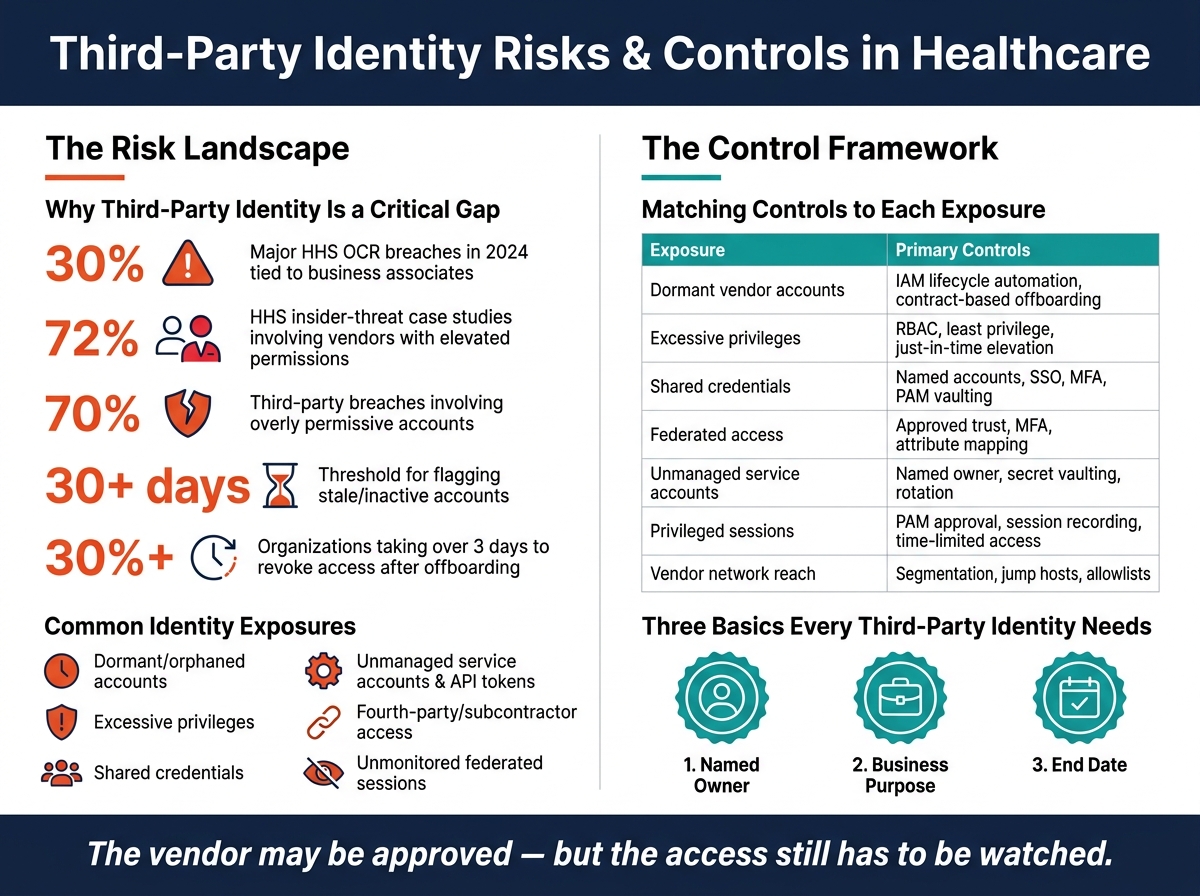
Third-Party Identity Risks in Healthcare: Key Stats & Controls
Audit findings should drive the controls you use. A read-only portal user and an MSP with production admin access should not be treated the same way. This is the point where insider risk meets vendor risk: access needs to stay tied to a named identity, a defined task, and an end date.
Use those findings to match the right control to each identity type.
| Exposure | Primary controls |
|---|---|
| Dormant vendor accounts | IAM lifecycle automation, contract-based offboarding, automated disablement, access reviews |
| Excessive privileges | RBAC, least privilege, just-in-time elevation, entitlement reviews |
| Shared credentials | Named accounts, SSO, MFA, PAM vaulting, credential rotation |
| Federated access | Approved trust, signed assertions, attribute mapping, and MFA |
| Unmanaged service accounts | Named owner, secret vaulting, rotation, usage monitoring |
| Privileged sessions | PAM approval, time-limited access, session recording, alerting |
| Vendor network reach | Segmentation, jump hosts, application-level allowlists |
Use IAM, SSO, MFA, and PAM to govern external access
Every third-party identity should have one source of truth: employer, role, approved systems, expiration date, and contract reference. Role-based access should match the actual support job. If a vendor only needs billing access, they should not also have server access. Simple idea, but it gets missed all the time.
SSO puts authentication in one place, which makes shutdown cleaner. Disable one identity, and that change carries across connected apps. Local accounts that sidestep SSO should be banned, because they create side doors no one remembers until something goes wrong.
For privileged access, PAM is where policy turns into day-to-day control. Credentials stay in a vault. Vendors do not see the raw credential or reuse it later. Access is granted just in time for a set task window, then removed when that window ends. Session recording shows what happened and ties it back to a ticket number. That gives you attribution, helps with investigations, and cuts out standing privilege - the part that makes a stolen credential so dangerous.
MFA should be the default for all external access to sensitive systems. For high-risk workflows - privileged access, remote administration, and apps that touch PHI - use phishing-resistant MFA, such as FIDO2/WebAuthn keys or passkeys. If a legacy medical device cannot support modern authentication, use compensating controls instead: a PAM-controlled jump host, network allowlisting, session approval, and tighter monitoring.
Govern nonhuman identities and limit lateral movement
Service accounts are easy to miss in a vendor audit, and that's a problem. For each one, identify the owner, document the purpose, list the permitted systems, store its secret in a managed vault - not in files or email - and set a rotation schedule. Interactive login should be disabled unless there is a documented reason to allow it.
Network segmentation helps stop one compromised vendor identity from turning into a much bigger incident. Vendor connectivity should end in a controlled zone. Limit access to the approved application, subnet, port, and protocol. Then pair that with direct authorization. In plain English: require the right user, the right device, the right MFA status, the right ticket, and the right target app before access is allowed.
Monitor continuously for access outside approved scope
Controls on paper do not help much if access drift sits unnoticed for weeks. You need alerts for unusual geography, off-hours access, out-of-scope data use, and large transfers. Also flag repeated failed MFA attempts, privilege escalation, access to systems outside the support purpose, and any remote activity after a contract expires.
High-confidence events should go to the security operations team and the system owner. Response actions should already be defined, not invented in the middle of an incident. That can include:
- Terminating the session
- Disabling the account
- Revoking tokens
- Rotating secrets
- Notifying the vendor
Preserved session logs and PAM records are what make a detection useful in an investigation. Without that trail, you're left guessing.
These controls need clear ownership and recurring review.
Making third-party identity governance an ongoing process
A one-time audit falls apart fast. Vendor access shifts as contracts renew, project scope grows, and new integrations stack up. If identity governance only shows up once a year, it misses what’s happening day to day.
That’s why identity governance needs to run all the time, not sit on an annual checklist.
Questionnaires show what a vendor says should exist. They don’t show live access. For that, look at proof you can verify: timestamped provisioning records, inactivity logs, offboarding confirmation, and remediation tickets with closure dates.
Assign clear ownership across security, IAM, procurement, and system owners
Things start to slip when nobody has a clear job. Third-party access touches several teams, so each one needs a defined lane:
| Role | Responsibility |
|---|---|
| Procurement / Legal | Contract status and end dates |
| Business / System Owners | Approve access grants; perform scheduled recertification |
| IAM / Security | Enforce MFA, SSO, and automated revocation |
This setup matters for a simple reason: third-party access doesn’t move through normal HR offboarding. Standard JML workflows often miss contractors and vendors. So the process needs to tie back to procurement records, SOWs, or a dedicated contractor source of truth.
Use risk-based reviews and measurable evidence
Not every vendor needs the same review schedule. Some need more attention than others. Reviews should kick off at procurement, onboarding, contract renewal, role changes, privileged support events, and after any major integration or incident.
Annual recertification is the minimum, not the limit.
A few metrics help show whether the process is working:
- Named-owner coverage
- MFA coverage
- Dormant accounts flagged in the last 30 days
- Average time to revoke access after contract end
Apply the model through Censinet RiskOps
When reviews, ownership, and remediation steps live in different systems, gaps stick around. Censinet RiskOps puts third-party assessments, identity findings, and remediation tasks in one place.
Censinet AI summarizes evidence, surfaces fourth-party exposures, and drafts risk reports. Human reviewers make the final risk decision.
FAQs
Why is vendor access considered insider risk?
Vendor access counts as insider risk because third parties, contractors, and managed service providers often have approved access to sensitive healthcare systems and data. That means the organization’s trust boundary doesn’t stop with employees. It extends to outside partners too.
Once those vendors are inside, their activity can look a lot like an internal threat. A simple mistake, stolen login details, or bad intent can all lead to the same problem: exposed systems and data. On top of that, excessive privileges, dormant accounts, and unmonitored access create blind spots that make it easier to expose PHI or move through systems without setting off alarms.
How can we find stale third-party accounts fast?
Move past manual spreadsheets and use automated identity governance instead. Keep a catalog of all third-party identities and tie each one to an active contract or business associate agreement. If an account doesn't match an active contract, flag it for removal.
Use your identity provider to run nightly or weekly reconciliation reports. Then check last-login timestamps and guest-account exports to spot inactive or ghost accounts. Automate offboarding so access ends as soon as contract records expire.
What proof should auditors expect for vendor offboarding?
Auditors will look for structured, timestamped records of vendor offboarding, not screenshots or after-the-fact manual reconstructions.
For each contractor who left during the audit period, provide deprovisioning records that show access was removed across all systems. That includes the long-tail SaaS apps people often miss.
Your evidence should line up HR records or contract termination tickets with IAM deprovisioning timestamps. It should also show that no active accounts remain.
Best case, the logs make the timeline plain:
- HR or contract termination is recorded
- IAM deprovisioning follows with a clear timestamp
- Access removal is shown across each system
- No active accounts are left open
The timing matters too. Logs should show access removal happened within your defined SLA - usually 24 hours for standard offboarding and 2 hours for emergency cases.
