
If HIPAA is not built into app requirements from day one, teams end up with more risk, more rework, and higher breach costs. In healthcare, the average breach cost hit $9.77 million in 2024, and late HIPAA fixes can cost 3x to 5x more than building controls in at the start.
If I had to boil this article down, I’d say this:
- I first define whether the app handles ePHI and where that data moves
- I map HIPAA duties to the right owners: policy, engineering, and IT and conduct third-party risk assessments for external vendors
- I turn risk findings into clear, testable requirements
- I tie those requirements to design, testing, release checks, and incident work
- I keep everything up to date with reviews, named owners, and a shared controls library
- I do not assume a cloud provider or a signed BAA covers the app itself
A few points stand out fast:
- MFA and encryption now need close attention in 2026
- Shared logins, weak session controls, and poor logging still cause trouble
- PHI can leak through URLs, logs, analytics tools, and third-party scripts
- Audit records and HIPAA documents often need to be kept for 6 years
This article is, at its core, a simple process: scope the data, assess third-party risk, write the requirements, connect them to the SDLC, and review them on a set schedule. That is how I turn HIPAA from rule text into work developers can build and testers can verify.
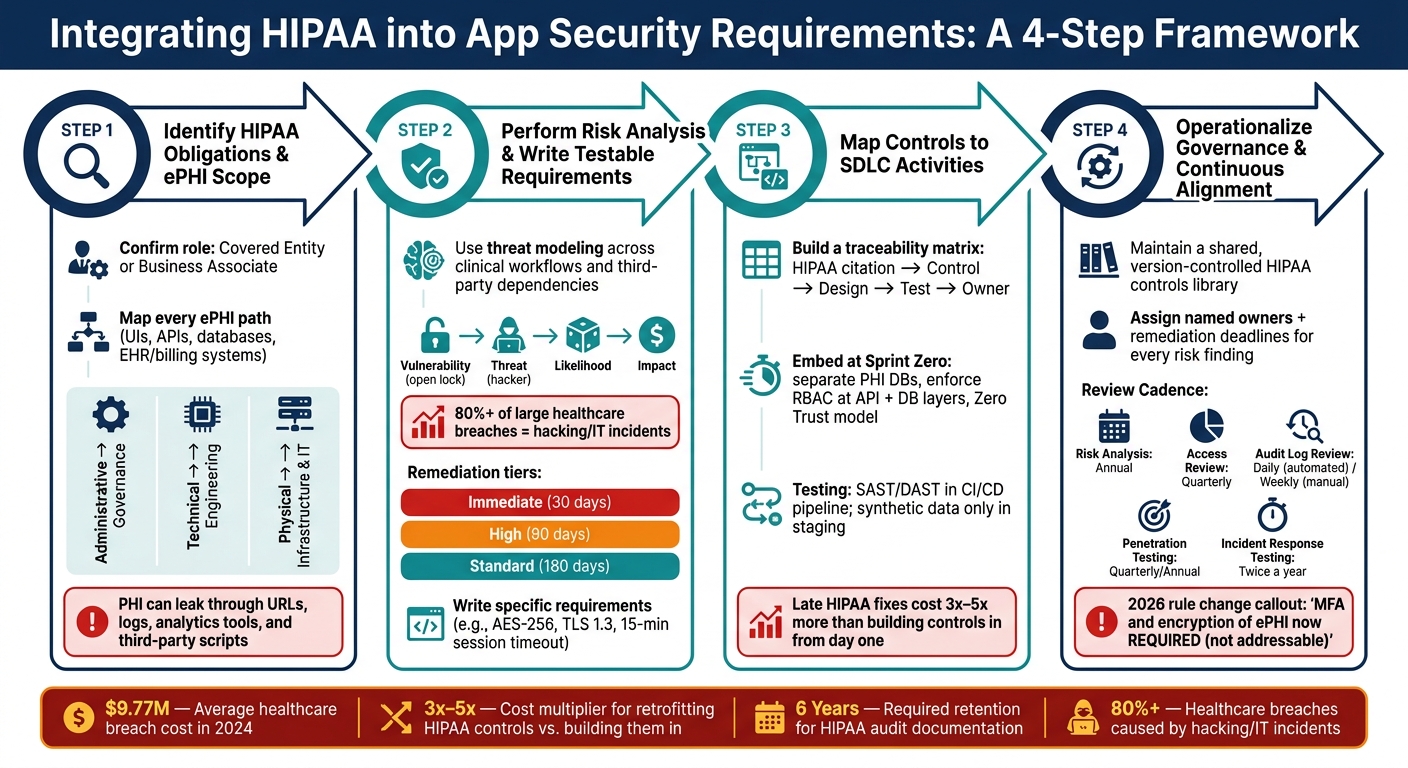
How to Integrate HIPAA into App Security Requirements: A 4-Step Process
OCR Webinar: The HIPAA Security Rule Risk Analysis Requirement
sbb-itb-535baee
Step 1: Identify which HIPAA obligations apply to the application
Before you write a single security requirement, pin down two things: your organization’s role under HIPAA and whether the application handles ePHI.
First, confirm whether your organization is a Covered Entity or a Business Associate. Then confirm whether the application creates, receives, maintains, or transmits ePHI. If a third party touches ePHI at all, you need a BAA before any data sharing starts. De-identified data sits outside HIPAA scope. That line matters because it tells you which parts of the application need HIPAA controls and which do not.
Once role and scope are clear, trace every ePHI path through the application. Use that scope map to match each HIPAA safeguard to the team or system layer that owns it:
| Safeguard Category | System Ownership Area | Key Requirements |
|---|---|---|
| Administrative | Governance and personnel | Risk analysis, workforce training, third-party risk management, contingency planning |
| Technical | Access & Data Integrity | Unique user IDs, MFA, encryption, audit logging, transmission security |
| Physical | Infrastructure & Devices | Facility access controls, workstation security, MDM for mobile devices |
HHS/OCR often points teams to NIST SP 800-66 as the main resource for putting the HIPAA Security Rule into practice [7]. And here’s the part many teams get wrong:
"Addressable does not mean optional: implement it, use an equivalent control, or document why it is unnecessary." - Security Compliance Guide Editorial Team [6]
Define the application's ePHI scope and data flows
Map every place where ePHI is collected, stored, processed, viewed, or transmitted. That includes user interfaces, APIs, mobile devices, databases, and links to EHR or billing systems [3]. This map becomes the working source for access controls, audit needs, integrity checks, and transmission rules.
It also helps you catch the sneaky stuff. PHI can leak through analytics tools, error messages, URLs, and logs. In 2024, Advocate Aurora Health faced scrutiny after data tied to 3 million individuals was exposed because tracking tools such as Google Analytics and Meta Pixel sent PHI to third parties without a BAA [4].
You should also plan for at least 6 years of retention for required audit documentation [3][6].
A simple way to split ownership:
- Administrative safeguards go to governance
- Technical safeguards go to engineering
- Physical safeguards go to infrastructure and IT operations
Keep policy and facility controls out of the application security requirements themselves. That ownership map gives you the starting point for risk analysis and for writing the right requirements.
Step 2: Perform a HIPAA-focused risk analysis and convert findings into requirements
HIPAA calls for an accurate, thorough review of risks to the confidentiality, integrity, and availability of ePHI. That review isn't just paperwork. Each security requirement should tie back to a risk you found. The ePHI flow map helps you spot where a risk starts, how it moves, and where it could interrupt care.
In healthcare, impact has extra weight. If ransomware locks clinicians out of patient records, the damage goes beyond downtime. It can turn into a patient safety problem. That’s why patient-safety impact should help set remediation priority.
Use threat modeling to find security gaps in clinical workflows
Walk through the workflow role by role, and include each third-party dependency. The goal is simple: find where ePHI is exposed and manage third-party risk and decide which requirement should close that gap. One common weak spot is shared credentials. More than 60% of investigated entities had shared credentials on at least one system, which violates unique user identification requirements [6].
Here’s how the main risk components map to day-to-day clinical use:
| Risk Component | Definition | Clinical Example |
|---|---|---|
| Vulnerability | A flaw or weakness in system security procedures or design [7] | Unlocked workstations in high-traffic patient areas [11] |
| Threat | Potential for a threat actor or event to exploit a vulnerability [7] | Ransomware, phishing, or unauthorized access by staff [11] |
| Impact | The harm caused if the threat succeeds [7] | Loss of access to patient records during surgery (Availability) [5] |
| Likelihood | The chance that the vulnerability will be exploited [7] | High probability of phishing due to lack of MFA [11] |
Hacking and IT incidents now account for more than 80% of large healthcare breaches [9], so your threat model should put heavy weight on those cases. A simple way to sort remediation is:
- Immediate: 30 days
- High: 90 days
- Standard: 180 days
From there, turn the top findings into requirements that developers can build and testers can check.
Write risk-based requirements that are specific and testable
A risk finding matters only if you turn it into something testable. Vague wording like "implement appropriate access controls" is too loose. Instead, write requirements that spell out the control, the condition, and the result you expect to measure.
For example, if users share credentials, write: "Each user must have a unique identifier; shared credentials are prohibited." If the issue is session exposure on shared clinical workstations, write: "Clinical sessions must time out after 15 minutes of inactivity; shared kiosks after 5." If logging is the gap, write: "All ePHI read, write, and export events must be captured in immutable logs that record who accessed what, when, and from where, and are retained for a minimum of 6 years." [5][10]
For ePHI at rest and in transit, be direct: require AES-256 and TLS 1.2 at a minimum, with TLS 1.3 preferred [9].
Each requirement should link back to the risk finding and the HIPAA standard it meets. That traceability makes your requirements easier to defend during an OCR review and easier for engineering teams to act on. Those findings then become the control requirements you map to design, testing, and operations.
Step 3: Map HIPAA standards to application security controls and SDLC activities
Once you’ve turned HIPAA into testable, risk-based requirements, the next job is making sure those requirements don’t drift as work moves from spec to sprint. That’s where a traceability matrix pulls its weight.
Build a traceability matrix for access, audit, integrity, authentication, and transmission security
A traceability matrix links each HIPAA citation to a specific control goal, a design choice, a test case, and an operational owner. Without that line of sight, requirements drift. In practice, this table maps core HIPAA safeguards to clinical application controls. Think of it as the execution layer for the requirements defined in Step 2. Use the same matrix to carry each requirement through design reviews, test plans, release gates, and runbooks.
| HIPAA Safeguard Category | Example Standard | Clinical Application Implication | Example Requirement |
|---|---|---|---|
| Access Control | §164.312(a) – Unique User ID | Clinicians need individual accounts to track specific patient record access | Assign each user a unique ID; prohibit shared logins [6] |
| Access Control | §164.312(a) – Automatic Logoff | Sessions on shared tablets must terminate to prevent unauthorized viewing | Log off after 15 minutes of inactivity; 5 minutes in shared areas [6] |
| Audit Controls | §164.312(b) – Audit Logging | Track which staff member viewed a patient's lab results for forensic review | Log user, time, action, record ID, and source for each ePHI access; forward to an immutable log store [1] |
| Integrity | §164.312(c) – Data Integrity | Clinical notes must not be silently altered after a physician signs off | Use signatures or checksums to detect unauthorized changes [1] |
| Authentication | §164.312(d) – Person Authentication | Remote access by physicians requires higher assurance than internal network access | Require MFA for all workforce ePHI access [6][12] |
| Transmission Security | §164.312(e) – Encryption in Transit | Patient data sent from a mobile app to the backend must be protected from interception | Use TLS 1.3 externally and mTLS internally [1][2] |
A BAA doesn’t hand off application-level duties to the cloud provider. Your code, RBAC model, and audit logging still belong in the traceability matrix.
Embed HIPAA requirements into design, testing, deployment, and operations
Treat HIPAA as a design constraint from day one, not a box to check at the end. If you wait and bolt it on later, costs can jump to 3 to 5 times more than building it in from the start [2].
Starting at sprint zero, separate PHI databases from general application data. Enforce RBAC at the API layer and the database query layer, not just in the UI. That last point matters. A clean front end means very little if the backend still hands over data too freely. At the same time, use a Zero Trust model where every request is authenticated, authorized, and logged no matter where it comes from on the network [1].
During development, use secrets management tools so credentials never end up hardcoded in source code. Also, never log PHI in plain text or in URLs. That kind of leak can happen quietly and then spread everywhere: app logs, monitoring tools, browser history, and support tickets.
For testing, use only synthetic or anonymized data in staging. Then wire automated SAST/DAST and dependency scanning straight into the CI/CD pipeline. If a security scan fails, deployment should stop automatically [12]. No debates, no last-minute exceptions.
For availability, HIPAA’s Contingency Plan standard calls for documented and tested disaster recovery procedures. That means encrypted backups, weekly restore tests, and quarterly tabletop exercises to check emergency mode operations [1].
Those owners and checkpoints feed the governance and reassessment loop in Step 4.
Use Censinet RiskOps™ to maintain risk visibility across applications and vendors
At portfolio scale, coordination tends to become the bottleneck. When you’re dealing with many applications and outside vendors, Censinet RiskOps™ gives teams one place to manage PHI-related risk assessments, remediation work, and ownership.
Step 4: Operationalize governance and continuous HIPAA alignment
Once controls are mapped and tested, governance is what keeps them in line as applications change. Deployment doesn't end HIPAA ownership. New integrations, new threats, and changes to HIPAA all need regular review. In 2026, the HIPAA Security Rule changed MFA and encryption of ePHI at rest and in transit from "addressable" to "required" specifications [13].
Maintain a reusable HIPAA requirements and controls library
If every project starts from zero, teams end up with different HIPAA requirements across the application portfolio. A shared library fixes that. It gives each team the same approved starting point: standardized requirement language, 45 CFR citations, control mappings, and the test cases used to show each control works [6][8][13]. Put simply, it's the day-to-day version of the traceability matrix from Step 3, reused across new projects.
The library should include technical, administrative, and physical safeguards. For technical safeguards, add test cases for access control, session timeout, and storage encryption. For administrative safeguards, include policy language, Security Official authority, and the risk management plan with owners and due dates. Physical safeguards need to be there too. Store the library in a version-controlled repository and keep required records for six years [6][8][11]. It should also include a documented, auditable "break-glass" procedure for emergency ePHI access, with immediate alerts when it's used [5].
A shared library is only useful if teams keep it current.
Track reassessments, remediation, and oversight with clear ownership
Each risk finding should have a named owner, a remediation deadline, and a documented status. HIPAA risk analysis must be updated at least once a year and after major operational changes, like a new system integration, a vendor change, or a security incident [11][6][10].
| Review Activity | Cadence | Focus Area |
|---|---|---|
| Risk Analysis Update | Annual / Upon Major Change | Organization-wide threat and vulnerability assessment [5][11] |
| Access Review | Quarterly | Privileged user access and unused grant revocation [5][6] |
| Audit Log Review | Daily (automated alerts) / Weekly (manual) | High-risk access events and anomaly detection [6][11] |
| Penetration Testing | Quarterly / Annual | External verification of technical safeguards [5] |
| Incident Response Testing | Twice a year | Tabletop exercises and breach detection playbook testing [5] |
| Data Flow Review | Quarterly | Updated diagrams for clinical workflows and new integrations [5] |
Ownership has to be formal, not implied. OCR often interviews the designated Security Official during investigations, so that person needs documented authority and accountability over the program [11]. Engineering owns the technical controls. The Security Official oversees policy and the risk management plan [11][13].
At portfolio scale, keeping track of ownership, reassessments, and remediation in spreadsheets can get messy fast. Censinet RiskOps™ tracks reassessments, remediation, and ownership across applications and vendors.
Conclusion: A repeatable process for integrating HIPAA into security requirements
HIPAA integration isn't a one-time project. It's a discipline. It starts before the first line of code and carries through every release and each regulatory update.
The path is straightforward: define your ePHI scope across data flows, map the HIPAA safeguards that apply to each system responsibility, run a structured risk analysis, turn those findings into specific and testable requirements, build those requirements into the SDLC, and keep everything aligned through formal governance.
Miss one step, and the next step inherits the gap.
That matters because the cost of getting it wrong shows up fast. Weak requirements lead to rework and more breach exposure. And retrofitting HIPAA controls after the fact costs 300% to 500% more than building them in from the start [5].
The pressure is also growing. With the 2026 Security Rule making MFA and encryption mandatory instead of addressable [13], teams that treat HIPAA as day-to-day engineering and governance work - not a late-stage audit fix - are in a much better spot to protect patients and scale with confidence.
FAQs
How do I know if my app is in HIPAA scope?
Your app falls under HIPAA if it collects, stores, sends, or uses electronic protected health information (ePHI).
That includes identifiable health data like medical records, test results, billing details, and appointment schedules. If your software touches any of HIPAA’s 18 identifiers in a health context, it counts as PHI. Data that has been properly de-identified does not fall within this scope.
What are the biggest HIPAA gaps in clinical apps?
The biggest HIPAA gaps in clinical apps usually come down to a few familiar problems: old tech, tight budgets, and messy integrations.
Common issues include:
- Weak access controls
- Misconfigured cloud environments
- Unpatched systems
- Poor audit logging
- Inadequate encryption
- Insecure APIs
Fast DevOps cycles can make things worse. Teams move quickly, testing gets rushed, settings slip through the cracks, and security documentation falls out of date.
Censinet RiskOps helps healthcare organizations spot vulnerabilities and simplify risk assessments across the clinical environment.
How often should HIPAA security requirements be reviewed?
HIPAA requires risk analysis on a recurring basis, not as a one-and-done task. There isn't a single review timeline that applies to every organization, so most teams should review requirements at least once a year and any time a major change happens.
That can include system upgrades, security incidents, bringing on a new vendor, or changes to regulations. Some risks need more frequent attention than others. For example, high-risk items may need a monthly review, while lower-risk items can often be checked quarterly or once a year.
