
Monitoring third-party network traffic in healthcare is critical for protecting sensitive systems and patient data. External vendor connections, like VPNs or cloud-hosted apps, often create vulnerabilities if left unchecked. This guide outlines practical steps to secure these connections while maintaining compliance with regulations like HIPAA and HITECH.
Key Takeaways:
- Understand Third-Party Traffic: Includes external vendor connections to clinical systems, medical devices, or IT tools.
- Identify Risks: Broad, undocumented, or persistent vendor access can lead to breaches and lateral attacks.
- Set Governance Rules: Base policies on HIPAA, HITECH, and HICP frameworks. Use session-based access and least-privilege principles.
- Build an Inventory: Document all vendor connections, conduct third-party risk assessments, and address undocumented pathways.
- Segment Networks: Isolate vendor traffic with DMZs, VLANs, and micro-segmentation to limit potential breaches.
- Use Continuous Monitoring: Deploy tools like SIEM and NDR for real-time visibility, especially in high-risk areas.
- Plan Incident Response: Create workflows to handle vendor-related breaches without disrupting patient care.
By following these steps, healthcare organizations can secure third-party traffic, reduce risks, and ensure uninterrupted clinical operations.
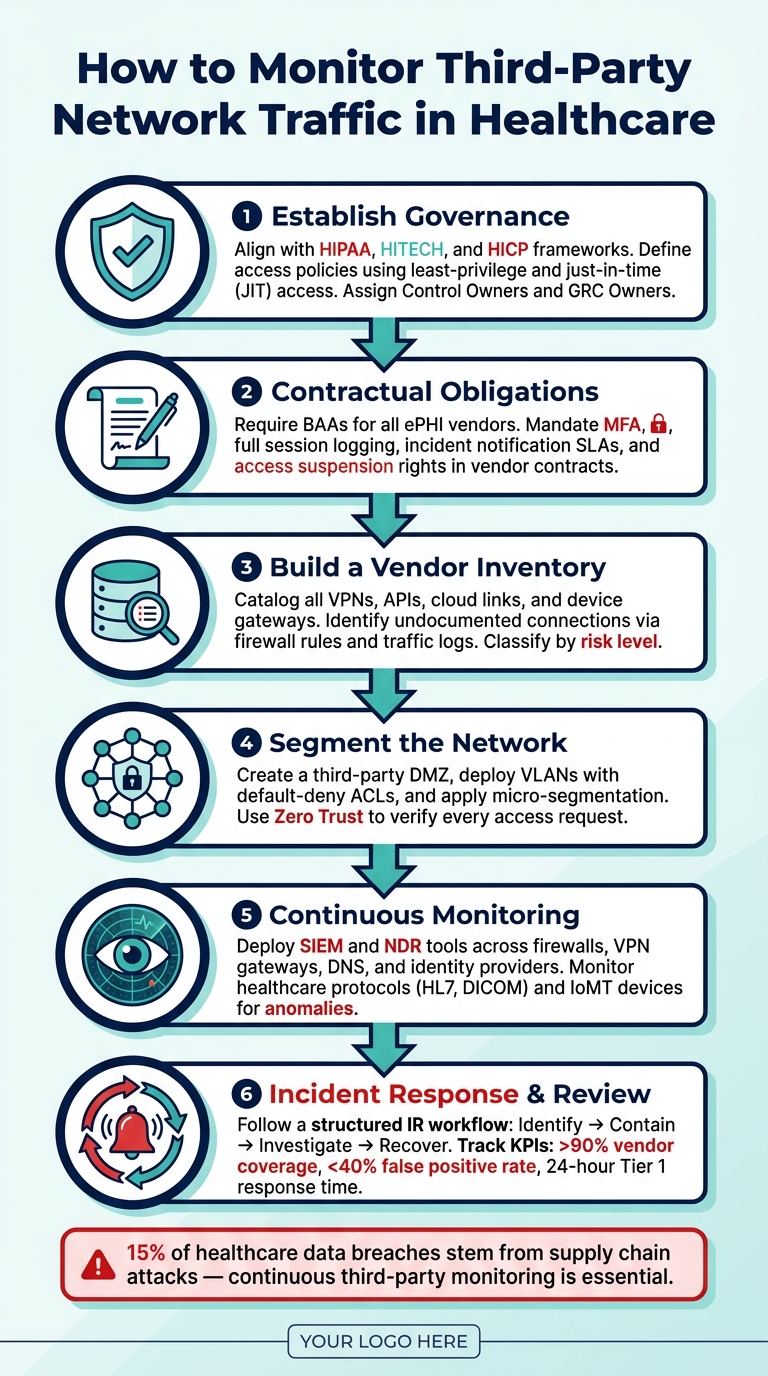
How to Monitor Third-Party Network Traffic in Healthcare
Establishing Requirements and Governance
Before deploying any monitoring tool, it's crucial to lay a solid governance foundation. This involves identifying the relevant regulations, assigning control owners, and setting clear rules for vendors.
Mapping Regulatory and Policy Requirements
Your monitoring setup should align with three key frameworks: HIPAA, HITECH, and the Health Industry Cybersecurity Practices (HICP).
The HIPAA Security Rule requires healthcare organizations to implement measures like risk management, access controls, and audit controls. This means you need to log and retain both internal ("east–west") and external ("north–south") traffic decisions to demonstrate compliance during audits [3]. HITECH builds on this by strengthening enforcement and increasing penalties for breaches involving protected health information (PHI).
HICP Practice 5.7, part of the 405(d) framework, specifically advises:
"Implement comprehensive network monitoring and logging with centralized log management and security event correlation." - Health Industry Cybersecurity Practices (HICP) [2]
Auditors often find firewall logs alone insufficient. Without identity and endpoint data, correlating events effectively becomes nearly impossible [2]. To address this, your monitoring strategy should cover network, identity, and endpoint layers.
Consider adopting Zero Trust Architecture (ZTA) to meet HIPAA's "minimum necessary" standard. This approach enforces identity-based, continuously verified access [3].
Defining Third-Party Access Policies
After understanding your regulatory requirements, the next step is to define access policies for third parties. The goal is to move away from persistent, always-on vendor connections and instead adopt session-based or time-limited access. This reduces the risk of exploitation.
Use just-in-time (JIT) access and enforce least-privilege policies that restrict access based on the vendor's identity, device status, and the sensitivity of the asset [1][3].
Assign a Control Owner (typically from Security Operations) and a GRC Owner for each type of vendor access. Clear accountability prevents policy drift and ensures enforcement, especially during staff changes or contract renewals.
Establishing this governance framework not only satisfies regulatory requirements but also helps you build a precise inventory of third-party connections.
Adding Monitoring Obligations to Vendor Contracts
Governance only works when vendors are contractually obligated to meet your monitoring standards. Start with Business Associate Agreements (BAAs), which HIPAA mandates for any vendor handling electronic PHI (ePHI). However, a standard BAA isn’t enough.
"Require Business Associate Agreements (BAAs) for vendors that handle ePHI; tie contractual obligations to measurable network controls." - Kevin Henry, AccountableHQ [3]
Vendor contracts and statements of work should outline specific requirements, such as multi-factor authentication (MFA), full session logging, and incident notification SLAs. Vendors should also maintain a detailed log source inventory, including system names, owners, log types, and collection methods. To prevent tampering, administrative users must not alter or delete logs without proper oversight [2].
Additionally, contracts should include provisions allowing your organization to quickly restrict or suspend vendor access during security incidents. This ensures you can act swiftly without breaching contractual terms [1]. In healthcare, this balance is critical, as service interruptions must be carefully managed alongside security priorities.
| Contract Provision | What to Require |
|---|---|
| Session Logging | Full logs of vendor activity, time-synced and protected against tampering |
| Incident Notification SLA | Clear timeframes for notifying your team of suspected security incidents |
| Log Retention | Defined periods for searchable "hot" logs and long-term archives |
| Access Suspension Rights | The ability to restrict vendor access during active security investigations |
| Log Source Inventory | A vendor-maintained list of systems, owners, and collection methods |
Once these contractual obligations are in place, the next step is to inventory your third-party connections to further strengthen your network defenses.
sbb-itb-535baee
Building an Inventory of Third-Party Connections
Once your governance framework and contractual obligations are set, the next step is to identify and document all vendor connections within your network.
Creating a Baseline Inventory
Start by cataloging every third-party connection. This includes VPNs, remote sessions, API integrations, cloud links, and device gateways. For each connection, record key details like the vendor name, access method, connection type, and the systems it interacts with. This documentation not only keeps you organized but also ensures you can enforce the contractual and regulatory requirements you’ve established.
Take it a step further by mapping each connection to the assets it interacts with - whether it’s EHRs, imaging systems, infusion pumps, surgical tools, or administrative platforms. Understanding which connections touch clinical systems versus administrative ones helps you identify and prioritize risks. This detailed mapping transforms your vendor list into a practical tool for managing risks effectively.
Finding Undocumented Connections
It’s not uncommon for undocumented connections to exist. Review your firewall rules and traffic logs to uncover these hidden pathways. Credentials can linger after approval, firewall rules may go unchecked, and temporary setups often become permanent without notice. By analyzing network logs, you can spot traffic that doesn’t match any documented connection. Any unidentified device generating traffic should be investigated immediately.
If you find an unverified connection, isolate the device and restrict its access until you confirm its purpose and security status. For connections tied to real-time clinical systems, avoid disruptions by increasing monitoring instead of cutting access outright.
Classifying Connections by Risk Level
To manage risks effectively, categorize each connection based on its potential impact. Evaluate factors like access type, data sensitivity, clinical importance, network exposure, and how the connecting device is managed. Use the table below as a guide:
| Risk Factor | What to Assess | Example |
|---|---|---|
| Access Type | Persistent vs. session-based | Always-on VPN vs. on-demand session |
| Data Sensitivity | Does it access ePHI? | EHR access vs. non-clinical IoT sensor |
| Clinical Criticality | Could disruption harm patients? | Infusion pump gateway vs. billing software |
| Network Reach | Can the vendor move laterally? | Flat network vs. isolated VLAN |
| Device Posture | Is the device managed? | Managed laptop vs. legacy device |
"Prioritize third‑party risk based on clinical impact by correlating vulnerabilities, exposure, behavior, and asset criticality, enabling faster, more precise response without disrupting care." - Rich DeFabritus, Forescout
Connections involving ePHI, life-critical devices, or those with broad network access should be continuously monitored. Lower-risk connections, like those limited to guest Wi-Fi or administrative tools, can be reviewed periodically. This tiered strategy ensures your security team focuses on the most critical threats without overextending resources.
For a streamlined approach, platforms like Censinet RiskOps™ can centralize third-party risk assessments and provide continuous oversight, helping healthcare organizations strengthen their clinical systems’ resilience.
Once your inventory is complete and connections are classified, the next step is to design a segmented network architecture that enhances security while maintaining visibility over these pathways.
Designing a Segmented and Observable Network Architecture
Once you've inventoried and classified vendor connections, the next step is to structure your network so third-party traffic stays contained, visible, and manageable. This type of architecture not only reduces risk but also improves your ability to monitor activity effectively. A well-structured network is the foundation for strong, ongoing security monitoring.
Implementing Network Segmentation
It's critical to keep vendor traffic isolated from internal clinical systems. Start by creating a dedicated third-party DMZ - a separate network zone where all vendor traffic is directed first. This zone should include an inspection layer that evaluates traffic before it can access sensitive systems. Additionally, set up dedicated clinical VLANs with Virtual Routing and Forwarding (VRF) instances and default-deny Access Control Lists (ACLs). These ACLs should allow only the specific protocols that are absolutely necessary.
Micro-segmentation takes this a step further by restricting communications at the workload level. For example, a vendor connection to a billing platform should not have any pathway to your electronic health records (EHR) or imaging systems. Combine this with a Zero Trust model, where every access request is verified based on identity, device health, and location before granting access to electronic Protected Health Information (ePHI) [3].
Inbound access initiated by vendors should be avoided whenever possible. Instead, provide access through hardened jump hosts or application-layer proxies. These access methods should include time-bound sessions, multi-factor authentication (MFA), and comprehensive logging [3].
Centralizing Network Visibility
While segmentation minimizes the potential impact of a breach, visibility across your network is essential for identifying and responding to threats. Aggregate logs from key sources - firewalls, DNS resolvers, identity providers, and endpoints - into a centralized SIEM or log analytics platform. This allows raw traffic data to be transformed into actionable alerts.
To ensure accurate log correlation, synchronize all log sources using NTP services. Timestamp inconsistencies across devices often derail security investigations, as events that should align fail to do so [2].
For high-risk segments, use traffic mirroring selectively to capture detailed insights. Additionally, leverage tools like VPC Flow Logs and automated threat detection for broader monitoring. Since mirroring and storing network traffic can be costly and resource-intensive, focus these efforts on high-risk areas or where compliance demands it [4].
Handling Healthcare-Specific Protocols
Healthcare networks rely on specialized protocols that general-purpose security tools may struggle to interpret. For instance, HL7 is used for clinical messaging between systems like EHRs and lab platforms, while DICOM manages medical imaging data for Picture Archiving and Communication Systems (PACS). The predictable nature of these protocols makes it easier to spot anomalies when operations deviate from the norm.
Firewalls should be configured to allow only these specific protocols between authorized endpoints, while blocking all other traffic by default [3]. Keep an eye out for irregularities such as unusual query volumes, unexpected source IPs, or off-hour data transfers, as these could indicate lateral movement or unauthorized data exfiltration. HIPAA mandates logging both internal (east-west) and perimeter (north-south) traffic to demonstrate diligence during audits [3]. Make sure your monitoring systems are set up to capture traffic in both directions.
"Healthcare network monitoring is, in the end, a clinical reliability problem disguised as an IT one. When the network falters, patients wait, clinicians work around it, and risk builds up quietly until something audible breaks." - David Aylward, Splitpoint Solutions [5]
With these architectural improvements in place, the next step is to establish continuous monitoring and incident response workflows.
Setting Up Continuous Monitoring and Incident Response
With your network architecture established, the next step is making sure your monitoring program actively identifies threats and your team is ready to respond effectively.
Setting Monitoring Objectives
Using your segmented architecture and well-defined vendor policies, set clear monitoring goals to detect anomalies immediately. Focus on specific scenarios, such as unusual outbound data spikes, "impossible travel" authentication patterns (e.g., a vendor account logging in from two far-apart locations within minutes), or unauthorized remote service creation via SMB or RDP [2]. Broad goals like "monitor vendor traffic" won't cut it when it comes to effective incident response.
"Stability monitoring asks: is this packet flow healthy? Security monitoring asks: should this packet flow exist at all?" [5]
Both questions are essential. Align your detection goals with patient-critical assets and ePHI, prioritizing alerts based on clinical impact rather than just technical severity [1]. For instance, an infusion pump reaching out to an unknown external IP poses a very different risk than a billing vendor generating excessive log activity.
Configuring Monitoring Tools
Your Network Detection and Response (NDR) and Network Traffic Analysis (NTA) tools should gather data from firewalls, VPN gateways, DNS resolvers, and identity providers - not just perimeter firewalls [2]. Relying solely on perimeter logs can leave you blind to lateral movement, a hallmark of supply chain breaches, which account for about 15% of healthcare data breaches [5].
For healthcare-specific protocols like HL7 and DICOM, configure your tools to interpret these formats and establish behavioral baselines using synchronized clocks. This setup helps flag anomalies, such as a PACS server initiating an unusual outbound connection. Extend this approach to Internet of Medical Things (IoMT) devices, where odd behavior often signals a compromise [5]. Additionally, maintain a detailed log source inventory that lists every in-scope system, its owner, log type, and collection method. This ensures you won’t face blind spots when you need logs the most [2]. Accurate log synchronization is particularly important for correlating events during investigations.
Once detection mechanisms are solid, shift focus to creating clear incident response workflows to address threats quickly.
Building Incident Response Workflows
When an alert is triggered, follow a structured incident response workflow. This typically includes the following steps: acknowledge, investigate, contain, eradicate, recover, and close [2]. Assign a specific team member to own each phase, including responsibilities for handling incidents outside regular hours.
The table below illustrates how each phase applies specifically to third-party traffic incidents:
| IR Phase | Action for Third-Party Traffic |
|---|---|
| Identification | Identify active vendor sessions and determine which clinical assets were accessed [1]. |
| Containment | Suspend VPNs, isolate vendor devices, and block compromised email domains [1]. |
| Monitoring | Increase scrutiny on critical clinical connections that must remain active [1]. |
| Investigation | Correlate identity, network, and endpoint logs to piece together the breach timeline [2]. |
| Recovery | Verify the vendor's security posture and rotate credentials before restoring full access [1]. |
In healthcare, simply cutting off a vendor's connection isn’t always an option. For clinically essential vendor connections that cannot be terminated, apply targeted restrictions - limit access to necessary protocols and closely monitor traffic - rather than severing the connection entirely [1]. Document every adjustment and exception in your alert management system. These records are vital for compliance with HICP Practice 5.7 and HIPAA audit requirements [2].
Measuring and Improving Monitoring Effectiveness
Once monitoring and response workflows are set up, the next challenge is to ensure they’re working as intended. Regular evaluation is key to keeping these systems effective.
Defining Metrics and KPIs
To understand how well your monitoring processes are performing, specific metrics are essential. These metrics help gauge whether your efforts are addressing actual risks:
- Vendor coverage: Strive to monitor over 90% of your vendor ecosystem. Manual systems often fall short, covering just 15%–20% of vendors, leaving large gaps in oversight [6].
- False positive rate: If more than 40% of your alerts are irrelevant, it’s time to adjust your thresholds [6].
- Tier 1 response time: For high-risk incidents involving PHI, investigations should begin within 24 hours, with resolution achieved within five business days [6].
- Alert-to-action ratio: Aiming for a ratio above 70% ensures most alerts prompt a documented response rather than being ignored [6].
Metrics should reflect the importance of the systems being monitored. For instance, assets critical to patient care deserve higher priority.
"The difference between a contained incident and a patient-impacting crisis often comes down to speed, visibility, and precision." - Rich DeFabritus, Forescout [1]
Running Periodic Reviews
Regular reviews ensure your monitoring system stays accurate and effective. Here’s a structured schedule to follow:
| Review Activity | Frequency | Objective |
|---|---|---|
| Ingestion Health Check | Weekly/Continuous | Identify dropped events or broken collectors from vendor segments |
| Retrieval Test | Quarterly | Confirm logs can reconstruct a complete timeline of a simulated incident |
| Tuning Audit | Quarterly | Check suppressed alerts to ensure critical risks aren’t being overlooked |
| Access Review | Bi-Annually | Verify only authorized personnel can modify or delete monitoring logs |
| Tabletop Exercise | Annually | Test monitoring data’s ability to handle a simulated vendor compromise |
Tabletop exercises are particularly insightful. For example, simulate a scenario where a vendor’s credentials are compromised. Ask your team: Can we trace which clinical assets were accessed? Can we contain the breach without disrupting patient care? If the answers are unclear, it’s a sign of gaps that need addressing.
"Monitoring without response is a paper control." - Daydream [2]
These reviews provide valuable feedback to refine your risk management processes as new challenges emerge.
Using Monitoring Insights to Improve Risk Management
Monitoring isn’t just about identifying risks - it’s about acting on them quickly. If a vendor’s risk profile shifts, don’t wait for the next scheduled assessment cycle (which could be 8–11 months away). Update their risk tier and access policies immediately. For example:
- If unexpected lateral movement is detected from a vendor-managed device, restrict their access to specific protocols right away.
- Platforms like Censinet RiskOps™ help healthcare organizations integrate real-time risk assessments with vendor monitoring, enabling immediate adjustments to risk ratings and access policies.
"Hospitals that treat vendor risk as an operational discipline rather than a checkbox exercise are better positioned to respond quickly during security incidents, minimize disruption to clinical workflows, and protect patient safety - even under active threat." - Rich DeFabritus, Forescout [1]
It’s also important to balance costs with risk levels. High-risk vendors with access to PHI justify greater monitoring investment. On the other hand, if monitoring expenses for a low-risk vendor exceed 5% of their contract value, it’s worth reallocating those resources to areas with higher impact [6].
Conclusion: Key Takeaways and Next Steps
Summary of Key Steps
Monitoring third-party network traffic in healthcare is an evolving practice that requires consistent effort. The steps outlined in this guide are interconnected: start by setting up strong governance and policies, create a detailed inventory of your vendors, organize your network into segments for better containment, implement continuous monitoring tools, and regularly assess your effectiveness.
A few essential principles stand out. First, ensure vendor access is tightly aligned with patient-critical assets, using dynamic, least-privilege controls. Second, treat segmentation as your go-to strategy for minimizing the impact of any security breach. Proper preparation is critical - if a vendor is compromised, your ability to isolate non-essential connections while keeping vital clinical systems operational depends on the groundwork you’ve already laid.
This step-by-step approach underscores the importance of governance, segmentation, and constant monitoring in safeguarding patient care.
"The goal isn't to eliminate third party access. It's to ensure trust is continuously verified and secure." - Rich DeFabritus, Forescout [1]
By following these foundational steps, organizations can better position themselves to use technology as a tool for improving risk management.
Using Technology to Scale Risk Management
Manual processes simply can't keep pace with the complexity of modern healthcare vendor ecosystems. To address this, risk data should be centralized, and assessments automated through platforms like Censinet RiskOps™. This approach provides a unified view of your digital supply chain, improving HIPAA compliance by enhancing auditability across vendor relationships. It also allows risk teams to prioritize critical issues and shift from one-time assessments to continuous, evidence-based monitoring.
"The posture within hospital cybersecurity is shaped not only by its own controls, but by the security of the vendors connected to its network." - Rich DeFabritus, Forescout [1]
FAQs
Which vendor connections should we monitor first?
Start by keeping a close eye on vendors that pose the greatest risk to patient care and data security. Prioritize Tier 1 or high-risk partners - these include those managing Protected Health Information (PHI), overseeing essential clinical systems, or operating connected medical devices. Censinet RiskOps™ simplifies this process by automating risk assessments and offering real-time monitoring. This ensures you maintain visibility and avoid potential security gaps or disruptions.
How do we find undocumented third-party access paths?
To get started, compile a full inventory of all vendor-related connections. This includes VPNs, cloud services, APIs, and medical devices. Use passive network discovery tools to monitor traffic - this way, you can spot unauthorized devices without interfering with clinical workflows. Check MAC address tables on routers, switches, and wireless controllers to identify any temporary or unexpected connections. Lastly, verify your findings by comparing the network data with the physical equipment. Conduct clinical walkthroughs and talk to department heads to ensure nothing is overlooked.
What logs are essential for HIPAA-ready vendor monitoring?
To meet HIPAA requirements, organizations need to gather logs that monitor access to protected health information (PHI). This includes user authentication records (such as successful and failed login attempts) and application-level logs that document activities like file access, database queries, and data exports. Additionally, network traffic logs (like firewall logs or NetFlow data) and cloud audit logs (e.g., AWS CloudTrail) play a crucial role in tracking and securing PHI access. Tools like Censinet RiskOps™ simplify this process, ensuring audit trails are maintained for up to six years.
