
A failed vendor assessment is not the end of the process - it’s the point where I have to make a risk decision. If a vendor touches PHI, I need to verify the issue, check the effect on care and data, choose a treatment path, and track it until closure.
Here’s the short version:
-
First, I confirm the finding
- Is it a real control failure?
- Is it just missing proof?
- Was the item out of scope?
- Does it still need clarification?
-
Next, I check impact
- Does the vendor store, send, or process ePHI?
- Can the issue affect patient care?
- Does the vendor have access into my systems?
- Do I need to restrict access now?
-
Then, I choose one path
- Remediation if the issue can be fixed
- Compensating controls if I need a short-term safeguard
- Conditional approval if I must keep the vendor in place with limits
- Risk acceptance if leadership agrees the remaining risk is worth it
- Suspension or offboarding if the risk is too high
-
Finally, I document six things
- the failed control
- PHI and patient-care impact
- owner
- deadline
- proof needed to close
- final risk decision
One fact drives all of this: vendor incidents remain a top source of reportable healthcare breaches. That means I can’t file away a failed assessment and move on. I need a clear record, named owners, dates, and follow-up.
Creating Cyber Resilience: Your Guide to Healthcare Vendor Risk Management [On-Demand Webinar]
sbb-itb-535baee
Quick Comparison
| Option | When I’d use it | What I need to record | When it ends |
|---|---|---|---|
| Remediation | There’s a clear fix | owner, due date, proof, interim safeguards | fix is done or deadline is missed |
| Compensating controls | The fix will take time | temporary safeguard, owner, review date | safeguard expires or fails |
| Conditional approval | The vendor must stay in use for now | conditions, limits, review date | vendor misses conditions |
| Risk acceptance | Leadership accepts the remaining risk | approver, risk owner, reason, review date | risk changes |
| Suspension / offboarding | Risk is too high to keep the vendor | exit plan, access removal, transition steps | vendor use stops |
If I handle the failed result this way, I can protect PHI, support care delivery, and show why the vendor stayed, paused, or left.
First Response: Confirm What Actually Failed
When a vendor assessment fails, save the record first and verify the finding before you do anything else. Don’t brush it off as a paperwork problem until you know which systems, data, and services are involved. A high-risk vendor with broad access to PHI calls for faster attention than a lower-risk service [1]. Once you confirm the finding, look at whether it affects PHI, patient care, or day-to-day operations.
Separate Confirmed Control Failures from Evidence Gaps and Scope Errors
Not every failed finding means a control actually broke. Sometimes the issue is missing evidence. Other times, the item was never in scope to begin with. Match each finding against the original assessment scope, the questionnaire responses, and the safeguards tied to the vendor’s service.
Put each item into a clear bucket:
- confirmed control failure
- missing or expired evidence
- non-applicable control
- needs clarification
Only confirmed control failures should move to remediation or risk acceptance. If the evidence is stale, ask for current evidence and keep the item open until you verify it [1].
That classification shapes the risk decision.
Request Evidence That Can Verify or Close Each Finding
After each finding is categorized, ask for the specific evidence needed to close it. Request the exact artifact that would verify the issue or clear it. For higher-risk vendors, focus on the safeguards that matter most for PHI protection, such as encryption at rest, staff training, and ransomware survival capabilities [1].
Give each open finding an owner, a due date, and clear closure criteria in one centralized workflow [1]. Then move to the next question: does the failed control create risk to PHI, patient care, or business continuity? That impact review tells you whether to remediate, contain, or pause the vendor relationship.
Impact Analysis: Assess PHI, Patient-Care, and Operational Risk
Once you confirm which findings are actual control failures, the next step is simple: figure out what’s on the line. Look at the vendor’s real exposure, not just the assessment score. That exposure tells you whether you should contain access now or move ahead with treatment selection.
Measure Confidentiality, Integrity, Access, and Care-Continuity Impact
Start with what the vendor actually touches. Does the vendor store, transmit, or process ePHI? Does it support a clinical workflow? Does it have access to your environment? Each one increases the level of risk.
Under HIPAA, a breach at a vendor is reported as a breach by the covered entity. A failed assessment can mean the vendor is not protecting PHI well enough. Put your attention on current technical access, data handling, and workflow dependence.[1]
A practical way to sort vendors is by what they affect:
- Vendors tied to core clinical systems or infrastructure are high risk
- PHI-handling communication vendors are medium risk
- Physical records services are low risk, unless they also touch ePHI or critical operations
That classification drives the next move. High-risk vendors may need immediate containment. Medium-risk vendors may move forward with remediation or conditional approval. Low-risk vendors may remain active with a short closure deadline.
Decide Whether Immediate Containment Is Needed
Not every failed finding calls for an immediate suspension. The real question is how exposed PHI is right now and how much patient care depends on this vendor.
If the vendor is high risk and the failure puts data protection or service availability in danger, containment may need to happen at once. In practice, that can mean restricting access, isolating integrations, or narrowing the vendor’s scope of service while remediation is in progress.
If the vendor is low risk and the failure does not materially affect PHI or care continuity, immediate containment may not be needed. If the failure creates immediate exposure, contain access now. If not, move to remediation, conditional approval, or exit.
Once the impact is clear, move to the treatment decision: remediate, contain, approve conditionally, accept, or exit.
Choose the Right Treatment: Remediate, Use Compensating Controls, Approve Conditionally, Accept, or Exit
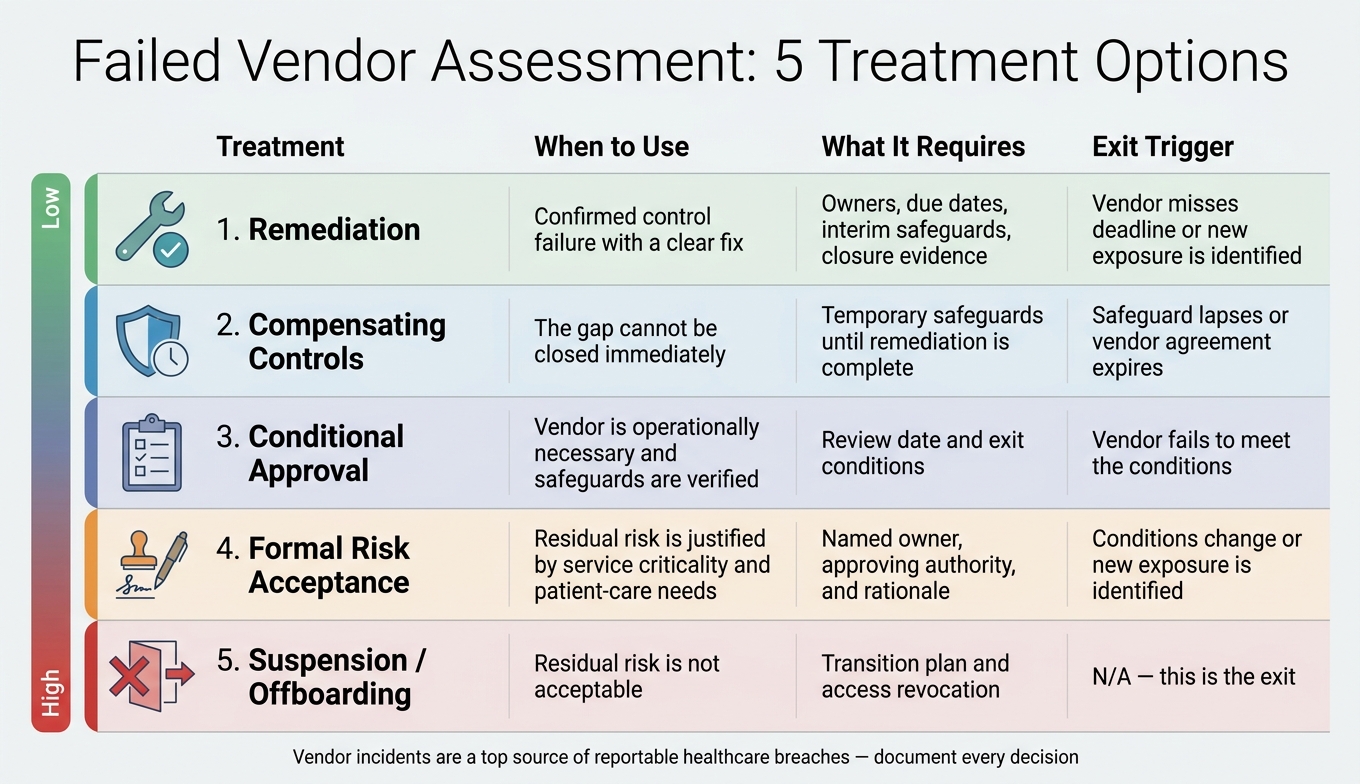
Failed Vendor Assessment: 5 Treatment Options Compared
After you confirm impact, pick the least disruptive treatment that still protects PHI, patient care, and service continuity.
Use Remediation and Compensating Controls When Risk Can Be Reduced Quickly
For most confirmed control failures, remediation is the default path. The goal is simple: fix the issue at its source.
Your remediation plan should spell out the failed control, the corrective action, the vendor owner, your internal owner, any interim safeguards, key milestones, due dates, and the evidence needed to close the finding. Then track the fix to closure in the same risk register you use for internal issues.
While the vendor works on the root issue, compensating controls can lower exposure for a limited time. They are a stopgap, not a long-term patch. In plain terms, they buy you time while the actual fix gets done.
Use Conditional Approval or Formal Risk Acceptance Only With Clear Limits
Use conditional approval only when the vendor is necessary, the risk is bounded, and you can set a review date with clear exit conditions.
Formal risk acceptance needs named approval and a review date. It should identify the risk owner, record the approving authority, explain the residual risk, and state why the service still supports patient care. This option fits only when the residual risk is justified by service criticality and patient-care need. A BAA alone is not enough.
Suspend or Offboard When Residual Risk Is No Longer Acceptable
If the vendor cannot close the finding, if safeguards lapse, or if the agreement expires without a renewed decision, the status should change. At that point, suspension or offboarding makes sense when the residual risk is no longer acceptable and the organization cannot justify continued use.
Use the rules below to document the decision and assign the next step.
| Treatment | When to Use | What It Requires | Exit Trigger |
|---|---|---|---|
| Remediation | Confirmed control failure with a clear fix | Owners, due dates, interim safeguards, closure evidence. | The vendor misses the deadline or a new exposure is identified |
| Compensating Controls | The gap cannot be closed immediately | Temporary safeguards until remediation is complete. | The safeguard lapses or the vendor's agreement expires |
| Conditional Approval | The vendor is operationally necessary and safeguards are verified | Review date and exit conditions. | The vendor fails to meet the conditions |
| Formal Risk Acceptance | Residual risk is justified by service criticality and patient-care needs | Named owner, approving authority, and rationale. | Conditions change or new exposure is identified |
| Suspension / Offboarding | Residual risk is not acceptable | Transition plan and access revocation. | N/A - this is the exit |
Reassess the treatment if safeguards lapse or the agreement expires. The scenarios below show how these treatments play out in common assessment failures.
Common Failure Scenarios and How to Document the Outcome
Use the examples below to match each failed control with the right treatment and the right paper trail.
Scenario 1: Failed MFA Control on Vendor Access
If a vendor fails an MFA control, start with the basics: which accounts are affected, and which systems do those accounts reach? Then narrow it down further. Is this a remote access issue, a privileged access issue, or both? You also need to spell out any PHI exposure.
From there, record the treatment choice tied to those affected accounts and systems. That could be remediation, compensating controls, conditional approval, acceptance, or exit.
Your documentation should include the exact accounts and systems missing MFA, the PHI or patient-care impact, the vendor’s remediation owner and due date, and the closure evidence needed to close the finding. For example, that may include screenshots showing MFA is turned on for each affected account. If you still can’t verify the control by the deadline, escalate the finding for final disposition.
Scenario 2: Missing Business Continuity Evidence or Unsupported Systems
The same level of recordkeeping applies to continuity findings and unsupported-system findings.
These are different kinds of failures, but they create the same core problem: you can’t verify PHI protection or care continuity.
For missing business continuity evidence, ask the vendor for its current plan, recovery time objectives (RTOs), recovery point objectives (RPOs), dependency maps, and results from a recent test. Then document the gap, the evidence you asked for, and the closure deadline. Missing continuity evidence is an operational risk, not just a paperwork problem.
For unsupported systems - software or hardware past end of support - identify the exact component, check whether it touches PHI, and require a remediation timeline. Record the affected system, the exposure level, the upgrade timeline, and the final risk decision.
Conclusion: Record the Decision in a Centralized Workflow and Track It to Closure
For every failed finding, record six items:
- The specific control failure
- The PHI and patient-care impact
- The assigned owner
- The remediation deadline
- The closure evidence needed
- The final residual risk decision
Taken together, those six items support OCR and insurer review.
Track all of this in a centralized risk register or workflow, such as Censinet RiskOps™, so findings, evidence, and dispositions stay in one place. Findings should move into a prioritized to-do list with owners and due dates. Set up expiration alerts so the record flags when a vendor’s remediation proof or security certification lapses. That way, continuous monitoring doesn’t turn into a manual chore. Then keep tracking the file until the finding is closed or the vendor is removed.
FAQs
Who should approve risk acceptance?
Risk acceptance needs formal approval from leadership.
For high-risk vendors, the security team shouldn't make that call on its own. The sign-off should also include Legal, Privacy, Compliance, and Clinical leadership.
The record should clearly document:
- The gap
- The threat
- Any compensating controls
- The business justification
- The approving authority
- A firm review date
Keep all decisions on file to show due diligence during audits.
How quickly should a failed finding be escalated?
How fast you escalate should match the risk.
High-risk issues - like shared credentials, unlogged privileged sessions, or missing MFA on EMR access - need action within 24 to 72 hours. If an account is actively compromised, treat it as an emergency and revoke access within 2 hours.
Escalate immediately to the CISO and General Counsel if:
- a critical vulnerability stays unpatched for more than 30 days
- a critical gap is more than 30 days overdue
- continuous monitoring flags a major risk
What proof is enough to close a finding?
Enough proof goes beyond policy statements. It needs dated, production-level evidence that shows the control works in day-to-day use.
That can include things like:
- recent access review reports
- restore-test logs
- remediation tracking reports
- MFA enrollment coverage
- EDR deployment logs
The proof should also show a named owner, a clear target state, and a firm deadline. That way, it’s clear the gap is being handled in a structured way, not just documented on paper.
