
I treat a vendor’s contract end date as a deadline to verify closure - not proof that the risk is gone. Before signing off, I check 3 areas: access, patient data, and subcontractors.
Here’s what I look for:
- Access and connections: Revoke accounts, tokens, and remote access; stop data transfers; and test replacement patient-care workflows.
- Patient data: Verify returned files and deletion records. If copies must remain, document why, who can access them, and when they will be deleted.
- Subcontractors: Confirm that their access and retained data are addressed, too.
- Closure records: Assign owners and deadlines, check system logs, and record approved exceptions. Set these requirements in contracts before services begin.
No activity does not mean access is closed. I use Censinet RiskOps™ to track records and unresolved tasks - not to replace the system owners who revoke access or delete data.
<u>My closure rule: verify each task or formally accept the remaining risk.</u>
The Forgotten Vendor: How an Offboarding Failure Exposes a Hospital Network
sbb-itb-535baee
Where Vendor Risk Remains After Termination
Closing a procurement contract does not end technical ownership. Match the termination record to application owners and clinical workflows. Include shared exports, workstation agents, and scheduled reports that procurement records may miss. Review access, data, and subcontractors separately. Each can leave a different gap after termination.
Credentials and Connections Left Active
Removing an SSO assignment does not necessarily revoke service accounts, OAuth tokens, certificates, VPN permissions, or file-transfer credentials. Trace each EHR interface, scheduled export, and webhook to its owner and destination.
Work with the clinical or application owner to disconnect each connection, revoke its credentials, and check logs for transmissions after termination. NIST-aligned guidance treats account deactivation and the termination of data flows as separate tasks.[5] Removing access does not shut down every connection.
PHI Left in Systems and Backups
A production-database deletion confirmation may leave out support-ticket attachments, endpoint downloads, test environments, and exported files. Request a written disposition record that names the systems and media covered - not just a blanket statement. HHS’s return-or-destruction requirement covers PHI the business associate still maintains in any form.[1]
Backups need their own closure record. If backups cannot be deleted immediately, require a full backup disposition record, not just an explanation of why they remain. It should cover the retention period, expiration process, access controls, and restore procedures.
Privacy or legal counsel should review any claim that deletion is not possible. Document retained copies, permitted uses, safeguards, and the date or event that will trigger final deletion.[3][4]
Subcontractor Access and Retained Data
A primary vendor’s confirmation may leave out a hosting provider’s disaster-recovery copies or a support firm’s administrative accounts. To verify closure, require the vendor to identify relevant subcontractors and obtain confirmation that credentials have been removed and PHI disposition has been addressed.
Each confirmation should name the environment covered and identify any unresolved access or retained data. HHS’s model BAA extends return-or-destruction provisions to agents and subcontractors.[2]
A Healthcare Vendor Offboarding Checklist
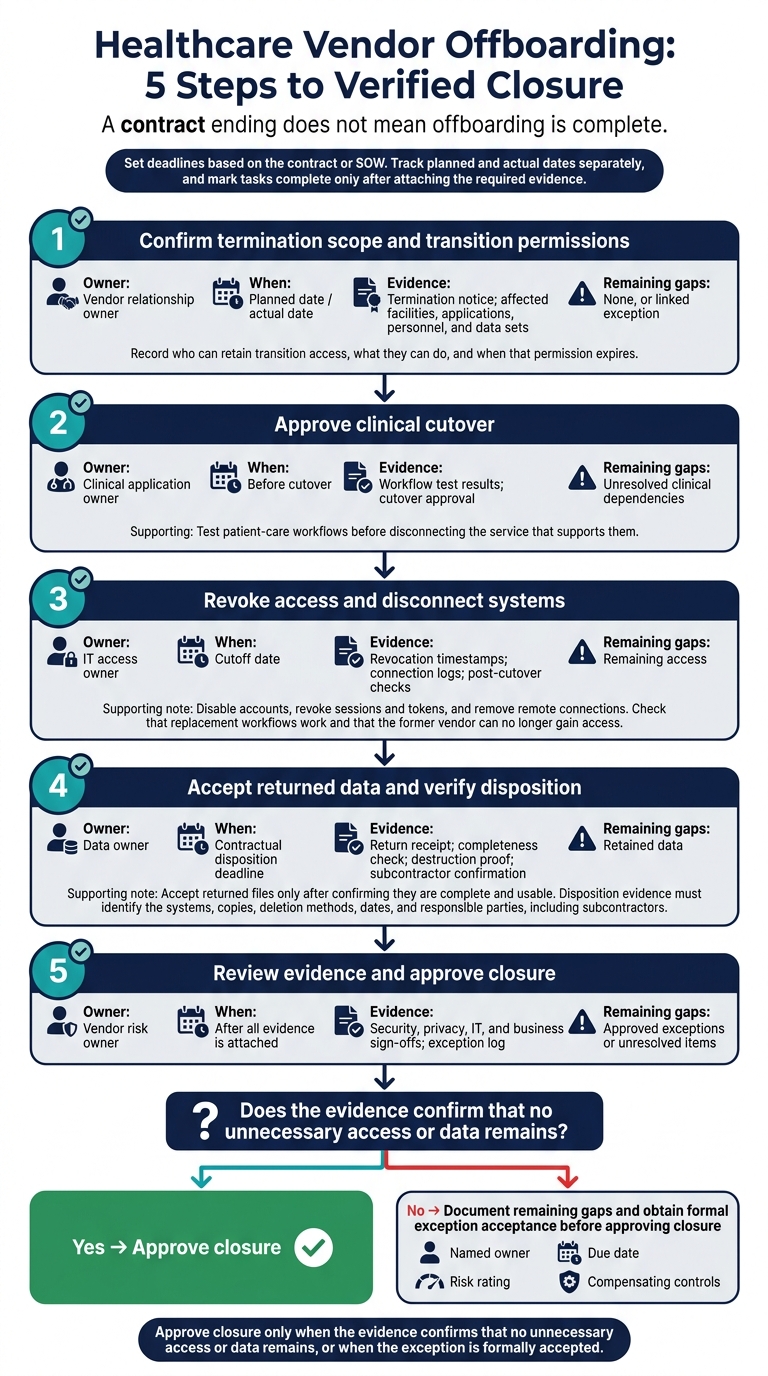
Healthcare Vendor Offboarding: 5 Steps to Verified Closure
A contract ending does not mean offboarding is complete. Use this checklist to confirm that access and connections are closed, data is accounted for, and subcontractor obligations are resolved.
Set deadlines based on the contract or SOW. Track planned and actual dates separately, and mark tasks complete only after attaching the required evidence.
| Task | Accountable owner | Verification date | Required evidence | Remaining gaps |
|---|---|---|---|---|
| ☐ 1. Confirm termination scope and transition permissions | Vendor relationship owner | Planned date / actual date | Termination notice; affected facilities, applications, personnel, and data sets | None, or linked exception |
| ☐ 2. Approve clinical cutover | Clinical application owner | Before cutover | Workflow test results; cutover approval | Unresolved clinical dependencies |
| ☐ 3. Revoke access and disconnect systems | IT access owner | Cutoff date | Revocation timestamps; connection logs; post-cutover checks | Remaining access |
| ☐ 4. Accept returned data and verify disposition | Data owner | Contractual disposition deadline | Return receipt; completeness check; destruction proof; subcontractor confirmation | Retained data |
| ☐ 5. Review evidence and approve closure | Vendor risk owner | After all evidence is attached | Security, privacy, IT, and business sign-offs; exception log | Approved exceptions or unresolved items |
Define Scope, Remove Access, and Disconnect Systems
Define the scope before revoking access or disconnecting systems. Record who can retain transition access, what they can do, and when that permission expires. HR offboarding alone is not enough. Include external identities, integration service accounts, partner-issued OAuth tokens, and systems that need manual removal. Set explicit access expiration dates and keep timestamped deprovisioning records.
Test patient-care workflows before disconnecting the service that supports them. At the approved cutoff, disable accounts, revoke sessions and tokens, and remove remote connections. Check that replacement workflows work and that the former vendor can no longer gain access.
Confirm Data Return, Deletion, and Subcontractor Closure
Check returned files against the agreed inventory. Accept them only after the data owner confirms they are complete and usable. Disposition evidence must identify the systems, copies, deletion methods, dates, and responsible parties, including subcontractors.
After documenting data disposition, send any remaining gaps for sign-off.
Record Exceptions and Approve Closure
Attach termination notices, access and connection records, data-return or destruction evidence, subcontractor confirmations, and security, privacy, IT, and business sign-offs.
Give each gap a named owner, due date, risk rating, and compensating controls. Approve closure only when the evidence confirms that no unnecessary access or data remains, or when the exception is formally accepted.
Verify Offboarding Claims With Evidence
A vendor’s confirmation is not proof of closure. Check each claim against the contract, the named business owner, and your organization’s records. Use timestamped system records - not screenshots or spreadsheet exports. Missing or conflicting evidence leaves the risk unresolved and the task unverified.
Check access first, data disposition second, and subcontractor closure third. Apply the same evidence standard to every offboarding task before approving closure.
| Offboarding claim | Objective evidence | Review owner | Closure status |
|---|---|---|---|
| Access revoked | Timestamped deprovisioning logs from the identity provider and affected applications, including OAuth token revocation records | IAM / IT Security | Verified when records cover all inventoried identities |
| Scope limited | Configuration records showing specific entitlements rather than broad administrative access | Business Owner | Unresolved if permissions exceed approved scope |
| No residual activity | Post-termination authentication logs showing zero successful logins or API calls | Security Operations (SOC) | Unresolved if activity or logging gaps remain |
| Data deleted or returned | Secure-transfer receipts, file hashes, or destruction certificates tied to identified data sets | Privacy / Compliance | Unresolved if copies or retention duties remain |
| Subcontractor access ended | Attestation or evidence of access revocation for fourth-party entities, supported by account, federation, or disposition records | Vendor Risk Management | Unresolved if subcontractor coverage is incomplete |
Check Inventories and Activity After Termination
Compare the vendor’s full inventory of external identities with your identity provider records. Include contractors, consultants, integration service accounts, and OAuth tokens. Also check older or non-automated applications that lack provisioning APIs.
Tie each identity to a named business owner and its contract or engagement. Disabling an SSO account does not prove that local or standalone application accounts are closed. Check actual permissions against the approved access scope.
Review post-termination authentication logs for orphaned accounts that remain active after the contract ends. Investigate unexpected activity and gaps in logging. No activity does not prove revocation. An enabled account still needs resolution, even if nobody uses it. Use a 30-day inactivity flag to find overlooked accounts - not to delay closure.
Validate Data Disposition and Retention Duties
Verify returned data using record counts, file hashes, secure-transfer receipts, and integrity checks suited to the file format. Tie disposition records to the identified data sets, systems, subcontractors, and termination date. These return checks do not prove that the vendor deleted its copies.
Use HHS guidance to confirm HIPAA-compliant vendor risk management closure requirements and any retention duties that continue after termination. If data remains, document why it must be retained and which safeguards apply. Do not label it deleted.
Align credential revocation and logging checks with NIST guidance. When reviewing destruction evidence, use NIST media-sanitization guidance.
Conclusion: Make Verified Closure Routine
Set Offboarding Requirements Before Services Begin
The checklist works only when closure terms are in the contract before go-live. Before access begins, include these terms in contracts and BAAs: revocation deadlines, integration shutdown, proof of data return or deletion, permitted retention, subcontractor closure, and post-termination incident reporting.
Make the contract end date the cutoff for access and integrations. Maintain an inventory of external identities, assign named owners, and set access to expire automatically. Where automation isn't available, assign manual shutdown steps.
Connect vendor inventories to procurement, legal, privacy, security, and IT workflows. Match the depth of verification to PHI exposure, access level, integration complexity, and clinical impact. Track open exceptions and overdue tasks separately from closed items.
Coordinate Closure Records With Censinet RiskOps™
After the contract ends, the closure record provides proof that access, data, and subcontractors were closed out. Use Censinet RiskOps™ as the central repository for vendor-risk records, evidence, remediation owners, and closure status. Give every unresolved exception an owner and deadline, and keep it visible after the commercial relationship ends.
Workflow tracking doesn't revoke credentials or delete patient data. System owners must complete those tasks, and reviewers must verify the evidence and residual risk. An ended contract is not a closed risk.
FAQs
What should we do if a vendor won't verify data deletion?
Rely on contractual and legal enforcement - not verbal assurances. Verbal promises do not meet HIPAA requirements. Check your Business Associate Agreement (BAA) for breach notification procedures, financial penalties, and corrective action clauses. If noncompliance continues, you may need to formally terminate the agreement through legal channels.
Require the vendor to provide its backup retention cycle and the date of its last restorable backup. Until the data is securely removed, require HIPAA-aligned safeguards, including continued encryption and strict limits on access.
How long should we monitor for post-termination access?
Monitor post-termination access for 30–90 days after the vendor system is shut down. Check for leftover connections, authentication attempts, API calls, and continued traffic to vendor IP addresses or endpoints. Extend this period if the vendor handled large volumes of protected health information (PHI) or used complex integrations.
Use SIEM/log review and interface monitoring to confirm that integrations have stopped and no credentials or data flows remain active. [1]
When is accepting residual vendor risk appropriate?
Accept residual vendor risk only through a formally documented exception when approving a high-risk vendor with unresolved gaps. The exception must include a specific expiration date for re-review. Auditors need proof that those gaps are tracked through closure.
Otherwise, reduce residual risk with automated offboarding: revoke credentials immediately, verify that data has been destroyed or returned, and continuously monitor for unauthorized access during a 30- to 90-day post-termination watch period.
