
I would not approve a healthcare vendor based on a clean pen test alone. Before granting access, I would check what the test excluded and run 4 checks covering patient data, access, controls, and response.
Here’s what I would pair with the test:
- Access review: Check who can reach patient data, whether access is needed, and whether former employees’ accounts were removed.
- Data-flow and dependency mapping: Trace where patient data goes, including subcontractors, and check Business Associate Agreement coverage.
- Control assessment: Review records showing that safeguards work - not just a certification. SOC 2 Type II reports typically cover 6–12 months of control performance.
- Joint response tabletop: Walk through who makes decisions, handles notifications, and keeps patient care moving during downtime. Test recovery separately.
My rule: <u>Match the review to the vendor’s access and the harm an outage could cause.</u> Require proof before production access, track fixes through retesting, and revisit the review when systems, ownership, or data use change.
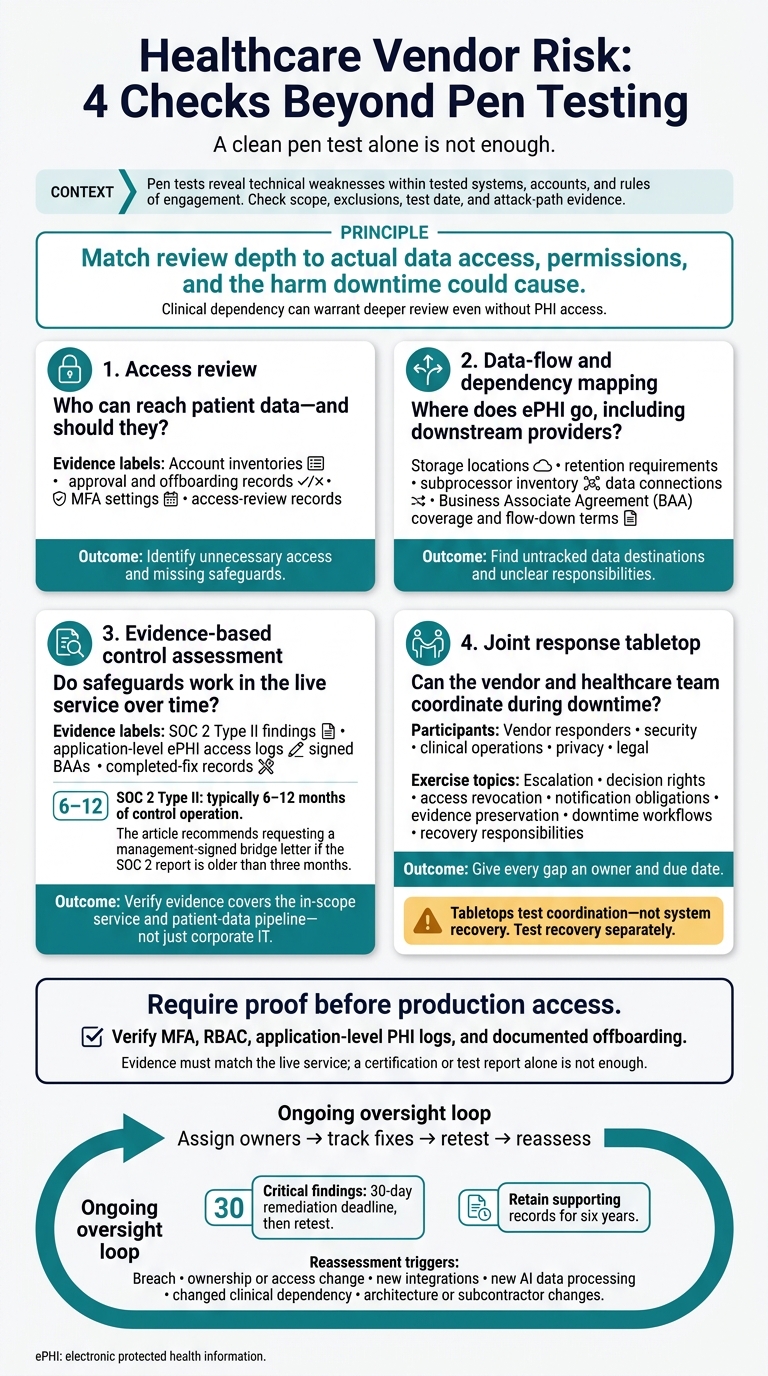
Healthcare Vendor Risk: 4 Checks Beyond Pen Testing
What Pen Tests Find - and What They Miss
Technical Findings Within the Test Scope
Pen tests can expose application and API flaws, missing patches, misconfigurations, and broken authentication or authorization. They can also show whether an attacker can link weaknesses to escalate privileges, move laterally, or cross network boundaries. Ask for attack-path evidence, not a pass/fail summary.[1] That evidence makes the report useful, but it doesn’t tell the whole story.
Test access shapes what a pen test can prove. Unauthenticated external tests, authenticated internal tests, and tests with restricted rules of engagement reveal different paths. Review findings alongside the accounts tested, systems in scope, and prohibited actions - especially for systems that handle ePHI or support patient services.[1]
Gaps in Access, Data Handling, Dependencies, and Recovery
A vendor’s test scope may leave out third-party systems, cloud storage, unsupported devices, and legacy apps. Check the test date against later releases, cloud changes, and new integrations. A clean result means no material issue was found under the tested conditions. It does not mean excluded systems or later changes are secure.[1]
The table connects unanswered vendor-risk questions with the assessments and evidence needed to address them.
| Tested capability | Unanswered vendor-risk question | Complementary assessment and evidence |
|---|---|---|
| Authentication and authorization | Do former employees still have access? Are privileged accounts consistently reviewed? | Vendor access review: offboarding records, account inventories, MFA settings, and access-review records. |
| Application and API security | Are PHI copies kept in dev or test longer than allowed? | Data-flow mapping and control assessment: storage locations, retention requirements, and supporting records. |
| Network segmentation | Could a downstream provider’s breach expose patient data or interrupt service? | Dependency mapping: subprocessor inventory, data connections, and applicable BAA flow-down terms. |
| Technical control effectiveness | Have controls stayed effective since the test ended? | Evidence-based control assessment: SOC 2 Type II findings and a bridge letter addressing the period since the report ended. |
| Recovery and response | Can the vendor and healthcare team coordinate during downtime? | Joint incident-response tabletop: escalation contacts, clinically critical downtime workflows, and recovery responsibilities. |
A clean finding doesn’t prove that offboarding, retention, or recovery works in practice. Verify those claims with operating records and exercise results, using direct checks of access, data flows, controls, and recovery.[1][2]
sbb-itb-535baee
Creating Cyber Resilience: Your Guide to Healthcare Vendor Risk Management [On-Demand Webinar]
4 Assessments to Pair With Pen Tests
A pen test can leave gaps in access, data, controls, and recovery. Pair it with four assessments: access review, data-flow and dependency mapping, evidence-based control assessment, and a joint response tabletop. Use these as checks on day-to-day practices within your HIPAA-compliant vendor risk management program, not as proof of compliance.
Review Vendor Access and Map Data Flows
For the access review, check approval, offboarding, and access-review records to verify who can reach ePHI. Identify unnecessary access and missing safeguards, then assign someone to correct each finding.[2] Next, check where that access sends ePHI.
For data-flow and dependency mapping, trace ePHI through EHR and non-EHR systems, including admin tools and vendor-managed apps. Compare logging, email, and analytics providers against the subprocessor list and BAA coverage. Build a map that shows untracked ePHI destinations and unclear responsibilities.[1][2]
Verify Controls With Supporting Records
Once you’ve mapped access and data paths, check whether controls work in practice. Confirm that audit evidence covers the in-scope service and ePHI pipeline.
SOC 2 Type II reports typically examine 6–12 months of control operation. Check that the report covers the patient-facing app and data pipeline - not just corporate IT. Review application-level ePHI access logs that show who accessed which record and when, signed BAAs and subprocessor flow-down terms, and records showing completed fixes. If the SOC 2 report is older than three months, request a bridge letter signed by management to cover the gap.[2]
Run Joint Incident-Response Tabletop Exercises
With access, data, and controls mapped out, test how the vendor and healthcare team respond together. Run a joint tabletop with vendor responders and teams from security, clinical operations, privacy, and legal. Use hypothetical scenarios that reflect the vendor’s access to ePHI and critical systems.
Walk through escalation, decision rights, access revocation, and downtime procedures that keep patient care moving. Also cover notification obligations, evidence preservation, and recovery priorities. Give every gap an owner and due date. Use the tabletop to test coordination, not system recovery.[2]
Choose Assessments by Vendor Exposure and Clinical Impact
Set assessment depth based on actual data access, permissions, and the impact of downtime.
Match Assessment Depth to Vendor Risk
| PHI access | Privileged or network access | Clinical dependency | Operational impact | Recommended assessments |
|---|---|---|---|---|
| None | None | Low or indirect | Limited administrative delays | Evidence-based control assessment using SOC 2 security criteria. |
| Limited or encrypted ePHI | Standard user | Moderate | Workflow delays with available workarounds | SOC 2 Type II, data-flow mapping, and subprocessor review. |
| Broad or unencrypted ePHI | Administrative/VPN | High clinical impact | Data exposure or major business interruption | HITRUST r2, a scope-limited pen test of high-risk systems, application-level PHI logs, and an incident response plan. |
| Broad ePHI access | Full system access | Life-safety/clinical operations | Care disruption or patient-safety risk | All assessments above, plus joint tabletop exercises, recovery testing, and fourth-party dependency review. |
Use this matrix to turn the earlier assessment list into a decision rule. Match the vendor’s actual access - not its label - to the right row. Revisit that choice when architecture, integrations, ownership, or subcontractors change.[2]
The selected row determines which assessments are mandatory. Broad PHI exposure requires deeper review. Clinical dependency can warrant the same depth even when the vendor has no PHI access. For fragile apps or devices, define narrow rules of engagement and limit exploitation.[1]
Set Proof Requirements and Approval Conditions
Once you’ve set the risk tier, spell out what proof the vendor must provide before access begins.
Before onboarding, assign owners for security, privacy, vendor management, and clinical operations. Define which records each owner must provide.[2] The evidence must match the live service; a certification or test report alone isn’t enough.
Allow production access only after verifying MFA, RBAC, application-level PHI logs, and documented offboarding.[2]
Conclusion: Review Vendor Risk Throughout the Relationship
A clean pen test does not prove that a vendor operates safely. Use the earlier review, mapping, control, and tabletop steps as the baseline for continued vendor oversight.
Track Findings and Schedule Reassessment
After the initial assessment, track every finding through closure and assign it to a system owner. For each accepted finding, record the due date and risk approver. Give critical findings a 30-day remediation deadline, then retest to verify the fix. Keep ownership, remediation, and retest records as evidence beyond the pen-test report, and retain supporting records for six years.[1]
Reset the risk review whenever the vendor changes. Schedule reassessments based on exposure and clinical impact. Review immediately after a breach, an ownership or access change, new integrations, new AI data processing, or a change in clinical dependency that affects patient-data exposure or downtime risk. After any material change, include critical vendors in the next exercise.[1][3]
Censinet RiskOps™ helps teams coordinate assessments, evidence, workflows, and vendor risk visibility.[3] Use current evidence - not a past clean test - to guide vendor oversight.
FAQs
How do I assess a vendor without a SOC 2 report?
Verify the vendor’s security posture with evidence - not just policies. Map where protected health information (PHI) is stored, processed, and accessed. Request penetration test summaries, ISO 27001 or HITRUST certifications, architecture diagrams, evidence of technical controls, and results from incident response and disaster recovery tests.
Have legal, clinical, and security teams review resilience and the impact on day-to-day operations. Record gaps in a Plan of Action and Milestones (POA&M), with an owner and a firm remediation deadline for each.
Can a vendor without PHI access still threaten patient safety?
Yes. A vendor can put patient safety at risk without direct access to protected health information (PHI). Disruptions to clinical operations or infrastructure can affect patient care [1][2].
If vendors supporting medical devices, clinical systems, scheduling, billing, or pharmacy systems are compromised or fail, patients may face care delays or trouble accessing medications. These failures can also cause outages across multiple systems [1][2] and halt revenue-cycle workflows, creating risks that go beyond data privacy [2].
What if a vendor won’t disclose its subcontractors?
Treat the refusal as a major contract and security risk, not just a process issue. Escalate it to legal and procurement [1]. Immediately put compensating controls in place, such as network segmentation, to limit the vendor’s access [2][1].
Document the refusal and any risks that remain unaddressed for your executive risk committee or CISO. The refusal should trigger a formal review for possible emergency contract termination [2][1].
