
If your cloud PHI backup plan can’t restore clean data after ransomware, it’s not enough. In healthcare, backups now need to do four things at once: protect ePHI, meet HIPAA rules, resist deletion and encryption, and bring high-priority systems back within target recovery times.
Here’s the short version:
- Backup is not the same as replication. Replication helps with failover, but it can copy encrypted or corrupted data too.
- RPO and RTO should follow patient care impact. EHRs often need 0–15 minute RPOs and 0–60 minute RTOs, while billing systems usually have more room.
- HIPAA expects recoverable ePHI plus written recovery plans. That includes backup, disaster recovery, emergency mode steps, and proof that testing happened.
- The safer model is 3-2-1-1-0. Keep multiple copies, store one offsite, make one immutable, and verify restores so you have zero untested backups.
- Isolation matters. Backups should sit in a separate account or subscription with separate access, MFA, locked deletion rules, and separate key control.
- Testing is where most teams fall short. One data point stands out: 97% of organizations report having backups, but only 54% test recovery on a regular basis.
- Backup attacks are common. In healthcare ransomware cases, attackers tried to hit backups in 95% of incidents, and 66% of those attempts worked.
- Money follows recovery strength. Average ransom demands were about $4.4 million when backups were compromised versus $1.3 million when they were not.
A simple way to think about it:
| Item | What it does | What to watch for |
|---|---|---|
| Backup | Restores data to a known-good point | Must be immutable, isolated, and tested |
| Replication | Keeps systems available during outages | Can copy ransomware and bad deletes |
| Snapshot | Rolls back short-term changes | Not enough alone unless protected from production access |
| Archive | Keeps data for long-term retention | Not built for fast recovery |
If I were boiling this guide down to one checklist, it would be this: inventory every ePHI system, assign recovery targets, keep at least one locked backup copy away from production, restrict restore and delete rights, encrypt everything, and run monthly, quarterly, and annual restore tests with written proof.
That’s the core of the article, and it sets up the rest of the details.
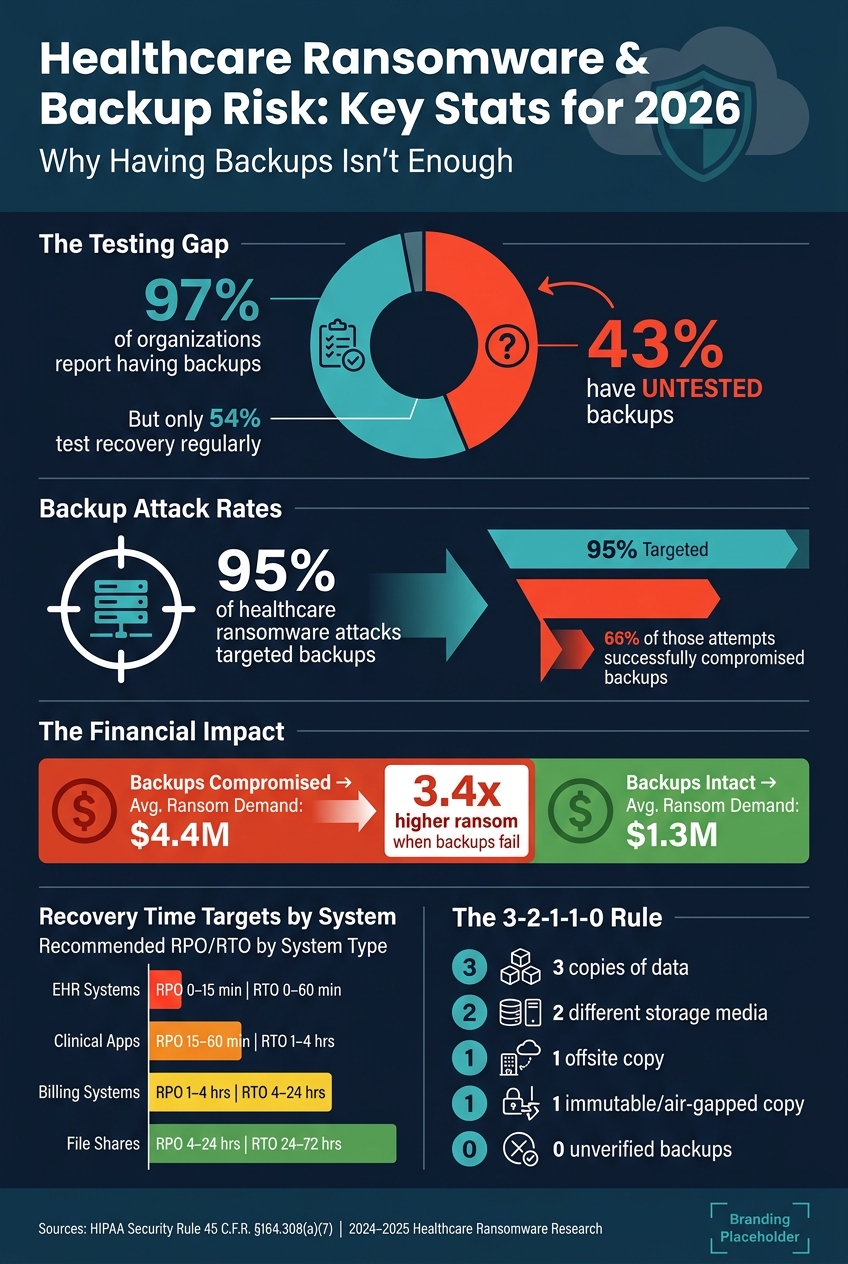
Healthcare Ransomware & Backup Risk: Key Stats for 2026
Top 5 HIPAA Compliant Cloud Backup Services
sbb-itb-535baee
Regulatory Baselines and Backup Requirements for PHI
HIPAA does not tell you which cloud vendor to use or which backup tool to buy. What it does require is much more practical: recoverable ePHI, documented recovery steps, and the ability to keep operating during a disruption. Those rules shape which backup setups can meet HIPAA in the first place.
Mapping HIPAA Contingency Requirements to Cloud Backup Controls
Each HIPAA contingency requirement should map to a specific cloud control. The HIPAA Security Rule’s contingency planning standard at 45 C.F.R. §164.308(a)(7) includes five implementation specifications. Three of them directly shape cloud backup design: a Data Backup Plan, a Disaster Recovery Plan, and an Emergency Mode Operation Plan.[3][4][7]
| HIPAA Element | What It Requires | Cloud Backup Controls |
|---|---|---|
| Data Backup Plan | Create and maintain restorable exact copies of ePHI | Immutable storage, versioned backups, scheduled daily or more frequent jobs for ePHI systems, encryption at rest and in transit[3][8][13][14] |
| Disaster Recovery Plan | Restore lost data and resume operations after disruption | Defined RTO/RPO per workload, cross-region replication, scripted restore runbooks, periodic restore testing with logged results[3][9][12] |
| Emergency Mode Operation Plan | Continue critical processes while systems are impaired | Read-only failover environments, alternate access paths, network segmentation, manual fallback procedures with reconciliation steps[3][5][14] |
In cloud setups, that usually means application-aware backups, transaction-consistent snapshots, and integrity checks.[3][10] A backup that looks fine on paper but can’t restore cleanly under load is a problem waiting to happen.
Backup frequency should line up with clinical criticality and how fast data changes. At a minimum, ePHI systems should be backed up daily, with more frequent runs for high-change clinical workloads.[14][6]
Retention, Documentation, and Evidence Requirements for PHI Backups
HIPAA requires security policies, procedures, and related documentation to be kept for at least six years from the date they were created or the date they were last in effect, whichever is later.[15][16] That includes backup plans, restore test reports, access change records, and exception logs.
Backup retention is a little trickier. It follows state medical-record law, not HIPAA by itself, and often falls between 5 and 11 years for adult records, with longer periods for pediatric and specialty records.[11] The practical move is to find the longest state rule that applies across your service footprint, then set cloud storage lifecycle policies to match. After that, older backup copies can move into lower-cost archival tiers for the rest of the required retention period.
For documentation, auditors and OCR investigators want proof that the process is being carried out, not just written policy. In plain English, they want evidence that the backup program is alive and working. That usually comes down to three core records:
- Backup job logs showing schedules, success or failure status, and data scope
- Restore test reports listing test dates, systems tested, RTO/RPO results, and issues found
- Records of access changes to backup environments[8][11]
When a backup job fails or a restore misses policy targets, the incident ticket and root-cause analysis should also go into the compliance record.[6][11] That link between policy and day-to-day evidence is what supports audit readiness and restore discipline.
These rules now shape the backup architecture choices that come next.
Cloud PHI Backup Architectures and Strategy Options
The compliance baseline needs to turn into an actual backup layout: how many copies you keep, where those copies sit, and how they hold up during a ransomware attack. That’s what shapes backup design.
Applying 3-2-1 and 3-2-1-1-0 Models to Healthcare Data
3-2-1 is a solid starting point, but it doesn’t go far enough for ransomware. The updated 3-2-1-1-0 model adds two key rules: one copy must be immutable, and zero backups should go unverified. That last part is where things get hard. A backup is not “good” just because the job says it finished. Every copy has to restore cleanly.
EHRs, PACS/VNA, and file shares don’t all need the same setup. Each one needs its own mix of immutability, versioning, and archival storage based on how often the data changes and how fast it needs to come back. Put immutability around the most sensitive, fast-moving data. Older imaging studies that staff rarely open can shift to lower-cost archival storage.
Zero unverified backups means doing real restore tests, not just looking at a green checkmark in a dashboard. For imaging, that means checking DICOM integrity and making sure studies open the right way in the viewer. For EHR databases, it means replaying logs and running core clinical workflows end to end after the restore.
Once the copy model is in place, the next step is picking the backup method that fits each workload.
Choosing Backup Methods by Workload Type and Recovery Target
No single backup method works for every PHI workload. The right pick depends on change rate, recovery target, and storage cost.
| Backup Method | Best Fit | RPO/RTO Trade-off | Storage Impact | Operational Complexity |
|---|---|---|---|---|
| Full backup | Small or critical systems needing simplest restore | Best restore simplicity; slowest to create | Highest | Low |
| Incremental backup | Large datasets, frequent change, tight backup windows | Fastest backup; restore requires full chain | Lowest | Medium to high |
| Differential backup | When restore speed matters more than chain length | Faster restore than incremental; only last full + latest diff needed | Grows until next full | Medium |
| Snapshot-based backup | Cloud volumes, VMs, point-in-time recovery | Very fast to create; restore speed depends on implementation | Efficient via changed blocks | Low to medium |
For EHR and lab systems, use application-consistent full backups along with transaction-log backups every 5–15 minutes to support sub-hour RPOs.[17][2][18] For virtual machines running clinical apps, quiesced snapshots plus export to secondary storage help with consistency and retention. For unstructured PHI like scanned documents and file shares, daily incrementals on top of periodic fulls are often the most practical option.
Backup depth should match clinical criticality. A low-priority file share and a live EHR database should not be treated the same way.
Copy count by itself isn’t enough. Where backups live, and who can reach them, matters just as much.
Designing for Cross-Region Recovery and Isolated Restore Environments
Cross-region replication helps with regional outages, but it does not protect you from account compromise. In 2025, 95% of healthcare organizations hit by ransomware said attackers tried to compromise their backups, and 66% of those attempts worked.[1] That’s the threat model this architecture has to handle.
Put backups in a separate cloud account or subscription with separate credentials, keys, and tightly scoped permissions. If someone gets into your production environment, they should not be able to walk straight into backup storage with the same login. Cross-region separation adds one more barrier. A backup stored in a different region and a different account means an attacker needs two separate compromises to wipe everything out.
An isolated recovery environment adds another layer. Instead of restoring PHI straight back into production after an incident, restore into a separate network segment or cloud account with hardened controls and no direct connection to clinical systems. Scan restored systems for malware and validate them before reconnecting anything to the production network.
This setup also helps teams work in parallel during a ransomware event. One group can focus on recovery while another investigates what happened. It also helps preserve evidence. Backup copies and pre-attack snapshots can be compared against compromised systems to rebuild the attack timeline and confirm when data was first affected. Use documented runbooks so restore validation stays repeatable.
These controls only work if backup data, access, and encryption keys stay tightly locked down.
Security Controls for Backup Data, Access, and Recovery
Even isolated, immutable backups can still fail if encryption is weak, access is too broad, or logging is spotty. Once backups are separated from production, the next step is simple: make sure they’re encrypted, tightly controlled, and fully auditable. In a ransomware attack, the failures that hit hardest are weak encryption, privilege abuse, destructive deletes, and backup jobs that fail quietly.
Encrypting Backup Data in Transit and at Rest with Strong Key Management
Encrypt backup data in transit between backup agents, cloud gateways, and storage. Also encrypt data at rest using NIST-aligned methods for cloud object storage, snapshots, and database backups [31][32][33][34][35]. OCR may treat ransomware-affected unencrypted backups as evidence of a breach unless you can show NIST-level encryption was in place [26][27][28][29][30].
Use customer-managed keys in a separate key management service. Rotate keys on a set schedule, limit which roles can use or manage them, and log every key access event. This is one place where separation of duties is a must: the person running backup jobs should not also control the encryption keys.
Restricting Restore and Delete Access with RBAC, MFA, and Network Isolation
Broad access to backup repositories is one of the fastest ways to lose everything during a ransomware event. Set three clear roles:
- Backup Operator runs jobs
- Restore Operator restores assigned data
- Repository Custodian manages storage and retention [19][20][22][23][24]
Restores should go through infrastructure or security teams under documented change requests [19][22][23].
MFA should be required for every human identity with admin or operational access to backup consoles, KMS, and storage admin interfaces [21][22][23][24]. Use phishing-resistant MFA, such as hardware security keys. For service accounts and automation identities, use centralized identity services with the fewest permissions possible and workload identity methods where supported. Tie backup API access to short-lived tokens, network restrictions, and conditional policies [22][23][24][25].
Deletion APIs should require multi-party approval or a change-control ticket. Cloud object lock or WORM settings should also enforce hard retention periods that even admins cannot override during the lock window [20][21][23][24]. That matters because, in a live attack, an attacker often goes after backups right after getting admin access.
Logging and Monitoring Backup Jobs, Changes, Failures, and Restores
Log every backup event: job start and end times, success or failure, configuration changes, deletion attempts, restore actions, and integrity check results [21][22][23][24][25]. Send those logs to a SIEM or logging platform retained under HIPAA and internal policy. Automated alerts should trigger on failed backup jobs, mass deletion attempts, unusual restore spikes, and any privilege escalation tied to backup roles [23][24][25].
Apply the same controls across storage objects, snapshots, database backups, and configuration backups. If one backup type is left out, that gap can turn into the weak link.
Review backup reports daily and open tickets right away for failures. That routine, paired with automated alerts, gives auditors hard proof that backup controls are active and working. It also gives teams a clean evidence trail for restore tests and governance reporting.
Testing, Governance, and the Path to Reliable PHI Recovery
Once backup controls are set, testing shows whether they hold up when things go wrong.
Running Restore Tests Based on Business Impact and Clinical Priority
Use the BIA to rank systems by clinical criticality and decide how often each one should be tested. [36]
A simple cadence works well here. Monthly spot restores check individual patient records, configuration files, and small datasets for integrity and chain of custody. Quarterly exercises restore a full application - an EHR or oncology system - into an isolated cloud environment, then confirm end-to-end function: logins, chart access, order entry, and medication reconciliation. [36] These tests should measure actual RTO and RPO against documented targets.
If an EHR has a target RTO of 2 hours, but tests keep averaging 3.5 hours, that gap needs to be fixed before a live incident makes it painfully clear. The same goes for restore success rates. If the rate drops from 98% to 90% over two quarters, treat it as an early warning sign - not a line item buried in a report. [39]
Run an annual, organization-wide simulation with clinical leadership across EHR, imaging, pharmacy, and lab, using emergency-mode workflows and communication procedures. [37] Direct-care systems should get the toughest drills, including ransomware and regional outage scenarios. Lower-priority systems can follow a semiannual or annual schedule. [36][37]
Those results should feed one governance view that leaders review on a fixed schedule.
Using Governance Dashboards to Track Backup Risk and Accountability
A governance dashboard pulls backup logs and test results into one clear view of recovery readiness.
Track these metrics in one dashboard:
| Metric | Owner | Review Cadence | Evidence Source |
|---|---|---|---|
| Backup coverage (ePHI systems in scope) | IT Operations | Monthly | Backup system inventory, asset register |
| Immutable copy status (WORM/object lock enabled, last verified) | Security/Compliance | Monthly | Cloud provider reports, storage logs |
| Restore test success rate (%) | IT Operations | Quarterly | Test runbooks, tickets, sign-offs |
| Achieved RTO vs. target (per critical system) | IT Operations | Quarterly | Test logs, timestamps |
| Achieved RPO vs. target (per critical system) | IT Operations | Quarterly | Test logs, backup schedules |
| Open exceptions and remediation status | Compliance | Monthly | Risk register, ticketing system |
| Vendor/third-party backup risk | Security/Compliance | Quarterly | BAAs, vendor DR assessments |
| Test coverage (% of in-scope systems tested in last 12 months) | Compliance | Quarterly | Test documentation archive |
Review exceptions each month. Then hold quarterly executive reviews with the CIO, CISO, CMIO, and compliance team to watch trends and close gaps. [36][38][40]
Vendor backup risk also needs its own lane. If a SaaS EHR vendor or a cloud-hosted clinical application stores or processes PHI, its DR capabilities and reported RPO/RTO become part of your own risk picture. [36] Platforms like Censinet RiskOps™ can help centralize third-party and enterprise risk assessments, cybersecurity benchmarking, and shared risk management across healthcare delivery organizations and their vendor networks.
Conclusion: The 2026 Cloud PHI Backup Checklist
The last step is turning test results into a governance routine that stays current.
Healthcare leaders should be able to answer "yes" to each of these by the end of 2026:
- Every ePHI system is inventoried, assigned RPO/RTO targets, and matched to a tested recovery method.
- Repositories are secured. Backup data is encrypted in transit and at rest with strong key management, and restore/delete access is restricted by role, MFA, and network isolation.
- At least one copy is immutable and isolated from production, and restores are tested on a defined schedule. Object lock or WORM settings enforce immutability, and monthly spot restores, quarterly application-level exercises, and annual multi-system simulations are documented with actual RTO/RPO results and clinical validation.
- Backup risk is reviewed continuously. A dashboard tracks coverage, immutability, test results, and open exceptions, with monthly operational reviews and quarterly executive reviews - all backed by auditable evidence. [36][38][40]
Research shows that only 54% of organizations regularly test their recovery processes, even though 97% report having backups in place. [41][42] In 2024, attackers compromised backups in 66% of healthcare ransomware incidents, pushing average ransom demands to around $4.4 million when backups were compromised versus $1.3 million when they weren't. [43][44] That gap between having backups and being able to trust them is exactly what this checklist is meant to close.
FAQs
How often should PHI backups be tested?
Test PHI backup restoration at least annually to help support recoverability and align with HIPAA requirements. In practice, quarterly testing is often treated as the better standard.
A solid way to handle this is with a tiered schedule. Run annual full-system disaster recovery exercises, quarterly full-application drills, and monthly file or database restores. It also makes sense to add extra testing after major infrastructure changes, system upgrades, or vendor shifts.
What makes a backup truly ransomware-resistant?
A ransomware-resistant healthcare backup plan should follow the 3-2-1-1-0 rule:
- Three copies of data
- On two media types
- One copy off-site
- One copy immutable or air-gapped
- Zero unverified backups
That last part matters more than it sounds. A backup isn’t much help if no one has checked that it can actually be restored.
Immutability plays a big role here because it prevents attackers from changing or deleting backup files. Add AES-256 encryption with keys managed separately from the backup data, then confirm everything works with regular automated restore tests and malware scans inside an isolated recovery environment.
How do I set the right RPO and RTO for each system?
Start with a Business Impact Analysis and a data criticality review. The goal is simple: rank each system based on how much it affects patient safety, clinical operations, and compliance if it goes down.
From there, assign recovery tiers based on that ranking.
- Tier 0: core EHR and life-safety systems. These need the fastest recovery.
- Tier 1: PACS and identity systems. These come next.
- Tier 2: billing and scheduling systems. These can tolerate more downtime.
- Tier 3: archives and analytics systems. These can wait the longest.
Once the tiers are set, match the right backup method to each one. A life-safety system shouldn’t be protected the same way as an archive. That’s just common sense.
Then test those recovery targets with tabletop exercises. It’s one thing to set a target on paper. It’s another to walk through a failure scenario and see if the plan holds up.
