
If you want to assess medical-device network security, I’d focus on four things first: inventory, segmentation, firewall rules, and IDS coverage. That gives you a clear record of what devices exist, where they talk, what should be blocked, and whether your team can spot bad traffic before it turns into downtime.
In plain terms, here’s the process I’d follow:
- List every device in scope across ICU, OR, radiology, clinics, and support systems
- Map traffic paths and protocols like HL7, DICOM, DNS, DHCP, and vendor remote access
- Record ownership and vendor limits such as patching limits, remote support needs, and logging gaps
- Test segmentation by checking VLANs, ACLs, NAC rules, and blocked east-west paths
- Review firewall rules for
any/any, broad ports, old exceptions, and weak vendor access - Check IDS/IPS visibility at core points, vendor paths, and device segments
- Write down residual risk with owners, due dates, and reassessment triggers
That matters because the impact is not abstract. The source article notes ransomware hit more than 140 U.S. hospitals in one year, and HHS 405(d) has described cases where attackers got into care settings through phishing and then affected ICU monitoring.
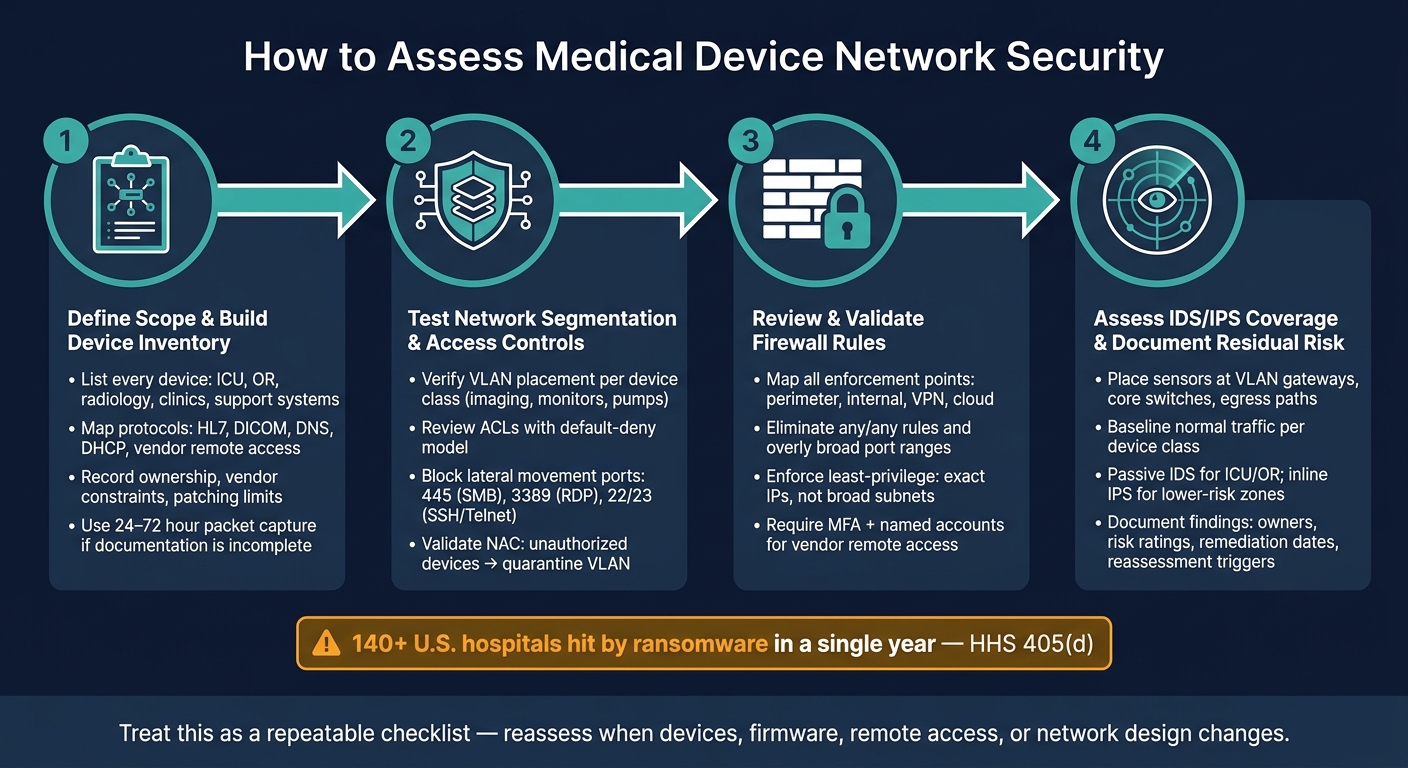
Medical Device Network Security Assessment: 4-Step Process
Medical Device Cybersecurity Challenges in Healthcare: An Engineer's Perspective
sbb-itb-535baee
Quick comparison
| Area to assess | What I’d verify | Main risk if missed |
|---|---|---|
| Device inventory | Device type, firmware, IP method, protocols, data flows | Unknown assets and hidden traffic |
| Segmentation | VLAN placement, ACLs, NAC quarantine, blocked ports | Lateral movement across clinical zones |
| Firewall rules | Least-privilege rules, vendor access, old exceptions | Overly broad access to systems and data |
| IDS/IPS coverage | Sensor placement, tuned alerts, blind spots | Suspicious traffic not seen in time |
| Portfolio risk management | Findings, owners, dates, reassessment triggers | Gaps stay open and drift grows |
I’d treat the assessment as a repeatable checklist, not a one-time project. Implementing RiskOps for healthcare helps teams respond faster to these evolving threats. Map it, test it, record it, and revisit it whenever devices, firmware, remote access, or network design changes.
1. Define scope and build a complete device network inventory
Start by listing every device and traffic path in scope.
Map devices, protocols, and data flows
First, identify every clinical site in scope: ICUs, med-surg units, EDs, outpatient clinics, imaging centers, ORs, and telehealth sites. Inside each site, group devices by criticality, such as life-support, diagnostic, monitoring, and specialized systems. That ranking helps determine how tightly each device should be segmented and monitored.
For each device, record the make, model, firmware version, IP assignment method - static or DHCP - and whether it connects through wired Ethernet or Wi-Fi. Then map what it communicates with: EHR interfaces, PACS, vendor cloud services, and device management endpoints. Be specific about the protocols in use, including DICOM for imaging, HL7 v2.x for orders and results, and infrastructure traffic like DNS, NTP, and DHCP that devices need to work.
If the documentation is spotty, don't guess. A 24- to 72-hour packet capture at the switch port during peak and idle periods can show the traffic patterns that vendor manuals often leave out.
Those communication paths become your baseline for segmentation and firewall testing.
Identify ownership, vendor constraints, and existing security capabilities
Once the technical map is done, assign named owners for each device class across clinical engineering, IT networking, and cybersecurity. Be clear about who approves VLAN changes, firewall rules, and vendor incident response. Later, those same people will be the ones signing off on segmentation changes, firewall exceptions, and IDS tuning.
Document vendor constraints with the same level of care. Some devices still depend on legacy protocols like SMBv1 or unencrypted HL7. Others need proprietary remote support tunnels or ports that must stay open both ways. In some cases, manufacturers do not allow inline IPS agents or TLS inspection because of safety or regulatory concerns. These limits shape what you can and can't do with segmentation, firewall policy, and IDS settings. Record authentication, encryption, logging, remote access, and patching limits so later design choices are based on facts instead of assumptions.[3][4][5]
Centralize assessment evidence and risk records
AAMI identifies connected-device inventory as the foundation of medical device cybersecurity.[2]
Keep these records in one place to cut down on silos across clinical engineering, IT, security, and vendors. A platform like Censinet RiskOps™ can centralize inventories, vendor questionnaires, communication profiles, BAAs, and findings in one workflow. That setup lets teams reuse the same evidence when reviewing segmentation, firewall, and IDS controls.
Use the inventory to define the allowed paths, ports, and trust zones you'll test next.
2. Test network segmentation and access controls for medical devices
Once your device inventory is in place, the next step is simple: make sure segmentation works in the real network, not just on a diagram.
Verify VLANs, zones, and allowed communication paths
Start by pulling current VLAN and subnet settings from your core switches and routers. Check that each device class - imaging modalities, patient monitors, and infusion pumps - is placed in its assigned VLAN or zone. Life-support devices and other high-risk systems should sit in dedicated, tightly controlled segments, not on shared general-purpose networks. HHS 405(d) stresses this point: because medical devices are often hard to secure directly, placing them in dedicated, highly restricted networks is key to safe operation.[6]
Next, review the ACLs and firewall policies between VLANs. A default-deny model is the right place to start: permit only documented flows. That includes traffic like DICOM to PACS, HL7 to integration engines, and approved vendor HTTPS or VPN access. Then verify that the traffic you actually see matches the approved matrix. Packet capture and NetFlow are useful here.
Don’t stop at reviewing what’s allowed. Try the blocked paths too. Attempt connections from device VLANs to destinations that should not be reachable and confirm they fail. Pay close attention to 445 (SMB), 3389 (RDP), and 22/23 (SSH/Telnet). These ports are common paths for lateral movement and should be closed between clinical and non-clinical segments.[10]
Before you move on to firewall rule validation, record any approved exceptions.
Validate NAC policies and unauthorized device blocking
NAC enforces segmentation at the port level. Use 802.1X for managed endpoints, and use MAB with device profiling for devices that can’t use certificates.[7][8][9] If a device doesn’t match a known profile, it should be pushed into a quarantine VLAN with no access to clinical systems, PHI, or management consoles.
To test this, run controlled checks. Plug a personal laptop or unmanaged tablet into a clinical switch port and confirm it lands in a restricted segment - not the medical device VLAN. Then try reaching known clinical IP ranges, PACS interfaces, and device management consoles from guest Wi-Fi and office LAN workstations. Every one of those attempts should fail.
If any of them work, that’s a finding. Assign a remediation owner and set a target date.
This step also helps you sort out where segmentation is enforced at the switch and where it still relies on firewall policy.
Compare segmentation designs for hospital environments
The table below groups the three most common approaches used in U.S. hospital networks. The right fit depends on your device mix, budget, and how much effort your team can put into rollout.
| Approach | Implementation Effort | Isolation Strength | Workflow Impact | Fit for Legacy Medical Devices |
|---|---|---|---|---|
| VLAN-based segmentation | Low | Subnet separation via ACLs | Low | Best for legacy devices |
| Internal segmentation firewall (ISFW) | Medium | Strong zone controls | Medium | Good for legacy devices |
| Micro-segmentation | High | Strongest isolation | Variable | Limited for legacy devices |
Document the segmentation model you use, then validate the firewall rules behind it.
3. Review and validate firewall rules that protect device traffic
Once you've confirmed segmentation, the next step is to review the firewall rules behind it. Even well-planned VLANs can fall apart if the rules are too broad, out of date, or missing documentation. Use the allowed-path matrix from your segmentation testing as the baseline for this review.
Inventory firewall enforcement points and rule dependencies
The most obvious enforcement points are perimeter firewalls at the internet edge and internal segmentation firewalls between clinical VLANs and core services. But device traffic doesn't stop there. It also moves through data center firewalls that protect EHR and PACS systems, VPN gateways used for vendor remote support, and cloud security groups tied to device management platforms or hosted clinical applications.[12][13]
Use your device inventory to find every subnet whose traffic crosses a firewall. Then map each subnet to the firewall zones and policies that control where that traffic can go. Pull every policy that references those subnets.
Don't stop at standard firewall rules. Check jump hosts, web or application proxies, and SSL/TLS inspection devices too. Any of them can affect device traffic in ways a basic rule review might miss. It's also smart to review vendor support runbooks and ticketing systems for "temporary" exceptions that were opened during an uptime issue and never removed.
Document each enforcement point, the technology behind it, and the device groups or clinical workflows that rely on it. That gives you the map you need for the least-privilege review in the next step.
Check for least-privilege rules and secure remote access
With enforcement points mapped, look at the rules themselves. The goal is least privilege: each device or device group should be allowed to reach only the services it must reach, using exact IPs or tightly scoped objects, not broad subnets or any.[11]
Common problems tend to look familiar:
- Wide
any/anyrules left open after troubleshooting - Devices with unrestricted outbound internet access instead of proxied connections to known vendor domains
- Service definitions that are far too broad, such as
TCP 1–65535 - Large object groups that combine unrelated device types, which can give newly added devices access they don't need[14][15]
For vendor remote access, route access through a jump host, require MFA, use named accounts, limit access windows, and log sessions.[13][14]
Compare firewall rule design patterns for maintainability and risk reduction
The table below helps you identify which rule pattern is already in use and what tradeoffs come with it. That matters because the pattern itself can hint at where rules have become too broad or where exceptions have piled up over time.
| Rule Design | Operational Overhead | Rule Sprawl | Exposure Reduction |
|---|---|---|---|
| Device-specific rules | High - rules scale with device count | High in large environments | Strongest for high-risk devices |
| Application-specific rules | Medium - grouped by clinical function | Moderate and manageable | Strong when services are well-defined |
| Zone-based rules | Low - fewer total policies | Low | Weaker if zones contain mixed trust levels |
A hybrid approach is common. Zone-based rules set broad trust boundaries, application-specific rules support clinical workflows, and device-specific rules cover the highest-risk systems.[11]
Whatever pattern you're using, validate rule changes in a test environment or during a maintenance window before pushing them into production. Keep a rollback plan ready in case something breaks.[11] Record the approved rule patterns and any exceptions so you can use that record later when reviewing IDS coverage and tuning.
4. Assess intrusion detection coverage and ongoing risk management
Once you've checked the firewall rules, the next step is simple: can your monitoring setup spot suspicious activity on those same device segments? Segmentation and firewall controls do a lot of the heavy lifting, but they don't catch everything. An IDS or IPS helps you see what slips through - or what starts inside the network in the first place.
Place and tune IDS or IPS sensors for clinical traffic
Put sensors where clinical traffic comes together. If traffic can take a path that bypasses your sensors, that path is a blind spot. A good starting point is the allowed-path matrix from your firewall review. Use it to tune sensors around the traffic that should be there, and to spot the traffic that shouldn't.
In most hospital networks, that means placing sensors at core points such as VLAN gateways, core switches, data center uplinks, and main egress paths to vendor cloud services. If you need visibility from access switches or span ports, mirror that traffic into a passive IDS so monitoring doesn't interfere with clinical operations.[16][17][19]
A solid placement review should confirm coverage for:
- Traffic between devices on the same segment
- Traffic entering or leaving the clinical network
- Vendor maintenance channels used for remote support
Placement is only half the job. Tuning matters just as much.
Start by baselining normal traffic for each device class. Imaging systems, infusion pumps, patient monitors, and lab analyzers all behave differently. They have their own communication patterns, approved vendor addresses, approved ports, and maintenance windows. Your signatures should reflect that. The goal is to flag activity that looks off - things like unexpected DNS queries, lateral movement attempts, repeated failed logins, or connections to destinations missing from your asset inventory.[16][17]
Use device- or zone-specific rules so the system alerts on odd behavior without lighting up every time routine vendor traffic appears. That balance matters. Too much noise and teams stop paying attention. Too little tuning and real problems slip by.
FDA notes that many devices rely on network monitoring for threat detection.[1]
Once you've mapped coverage, the next step is to look at passive and inline monitoring by device tier.
Compare passive IDS and inline IPS for different device tiers
The choice between passive IDS and inline IPS often comes down to one issue: how much harm would a false positive cause?
For life-critical devices in the ICU or OR, a bad inline rule can create a very bad day. If an IPS blocks traffic by mistake, it can interrupt workflow or delay a time-sensitive communication. That's why passive IDS is often the safer default in high-acuity areas. It watches mirrored traffic, adds no latency, and doesn't become a single point of failure.[16][17][19]
Inline IPS has a different strength. It can block malicious traffic in real time. But that comes with tradeoffs: added latency, more operational overhead, and a higher chance that a bad rule affects patient care. In practice, passive IDS usually fits ICU, OR, and device-monitoring segments, while inline IPS may make more sense in lower-risk zones where blocking is worth the tradeoff.[19]
| Factor | Passive IDS | Inline IPS |
|---|---|---|
| Latency impact | None - traffic is mirrored | Adds processing delay in the data path |
| Blocking capability | None - detect only | Blocks malicious traffic in real time |
| False positive risk | Alert noise only | Can disrupt clinical workflows if misconfigured |
| Best fit | ICU, OR, high-acuity device segments | Lower-risk zones, vendor access paths, admin networks |
Document residual risk, metrics, and reassessment triggers
After placement and tuning, write down what the sensors can see - and what they can't. That record should go into a risk report covering scope, owners, zones, threats, controls, findings, compensating controls, residual risk, and remediation dates.[1][18]
Track the metrics that show where gaps still exist. That includes unsegmented devices, firewall exceptions, IDS coverage, alert response time, false positives, baseline-profile adoption, and monitored vendor paths. Those numbers help you move from gut feel to a clear picture of risk.
Reassess when something changes. Common triggers include firmware updates, new remote-access paths, firewall changes, network redesigns, or newly disclosed vulnerabilities.[1][18]
Censinet RiskOps™ can help here by centralizing assessment findings, tracking compensating controls, assigning remediation owners, and benchmarking risk posture across facilities and device classes.
Conclusion: Turn one-time testing into a repeatable assessment program
One assessment gives you a snapshot in time. To keep that picture current, repeat inventory, segmentation, firewall, and IDS checks on a set schedule.
Set clear reassessment triggers for new devices, firmware updates, network redesigns, and newly disclosed vulnerabilities. Assign one owner to each control area so nothing slips through the cracks. If a trigger leads to firewall or NAC changes, require a joint review from security, clinical engineering, biomedical, networking, and clinical leadership before anything goes live.
Document findings with risk ratings, compensating controls, owners, and due dates so leadership can track gaps and remediation in one place. Censinet RiskOps™ can centralize assessment evidence and remediation tracking in a single source of truth for cybersecurity, clinical engineering, and supply chain teams.
The aim is a defensible network that keeps getting stronger with each assessment cycle.
FAQs
How often should we reassess medical device network security?
Medical device network security needs a lifecycle-based approach, not a one-time setup.
Reassess it quarterly to update threat modeling, KPIs, and device inventory. Review risk exceptions, such as unpatched legacy devices, at least annually.
You should also reassess any time major changes happen. That includes firmware updates, platform updates, and cases where devices are added or retired.
Use continuous automated monitoring, backed by regular scans.
What should we do if a medical device cannot be patched or fully segmented?
Prioritize patient safety by putting compensating controls in place and documenting the decision. Use virtual patching at the firewall to block specific ports or protocols, move the device to a restricted VLAN with only a small set of allowed destinations, and step up monitoring for unusual behavior.
Also tighten the device itself, enforce least-privilege access, and add targeted intrusion prevention rules. Record every exception in your risk register with a time-bound review plan, and bring in clinical and biomedical engineering teams.
Where should IDS or IPS sensors be placed for medical devices?
Place passive IDS/IPS sensors and network taps at key aggregation points like core switches, medical VLANs, and wireless controllers that manage clinical devices.
These tools belong at critical network boundaries, where they can collect enriched telemetry without touching sensitive medical equipment. That setup lets teams watch device traffic and behavior closely while care delivery stays uninterrupted.
