
Healthcare malware detection has to focus on behavior, not just files. In 2024, attacks exposed 155 million patient records, ransomware hit 67% of healthcare organizations, and 72% of affected U.S. providers said care was disrupted.
If I boil this down, the article says a few simple things:
- Signature-only tools miss too much, especially fileless malware, stolen-account misuse, and zero-day activity
- Behavioral detection looks for actions that do not fit, such as odd logins, strange scripts, lateral movement, and mass file changes
- Good detection depends on joined-up telemetry, including endpoints, servers, identity systems, network logs, and passive monitoring for medical devices
- Healthcare teams need role-based baselines, because a nurse workstation, PACS server, and infusion pump should not be judged the same way
- Triage and containment must account for patient care, so teams do not cut off a system that clinicians need at that moment
- Forensics matters after containment, especially when deciding whether PHI was accessed, staged, or sent out
A few high-priority signs stand out: Office apps spawning PowerShell, shadow copy deletion, bulk PHI access that does not match a user’s job, SMB or RDP movement across clinical segments, beaconing from systems with limited internet use, and medical devices talking to new hosts or using new protocols.
The article also makes the rollout path clear. I’d sum it up like this:
- Inventory assets
- Rank them by enterprise risks like patient safety impact and PHI exposure
- Baseline normal behavior for users, systems, and devices
- Correlate EDR, SIEM/XDR, identity, and network data
- Tune alerts with allowlists and maintenance windows
- Use playbooks to contain threats without hurting care delivery
- Feed incident findings back into rules and baselines
Here’s the main idea in one line: <u>in healthcare, the best malware signal is often not a known bad file - it’s activity that makes no sense for that user, system, or device.</u>
What Is Behaviour-Based Detection In Cybersecurity? | Explore Behaviour-Based Detection Of Malware
sbb-itb-535baee
How Behavioral Detection Systems Work
Behavioral vs. Signature-Based Malware Detection in Healthcare
Core Telemetry Sources and the Detection Pipeline
To catch suspicious behavior, the system has to watch activity across the full care environment. In practice, that means pulling telemetry from five main sources: endpoints, servers, network controls, identity systems, and passive medical-device sensors.
Endpoint agents on clinician workstations and administrative PCs record things like process execution, command-line parameters, file creation and changes, registry changes, and outbound connections. Server telemetry, especially from EHR systems, PACS servers, and databases that store PHI, tracks access patterns, privilege changes, and query behavior. Network telemetry from firewalls, DNS resolvers, and internal segmentation gateways helps spot rare outbound connections and odd internal traffic. Identity logs from Active Directory, SSO, and MFA systems highlight failed logons, unusual geolocations, and privilege escalation. And because most medical devices can’t run agents, teams rely on passive network sensors to track which servers those devices communicate with and how much data they transfer.[1][4][5][7][8]
Once that data comes in, it gets normalized and compared against baselines built around role and device type. That can include login hours for ICU staff, normal data volumes for billing accounts, and expected traffic patterns for imaging devices. The system then scores activity against those baselines, links related events into incident chains, adds context like asset criticality and threat intel, and ranks alerts based on patient-safety impact, PHI exposure, and confidence. That’s the step that turns a pile of disconnected alerts into a usable attack path.
Detection Methods Used in Practice
No single method catches every threat. That’s why healthcare SOCs stack multiple approaches instead of betting on just one.
Statistical anomaly detection is useful for spotting odd data movement, like a clinician account exporting thousands of records out of nowhere. Heuristic and rule-based detection focuses on known suspicious activity on clinical endpoints, such as Office documents spawning script interpreters or processes injecting code into EHR clients. Supervised machine learning models trained on labeled incident data can identify multi-step attack chains that look like past ransomware or data theft campaigns. Sandbox analysis gives security teams a safe place to run suspicious email attachments or vendor-supplied installers —a key part of third-party risk management— and watch for file encryption attempts or network beacons before anything touches production.[2][6][8][10]
User and Entity Behavior Analytics, or UEBA, builds profiles for clinicians, billing staff, and IT administrators, then flags behavior that falls outside the norm. A lab technician accessing oncology records at 3:00 AM from an unfamiliar device is one example. A radiology workstation querying finance databases is another. UEBA is also directly recommended for HIPAA privacy monitoring because it can help detect staff who access patient records without a valid clinical reason.[3][9][11]
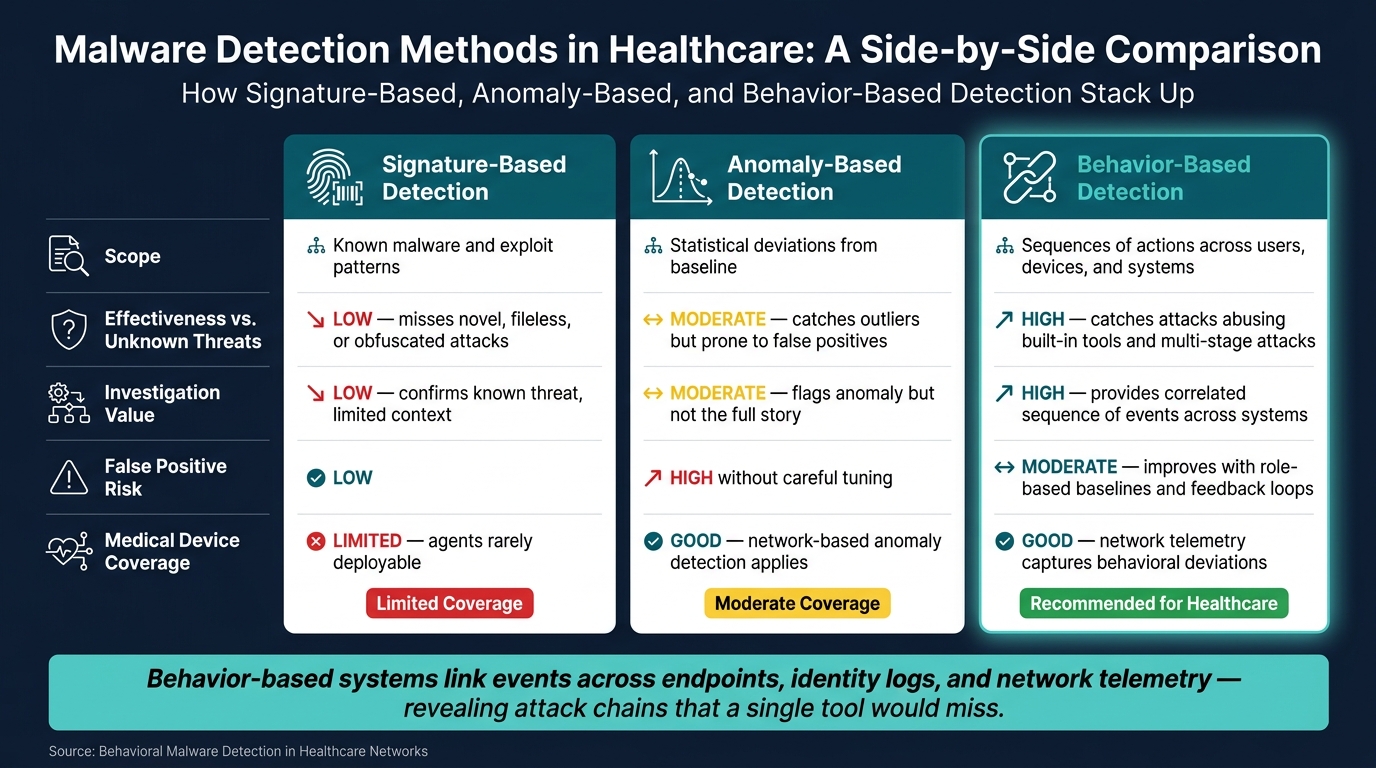
Behavior-Based vs. Signature-Based Detection: A Comparison
These differences shape how healthcare teams tune detections and decide which alerts need attention first.
| Dimension | Signature-Based | Anomaly-Based | Behavior-Based |
|---|---|---|---|
| Scope | Known malware and exploit patterns | Statistical deviations from baseline | Sequences of actions across users, devices, and systems |
| Effectiveness against unknown threats | Low - misses novel, fileless, or obfuscated attacks | Moderate - catches statistical outliers but prone to false positives | High - catches attacks that abuse built-in tools and multi-stage attacks |
| Investigation value | Low - confirms known threat, limited context | Moderate - flags the anomaly but not the full story | High - provides a correlated sequence of events across systems |
| False positive risk | Low | High without careful tuning | Moderate - improves with role-based baselines and feedback loops |
| Medical device coverage | Limited - agents rarely deployable | Good - network-based anomaly detection applies | Good - network telemetry captures behavioral deviations |
Behavior-based systems link events across endpoints, identity logs, and network telemetry so teams can see attack chains that a single tool would miss. That matters a lot in healthcare, where the same attack may touch a workstation, an account, a server, and a medical device before anyone notices.
Healthcare-Specific Signals That Indicate Malicious Behavior
Once telemetry is baselined and normalized, the next job is simple: look for the healthcare behaviors that matter most.
User, Endpoint, and Server Behaviors to Watch
Strange login activity is often the first visible clue that credentials have been stolen. Say a nurse account signs in from a device it has never used before, then starts opening systems outside that person’s normal role. That’s not random noise. It’s the kind of pattern that deserves attention fast.
PHI access can tell the same story. The warning sign usually comes from volume plus role mismatch. For example, if a billing account starts running bulk queries against oncology records, that lines up closely with data theft risk and HIPAA exposure. The same goes for privilege abuse. If a standard user account suddenly uses domain-admin rights and then starts moving laterally, that’s a direct sign that the attacker is setting up the next stage.
On endpoints and servers, ransomware often shows its hand before users notice anything is wrong. Mass file encryption paired with shadow copy deletion is a classic early signal. Commands like vssadmin delete shadows or similar WMI calls, especially when followed by fast encryption across shared drives, show up again and again in these incidents.[13][14][16][17][18]
Another pattern worth watching: Microsoft Office spawning PowerShell or another script host. That often points to malware execution from a phishing attachment, which is still common in healthcare. Suspicious scripting matters too, especially PowerShell, WMI, or Python launched from odd directories and packed with obfuscated or encoded payloads. Add registry persistence changes like new Run keys or auto-start services pointing to temp folders, and you’re looking at an early attack chain that often appears before any visible hit to operations.[15][16][17][18][19]
Host-level signs get much stronger when they’re tied back to network and identity activity.
Network and Data Movement Anomalies
East-west traffic is where lateral movement tends to hide after initial access. If a nurse workstation starts opening SMB or RDP sessions to domain controllers, lab analyzers, or PACS storage it does not usually touch, that’s a strong signal that someone is moving through the environment.[21][22][23][24] Network Detection and Response (NDR) tools can baseline normal inter-segment traffic and flag those deviations in near real time.
Beaconing is another pattern that stands out. Small, periodic outbound connections to a narrow set of external hosts often point to command-and-control (C2), especially when they come from systems that should have very limited internet access, like medication dispensing units or PACS servers.[20][21][24][25][27]
Data exfiltration can be massive in healthcare. Documented campaigns have reached 8.8 TB of stolen data.[26] That’s why outbound traffic spikes to external IPs outside approved business services should be treated as high-priority signals. The hard part, of course, is separating bad traffic from normal clinical workflows. To do that well, teams need a clean view of which third-party vendors and cloud services are approved parts of day-to-day care delivery.
For medical devices, these patterns usually show up in even tighter and more predictable traffic paths.
Medical Device Behavior Monitoring
Spotting abnormal medical device behavior takes a mix of device telemetry, network patterns, and configuration checks.
For infusion pumps, bedside monitors, and ventilators, teams should watch for shifts in how those devices talk to central monitoring stations or device management servers. New destinations, protocol changes, or sudden jumps in message frequency can point to compromise or unauthorized remote control. Imaging systems like CT, MRI, and X-ray, along with PACS servers, should be watched for odd access to image archives, unusual export volumes, and study deletion or modification tied to unexpected accounts or endpoints.[12]
Configuration changes on medical devices also deserve close review. Firmware updates, new user accounts, or changed network settings are high risk and should line up with approved change windows. Access attempts from non-clinical subnets into device VLANs, especially over admin protocols like Telnet or SSH, are a strong sign of lateral movement. The same goes for direct device-to-device traffic that bypasses the central controller. That can reveal attackers taking advantage of a misconfiguration.
Behavioral monitoring through NDR sensors placed around device VLANs, along with asset and vendor risk tracking in platforms like Censinet RiskOps™, helps teams focus on the devices most likely to interrupt care if they’re compromised.[12]
In healthcare, device behavior can be one of the first practical signs that something is off.
How to Implement Behavioral Malware Detection in a Healthcare Environment
Start With Asset Inventory, Risk Tiering, and Baseline Tuning
Start by turning those behavior signals into a tiered rollout plan. Pull one asset inventory from your CMDB, Active Directory, EHR system, vulnerability scanners, medical device management tools, and procurement records. Then group assets into clinical endpoints, EHR/PACS servers, identities, cloud workloads, and connected medical and IoT devices.
Next, score each asset using patient safety impact and PHI exposure as the main factors. Add connectivity exposure and clinical criticality as supporting inputs. In practice, a simple three-tier model is usually enough:
| Tier | Asset Types | Detection Priority |
|---|---|---|
| Tier 1 | Life-critical systems, PHI-heavy servers, EHR, PACS, ICU devices | Highest - deploy behavioral detection controls first |
| Tier 2 | Clinically important but not directly life-critical systems, such as lab systems and pharmacy apps | High - strong monitoring and careful tuning |
| Tier 3 | Administrative or low-impact systems | Standard - baseline monitoring |
Watch 30–60 days of activity across sample units, then check those patterns with clinical and biomedical leaders before you write rules. Platforms like Censinet RiskOps™ can help here by mapping assets to patient safety impact and vendor risk data, which gives teams one view of what matters most for behavior-based monitoring.
Once assets are tiered, correlate alerts across endpoint, identity, and network data.
Integrate EDR, SIEM, Identity, and Network Telemetry
Behavioral detection works best when endpoint, identity, and network signals meet in one analytics platform. A single EDR alert for suspicious PowerShell on a workstation only tells part of the story. Pair it with identity logs that show a recently elevated account and network telemetry that shows odd outbound connections, and the attack chain starts to come into focus. What looked like a weak signal can become a top-priority incident.
Use a central SIEM or XDR to bring those telemetry sources together. For correlation to work, you need data normalization. Map fields like user, device ID, IP address, and application name into one common schema across tools and vendors. Without that step, teams end up comparing apples to oranges.
For legacy medical devices that can’t run EDR agents, network telemetry is your main line of sight. Use protocol-aware passive sensors for DICOM and HL7 traffic so you can watch those devices without installing agents.
After that correlation layer is set, tune detections around how the hospital actually works.
Reduce False Positives Without Missing Real Threats
False positives drop when you add context, allowlists, and tightly scoped suppression rules.
Allowlists should include approved clinical applications such as EHR, PACS, lab systems, anesthesia documentation, and pharmacy tools. That keeps routine activity like bulk image transfers or HL7 message bursts from setting off generic exfiltration rules all day long.
Suppression rules should stay narrow and tied to approved maintenance windows, including:
- OS patch cycles
- EHR upgrades
- Database reindexing
- Backup jobs
- Vendor maintenance sessions tied to operating-room schedules
Each one needs clear time limits and documentation. That way, activity outside those windows stays visible.
Segmentation-aware policies add another check. Traffic moving between defined PACS and imaging subnets at normal volumes should not be treated the same way as similar traffic moving into guest Wi‑Fi or external IP ranges.
Threshold tuning should rely on past metrics for each unit or system. For example, use the normal login rate per hour on ED workstations instead of one static threshold for the whole hospital. Outlier models tuned to flag combinations like a new device plus a new user or protocol usually cut far more noise than any single metric on its own. Review each tuning change with security and clinical stakeholders, and log the reason so the team can revisit it after an incident.
Response, Forensics, and Continuous Improvement
Use Behavioral Alerts to Drive Triage and Containment
After tuning and correlation, the next step is deciding what to contain first. Once detections are dialed in, alerts should lead to action, not just pile up on a dashboard. Every behavioral alert from EDR, SIEM, IDS, or network monitoring should feed a risk-based triage process that ranks threats by clinical impact. The first thing analysts need to answer is simple: which asset is affected, and how critical is it?
From there, containment should fit both the threat and the sensitivity of the system involved. An endpoint showing encryption activity or mass file changes can often be isolated from the network. An account with impossible travel patterns or unusual login behavior can be locked or pushed through step-up authentication. If the alert involves a server or a shared clinical application, network-level containment may be the safer move than shutting it down outright, especially when patient-facing services need to stay up.
These calls shouldn't happen in a vacuum. IT, security, and clinical leadership need to coordinate so teams don't accidentally disrupt imaging, lab, pharmacy, or bedside workflows. In some cases, exceptions may be needed for life-supporting or time-sensitive systems.
Each alert type also needs a documented playbook. Ransomware-like behavior, credential theft, suspicious script activity, and odd data exfiltration all need a clear containment path, so analysts aren't making it up on the fly when pressure is high.
Reconstruct Attacker Activity and Assess Impact
Once containment starts, preserve evidence before logs roll over or systems change. After that, the investigation moves to scope validation and evidence preservation. Investigators bring together endpoint telemetry, identity logs, network flows, EHR audit logs, DNS and proxy records, and application activity. The goal is to rebuild the attack sequence: initial access, persistence, lateral movement, execution, and data access or exfiltration.
Investigators also need to figure out whether PHI, core clinical systems, or connected medical devices were touched. Malware on a system does not automatically prove PHI exfiltration. Teams need evidence of access, staging, compression, transfer, or external communication before making impact decisions.
Under HITECH, there is a strong presumption that PHI was compromised during a ransomware incident unless investigators can produce clear, documented evidence of no access or disclosure. [28] That makes forensic evidence a must when organizations are deciding whether notification duties apply. If medical devices, imaging systems, or lab platforms are involved, teams should collect device logs, management-console records, and network telemetry. Agent data is rarely available on those systems, so network telemetry is often the main evidence source.
Process trees, authentication events, privileged account use, and other available logs give investigators the proof they need to assess impact with care.
Conclusion: Key Steps for Building Detection Maturity
Use investigation findings to sharpen future detections and response playbooks. After each incident, feed what you learned back into baselines, playbooks, and thresholds.
FAQs
How is behavioral detection different from antivirus?
Traditional antivirus relies on predefined signatures and rules to spot known threats. That means it does a good job with common malware. But when a new or more sophisticated attack shows up, it can miss the mark.
Behavioral detection takes a different path. It uses AI and machine learning to learn what normal activity looks like across users, applications, and devices. From there, it can flag unusual behavior, such as unexpected data transfers, unauthorized access, or suspicious network connections.
What data sources are needed to detect malware behavior in hospitals?
Hospitals should rely on passive network and device activity telemetry to see what’s happening across their environment without disrupting care systems.
That should include:
- Network flow and flow logs from firewalls, switches, and taps/SPAN
- Protocol metadata, DNS/DHCP, and VLAN context
- Firewall, authentication, device management, and cloud audit logs
For healthcare-specific visibility, it also helps to track clinical traffic patterns such as DICOM and HL7/FHIR. Those patterns become far more useful when they’re tied to device identity data, including firmware and model, IP segment, clinical location, and MAC address.
How can hospitals contain threats without disrupting patient care?
Hospitals can contain threats without interrupting patient care by using passive behavioral monitoring to flag unusual device or user activity early. The big upside is simple: these tools watch traffic without touching sensitive equipment. That gives security teams a way to spot trouble soon and coordinate containment based on clinical impact, not just technical risk.
When an alert shows up, the first step is to confirm whether the device is actively being used for care. If it is, start with isolation at the network layer, like segmentation or quarantine. Only remove the device from service after sign-off from clinical engineering or biomed, and only when a replacement is ready if one is needed.
