
If you use DAST in healthcare, the goal is simple: test the right apps, at the right time, with the right guardrails, so you find security gaps without affecting patient care.
I’d boil the article down to this:
- Scope scans around care workflows, not just app names
- Use staging or production-like test setups with synthetic or de-identified data
- Run logged-in scans for patient, clinician, billing, and admin roles
- Test FHIR APIs and role boundaries to catch access control issues
- Add DAST to CI/CD with light scans early and deeper scans before release
- Block releases for confirmed high-risk flaws tied to ePHI, login, sessions, APIs, or care access
- Push findings into tickets, SLAs, and risk tracking
- Retest fixes and review scope often as apps, APIs, and identity flows change
One stat stands out: 81.2% of 725 large healthcare breaches reported to HHS OCR in 2024 came from hacking or IT incidents. Another: 84.7% of healthcare professionals in one study said they had an API security incident in the prior year. That’s why DAST matters most on patient portals, clinician tools, and FHIR APIs.
Here’s the short version of what to do:
| Area | What I’d focus on |
|---|---|
| Scope | Patient portals, EHR front ends, billing apps, FHIR/HL7 APIs, and other ePHI paths |
| Safety | Approved low-traffic scan windows, rate limits, endpoint exclusions, and a stop rule |
| Test setup | Synthetic data, role-based test accounts, secrets manager, audit logs |
| Coverage | Logged-in flows, SSO, CSRF handling, session timeouts, API specs, and role comparison |
| Release process | Targeted scans in staging, deeper scans before release, scheduled scans off-hours |
| Triage | Rank by exploitability, ePHI exposure, and care impact |
| Follow-up | Retest fixes, suppress noise with records, and review coverage each quarter |
That’s the core playbook: keep scans safe, focus on high-risk workflows, and make sure every confirmed issue moves to closure.
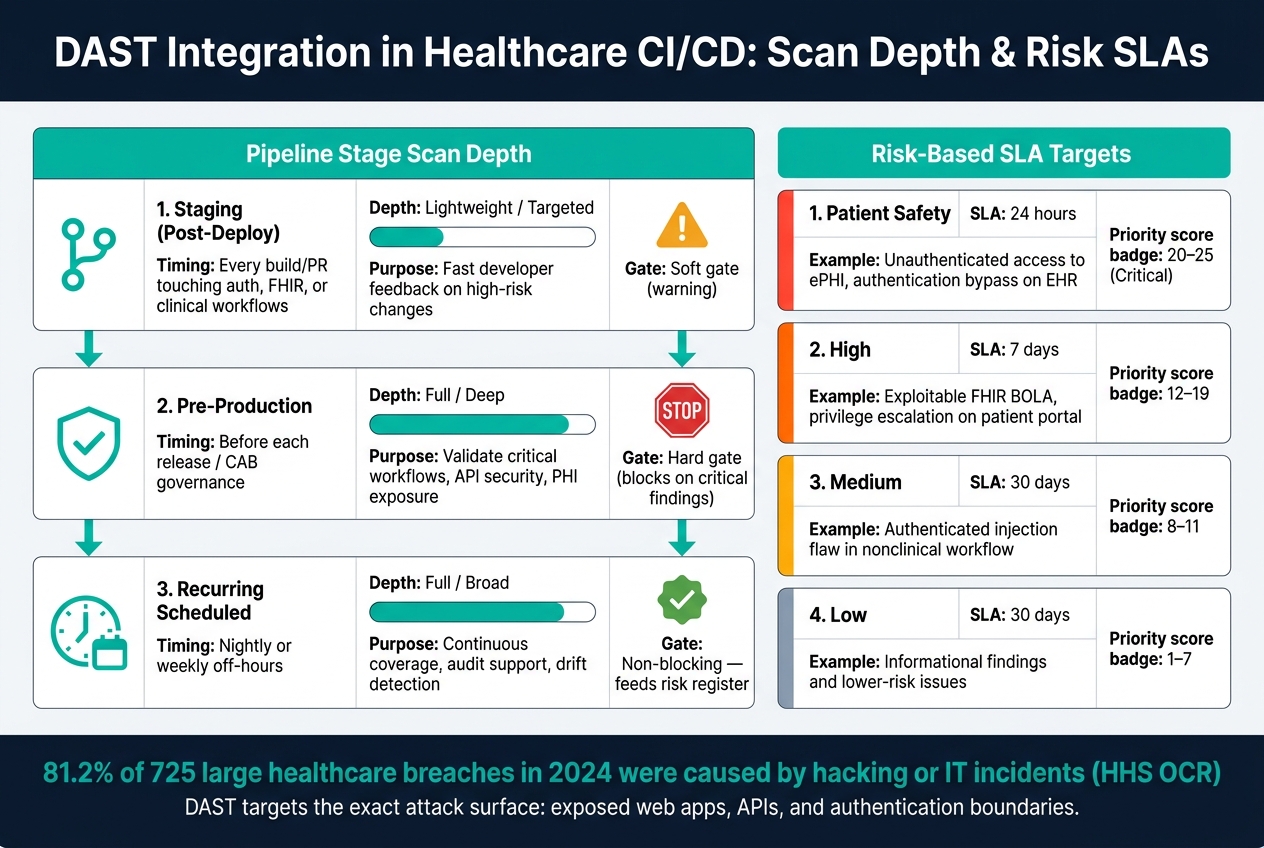
DAST in Healthcare: Scan Depth by Pipeline Stage & Risk SLAs
DAST: Dynamic Application Security Testing for Real-World Protection | Uplatz

sbb-itb-535baee
1. Scope DAST around clinical workflows and approved test windows
In healthcare, scope is a safety control, not just a testing task. DAST should cover systems that handle ePHI or affect clinical operations, and scans should run only during approved windows that won't disrupt care. Go too narrow and you miss risk. Go too broad and you can interfere with patient care. The goal is simple: test the right systems, at the right time, in safe modes.
Map in-scope assets, data flows, and user roles
Start with a risk-based asset inventory. This approach aligns with Censinet RiskOps for healthcare, which helps teams respond faster to risks affecting care delivery. List every web app, mobile app, and API that creates, receives, maintains, or transmits ePHI. That includes patient portals, EHR interfaces, FHIR/HL7 APIs, e-prescribing, scheduling, referral, imaging, and billing systems. For each asset, record the business owner, internet exposure, authentication method, user roles, PHI types handled, and testing history.
Then map how data moves through actual clinical workflows. Follow the path from a patient portal login into the EHR, across FHIR endpoints, and on to connected systems like lab or pharmacy. Add user roles and journeys so the map reflects how care happens in practice: a patient viewing lab results, a nurse placing a medication order, a scheduler booking an appointment, or a billing clerk working through a billing flow. That full picture helps you turn each workflow into crawl paths and API calls that DAST can test. Use OpenAPI/Swagger specs to seed API scans, and use traffic recording or guided crawling for multi-step flows that basic crawlers often miss.
To set priorities, use a simple scoring model. Rate each system on data sensitivity, business criticality, and internet exposure on a 1–5 scale, then start with the highest scores. Patient-facing portals and FHIR APIs usually rise to the top. Leave out life-support and safety-critical devices unless you have specialized tooling and formal clinical approval in place.
Define safeguards before scanning production-adjacent systems
Start with a staging or production-clone environment that mirrors production settings, including WAF/CDN rules, IAM roles, and integrations, and use synthetic or de-identified data. That gives you a test setup that behaves like production without touching live sessions or real PHI. If the staging setup doesn't match production closely enough - maybe it has fewer integrations or less data volume - you can miss issues that only show up under normal operating conditions. So check that fidelity before you lean on the results.
If you need to scan a production-adjacent system, treat it as a planned change in your change-management process. Submit a formal change request that spells out the target systems, scan dates and times, expected load, safeguards, and abort criteria. Schedule scans during low-activity windows, usually overnight or early weekend hours, around 1:00 to 4:00 a.m. local time, and confirm those windows with clinical operations leadership.
Before each scan, notify the right teams - security, IT operations, and clinical informatics - and open a dedicated channel for real-time go/no-go calls. Put the safeguards in a scan runbook:
- Cap request rates and concurrent threads
- Exclude endpoints that trigger irreversible actions, such as order finalization, e-prescribing, appointment changes, or patient communications
- Define a kill switch, such as pausing the scan automatically if error rates or latency cross preset thresholds
With scope under control, the next step is to secure test data and expand authenticated coverage.
2. Prepare a safe test environment and configure authenticated coverage
Once scope is set, the next step is a production-like test setup where you can safely run real logins and role checks. The goal is simple: let the scanner move through the app the way actual users do, without putting live clinical systems at risk.
That means building a test environment that supports authenticated workflows, role checks, and repeatable scans. It should mirror the controls that shape scan behavior, including WAF rules, IAM roles, SSO settings, and logging pipelines, but on infrastructure kept separate from live clinical systems. Use infrastructure-as-code to keep staging in sync with each production release so the scan output matches how the live system behaves.
Use sanitized data, controlled accounts, and secure credential handling
Use synthetic or de-identified data that keeps patient, encounter, medication, and lab relationships intact. That way, DAST can move through lifelike workflows without touching actual records. Tools like Synthea can generate realistic FHIR-based patient datasets, including edge cases such as long medication histories, multi-provider care episodes, and unusual character sets that put input validation under stress. Before logs or reports are shared or stored, redact names, MRNs, and other ePHI from DAST output.
For test accounts, set up role-based, least-privilege identities for each main user type:
- patient
- clinician
- billing staff
- admin
Store credentials in a secrets manager, and have your DAST tool pull them by using short-lived tokens. For MFA, create test-only bypasses, such as static OTPs or MFA-exempt IP ranges locked down to DAST infrastructure, while still producing audit log events. Every access event tied to DAST credentials should be logged, with audit trails that line up scan windows, credential use, and privilege changes.
Cover authenticated workflows, FHIR APIs, and authorization boundaries
In healthcare, unauthenticated scans usually stall at the login page. The issues that matter most - broken access control, IDOR, and session flaws - tend to show up after login, not before.
Set up your DAST tool with recorded login scripts or Playwright/Selenium macros for each role. Then define clear start URLs and high-value paths such as /login, /appointments, /refill, /documents/upload, and clinician dashboard views. The scanner should also handle CSRF tokens, cookie replay, SSO redirects, and re-authentication on its own when sessions time out mid-scan.
For FHIR and REST APIs, import OpenAPI/Swagger specs or FHIR capability statements to seed endpoint discovery. Focus first on operations that return or change PHI, such as Patient, MedicationRequest, Encounter, and Observation. Test auth enforcement, SMART on FHIR scope boundaries, rate limiting, and input validation with boundary payloads. One check matters a lot here: a patient-scoped account must not be able to reach population-level data.
Authorization testing works best when you compare roles directly. Run the same scan with different account types and look for changes in access. Run it with Patient A and Patient B to spot unauthorized record access. Do the same across clinician and admin accounts to catch broken function-level authorization.
Also, tell the crawler to skip destructive endpoints so the scanner doesn't trigger irreversible actions in downstream test services. Those role-based scans then become the baseline for CI/CD and release gates.
3. Integrate DAST into CI/CD and release governance
Once authenticated coverage is in place, the next step is to plug DAST into the delivery pipeline so teams catch exploitable issues before release.
Set scan depth by pipeline stage
Not every scan needs to be deep. A full crawl on every commit slows teams down and adds noise. It makes more sense to match scan depth to the type of change and how close that change is to production.
| Pipeline Stage | Timing | Scan Depth | Purpose | Release Impact |
|---|---|---|---|---|
| Staging (Post-Deploy) | Every build or PR touching auth, FHIR endpoints, or clinical workflows | Lightweight / Targeted | Fast developer feedback on high-risk changes | Soft gate - warning or notification |
| Pre-Production | Before each release, as part of CAB or release governance | Full / Deep | Validate critical workflows, API security, and PHI exposure | Hard gate - blocks on critical findings |
| Recurring Scheduled | Nightly or weekly off-hours | Full / Broad | Continuous coverage, audit support, drift detection | Non-blocking - feeds the risk register |
Nightly or weekly scans also help cover parts of the environment that teams don't touch often, like legacy clinical viewers, imaging portals, and device integration endpoints. Those systems may sit quietly for long stretches, but the risk doesn't disappear.
Create release gates tied to exploitability and patient-safety risk
A release gate only works when it's tied to something that matters. That means gating on exploitability, PHI exposure, and patient-safety impact, not just raw severity scores.
Production releases should be blocked automatically when DAST confirms exploitable findings in areas like:
- authentication and session management
- broken access control or IDOR affecting PHI
- unencrypted transmission of sensitive data
- FHIR API authorization failures
- vulnerabilities that could disrupt clinical system availability
For time-sensitive clinical releases, a formal exception process should be in place. That process should require documented justification, compensating controls, a remediation deadline, and sign-off from security, privacy, and clinical leadership when patient safety is involved. Every accepted exception should also be logged with a clear owner and a revisit date.
Connect findings to enterprise risk workflows
Findings that stay buried in a scanner dashboard usually don't get fixed. Each confirmed finding should create a ticket that includes the affected asset, severity, exploitability, and reproduction steps. The ticket should also show whether the system handles PHI, so triage reflects clinical impact, not just the technical score.
SLA targets should be tighter for critical patient portals and FHIR APIs, usually 7 days, than for lower-risk internal tools, usually 30 days. When teams track those SLAs in a central view, along with open exceptions and scan trends, security and clinical leadership can see how application risk is changing over time.
Censinet RiskOps™ (censinet.com) can centralize DAST findings and align them with PHI, clinical application, and enterprise risk workflows. Those tickets and SLAs then feed the triage and retesting cycle.
4. Triage findings, retest fixes, and maintain continuous coverage
Once release gates are in place, triage decides what gets fixed first and what needs a retest. After scans finish, the job shifts from finding issues to turning them into fixes and making sure those fixes stick.
Prioritize issues by exploitability, PHI impact, and clinical impact
Start by ranking findings based on reachability, ePHI exposure, application criticality, and the chance of disrupting care. If an issue exposes ePHI or could block access to care, treat it as at least High. In many cases, it should be escalated to Patient Safety, especially when it can directly affect clinical workflows. Patient-facing and clinician-facing workflows should take priority over lower-risk internal tools.
A simple way to sort this is with a 1–5 likelihood-and-impact score. Multiply the two numbers to set priority:
- 20–25: Critical
- 12–19: High
- 8–11: Medium
- 1–7: Low
Use the SLA table below to set response times. [3][5]
| Risk Level | Target SLA | Typical Scenario |
|---|---|---|
| Patient Safety | 24 hours | Unauthenticated access to ePHI, authentication bypass on an EHR |
| High | 7 days | Exploitable FHIR broken object-level authorization (BOLA), privilege escalation on a patient portal |
| Medium | 30 days | Authenticated injection flaw in a nonclinical workflow |
| Low | 30 days | Informational findings and lower-risk issues |
After priorities are set, confirm the fixes and clear out noisy findings so scan results stay usable. If remediation has to wait, document the compensating controls, set a deadline, and get formal risk acceptance from the right risk owner.
Reduce false positives and keep scan coverage current
False positives happen. Left alone, they lead to alert fatigue fast. The best move is to confirm each finding with a targeted rescan or a manual check of the changed endpoint, workflow, or API version. If you can't reproduce the issue, suppress it with a documented rule instead of just letting it sit there. That matters because a suppression rule that made sense in an earlier release can end up hiding a live vulnerability after an application update. [6]
Coverage drift is a constant problem in healthcare. FHIR API expansions, vendor patches, identity provider changes, and new third-party integrations can all add routes the scanner has never touched. Give someone clear ownership of scan configuration reviews, then update coverage every quarter and after any major release, new route, new API, or auth change. [4][5] If the scanner can't reach a new endpoint, review and update the scan scope so that gap doesn't slip by unseen.
Conclusion: Build a DAST program that improves security without disrupting care
A strong healthcare DAST program starts with the way care is delivered. That means scoping scans around clinical workflows, using sanitized staging data and controlled accounts, testing authenticated paths and FHIR APIs, tying scans to CI/CD release gates, and pushing findings through disciplined triage and retesting. Put simply, DAST works best when it becomes a standing control, not a one-off test.
The risk is real. In 2024, 81.2% of the 725 large healthcare breaches reported to HHS OCR were caused by hacking or IT incidents. [1][7] That’s the attack surface DAST is built to test: exposed web apps, APIs, and authentication boundaries.
DAST delivers the most when results feed into enterprise risk decisions. The gap between a mature program and a checkbox exercise comes down to one thing: action. DAST findings should move straight into your enterprise risk register, mapped to the right assets, data types, and clinical impact. Censinet RiskOps™ can help route DAST findings into enterprise risk workflows and map them to the right clinical assets.
The aim is simple: run the right scans in approved windows, then move every confirmed finding to resolution without disrupting care.
FAQs
When should healthcare teams scan production systems?
Healthcare teams need to scan production systems on a steady basis so they can spot newly disclosed vulnerabilities without disrupting day-to-day care.
For systems that handle electronic protected health information, HIPAA calls for scans at least every six months. That said, scanning quarterly or even monthly gives you a tighter safety net.
It also makes sense to run scans after major changes, like:
- new deployments
- major upgrades
- network restructuring
For heavier scans, use off-peak hours or planned maintenance windows. That helps protect clinical continuity while still keeping systems in check.
How can DAST test FHIR APIs safely?
Use DAST in isolated test environments, not production, so you don’t expose sensitive data by accident. Run authenticated scans with dedicated test accounts instead of real patient data.
Also check granular authentication, strict token scopes, input validation, and encryption settings. That helps you catch issues like BOLA, weak transport security, and unauthorized data exposure before deployment.
What findings should block a release?
Block a release if any critical or high-severity findings from SAST, DAST, or SCA scans are still open and have not been fixed or formally accepted with written justification.
That includes exposed secrets, major misconfigurations, high-risk vulnerabilities, and any finding listed in the CISA Known Exploited Vulnerability (KEV) Catalog. KEV-listed issues need immediate attention, even if their base severity looks lower on paper.
