
If you store PHI, start with this rule: use AES-256 for the data, keep keys separate, and check every place PHI sits. In 2023, hacking and access-related incidents exposed 133 million+ records, and 27% of breaches involved unencrypted PHI. Under HIPAA, encryption is "addressable", but in practice, I’d treat it as the default for data at rest.
Here’s the short version:
- I’d map every PHI location first: databases, laptops, mobile devices, backups, cloud storage, snapshots, and archives
- I’d set a hard baseline: AES-256, no DES or RC4, and FIPS 140-3 validated modules for new deployments
- I’d use symmetric encryption for stored PHI and RSA/ECC for key wrapping, exchange, and certificates
- I’d match the method to the system:
- AES-256-XTS for disks and volumes
- AES-256-GCM for files, objects, and some app-level use cases
- TDE for many databases
- field-level encryption only for the most sensitive fields
- I’d make key management part of the decision, not an afterthought: KMS or HSM, role-based access, split duties, rotation, and dual approval for high-risk key recovery
- I’d test performance, failover, and restores before rollout
- I’d track gaps in a risk process with owners, due dates, and proof
A few points matter most. Where PHI lives changes the right encryption layer. How keys are stored can make or break the setup. And whether backups, replicas, and restore paths are encrypted often decides if an incident turns into a reportable breach. Proactive management is essential for taking the risk out of healthcare operations.
Quick Comparison
| Area | Best fit | Main note |
|---|---|---|
| Full-disk / volume encryption | AES-256-XTS | Good for laptops, desktops, and storage volumes |
| Database encryption | TDE + wrapped keys | Good for high-throughput systems |
| Field-level encryption | AES-256-GCM | Use for a small set of very sensitive fields |
| Backup encryption | AES-256-GCM + wrapped keys | Test restores and key recovery |
| Key distribution / wrapping | RSA or ECC | Use for keys, not bulk PHI |
I’d use this checklist as a simple way to choose encryption based on risk, workload, and key control - not just on the algorithm name.
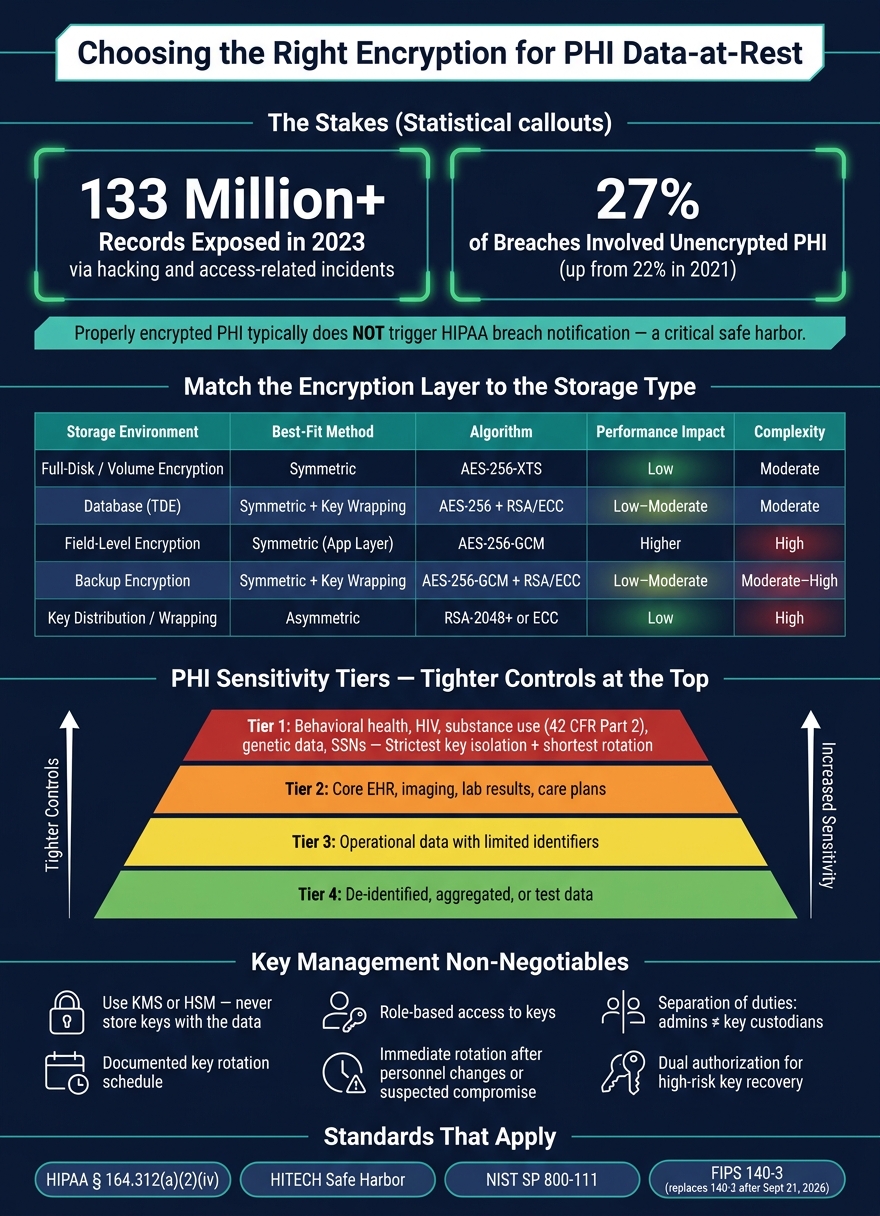
PHI Encryption Methods by Use Case: Healthcare Data-at-Rest Guide
What does encryption of data-in-transit and data at rest mean?
sbb-itb-535baee
1. Confirm the Regulatory and Technical Baseline
Start with your PHI inventory and map each environment to the controls it must meet before you compare algorithms. HIPAA’s Security Rule treats encryption as an addressable control under 45 C.F.R. § 164.312(a)(2)(iv). That means you either implement encryption or document and justify an equivalent option based on risk analysis. In day-to-day practice, encryption is the default for PHI at rest.
HITECH pushes this even further. When PHI is encrypted under HHS guidance aligned with NIST standards, it generally is not treated as unsecured PHI. So if a laptop goes missing or a backup is stolen, the event is usually not a reportable breach. Those rules shape which algorithms and key management methods you can still use.
Use NIST SP 800-111 as the main technical guide for end-user storage encryption. It covers file-, volume-, and application-level controls for lost or stolen devices. For cryptographic modules, FIPS 140-3 is now the current validation standard and replaces FIPS 140-2. FIPS 140-2 modules remain acceptable only through September 21, 2026, so new deployments should be planned around FIPS 140-3.[2][3][4]
Use this baseline to trim your choices before moving to the next checklist.
Map Requirements to PHI Storage Environments
Federal rules are only one layer. State breach notification laws, Business Associate Agreements (BAAs), and internal security policies all add more requirements, and those need to be mapped to each storage environment. A simple way to do that is with a data protection matrix: one document that lists each PHI system, its storage type, the standards that apply, the required encryption approach, and the team that owns it.
That matrix turns broad rules into system-specific requirements.
| Storage Environment | Key Standards | Common Requirement |
|---|---|---|
| On-premises EHR/database servers | HIPAA, NIST SP 800-111, FIPS 140-3 | Database encryption, such as transparent data encryption, with FIPS-validated modules; keys stored separately |
| Clinician laptops and desktops | HIPAA, NIST SP 800-111, state laws | Full-disk encryption with centralized key management |
| Mobile devices and tablets | HIPAA, HITECH, state laws | Full-disk or volume-level encryption |
| Backup tapes and removable media | HIPAA, HITECH, BAA terms | AES-256 encryption before write; keys stored independently of the media |
| Cloud-hosted repositories | HIPAA, BAA, CSP contracts | Customer-managed keys or CSP-native encryption aligned to FIPS-validated modules |
Each row helps narrow the encryption method, key handling model, and deployment approach you can use. Miss one, and the risk is not abstract. If a vendor-managed imaging archive or a cloud analytics platform is never checked against the encryption terms in your BAA, you could end up out of contract and face more breach notification exposure if something fails. This highlights the need for third-party risk management in healthcare to ensure continuous compliance across all partners.
Define Non-Negotiable Controls
Once the mapping is done, set the baseline controls that apply everywhere. No exceptions. At a minimum, your policy should require AES-256 for bulk data-at-rest encryption, ban weak or outdated algorithms such as DES and RC4, and require FIPS 140-2 or 140-3 validated modules.
Key management matters just as much as the algorithm. Your baseline should include:
- Centralized key management through a KMS or HSM
- Role-based access to keys
- Separation of duties between system administrators and key custodians
- Documented key rotation
- Immediate key rotation after personnel changes or suspected compromise
Encryption also needs to cover more than production databases. Replicas used for high availability, offline backup media, cloud snapshots, and archival storage that hold PHI should all be named directly in the policy. Log key creation, rotation, and access events so you have records ready for OCR investigations and BAA audits, focusing on measuring what matters for cybersecurity in healthcare to demonstrate effective risk control.
These controls set the floor for the symmetric and asymmetric comparison that follows.
2. Work Through the Selection Checklist
Once you’ve set your regulatory baseline and locked in your non-negotiable controls, the next step is to make decisions system by system. This is where broad policy runs into day-to-day systems, workflows, and the messiness of actual operations.
Inventory PHI Locations and Classify Sensitivity
Start with a full PHI inventory. That means looking across EHR databases, clinical warehouses, PACS/VNA, LIS/RIS, pharmacy systems, revenue cycle platforms, portals, file shares, endpoints, cloud storage, backups, and archives.
For each location, document:
- What data types are stored
- Whether Social Security numbers or financial account data are present
- How the system is hosted
- What encryption controls already exist
Don’t rely on one source alone. Pull from your configuration management database (CMDB), then compare that with direct input from IT, security, and clinical operations teams. That cross-check helps you spot the gap between where PHI is supposed to live and where it actually ends up. Research databases, specialty clinic apps, and departmental file shares often slip under the radar.
Use that inventory to rank systems by sensitivity, workload, and recovery impact.
After that, place each PHI store into a sensitivity tier. A simple four-level model works well:
| Tier | Sensitivity | Typical Data |
|---|---|---|
| 1 | Highest | Behavioral health records, HIV-related diagnoses, substance use disorder data (42 CFR Part 2), genetic data, Social Security numbers |
| 2 | High | Core EHR records, imaging with identifiable metadata, lab results, care plans |
| 3 | Moderate | Operational data with limited identifiers |
| 4 | Low | De-identified, aggregated, or test data |
Tier 1 data needs the toughest controls: tighter key isolation, shorter rotation intervals, and stricter access limits. It also helps to attach these sensitivity ratings right to database schemas, file shares, and object buckets. That way, policy can be enforced automatically instead of depending on manual checks.
Match Encryption to Workflow, Performance, and Availability Needs
If you encrypt an entire database without testing the workload first, EHR queries can take a hit.
The better move is to match the encryption layer to the job. Use storage-level or transparent database encryption for high-throughput systems. Keep field-level encryption for highly sensitive fields that aren’t queried often. Use AES-GCM for file- and object-based imaging archives. Use AES-XTS with pre-boot authentication for endpoints.[1][13][14][12]
Before you lock anything in, test it under conditions that look like real life. Build a test setup, compare transparent database encryption with file-level encryption, measure throughput, and define clear performance thresholds. Also make sure encrypted backups can be restored within your Recovery Time Objectives (RTOs).
Here’s a common failure point: if your database transparent encryption depends on keys stored in an HSM at the primary data center, your disaster recovery site needs the same HSM support or a cloud KMS option. If not, a failover could leave you staring at encrypted data you can’t open when you need it most.[16][17]
Set Key Management and Governance Requirements
At this stage, the encryption layer has to fit the workload - but the algorithm alone doesn’t settle the matter. Keys are where plans either hold up or fall apart.
Define ownership up front. The security or infrastructure team should manage keys, not application developers. Keep separation of duties in place so no single administrator can both access PHI and control the keys that protect it.
For higher-sensitivity systems, require dual authorization - two authorized people - to access or recover key material. Break-glass key recovery for these systems should also require dual approval.[7][8][9][10][11][12]
Keep logical separation in place by application, environment, and business unit. In hybrid setups, use the same rotation schedules and access controls across on-premises and cloud KMS platforms. Base key governance on NIST SP 800-57.
3. Choose the Right Cryptography for Data-at-Rest
Once key management governance is set, the next step is managing cyber risk by choosing the right cryptographic method for each job. For PHI at rest, the rule is pretty simple: use symmetric encryption for the data itself, and use asymmetric cryptography to protect the keys. Keep it simple. Pick the algorithm that fits the workload, then use asymmetric methods for key protection and trust.
Use Symmetric Encryption for Bulk PHI Storage
AES (Advanced Encryption Standard) is the default pick for PHI at rest because it's fast and widely supported. And the mode matters just as much as the algorithm.
For full-disk and volume encryption, AES-256-XTS is the preferred option because it was built for storage devices [19][25]. For files, cloud object storage, and sensitive database fields, AES-GCM is a better match because it gives you both confidentiality and integrity through an authentication tag [18][20].
In practice, many healthcare groups standardize on:
- AES-256-GCM for PHI files and application-level encryption
- AES-256-XTS for volume or disk encryption
Use Asymmetric Cryptography for Keys, Not Large Data Sets
RSA and ECC work best for key exchange, key wrapping, digital signatures, and identity verification - not for encrypting whole databases, disk volumes, or backup archives [21][22].
That’s where envelope encryption comes in. An AES data encryption key (DEK) protects the bulk data, while a key encryption key (KEK), managed through a KMS or HSM, wraps that DEK [21][23][24].
Think of it like this: AES does the heavy lifting, and RSA or ECC helps keep the keys under control.
Compare Symmetric and Asymmetric Fit by Use Case
| Use Case | Preferred Approach | Algorithm Examples | Performance Impact | Implementation Complexity | Standards Alignment |
|---|---|---|---|---|---|
| Full-disk / volume encryption | Symmetric | AES-256-XTS | Low | Moderate - OS-native tools | NIST, HIPAA |
| Database TDE | Symmetric + key wrapping | AES-256 for data; RSA/ECC for key wrapping | Low to moderate | Moderate - KMS/HSM integration required | NIST, HIPAA, HITRUST |
| Field-level encryption | Symmetric (application layer) | AES-256-GCM | Higher - per-field operations add latency | High - application logic changes required | NIST, HIPAA |
| Backup encryption | Symmetric + key wrapping | AES-256-GCM; RSA/ECC for DEK wrapping | Low to moderate | Moderate to high - restore and key recovery planning required | NIST, HIPAA |
| Key distribution | Asymmetric | RSA-2048+, ECC | Low | High - certificate lifecycle and identity verification | NIST, HIPAA |
Use field-level encryption only for a small set of highly sensitive fields. Once you’ve matched the method to the use case, check that the implementation covers every PHI system, backup, and snapshot.
4. Validate Implementation, Monitoring, and Risk Management
After you choose an encryption method, the next step is simple in theory and messy in practice: make sure it was set up the right way, watch for drift, and send exceptions straight into your risk process.
Verify Implementation Quality and Full Coverage
Picking an algorithm isn't enough. You also need to check that deployment, coverage, and monitoring line up with policy.
Use only standard algorithms in FIPS-validated modules. Check the module on NIST's validation list, and record the module name, version, and configuration in your system security plans, including details like FIPS mode enabled.
Then verify encryption across the full estate, not just core production systems. That means:
- Production systems
- Replicas
- Snapshots
- Backups
- Archives
- Removable media
- Restores
This is where teams often get tripped up. A single unencrypted laptop or removable drive can turn a simple loss into a reportable breach.
Restore checks need to be part of disaster recovery runbooks before systems go back into production. Those checks should cover both live systems and recovery paths.
Monitor Exceptions and Connect Findings to Risk Workflows
Once coverage is confirmed, keep watching. Drift happens.
Upgrades, migrations, and reconfiguration can all weaken encryption over time. Monitor for unencrypted assets, weak cipher settings, expired keys, and approved exceptions on a continuous basis.
A few metrics are especially useful here:
- Percentage of PHI systems with validated encryption
- Number and severity of open exceptions
- Time to remediate identified gaps
Treat these as risk metrics, not just technical stats. Encryption findings should flow straight into your enterprise risk register, with named owners, remediation timelines, and residual risk ratings.
Use Censinet RiskOps™ to centralize encryption exceptions, vendor disclosures, and remediation tracking in one risk workflow.
Conclusion: A Practical Standard for Encryption Decisions
Start with HIPAA and NIST. Then map where PHI lives and match the cryptographic tool to the workload. In plain English: use the right algorithm for the right storage layer.
For bulk PHI at rest, AES-256 is the default choice. It’s fast, scales well, and lines up with FIPS 197 and NIST SP 800-111 - the reference HHS explicitly cites for storage encryption technologies that render PHI "unusable, unreadable, or indecipherable" to unauthorized individuals.[5][15]
Asymmetric cryptography - RSA and ECC - has a different job. Use it for key exchange, key wrapping, certificates, and identity verification. Don’t use it to encrypt large PHI datasets directly. That choice improves performance and can reduce breach exposure.
The risk is not theoretical. In 2023, 27% of breaches involved unencrypted PHI, up from 22% in 2021.[26] And there’s a clear compliance angle here too: properly encrypted PHI usually does not trigger HIPAA breach notification, which gives organizations a meaningful safe harbor.[27][6]
Encryption also needs governance, or it won’t hold up over time. That means an approved policy, clear ownership, annual review, and repeatable exception handling. To make those controls work at scale, use Censinet RiskOps™ to put those requirements into day-to-day practice, centralize evidence, and track remediation with named owners and risk ratings.
This checklist gives security, IT, and procurement teams a repeatable way to choose encryption and manage PHI risk.
FAQs
How do we know which PHI systems need stronger encryption controls?
Start with a full inventory and risk review. Map every system, application, and device that stores or sends PHI. That includes backup archives, mobile devices, and third-party vendor platforms.
Then check each system for gaps, like old encryption, uneven coverage, or weak key management. Censinet RiskOps can make this easier with automated assessments, scoring, and one place to see everything.
When is field-level encryption worth the extra complexity?
Field-level encryption is worth the extra work when you need tighter protection for highly sensitive PHI than database-level or volume-level encryption can offer. That often applies to data like Social Security numbers or mental health records, where a broader approach may not be enough.
But there’s a tradeoff. Field-level encryption adds admin and development work, and it can slow down indexing and search. That’s why it usually makes more sense to use it on specific sensitive fields, not across entire datasets.
What should we test before rolling out encryption for PHI at rest?
Before rollout, test encryption in production-like, high-volume conditions. The goal is simple: make sure performance holds up and that encryption works cleanly with clinical systems such as EHRs.
You should also run penetration testing, vulnerability scans, and data integrity checks with sample datasets. On top of that, carry out documented backup and recovery drills to confirm that encrypted databases can be restored and that keys stay accessible if primary systems fail.
