
If your healthcare backups hold ePHI, the baseline is simple: use AES-256 for stored data, TLS 1.3 or TLS 1.2 for transfers, and keep encryption keys separate in a KMS or HSM. That is the shortest path to meeting HIPAA expectations and lowering breach risk if backup data is lost or stolen.
I’d boil the article down to this:
- Backups are a breach target. In 2025, the average U.S. healthcare breach cost $7.42 million.
- Encryption can change breach response. If backup data is encrypted to NIST-backed standards and keys stay protected, the data may not count as "unsecured" under HHS breach rules.
- HIPAA now puts more weight on encryption. The January 2025 Security Rule update makes encryption under § 164.312(a)(2)(iv) a required implementation specification.
- Each control has a separate job.
- AES-256 protects backup files, snapshots, tapes, and repositories at rest.
- RSA-2048 or higher protects the keys used to encrypt those backups.
- TLS 1.3 protects backup and restore traffic in motion.
- "FIPS-compliant" is not enough. I’d look for FIPS 140-2 or 140-3 validated modules, not loose vendor wording.
- Key management decides whether backup encryption works. Keep keys out of scripts and config files, split admin and key access, use MFA, and rotate KEKs every 90 days for high-sensitivity data.
- Encryption alone does not prove recovery. You still need immutability, integrity checks, and restore testing, including quarterly drills from immutable and offline copies.
- A common 2026 baseline is:
- AES-256 at rest
- TLS 1.3 preferred in transit
- RSA-2048+ for key protection
- 6 years of audit log retention
- 3-2-1-1-0 backup design with one immutable or air-gapped copy
Here’s the short version: if I were checking a healthcare backup program, I’d want to see encrypted backup data, validated crypto modules, separate key control, immutable copies, and tested restores that meet patient care recovery targets. That’s what makes the setup hold up under audit and during an outage. Implementing these standards is a core part of healthcare risk operations to ensure patient safety.
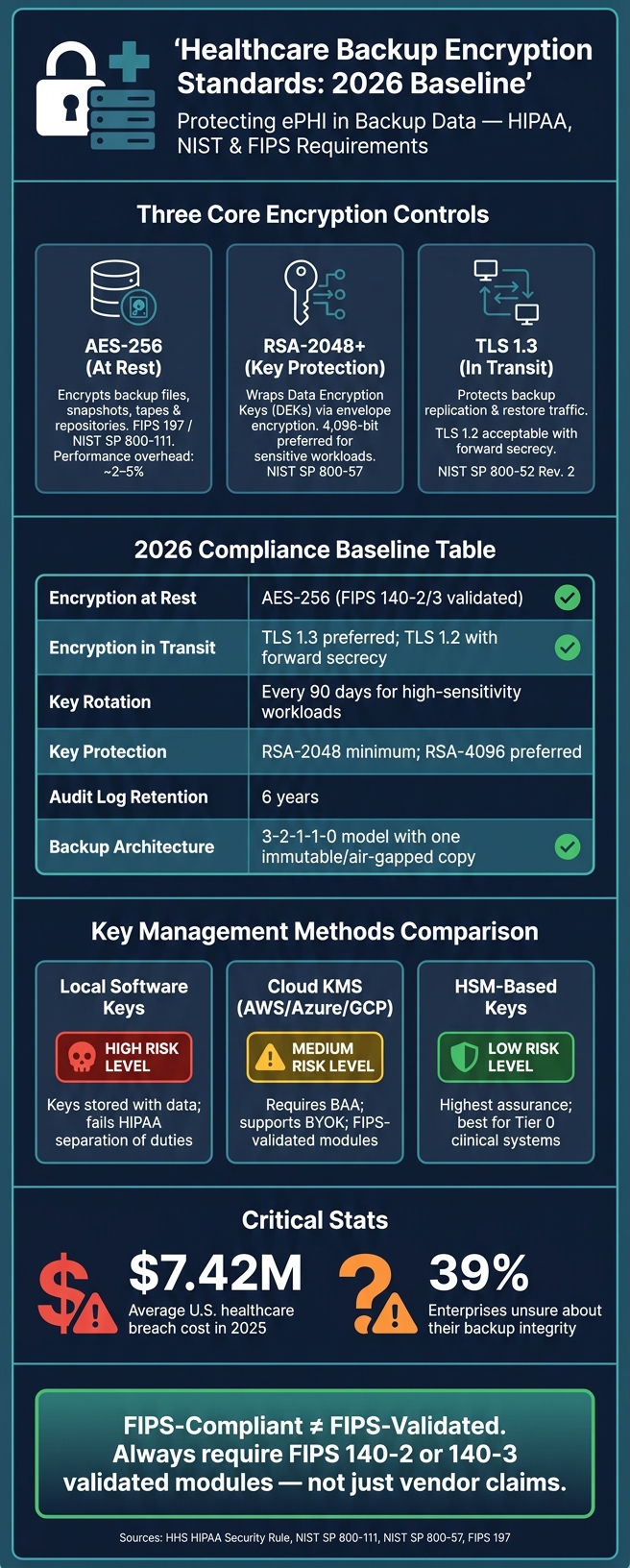
Healthcare Backup Encryption Standards: 2026 Baseline at a Glance
Regulatory and standards basis for encrypting healthcare backups
HIPAA Security Rule and HHS breach safe harbor
The HIPAA Security Rule (45 CFR §164.312) treats encryption as an addressable safeguard under §164.312(a)(2)(iv) for data at rest and §164.312(e)(2)(ii) for data in transit. In plain English, that means you either encrypt the data or document a reasonable equivalent.
For backups, encryption is usually the safest call. It’s the control that’s easiest to defend if an auditor, investigator, or legal team starts asking hard questions about third-party risk.
The biggest day-to-day driver is the HHS breach notification safe harbor. Under the HIPAA Breach Notification Rule, PHI must be rendered "unusable, unreadable, or indecipherable" to qualify for safe harbor protection [3]. If encrypted backup media is lost or stolen, and the keys remain protected, that backup may fall under safe harbor. That legal test shapes the technical decisions that follow.
NIST and FIPS references that shape backup encryption choices
HIPAA is intentionally technology-neutral, so it doesn’t name exact algorithms. That’s where NIST and FIPS come in. They fill in the blanks and show what acceptable encryption looks like in practice.
The table below links the main standards to common backup use cases:
| Purpose | NIST/FIPS Standard | Practical Application |
|---|---|---|
| Data at rest | NIST SP 800-111 / FIPS 197 | AES-256 for repositories and snapshots |
| Data in transit | NIST SP 800-52 Rev. 2 | TLS 1.3 or TLS 1.2 for transfers |
| Key management | NIST SP 800-57 | HSMs or cloud KMS with dual control |
| Module validation | FIPS 140-2 / FIPS 140-3 | FIPS-validated software/hardware crypto modules |
There’s one point here that trips people up: "FIPS-compliant" is not the same as "FIPS-validated." That difference matters.
When backup software, storage appliances, or cloud storage services are used to protect ePHI, they should rely on FIPS 140-2 or FIPS 140-3 validated modules, not just vendor claims that they are "FIPS-compliant" [4][2]. For health IT, the safer path is to use NIST-approved algorithms with FIPS-validated modules.
In practice, that usually means:
- AES for stored backups
- RSA for key protection
- TLS for data transfers
sbb-itb-535baee
HIPAA Safeguards for AI: Controls for PHI in Cloud Workflows | Module 2.2
Core encryption standards for backup data: AES, RSA, and TLS
Now that the standards baseline is in place, the next step is simple: match each control to the right backup job. In healthcare backups, AES protects stored data, RSA protects keys, and TLS protects data in motion. They do different jobs, and that split matters. Use the wrong one for the wrong task, and gaps show up fast.
AES for backup data at rest
AES-256 protects bulk backup data like files, snapshots, and tapes. It uses the same key to encrypt and decrypt data, which makes it a good fit for large backup sets.
AES-256 is the default choice for healthcare backups [1][5]. With AES-NI, the performance hit stays low, usually around 2–5% [2][5][6].
RSA for key protection and TLS for data in transit
RSA protects the keys behind AES-encrypted backups. It does not encrypt the backup data itself. In practice, a key encryption key (KEK) encrypts the Data Encryption Key (DEK) used for the backup set. That setup is known as envelope encryption. The big upside is practical: you can rotate keys without re-encrypting petabytes of backup data [1]. In healthcare settings, a 2,048-bit RSA key is the minimum, while 4,096-bit is preferred for more sensitive workloads [1][5].
TLS solves a different problem: it protects backup data while that data moves from place to place. That includes replication between on-premises agents, backup repositories, and cloud systems, along with data restores during recovery. TLS 1.2 or 1.3 is preferred, with TLS 1.3 the preferred option when supported [2][1][6].
Use the table below to match each standard to its job in backup protection.
| Algorithm | Type | Primary Use in Backups | Typical Key Sizes | Standards References |
|---|---|---|---|---|
| AES | Symmetric | Bulk backup data at rest | 128, 192, 256-bit (256 preferred) | FIPS 197, NIST SP 800-111 |
| RSA | Asymmetric | Wraps and protects encryption keys | 2,048-bit minimum, 4,096-bit preferred | NIST SP 800-57, FIPS 186-4 |
| TLS | Protocol | Backup replication and recovery traffic | Varies by cipher suite (e.g., ECDHE) | NIST SP 800-52 Rev. 2 |
Encrypt at the source so PHI is protected before transfer and storage [2][5][6].
Implementation patterns and key management for encrypted backups
The next step is operational: put encryption at the right layer, and keep keys away from the data.
Where encryption is applied in backup architectures
Healthcare backups usually use layers of encryption. Each layer deals with a different kind of risk.
Application-level encryption protects sensitive fields before data ever reaches backup storage. Database-level encryption, such as Transparent Data Encryption (TDE), protects data inside the database engine. But there's a catch: if a backup file leaks and the keys are stored with the ciphertext, TDE alone won't save you. These layers help limit what reaches backup storage in the first place.
Backup software-level encryption is where many teams apply AES-256 through FIPS-validated modules and wrap backup keys with a separate KMS or HSM. This is where the AES/RSA/TLS controls from the previous section fit into the backup workflow. AES handles data at rest, the KMS or HSM protects the keys, and TLS protects data in motion.
For cloud repositories, CMEK or BYOK lets the organization keep control of the keys and cut off cloud backup access fast when needed. Pair that with WORM (Write Once, Read Many) or S3 Object Lock to build an immutable backup tier.
That setup only works if key access, immutability, and recovery testing work together. It lines up with the 3-2-1-1-0 backup pattern: multiple copies, offsite storage, one immutable or air-gapped copy, and zero unresolved restore errors [2][7].
Key management, integrity controls, and recovery readiness
Where you place encryption matters. But key control decides whether encrypted backups can actually be restored.
Centralized key management means using a dedicated KMS or HSM. Don't store keys in scripts, config files, or environment variables [3]. This is especially critical when managing vendor risk assessments for third-party backup providers. Backup administration should stay separate from key access, and both should require MFA [3][2][8].
For key rotation, rotate KEKs every 90 days for high-sensitivity workloads, and do it right away after personnel changes or a suspected compromise [1][3]. With envelope encryption, the DEK stays separate from the KEK, so rotating the KEK doesn't mean re-encrypting the backup data.
Use SHA-256 or HMAC checks at write, replication, and restore to catch silent data corruption [1][3]. That's more than a box-checking exercise. About 39% of enterprises say they aren't sure about their backup integrity [7].
Restore testing matters more than backup creation. Test files, databases, and full systems on a regular basis [2]. Run restore-from-immutable and offline media drills at least quarterly [3][8]. For critical clinical systems, aim for an RTO of under 4 hours and an RPO of under 1 hour [7][8]. Log every encrypt and decrypt event with the user ID, time, key ID, and resource, and keep those logs for at least six years to meet HIPAA documentation rules [1].
The table below compares the three main key management approaches used in healthcare backup environments.
| Method | Strengths | Weaknesses | Operational Considerations in Healthcare | Alignment with FIPS/NIST Guidance |
|---|---|---|---|---|
| Local Software-Based Keys | Low cost; simple to deploy | Keys often stored alongside data; high co-location risk [1] | Fails separation-of-duties requirements for HIPAA [1] | Generally discouraged; does not meet NIST SP 800-57 [1] |
| HSM-Based Keys | Highest security; physical key protection [1] | High cost; requires specialized expertise | Best for large health systems and Tier 0 clinical systems [1] | Strongly aligned with NIST and FIPS high-assurance requirements [1] |
| Cloud KMS (AWS KMS, Azure Key Vault, GCP KMS) | Native cloud integration; automated rotation and audit logging [1] | Requires cloud provider BAA; potential vendor lock-in | Simplifies compliance for cloud-native EHRs; supports BYOK [1][4] | Aligned with NIST SP 800-57 when using FIPS-validated modules [1][2] |
Those controls only work if teams measure them, test them, and track them inside the broader enterprise risk program.
Risk management, emerging expectations, and conclusion
How risk programs evaluate backup encryption controls
Once the controls are in place, risk programs look at something simple but hard to fake: are those controls being run well, tested on a regular basis, and backed up with proof? They assess whether backup encryption is turned on, set up the right way, tested, and documented well enough to hold up during an audit review. [1][8]
In day-to-day reviews, risk teams check backup encryption against NIST standards for data at rest, data in transit, and key management. Auditors also want proof that keys are rotated, duties are split across staff, and access is logged. [1][3]
Business Associate Agreements (BAAs) also need to spell this out. That means backup encryption, breach notification timelines, and subcontractor duties should all be clearly covered. Cyber insurers are also asking for more before they renew a policy, especially immutable backups and off-site replication. [4][2][8][1]
A lot of these checks move through third-party risk workflows. Censinet RiskOps™ pulls third-party and enterprise risk reviews into one place, along with benchmarking and shared review of vendor evidence such as SOC 2 Type II or HITRUST reports. [9]
Conclusion: Key takeaways for healthcare leaders
For healthcare leaders, the issue isn't whether to encrypt. It's whether that encryption still allows fast, provable recovery when systems go down. That's the standard risk programs and auditors tend to use, and the table below sums up the baseline technical expectations they often look for.
| Control | 2026 Baseline Standard |
|---|---|
| Encryption at Rest | AES-256 (FIPS 140-2/3 validated) |
| Encryption in Transit | TLS 1.3; TLS 1.2 only with forward secrecy |
| Key Rotation | 90 days for high-sensitivity workloads |
| Asymmetric / Key Protection | RSA-2048+ |
| Audit Log Retention | 6 years |
| Backup Architecture | 3-2-1-1-0 model with an immutable copy |
Standards matter. But the controls behind them matter more. Validated modules, protected keys, and tested recovery are what make encryption defensible in front of risk teams and auditors. [1][3]
And here's the part that hits home during an outage: recovery is the test that counts. Encrypted backups still need to restore fast enough to support patient care. Critical EHR systems should target an RTO of 1 to 4 hours and an RPO of 1 hour. If restore testing never happens, encryption does little from an operations standpoint. [8]
Encryption protects backups. Tested recovery shows they can actually be used.
FAQs
When does encrypted backup data qualify for HIPAA safe harbor?
Encrypted backup data can fall under the HIPAA Breach Notification Rule safe harbor if it has been made unusable, unreadable, or indecipherable to unauthorized people.
In plain English, that means using NIST-approved encryption for backups. A common example is AES-256 for data at rest. It also means the encryption should rely on FIPS 140-2 or 140-3 validated cryptographic modules.
Just as important, the encryption keys need to stay secure and separate from the data itself. If the data and the keys sit together, that safety net starts to look a lot weaker.
Do we need both backup encryption and separate key management?
Yes. For healthcare backup data, separate key management is a must.
AES-256 is the standard for encrypting stored backups. But encryption alone isn't enough if the backup provider also controls the keys. In that setup, you don't have full control.
The safer approach is to keep encryption keys separate from the encrypted data. That lowers the risk of unauthorized access and adds another layer of control.
Good practice here usually includes:
- Customer-controlled keys
- Separation of duties
- Regular key rotation
How often should healthcare teams test encrypted backup restores?
Healthcare teams should test recovery processes at least once a year to make sure they’re ready when it counts.
More frequent testing can help confirm that backups work as expected and that systems stay in good shape. For example:
- Monthly partial restores for critical systems
- Quarterly full restores
- Tests after major infrastructure changes
These tests should confirm:
- Data integrity
- Successful decryption with managed keys
- Compliance with recovery time objectives
