
If a medical device uses third-party software, patching is not just IT upkeep - it is part of FDA compliance and patient safety.
I’d boil the article down to this: manufacturers need a documented way to track software parts, spot vulnerabilities, test patches, decide if a change affects device function, and keep records that show why they patched, delayed, or used other controls instead. That duty runs from device design through postmarket support under Section 524B and FDA cybersecurity guidance.
Here’s the short version:
- Know what’s in the device. An SBOM should list software components, versions, suppliers, and support dates.
- Map each new vulnerability to affected devices. Without that, teams are guessing.
- Separate routine patches from higher-risk changes. If a patch changes timing, logic, workflow, or connectivity, it may need extra review.
- Test before rollout. Check both security and device behavior.
- Document every decision. If you patch, defer, or use network controls instead, write down the reason, evidence, owner, and review date.
- Plan for legacy devices. If a system can’t be patched, use controls like segmentation, access limits, and monitoring.
- Keep teams aligned. Cybersecurity, quality, clinical engineering, and clinical staff all have a role.
A few numbers in the article make the problem clear:
- 75% of infusion pumps have known vulnerabilities
- 52% were still affected by a critical OS flaw years after a patch was available
- Only 22% of healthcare organizations say all medical equipment runs current software
- 1 in 5 connected medical devices in hospitals runs an unsupported OS
If I were explaining the article in one sentence, I’d say this: FDA-aligned patch management means knowing your software, judging patient and device risk before each update, and keeping audit-ready records for every choice.
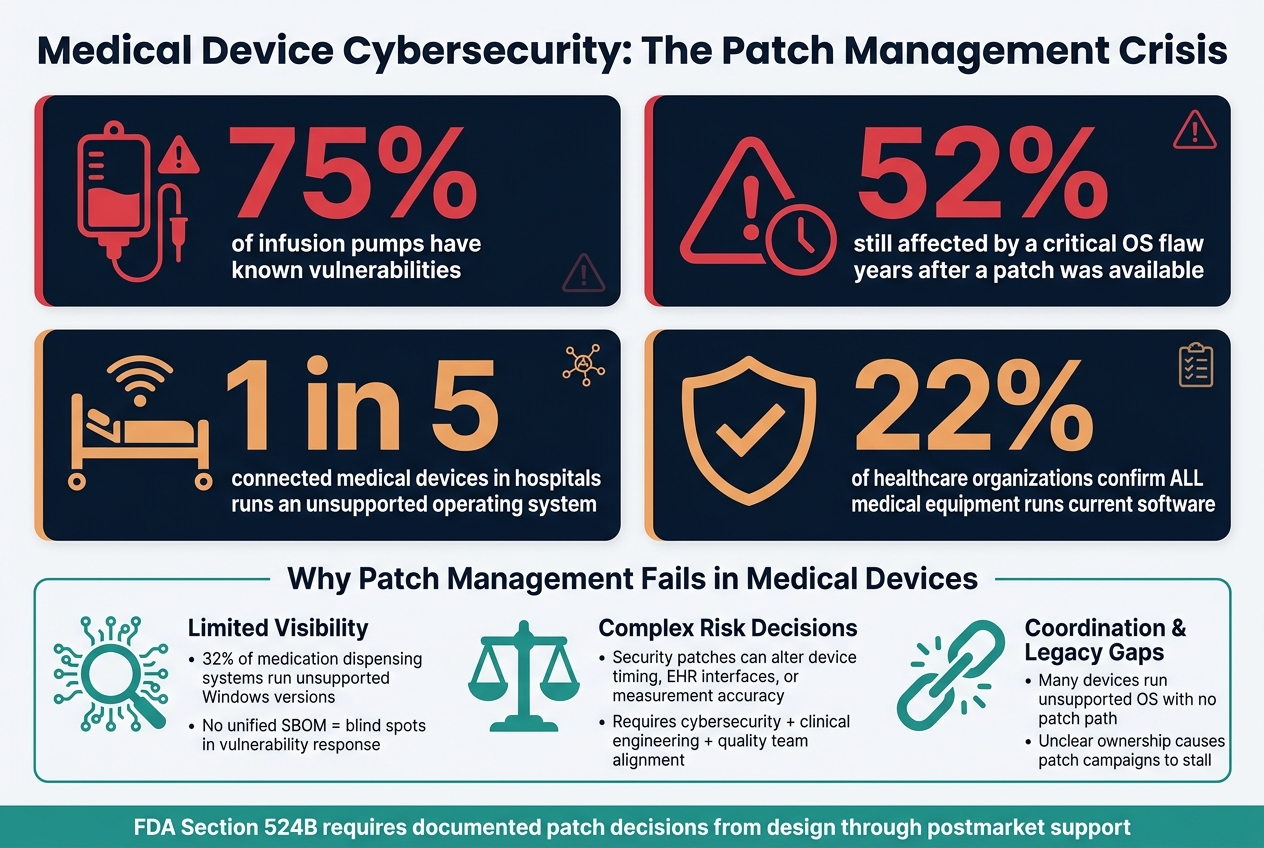
Medical Device Cybersecurity: Patch Management by the Numbers
Core Compliance Problems in Medical Device Patch Management
Most patch-management failures in medical devices come back to three problems: weak component visibility, hard clinical risk calls, and poor coordination.
Limited Visibility Into Components, Versions, and End-of-Support Dates
If a component isn't tracked, it can't be patched. That's the blunt truth.
When device records are split across a CMMS, IT asset management tools, and vendor-owned files, security teams don't have a clean way to tell which devices are running a vulnerable component when a new CVE drops. At that point, the response becomes a manual hunt. It's slow, messy, and easy to get wrong. It also drags out the risk reviews the FDA expects.
The numbers show how common this problem is. Only 22% of healthcare organizations say all medical equipment is running current software. Armis also found that 1 in 5 connected medical devices in hospitals runs on an unsupported operating system, including 32% of medication dispensing systems using unsupported Windows versions.[11][14][15]
There's another problem hiding underneath that. If end-of-support dates aren't tied to device records, an organization can't show that it is managing lifecycle risk in line with FDA postmarket cybersecurity expectations. And without a current component map, vulnerability triage starts behind schedule.
Risk Decisions When Security Fixes Could Affect Clinical Performance
This isn't just an IT call.
A patch for a communication stack or database engine can change device timing, affect an EHR interface, or shift measurement accuracy. So before anything goes live, clinical engineering, cybersecurity, and quality teams all need to weigh the risk from more than one angle.
The core question is simple: can the patch be deployed without changing clinical behavior or creating new risk?
If a vulnerability is still open after existing controls are applied, it should be treated as uncontrolled risk and moved up for remediation. If those controls bring exposure down to an acceptable level, the patch should be documented under change control. That choice decides whether the work stays in standard change control or moves into expedited remediation.[5][6][7][9][13]
This is where patching gets tricky. A security fix may look straightforward on paper, but once it touches a live clinical device, the stakes change fast.
Coordination, Documentation, and Legacy Device Constraints
Even when the risk decision is clear, the work can still stall.
Patch delays usually come from supplier testing demands, clinical scheduling limits, and fuzzy ownership between cybersecurity and clinical engineering. HDOs often have trouble lining up deployment windows for high-use equipment such as infusion pumps, imaging systems, and ventilators. And when no one clearly owns the task, patch campaigns drift. The risk sits there, but no one formally accepts it or moves it up for action.
Patch timing, rollback plans, and owner assignment all need to fit inside the quality system. Otherwise, the process breaks down when teams are under pressure.
Legacy devices make this harder. Many still run unsupported operating systems, and unauthorized software changes can affect clearance. If the documentation is incomplete, the compliance problem gets worse. Regulators and auditors need to see that risk decisions were made on purpose, not just left to chance.[16][17][18]
sbb-itb-535baee
FDA-Aligned Solutions for a Compliant Patch Management Program
The three gaps above - visibility, risk triage, and coordination - can be handled with a documented patch process that lines up with FDA expectations. The sections below turn those gaps into a workflow teams can use again and again.
Build a Risk-Based Process for Identifying, Assessing, and Prioritizing Patches
FDA expects manufacturers to have a formal, documented process to monitor, identify, and address cybersecurity vulnerabilities and exploits as part of postmarket management of medical devices.[5] That process should sit inside the quality system and be described in premarket submissions for cyber devices.[1][9]
In practice, that means watching sources like NVD, vendor advisories, mailing lists, and internal reports. From there, teams need to map each finding to affected devices using asset inventories and SBOMs, check whether the vulnerability is reachable in the device’s actual use environment, weigh the clinical and patient-safety impact, and document the remediation path.
Not every patch needs the same level of urgency. If a vulnerability could create uncontrolled risk of patient harm, it calls for fast action under Section 524B of the FD&C Act.[2][7] If an issue does not affect clinical performance, it can often move through scheduled patch windows - as long as that choice is documented and supported by risk analysis.
That workflow only works if SBOMs stay current and change control stays tight.
Use SBOM Data and Change Control to Manage Third-Party Components
FDA’s premarket cybersecurity guidance requires machine-readable SBOMs that list each component’s name, version, supplier, support status, and end-of-support date.[7][4]
SBOMs help teams connect known vulnerabilities to devices already in the field and spot components that are getting close to end of support.[7][4] That matters because once support disappears, patching can get messy fast. At that point, teams may need to plan a design update or use interim compensating controls.
Change control is the other side of this. Every proposed patch needs a risk analysis to decide whether it changes intended use, clinical decision logic, or safety-critical architecture. Routine cybersecurity patches - ones that fix a vulnerability without changing clinical performance - usually do not need premarket review, but that decision has to be documented.[3][8] Updating the SBOM whenever components are added, removed, or upgraded links each build to its change-control record and supports auditability.[7][4]
Define Communication and Disclosure Procedures Before Incidents Happen
Manufacturers should maintain a coordinated vulnerability disclosure process for cyber devices.[1][7] That process should spell out how vulnerabilities are received, triaged, and communicated to customers, including deployment guidance and compensating controls when a patch is not yet available.
HDOs need enough detail to make their own risk calls. They need to know what is affected, how severe the exposure is, what temporary steps can cut risk, and when a patch is expected. If communication templates and escalation paths are ready ahead of time, teams can respond in a steady way and keep a clear record of what happened.
Those records should also shape deployment instructions and compensating controls.
These decisions usually fall into four categories:
| Patch Type | Typical FDA Regulatory Implication | Required Validation | Required Documentation |
|---|---|---|---|
| Routine cybersecurity patch (no clinical impact) | Usually handled under change control.[3][8] | Security testing; regression testing for affected components | Risk assessment, change-control record, test results, deployment date |
| Patch addressing critical uncontrolled risk | Expedited remediation; report when required.[9] | Expedited security and safety testing | Vulnerability source, exploitability analysis, remediation rationale, validation evidence |
| Patch that alters clinical performance or intended use | May require supplemental or new premarket review.[3][8] | Full safety and effectiveness validation | Updated design documentation, SBOM revision, regulatory pathway decision record |
| Compensating control when patching is not possible | Usually no premarket review if function is unchanged. | Verification that the control reduces risk to an acceptable level | Risk acceptance rationale, control description, monitoring plan, transition timeline |
How to Put Patch Management Into Practice Across the Device Lifecycle
Once you know which devices are affected by a vulnerability, the job moves from triage to action: patch design, testing, deployment, and, when patching isn’t possible, fallback controls. After risk triage, the next step is execution across design, validation, deployment, and legacy control.
Design for Patchability and Supplier Accountability
Build devices so they can be patched without turning every update into a major event. Third-party component choices play a big role here. They can make future patches a simple software update - or force a full validation cycle.
That’s why early architecture decisions matter. Use modular software designs that separate safety-critical functions from non-clinical components, signed update packages, and rollback paths that have already been tested. When non-clinical modules are isolated, security updates can stay contained and usually don’t trigger premarket review.[10]
Supplier selection matters just as much. Before you commit to a third-party component, make sure the vendor publishes end-of-support (EOS) dates, has a documented vulnerability response process, and can provide test builds or reference environments so your team can check patches against clinical workflows.[21][22] Contracts should also require advance notice for major architecture changes or EOS decisions, along with severity-based advisory timelines. If a supplier gives vague answers, treat that as a lifecycle risk.
Patchability on paper isn’t enough. Updates also need to be tested and rolled out in a way that doesn’t interrupt patient care.
Test, Deploy, and Monitor Patches Without Disrupting Care Delivery
Validation should stay focused on what the patch could change. That might include dosing, alarms, or EMR connectivity. Do that work in a bench environment that matches hospital VLANs, authentication, and load as closely as possible.[1][6][9]
Then start small. Roll out the patch to a limited pilot group first, and watch for signs of trouble like CPU spikes, error logs, or unexpected reboots before moving to a broader deployment.
In a live hospital setting, patching takes coordination. Clinical leadership needs to help identify low-use windows. Biomedical engineering and nursing staff need clear notice about which devices will be offline and for how long. And the rollback process can’t be theoretical - it needs tested steps and written criteria for when to use it.
After deployment, keep watching. Network flow analytics, device logs, and a dedicated post-patch incident category can help teams spot patterns that suggest side effects before they turn into clinical issues.
When patching isn’t possible, the focus shifts to compensating controls and recorded risk acceptance.
Manage Legacy Devices With Compensating Controls and Audit-Ready Records
If a patch isn’t available or can’t be applied, reduce exposure without changing the device software. Common options include segmentation, access limits, hardening, and monitoring.[6][12][19][20]
The risk record should show why patching was deferred, which controls were put in place instead, and when the decision will be reviewed again.[6][12][20] Formal risk acceptance statements, approved by the right governance body and tied to a review cadence, show that the risk is being managed - not brushed aside. Replacement or decommissioning timelines should also be recorded in the risk file.
The table below lays out the main activities, records, and owners across the legacy device lifecycle so governance stays consistent and audit-ready:
| Lifecycle Stage | Key Activity | Required Artifact | Operational Owner |
|---|---|---|---|
| Inventory & Discovery | Identify legacy devices, firmware versions, and connectivity paths; classify criticality | System inventory report; risk classification list | Biomedical/clinical engineering |
| Risk Assessment | Analyze vulnerabilities, clinical impact, and patch feasibility; determine risk rating | Risk assessment record; vulnerability list; risk matrix | Information security/cyber risk team |
| Compensating Control Design | Select segmentation, access controls, and monitoring for each device and use case | Compensating control plan; updated network diagrams | Network/security engineering |
| Implementation & Validation | Implement controls; confirm they do not hinder clinical workflows | Implementation checklist; test results; clinician sign-off | Network/security engineering |
| Risk Acceptance & Governance | Approve residual risk; document conditions and review cadence | Formal risk acceptance memo; governance meeting minutes | Risk committee/CISO/clinical leadership |
| Monitoring & Review | Monitor for anomalous behavior; review controls and risk annually or after incidents | Monitoring dashboard snapshots; annual review report | SOC/security operations with biomed support |
| Decommissioning & Replacement | Plan and execute retirement or replacement aligned with risk and budget | Decommissioning plan; data disposal records; replacement project plan | IT/biomed project management |
Good records do more than satisfy auditors. They also make it much easier to centralize patch decisions, evidence, and approvals across the enterprise.
Using Censinet to Support FDA Patch Management Workflows
Once the workflow is set, the next move is to put everything in one place. Censinet RiskOps™ pulls together the records, assessments, and approvals that FDA patch management work relies on.
Centralize Third-Party Risk, Inventories, and Patch Decisions in Censinet RiskOps™
Censinet RiskOps™ gives healthcare delivery organizations one place to track medical devices, clinical applications, and third-party components, along with the vendors, contracts, security questionnaires, and risk decisions tied to them. For patch governance, that cuts down patch triage time. When a new vulnerability comes out, teams can see which devices are affected, whether the vendor has released a patch or advisory, and which compensating controls are already in place.
The platform supports SBOM-aligned device registries. That means each asset record can include its underlying libraries, operating systems, and dependencies. If a third-party operating system version is getting close to end-of-support, RiskOps™ flags those devices for more review. And when a patch decision is made - whether to deploy, defer, or use compensating controls - the rationale, supporting evidence, and approval chain all live in a single record.
Patch decisions often involve clinical engineering, IT security, procurement, and compliance. Censinet RiskOps™ sends each assessment to the right owners through one workflow, so their input and approvals stay together instead of getting scattered across email threads and spreadsheets.
Once those records are centralized, evidence review moves faster.
Use Censinet AI™ to Speed Evidence Review With Human Oversight
Patch reviews rely on vendor evidence, SBOM files, and technical advisories. Censinet AI™ helps teams work through that material faster. It processes large volumes of documentation and surfaces clear risk findings, such as gaps in patch timelines, missing SBOM data, or weak incident response procedures.
Censinet AI™ also routes tasks, flags missing evidence, and tracks review status. If a new vulnerability affects a device that's deployed across many locations, it can help identify affected assets, suggest a review workflow, and send tasks to the right owners while flagging incomplete assessments before anyone approves deployment.
The automation helps move work along, but the final call stays with qualified reviewers.
Key Takeaways: FDA-Compliant Patch Management for Medical Devices
Put all of this together, and patch management becomes a full lifecycle practice, not a one-off IT job. FDA patch management begins at the design stage and carries through postmarket maintenance: track third-party components, record risk decisions, and handle patches under Section 524B of the FD&C Act.[4][9][10]
An SBOM-based inventory is where the work starts. Without it, teams can't quickly tell which devices are affected, which versions are in use, or whether those products are still supported.
Once the inventory is in place, validation is the next checkpoint before rollout. Patches need security testing and regression testing before deployment. If a patch can't be applied, teams should document compensating controls - segmentation, access limits, and monitoring - along with the residual risk and the review date.[2][23][24]
Centralized records make those choices faster to manage, easier to trace, and ready for audit. Bringing SBOMs, risk decisions, patch status, and approvals into Censinet RiskOps™ cuts documentation friction and improves audit readiness.
The aim is straightforward: protect patients, maintain device performance, and handle patch management as a lifecycle discipline rather than a reactive IT task.
FAQs
Who is responsible for medical device patch decisions?
Under FDA guidelines, medical device manufacturers carry the main responsibility across the full product lifecycle. That includes monitoring for issues, finding vulnerabilities, and dealing with them when they show up.
Inside the manufacturer, a PSIRT usually manages triage, scoring, and remediation planning. Engineering teams then build and ship patches, while Quality or Regulatory teams update the official risk records in the CAPA system.
When does a patch need extra FDA review?
A patch may need added FDA review if it falls outside your authorized Predetermined Change Control Plan and your change control process under 21 CFR 820.30 shows that it could call for a new premarket submission.
Manufacturers should assess each remediation to decide whether it counts as a significant device change, and they should document the remediation path for audit readiness and compliance.
What should we do if a device cannot be patched?
If a medical device can't be patched, put documented compensating controls in place to keep risk in check and stay aligned with FDA requirements.
That can mean using network segmentation, application whitelisting, enhanced logging, IDS/IPS, and tighter access controls. You should also document the technical reason the remaining risk is still acceptable, run regular risk assessments, and keep a long-term plan for migration, replacement, or secure decommissioning in your risk management files.
