
A valid service account or token can give an attacker access to patient data. I’d start with EHR and vendor integrations: identify who owns each connection, check what it can access, and compare its activity with its approved purpose.
My approach comes down to 5 steps:
- Map access: Record each identity’s owner, permissions, credentials, and patient-care dependencies.
- Rank risks: Separate suspected abuse from stale accounts and excess permissions.
- Reduce access safely: Test narrower permissions before changing live clinical workflows.
- Rotate or revoke credentials: Use short-lived credentials where supported, and never restore a compromised secret during rollback.
- Watch and review: Check API activity, exports, and permission changes. Track findings, deadlines, and closure in your risk-management workflow.
The goal isn’t just fewer accounts. It’s <u>access you can explain, monitor, and remove</u> - without disrupting care.
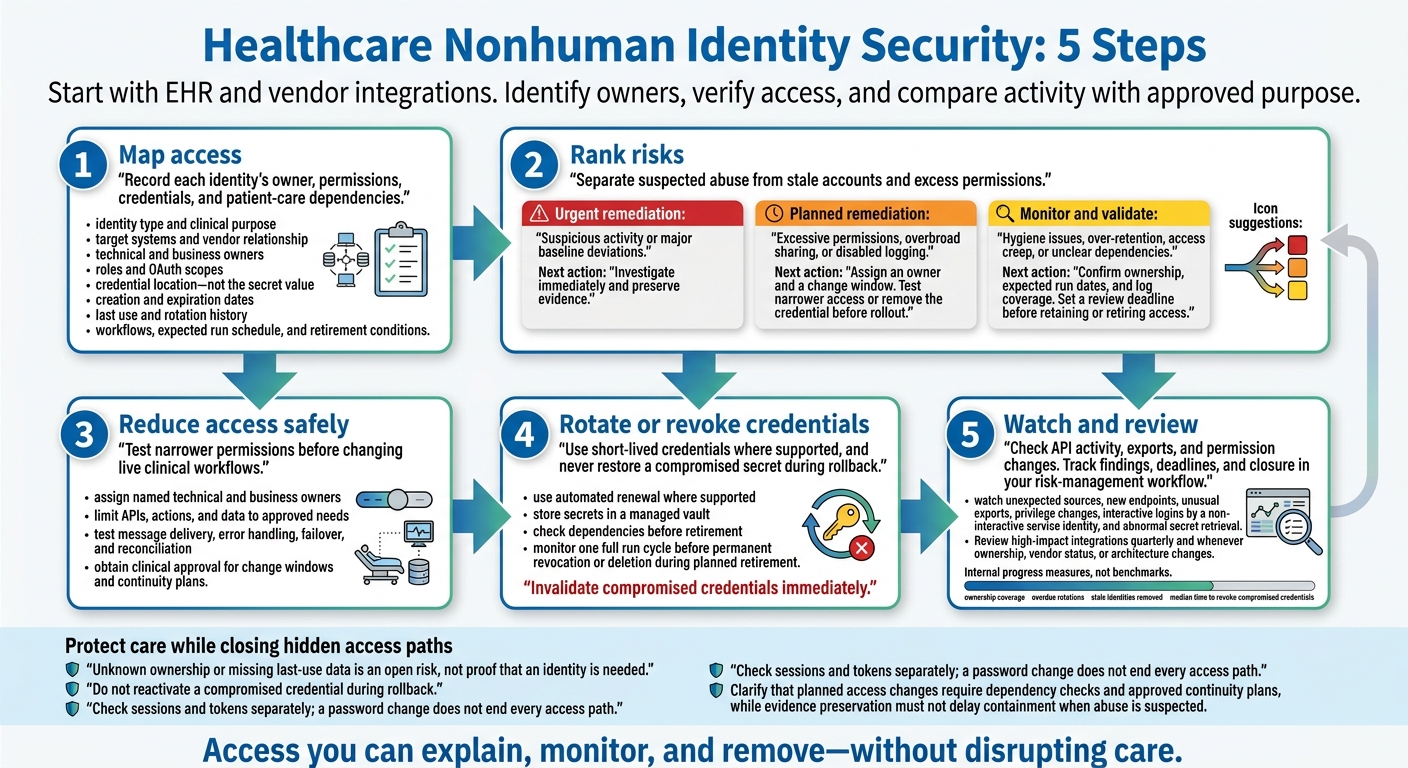
Healthcare Nonhuman Identity Security: 5 Steps
How Valid Credentials Hide Attacks
Integration setup can leave accounts with more permissions than intended - and keep that access active after the work ends. Valid credentials can make an attack look routine. Monitoring needs to compare API activity with the intended workflow to flag malicious bulk exports or unexpected queries. [1] EHR integration accounts with lingering permissions show how this gap works.
Compromised EHR Integration Accounts
Hypothetical scenario: An internal laboratory interface account syncs lab results but retains EHR write permissions beyond that task. Stolen credentials let an attacker operate inside those retained permissions, putting protected health information (PHI) and clinical data integrity at risk. [1]
Investigate bulk exports, unusual API request volume, and access from unexpected locations. Compare EHR audit events with interface activity to separate expected traffic from suspicious access or changes. [1]
Stolen Vendor Tokens and Expired Vendor Access
Third-party vendor relationships pose the same risk when access outlasts the contract.
Hypothetical scenario: A vendor API token remains valid after a contract ends or an application is replaced. A stolen token stays usable until it expires or is revoked. [1]
Watch for unexpected hosts, unusual volume, and calls to endpoints unrelated to the former vendor’s work. These patterns can reveal misuse. [1]
| Comparison | Laboratory interface account | Leftover vendor API token |
|---|---|---|
| Identity | EHR integration account | Vendor API credential |
| Intended purpose | Sync lab results | Third-party analytics or billing |
| Failure mode | Retained write permissions and broad OAuth scopes | Access remains active after the relationship ends |
| Suspicious activity | Bulk exports, unusual API volume, unexpected locations | Unexpected hosts, unusual volume, unrelated endpoints |
| Risk | Unauthorized PHI exfiltration and clinical data tampering | Supply-chain data breach and bypass of MFA/perimeter controls |
Inventory and rank these identities first. Match application audit logs and API request records against the vendor’s approved permissions and termination date. Establish a baseline for partner and endpoint activity, then distinguish reads from exports and changes. [1]
sbb-itb-535baee
Find Nonhuman Identities and Rank Their Risks
Once you find hidden service accounts and tokens, link each one to an owner, a purpose, and its current permissions.
Build an Identity and Credential Inventory
Gather identities from identity providers, application configs, secrets stores, API gateways, cloud inventories, and logs. Match records across systems, including credentials for system-to-system connections.
For each inventory record, document:
- Identity and purpose: Identity type, clinical purpose, target systems, and vendor relationship.
- Owner and access: Technical owner, business owner, roles, and OAuth scopes.
- Credential lifecycle: Credential location - not the secret value - creation and expiration dates, last use, and rotation history.
- Clinical dependencies: Workflows, expected run schedule, and retirement conditions.
Unknown ownership or missing last-use data is an open risk, not proof that an identity is needed.
Check Permissions Against Actual Use
Compare approved duties with effective access: what an identity can actually reach through roles, OAuth scopes, and connected applications. Checking roles alone isn't enough. Flag unnecessary administrative or write permissions, shared credentials, cross-environment access, long-lived tokens, and credentials kept after offboarding. [1]
Establish a baseline for normal activity. Then review audit logs, authentication events, and permission changes together.
Escalate combinations such as a new permission followed by an API spike. [1]
Distinguish read-only actions from higher-risk writes and changes. Don't flag clinical workflows simply because they run infrequently, if their use is legitimate. [1]
Use that baseline to decide which findings need immediate action and which can wait for scheduled cleanup.
Separate Urgent Threats From Scheduled Cleanup
Use the inventory and activity baseline to distinguish active abuse from cleanup work. Confirm clinical dependencies before classifying identities as keep, fix, or retire.
| Priority | Findings | Next action |
|---|---|---|
| Urgent remediation | Suspicious activity or major baseline deviations | Investigate immediately and preserve evidence. |
| Planned remediation | Excessive permissions, overbroad sharing, or disabled logging | Assign an owner and a change window. Test narrower access or remove the credential before rollout. |
| Monitor and validate | Hygiene issues, over-retention, access creep, or unclear dependencies | Confirm ownership, expected run dates, and log coverage. Set a review deadline before retaining or retiring access. |
Reduce Access Without Disrupting Care
After ranking risky identities, reduce access in stages to keep care uninterrupted.
Assign Owners and Limit Permissions
For service accounts, tokens, and vendor connections, document each access change rather than removing access in bulk. Use the inventory and risk ranking to decide what to narrow, rotate, or revoke first. Assign named technical and business owners, plus backup contacts. The technical owner manages credentials; the business owner confirms whether access is still needed.
Limit integrations to the APIs, actions, and data they need. Keep clinical-data permissions separate from administrative rights. Replace shared credentials with workload-specific identities. Where supported, allow requests only from approved source networks or hosts. [5][8]
Before deployment, test message delivery, error handling, failover, and reconciliation. Record who approved the change, which permissions were removed, which dependencies were tested, the monitoring period, and rollback steps. Require clinical approval for change windows and continuity plans covering essential orders, results, and medication workflows.
With owners assigned, rotate and retire credentials on a fixed schedule.
Rotate Credentials and Remove Stale Access
For service accounts and integrations, use short-lived credentials with automated renewal where supported. Test renewal failures before rollout. Store secrets in a managed vault, and track expiration, renewal dates, chain trust, and key storage. Schedule rotation and define an emergency process for suspected exposure. Review access after staffing, vendor, or integration changes to determine whether rotation or revocation is needed. Invalidate compromised credentials immediately. [6][7]
Before retiring service accounts or tokens, check middleware, job schedulers, interface configurations, and vendor documentation for dependencies. Disable access during an approved window, then monitor authentication failures, interface queues, delayed results, and downstream errors. Watch one full run cycle before permanently revoking or deleting access.
If a required dependency fails, follow approved rollback steps to restore only the access it needs. Do not reactivate a compromised credential during rollback.
Detect Abuse and Plan Access Revocation
Move to containment when access is no longer needed or appears compromised.
Set alerts for unexpected sources, new endpoints, unusual exports, privilege changes, interactive logins by a noninteractive service identity, and abnormal secret retrieval. When abuse is suspected, preserve authentication, API, and vault evidence if doing so won’t delay containment.
Restrict or disable the service identity, revoke tokens where supported, and rotate associated secrets. Check for credentials created by an attacker. Check sessions and tokens separately; a password change does not end every access path. Check dependent interfaces before and after containment. When needed, activate approved downtime procedures with clinical operations. [2][6]
Conclusion: Make Identity Ownership Routine
Manage every nonhuman identity as a lifecycle record with a purpose, owner, least-privilege access, rotated credentials, observable activity, and retirement date.[3][4][12] Keep records current so service accounts, tokens, and vendor connections don’t become hidden access paths. Each identity needs a clearly assigned owner.
Set Review Responsibilities and Track Progress
For service accounts, tokens, and vendor connections, assign responsibilities across teams:
- Security and IAM: Maintain the inventory, monitor activity, and handle recertification.
- Application owners and clinical engineering: Validate the need for access and its dependencies.
- Procurement and vendor-risk: Manage onboarding and offboarding.
- Privacy and compliance: Assess PHI exposure.
Before granting privileged integration access, require joint approval from the application owner, security, and the relevant clinical or operational owner.[9][11]
Review high-impact integrations quarterly and whenever ownership, vendor status, or architecture changes. Record each decision: retain, reduce, rotate, transfer, suspend, or retire. Track ownership coverage, overdue rotations, stale identities removed, and median time to revoke compromised credentials. Treat these as internal progress measures, not benchmarks.
Link Identity Findings to Healthcare Risk Management
Feed these measurements into the same remediation workflow. After inventorying and ranking nonhuman identities, use Censinet RiskOps to track findings, owners, remediation tasks, and vendor and fourth-party risk in one place. Use it for tracking and oversight - not credential discovery, secret rotation, or access enforcement.[9][10][11] Link each material finding to its clinical service, PHI exposure, due date, and proof of closure.
Start with high-impact EHR and vendor integrations. Validate owners, connect hidden access to patient-care impact and PHI exposure, and fix the highest-risk access first.
FAQs
How can we find service accounts missing from our inventory?
Build a centralized inventory using directory services, SSO/federation platforms, PAM, VPNs, EHRs, clinical applications, cloud platforms, and SaaS tools [1][2]. Compare it with your master vendor register. Internal records often miss 30% to 50% of connected vendors [1][3].
Use automated identity governance to generate regular reconciliation reports. Review last-login timestamps and guest-account exports to spot inactive accounts or accounts without an owner that don’t match active contracts [1][4].
How can we distinguish legitimate exports from token abuse?
Look beyond login monitoring. Define expected behavior for each service account and API token: its purpose, the systems it can use, and the data it needs. Flag unusual export volumes, timing, or locations, along with access outside its defined scope.
Cross-check authentication and data-access logs against identity inventories, vendor contracts, and HR records. Treat exports from vendor accounts that aren't listed or lack active contracts as high-priority incidents. Keep audit trails that identify the internal owner.
What if a clinical integration cannot support short-lived credentials?
Use compensating controls to reduce the risks of long-lived credentials. Store credentials in a Privileged Access Management (PAM) vault so vendors can’t see raw secrets, and limit access to specific tasks within a set time window [1].
Isolate the integration through a PAM-controlled jump host. Enforce network allowlisting, require session approval, and strengthen monitoring of all traffic [1]. For legacy medical devices, segment networks by clinical function and risk level to limit access paths to sensitive data [2][3].
