
If you miss just one HIPAA identifier, your data may still be PHI. Under 45 CFR 164.514, data is de-identified only when it does not identify a person and there is no reasonable basis to think someone could identify them from what remains.
Here’s the short version:
- I first sort the data into the right bucket: PHI, limited data set, or de-identified data
- I pick one HIPAA path before any processing starts: Safe Harbor or Expert Determination
- If I use Safe Harbor, I remove all 18 identifier types, plus hidden data in file names, metadata, images, logs, and free text
- If I use Expert Determination, I keep only the detail I need and document why the re-identification risk is very small
- I do not treat de-identification like a one-time scrub; I pair it with access controls, encryption, audit logs, key separation, and release checks
- I check common failure points before release, like dates, ZIP codes, DICOM headers, burned-in image text, PDF metadata, hashed MRNs, and small cell sizes
A few points matter more than most:
- A limited data set is still PHI
- Safe Harbor allows only year for dates, not full dates
- Ages over 89 must be grouped as 90 or older
- ZIP codes can keep only the first 3 digits, and only when the shared population is above 20,000
- A random study ID is safer than a derived ID like a hashed MRN
If I had to boil the article down to one line, it would be this: HIPAA anonymization is not just about removing names; it is about proving the remaining data cannot reasonably point back to a person.
That is the standard the rest of the article helps you meet.
HIPAA De-Identification: Safe Harbor vs. Expert Determination
sbb-itb-535baee
Safe Harbor Checklist: Remove All 18 HIPAA Identifiers
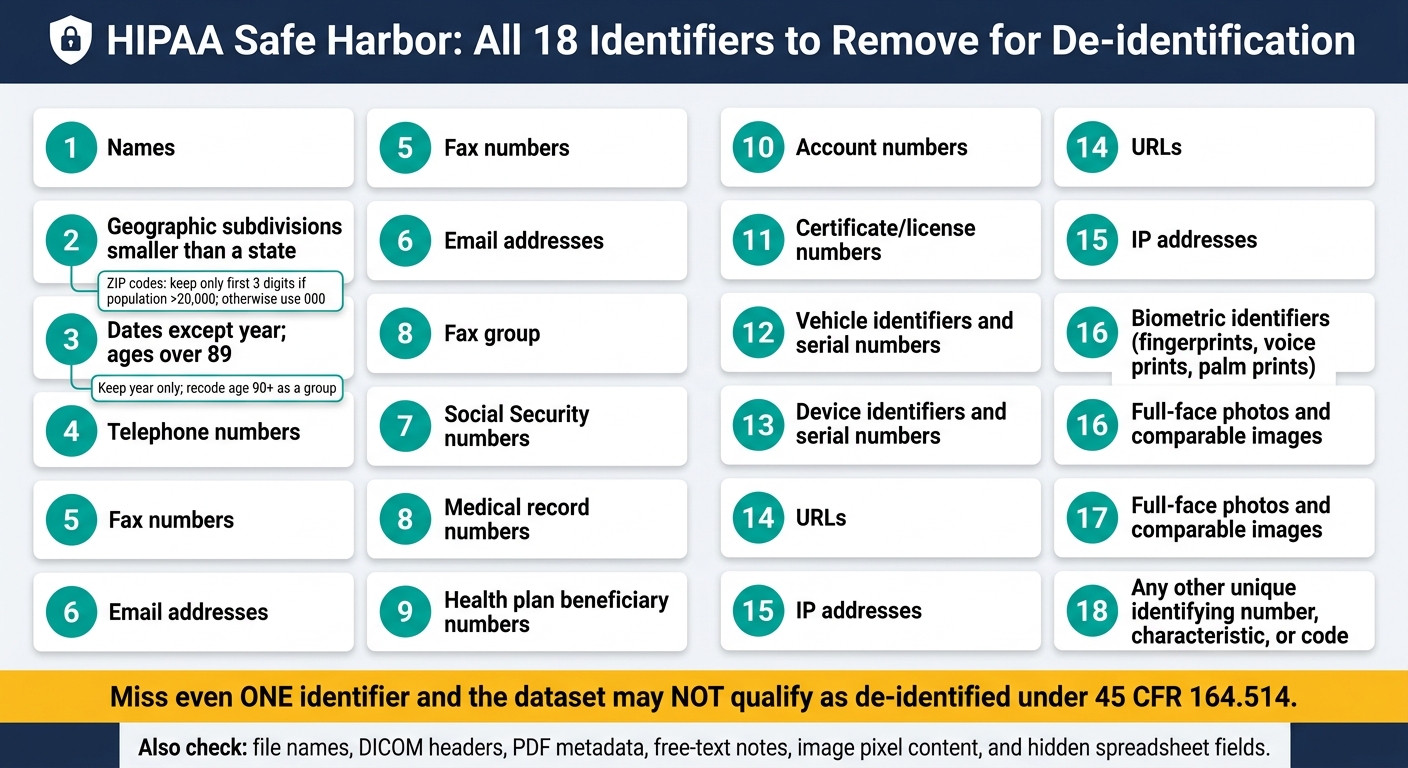
HIPAA Safe Harbor: All 18 Identifiers to Remove for De-identification
If Safe Harbor is your path, use this checklist before any release. You need to remove all 18 identifier categories and confirm you have no knowledge that the remaining data could identify anyone.[1][11] Miss even one, and the dataset may not qualify as de-identified.
Find Identifiers in Structured Data, Free Text, Images, and Metadata
Check every export source - EHR fields, notes, images, documents, logs, and metadata. Then use pattern matching for structured identifiers and NLP for names and locations buried in free text.[1][2][8][3][4]
| # | Identifier | Typical Locations | Required Action |
|---|---|---|---|
| 1 | Names | Registration tables, clinical notes, imaging headers, file names | Remove; replace with non-derived study IDs |
| 2 | Geographic subdivisions smaller than a state | Address fields, free-text notes, referral documents | Remove street address and smaller geographic units; apply the 3-digit ZIP rule; suppress coordinates |
| 3 | Dates (except year); ages over 89 | DOB, admission/discharge dates, procedure dates, death dates | Keep year only; recode ages over 89 as age 90 or older |
| 4 | Telephone numbers | Registration fields, notes, scheduling data | Remove; tokenize as [PHONE] |
| 5 | Fax numbers | Provider records, referral forms | Remove or tokenize |
| 6 | Email addresses | Patient portals, scheduling, provider records | Remove; tokenize as [EMAIL] |
| 7 | Social Security numbers | Registration, billing, insurance records | Remove; tokenize as [SSN] |
| 8 | Medical record numbers | EHR tables, imaging headers, file names | Remove; replace with non-derived study IDs |
| 9 | Health plan beneficiary numbers | Claims, insurance, billing tables | Remove; replace with non-derived study IDs |
| 10 | Account numbers | Billing and financial modules | Remove |
| 11 | Certificate/license numbers | Provider tables, credentialing records | Remove or tokenize |
| 12 | Vehicle identifiers and serial numbers | Structured data, photos, notes | Remove |
| 13 | Device identifiers and serial numbers | Medical device records, DICOM headers | Remove; generalize to device type or class only |
| 14 | URLs | Clinical notes, system logs, documents | Remove; tokenize as [URL] |
| 15 | IP addresses | Web server logs, audit logs, application metadata | Remove; generalize to network segment if consistent with Safe Harbor |
| 16 | Biometric identifiers | Fingerprint, voice print, palm print records | Remove raw biometric data and any identifying references |
| 17 | Full-face photos and comparable images | PACS, imaging systems, scanned documents | Remove or crop/blur so individuals cannot be recognized |
| 18 | Any other unique identifying number, characteristic, or code | Custom fields, legacy systems, research databases | Remove; keep only re-identification codes that are not derived from the data and are separately protected |
For each identifier, write down three things: where the data lives, how you detected it, and what you did to it. That makes it much easier for teams to apply the same controls every time. Use automated pattern detection for phone numbers, SSNs, emails, ZIP codes, URLs, and IP addresses in both structured data and free text. Add NLP-based scanning for names, organizations, locations, and dates.[1][2][8][3][4]
After the 18 identifiers are removed, take another pass through dates, ZIP codes, and hidden fields. Those are common places where data slips through.
Apply Safe Harbor Rules for Dates, ZIP Codes, and Hidden Fields
For dates, remove all date elements except the year.[1][2][4] That includes birth dates, admission dates, discharge dates, procedure dates, and dates of death.
For ages over 89, group them into one category: age 90 or older.[1][2][4][12]
ZIP codes need special handling. Keep only the first three digits, and only if the combined population of all ZIP codes sharing that prefix is greater than 20,000 based on current Census data. If the population is 20,000 or fewer, replace the prefix with 000.[1][2][4][10] An up-to-date reference table helps staff apply that rule the same way across releases.
Hidden fields deserve the same level of scrutiny as visible ones. File names can contain names, MRNs, and dates. DICOM headers can store patient name, accession number, device serial number, and institution details. PDF properties can hold author names and creation dates. Spreadsheet hidden columns and comments can hide phone numbers or plan IDs.[2][8][3][4]
Every export workflow should include:
- file-name scrubbing
- DICOM metadata scrubbing
- document metadata sanitization
Those steps should happen before any data leaves the organization.[2][8][3][4]
Document the Review and Confirm No Knowledge of Re-identification
Once the technical scrub is done, record what you found and what you did with it. The goal is simple: leave a trail that lets an auditor reproduce the de-identification decision.[1][11]
The record should show which identifier was found, where it appeared, how it was handled, and who reviewed it. Pair that with a transformation log that records the rules applied - for example, ZIP 021xx retained as 021; ZIP 006xx converted to 000 - so the process is reproducible and auditable.[1][2][4][10]
It also helps to sample the output by hand, especially in places where automation can miss odd cases. Free text, file names, and metadata are usual trouble spots.[2][8][3][4]
Expert Determination Checklist: Prove Re-identification Risk Is Very Small
If Safe Harbor strips out too much useful detail, move to Expert Determination. This path makes sense when you need to keep more of the data intact and can show, with documentation, that the chance of re-identification is very small for the specific use case and the specific recipients.[2][3]
Define the Use Case, Recipients, and Threat Model
Start by getting specific. Before anyone runs the analysis, define the disclosure purpose, intended recipients, access environment, retention period, and the level of data utility you need.[14] If that part is fuzzy, the rest of the review gets shaky fast.
Next, look at what outside data a recipient could use to connect records. That can include voter registries, public death records, state-level hospital discharge data, and commercial consumer datasets.[14] The point is simple: don’t judge risk in a vacuum. Judge it against what someone could match the data with.
Then sort each field into clear groups:
- Direct identifiers: name, SSN, or MRN
- Quasi-identifiers: age, sex, ZIP code, admission dates, or rare diagnoses
- Sensitive fields: HIV status or substance use treatment
- Non-identifiers
That inventory should cover more than clean spreadsheet columns. It also needs to include structured data, free text, images, and metadata.[13][14]
Apply Statistical Controls and Measure Residual Risk
Once the threat model is set, apply only the minimum controls needed to bring residual risk down. Don’t overdo it. The goal is to use the least aggressive controls that still keep risk very small.
Common options include:
- Generalize - change exact dates to month or quarter; reduce 5-digit ZIP codes to 3-digit
- Suppress - remove high-risk values or records
- Aggregate - roll details into broader groups
- Perturb - add limited noise
- Tokenize - replace direct identifiers with tokens; keep the mapping key separate and secured[14][16]
After that, measure what risk is left. Use k-anonymity, linkage testing, and subgroup analysis.[14][13] This is the part where assumptions meet reality.
Require a Written Expert Report and Schedule Re-evaluation
HIPAA requires the expert to document the methods and results of the analysis.[2][3][15] That means a written report isn’t optional. It needs to spell out:
- Scope and objectives
- Methods and results
- Controls applied
- Release conditions - access controls, data use agreements, retention limits, and prohibited uses[2][13][3]
Even after the expert signs off, don’t treat the assessment like a one-and-done approval. Re-identification risk shifts over time. New data sources appear. Recipient access can change. Internal controls can drift. Set a recurring review cadence, and trigger a new assessment right away when data sources, recipients, or access controls change.[13][9][1]
Day-to-Day Compliance Checklist: Prevent Re-identification and Audit Gaps
After the expert report is done, the work shifts to day-to-day controls. That’s where many teams slip. The goal is simple: keep residual risk low in actual use, not just on paper. Start with access, key separation, and limits on how downstream recipients can use the data.
Control Access, Keys, Linkage, and Downstream Data Use
Use role-based access control (RBAC) so only people with a direct need - such as analytics, research, or quality improvement staff - can get to the data. Access levels should line up with sensitivity. A highly aggregated report carries less risk than a granular longitudinal dataset.[22][16][23]
Re-identification keys need even tighter handling. Store them in a separate, encrypted system with its own access controls, away from analytic environments. Don’t build keys from PHI. A hash of an MRN can still be guessed and reversed through attack methods.[18][22] Use randomly generated identifiers instead. Log every access to the key, and require documented justification plus approval before anyone can use the re-identification mechanism.[2][3][22]
For outside recipients - vendors, researchers, or analytics partners - contracts do a lot of the heavy lifting, since HIPAA does not require them for de-identified data. Data Use Agreements (DUAs) should clearly ban re-identification, limit permitted uses, restrict redistribution, and require breach notification. Flow-down clauses matter too, especially when subcontractors are involved. You also need a way to track those duties over time so downstream use stays inside the contract terms.[19][21][22][23]
Check for Common HIPAA De-identification Mistakes Before Release
Before any release, use automated scanning and manual spot checks on sampled files. Images need extra care. PHI can show up in DICOM headers and in burned-in pixel content, including overlays and visible labels on scans.[6][3] PDFs and office files can also carry hidden metadata, like creator names, locations, and timestamps, and teams miss that stuff all the time.[17][18]
Use the table below as a pre-release control check.
| Common Error | Compliance Impact | Corrective Action |
|---|---|---|
| PHI in free-text notes or reports | Undermines Safe Harbor or Expert Determination | Automated NLP scan + manual spot checks of sampled files |
| Identifiers in image headers or pixel content | Re-identification via DICOM metadata or burned-in text | Strip metadata; review overlays and visible labels[6][3] |
| Residual metadata in PDFs or office files | Names, locations, timestamps expose individuals | Use metadata-stripping tools before export[17][18] |
| Exact times or fine-grained durations | Unique event sequences reconstruct care journeys | Coarsen to day or week level[20][22] |
| Small cells or rare identifier combinations | Individuals can be singled out even without direct identifiers | Suppress cells below threshold; apply k-anonymity transformations[17][18][20] |
| Hashed MRNs used as pseudonyms | Hashes remain guessable | Replace with randomly generated, non-derivable identifiers[18][22] |
| Filenames or folder paths containing patient IDs | Identifiers persist outside the dataset itself | Rename files before transfer[17][20] |
Run linkage tests before release to catch re-identification through shared quasi-identifiers.
Conclusion: Build De-identification Into Healthcare Risk Management
Here’s the bottom line: de-identification is a risk management discipline, not a one-and-done technical task. It should shape every data-sharing decision. And it doesn’t stop once the data is released. Teams need governance after release, plus documentation that can stand up during an audit or incident review.
External sharing needs the same level of care. If data goes to analytics partners, AI vendors, or research collaborators, your contracts and vendor assessments should match your de-identification standards. That includes a clear duty to notify your organization if the data no longer fits the assumptions behind its de-identification. [7][1][24][25] Censinet RiskOps™ can centralize evidence, track remediation, and connect anonymization decisions to vendor-risk reporting.
Use a Repeatable Checklist for Internal and Vendor-Facing Workflows
De-identification should be built into every workflow that touches patient data, including analytics and AI pipelines, vendor onboarding, default de-identified access, and recurring expert review. [16][26][27][28][29]
A repeatable checklist gives internal teams and vendors the same playbook to follow. It should cover method selection, identifier inventory, risk assessment, documentation, and review triggers. [7][2][4][5][16] That kind of standard cuts down on variability, speeds up review cycles, and creates the audit trail regulators and legal teams expect. Treat de-identification as a standard control, not just a final release step.
FAQs
When is data still considered PHI under HIPAA?
Data is still PHI under HIPAA when it includes identifiers that point to a specific person, either on their own or when combined with other data, and the information relates to health, health care, or payment for care.
That status doesn't change unless the data is formally de-identified under HIPAA using the Safe Harbor method or the Expert Determination method.
And here's where people sometimes get tripped up: pseudonymized or tokenized data is still PHI if it can be reversed with a key or a token vault. In plain English, if the link back to the person still exists, the data hasn't stopped being PHI.
How do I choose between Safe Harbor and Expert Determination?
Choose Safe Harbor when you want a simple, rules-based way to comply and you can do without fine-grained detail. It requires removing all 18 HIPAA identifiers, which makes it a good fit for routine reporting or lower-risk data sharing.
Choose Expert Determination when you need to keep more detail in the data for analytics or research. With this method, a qualified expert must confirm that the risk of re-identification is very small. The tradeoff is that it calls for stronger documentation and closer oversight.
What hidden identifiers are often missed before release?
Hidden identifiers often slip through in unstructured free text like clinical notes, discharge summaries, and medical reports. The problem doesn't stop there. They can also hide in image metadata, including DICOM headers, burned-in text, and file attachments.
Teams can miss identifiers in places that don't get much attention day to day, such as server and audit logs, crash reports, support tickets, and vendor dashboards. And here's the part that catches people off guard: removing direct identifiers by itself may not be enough. Quasi-identifiers like ZIP codes, birth dates, and diagnosis codes can still make re-identification possible.
