
Deploying clinical apps that handle patient data? Here's what you need to know: HIPAA compliance isn't optional - it’s mandatory. Whether you're using on-premises systems, cloud infrastructure, managed platforms, or SaaS solutions, each deployment model has unique compliance responsibilities.
Key Takeaways:
- On-premises: You manage everything - servers, encryption, logging - but it’s resource-intensive and risky without proper safeguards.
- Cloud infrastructure (IaaS): Providers handle physical security, but you’re responsible for app-level controls like RBAC, encryption, and audit logs.
- Managed platforms (PaaS): Pre-configured environments simplify compliance by automating key security features, but offer less control.
- Clinical SaaS: Vendors handle most compliance layers, but you must manage user access and review logs.
Critical Requirements Across All Models:
- Access Control: Unique user IDs, RBAC, and session timeouts are non-negotiable.
- Encryption: AES-256 for data at rest and TLS 1.3 for data in transit are now required.
- Audit Logging: Logs must track all ePHI access and be retained for six years.
- Configuration Management: Automating compliance tasks saves time and reduces errors.
Key Insight: A Business Associate Agreement (BAA) does not equal compliance. You’re still responsible for securing application-level data.
Quick Comparison Table:
| Deployment Model | Access Control Responsibility | Encryption Setup | Audit Logging Responsibility | Configuration Management Effort |
|---|---|---|---|---|
| On-Premises | Fully managed by you | Manual setup | Manual aggregation | High |
| Cloud IaaS | Shared (you configure IAM/RBAC) | Customer-configured KMS | Customer aggregates logs | Moderate |
| Managed Platforms (PaaS) | Automated, you build RBAC | Pre-configured encryption | Automated, centralized logs | Low |
| Clinical SaaS | Vendor-provided, you manage users | Fully managed by vendor | Vendor-provided logs | Minimal |
Bottom Line: Choose a model that aligns with your technical expertise, budget, and compliance capacity. Missteps in compliance, like failing to secure ePHI, can lead to penalties and costly breaches. Always scrutinize your vendor’s controls and ensure your application meets HIPAA standards.
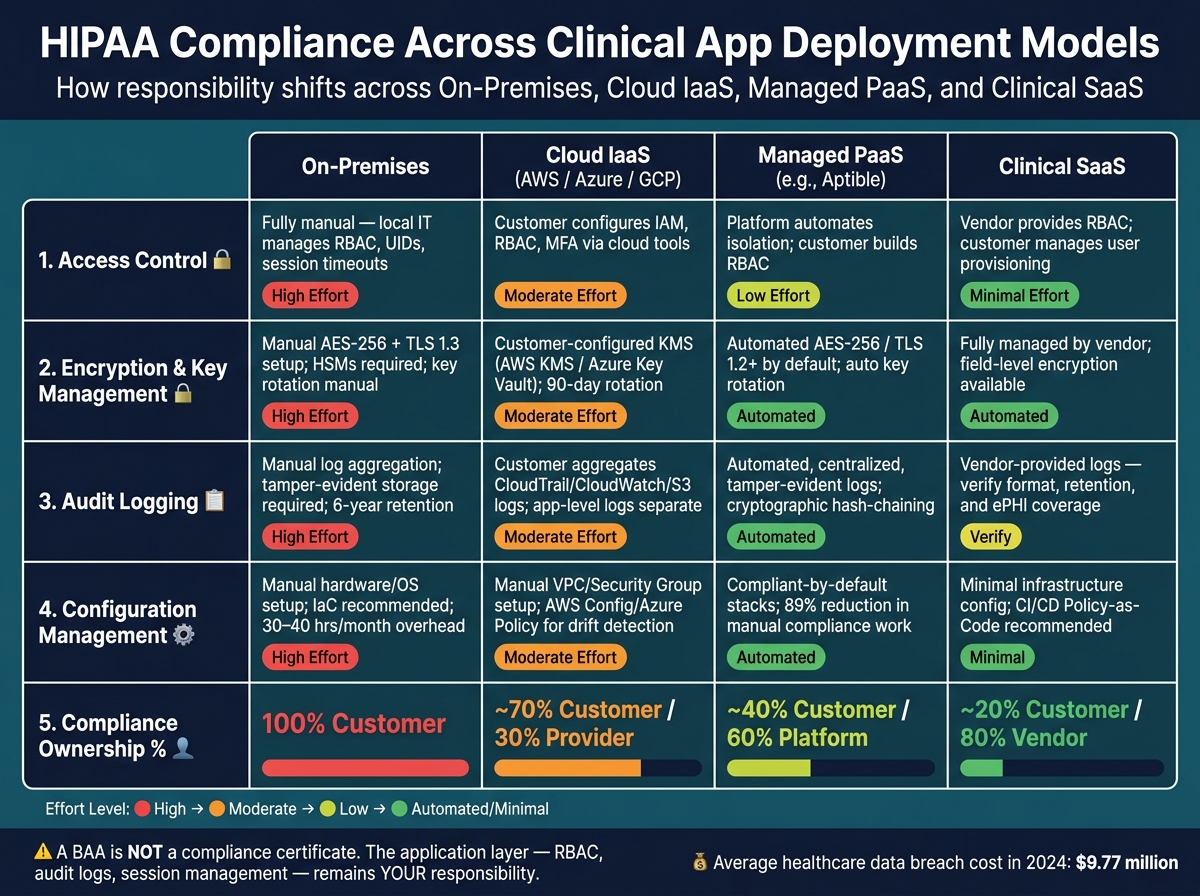
HIPAA Compliance: Deployment Model Comparison Guide
How to deploy a HIPAA compliant full stack app on Azure
sbb-itb-535baee
1. On-Premises Deployment
In an on-premises setup, your organization takes full control of the compliance stack - from physical servers to application code. There's no shared responsibility here; it’s all on you.
But with full control comes added risk. The HHS Office for Civil Rights (OCR) has repeatedly penalized organizations for failing to manage access controls properly. A striking example: In February 2017, Memorial Healthcare System faced a $5.5 million penalty after investigators discovered employees were accessing ePHI using credentials from a former staff member. The root cause? Failing to revoke credentials and enforce unique user identifiers [1].
Access control is often where on-premises deployments stumble. HIPAA mandates that every user must have a unique identifier - shared logins like "admin" or "support" are a big no-no. Role-based access control (RBAC) is also non-negotiable, and it must extend beyond the user interface to include API and database layers. For instance, a billing coordinator should never be able to access clinical notes, even through a direct database query. Additionally, session timeouts are critical; most clinical workstations follow the widely accepted standard of a 15-minute timeout [3].
Encryption in an on-premises environment requires careful planning. The baseline standards are AES-256 for data at rest and TLS 1.3 (or at least 1.2) for data in transit. And as of January 2025, encryption has shifted from being "addressable" to "required" under the updated Security Rule. This means organizations can no longer opt out by documenting alternative controls [5]. For managing encryption keys, Hardware Security Modules (HSMs) are the gold standard. Storing keys in environment variables or hardcoding them into application code is a compliance red flag that auditors will not overlook.
Audit logging is another must-have. Every access to ePHI must be logged, capturing details like the user, the record accessed, the action taken, the timestamp, the source IP, and the device. These logs need to be stored in a tamper-evident, centralized location separate from general application logs and retained for at least six years [1]. As Mat Steinlin, Head of Information Security at Aptible, aptly stated:
"Verbal processes don't hold up in audits." [4]
Then there’s the issue of configuration drift, a frequent challenge in on-premises setups. Without automation, security settings can change manually over time, leading to inconsistencies. Adopting Infrastructure-as-Code (IaC) can help enforce guardrails, such as requiring MFA or blocking unencrypted storage, ensuring configurations remain auditable and consistent. However, managing compliance manually can be a massive time sink, taking up 30 to 40 hours of engineering time each month just for configuration upkeep and documentation [2]. This operational burden is a key factor to consider when weighing an on-premises deployment.
Next, we’ll dive into HIPAA-ready cloud infrastructure and how it stacks up for comparison.
2. HIPAA-Ready Cloud Infrastructure
When moving clinical workloads to cloud platforms like AWS, Azure, or GCP, it’s essential to understand the shared responsibility model. While the cloud provider secures the physical hardware and underlying infrastructure, you're responsible for securing everything above that layer - things like access controls, identity management, and application-level security. Misinterpreting this division of responsibilities can lead to costly mistakes. This is especially true when managing third-party risk across your digital supply chain.
As Kevin Yamazaki, CEO of Sidebench, warns:
"The assumption that 'we use AWS with a BAA, so we're HIPAA compliant' is the most expensive misconception in health tech." [1]
Signing a Business Associate Agreement (BAA) with your cloud provider is just the starting point. Cloud platforms simplify many operational tasks compared to on-premises systems, but access controls remain a critical focus. You’ll need unique user IDs, layered role-based access control (RBAC), and strict session timeouts, all of which can be enforced effectively with integrated cloud tools. Beyond access controls, cloud providers also offer tools that enhance encryption, audit logging, and configuration management.
Encryption and Key Management
Encryption is one area where cloud infrastructure offers significant advantages. Instead of managing physical hardware security modules (HSMs), services like AWS Key Management Service (KMS) or Azure Key Vault handle key storage, rotation, and audit logging automatically. These tools use envelope encryption, where a data encryption key (DEK) encrypts the data, and a key encryption key (KEK) secures the DEK. This setup enables seamless key rotation without the operational headaches of re-encrypting large datasets - a common pain point in on-prem setups.
With encryption now classified as required under the January 2025 Security Rule update, automated key rotation every 90 days has become the standard for high-sensitivity workloads [5]. However, one important detail to keep in mind: ensure that your KMS and encryption services are tied to regions covered by your BAA, as not all regions may qualify under the agreement [5].
Audit Logging
Cloud-native tools like AWS CloudTrail, Azure Monitor, and GCP Cloud Audit Logs automatically track infrastructure-level events, such as server startups or changes to IAM policies. However, these logs don't cover everything. For clinical applications, you'll need a dedicated audit trail to track user-level activity, particularly access to electronic protected health information (ePHI). This level of oversight is equally critical for medical devices that process patient data. This data must be stored in a tamper-evident, centralized system and retained for at least six years. For example, AWS offers S3 Object Lock with KMS encryption to meet these requirements [2].
To complement logging, real-time threat detection tools like AWS GuardDuty or Microsoft Defender for Cloud can identify anomalies, such as unusual login attempts or bulk data downloads, before they escalate into breaches.
Preventing Configuration Drift
Even with robust logging and encryption, automated policies are essential to maintain compliance. Tools like AWS Config and Azure Policy can automatically detect and remediate non-compliant changes, reducing manual intervention. This automation can save up to 40 hours of engineering work each month [2].
3. Managed HIPAA-Compliant Platforms
Managed HIPAA-compliant platforms take a completely different approach compared to raw cloud infrastructure. Instead of requiring teams to configure security features from scratch, these platforms come with pre-configured environments where essential safeguards - like encryption, access management, and audit logging - are already built in. This reduces manual work and lowers the risk of compliance gaps. Mat Steinlin, Head of Information Security at Aptible, puts it clearly:
"A BAA is not the same as compliance. It establishes legal accountability and allocates responsibility. It doesn't tell you whether the work has been done." [2]
With managed platforms, much of the heavy lifting for compliance happens at the infrastructure and platform levels. This allows your team to focus on securely setting up your application, rather than building an entire security framework from the ground up.
Access Control
These platforms enforce critical access controls right out of the box. Features like unique user IDs, role-based access control (RBAC), multi-factor authentication (MFA), and session timeouts are implemented by default. Permissions are fine-tuned so that clinicians only see the patient records relevant to their work, while billing staff are limited to the information needed for claims processing. Sessions automatically log off after 15 minutes of inactivity, and sensitive operations are secured with HTTPS-only cookies and rotating tokens.
Encryption and Key Management
Encryption setup is automated on managed platforms, removing the need for manual configuration. Data is encrypted both at rest and in transit using TLS 1.2+ protocols, with TLS enforced at the platform endpoint to prevent unencrypted transmissions. Other features, like automated key rotation and secure key isolation, ensure that master keys remain protected and aren't exposed in environment variables or source code. For highly sensitive data - such as Social Security numbers or clinical notes - field-level encryption adds an extra layer of security beyond disk-level encryption.
These encryption measures work hand-in-hand with advanced audit logging to maintain a secure environment.
Audit Logging and Monitoring
The HIPAA Security Rule (45 CFR 164.312(b)) mandates robust audit controls. Managed platforms go beyond basic infrastructure-level logging by integrating application-level audit logs. These logs capture key events involving electronic protected health information (ePHI), such as access, downloads, and record modifications. They also track authentication attempts, role changes, and emergency "break-glass" access. For instance, the AXON platform, used by Cortica, identified an insider threat attempt within just 72 hours of deployment through its detailed audit logs [1]. Logs are stored for at least six years in tamper-evident systems, with some platforms using cryptographic hash-chaining to ensure log integrity. To manage storage costs, recent logs are kept in hot storage, while older records are archived in cold storage.
Configuration Management
One of the standout benefits of managed platforms is their ability to reduce configuration drift. By maintaining control over the underlying infrastructure, these platforms ensure that the compliance baseline remains consistent over time. For example, Sidebench partnered with PCIHIPAA (later acquired by Rectangle Health) to embed a 47-control HIPAA framework directly into the application architecture. This approach cut manual compliance work by 89% while keeping the system audit-ready with immutable logs [1] [3].
Solutions like Censinet RiskOps™ exemplify how managed platforms integrate these robust security measures into their core functionality. By doing so, healthcare organizations can concentrate on delivering quality care while ensuring that sensitive data remains protected. The next section will explore how Clinical SaaS Applications further simplify compliance efforts.
4. Clinical SaaS Applications
Clinical SaaS applications play a unique role in healthcare technology. Here, the vendor handles infrastructure and platform components, while the customer is responsible for securing the application layer. This division is essential for meeting HIPAA requirements. As the Cloud Security Alliance explains:
"No cloud platform is inherently HIPAA compliant... compliance comes not from having a certain kind of technology or platform, but rather from configuring the platform in the appropriate ways." [1]
Access Control
HIPAA demands that SaaS applications assign unique identifiers to every user - shared "admin" logins are not allowed. To streamline access, integrate with an enterprise Identity Provider (IdP) using Single Sign-On (SSO). This allows clinicians to use a single set of secure credentials across tools. Role-Based Access Control (RBAC) ensures users only see data relevant to their role. For example, a nurse practitioner can access their patients' records, while a billing coordinator views claims data. Emergency access, often called "break-glass" access, must be documented, logged, and reviewed each time it's used.
Encryption and Key Management
Encryption is a mandatory HIPAA standard (§ 164.312(a)(iv)). The recommended baseline is AES-256 for data at rest and TLS 1.3 for data in transit, especially since SaaS environments often involve shared infrastructure. Advanced SaaS applications may also use field-level encryption to protect sensitive details like clinical notes or Social Security numbers. Encryption keys should be managed through a dedicated key management service, rotated every 90 days, and never stored in insecure locations like environment variables or source code. Garvita Amin, a Healthcare Technology Expert at VertiComply, highlights its importance:
"Encryption is the single control that turns a HIPAA breach into a non-event. The Breach Notification Rule has a safe harbor for properly encrypted PHI." [5]
Audit Logging and Monitoring
SaaS applications must log detailed application-level events, such as who accessed a patient record, what data was exported, or when role changes occurred. These logs should be stored in tamper-resistant environments and retained for at least six years. Logs must include consistent fields like user ID, timestamp, action type, affected record, and source IP to support audits and forensic investigations. Alerts should be tailored to clinical scenarios, such as flagging unusual queries by a billing user accessing unrelated departments. This detailed logging also ties into broader configuration management efforts.
Configuration Management
Embedding compliance controls directly into CI/CD pipelines helps reduce configuration drift in SaaS environments. Tools like Infrastructure-as-Code and Policy-as-Code can automatically reject non-compliant configurations before they reach production. A comprehensive Business Associate Agreement (BAA) is crucial to ensure every service involved in SaaS deployment adheres to HIPAA - not just the primary cloud provider [1] [2]. Platforms like Censinet RiskOps™ assist healthcare organizations in continuously evaluating and managing the risk profiles of their clinical SaaS vendors, ensuring compliance throughout deployment.
Pros and Cons of Each Deployment Model
This section offers a side-by-side look at the advantages and drawbacks of various deployment models, helping you weigh their suitability based on factors like control, cost, and compliance responsibilities. Your choice will hinge on your organization's technical capacity, budget, and tolerance for risk.
On-premises gives you total control over physical, network, and application layers. However, this comes with a hefty price tag in terms of resources and compliance management. Since there’s no shared responsibility model, it’s the most demanding option when it comes to meeting HIPAA requirements.
HIPAA-ready cloud infrastructure (IaaS, such as AWS or Azure) shifts the burden of physical security to the provider. But your team still needs to manage critical tasks like IAM policies, VPC isolation, KMS encryption, and centralized logging. Keep in mind: signing a BAA doesn’t guarantee compliance. Setting up and maintaining a HIPAA-compliant system on your own significantly increases engineering workload.
Managed platforms (PaaS, like Aptible) ease this workload by automating key tasks such as encryption, logging, and network isolation. As Mat Steinlin, Head of Information Security at Aptible, points out:
"The distinction between 'HIPAA-eligible infrastructure' and 'HIPAA-compliant by default' is one of the more consequential architectural decisions early-stage health tech companies make." [2]
On the flip side, managed platforms offer less granular control over the infrastructure. Clinical SaaS takes this a step further, with the vendor handling nearly everything. Your team’s responsibilities are limited to user provisioning, access reviews, and managing MFA. However, because you rely heavily on the vendor, third-party audits like SOC 2 Type II are critical to ensure HIPAA compliance.
Here’s a breakdown of how these models address the four core areas of HIPAA compliance:
| On-Premises | HIPAA-Ready IaaS | Managed PaaS | Clinical SaaS | |
|---|---|---|---|---|
| Access Control | Fully managed by local IT | Customer configures IAM & RBAC | Platform automates isolation; customer builds RBAC | Vendor provides RBAC; customer manages users |
| Encryption & Key Management | Manual, local IT managed | Customer-configured KMS | Automated AES-256 / TLS 1.2+ by default | Fully managed by vendor |
| Audit Logging | Manual log aggregation | Customer must aggregate CloudWatch/S3 logs | Automated, centralized, tamper-evident | Vendor-provided logs (verify format and retention) |
| Configuration Management | Manual hardware/OS setup | Manual VPC/Security Group setup | Automated "compliant by default" stacks | Minimal infrastructure configuration required |
| Compliance Ownership | 100% customer | Shared (customer owns most layers) | Shared (platform covers more layers) | Mostly vendor (customer owns user policy) |
Each model has its strengths and trade-offs, and the right choice depends on your specific needs and resources.
Conclusion
There's no one-size-fits-all deployment model for every organization. The right choice depends on factors like your team's technical expertise, budget, and the level of compliance responsibility you're ready to handle.
On-premises offers complete control but places the full compliance burden on your team. Cloud IaaS shifts physical security to the provider but requires 30–40 engineering hours monthly to maintain HIPAA-level configurations, with operational costs ranging from $3,000 to $6,000. Managed platforms ease this burden with pre-configured controls, while clinical SaaS accelerates compliance but may reduce visibility into how data is handled.
One critical takeaway from these comparisons is this: a BAA is not a compliance certificate. As Kevin Yamazaki, CEO & Partner at Sidebench, explains:
"The assumption that 'we use AWS with a BAA, so we're HIPAA compliant' is the most expensive misconception in health tech." [1]
No matter what your vendor signs, the application layer - including audit logging, RBAC, and session management - remains your responsibility. With healthcare data breaches averaging $9.77 million per incident in 2024, this misunderstanding can have serious financial consequences [1].
HIPAA compliance should be treated as an ongoing, role-specific discipline. Assign control ownership to specific roles, scrutinize vendors on their application-layer controls instead of relying on generic certifications, and confirm that audit logs meet the six-year retention requirement [1][2]. Tools like Censinet RiskOps™ support this continuous approach by simplifying third-party risk assessments and ensuring clear visibility into vendor compliance for clinical applications and beyond.
FAQs
What do I still own for HIPAA if my vendor signs a BAA?
Signing a Business Associate Agreement (BAA) doesn’t mean you can hand off your HIPAA compliance responsibilities to the vendor. While the vendor handles securing the infrastructure, you are still responsible for ensuring application-level security. That includes managing access controls, implementing encryption, conducting risk analyses, and monitoring audit logs. Think of a BAA as a contractual safety net - it’s there to outline responsibilities, but it’s up to you to ensure your processes and data handling practices align with HIPAA standards. Failing to do so could lead to penalties.
How can I prove my audit logs are tamper-evident for 6 years?
To keep audit logs secure and intact for six years, rely on immutable storage solutions such as write-once, read-many (WORM) systems. These systems block unauthorized alterations, ensuring logs remain unchanged. Strengthen this by using cryptographic techniques like hash chaining or digital signatures to confirm the logs' integrity. On top of that, implement strict access controls, thoroughly document your procedures, and run regular automated checks to verify log integrity and compliance with retention policies.
Which deployment model best reduces compliance work for a small team?
For smaller teams, a Software as a Service (SaaS) model can significantly lighten the compliance workload. With SaaS, the provider takes care of the physical infrastructure, operating systems, and runtime environments, allowing your team to concentrate on managing user access, data inputs, and retention policies. Although your team still oversees data and identity configurations, this setup eliminates much of the hassle tied to infrastructure and ongoing maintenance. Tools like Censinet RiskOps™ can make risk assessments and compliance even easier.
