
When a cyberattack hits a healthcare team, the first goal is simple: stop the threat without stopping patient care. Under HIPAA, that means I need to isolate affected systems, lock down access, keep care moving with downtime procedures, save evidence, and document every step for breach review and notice duties. If unsecured PHI is involved, large breaches may need notice within 60 days.
Here’s the short version of what matters most:
- Put patient care first. Check the EHR, e-prescribing, PACS, medication workflows, and life-safety devices before making major IT changes.
- Isolate, don’t wipe. Quarantine hosts, suspend compromised accounts, and block known bad IPs, domains, and file hashes.
- Treat it as a possible ePHI event early. Scope affected systems, users, integrations, and vendors until logs show otherwise.
- Save proof before cleanup. Keep logs, timelines, memory or disk images, and chain-of-custody records.
- Use downtime plans. Paper charting, manual medication checks, and fallback workflows should stay in place until systems are cleared.
- Recover in a controlled way. Restore only from offline or immutable backups, scan them, verify dates and checksums, and test in isolation first.
- Close gaps after the event. Patch systems, tighten access, review vendor links, update policies, and map findings back to HIPAA safeguards.
A simple way to think about it: first minutes = contain spread and protect care; next days = restore safely and document everything.
| Phase | Main goal | What I focus on |
|---|---|---|
| First minutes/hours | Stop spread and protect patients | Isolate systems, restrict access, start downtime procedures, save logs |
| Recovery | Return systems safely | Restore from clean backups, patch, validate, watch for reinfection |
| Post-incident review | Support HIPAA review | Build timeline, assess PHI exposure, map fixes to safeguards |
If I prepare roles, playbooks, logging, backups, and device inventories ahead of time, containment gets cleaner when the pressure is on.
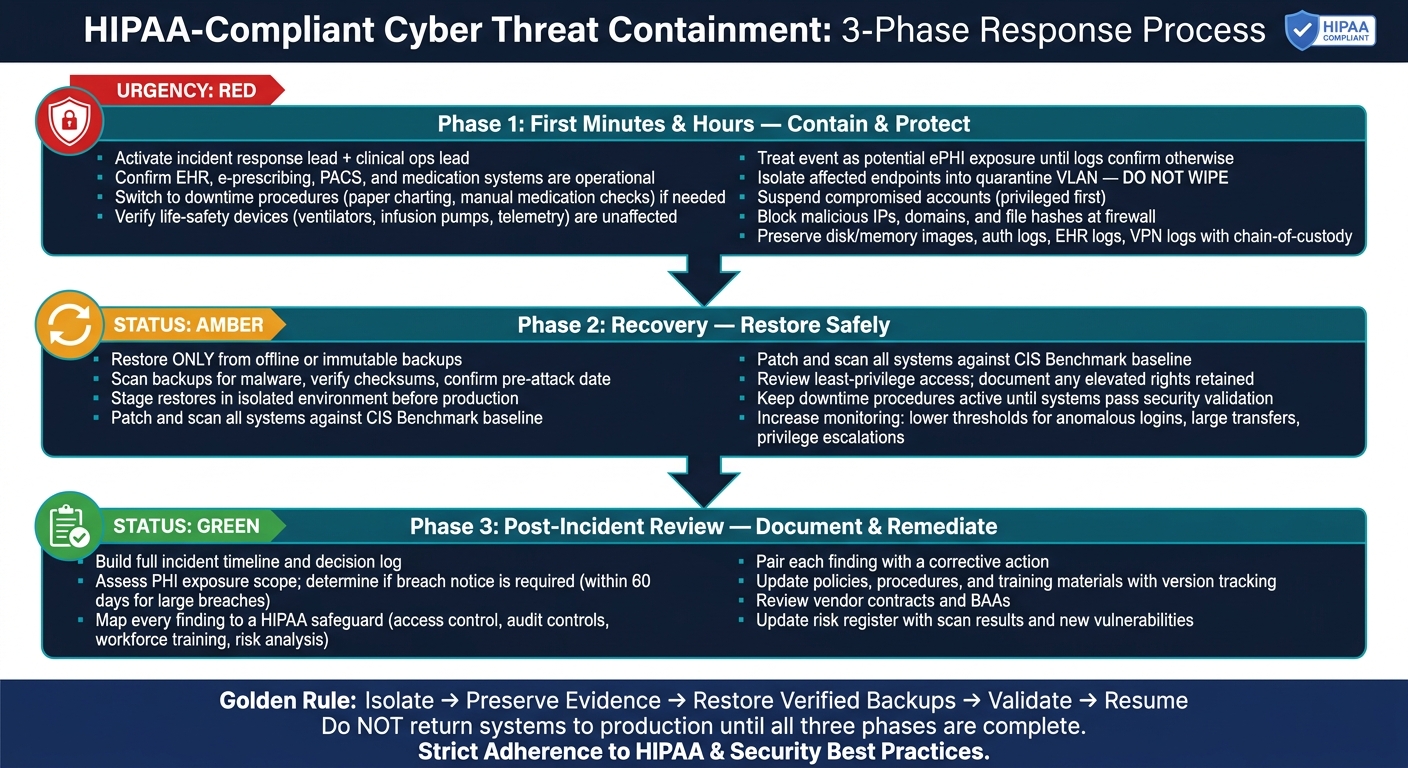
HIPAA-Compliant Cyber Threat Containment: 3-Phase Response Process
Checklist 1: Map HIPAA Safeguards to Containment Readiness
Before an incident hits, your team needs to know if its HIPAA safeguards can do more than sit on paper. They need to help you contain damage fast. That means tested controls, clear ownership, and plain authority to isolate systems, restrict access, and preserve evidence when things go sideways.
Use this checklist to confirm each safeguard supports those actions.
Administrative Safeguards to Verify Before an Incident
Start with a current risk analysis that flags high-risk ePHI systems and workflows.[5] If that work isn't up to date, teams can lose precious time figuring out what matters most.
Make sure a named Security Officer or incident lead is documented with current contact details and clear authority to order containment steps, such as isolating systems or disabling compromised accounts.[3][5][7] It also helps to set role-based escalation paths with alternates so someone is always on call, day or night.
Build scenario-based playbooks for ransomware, lost devices, misdirected PHI, and EHR compromise.[1][2][7] Each one should spell out who decides what, what must be documented, and when legal hold starts so logs and system images are preserved before any reimaging or cleanup begins.[1][2][7]
Your contingency plan should also cover backup, recovery, emergency mode operations, testing, revision, and criticality analysis.[1][10][6] If that plan hasn't been tested, it's hard to count on it under pressure.
Administrative prep only goes so far. The plan still needs technical controls that can carry it out.
Technical and Physical Controls That Support Fast Containment
Use unique user IDs and role-based access so you can disable one compromised account without knocking other users offline. Pair that with MFA for remote access, VPNs, and privileged accounts. If credentials are stolen, that setup makes revocation much cleaner during containment.
For EHR and other clinical systems, use time-limited break-glass access with immediate audit review.[9][11][6] That gives care teams the access they need while still keeping a close eye on misuse. At the same time, maintain comprehensive audit logging across EHRs, identity systems, and network tools. Keep those logs centrally aggregated and time-synchronized so investigators can track unauthorized access and lateral movement without blind spots.[2][8]
Physical access controls matter too. Badge-controlled entry to server rooms and network closets can help you lock things down fast if tampering is on the table. Add automatic logoff, screen locks, and limits on local ePHI storage.[4][8] Keep a current device inventory, and encrypt mobile devices so you can size up lost or stolen equipment right away.[4][8]
The table below shows how each safeguard supports containment.
| Safeguard Category | Key Control | Containment Benefit |
|---|---|---|
| Administrative | Named Security Officer or incident lead with documented contact info | Clear authority for isolation decisions |
| Administrative | Written incident playbooks by scenario | Consistent, fast response across teams |
| Administrative | Tested Contingency Plan (all five elements) | Care continuity during system isolation |
| Technical | Role-based access + MFA | Quick account revocation without broad disruption |
| Technical | Break-glass procedures with audit review | Maintains care access while restricting threat |
| Technical | Centralized audit logging | Traceable evidence for breach assessment |
| Physical | Badge-controlled server room access | Rapid lockdown if physical threat is involved |
| Physical | Current device inventory + mobile device encryption | Immediate scope assessment for lost or stolen devices |
Checklist 2: Immediate Containment Steps in the First Minutes and Hours
The first few minutes after detection shape the rest of the incident. Move fast, but don’t knock clinical care off balance or destroy evidence in the process. A blind shutdown can put patients at risk and make HIPAA problems worse. Bring in the incident response lead and the clinical operations lead right away so each move lines up with patient care. Start with care continuity, then narrow down what may have been exposed.
HHS guidance says teams should determine the scope, origin, whether the incident is ongoing or has propagated, and how it occurred before choosing containment actions. That context drives every step that comes next.
Stabilize Patient Care and Scope Possible ePHI Exposure
Patient safety comes first. Check right away that core systems like the EHR, e-prescribing, PACS, and medication administration are still available for critical workflows. If any of them are degraded, switch to downtime procedures such as paper order sets, whiteboard tracking, and manual medication checks. Also confirm that life-safety devices like ventilators, infusion pumps, and telemetry monitors are still working and are not shut down during IT containment.
At the same time, begin scoping possible ePHI exposure. If the facts aren’t clear yet, treat the event as a potential ePHI exposure until logs and vendor checks rule that out. Look beyond the EHR. That means including any compromised system that handles ePHI, such as nurse workstations, cloud fax integrations, lab instrument interfaces, and AI triage tools. Document the affected systems, the impact on patient care, and the time of detection for later breach review. Once the scope is clearer, isolate only the systems that pose a spread or exposure risk.
Isolate Systems and Restrict Access Without Destroying Evidence
The rule here is simple: isolate, do not wipe. Powering off or wiping systems can erase volatile evidence needed for breach review and HIPAA documentation.
Logically isolate affected endpoints and servers by removing them from clinical VLANs or moving them into a quarantine segment. Suspend or lock compromised accounts, starting with privileged accounts, remote access credentials, and any account that can reach ePHI repositories. Do that in coordination with supervisors so clinical coverage stays in place. Block known malicious IPs, domains, and file hashes at firewalls and endpoint tools, and log each block action.
Before any reimaging or cleanup starts, preserve evidence. Capture disk or memory images from critical hosts, export authentication logs, EHR access logs, VPN logs, email logs, and firewall logs, and store everything in a secured repository with chain-of-custody records. If you suspect a vendor-hosted integration or data feed was used for exfiltration, pause it first and log the time, reason, and affected data flows. Record every containment step, since those details matter later for breach review and notification decisions.
Short-Term vs. Long-Term Containment: Action Table
Use the table below to separate what needs to happen NOW from what can wait a bit.
| Action | Timeframe | System Impact | Owner | HIPAA Requirement |
|---|---|---|---|---|
| Suspend compromised accounts | Immediate | Access loss for attacker; may affect tied users | IAM / Security | Limits unauthorized access |
| Quarantine affected endpoints | Immediate | Stops lateral movement; host preserved for forensics | IT / Security Operations | Supports containment while preserving evidence |
| Block malicious IPs, domains, hashes | Immediate | Reduces re-entry and exfiltration paths | Network Security | Stops propagation and mitigates exposure |
| Activate downtime procedures | Immediate | Shifts clinical workflows to manual processes | Clinical Ops / IT | Supports availability and contingency operations |
| Preserve logs, emails, disk images | Immediate | No operational impact if handled correctly | Forensics / IR Lead | Supports investigation and documentation |
| Pause risky data feeds or integrations | Immediate–short-term | May interrupt non-critical data flows | Integration / Security | Prevents unauthorized ePHI disclosure |
| Redesign network segmentation | Days to weeks | Broader connectivity changes across departments | Network / Infrastructure | Long-term containment and spread reduction |
| Update access control policies | Days to weeks | Minimal immediate disruption | Security / Compliance | Sustained risk reduction and remediation |
| Revise vendor contracts and BAAs | Weeks | No operational impact | Legal / Compliance | Vendor risk and breach-response obligations |
Checklist 3: Sustained Containment, Recovery, and Documentation
Once the threat is contained, the job shifts from isolation to proof. You need to confirm recovery, shut any paths the attacker could still use, and document each step for HIPAA review.
Harden the Environment During Recovery
Before any system goes back into production, patch it, scan it, and check its settings against an approved baseline, such as a CIS Benchmark. Start with the systems that matter most:
- Internet-facing assets
- EHRs
- Medical device gateways
Run scans during maintenance windows so you don’t disrupt live clinical work. Then add the results to the risk register.
This is also the right time to review least-privilege access. Take a close look at domain admin accounts, application service accounts, and any privileged clinical roles used during the incident. If any elevated rights stay in place, write down why.
For restoration, stick to a tight process:
- Restore only from offline or immutable backups.
- Scan backups for malware, verify checksums, and confirm they predate the attack window.
- Stage restores in an isolated environment before returning systems to production.
After systems are restored, turn up monitoring. Lower alert thresholds for anomalous logins, large data transfers, privilege escalations, and unexpected changes to security tools. That extra watch period can help you spot reinfection or leftover attacker activity before it spreads again.
Even after a restore looks clean, keep downtime operations in place until production systems are fully cleared.
Run Contingency Operations and Complete the Post-Incident Review
Downtime operations should stay active until systems pass security validation. That includes approved downtime workflows like paper documentation, manual order entry, and fallback steps for medication administration and diagnostic reporting. Keep those procedures in place the whole time.
After recovery, reconcile downtime data with care. A rushed cleanup can create a second problem. Track plan performance using a few plain measures: activation speed, documentation accuracy, and reconciliation error rate.
A post-incident review is required for HIPAA-aligned recovery and future prevention. Build that review around the timeline, decision log, corrective actions, and HIPAA safeguard mapping.
The decision log should show who made key calls, what options were considered, and how patient safety and HIPAA duties shaped those choices. Then map each finding to a HIPAA safeguard, such as access control, audit controls, workforce training, or risk analysis. Pair each finding with the corrective action tied to it.
OCR has repeatedly cited failures in ongoing risk analysis, documentation, and access control after incidents[1], so this mapping needs to be direct and easy to follow. Update policies, procedures, and training materials based on what the incident exposed, and version each update with the finding it fixes.
Use the review to guide the next round of policy, training, and control changes.
sbb-itb-535baee
Using Censinet to Support HIPAA-Aligned Containment Decisions
Recovery should shape the next containment move. When teams already know which vendors, devices, applications, and suppliers touch ePHI, they can act faster. That kind of pre-incident visibility into ePHI-linked dependencies makes containment calls easier to make and easier to justify.
Censinet RiskOps™ puts third-party and enterprise risk data in one place for response planning. It supports third-party and enterprise risk assessments, along with shared risk tracking. A HIPAA-aligned risk analysis should cover asset inventories, network maps, threats, vulnerabilities, and risk ratings. Once an alert fires, that same inventory helps teams isolate affected systems with less delay.
During an active incident, this visibility helps teams decide what to isolate first and what falls within scope, while avoiding unnecessary disruption to patient care.
It also cuts down the back-and-forth with vendors during an incident. Human review still guides containment and compliance decisions. Censinet AI™ helps speed vendor intake by summarizing questionnaires, evidence, integration details, and fourth-party exposure. For AI-related risk, it sends findings to designated stakeholders through a central dashboard that organizes policies, risks, and tasks, helping teams keep clear ownership during HIPAA-relevant incidents.
Conclusion: A Practical HIPAA Threat Containment Checklist for Healthcare
The last rule is simple: don’t put systems back into normal use until containment, evidence, and recovery checks are done. Good HIPAA containment comes down to prep work, fast isolation, preserving evidence, clear records, and recovery that’s been tested.
OCR breach reports and ransomware settlements show that weak containment still carries real enforcement risk.
This isn’t just theory. It’s day-to-day work. Containment works when teams isolate the threat, preserve evidence, and keep downtime procedures in place until systems are validated.
Recovery is done only after backups are verified, access is restored the right way, monitoring is active, and critical applications pass testing. Risk visibility across vendors, clinical applications, medical devices, and supply chains - using Censinet RiskOps™ - helps teams isolate affected connections faster and limit ePHI exposure. Containment works when teams move fast and keep visibility in place.
FAQs
What counts as unsecured PHI in an attack?
Under HIPAA, unsecured PHI means protected health information that has not been made unusable, unreadable, or indecipherable to unauthorized people using approved methods.
During an attack, PHI can count as unsecured if someone accesses it, discloses it, or compromises it in an improper way. And there’s an easy detail to miss here: even when files are encrypted at rest, they may still be treated as unsecured if a logged-in user’s system decrypts them automatically for viewing.
Who should decide when to isolate a clinical system?
Isolation decisions should be made by a cross-functional incident response team. That way, you can balance cybersecurity needs with patient safety instead of leaning too far in one direction.
Here’s the split in plain terms:
- IT and security teams manage technical containment
- Clinical leaders assess clinical impact
For medical and IoMT devices, biomedical engineering and IT security should share responsibility. A RACI matrix should spell out who makes the call, who supports the work, and how clinical continuity will be maintained.
How do we know a backup is safe to restore?
Confirm the backup is clean before recovery starts. Check its integrity and scan for malware, since threats may have spread into online backup systems. When you can, use immutable, offline backups.
Before you restore anything, test the backup in isolation to catch lingering threats and map system dependencies. Then verify interfaces and workflows with a controlled, phased recovery so you protect clinical safety and patient care.
