
If your mHealth app handles PHI, de-identification is not just “remove names and move on.” I need to choose Safe Harbor or Expert Determination, strip out direct and hidden identifiers, test for re-identification risk, and review the setup again when the app, SDKs, or vendors change.
Here’s the short version:
- PHI depends on context. If the app works for a covered entity or business associate, the data is often PHI.
- HIPAA gives me two paths.
- Safe Harbor: remove the 18 identifiers and avoid known re-identification risk.
- Expert Determination: use a qualified expert to show the risk is very low.
- Mobile apps add extra risk. Device IDs, IP addresses, push tokens, GPS data, URLs, timestamps, crash logs, screenshots, and free text can still point back to a person.
- Joined datasets can undo my cleanup. Wearables, EHR feeds, claims data, and analytics tools may look harmless alone but identify people when combined.
- Testing matters. I should check quasi-identifiers, small cell sizes, rare-condition groups, and odd event patterns before sharing data.
- Documentation matters too. I need a record of the method used, field-level handling, validation results, and approvals.
- This is not one-and-done. A new SDK, analytics tool, export, AI feature, or location service can change PHI scope and bring identifiers back in.
One stat says a lot: four random location points can identify 95% of people in a large dataset. That’s why mobile de-identification needs more than a database cleanup.
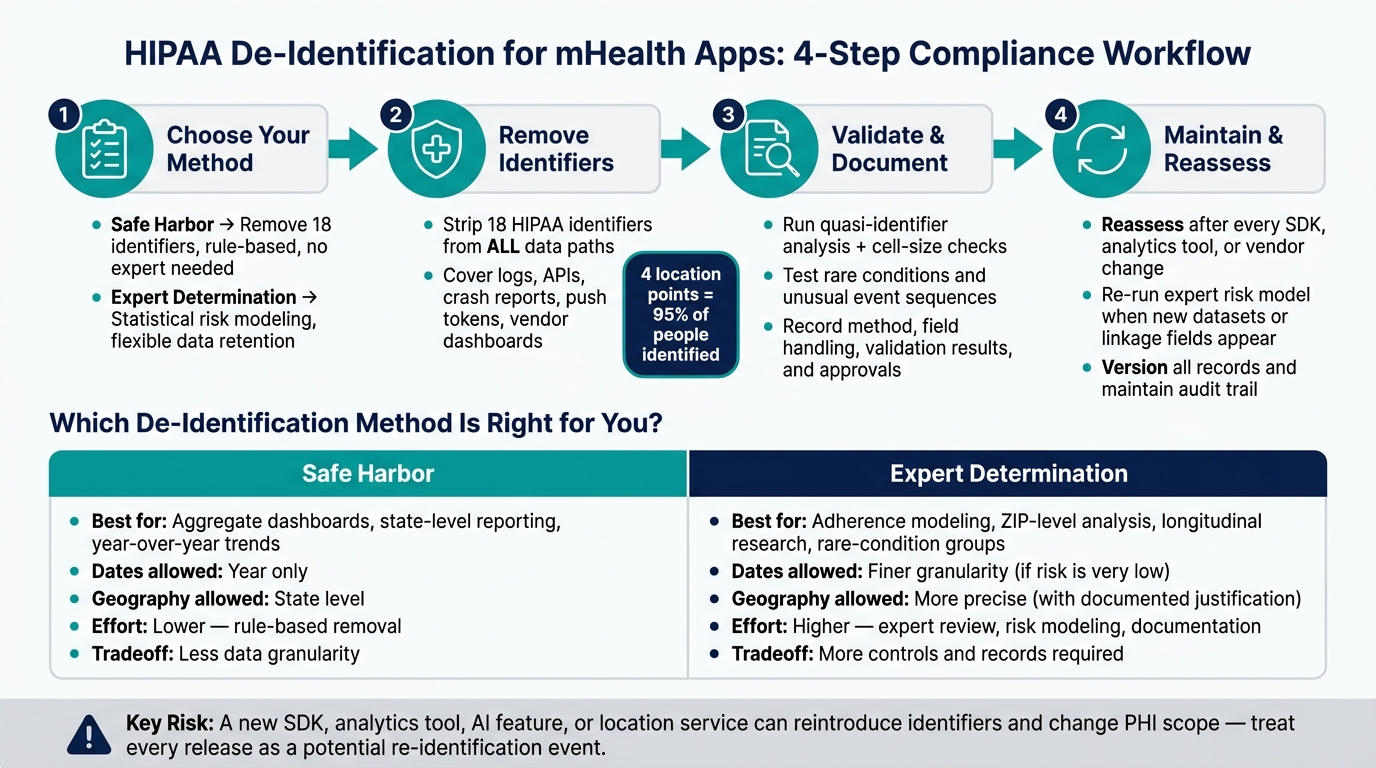
HIPAA De-Identification for mHealth Apps: 4-Step Compliance Workflow
HIPAA and De-Identification of PHI - Sometimes Required, Never Easy
sbb-itb-535baee
Quick comparison
| Method | Best when I need | Main tradeoff |
|---|---|---|
| Safe Harbor | Simple, rule-based removal | Less detail in dates and geography |
| Expert Determination | More detailed data for app features or research | More review, more records, more controls |
Bottom line: if my app needs only broad trends, Safe Harbor may work. If I need finer time, place, or linked-data detail, Expert Determination may be the better fit.
Step 1: Choose Safe Harbor or Expert Determination
HIPAA gives you two ways to de-identify data: Safe Harbor and Expert Determination. The right choice comes down to a simple question: how much detail does your mHealth app need to keep working well? [1][6][3][8][5]
Use Safe Harbor for rule-based identifier removal
Safe Harbor is the more direct option. You remove the 18 HIPAA identifiers and make sure you have no actual knowledge that the remaining data could be used to re-identify someone. You do not need a statistical review or an outside expert. [1][6][11][12][14][7]
This path makes sense when your analytics only need broad patterns, like:
- average engagement by age group
- state-level usage trends
- year-over-year summaries
There’s a catch, though. Safe Harbor only allows dates at the year level and geography at the state level. That can get in the way if your app depends on time-based coaching, local interventions, or more precise A/B testing. It also groups everyone age 90 and above into a single 90-or-older bucket. [1][6][5][15][16][17]
If those limits strip out too much of what your app needs, move to Expert Determination.
Use Expert Determination for complex app datasets
Expert Determination is more flexible. A qualified expert uses statistical and scientific methods on the dataset - such as generalization, aggregation, suppression, or perturbation - and documents that the risk of re-identification is very low for the intended users and uses. HHS does not give one fixed numeric cutoff. Instead, it looks at context: who will get the data, what outside datasets they might reach, and how realistic a linkage attack would be. [1][6][7][10][12][13][8][9]
That flexibility matters when you need more detailed data. An expert may be able to keep finer-grained information in place if the risk stays very low for the planned use. The downside is the extra work: expert review, formal risk modeling, and tighter documentation.
For longitudinal datasets, linked data from many sources, or apps built for rare-condition groups, that extra work is often worth it.
The table below shows where each method tends to fit.
Safe Harbor vs. Expert Determination: a side-by-side comparison
| Dimension | Safe Harbor | Expert Determination |
|---|---|---|
| Evidence required | Remove all 18 identifiers; confirm no actual knowledge of re-identification. | Expert documents very low re-identification risk for the specific use and users. |
| Data utility | More limited - year-only dates and state-level geography. | Higher - more granular data can stay when backed by transformations. |
| Implementation effort | Lower - rule-based identifier removal. | Higher - expert engagement, risk modeling, and supporting controls. |
| Common mHealth use cases | Aggregate dashboards, state-level reporting, year-over-year trend summaries. | Adherence modeling, ZIP-level social determinants analysis, longitudinal research. |
| Documentation needs | Data dictionaries, ETL specs, QA results, no re-identification policy. | Expert qualifications, risk metrics, transformation details, residual risk assessment. |
If removing all 18 identifiers still leaves your app’s main features and analytics in good shape, Safe Harbor is usually the simpler and lower-cost path. If your product or research depends on more detailed data - and you have the governance setup to back it up - Expert Determination gives you more room to work with a documented risk basis.
Step 2: Remove identifiers and address mHealth-specific risk
Before you strip out identifiers, map every path the data takes. In mHealth, the biggest risks often live outside the main database.
Remove the 18 HIPAA identifiers from app data
Don’t stop with the patient profile. Identifiers can linger in logs, exports, and third-party vendor tools. The 18 HIPAA identifiers include names, dates, contact details, account and certificate numbers, device and serial numbers, URLs, IP addresses, biometric data, photos, and any other code or trait that can point to a person. [1][19][22][5][23]
That means your review has to go past the production database. Check APIs, server logs, audit logs, push-notification payloads, crash reports, support tickets, analytics events, export files, backup snapshots, and vendor dashboards. A common problem is simple: data gets removed from the live app database, but the same data still sits in logs or third-party systems that were never part of the cleanup. [20][21][28][31]
Handle device IDs, IP addresses, location, URLs, and timestamps
Mobile apps generate a long trail of technical identifiers, including IMEI, MAC address, Android Advertising ID (GAID), IDFA, session IDs, IP addresses, and push tokens. Many of these are fixed and tied to one user or device, which makes them useful for tracking people across apps and networks. [24][25] They also show up all the time in mobile logs and SDK output, so scrub them anywhere they’re stored.
Location data needs extra care. One study found that just four random location points can uniquely identify 95% of people in a large anonymized dataset. [32] That’s a big deal. For most analytics use cases, city-level data or a rough geohash is enough. Remove location details from exports and support logs too.
Timestamps can create the same kind of risk. A pattern of medication check-ins or symptom entries may identify one person in a small group or a rare-disease cohort, even if no name is attached. Date shifting helps keep the time pattern while cutting the direct link back to the person. Use the lowest level of time detail your analytics team actually needs.
The other trouble spots are less obvious: free text and joined data.
Review free-text fields, telemetry, and linked datasets
Unstructured content is where de-identification often falls apart. Symptom notes, chatbot transcripts, user feedback, help-desk comments, and uploaded screenshots often include names, phone numbers, email addresses, provider names, appointment times, and other clues that point back to the user, even when the structured fields look clean. [20][26][27][29][31]
Screenshots are a headache on their own. They can show full names, portal alerts, or device settings right inside the image. That’s why redaction workflows need to cover attachments, not just typed text. OCR is often needed to find PHI inside images.
Telemetry and crash data can leak more than teams expect. Crash logs, stack traces, request payloads, and partial URLs may expose PHI, so use scrubbing, allowlists, and payload minimization in production. Linked datasets add another layer of risk. Medical devices like wearables, lab interfaces, EHR feeds, claims exports, and third-party analytics tools can all look safe on their own, then become identifying when combined. Map each join, then lock down re-linking with contract terms and access controls unless it is clearly authorized.
Here’s a quick reference for the identifier types that show up most often in mHealth apps:
| Identifier Type | mHealth Example | Handling Step |
|---|---|---|
| Direct | Name, email, phone number, full address | Remove or irreversibly redact |
| Direct (technical) | Device ID, IDFA/GAID, IP address, push token | Suppress or tokenize; keep any mapping table separate |
| Quasi | ZIP code, age band, coarse location, device model plus timestamp | Generalize, truncate, or aggregate |
| Quasi (temporal) | Exact medication reminder times, wearable reading sequences | Date-shift or truncate to lowest precision needed |
| Unstructured | Symptom notes, chatbot transcripts, crash dumps, screenshots | Content scanning, OCR redaction, manual review |
| Joined data | Wearable streams joined to EHR or claims exports | Map joins; restrict re-linkage by contract and access controls |
After cleanup, test the dataset for leftover identifiers before you document anything. The next step is to validate the scrubbed dataset and record the review.
Step 3: Validate the dataset and document the process
After cleanup, check that the fields you kept don't create a reasonable chance of re-identifying someone. Then write down what you did and what you found. That record becomes your baseline before any later sharing or analytics.
Test for residual re-identification risk
The main issue is simple: can the remaining fields, when combined, point to one person?
Start with a quasi-identifier analysis. Test whether common quasi-identifiers can identify a person when used together. Focus on fields that don't identify someone by themselves, such as age band, ZIP3, diagnosis category, device type, and event timestamps. Then run cell-size checks across those combinations. Use one documented minimum cell-size threshold for all tests, and run the checks again after any generalization or suppression. [38][18]
Pay close attention to rare conditions and unusual event sequences. Someone with a low-prevalence diagnosis, an uncommon device type, and an odd check-in pattern can still stand out, even after all 18 HIPAA identifiers are removed. Use pattern checks to flag outliers tied to rare diagnoses or unusual event sequences. Also test whether public information could link records back to named people. [4][35][37]
If you used Expert Determination, your validation needs to match the expert's documented method. In plain terms, that means:
- Run the same risk metrics the expert specified
- Apply the same thresholds
- Confirm that the controls the expert assumed are in place, such as access restrictions, data use agreements, and audit logging [6][3][33][36]
If the risk is still too high, add more generalization or suppression and test again before moving ahead.
Build de-identification documentation and approval records
Keep a structured record of the method, field handling, validation results, and approvals. At minimum, your documentation should cover:
| Document Component | What to Include |
|---|---|
| Data inventory | All fields collected, stored, or transmitted, with sensitivity classification |
| Chosen method | Safe Harbor or Expert Determination, with references to the relevant HIPAA rule in 45 C.F.R. §164.514(b) |
| Identifier treatment rules | How each of the 18 HIPAA identifiers - and mHealth-specific items like device IDs, IP addresses, and GPS coordinates - was handled |
| Attacker model | User population, geography, anticipated data linkages, and assumed attacker capabilities |
| Validation results | Cell-size distributions, quasi-identifier checks, linkage test outcomes, and any mitigations applied |
| Expert report (if used) | Expert's credentials, methodology, findings, risk conclusion, and recommended controls |
| Version history | Change log with effective dates, linked to release notes or change tickets |
| Approvals | Signed sign-offs from privacy, security, compliance, and legal stakeholders |
Treat this documentation as sensitive. Detailed parameters can reveal how the process works and make it easier for an attacker to reconstruct your de-identification method. [30] Store the records in a secured governance repository with access controls, and connect them to your risk register and data catalog entries. Keep the record versioned so later app, integration, or vendor changes can be checked against it.
Step 4: Keep de-identification controls current as the app and vendor ecosystem changes
Once you've validated and documented the baseline, connect de-identification to every release and every vendor change. Use the Step 3 validation record as the baseline for future change reviews. HHS/OCR has been clear that a de-identification determination may need to be revisited as product features, vendor connections, and outside datasets shift over time.[2][40] For mHealth apps, where feature releases, SDK updates, and vendor connections can change fast, de-identification needs to sit inside your change-management process.
Reassess after product, integration, or analytics changes
Any time your app adds a new capability or vendor connection, your data flows can shift in ways that change PHI scope. A new analytics SDK, wearable integration, location service, AI feature, messaging module, or another data path can bring in new identifiers or new linkage paths that were not part of the first de-identification review.[41][42][44][46]
Enforcement actions show how this can go wrong in practice. Third-party SDKs have been found to reintroduce advertising IDs, sensitive health events, and precise geolocation, which can break earlier assumptions that the data was non-identifiable.[42][43][45][46] The lesson is pretty simple: treat each new data path as a possible re-identification risk before launch.
Before release, run a fresh PHI scope and identifier review whenever you change:
- SDKs
- Analytics tools
- Advertising dependencies
- Wearable integrations
- Location services
- Export dependencies
These are the kinds of changes most likely to shift what data is collected, shared, or linked.[41][42][44][46]
If you used Expert Determination, rerun the expert's risk model whenever new outside datasets, finer timestamps, or added linkage fields show up.[34][39][40] Also, version each de-identification record and exported dataset. Then log the trigger, reviewer, method, and approval date so your audit trail stays clear. Healthcare organizations can use Censinet RiskOps™ to track PHI-related data flows, surface third-party and fourth-party dependencies, and build structured reassessment checkpoints into HIPAA-compliant vendor risk management workflows.
Conclusion: A practical workflow for HIPAA-aligned de-identification
This workflow only works if you check it again with each product and vendor change. For mHealth, HIPAA de-identification is not a one-time compliance checkpoint. It's a repeatable, documented process that keeps up with how the app and vendor ecosystem change in the real world.
FAQs
How do I know if my app data is PHI?
App data is PHI when it relates to health and includes details that can point to a specific person, either on their own or when combined with other data.
Direct identifiers include names, Social Security numbers, medical record numbers, phone numbers, and email addresses. Indirect identifiers, like ZIP codes, birth dates, gender, and diagnosis codes, can also turn data into PHI when they’re linked together. Under HIPAA, data remains PHI unless it has been properly de-identified through the Safe Harbor or Expert Determination methods.
When should I use Safe Harbor instead of Expert Determination?
Use Safe Harbor when you want a simple, rules-based path to compliance and can strip out all 18 HIPAA identifiers. It fits best for simple reporting, basic research, or public data sharing when fine-grained detail isn’t needed.
Choose Expert Determination when you need more detailed data for advanced analytics, AI training, or specialized research. It calls for a qualified expert and stronger documentation, but gives you more room to work while still protecting privacy.
What app changes trigger a new de-identification review?
De-identification isn’t a one-and-done task. Revisit it any time you make material changes to your data, systems, or security setup.
That includes cases like:
- updating or expanding a dataset
- linking data to a new external source
- sharing data with a new third-party vendor
- reusing data for a new AI model
- adopting new collection methods
- making major policy changes
- introducing new tools or systems
