
An IoMT incident plan should do 4 things fast: protect patients, keep care running, contain the threat, and meet reporting rules. In healthcare, a device attack is not just an IT issue. If a connected pump, monitor, or ventilator is hit, the first call is about patient safety - not just device cleanup.
Here’s the short version:
-
Start before an incident happens
- Set clear roles across security, clinical engineering, care teams, legal, and privacy using collaborative risk management
- Keep a current device inventory with model, firmware, network details, location, and care priority
- Define who can approve isolation, shutdown, or other device changes during patient care
-
Triage with safety first
- Confirm the alert
- Identify affected devices and where they are
- Check whether a device is in active use and whether PHI may be at risk
- Rate severity based on patient harm, care disruption, and data exposure
-
Contain with the least disruptive step
- Prefer network controls like firewall changes, switch-port isolation, or quarantine VLANs when care must continue
- Avoid device shutdown unless clinical staff confirm it is safe
- Save logs, traffic data, and config details before cleanup when possible
-
Restore in a controlled way
- Use manufacturer-approved patches, images, and reset steps
- Test devices in a quarantine segment before reconnecting to the live network
- Check alarms, therapy functions, interfaces, and data accuracy before return to use
- Close the loop
One stat sets the tone: 88% of hospital data breaches involve IoT devices. So if you’re building an IoMT response plan, the goal is simple: make cyber decisions without creating patient harm. The rest of the article walks through how I’d structure that plan from prep to recovery.
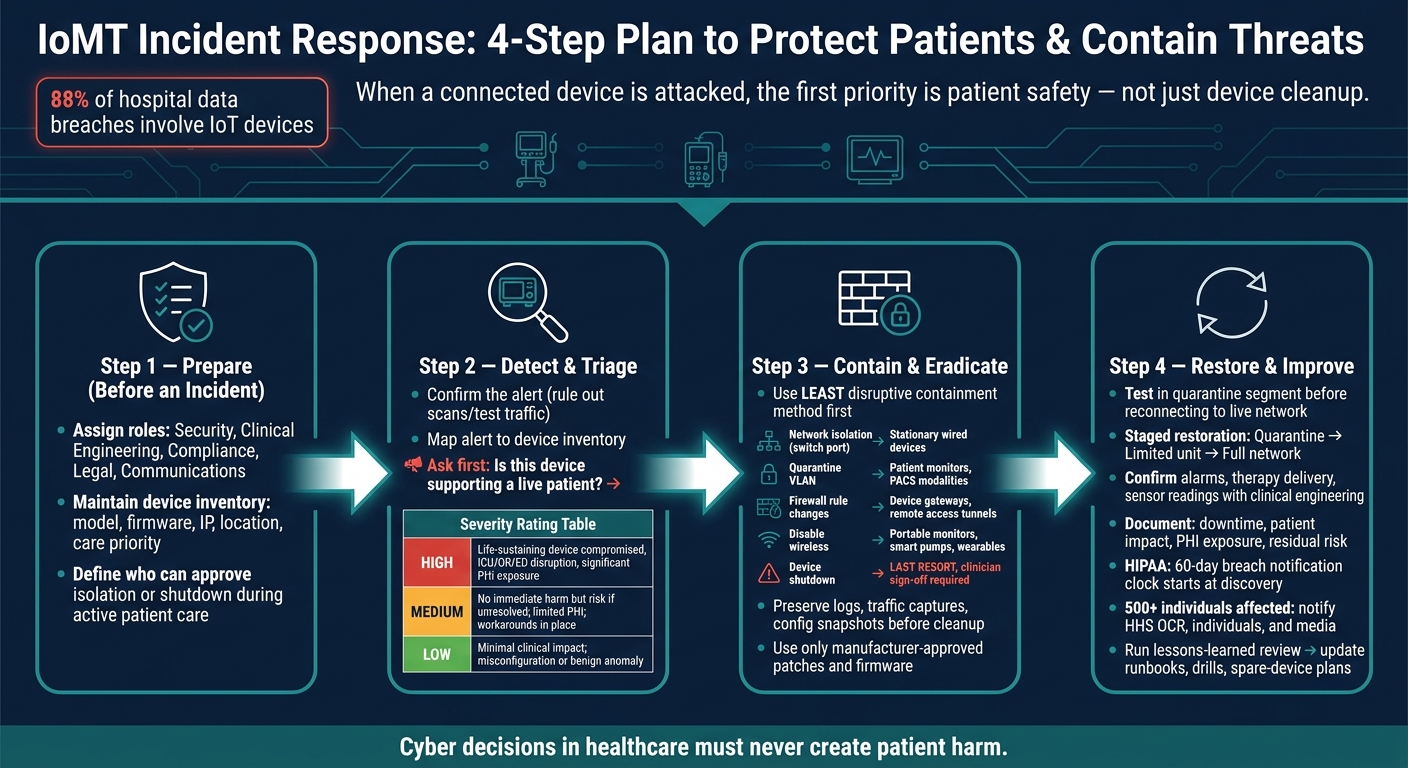
IoMT Incident Response: 4-Step Plan to Protect Patients & Contain Threats
How to Build an Incident Response Plan
Effective planning helps mitigate risks to patient care caused by clinical application downtime and device disruptions.
sbb-itb-535baee
Step 1: Establish Governance and Prepare Before an Incident
Good prep stops rushed calls when an incident is live. Before any alert comes in, set clear owners, approval paths, and up-to-date escalation contacts. When roles and inventory are already in place, the team can triage with facts instead of guesswork.
Assign Roles Across Security, Clinical Engineering, Compliance, and Care Teams
Set ownership across the groups that will need to act fast:
- Incident coordination
- Technical investigation
- Device expertise
- Clinical approval
- Privacy/compliance
- Legal
- Communications
Spell out who can approve device isolation during active care. That should include emergency override authority too. In the runbook, list on-call coverage and two contact methods for each role so no one is stuck hunting for a phone number when minutes matter.
Build and Maintain a Device Inventory With Severity Criteria
Keep a current, searchable inventory so responders can quickly see which devices are affected, where they are, and how critical they are to care.
The most useful inventory fields are shown below:
| Inventory Field | Why It Matters During an Incident |
|---|---|
| Device type, manufacturer, model number, serial number | Identifies whether life-support, diagnostic, or ancillary devices are involved; supports manufacturer advisory and recall checks |
| Firmware and software version | Confirms whether affected devices run a vulnerable version tied to a known CVE or vendor notice |
| IP address, MAC address, network segment | Enables rapid isolation or segmentation using network tools |
| Physical location (unit, floor, room) | Helps HTM and clinical staff locate devices and coordinate patient transfers |
| Owner department, use case, and clinical criticality | Prioritizes response based on patient acuity, workflow impact, and device risk level |
| Patch and update status | Determines whether unpatched vulnerabilities are a factor |
| End-of-life or vendor support status | Flags devices where manufacturer remediation may not be available |
Of course, an inventory is only useful if it stays accurate. Give HTM/biomedical engineering primary ownership of device records. Have IT and network teams own IP and segmentation data. Then tie firmware updates and network changes to inventory updates through change tickets. It also helps to run quarterly reconciliations between physical asset lists and network discovery data.
When an alert hits, this inventory should be your first source of truth in Step 2.
Connect Incident Readiness to Ongoing Risk Management
Incident response and risk management should feed each other, not sit in separate silos. Prior risk assessments, especially for third-party vendor risk management and device manufacturers, shape what your response looks like when something goes wrong.
Say you already know a certain infusion pump model has a history of unpatched vulnerabilities and slow manufacturer response. That changes the containment decision right away. You're not starting from zero. You already have context, and that context matters.
Response moves faster when device and vendor risk data is already centralized. Censinet RiskOps™ can centralize device, vendor, and prior risk assessment records so responders can use that history during containment decisions.
The next step is to confirm the alert and identify which devices and patients are affected.
Step 2: Detect and Triage the IoMT Incident
Use the inventory and role assignments to confirm the event and size up the risk before you contain anything. Then answer the next issue fast: does this affect a live patient, or is it limited to device uptime?
Confirm the Alert and Identify Affected Devices
Start by confirming the alert and ruling out scheduled scans or test traffic. Then map the alert to the device inventory. From there, figure out whether the issue is limited to medical devices on a clinical network segment or whether it looks like part of a broader IT event. [5][2]
Check for patterns across devices. Are you seeing the same model, vendor, patch level, department, or remote-access path pop up again and again? [5][1] Pull in clinical staff and biomedical engineering early. Bedside teams often notice odd device behavior before any dashboard lights up. [2][1]
Once you know which devices are affected, shift at once to patient impact.
Assess Patient Safety and Care Impact First
Before containment, ask the first and most important question: is the device supporting a patient right now? [2][1] If the device is life-sustaining, bring in the responsible clinician at once. Confirm whether there is a safe backup, how long a switch would take, and which risk is worse: keeping the device connected or taking it offline.
Define safety and safe operation to judge patient harm and triage vulnerabilities. [7]
Isolating a non-critical imaging workstation is usually a simple call. Disconnecting a ventilator from a patient is not. You also need to check scope: which departments are affected, how many patients may be touched, whether PHI is stored or sent by the device, and whether the event could spread into EHR or PACS systems. [5][2][6]
Severity at this stage decides whether the full response team needs to step in.
Document Initial Findings and Trigger Escalation
Open an incident record as soon as the event is confirmed. Record the detection time in local time and UTC, the source, affected device type and model, network segment, symptoms, scope, impact, suspected attack vector, and any actions already taken. [5][1][6]
Assign a preliminary severity rating based on patient safety, PHI exposure, and operational impact:
| Severity | Criteria |
|---|---|
| High | Life-sustaining devices compromised, major clinical service disruption (ICU, OR, ED), or significant PHI exposure |
| Medium | No immediate patient harm but risk of harm if unresolved; limited PHI or integrity issues; workarounds in place |
| Low | Minimal clinical impact; alerts tied to misconfiguration or benign anomalies with no patient or PHI risk |
Move faster here than you would in a standard IT incident. In a hospital, even a small number of affected devices can put patients at risk in a big way. [2][1][7] Activate the full team if any high-severity condition is met, if multiple devices of the same model show similar behavior, or if reporting rules may apply, such as HIPAA breach notification or an FDA user facility report. This process is often part of a larger strategy to manage healthcare third-party risk across the enterprise.
Step 3: Contain the Threat and Remove the Cause
After you confirm severity and trigger escalation, the next job is simple: stop the threat from spreading. The goal isn't to shut everything down. It's to use the least disruptive option that still blocks movement across the network. Use the incident record from Step 2 to decide which devices need containment right away.
Choose the Safest Containment Method for the Device
Not every device can be handled the same way. A ventilator supporting a patient right now is nothing like a lab analyzer sitting idle. Your choice has to reflect what the device is doing, who relies on it, and how fast you need to move.[8]
Use the table below to line up the containment method with device criticality and care impact:
| Containment Method | Impact on Patient Care | Implementation Speed | Technical Complexity | Suitable Device Types |
|---|---|---|---|---|
| Network isolation (switch port) | Low–Medium if the device is not life-supporting | Fast | Medium | Stationary wired devices: imaging modalities, lab analyzers |
| Quarantine VLAN | Low when properly designed | Fast in software-defined networking environments | Medium–High | Patient monitors, PACS-connected modalities |
| Firewall rule changes | Low if core application ports stay open | Fast | Medium | Medical device gateways, vendor remote access tunnels |
| Disable wireless (Wi-Fi/Bluetooth) | Medium if the device depends on wireless for workflow | Quick | Low–Medium | Portable monitors, smart infusion pumps, wearables |
| Device shutdown or physical disconnection | High, especially for devices delivering active therapy | Slow; requires clinician sign-off | Low | Non-critical devices or confirmed destructive malware |
For life-sustaining devices, lean toward firewall rule changes or a quarantine VLAN. Those options can block outside communication while keeping core clinical functions running. Full shutdown should be the last move, and only after a clinician confirms it's safe.[8]
Work With Clinicians and Preserve Evidence
If a device is actively supporting a patient, get clinical sign-off before you change anything. Sudden isolation can create a direct enterprise risk to patient safety. In practice, that means bringing in the responsible clinician, the unit charge nurse, or the on-call biomedical engineer, depending on who owns the decision at that moment.[4][8][14]
Before isolation or cleanup, preserve logs and device state. This part matters more than teams sometimes expect. A reboot, wipe, or even a well-meant probe can erase volatile memory that never gets written to disk, and that memory may hold the clearest record of what happened.[9]
Focus on collecting:
- System logs
- Network traffic captures
- Configuration snapshots, including firmware version, running services, user accounts, and network settings
If forensic imaging makes sense for that device type and aligns with vendor guidance, use write-blocked tools and verify integrity with hashing. Document every step in a chain-of-custody record: who accessed the device, when they accessed it, what they did, and who received it next. If patient safety forces action before evidence collection is done, record that decision right away along with the clinical reason.[9]
Apply Manufacturer-Approved Steps to Remove the Threat
Once the device is contained and evidence is preserved, you can move into eradication. Stick to manufacturer-approved tools and updates. Using unapproved utilities can affect device performance or certification.[11][12] FDA postmarket cybersecurity guidance also states that manufacturers and healthcare delivery organizations both share responsibility for mitigations that protect patient safety and device function.[4]
For patching, use vendor-supplied firmware and software updates that are validated for the exact device model. Test in a controlled environment when possible, and alert affected clinical departments ahead of time. If full reimaging is needed, use vendor-provided base images, document the exact versions applied, and have clinical engineering complete functional testing before the device goes back into patient use. For credential resets, cover default passwords, compromised accounts, API keys, service accounts, and any remote-access credentials. Start with shared accounts and privileged roles.[10][13]
After remediation, verify safety, function, and data integrity before reconnecting the device. Once the threat is removed, move to safety checks and controlled reconnection.
Step 4: Restore Services and Improve the Plan
With the threat removed, the next job is simple in theory and tricky in practice: get devices back into use safely and make sure the incident leads to better response steps next time.
Check Device Safety, Function, and Data Integrity Before Reconnection
After eradication, move into controlled restoration, not instant reconnection. Test each device in a quarantine segment before it goes back on the live network. Make sure it boots as expected, passes vendor-approved diagnostics, and shows no unauthorized configuration changes. Then confirm that it connects the right way to the EHR, middleware, or monitoring platform, and that it isn't sending corrupted or incomplete patient data[16].
Take restoration in stages. Bring back one device class at a time:
- Start in a quarantine segment
- Move to a limited clinical unit
- Expand to the live network only after stable operation is confirmed
During that period, keep heightened monitoring turned on. Watch for unusual traffic, authentication failures, unexpected reboots, and data-sync errors[15][24].
Before any patient-facing device returns to use, clinical engineering or the responsible clinician should confirm that alarms, therapy delivery, and sensor readings work as expected in normal clinical workflow. If the incident touched software, a clean reimage or firmware refresh is safer than trying to clean the system in place[21][16]. It also helps to validate every connected interface end to end - EHR, PACS, nurse call, and remote monitoring - especially if the incident involved segmentation changes, credential resets, or certificate updates.
Review Impact, Residual Risk, and Reporting Requirements
Once devices are back, document what actually happened. That means downtime, affected devices, patient impact, PHI exposure, compensating controls, restored controls, and residual risk. Then use those findings to update the recovery playbook and risk records.
Reporting decisions should be made together by clinical, privacy, legal, compliance, and security teams. If the incident involved unauthorized access to PHI, assess whether it meets the HIPAA breach definition. Under HIPAA's Breach Notification Rule, the 60-day clock starts at discovery, not when the investigation ends[20]. The same safety-first approach used during containment and restoration applies here too: the clinical effect of the incident shapes what must be disclosed and who needs to receive that notice.
Incidents affecting 500 or more individuals require notice to HHS OCR, affected individuals, and in some cases the media within that same 60-day window[17][18][23]. OCR guidance treats cyber incidents involving PHI access as reportable breaches unless the data were encrypted or a formal risk assessment shows a low probability of compromise[17][3]. If the incident led to device malfunction or a patient safety event, FDA reporting channels may also apply under 21 CFR Part 806[19][22].
Conclusion: Core IoMT Incident Response Steps to Standardize
After reporting, the work shouldn't stop. The point is to turn one bad incident into better control across the program.
A lessons-learned review should lead to specific changes, such as revised containment playbooks, tested recovery steps, better backup spares for high-acuity units, and new tabletop exercises built around the actual incident scenario. Each change needs an owner, a deadline, and a success metric. That's how restoration lessons become repeatable response steps across the full incident lifecycle.
Censinet RiskOps™ can connect incident findings to device and vendor risk records and track remediation tasks.
FAQs
Who should own IoMT incident response decisions?
IoMT incident response decisions should sit with a cross-functional PSIRT that brings cybersecurity and clinical leadership into the same room.
That setup matters for a simple reason: disconnecting a device isn't just an IT move. It can affect life-critical care. So containment calls should need joint sign-off from cybersecurity and clinical leaders.
A predefined RACI also helps the right teams move fast when an incident is live. It gives IT, biomedical engineering, legal, and compliance a clear view of who does what, who approves what, and where each handoff starts and ends.
When is it safe to isolate an IoMT device?
Only isolate an IoMT device when that step won’t interfere with patient care.
If the device is being used right now, go with logical isolation instead of powering it down or pulling it off the network. That can mean isolating affected network paths or VLANs and blocking unauthorized configuration writes, while keeping the device available for care.
Containment choices should be made with clinical and biomedical teams, and they should sign off on any action that could affect availability. For life-sustaining devices, use selective isolation and put clinical compensating controls in place until it’s safe to move the patient to a backup device.
What reports may be required after an IoMT incident?
After an IoMT incident, document both the technical side and the admin side. That record matters for compliance and for patient safety.
Include the basics first: incident IDs, UTC timestamps, coordinator details, device inventory, containment steps, configuration changes, patches, and chain of custody. Think of it as building a clean timeline. If someone reviews the event later, they should be able to see what happened, when it happened, who handled it, and what changed.
You may also need to file reports with strict deadlines:
- CISA CIRCIA notifications: 72 hours for covered incidents and 24 hours for ransomware payments
- FDA 21 CFR 806 corrections or removals: 10 working days
- HIPAA breach notifications: 60 days
Miss a detail here, and follow-up work gets messy fast. A clear record helps your team trace decisions, support audits, and protect patients while the incident response is still unfolding.
