
If I had to boil this article down to one point, it’s this: HIPAA audits are won or lost on records. If I can’t produce the right files fast, it may not matter that my team did the work.
HHS OCR has received 374,321+ complaints since April 2003, and settlements and penalties have reached about $134.8 million. In 2023 alone, OCR received 30,968 new HIPAA complaints and opened 773 compliance reviews. That tells me one thing: I need my documents in order before anyone asks for them.
Here’s the short version. For a privacy audit, I need to keep these 10 records current, dated, and easy to pull:
- Security Risk Analysis
- Risk Management Plan
- HIPAA policies and procedures
- Notice of Privacy Practices
- Patient authorization and rights request records
- Business Associate Agreements
- Vendor inventory and third-party risk records
- Workforce training records and sanctions log
- Privacy incident and breach files
- System inventory, data flow maps, and audit log records
A few points stand out:
- Auditors often ask for records within 10 business days
- Most HIPAA records must be kept for at least 6 years
- Missing, old, or mismatched files often lead to findings
- The Security Risk Analysis is usually one of the first things auditors request
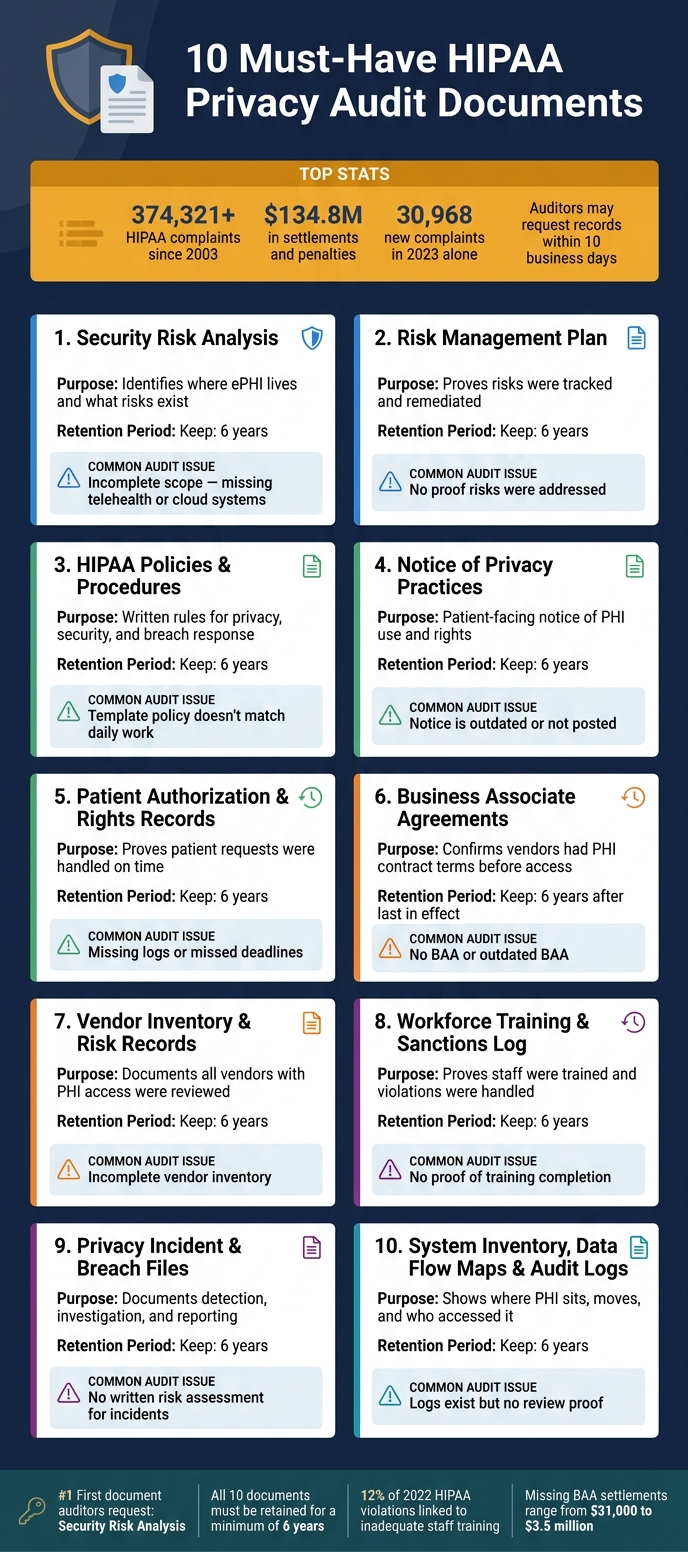
10 Must-Have HIPAA Privacy Audit Documents: Quick Reference Guide
HIPAA Compliance 15 | Documentation Has a Lifecycle
sbb-itb-535baee
Quick Comparison
| Document | What it proves | Common audit issue | Keep for |
|---|---|---|---|
| Security Risk Analysis | I know where ePHI is and what risks exist | Scope leaves out systems or vendors | 6 years |
| Risk Management Plan | I tracked and fixed risks | No proof risks were addressed | 6 years |
| HIPAA Policies and Procedures | Rules are written and approved | Template policy doesn’t match daily work | 6 years |
| Notice of Privacy Practices | Patients were told how PHI is used | Notice is old or not posted/distributed | 6 years |
| Patient Rights Records | Requests were handled on time | Missing logs or missed deadlines | 6 years |
| BAAs | Vendors had contract terms in place before PHI sharing | No BAA or old BAA | 6 years after last in effect |
| Vendor Risk Records | Vendors with PHI access were reviewed | Inventory is incomplete | 6 years |
| Training and Sanctions | Staff were trained and discipline was tracked | No proof of completion | 6 years |
| Incident and Breach Files | Events were reviewed and reported | No written risk assessment | 6 years |
| System Inventory / Logs | I can show where PHI sits, moves, and who accessed it | Logs exist but no review proof | 6 years |
My takeaway: this isn’t about building a giant binder full of paper. It’s about keeping dated proof that policies, training, vendor control, patient rights, and breach response all match what happens day to day.
Why Documentation Determines Audit Outcomes
When OCR reviews your organization during an audit or after a breach report, they want documented proof. It’s not enough to say a control is in place. Auditors check dated records like approved policies, training rosters, risk reports, incident files, and business associate agreements.[1][4]
HIPAA also requires covered entities and business associates to document safeguards and keep those records for at least six years from the date they were created or the date they were last in effect, whichever is later.[8][9][11] That includes privacy and security policies, risk analyses, training records, BAAs, and breach investigation files.
Most findings come back to the same three problems: records are missing, out of date, or they don’t line up with each other. A policy might say one thing while system settings or audit logs show another. That mismatch is where trouble starts, and it’s exactly the kind of gap this list is meant to help fix.
In a review of more than 100 OCR resolution agreements, the same weak spots showed up again and again: no current risk analysis, no written risk management plan, missing BAAs, undocumented workforce training, and audit logs that were never reviewed.[5] Those aren’t obscure system errors. They’re recordkeeping problems. And when documentation is missing, auditors often treat that as proof the control itself doesn’t exist. That can lead to corrective action plans and financial penalties, even if the organization was doing the right thing in day-to-day work.[6][7]
The first document auditors usually ask for is the security risk analysis.
1. Security Risk Analysis
The SRA is where auditors usually start. It tells them, fast, whether the organization knows where ePHI lives, how it moves, and what could put it at risk.
Regulatory basis
The Security Risk Analysis is the main HIPAA Security Rule document. It is required by 45 C.F.R. § 164.308(a)(1)(ii)(A). The report needs to identify risks to ePHI, show the method used to assess those risks, and support remediation decisions. If you use a framework such as NIST SP 800-30, document that clearly in the report. [12]
Required contents
An SRA should exist as one written report. Not a mix of notes, email threads, and loose files.
At a minimum, it should cover:
- Scope
- All systems that create, receive, maintain, or transmit ePHI
- Data flows
- Threat and vulnerability findings
- Risk ratings based on a 1–5 risk matrix
- Remediation actions with named owners and deadlines
OCR often flags one issue again and again: incomplete scope. That usually means an organization left out newer tools or platforms, such as telehealth systems, patient portals, or cloud-based billing platforms.
Retention period
Keep each SRA version for at least six years. Store older versions separately, and label them with dates and version numbers. [12]
Audit-ready evidence
Auditors often ask for the SRA report, the supporting risk register, data-flow diagrams, and proof that remediation is being tracked. It also helps to point to the technical evidence behind specific findings so the report does not stand on its own without backup.
A clean indexed folder structure and a clear naming convention can save a lot of time here. When an auditor asks for a file, you don't want to go digging through shared drives and email chains.
Use the findings from this report to build the cyber risk management plan.
2. Risk Management Plan
If the Security Risk Analysis finds the risks, the Risk Management Plan shows the fix path an auditor will review.
Regulatory basis
The Risk Management Plan connects directly to HIPAA Security Rule requirements, especially 45 CFR § 164.308(a)(1)(ii)(B). That rule calls for controls that bring risk down to a reasonable and appropriate level. HHS also views risk management as a continuous process, not a one-and-done task, so your plan should make that clear through regular review and follow-up.
Required contents
Tie the plan to the latest Security Risk Analysis. Then list each risk, the control tied to it, the owner, deadline, status, and treatment approach. The plan should also show how risks are ranked, which ones are being mitigated, accepted, transferred, or avoided, and how progress is monitored through documented leadership review.
A solid plan also spells out milestones, budget or resource needs, and dependencies. That makes remediation work more realistic and easier to track. Start with high-risk issues first, such as:
- weak authentication
- unpatched systems
- missing MFA
- poor access controls
- incomplete third-party vendor oversight
If you use Censinet RiskOps™, reference the reports, dashboards, and remediation records stored there so auditors can trace the evidence. Each remediation should link back to the safeguard it improves.
Retention period
Keep each dated version of the plan, along with its supporting records, for at least 6 years from the date it was created or last in effect, whichever is later.
Audit-ready evidence
A written plan by itself isn't enough. Auditors want proof that the plan was carried out. Keep records showing that each risk moved from identification to approval to implementation. The table below shows what auditors usually want to see:
| Evidence type | What it demonstrates |
|---|---|
| Approved plan versions with dates | Leadership accountability and governance |
| Risk register with status updates | Active tracking of open and closed risks |
| Implementation artifacts (tickets, screenshots) | Controls were actually deployed |
| Risk acceptance forms | Deliberate, documented decisions on accepted risks |
| Quarterly or annual review records | Ongoing risk management, not a one-time effort |
Version the plan alongside the Security Risk Analysis so auditors can follow the trail from risk identification to remediation. Each risk action should map cleanly to the written policies and procedures that govern it.
3. HIPAA Privacy, Security, and Breach Notification Policies and Procedures
After the risk plan, these policies turn known risks into day-to-day rules that auditors expect people to follow.
Regulatory basis
Three federal rules sit at the center of this document set: the HIPAA Privacy Rule (45 C.F.R. Part 164, Subpart E), the Security Rule (45 C.F.R. Part 164, Subpart C), and the Breach Notification Rule (45 C.F.R. §§ 164.400–414). The Privacy Rule’s administrative requirements at 45 C.F.R. § 164.530(i) require covered entities to implement written policies and procedures for PHI.[16]
The Security Rule adds its own documentation duty, and the Breach Notification Rule calls for documented workflows to identify, assess, and report breaches within 60 calendar days of discovery.[15][17][18] Each policy section should map to its HIPAA citation and audit protocol item. In practice, that means organizing the material into three policy families: privacy, security, and breach notification.
Required contents
Privacy policies should address permitted uses and disclosures of PHI, patient rights such as access, amendment, restrictions, and accounting of disclosures, minimum necessary standards, and complaint handling.
Security policies should cover administrative, physical, and technical safeguards. That includes items like access controls, audit log reviews, workforce security, contingency planning, and multi-factor authentication.
Breach Notification policies need to define what counts as a breach, explain the four-factor risk assessment under 45 C.F.R. § 164.402, and set internal timelines that still meet the 60-day deadline.
OCR doesn’t just want policies that exist on paper. It wants policies that fit your organization. So instead of dropping in a generic template, refer to your actual EHR, billing systems, cloud vendors, and day-to-day workflows. Each policy should also name the people in charge, such as the Privacy Officer, Security Officer, and incident response team, and spell out steps staff can follow without guessing.
Retention period
Keep every version of your policies and procedures for at least 6 years from the date of creation or the date it was last in effect, whichever is later.[8] The cleanest way to handle this is with a version-controlled repository that includes date-stamped approvals and effective dates.
Audit-ready evidence
The table below shows the evidence auditors often ask for along with your written policies:
| Evidence type | What it demonstrates |
|---|---|
| Revision history with dates and approvers | Policies are actively governed, not static documents |
| Workforce distribution logs and acknowledgments | Staff received and were trained on current policies |
| Sample breach notifications and risk assessments | Breach Notification procedures are followed in practice |
| Access review logs and audit log review records | Security controls are operating as written |
| Patient rights request logs with response timestamps | Privacy procedures are being followed within required timelines |
It also helps to run periodic internal walkthroughs or mock OCR audits. That’s the quickest way to see whether the documented workflow matches what people do on the ground. Record the findings and any corrective actions, then store them with the related policy files.
4. Notice of Privacy Practices
The Notice of Privacy Practices (NPP) is the patient-facing notice that explains how PHI may be used or shared, what rights patients have, and how they can file a complaint. In plain terms, it shows whether the privacy message patients see lines up with the rules the organization says it follows behind the scenes.
That’s why auditors pay close attention to it. They use the NPP to check that patients received the same privacy information the organization claims to follow internally.
Regulatory basis
The NPP is required under 45 C.F.R. § 164.520. It must be distributed, posted when needed, and written in plain language.[19][27]
Starting Feb. 16, 2026, the NPP must also address substance use disorder records and Part 2 limits.[20][22][23]
Required contents
A compliant NPP needs to explain how PHI may be used and disclosed for treatment, payment, and health care operations. It also needs to cover other permitted disclosures, such as:
- Public health reporting
- Law enforcement
- Disclosures to avert serious threats to health or safety
It must also explain individual rights, including access, amendment, accounting of disclosures, restrictions, and confidential communications.[19][21][26][27]
Just as important, the notice has to spell out the organization’s legal duties. That includes maintaining PHI privacy, providing the notice, following the notice, and notifying individuals of breaches of unsecured PHI. Patients also need to know how to complain to the organization or to HHS without retaliation.[21][26][27]
On paper is one thing. In practice is another. The notice should match what happens during patient intake, inside the portal, and through the complaint process.
Retention period
Keep every version of the NPP for at least 6 years from the date it was created or last in effect, whichever is later.[24][25]
That means keeping current and past versions, approval records, and proof that the notice was posted or distributed. A simple version log can help a lot here. It should show the effective date, a short note on what changed, and who approved the update.
Audit-ready evidence
Auditors usually want more than the notice itself. They also want proof that it was distributed, posted, and kept up to date.
| Evidence type | What it demonstrates |
|---|---|
| Current and prior NPP versions with effective dates | The notice is actively maintained and version-controlled |
| Website screenshots with timestamps | The NPP is publicly accessible and current online |
| Registration workflow records or EHR audit logs | Patients were presented with the NPP at first service encounter |
| Physical posting photos or facility inspection logs | The NPP is prominently displayed at service locations |
The NPP should also line up with authorization forms, access logs, and rights-request records. Next, auditors compare the notice against authorization forms and patient rights-request records.
5. Patient Authorization and Rights Request Records
The notice explains a patient's rights. These records show the organization acted on them.
Patient authorizations and rights request logs help prove two HIPAA duties were met: what disclosures were allowed and how patient rights requests were handled. In plain English, they show that day-to-day privacy work lines up with the organization's written rules.
Regulatory basis
These records sit under four HIPAA provisions: 45 C.F.R. § 164.508 for authorizations, § 164.524 for the right of access, § 164.526 for the right to amend, and § 164.528 for accounting of disclosures.[28][40] The general documentation and retention rule at § 164.530(j) connects them, requiring covered entities to keep these records for at least six years.[38][40]
Required contents
A valid authorization must identify the PHI, the sender, the recipient, the purpose, the expiration date or event, and the patient's signature and date.[29][30][34] It also must include three statements: the patient's right to revoke, the fact that the recipient may re-disclose the information, and whether signing is a condition of receiving care.[30][34]
Rights request records need their own paper trail. Auditors want to see when the request came in, how identity was checked, what action was taken, and when the matter was closed.
For access requests, the file should show:
- The date received
- How identity was verified
- What PHI was provided
- Any fees charged
- Whether a denial was issued, along with the written explanation[35][40]
For amendment requests, records should include the patient's written request, the decision, and, if the request was accepted, the amendment itself plus any notices sent to other entities that hold the PHI.[32][33][37]
For accounting of disclosures, the file must list the date, recipient, PHI disclosed, and purpose.[46][47][48]
Retention period
All authorizations and rights request records must be kept for at least 6 years from the date they were created or the date they were last in effect, whichever is later.[36][38][39][40] If state law requires a longer period, use that longer period instead.
Many health systems tie patient rights documentation to the same retention schedule used for medical records. That can make life easier, as long as the period never drops below HIPAA's six-year floor.[31][38]
Audit-ready evidence
These records should show the full path of each request: receipt, processing, and closure. Auditors often look for time-stamped logs proving that access requests were completed within 30 calendar days. Only one 30-day extension is allowed, and it must be justified in writing within the first 30-day window.[41][42][43][44][45]
| Record type | Key evidence auditors request |
|---|---|
| Patient authorization | Signed form with all required elements, revocation records, disclosure log tied to the authorization |
| Access request | Dated request, identity verification, date and method of fulfillment, any denial with written basis |
| Amendment request | Written request, decision letter, amendment or notation if accepted, notifications to other PHI holders |
| Accounting of disclosures | Request, produced accounting with disclosure details, date provided to patient |
For accounting of disclosures, document the title of the person or office that handles these requests. HIPAA's documentation rules call for this point specifically.[46][48][49] It's easy to miss, but auditors notice it.
Next, auditors turn to the vendor agreements that control outside access to PHI.
6. Business Associate Agreements
A vendor services contract is not the same thing as a Business Associate Agreement. A BAA is a separate, required document. And if it's missing, that alone can be a violation, even when no breach happened.
If a third party creates, receives, maintains, or transmits PHI for a covered entity, a BAA must be in place before any PHI is shared. That includes groups like a billing company, cloud provider, or telehealth platform. For auditors, this is the paper trail that shows outside access to PHI is controlled. A casual understanding or side note in another contract won't cut it.
Regulatory basis
BAAs are required under 45 CFR § 164.502(e) and § 164.504(e).[50][51][52] OCR audits look closely at whether BAAs exist, are current, and contain all required terms.[3][2][53][54] OCR settlements tied to missing or weak BAAs have ranged from $31,000 to $3.5 million.[60][61]
Required contents
Every BAA needs a few core terms at a minimum:
- Permitted and required uses and disclosures of PHI
- Required safeguards, including Security Rule compliance for ePHI
- Incident and breach reporting obligations
- Subcontractor flow-down requirements
- Terms for return or destruction of PHI at the end of the contract
Retention period
Keep executed BAAs, amendments, renewal notices, termination letters, and PHI return or destruction records for at least six years after they are no longer in effect.[55][56][57][58][59]
Audit-ready evidence
Your audit file should show two things clearly: the signed agreement and the dates it remained current.
| Evidence type | What auditors look for |
|---|---|
| Executed agreements | Signed and dated BAA with required clauses and subcontractor obligations |
| Amendments and addenda | Version history showing updates for new services or regulatory changes |
| Termination records | PHI return or destruction documentation and termination letters |
These agreements belong in the broader vendor risk management file, which comes next.
7. Vendor Inventory and Third-Party Risk Assessment Records
A vendor inventory and third-party risk assessment record set shows that your organization knows exactly who can access PHI and has made a documented call on each relationship.
That matters because auditors use these records to verify that every vendor touching PHI has been identified, classified, and reviewed. They also want to see that each BAA-covered relationship is current, properly scoped, and checked on a regular basis. If a vendor has access to PHI, it shouldn't be floating around in some forgotten spreadsheet.
Regulatory basis
HIPAA requires BAAs for vendors that handle PHI, and auditors expect your inventory to connect each vendor to the right security and privacy controls.
Required contents
Once you've identified your vendors, the next step is simple: Has each one been assessed and monitored?
A complete vendor inventory should include:
- Vendor name
- Service description
- HIPAA business associate status
- Associated systems where PHI is processed
- Data types handled
- Data storage and processing location
- BAA status
- Risk classification: high, medium, or low[66]
Risk assessment records should show the scope, method, findings, risk rating, remediation owner, deadline, and reassessment date[65].
These records should also feed straight into the security risk analysis. In other words, vendor exposure should be part of enterprise risk management, not parked in a separate compliance folder that nobody checks. Censinet RiskOps™ can centralize vendor profiles, assessments, and remediation tracking[62][63][64].
Audit-ready evidence
| Evidence type | What auditors look for |
|---|---|
| Vendor inventory | Complete list of all business associates with service descriptions, PHI interaction, system mappings, and BAA status |
| Risk assessment records | Evaluations per vendor showing scope, findings, risk ratings, and mitigation steps taken |
| Corrective action plans | Documented ownership, remediation status, and timelines for each identified gap |
Audit checklists should also include primary contact, vendor type, PHI interaction, subcontractors, last review date, BAA status, breach-notification timeline, and termination rights[67].
After vendors, auditors usually move to the next point: whether staff were trained to follow these controls.
8. Workforce HIPAA Training Records and Sanctions Log
These records show that staff actually followed the privacy and security procedures documented above. Training records and the sanctions log help prove two things: your workforce got the right HIPAA training, and policy violations were handled the same way across the organization. That matters because auditors want proof, not verbal assurances. If training wasn't documented, it's tough to defend during an audit.
This point gets missed more often than it should. One overview found that 12% of 2022 HIPAA violations were tied to inadequate staff training.[73]
Regulatory basis
Training duties come from 45 CFR § 164.530(b). Sanctions are covered under 45 CFR § 164.530(e). Record retention falls under 45 CFR § 164.530(j). Covered entities and business associates must document workforce training, keep sanctions records, and retain those records for at least six years from the date they were created or the date the document or policy was last in effect, whichever is later.[70][71][10]
Required contents
A complete training record should make the basics easy to verify: who was trained, what they were trained on, when the training happened, and how it was delivered. It should also include proof that the person confirmed completion. At a minimum, include the workforce member's name, employee ID, role, department, course title, delivery method, completion date, assessment score if one applies, and a signed or electronic acknowledgment.[72][74][75]
Training also needs to match the current version of the policy in use. For example, if breach procedures change or a new telehealth workflow is rolled out, the training record should connect back to that policy version. And this can't be a one-time event. Training should repeat at hire and after material policy changes.
The sanctions log serves a different purpose. It shows whether similar violations were handled the same way. A solid log should record the incident, the policy violation, the sanction, the decision maker, and the closure date.[68][69] HHS's October 2023 cybersecurity newsletter also stressed documenting the time period, reasons, and outcomes for each sanction.[68] Auditors often compare similar cases across departments to see if discipline was applied evenly.
Retention period
HIPAA sets the minimum retention period at six years. If policies change over time, keep each training record tied to the specific policy version that was in effect at that time.
Audit-ready evidence
| Evidence type | What auditors look for |
|---|---|
| Training roster | A complete list of workforce members with PHI access, showing course name, completion date, delivery method, and attestation |
| Sanctions log | A structured register with the incident date, violation description, policy citation, sanction type, decision rationale, and closure date |
| Investigation files | Investigation notes, HR records, remedial training confirmation, and cross-references to prior training |
One of the easiest ways to prevent common gaps is to keep LMS and HR data in sync, so no one with PHI access is left out of the training log.[72][74]
If auditors spot a gap in the training records, the next file they usually ask for is the related incident or breach record.
9. Privacy Incident and Breach Documentation
Auditors often ask for incident logs first, then the supporting files that show detection, investigation, mitigation, and reporting.[1][76] That order makes sense. The log shows what happened. The file shows whether your team followed the response process when things got messy. It also shows whether your breach policies worked in practice.
Regulatory basis
The HIPAA Breach Notification Rule (45 CFR §§ 164.400–414) requires documented incident investigations, breach determinations, and notifications for unsecured PHI.[83][13][84] If an incident is reviewed and found to be non-reportable, you still need to keep the written risk assessment and the reason for that decision.
Required contents
Think of each incident record as a two-part audit packet: the log tracks the event, and the file backs up the response.
The log should include:
- Date and time of occurrence and discovery
- Who reported the incident
- A description of what happened
- Number of individuals affected
- Whether the PHI was unsecured
- Risk assessment outcome
- Notification steps taken, with dates[79][1][82]
The investigation file should include the four-factor risk assessment covering the nature and extent of the PHI involved, who used, received, or accessed it, and the mitigation steps taken to reduce risk.[13][84] Even if the incident is marked non-reportable, the assessment and the rationale for that determination still must be documented.[13][84]
For confirmed breaches, the file should also contain copies of individual notification letters, media notices for breaches affecting 500 or more residents in a state or jurisdiction, HHS submission confirmations, and proof of delivery such as mailing lists or email delivery logs.[79][13][12][82][84] Corrective action plans and evidence that remediation was completed should also be included.[79][80][82]
These records should also tie back to the affected systems and the related log trail.
Retention period
HIPAA requires covered entities and business associates to retain documentation tied to privacy investigations, risk assessments, policies, procedures, and breach notifications for at least six years from the date of creation or the last effective date, whichever is later.[2][77][78][14]
Audit-ready evidence
| Evidence type | What auditors look for |
|---|---|
| Incident/breach log | Central log with dates, PHI involved, affected count, breach status, assessment result, and notice dates |
| Four-factor risk assessment | Completed worksheet with the breach determination rationale and supporting evidence |
| Notification records | Copies of individual letters, media notices, HHS submission confirmations, and delivery proof |
| Corrective action evidence | Root cause analysis, remediation steps, configuration changes, and validation testing showing the risk was addressed |
If the incident involved a third party, link it to the third-party risk management record.
10. System Inventory, Data Flow Maps, and Audit Log Evidence
These records show where PHI lives, how it moves, and how access is watched. They also help connect your risk analysis to the systems and vendors it actually covers.
Regulatory basis
The HIPAA Security Rule (45 CFR § 164.312(b)) requires audit controls that record and examine activity in systems containing ePHI.[85][88] The HIPAA Risk Analysis requirement (45 CFR § 164.308(a)(1)) also depends on identifying the systems that store, process, or transmit ePHI, which is why a current system inventory matters.[86][93] OCR audit-readiness guidance and NIST SP 800-66 Rev. 2 identify ePHI asset inventories and data flow diagrams as core artifacts auditors expect to see alongside a current risk analysis.[92][93]
Required contents
These records answer three plain questions: what exists, where does it go, and who accessed it?
Start with the systems behind the risk analysis. A system inventory should list every application, database, medical device security risks, cloud service, and interface that creates, receives, maintains, or transmits ePHI. Each entry should include the system owner, business purpose, data classification, and hosting model.[86][91][92] It should also include other systems, such as patient portals, medical transcription vendors, cloud backup services, and file-sharing tools used by clinical staff.[93] When you can, separate production from test environments and note systems that do not handle PHI so the scope is clear.
A data flow map shows how ePHI moves through the environment. In simple terms, it should show where PHI starts, where it is stored, how it travels, and which third parties receive it.[93][94] AHIMA guidance recommends diagramming ePHI flows to determine which applications and systems require auditing and to distinguish appropriate from inappropriate access.[94] Keep each version under document control with dates and approvals so the map matches the current environment.
Audit log evidence means more than dumping raw logs into a folder. Auditors want proof that someone reviewed them. That usually includes sample logs showing user logon and logoff events, failed access attempts, PHI exports or downloads, privileged-account activity, and administrative changes, plus review evidence such as tickets, SIEM reports, exception follow-up, and escalation records.[85][87][90] NIST SP 800-66 Rev. 2 also encourages organizations to consider automating log review so teams can keep up with activity across systems containing ePHI.[86][89]
Auditors usually want to follow one clear trail across the inventory, maps, and logs. If an incident involves a system, they should be able to trace that system back to the inventory, the data flow map, and the related log evidence without a scavenger hunt.
Retention period
HIPAA requires covered entities and business associates to retain documentation for at least six years from the date of creation or the date last in effect, whichever is later.[86] Keep log extracts tied to incidents, audits, or investigations longer when state law, contracts, or litigation holds require it.
Audit-ready evidence
| Evidence type | What auditors look for |
|---|---|
| System inventory | Complete list of ePHI systems with owner, purpose, hosting model, and data classification |
| Data flow maps | Dated, version-controlled diagrams showing ePHI entry, movement, storage, transmission, and third-party disclosures |
| Logging configuration standards | Per-system documentation of what events are logged, retention period, and how logs are protected from alteration |
| Log review records | Tickets, reports, or sign-offs showing reviews occurred on schedule, with exception follow-up documented |
Keep these files in one indexed folder so the next section can focus on fast retrieval.
How to Organize These Documents for Faster Audit Response
Audit speed comes down to one thing: one organized evidence repository. Keep all ten document types in a single audit binder or digital repository.
Set it up the way auditors already think. Create top-level folders for Governance, Policies and Procedures, Risk Management, Vendors and BAAs, Training, Incidents and Breaches, Systems and Logs, and Patient Rights. Then use subfolders by year. Once that structure is in place, use the same naming approach across every file.
Each document should carry the same core metadata: title, version number, owner, approval date, effective date, next review date, retention period, and related HIPAA citation or control reference. Every file should also point to the control it supports. For example, a Business Associate Agreement should connect to the related vendor risk assessment questions and remediation plan. A training record should connect back to the matching policy and sanctions log. That’s how you show a clear evidence trail.
Version control needs its own rules. Keep the current version in the main folder, and move older versions into an archive with timestamps and change notes. Use three labels only: Current, Superseded, and Archived. Saving final, approved policies as read-only PDFs helps prevent last-minute edits during an audit window. [95][96] That matters even more when several teams own different parts of the evidence.
For large healthcare organizations, Censinet RiskOps™ can centralize risk assessments, vendor documentation, remediation tracking, and audit evidence.
It also helps to run a periodic drill: pull the full document set within 72 hours. [81][1][96] Then use the quick reference tables below to check file owners, retention, and evidence types at a glance.
Quick Reference Tables
When an audit request hits your inbox, speed matters. These tables help you pull the right proof without digging through folders for half an hour. Think of them as a shortcut to the files auditors usually want first.
They boil the ten documents down into a simple audit checklist. Once your repository is set up, you can use these tables to confirm scope, evidence, and ownership before anyone asks.
Table 1: Security Risk Analysis vs. Risk Management Plan
| Element | Security Risk Analysis (SRA) | Risk Management Plan (RMP) |
|---|---|---|
| Primary purpose | Identify and rate risks to ePHI | Treat identified risks over time |
| HIPAA citation | §164.308(a)(1)(ii)(A) | §164.308(a)(1)(ii)(B) |
| Core contents | Asset inventory, threat/vulnerability list, likelihood/impact scores, risk ratings | Safeguards, owners, timelines, residual risk decisions |
| Update frequency | Point-in-time; refresh after major system, threat, or operational changes | Ongoing; update as risks are mitigated, deferred, or accepted |
| What auditors ask for | Report, method, date range, system scope | Remediation plan, status updates, change logs, residual-risk approvals |
| Example evidence | SRA report covering the EHR, billing, and patient portal | Risk register entry showing an MFA gap, current status, target date, and assigned owner |
A simple way to think about it: the SRA tells you what the risks are, and the RMP shows what you're doing about them.
Table 2: Policy Categories Mapped to Auditor Requests
| Policy Category | Representative Policies | Typical Auditor Requests | Example Artifacts |
|---|---|---|---|
| Privacy | Use and disclosure of PHI, minimum necessary, patient rights, complaint handling | Current policy documents; approval history; revision history; workflow evidence | Current Notice of Privacy Practices and proof of distribution; patient rights request log showing responses within required timeframes; privacy complaint log with outcomes |
| Security | Access control, authentication, encryption, device controls, incident response | Written policies; system configuration evidence; access control matrix; change management records | User access provisioning and termination records; MFA configuration screenshots; access log review reports |
| Breach Notification | Incident identification, investigation procedures, risk assessment, notification timelines, content of notices, reporting to HHS and affected individuals | Incident response playbooks; completed breach risk assessments; copies of notification letters; HHS portal submission proof | Anonymized breach case file showing investigation steps, risk scoring, and a timeline that meets the 60-day notification requirement |
This table is handy when an auditor asks for “privacy policies” or “breach documentation” and you need to know what that request usually includes.
Table 3: BAA and Vendor-Risk Documentation
| Document Type | What It Covers | Typical Auditor Requests | Example Artifacts |
|---|---|---|---|
| Business Associate Agreement (BAA) | Permitted PHI uses and disclosures, required safeguards, breach reporting, subcontractor flow-down obligations, termination, data return and destruction, audit and oversight rights | Full list of current Business Associates; executed BAAs; evidence of periodic review; confirmation no service that creates, receives, maintains, or transmits PHI is active without a signed BAA | Signed BAA for a cloud EHR vendor; contract management record showing effective dates and renewal terms |
| Vendor Risk Assessment | security threats in healthcare’s third-party vendor relationships, questionnaire results, SOC 2/HITRUST reports, remediation plans, ongoing monitoring | Completed risk assessments for high-risk vendors; documented review of vendor security reports; evidence of privacy and security risk evaluation before onboarding or renewal | Censinet RiskOps™ assessment record with risk scoring output and follow-up mitigation actions for a vendor hosting ePHI |
| Vendor Inventory | All vendors touching PHI, risk classification, BAA status, last assessment date, renewal schedule | Current vendor inventory with Business Associate flags; periodic reassessment evidence | Spreadsheet or platform export showing vendor name, PHI type, risk tier, BAA date, and next review date |
A BAA covers contract terms; a vendor risk assessment covers control effectiveness.
That distinction matters. Teams often lump these together, but auditors usually won’t.
Table 4: System Inventories, Data Flow Maps, and Audit Logs Linked to Privacy Compliance Objectives
| Artifact | Privacy Compliance Objective | Related HIPAA Requirement | Example Data Elements |
|---|---|---|---|
| System Inventory | Show where PHI lives; confirm encryption and backup status | §164.312(a) – Access Control | System name, owner/department, PHI types stored, hosting model, encryption status, backup and disaster recovery details |
| Data Flow Maps | Show how PHI moves between systems, users, and external parties; support minimum necessary analysis | §164.308(a)(1) – Risk Analysis; §164.514(d) – Minimum Necessary | External data flows, PHI types transmitted, secured transport, HIE interfaces, third-party billing connections |
| Audit Logs | Show access monitoring; support accountability and accounting of disclosures | §164.312(b) – Audit Controls; §164.528 – Accounting of Disclosures | User IDs, timestamps, activity types, configuration changes, interface errors, periodic log review reports |
These three artifacts do a lot of heavy lifting in an audit. If someone asks where PHI sits, how it moves, or who touched it, this is where you look first.
Conclusion
Privacy audit readiness never stands still. These ten documents only matter when they’re current, complete, and matched to how work gets done in practice. The same goes for retention, since an audit may look back several years.
Keep required records for at least six years from the date they were created or last took effect. If state law or a contract calls for a longer retention period, spell that out in policy.
It also helps to assign a clear owner to each document, set review dates, and connect every policy to proof that it works in day-to-day operations. That proof may include access logs, training records, incident files, and vendor assessments. When those records stay in sync, auditors can trace compliance without missing pieces. Censinet RiskOps™ can help centralize vendor inventories, third-party assessments, and audit evidence.
Treat these ten documents as living evidence, not paperwork you scramble to pull together during audit week. The organizations that keep them current and tied to operations tend to pass audits with fewer findings.
FAQs
Which document should I update first?
Update your organization-wide risk analysis first. That’s the starting point for HIPAA and privacy audit readiness.
You need a broad review of every system that handles ePHI.
That review helps you spot threats, weak points, and possible impact. It also shows which other documents and pieces of evidence you need to refresh before the audit.
What if audit records are missing?
If required audit records are missing, document that clearly and explain why they aren’t available. A centralized evidence index helps you spot gaps early, so you can deal with them before an auditor does.
Missing, incomplete, or altered evidence can weaken your case during an investigation. That’s why it’s smart to find any gaps upfront and explain them before they become a problem.
How do I organize these files for fast retrieval?
Use a centralized, searchable repository and a master evidence index that maps each HIPAA/privacy citation to the exact file.
Set up a folder structure that mirrors how auditors look for records. That way, when someone asks for a policy, log, or screenshot, you’re not digging through random folders and guessing which version is right.
Stick to one file-naming format, use dates in MM-DD-YYYY, and include metadata such as:
- Evidence ID
- Document name
- Owner
- System
- Citation
- Effective date
- Review date
- Retention deadline
This keeps the repository tidy, makes searches easier, and cuts down on back-and-forth during audits.
