
If you monitor PHI in cloud systems, SIEM should do the heavy lifting and people should handle the judgment calls.
I’d sum it up like this: SIEM is better for round-the-clock log review, cross-system alerting, and audit records. Manual analysis is better for checking context, reviewing edge cases, and building case files after an alert. In healthcare, that split matters because teams may face 1,000,000+ daily access transactions and HIPAA expects them to record and review system activity.
Here’s the short answer:
- Use SIEM first for log collection, correlation, alerting, and long-term records
- Use manual review second to decide whether flagged access was allowed
- Relying on manual-only review creates gaps, especially after hours, on weekends, and across many cloud systems and third-party risk environments
- SIEM helps with HIPAA audit trail needs, while people help with legal, privacy, and clinical context
- The best setup is mixed: automated monitoring plus scheduled human checks
Quick Comparison
| Criteria | SIEM | Manual Analysis |
|---|---|---|
| Detection timing | Near real time | Delayed |
| Cross-system review | One place | Split across tools |
| Scale | Handles high event volume | Struggles as volume grows |
| Audit trail | Structured, searchable records | Manual exports and notes |
| Context review | Limited without human input | Strong for case-by-case review |
| Staffing coverage | Can run 24/7 | Often limited by staff hours |
| Best use | Primary monitoring control | Validation and forensics |
If I were setting this up today, I’d treat SIEM as the main monitoring layer and manual analysis as the review layer that confirms what the alert means.
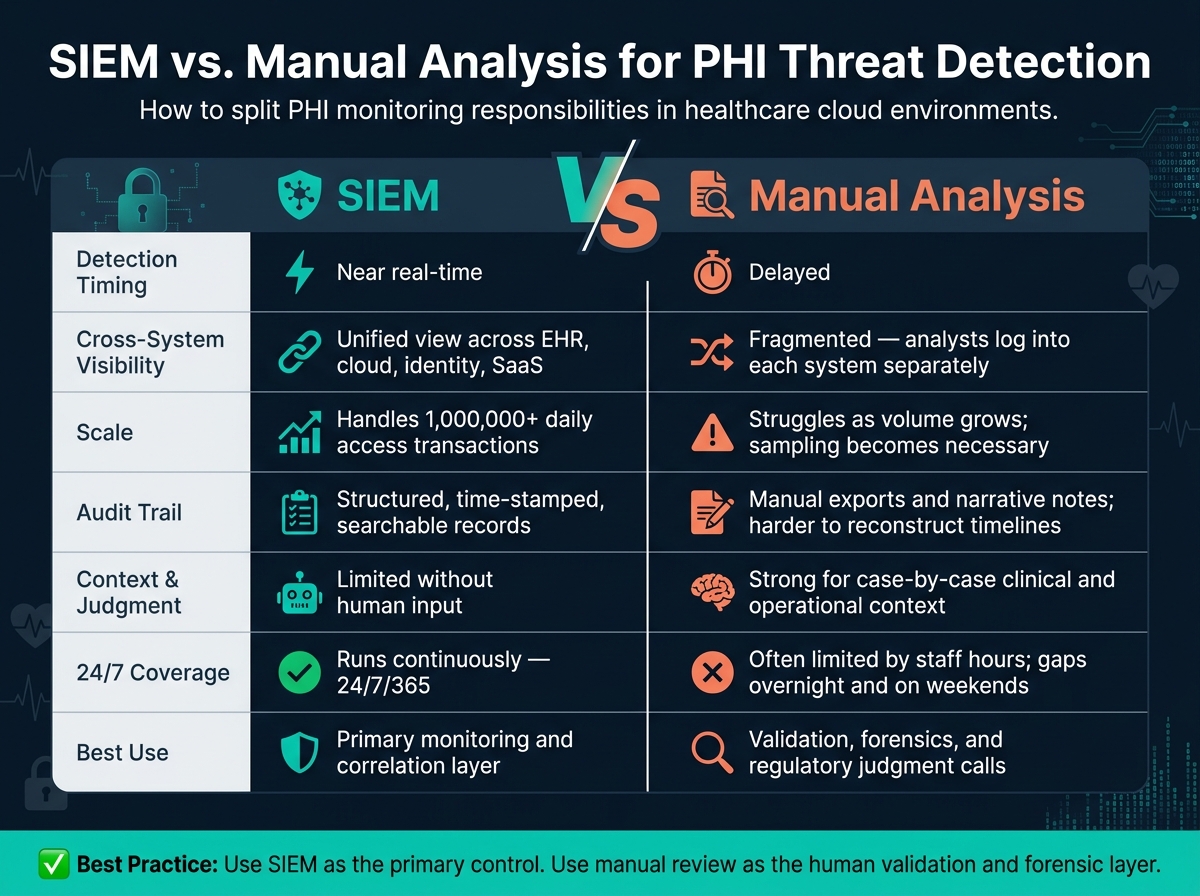
SIEM vs. Manual Analysis for PHI Threat Detection: Key Differences
What is SIEM? Security Information and Event Management for Modern Cyber Threat Protection
sbb-itb-535baee
SIEM for PHI Threat Detection in Healthcare Cloud Systems
Once logs are in place, SIEM starts to earn its keep through cross-system correlation. In a healthcare setting, PHI often moves across cloud EHRs, SaaS apps, identity platforms, and connected devices. That creates far too much activity for a team to track by hand. SIEM deals with that scale by continuously correlating events across PHI systems.
How SIEM Speeds Up Correlation and Detection
The main edge of SIEM isn't log collection by itself. It's the way it connects events across systems in near real time and surfaces patterns that one log source alone would miss.
Take a clinician account that fails authentication several times from an unfamiliar IP, then gets in, then pulls hundreds of patient records a few minutes later. Each event on its own might not look alarming. Put them together, and the picture changes fast. The same goes for a user whose access suddenly stretches beyond their usual department or location. One event may seem harmless. Correlated together, those events can point to a breach already in motion.
SIEM platforms that include User and Entity Behavior Analytics (UEBA) go a step further. They build baselines for each user and flag deviations based not only on fixed rules, but also on that person's own past behavior. So if a nurse who usually accesses a modest number of records per shift suddenly starts viewing far more than normal, that's an outlier worth checking - even if each individual access event looks fine on its own.
For ransomware, SIEM can spot early behavior before encryption spreads across systems. That can include:
- Rapid file changes in PHI repositories
- Deletion of cloud snapshots or backups
- Lateral movement between servers
- Outbound connections to known malicious domains
How SIEM Supports Audit Controls and Investigation Records
Detection is only part of the job. Investigators also need an event trail they can stand behind. SIEM puts audit controls into practice at scale by centralizing and normalizing PHI activity logs into a consistent schema. That means key fields like user ID, source IP, timestamp, action, and outcome are standardized, so events from different platforms can be compared and sequenced in a reliable way[3][4][5].
Time synchronization matters more than many teams expect. If a security incident touches an EHR, a cloud storage service, and an identity provider, the team has to rebuild the exact order of events. A well-set-up SIEM uses consistent time sources and time zones so investigators can show who accessed which PHI, when it happened, where it came from, and what happened next[3][4][5]. That kind of searchable, time-ordered trail is hard to produce through manual review alone.
HIPAA also requires security incident documentation to be kept for at least six years from the date of creation or last effective date[1][4][5]. SIEM retention policies are often built around that need, with newer data kept in searchable storage and older records moved to colder archives. Many setups also use immutable storage options to help guard against tampering.
How Censinet RiskOps Can Strengthen the Broader PHI Risk Program
SIEM shows the event. Risk governance shows the exposure behind it.
SIEM handles detection and investigation inside your own environment, but PHI risk in healthcare goes beyond your internal systems. Third-party vendors, SaaS clinical apps, medical device manufacturers, and supply-chain partners can all create exposure points. Many sit outside the direct visibility of the data sources a SIEM monitors.
That's where Censinet RiskOps™ comes in. Censinet RiskOps helps teams connect SIEM alerts to vendor, application, and medical-device risk context. If a SIEM alert points to a suspicious event tied to a third-party integration or a connected medical device, Censinet RiskOps adds the missing context: what data that vendor touches, what controls are in place, and what remediation is needed.
Manual Analysis for PHI Threats: Where It Helps and Where It Falls Short
Where Manual Review Adds Value in Complex Investigations
Once a SIEM flags suspicious behavior, the next question is the hard one: was the access allowed, or not?
That’s where manual review does its best work. It helps teams figure out whether odd-looking access was still legitimate. For example, a clinician may access records outside their normal pattern because of a patient transfer, shift coverage, or break-glass access. On paper, that can look suspicious. In practice, it may be completely allowed. That kind of clinical and operational context is tough for automated systems to read.
Manual review is also a strong fit for focused forensic work after a high-risk alert or a confirmed incident. Analysts can trace who accessed what, speak with stakeholders, and piece together a defensible timeline [7][12].
Where Manual Review Breaks Down at Scale
The main problem isn’t skill. It’s volume.
Cloud PHI environments produce too many events for nonstop manual review. Even strong teams hit a wall when the alert stream never stops.
Fragmentation adds another layer of pain. Pulling together EHR, identity, storage, and remote access logs by hand is slow and easy to get wrong [9][10][11]. AHIMA notes that manual review may be virtually impossible at scale when the goal is detecting unauthorized PHI access [7][8].
Coverage gaps are another serious issue. HICP guidance recommends that mature security operations be staffed and monitored 24 hours per day, 7 days per week, 365 days per year [9]. Most manual teams don’t meet that bar in day-to-day work. Activity can slip by overnight, on weekends, or during holidays. In one documented case, inappropriate ePHI access continued for 19 months before it was found during a routine audit [6]. That’s a blunt example of how much delayed manual monitoring can cost.
Manual review works best as the human layer for validation and forensic follow-up.
SIEM vs. Manual Analysis: Direct Comparison for Cloud PHI Monitoring
Once you put SIEM automation next to the limits of manual review, the tradeoffs get pretty clear. For cloud PHI monitoring, SIEM is better at stitching events into a timeline. Manual analysis is better at judging what that timeline means.
Comparison Table: Correlation, Coverage, Compliance, and Staffing
| Dimension | SIEM | Manual Analysis |
|---|---|---|
| Real-time detection | Near-real-time ingestion of PHI access logs | Delayed; depends on scheduled reports or ad hoc queries |
| Cross-system visibility | Unified view across EHR, cloud storage, identity, SaaS, and connected devices | Fragmented; analysts log into each system separately |
| Insider threat monitoring | Behavioral baselines and correlation rules flag insider threat indicators automatically | Relies on tips, complaints, or targeted audits after the fact |
| Ransomware indicators | Detects multi-stage attack chains such as brute force, lateral movement, and file encryption | Typically post-fact; symptoms surface before logs are reviewed |
| Cloud-native scale | Elastic ingestion scales with PHI workload growth | Analyst time scales linearly; sampling becomes necessary |
| Audit and compliance support | Structured, time-stamped evidence for HIPAA audits and OCR inquiries [2][13][14] | Manual data pulls and narrative notes; harder to reconstruct timelines |
| Analyst workload | Focused on triaging prioritized alerts; over-alerting when rules are not tuned | Heavy time spent on repetitive log retrieval and manual correlation |
| Risk of missed events | Tied to rule gaps and unintegrated systems; testable via security testing | Higher due to fatigue, inconsistent review frequency, and incomplete coverage |
In day-to-day use, SIEM cuts down the pile of alerts that need a person to look at them. That split matters. PHI monitoring needs fast correlation and defensible human validation.
When SIEM Is the Better Primary Control
SIEM is the stronger primary control when PHI environments are large, spread out, or hard to manage. If an organization handles tens of thousands of security events per day across cloud EHRs, SaaS billing platforms, telehealth tools, and imaging archives, manual review just can't keep up without missing things.
The same problem shows up when PHI moves through multiple business associates. SIEM can ingest business associate logs, when contracts allow it, and connect that activity with internal access patterns. Manual approaches have a much harder time doing that when log formats and access models differ from one organization to another.
There’s also the coverage problem. SIEM runs all the time. Manual teams, in most cases, do not maintain 24/7 monitoring during normal operations.
When Manual Analysis Still Adds Value
SIEM flags the event. Humans decide whether it was legitimate.
When a SIEM marks unusual access, a skilled analyst looks at context: the user’s role, work schedule, and patient assignment. Sometimes the odd pattern has a simple reason. Shift coverage, patient transfer, or break-glass access can all explain activity that looks suspicious at first glance. No rule set can sort out those cases on its own with steady accuracy.
Manual analysis also matters when an incident could trigger legal or regulatory action. In those cases, analysts work with privacy officers and legal counsel to read SIEM data against regulatory definitions, handle evidence under legal protocols, and document decisions in a way that shows due diligence.
Conclusion: A Practical Model for PHI Threat Detection
After comparing SIEM and manual analysis, the practical model is pretty straightforward: use both, but give each one a clear job.
SIEM should handle continuous monitoring and large-scale correlation. Human analysts should handle the cases that need judgment, context, and regulatory calls. That split makes sense in healthcare, where teams are often short on time and alerts never seem to stop.
Key Points for Healthcare Decision-Makers
SIEM is usually the stronger primary control if your goal is steady coverage. When security and privacy teams are stretched thin, SIEM takes on the repetitive work and lets analysts focus on escalated cases.
For compliance evidence, SIEM also lines up well with HIPAA's audit controls standard, 45 C.F.R. § 164.312(b), and retention requirements because it produces structured, searchable logs and audit records.[2][16]
A practical setup looks like this:
- Use SIEM as the primary control.
- Use manual review as a sampling and validation layer.
- Add quarterly manual sampling to catch parsing gaps, misconfigured rules, and missed patterns.[15][18]
Aligning Detection Strategy with Cyber Risk Governance
Detection does not help much if it stays locked inside the security team. It needs to feed governance.
That starts with a clear inventory of every PHI system in scope and a map that ties each SIEM log source to a HIPAA safeguard.[17][2] Once that link is in place, the day-to-day output from detection can support risk oversight instead of sitting in a dashboard that no one uses.
Censinet RiskOps™ supports that governance layer by tracking covered PHI systems and vendors, documenting logging and breach-notification obligations, and feeding incident metrics into risk registers.
FAQs
How does SIEM reduce missed PHI threats?
SIEM cuts down on missed PHI threats by pulling security logs into one place and standardizing them across infrastructure, cloud environments, applications, and network devices. From there, it uses behavioral analytics to connect events from different sources and flag patterns tied to coordinated attacks.
That matters because manual review can only go so far. SIEM can send customized, real-time alerts when something looks off, like unusual login times, mass record exports, or access from improbable locations. That gives security teams a clearer view of what needs attention first and helps them respond fast.
What should analysts review after a SIEM alert?
After a SIEM alert, analysts need to look at the logs, timestamps, affected systems, and the incident’s origin to judge the threat’s scope and severity.
They should also connect activity across related sources, such as IAM/SSO logs, EDR telemetry, and network flows, and confirm that PHI was not improperly viewed, altered, or exfiltrated.
How often should manual PHI log checks happen?
Organizations should automate daily PHI log reviews with a SIEM system, then back that up with monthly manual audits. That mix helps catch the obvious issues fast while still giving teams a chance to spot quieter, harder-to-see problems.
The right review cadence depends on formal risk analysis, day-to-day readiness, and the current threat landscape. In many cases, a practical setup looks like this:
- Continuous alerting for high-risk systems
- Weekly reviews for moderate-risk systems
- Monthly manual checks for lower-risk areas
