
If your backup fails, patient care can slow down fast. In healthcare, backup automation means setting clear recovery targets, backing up each system on the right schedule, protecting copies from ransomware, and proving that restores work before an outage happens.
Here’s the short version:
- Downtime is expensive. Ransomware-related downtime in U.S. healthcare is estimated at $19 million per day.
- Backups are still a main recovery path. Even though 95% of hit organizations said attackers tried to go after backups, 73% still used backups to restore data.
- HIPAA requires more than copies of data. You need documented backup, disaster recovery, emergency mode work, testing, and records.
- Not every system gets the same backup plan. EHR, pharmacy, PACS, labs, cloud apps, endpoints, and file shares need different RPO and RTO targets.
- Schedules alone are not enough. You also need alerts for failed jobs, missed recovery targets, storage issues, and checksum errors.
- Ransomware protection matters. Use the 3-2-1-1-0 rule, immutable storage, network separation, least-privilege access, and separate key management.
- Restore tests are the proof. A completed backup job does not mean you can restore cleanly under pressure.
- Clear ownership keeps the program working. IT, app owners, security, compliance, and clinical leaders each need defined roles.
A simple way to think about it: back up the right systems, at the right time, to the right place, and test the restore path on a set schedule.
Quick snapshot of what this guide covers:
| Area | What you need to do |
|---|---|
| Recovery targets | Set RPO and RTO by clinical impact |
| Backup design | Match full, incremental, differential, snapshot, and log backups to each system |
| Protection | Use immutable and off-site copies, plus isolated backup storage |
| Monitoring | Track failed jobs, warnings, missed RPOs, capacity, and integrity issues |
| Compliance | Keep logs, test records, incident tickets, and plan documents in one place |
| Daily use | Review jobs, check capacity, run restore tests, and review access logs |
If I were building this program, I’d focus on one goal: make recovery predictable. This requires real-time risk management to identify vulnerabilities before they lead to downtime. That means fewer manual steps, more testing, and backup records that hold up during both an outage and an audit.
Cloud Backup for Healthcare and HIPAA Compliance | FinenceFlow
sbb-itb-535baee
Regulatory and risk requirements that shape backup automation
In healthcare, backup automation does more than save copies of data. It supports compliance and keeps care moving when systems go down. HIPAA and NIST shape how teams schedule backups, test them, log activity, and restore systems. In practice, that means backup tools need a few non-negotiables: automated schedules, failure alerts, restore checks, and immutable logs.
HIPAA contingency planning and documentation requirements
Under 45 CFR §164.308(a)(7), HIPAA requires a contingency plan with five parts: data backup, disaster recovery, emergency mode operations, testing and revision, and criticality analysis.[1][2][3]
Automated backups should collect ePHI from EHRs, PACS, lab systems, and other clinical apps based on schedules tied to each system’s criticality.[1][3] A mission-critical EHR can’t be treated the same way as a lower-priority reporting tool.
Disaster recovery plans must spell out restore workflows, including the order of recovery, who does what, and how teams communicate during an incident.[1][3] Emergency mode operation plans cover how clinical work continues while primary systems are unavailable. One example is read-only access to patient records from a backup replica when the main EHR is down.[1][5]
To show integrity and control access, use checksum validation, tamper-evident logs, and encryption in transit and at rest.[1][2] Keep logs for backup jobs, failed jobs, restores, and admin changes based on organizational policy.[1][2]
For audit readiness, store backup reports, restore test records, incident tickets, change logs, and vendor risk artifacts in one audit-ready repository.[1][2]
HIPAA sets the floor. NIST adds a more structured approach to restore order and testing.
NIST-aligned recovery planning for clinical operations
NIST SP 800-34 lays out contingency planning as a clear sequence: inventory critical systems, map dependencies, set restore priority, document automated runbooks, and test on a regular basis.[4]
A critical system inventory should rank each system by clinical impact - life-safety, high, medium, or low - and connect that ranking to its RTO, RPO, and backup setup. Dependency mapping matters here. Teams should make restore order explicit: infrastructure and databases first, then applications and interfaces, then reporting and other less urgent systems.[4]
Automated runbooks turn those steps into scripts or orchestration workflows that can run under pressure without leaning on manual work. That matters when time is tight and staff are juggling incident response.
Run tests on a fixed quarterly or semiannual cadence to confirm that runbooks work, backups are usable, and staff know their roles. Tests should reflect realistic scenarios and include distributed care sites such as ambulatory clinics. Document each test with success metrics, timelines against target RTOs, issues found, and assigned corrective actions.[4]
Those priorities then shape backup schedules, retention periods, and storage tiers covered next.
How to design an automated backup strategy for healthcare systems
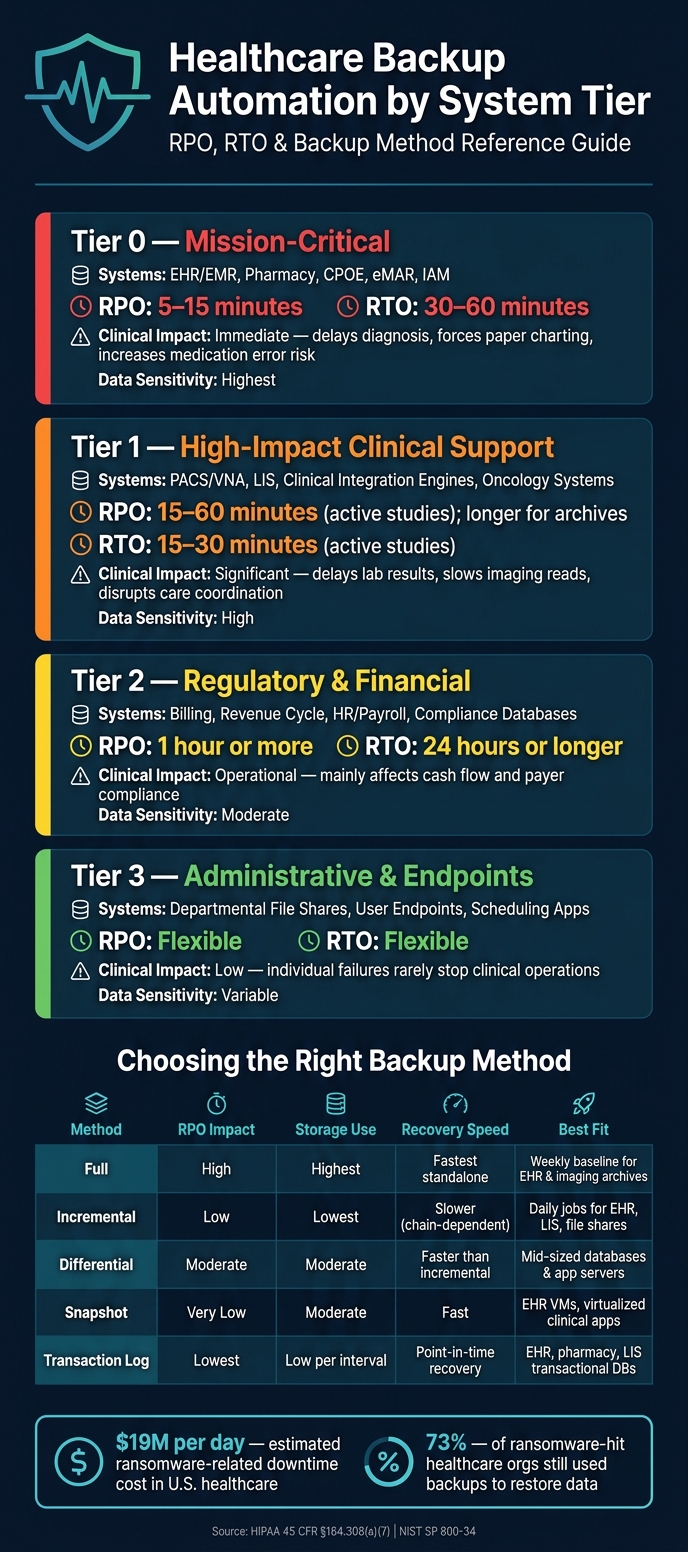
Healthcare Backup Automation: System Tiers, RPO & RTO Targets at a Glance
A backup plan only holds up if scheduling and monitoring tools run it automatically. If people have to remember every job, something will get missed.
Classify systems by clinical criticality and data sensitivity
Start with a full inventory of systems that create, receive, maintain, or transmit ePHI. That means on-premises systems, cloud workloads, SaaS apps, endpoints, and medical device integrations.
From there, sort systems into protection tiers based on two things: how much they affect patient care if they go down, and how sensitive the data is.
| Tier | Systems | Clinical Impact if Down | Data Sensitivity |
|---|---|---|---|
| Tier 0 - Mission-critical | EHR/EMR platforms, pharmacy, CPOE, eMAR, identity and access management (IAM) | Immediate: delays diagnosis, forces paper charting, increases medication error risk | Highest - high volumes of ePHI and clinical documentation |
| Tier 1 – High-Impact Clinical Support | PACS/VNA, LIS, clinical integration engines, oncology systems | Significant: delays lab results, slows imaging reads, and disrupts care coordination | High - ePHI and large imaging datasets |
| Tier 2 – Regulatory & Financial | Billing, revenue cycle, HR/payroll, compliance databases | Operational: mainly affects cash flow and payer compliance | Moderate - financial PII and insurance data |
| Tier 3 – Administrative & Endpoints | Departmental file shares, user endpoints, scheduling apps | Low: individual failures rarely stop clinical operations | Variable - may include cached ePHI |
Not every system fits neatly by business function alone. A billing database may not drive bedside care, but if it holds Social Security numbers and insurance records, it may need tighter isolation and stricter backup controls than its daily role suggests.
Those tiers should guide backup frequency, retention, and alert severity.
Map RPO and RTO to schedules, retention, and storage tiers
Once the tiers are set, turn clinical impact into hard RPO and RTO targets. Then match those targets to backup methods that can meet them in practice.
In U.S. healthcare settings, tighter targets are common for systems tied directly to patient care. EHR and pharmacy systems often run with an RPO of 5–15 minutes and an RTO of 30–60 minutes. PACS and active imaging workflows often aim for an RPO of 15–60 minutes and an RTO of 15–30 minutes for active studies, while archives can usually live with longer windows. Administrative systems like billing often tolerate an RPO of 1 hour or more and an RTO of 24 hours or longer.[6][8][10][11][14]
Your backup method has a direct effect on whether those targets are realistic:
| Backup Method | RPO Impact | Storage Use | Recovery Speed | Best Fit in Healthcare |
|---|---|---|---|---|
| Full | High (long gap between runs) | Highest | Fastest standalone restore | Weekly baseline for EHR and imaging archives |
| Incremental | Low (short gaps) | Lowest | Slower because restores depend on the chain | Daily jobs for EHR databases, LIS, and file shares |
| Differential | Moderate | Moderate | Faster than incremental | Mid-sized databases and application servers |
| Snapshot | Very low (15–60 min) | Moderate | Fast | EHR VMs, virtualized clinical apps, and file shares |
| Transaction log-based | Lowest (5–15 min) | Low per interval | Point-in-time recovery | EHR, pharmacy, and LIS transactional databases |
A common EHR schedule mixes weekly full backups, nightly differentials, 15-minute transaction log backups, and 30-minute VM snapshots copied to a secondary site. PACS setups often use weekly or monthly full backups with daily incrementals for large image volumes, then rely on tighter snapshot timing for the metadata and worklist databases that keep daily radiology work moving.[6][7][9]
Retention adds another layer. It has to satisfy HIPAA, state law, payer contracts, and clinical needs at the same time. A tiered storage model helps here: keep recent backups on faster storage, then move older copies to lower-cost tiers.
These intervals should feed automated schedules and failure alerts, not manual job starts.
Build resilience with immutability, segmentation, and verified restores
The 3-2-1-1-0 rule is built for one of healthcare’s biggest backup risks: ransomware. Keep 3 copies of the data, on 2 different media types, with 1 copy off-site, and 1 copy offline or immutable.[7][9][11]
Immutable copies matter because they block users or processes from changing or deleting backup data during the retention window. This usually means object-lock storage or WORM (write once, read many) media. Pair that with network segmentation. Backup repositories should sit on isolated network segments with separate credentials, apart from production systems and domain admin accounts.
Access control matters too. Role-based access and least-privilege rules cut down who can change backup jobs or delete recovery points. Emergency access should go through audited break-glass procedures with audit logging.
Encryption needs to cover every layer: data in transit from source to backup target, and data at rest across each storage tier, including off-site and cloud copies. Keep encryption keys separate from the backup data. Otherwise, a hacked backup server can hand over both the files and the keys needed to read them.
Restore testing is not optional. HIPAA guidance says backups must be retrievable exact copies of ePHI and must be tested on a regular basis, not just created.[12][13] Use checksum validation at backup creation and again at restore time to confirm data integrity.
Each test should leave a paper trail that shows:
- What was restored
- How long the restore took compared with the target RTO
- Any issues found
- The corrective actions assigned
Store those records with your HIPAA contingency plan documentation.
Restore-test results should feed the monitoring workflow covered next.
What to look for in automated backup scheduling and monitoring tools
Pick a backup tool that holds up across multi-site clinical environments. If a backup gets missed, patient care and recovery can take a hit.
Use the RPO, RTO, and restore-test targets above to set the requirements for the tool.
Scheduling features that support clinical workloads
Start with policy-based scheduling tied to system tier. The tool should apply tier-based schedules on its own across every workload in that tier. That cuts manual mistakes and keeps schedules in line with clinical priorities.
You also need application-aware backups for EHRs, PACS, LIS, and scheduling systems. Without that, a restore point may exist on paper but still fail to restore cleanly at the transaction level.
For multi-site health systems, centralized orchestration is a hard requirement. One policy plane should cover hospitals, outpatient clinics, cloud workloads, and on-premises data centers. At the same time, each site should still be able to make local exceptions for bandwidth limits or maintenance windows. Bandwidth-aware job timing matters too. Large imaging backups should run during off-peak hours so they don't compete with telehealth, imaging, or other bandwidth-heavy clinical services.
And here's the plain truth: scheduling is only as good as the team's ability to spot failures fast enough to fix them before recovery is in danger.
Monitoring and alerting that catch backup failures early
A completed job does not prove the backup is restorable. A green checkmark can give false comfort.
Monitoring should show more than job status. The tool should provide a centralized dashboard showing which systems are protected, which jobs are overdue, and which finished with warnings instead of cleanly. Alerts should trigger for:
- Failed jobs
- Jobs that finish with warnings
- Missed RPO thresholds
- Repository capacity getting close to limits
- Checksum or integrity mismatches that point to corrupted data
Slow detection creates real operational risk. If a critical EHR backup has been failing quietly, the team may not find out until the moment they need to restore. That's a bad time to learn the backup wasn't usable.
Look for anomaly detection that flags unusual access, mass file changes, or spikes in encrypted files. When these alerts tie into SIEM or SOAR systems, security teams can kick off incident response workflows right away.
The tool should also log job changes, restores, privilege changes, and deletions in a tamper-resistant audit trail. In healthcare, those records matter for compliance review, incident investigation, and showing that backup operations are being handled with care.
Must-have capabilities versus secondary features
Separate the core controls from the extras. Some features belong on the baseline checklist. Others are helpful, but not required on day one.
| Capability | Priority | Why It Matters |
|---|---|---|
| Immutable storage support | Must-have | Ransomware resilience; preserves known-good recovery points |
| Automated test restores | Must-have | Validates actual recoverability, not just job completion |
| Granular role-based access controls (RBAC) | Must-have | Limits who can change schedules, delete sets, or approve restores |
| Tamper-resistant audit logging | Must-have | HIPAA documentation and forensic investigation support |
| Application-aware backup agents | Must-have | Consistent recovery points for EHR, LIS, PACS, and databases |
| Missed RPO alerting | Must-have | Catches protection gaps before they become recovery failures |
| Anomaly detection | Nice-to-have | Improves early ransomware detection; useful, but not yet universal |
| Predictive capacity forecasting | Nice-to-have | Helps with storage planning; not a recovery-readiness control |
| SIEM / SOAR integration | Nice-to-have | Strengthens incident response; depends on the current security stack |
Implementation, operations, and conclusion
Governance, hardening, and daily operations
Once scheduling and monitoring controls are set, someone has to own the work. Backup automation doesn't run on good intentions alone. It needs clear accountability. A RACI structure helps pin that down: IT infrastructure owns backup platform setup, job scheduling, monitoring, and restores; application owners define and validate RPO/RTO for clinical systems like EHR and PACS; information security owns privileged access management; compliance/privacy makes sure HIPAA contingency planning, documentation, and audit requirements are met; and clinical leadership is consulted when recovery plans could affect patient safety.[16][19]
On the infrastructure side, backup servers should be treated as Tier-0 assets. In plain English, that means locking them down HARD: hardened OS builds, host-based firewalls, MFA for all admin functions, and backup repositories kept in dedicated network zones with no direct access from clinical VLANs or the internet. Console logs should also flow into the SIEM so teams can spot mass deletions, repository changes, and spikes in failed jobs.
Before clinic hours start, teams should verify:
- Job success
- Capacity
- Checksum integrity
- Encryption status
The table below turns those ownership lines into a repeatable operating cadence.
| Recurring Task | Primary Role | Automation Opportunity | Audit Evidence |
|---|---|---|---|
| Daily Tier-1 job review | Backup Ops / IT | Automated dashboards, email/SMS alerts | Ticket records, status exports |
| Daily capacity check | Backup Ops / Storage | Threshold alerts, capacity forecasting | Capacity trend logs |
| Weekly test restore | App Owners + Backup Ops | Scheduled test-restore, validation scripts | Signed restore reports |
| Monthly critical app restore | DR/BC + App Owners + IT | Orchestrated recovery runbooks | DR docs, sign-off forms |
| Monthly access and audit log review | Security Ops / IAM | SIEM correlation, anomaly reports | Log review summaries, incident tickets |
| Quarterly policy and retention review | IT Leadership + Compliance | Configuration drift detection | Updated policy docs, meeting minutes |
| Annual DR exercise | DR/BC + Clinical Leadership | Recovery orchestration platforms | After-action reports, improvement plans |
| Annual HIPAA contingency and risk review | Compliance / Privacy + CISO | Risk management platforms (e.g., Censinet RiskOps™) | Risk assessment reports, contingency plan docs |
Continuous improvement and final takeaways
Once daily controls are in place, track a small set of metrics that answer one simple question: Can you recover when it counts? If a backup program stops improving, it starts slipping behind changes in clinical operations and threat activity. Watch the Tier-1 backup success rate, average restore time against the defined RTO, and the share of workloads covered by immutable copies with tested recovery paths.
After every DR exercise or actual incident, run a formal after-action review. Write down what worked, what failed, and what needs to change. Then feed those findings back into HIPAA contingency plan documentation and the enterprise risk register.[17][18]
For organizations dealing with vendor and cloud backup risk, Censinet RiskOps™ can help track residual risk, control maturity, and provider dependencies as part of a broader cyber risk program.[15][19]
FAQs
How do I set RPO and RTO for each healthcare system?
Start with a Business Impact Analysis, along with an application and data criticality review, to rank systems based on how much they affect patient safety, clinical operations, and compliance.
Then set recovery tiers to match that impact.
- Tier 0: Core EHR and life-safety systems. These need near-zero RPO and the shortest RTO.
- Tier 1: PACS and identity services. These need fast recovery.
- Tier 2: Billing and scheduling. These can allow up to 24 hours.
- Tier 3: Reporting and analytics. These can allow longer recovery windows.
How often should we test backup restores?
Healthcare organizations should test disaster recovery and backups at least once a year to meet HIPAA requirements and stay ready when something goes wrong. That said, once a year usually isn't enough if patient care is on the line.
A better plan is to test critical systems and ePHI restores at least every quarter. It also helps to run disaster recovery drills quarterly, complete full system restores twice a year, and use automated sample testing on a continuous basis.
For audits, document everything: test results, timestamps, and any corrective actions taken.
What makes a backup strategy ransomware-resistant?
A ransomware-resistant backup strategy relies on immutable storage - like WORM or object lock - so backups can't be changed or deleted. That matters because if attackers get in, they often go straight for backup files first.
It should also follow the 3-2-1-1-0 rule, which adds an offline or air-gapped copy that ransomware can't touch.
On top of that, the setup should use AES-256 encryption with keys managed separately. And it needs regular automated restore testing, plus an isolated recovery environment where teams can scan for malware before putting data back into production.
