
When a medical device is hit, the first job is simple: cut cyber risk without putting patient care at risk. In U.S. hospitals, that usually means I don’t start with “disconnect it now.” I start with device criticality, patient status, backup availability, and the least disruptive containment step.
Here’s the article in plain English:
- Medical devices need a different response than normal IT assets. A file server can be taken offline fast. A ventilator or infusion pump often cannot.
- Containment decisions depend on two things:
- How serious the cyber event is
- How much the device matters to patient care
- Devices should be tiered before an incident happens: life-critical, safety-critical, and non-critical.
- Common containment steps include selective port blocks, network segmentation, VLAN isolation, wireless disablement, and other controls that limit exposure without stopping care.
- Full disconnection is not always the first move. If a device is in active use, bedside staff need to confirm patient status and backup support before any isolation that could affect therapy.
- Clinical leadership, security, IT, biomedical engineering, and vendors all have decision roles. Security should not make high-risk device shutdown calls alone.
- Evidence matters. Logs, configurations, and network data should be saved before reimaging or power cycling, when patient care allows.
- Clinical workarounds must start at once if monitoring, documentation, or connectivity is limited.
- Recovery is a separate gate. A device should return to service only after technical checks, biomedical review, clinical sign-off, and validation of alarms and data flows.
- One stat stands out: 85% of surgical devices on unsupported operating systems had vulnerabilities with high exploitation probability, which shows why high-risk devices need tight network controls and close review.
If I had to reduce the whole guide to a few rules, they would be these:
- Patient safety comes first
- Use the least disruptive control that still limits spread
- Get clinical approval before isolating high-acuity devices
- Document every decision and risk trade-off
- Test the playbook before a live event
This guide then walks through risk tiers, decision paths, containment choices, team roles, clinical fallback steps, vendor coordination, playbook design, and post-incident updates.
Protecting Connected Medical Devices With Palo Alto Networks IoT Security (Sponsored)
sbb-itb-535baee
Threat Landscape, Risk Assessment, and Governance Basics
Connected medical devices now deal with ransomware, remote-access misuse, slow patch cycles, and supply-chain compromise. Because of that, containment planning has to begin before an incident starts. If teams wait until an alert fires, they lose time they may not have. That’s why pre-assigned device tiers and clear escalation paths matter so much.
How to Classify Devices by Clinical Criticality and Business Impact
Before an incident happens, every connected device should be placed into a criticality tier. That classification should use four inputs: the care setting where the device is used, which workflows rely on it, its downtime tolerance, and the impact if it is compromised or unavailable.[1][3][5]
Put simply, a ventilator in the ICU is not the same as a non-urgent outpatient peripheral. The setting, the workflow, and the risk to patient care all change the right containment move.
The table below breaks down the three tiers and the recommended containment approach.[1][3][4][5]
| Tier | Examples | Downtime Tolerance | Recommended Containment Actions |
|---|---|---|---|
| Life-critical | Ventilators, anesthesia machines, infusion pumps delivering continuous critical medications, implantable cardiac devices | Near zero | Use micro-segmentation and compensating controls; isolate only with clinical approval. |
| Safety-critical | Imaging systems, medication dispensing cabinets, patient monitoring with backup coverage | Hours, if alternatives exist | Use restricted mode or network isolation with clinical sign-off; activate fallback workflows immediately. |
| Non-critical | Non-urgent outpatient diagnostic peripherals, non-continuous monitoring tools | Flexible | Quarantine or disconnect immediately until remediated. |
One data point stands out: among surgical devices running unsupported operating systems, 85% carry vulnerabilities with high exploitation probability based on high EPSS scores.[6] In plain terms, these devices deserve close attention. They should move to the front of the line for segmentation, added monitoring, and compensating controls.
Roles, Decision Rights, and Escalation Paths
Fast and safe containment decisions don’t just happen. Teams need a governance model set ahead of time, not something thrown together in the middle of an incident.[1][2][4]
Here’s how ownership usually breaks out:
- Cybersecurity/Security Operations leads technical detection, triage, and containment recommendations.
- IT/Network Engineering makes the network changes, including segmentation, access control updates, and patch deployment.
- Biomedical Engineering owns device inventory accuracy and checks whether a proposed technical change is safe from a clinical standpoint.
- Clinical leadership such as the CMIO, CNO, or physician leads approves any action that would take a life-critical or safety-critical device offline.
- Compliance and Legal advises on HIPAA breach notification timelines, vendor contract duties, and documentation.
- The incident manager or vendor security response team coordinates the response, vendor outreach, forensic work, and post-incident review.[1][5]
A RACI-style model helps keep these groups from stepping on each other when the pressure is on. For triage, Security is Responsible, the CISO is Accountable, and IT plus Biomedical Engineering are Consulted. For containment approval on critical devices, Clinical Leadership is Accountable, while Security and Biomedical Engineering are Responsible, and Legal/Compliance is Consulted. Patient safety review sits with Clinical Leadership, with Biomedical Engineering and Security serving in a consulting role. External and internal communications belong to the Incident Manager, with Legal and Compliance brought in as needed.[1][2]
Escalation paths also need to be documented and rehearsed. If containment is delayed, both operational risk and patient safety risk get worse.
With ownership set in advance, teams can move from assessment to containment without stopping for ad hoc approvals.
Using Censinet RiskOps™ for Device Risk Visibility
Censinet RiskOps™ brings medical device, application, third-party risk assessments, PHI, and supply-chain risk data into one workflow, giving teams a single place to track exposure and response status.
How to Make Containment Decisions During Medical Device Incidents
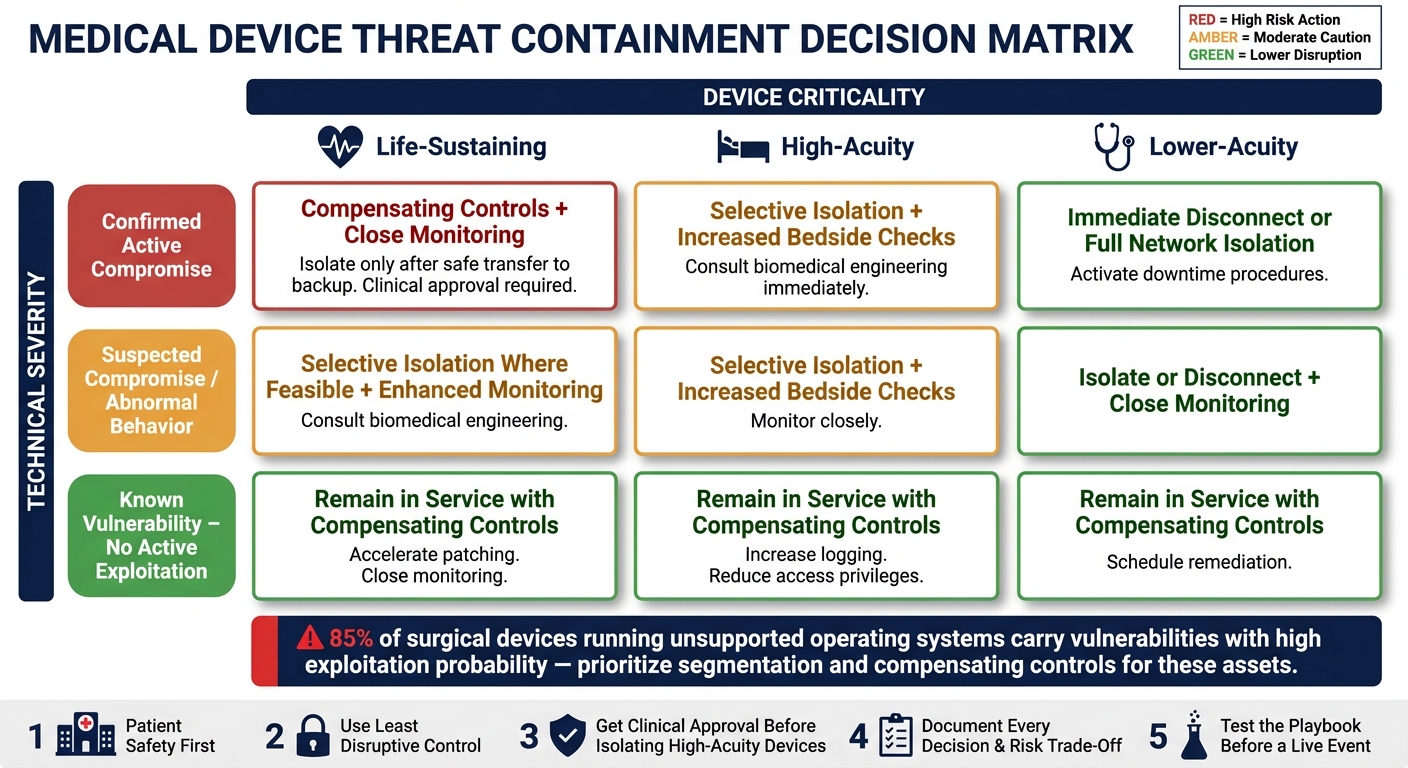
Medical Device Threat Containment: Decision Matrix by Severity & Criticality
Once you can see the device risk, the next step is picking the containment action that causes the least disruption.
Containment has to do three things at once: stop the spread, preserve evidence, and protect patients. It also can't derail reporting, remediation, or documentation timelines.
In practice, teams usually work from two common approaches. The first is "stop spread, remediate, and restore" - contain the incident, fix the damage, and get services back online. The second is "observe and document", which fits cases where suspected criminal activity makes it more useful to watch adversary behavior and preserve evidence before stepping in.[7] Choosing between those paths depends on a clear view of clinical risk, not just technical severity.
Safety-First Principles for Every Containment Decision
Use the same safety rules every time:
- Patient safety first: never disrupt active therapy without verified backup support.
- Use the least disruptive control that still contains the threat.
- Preserve evidence before acting. Capture logs, configurations, and network traces before reimaging or power cycling a device - when doing so does not delay critical care. Evidence lost during containment may be needed for HIPAA breach assessments, FDA reporting, or legal proceedings.
- Escalate fast when clinically significant technology is involved. Any suspected compromise affecting life-sustaining devices should immediately trigger the incident command structure. Bedside staff must verify patient status and set up manual backup monitoring before any technical action is taken. Clinical leadership holds veto power over high-risk containment actions, and every decision should be logged with a timestamp, the rationale, and the risk trade-offs considered.
When to Disconnect, Isolate, Monitor, or Apply Compensating Controls
The right move comes down to two factors: how severe the technical threat is and how important the device is to patient care. The table below shows how those two factors interact.
| Technical Severity | Life-Sustaining | High-Acuity | Lower-Acuity |
|---|---|---|---|
| Confirmed active compromise | Compensating controls + close monitoring until safe transfer to backup; then isolate | Selective isolation + increased bedside checks; consult biomedical engineering | Immediate disconnect or full network isolation; activate downtime procedures |
| Suspected compromise or abnormal behavior | Selective isolation where feasible; enhanced monitoring; consult biomedical engineering | Selective isolation + increased bedside checks | Isolate or disconnect; monitor closely |
| Known vulnerability, no active exploitation | Remain in service with compensating controls + close monitoring; accelerate patching | Remain in service with compensating controls + increased logging and reduced access privileges | Remain in service with compensating controls; schedule remediation |
Full disconnection or power-down makes sense when there is a confirmed active compromise, the device is not in active patient use, or safe backup options are ready.[8] Before disconnecting any device that is in use, the responsible clinician must confirm the patient's condition, and a backup must be confirmed and running. For example, replace the affected pump with a verified backup first, then send the original device to biomedical engineering for imaging.
Network isolation is often the better first step when the device must keep working but its connectivity needs to be cut back. Put the device on a restricted VLAN, limit firewall rules to only the destinations it must reach, and disable nonessential services. That said, isolation can't happen in a vacuum. Biomedical engineering needs to be involved so the team can catch hidden dependencies - like dose error-reduction software libraries or time synchronization for alarms - that may fail quietly if connectivity changes.
If a critical device can't be safely isolated, use time-limited compensating controls and document the risk acceptance. On the clinical side, that can mean more frequent vital sign checks, manual double-verification of infusion rates, or independent monitoring with a portable device alongside the affected one. On the technical side, increased logging, targeted IDS/IPS rules, and reduced access privileges can lower exposure while the team works on a permanent fix. These controls should be reviewed at intervals and kept on record for auditing and possible FDA or Joint Commission review.
These thresholds should be written into the incident response playbook.
Containment Actions and Response Workflows
With medical device security risks classified and approvals in place, the work shifts from deciding what to do to doing it. At that point, teams need to contain the threat fast without disrupting patient care.
Technical Containment Options for Connected Medical Devices
Each containment option comes with tradeoffs. The best fit depends on clinical criticality, system dependencies, and whether backup workflows are ready. The table below lays out the five main options.
| Containment Option | Patient Safety Impact | Technical Complexity | Regulatory Considerations | Operational Disruption |
|---|---|---|---|---|
| Full network disconnection | High for life-sustaining or monitoring-dependent devices; lower for standalone-capable devices | Low - disable switch port or block device IP at the firewall | May affect validated configurations or manufacturer instructions for use | Disrupts EMR documentation, remote monitoring; may trigger downtime procedures |
| Selective isolation | Low to moderate if essential flows - EMR, time sync, remote monitoring - are preserved | Medium - requires accurate dependency maps and ACL, microsegmentation, or quarantine VLAN changes | Review against manufacturer guidance and organizational policy | Minimal if dependencies are mapped; may affect non-essential services |
| VLAN-based segmentation | Low to moderate; depends on whether safety-related traffic still flows | Medium to high - requires pre-planned network architecture and coordination with network operations | Limits PHI exposure; log changes for audit and regulatory review | Can affect entire device classes; useful for limiting blast radius during ransomware events |
| Complete offline isolation | High - removes all digital connectivity; requires safe standalone operation | Low to execute; requires pre-planned manual data transfer | Strong containment posture; may require vendor review before reconnection | Eliminates automated data flows, remote monitoring, and electronic documentation |
| Wireless disablement | Low to moderate when wired fallback exists; higher if device depends solely on wireless | Low - disable Wi‑Fi, Bluetooth, or RF links at device interface or access point level | Reduces attack surface; log the configuration change | Lower than full disconnection; portable devices may need relocation or additional staff |
For legacy medical devices, isolation and segmentation can go a long way. But there’s a hard line: they can’t interfere with device function or patient care. That’s why IT and clinical teams need to make these calls together, not in separate lanes.
Clinical Compensating Controls During Device or Network Isolation
If containment limits access or connectivity, care teams need bedside workarounds right away. Those controls should line up with documented downtime procedures.
When telemetry or remote monitoring is down, teams can fall back on manual verification, bedside checks, and more frequent rounding. Paper forms can cover vitals, medication records, and lab results until systems come back, with data reconciled afterward. During a long outage, experienced staff may need to shift into support roles for manual workflows.
Tabletop exercises and downtime drills help surface hidden dependencies before a live event does. That might mean alarm routing tied to network systems, pharmacy links, or lab result delivery paths that no one notices until they fail.
Coordinating IT, Clinical Teams, Biomedical Engineering, and Vendors
Containment works only when IT, clinical staff, biomedical engineering, and the vendor operate from a single incident channel.
The first move should be visible labeling and asset-status updates. Affected devices should receive a Do Not Use or Under Investigation tag, and that status should be reflected in the asset management system. IT and biomedical engineering should decide ahead of time who applies the labels, how unit managers and bedside staff get notified, and which communication channel carries those updates. If a device may contain forensic evidence or PHI, chain of custody documentation is required. Every access, change, and movement needs a timestamped log.
The vendor should be pulled in through the incident process, not through side conversations or ad hoc requests. Contact the manufacturer through the incident process, share logs through a secure channel, and ask for safe containment and recovery steps. Reconnection should happen only after technical integrity checks show the threat is gone, patches or firmware updates are applied per manufacturer guidance, and clinical validation confirms that the device is working as expected - including alarm behavior and downstream data flows to the EMR, PACS, or LIS.
Censinet RiskOps™ centralizes affected assets, vendor risk profiles, vulnerabilities, and task status in one workflow.
Playbooks, Recovery, and Continuous Improvement
Building a Repeatable Medical Device Incident Response Playbook
Ad hoc containment decisions don't scale. Once containment is in place, the playbook gives teams a repeatable path to recovery. After the threat is contained, the next job is safe restoration.
Use NIST SP 800-61 as the base, then tailor it to clinical workflows, device risk tiers, and escalation paths. Use the same life-critical, safety-critical, and non-critical tiers when assigning approvals.
Each phase should tie to clear, role-based tasks, not vague guidance:
| Incident Response Phase | Medical Device–Focused Tasks |
|---|---|
| Preparation | Maintain a risk-ranked device inventory; document clinical criticality and workarounds; validate segmentation for high-risk devices; store vendor security guidance centrally |
| Detection & Triage | Correlate SOC alerts to specific devices; confirm whether the device is in active patient use; record clinical observations; determine if the event is safety-relevant |
| Analysis | Review logs and configuration; verify firmware integrity; consult vendor advisories; assess clinical impact (diagnostic delay, dosing risk, monitoring gaps) |
| Containment & Mitigation | Select isolation vs. enhanced monitoring; implement compensating clinical controls; switch to backup devices; coordinate IT–clinical communication |
| Eradication & Recovery | Apply patches or updates; reimage or restore secure baselines; test device performance and safety; validate data flows to EHR or PACS |
| Corrective & Preventive Actions (CAPA) | Update policies and playbooks; refine governance and escalation paths; adjust procurement criteria; integrate lessons into ongoing training |
Recovery is its own decision gate, not a cleanup step. A device should return to care only after technical integrity, clinical safety, and documentation are verified.
That means checking verified firmware, restored segmentation, biomedical engineering sign-off, clinical sign-off, and a working test of alarms plus EHR/PACS data flows. In the end, patient safety is the final gate before the device goes back into service.
Training, Tabletop Exercises, and Post-Incident Updates
Exercises are what make a playbook hold up when the pressure hits. Run realistic scenarios that test incident declaration, role clarity, backup availability, and safety-first decisions. On paper, a playbook can look solid. In a live exercise, the weak spots show up fast.
After each exercise, use a structured after-action review to surface gaps in device inventory data, communication workflows, and backup device availability. Then feed those findings straight back into the playbook.
Train clinicians, biomedical engineering, IT security, and leadership on the tasks each group will own during an incident. Clear ownership matters. When time is tight, no one should be guessing who's supposed to do what.
Censinet RiskOps™ supports this work by centralizing incident records, linking after-action findings to specific assets and risk profiles, and tracking the completion of governance updates and CAPA items. That creates an auditable record of program maturity.
Conclusion: Key Elements of Effective Medical Device Threat Containment
The end state is simple: safe restoration, clear ownership, and a faster response the next time. Containment works only when it can be repeated, keeps clinical care safe, and is documented. That depends on accurate device risk visibility, safety-first decisions, coordinated cross-functional workflows, and a playbook that gets sharper with every exercise and incident review.
FAQs
How should hospitals tier medical devices before an incident?
Use a risk-based approach that looks past technical CVSS scores and zeroes in on clinical criticality. Start with a current asset inventory that lists each device’s type, clinical role, and connectivity.
Then sort devices into tiers like Critical, High, Medium, and Low based on patient safety impact, downtime tolerance, and PHI exposure. That makes it easier to prioritize remediation and map out containment steps, such as network isolation, before an incident hits.
When should a medical device be isolated rather than disconnected?
A medical device should be isolated, not disconnected or powered off, when it’s actively involved in patient care. Pulling it off the network without warning can put patient safety at risk.
A safer move is to use network segmentation or a quarantined VLAN. That can block unauthorized traffic and help contain malware while the device stays up and usable. This step should be coordinated with clinical and biomedical engineering teams.
Who must approve containment actions for life-critical devices?
Containment actions for life-critical devices should be approved by both cybersecurity and clinical teams. That shared sign-off matters because patient safety has to come before pure technical isolation.
If a device needs to be removed from the network, clinical or biomedical engineering leadership must approve it first. Hospitals should also map out who can approve what, who needs to be informed, and where issues get escalated in a documented RACI matrix. If there's any risk to patient care, the issue should go straight to the patient safety officer and clinical leadership.
