
If I had to boil this guide down, I’d say this: know every device and service in use, lock down access, limit network reach, check vendors before purchase, and keep watching after go-live. That includes patient devices, clinician tools, cloud dashboards, mobile apps, remote support tools, APIs, and any outside provider that can touch PHI.
Here’s the short version:
- Inventory first: track hardware, apps, firmware, cloud services, integrations, data flows, owners, versions, and end-of-life dates
- Rank risk by patient impact and exposure: give more weight to internet-facing systems, remote support, PHI access, and diagnosis or monitoring use
- Set purchase rules up front: require TLS 1.2+, encryption at rest, MFA, audit logs, patch commitments, and PHI contract terms
- Lock down remote access: use time-limited vendor sessions, approval before access, and full session logging
- Harden devices: remove default passwords, turn off unused services, use secure boot where supported, and test settings before rollout
- Segment the network: place telemedicine and IoMT devices on separate VLANs, restrict outbound traffic, and quarantine devices that fail posture checks
- Protect logs and updates: send logs to a SIEM, watch for failed logins and odd data movement, and accept only signed firmware and software
- Review third-party vendor risk with proof, not claims: ask for assurance reports, patch SLAs, incident playbooks, breach timelines, subcontractor lists, and data-flow diagrams
- Put security terms in the contract: define breach notice windows, audit rights, remote support rules, log retention, and end-of-life data handling
- Keep monitoring after deployment: watch for drift, failed updates, new CVEs, odd IP connections, and vendor changes in hosting, ownership, or support
- Plan for incidents before they happen: build joint runbooks, set 24/7 contact paths, preserve evidence, and prepare fallback care workflows
A simple way to think about it: telemedicine extends care beyond the hospital, so your controls have to extend too. The rest of the article walks through how I’d do that step by step.
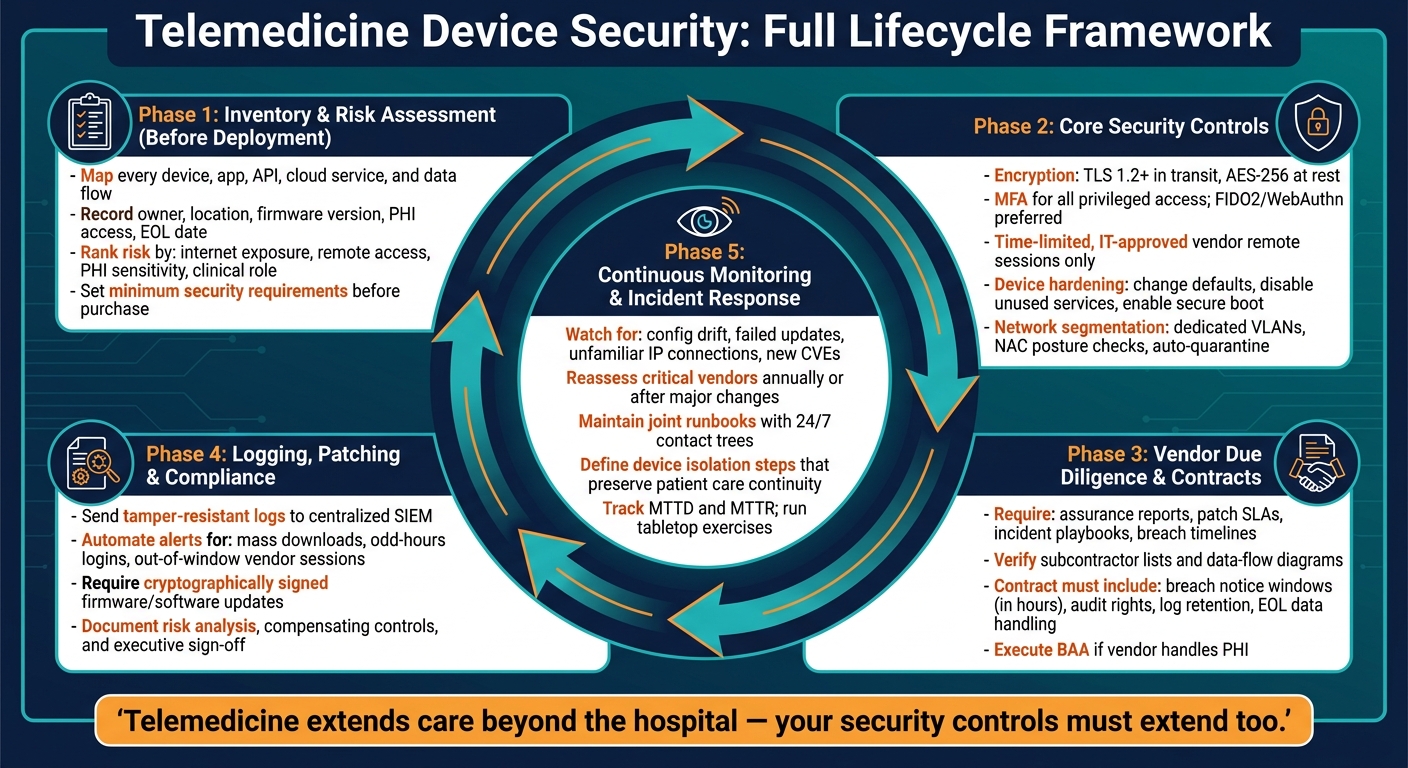
Telemedicine Device Security: Full Lifecycle Framework
How to Secure Real-Time Communication Within a Medical Device Ecosystem Without Compromises
sbb-itb-535baee
Build an Inventory and Assess Risk Before Deployment
Before deployment, document every device, vendor service, integration, and data flow. That means hardware, patient apps, EHR interfaces, cloud dashboards, and remote support portals. This inventory becomes the backbone for access control, network segmentation, logging, and vendor review across every control that comes next.
Map Assets, Interfaces, and Data Flows
For each asset, record the owner, physical location, network location, clinical role, and whether it creates, transmits, stores, or accesses PHI. Include the model number, firmware or OS version, support expiration date, end-of-life date, encryption status, and whether remote access is turned on. You should also note which team is on the hook for approving use and tracking risk over time, whether that's clinical operations, IT, biomedical engineering, or procurement.
The device list alone isn't enough. You also need to trace how patient data moves from one point to another. Follow the full path: device to gateway, gateway to home network, home network to cloud, cloud to EHR, and then to clinician apps and reporting tools. Write down the communication path too, including public internet, VPN, cellular, and Bluetooth, because each one changes the attack surface and what you need to watch.
Rank Risk by Clinical Impact and Exposure
Once the inventory is in place, rank each asset by looking at exploitability alongside clinical impact. The FDA recommends using exploitability instead of probability in cybersecurity risk reviews, since many medical device flaws are publicly known and often targeted [1].
Give higher priority to devices with remote access exposure, high data sensitivity, and direct clinical importance, especially devices used for diagnosis, monitoring, or treatment. A cloud-connected home monitoring kit with a patient app and vendor-managed dashboard will often carry more risk than a standalone peripheral used only during a supervised clinic visit. Devices with always-on internet connections and remote vendor support usually need more logging, tighter access controls, and stronger incident response planning than devices managed only on-site. Use this ranking to decide which devices get the strictest controls first.
Set Approval Criteria Before Purchase
Set minimum security requirements before signing the contract. At a minimum, require encryption for data in transit and at rest, support for multi-factor authentication, audit logging, a clear patch and update commitment, vendor incident response contacts, and business associate terms when the vendor handles PHI. You should also get clear answers on data ownership, support timelines, end-of-life notice, and whether unnecessary remote access can be disabled or restricted.
Ask vendors to disclose any subcontractors or cloud providers involved, and whether the device relies on third-party software components. FDA cybersecurity expectations for cyber devices also include a software bill of materials (SBOM) that covers commercial, open-source, and off-the-shelf components [2]. If a vendor can't meet your baseline requirements, don't approve the device until compensating controls or contract changes are in place.
Approved devices can then move into access, network, logging, and update controls.
Core Security Controls for Third-Party Telemedicine Devices
Once your inventory is built and your approval rules are set, the next move is simple: put the right controls in place before any device touches your clinical network. These are the baseline safeguards for every third-party telemedicine and IoMT device.
Protect Access, Data, and Remote Sessions
Require TLS 1.2+ for all traffic, AES-256 or equivalent for stored data, MFA for all privileged access, and adaptive MFA for high-risk actions. This needs to cover the entire data path. Telehealth video, audio, messaging, API traffic, scheduling messages, billing integrations, and follow-up communications all carry PHI.
When possible, lean on phishing-resistant methods like FIDO2/WebAuthn hardware keys or authenticator-app codes. Use SSO so clinicians sign in once across connected tools. Then add step-up authentication for higher-risk actions, such as exporting data or changing system settings.
third-party vendor security threats make it clear that remote access should be tightly controlled. Allow it only through approved, time-bound sessions. Internal IT should approve access before a session starts, and that access should expire on its own. Log every remote session in detail: who connected, when they connected, which IP they used, and what they did. Persistent vendor tunnels need to go.
Endpoint lock policies matter too. Set short idle timeouts on telemedicine endpoints, require strong passcodes, and make sure any mobile device or tablet that accesses ePHI can be wiped remotely. Timeouts should line up with normal visit lengths so security doesn’t get in the way of care.
Once access is locked down, the next job is to shrink the attack surface and limit where devices can go on the network.
Harden Devices and Segment the Network
Start with a secure baseline for every device before it goes live. Change all default usernames and passwords right away. Turn off unused services and protocols. Legacy remote management interfaces, open Telnet or FTP, and unneeded web portals only add risk and give you nothing back on the clinical side. Where the device supports it, enable secure boot so only vendor-signed firmware and trusted operating systems can run at startup. That blocks unauthorized code from loading.
For general-purpose telemedicine endpoints like Windows laptops, clinician tablets, and mobile carts, deploy anti-malware or EDR agents with policies tuned for healthcare workflows. For dedicated telemedicine appliances, use application allow-listing so unapproved software can’t run at all.
Before approval for clinical use, validate the hardening work with a pre-deployment checklist:
- Scan for open ports
- Verify encryption settings
- Confirm disabled services are actually off
- Test boot integrity
Place telemedicine and IoMT devices on dedicated VLANs with boundary firewall rules. High-risk devices, such as remote monitoring hubs and connected diagnostic peripherals, need micro-segmentation with tighter access rules. Use NAC to profile devices as they connect and enforce posture checks like current firmware and valid certificates. If a device fails a posture check, quarantine it automatically instead of just flagging it for someone to review later. Restrict outbound traffic from device segments so it can reach only approved gateways and cloud endpoints. It also helps to deploy intrusion detection to watch east-west traffic inside IoMT zones.
After hardening and segmentation, shift attention to logging and update integrity.
Manage Logging, Patching, and Secure Updates
Once the device is hardened, logging and signed updates become your main defense against quiet compromise.
Every telemedicine device and platform should produce tamper-resistant audit logs that record authentication events, PHI access, configuration changes, and remote session activity, including failed attempts. Send logs off the device to a centralized SIEM so they can’t be changed or deleted if the device is compromised. Encrypt logs in transit and at rest, and keep them long enough to support breach investigations and regulatory inquiries.
Don’t stop at collection. Automate log analysis with behavioral analytics and rules-based alerting so high-risk events stand out fast. Think mass data downloads, logins at odd hours, or vendor sessions outside approved windows. That way, the security team can focus on incidents that matter instead of digging through noise. Define runbooks for the alerts you expect to see most often so response stays consistent and fast.
For updates, require all firmware and software to be cryptographically signed by the vendor before deployment. Require a rollback plan before any clinical update goes out. Patch timing should also be written into vendor contracts through clear SLAs, and compliance should be tracked as part of day-to-day vendor oversight.
Evaluate Vendors, Contracts, and Compliance Requirements
Device controls only hold up when the vendor is bound to follow them. That means vendor review can't be casual. It needs to be a formal process with clear ownership across procurement, security, compliance, legal, clinical engineering, and operations.
Keep the review focused on the areas that matter most: device access, update integrity, PHI handling, and remote support. Once you've set your baseline device controls, put them into vendor obligations so they're not left to good intentions.
Perform Vendor Due Diligence
Don't take a vendor's word for it. Ask for proof.
A solid due diligence package should include:
- Independent assurance reports or certifications
- A HIPAA Security Rule risk analysis summary
- Network and data-flow diagrams
- Documentation of the vendor's vulnerability management process, including patch SLAs for critical findings
- The vendor's incident response playbook
- Breach notification timelines
- A list of subcontractors with PHI access and contractually flow down obligations
This review helps you see whether the vendor can safely support devices tied to patient data and remote clinical work. Look closely at remote support controls, signed updates, and how the vendor handles disclosures. Review recent breach and incident history too. If incidents keep happening or fixes take too long, that's a warning sign.
Use a repeatable risk-scoring process so every vendor is judged against the same standards. Then use those findings to decide whether the vendor is approvable, approvable with conditions, or not approvable.
Write Security Terms Into Contracts
A vendor can say all the right things in a meeting and still create risk if the contract doesn't require follow-through. If a telemedicine device or platform touches PHI, the contract needs clear security terms that can be enforced.
At a minimum, the agreement should address data use restrictions, PHI handling requirements, and the security controls your policy already requires. It should also spell out breach notification windows in hours, not vague terms like "promptly." Add cooperation duties during investigations, rights to audit or receive updated assurance reports, log retention periods, and subcontractor flow-down requirements.
For telemedicine devices, get specific. Define how remote vendor support works, who can start it, whether vendor staff can see patient data during a session, and what happens to device data at end of life or contract termination. Remediation timelines should also be in the contract, along with clear ownership for fixes and notice requirements before any material change in software, hosting, or ownership.
Those terms aren't just paperwork. They set the rules for oversight after go-live.
Align the Program With HIPAA and Internal Governance
HIPAA compliance calls for administrative, physical, and technical safeguards. So telemedicine device security can't sit with one team alone. Compliance, legal, clinical, IT, and security all need a hand in it.
If the vendor handles PHI, execute a BAA that matches how the device is actually used. The BAA should define permitted uses, required safeguards, and cooperation during incident response.
Beyond the BAA, your internal risk analysis records should show each vendor's role, the PHI data elements involved, the medical device security risks you found, and the residual risk rating after controls are in place. Document why the vendor was approved, who accepted residual risk, and when the review expires.
That paper trail is what helps your program stand up to auditors and regulators. If a vendor can't meet a required control - for example, a legacy device with limited logging - document the compensating controls, get executive sign-off, and set a firm review date.
Monitor Continuously and Strengthen the Program Over Time
Once devices are approved and deployed, the work isn't over. You still need to watch the inventory, security controls, and vendor obligations for drift. Telemedicine device risk doesn't stop at deployment.
Threats change. Vendor setups change. Internal workflows change too. So monitoring has to continue after go-live.
Track Device Behavior and Vendor Risk After Go-Live
After deployment, use the same inventory and risk tiers to guide continuous monitoring. Watch for connectivity issues, configuration drift, failed updates, authentication anomalies, and unusual data transfer patterns.
A device that suddenly reaches an unfamiliar IP address is a problem. So is a device running end-of-life software because an update failed quietly in the background. Both create exposure, and neither shows up on its own without deliberate monitoring.
Device telemetry and vendor oversight should move in lockstep because either one can shift exposure after go-live. Post-launch monitoring should confirm that the vendor still lines up with the assumptions made during approval.
That means you should:
- Require vendor notice for changes that affect PHI exposure, support, or connectivity
- Subscribe to vendor security advisories so critical vulnerabilities don't catch you late
- Reassess critical vendors at least once a year, and sooner after firmware, integration, support, ownership, or hosting changes
A centralized risk platform can help tie telemetry, patch status, and reassessment triggers together, including new CVEs or contract changes.
Coordinate Incident Response With Internal and Vendor Teams
When monitoring flags a problem, the response needs to be immediate and planned in advance. If something fails with a telemedicine device or a vendor-connected service, the team shouldn't be making it up on the fly. The response should follow a prewritten runbook.
That runbook should spell out escalation paths, containment steps, evidence preservation, and communication responsibilities before an incident ever happens.
Joint runbooks should include 24/7 contact trees for internal teams like security operations, clinical leadership, and biomedical engineering, along with vendor contacts such as the vendor security officer and support escalation teams.
They should also define when to isolate a device or disable a vendor integration while still keeping patient care moving. In practice, that may mean switching to local monitoring or manual workflows if a device has to be isolated. When ransomware is detected, isolate affected systems immediately, then determine scope, origin, and attack method before recovery.[3] Pre-defined fallback workflows make that possible without interrupting care.
It's also smart to run joint tabletop exercises during evenings and weekends. That's often when telemedicine use is highest in urgent-care and rural-care settings, so plans need to hold up when staffing is thinner and pressure is higher.
After each incident or near miss, do a structured after-action review. Document the root cause, contributing factors, and exact corrective actions. Then track metrics like mean time to detect (MTTD) and mean time to respond (MTTR) over time.
Conclusion: Key Steps for a Defensible Telemedicine Device Security Program
A defensible telemedicine device security program comes from steady execution across the full device lifecycle. Keep a complete, living inventory. Assess risk before deployment. Require core security controls, and check them through vendor due diligence and contract terms.
Just as important, align the program with HIPAA and your internal governance process so findings reach the right decision-makers and residual risk is documented. Then keep monitoring, reassess vendors when conditions change, and respond to incidents with shared playbooks that protect both patients and evidence.
Used consistently, this approach helps protect patient safety, PHI, and care continuity throughout the device lifecycle.
FAQs
Which telemedicine devices should we secure first?
Start by ranking telemedicine devices based on risk level, clinical importance, and access to ePHI. That means you first need a complete inventory of clinic workstations, mobile devices, RPM kits, and medical equipment.
Put the most attention on assets that directly affect patient safety or handle sensitive ePHI. The same goes for vendors that support critical clinical functions or provide remote access.
What security requirements should we demand from vendors?
Set clear expectations through contracts and technical reviews. Before onboarding any vendor, require a signed BAA and proof that their security program is in good shape. That can include SOC 2 Type II, HITRUST, or ISO 27001, along with an SBOM, MDS2, and results from recent penetration testing.
Your contract should also spell out the security rules in plain terms. Ask vendors to align with NIST or FDA guidance, patch issues on time, and follow set incident notification timelines. It should also cover secure data handling, including AES-256 for data at rest and TLS 1.3 for data in transit.
How often should telemedicine device risks be reassessed?
Telemedicine device risks should be checked again through both scheduled reviews and event-driven reviews so security stays current.
A simple cadence often works well:
- High-risk or critical assets: monthly or quarterly
- Medium-risk assets: every six months
- Low-risk assets: annually
But a calendar alone isn't enough. Risk should also be reviewed after major events, such as critical vulnerabilities, vendor advisories, service updates, security breaches, or compliance changes.
Continuous monitoring can help support these reviews and make it easier to spot issues before the next scheduled check.
