
If a healthcare vendor scanner can’t handle medical devices, PHI risk, and vendor workflows, it’s not enough. In healthcare, a basic scan may find CVEs, but it may miss what matters most: patient care impact, vendor access paths, and where PHI is at risk.
I’d look for 10 things first:
- Workflow tie-in so findings move into HIPAA-compliant vendor risk review and remediation
- Asset discovery across vendor-connected systems, cloud apps, portals, and devices
- Logged-in scanning for deeper checks on patching and settings
- Low-impact scan controls for IoMT and OT devices
- Web app and API testing for portals, FHIR, HL7, and SaaS connections
- Risk scoring with PHI and care context, not CVSS alone
- HIPAA, NIST, and HHS 405(d) mapping
- Frequent monitoring and alerts
- Connections to ITSM, SIEM, SOAR, patching, and GRC tools
- Proof of fixes, SLA tracking, and vendor reporting
The stakes are high. 89% of healthcare organizations had systems exposed to public exploits and the internet, and 35% of healthcare breaches in 2023 were tied to third parties. On top of that, 53% of connected medical devices in hospitals had known critical flaws, and 40%+ were end-of-life.
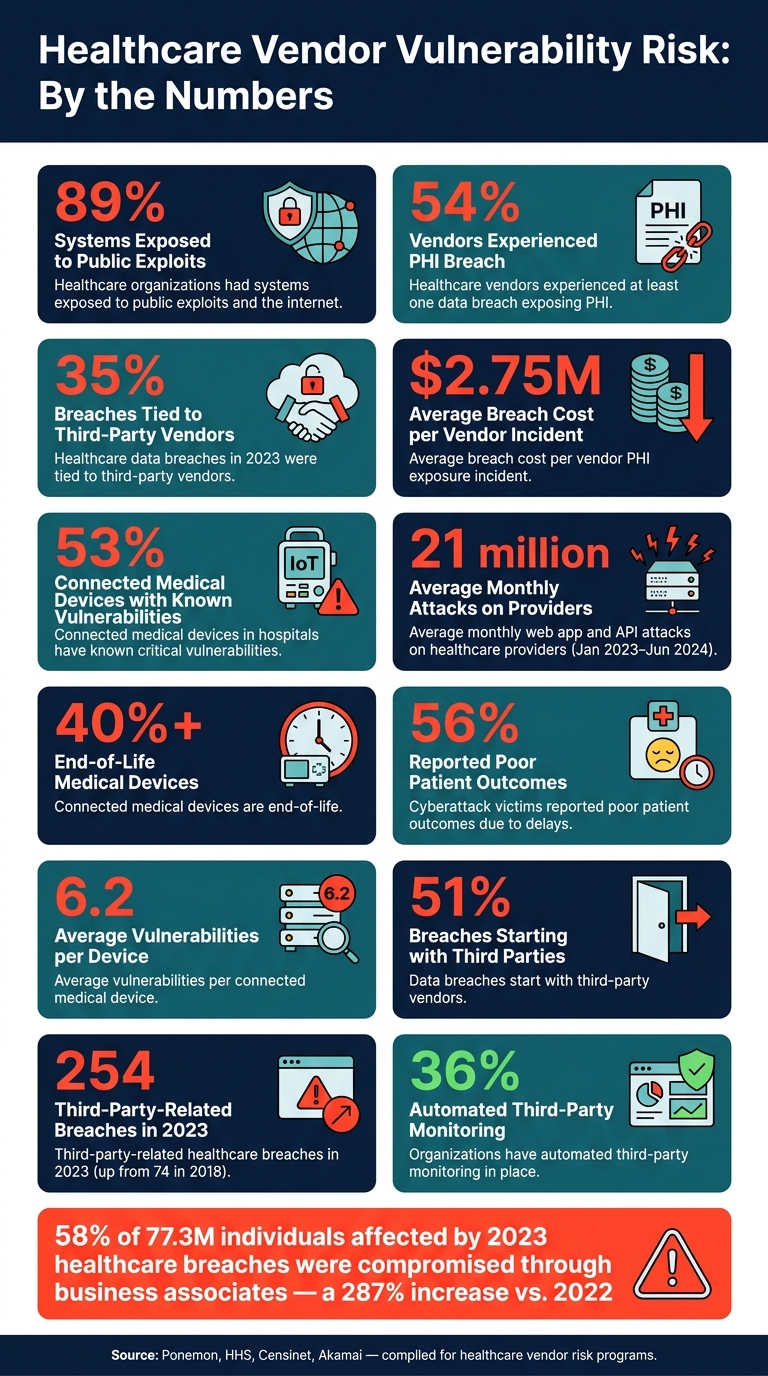
Healthcare Vendor Vulnerability: Key Statistics & Risk Data
Quick Comparison
| Feature | What I’d want it to do | Why it matters in healthcare |
|---|---|---|
| Workflow tie-in | Send findings into vendor risk tasks and tracking | So issues don’t sit in a scan console |
| Asset discovery | Find vendor-reachable assets across network and cloud | You can’t scan what you don’t know exists |
| Logged-in scanning | Check systems from the inside with least-privilege accounts | Shows patch and config issues external scans miss |
| Medical/OT-safe scanning | Use passive or low-intensity methods | Helps avoid device disruption |
| Web/API scanning | Test portals, APIs, auth flows, and hidden endpoints | PHI often moves through these services |
| Risk-based ranking | Score by exploitability, PHI, care impact, and exposure | A “medium” issue can matter more than a “critical” one |
| Compliance mapping | Link findings to HIPAA, NIST, and HHS 405(d) | Makes reporting and review easier |
| Monitoring and alerts | Run on a set cadence and after major changes | Risk shifts fast when vendors update systems |
| Tool integrations | Sync with ticketing, monitoring, patching, and GRC | Turns findings into action |
| Evidence and reporting | Keep logs, status, timestamps, and proof of closure | Needed for audits, renewals, and vendor reviews |
Bottom line: I’d choose a tool that turns scan data into clear vendor action while staying safe for clinical systems.
sbb-itb-535baee
Why Healthcare Organizations Need More Than Generic Vulnerability Scanning
Generic scans can spot exposures, but they often miss the part that matters most in healthcare: clinical context. Healthcare networks aren't made up of standard office endpoints alone. They include EHRs, PACS, lab systems, pharmacy platforms, and IoMT devices. Treating a bedside monitor the same way you'd treat a workstation isn't just a technical miss. It can create operational problems and even patient-safety risk.
IoMT and biomedical devices make this harder. Many run on legacy or embedded operating systems, use proprietary protocols, and rely on fragile hardware that can be disrupted by aggressive scanning. That's a bad mix for off-the-shelf tools. On top of that, support contracts and regulatory limits can narrow how these devices are tested. And even if the device itself is locked down, vendor access can still expose the same environment from another angle.
Vendor remote access is one of the biggest blind spots. Support connections from vendors can slip past normal controls. If those links don't have strong authentication or proper segmentation, they can become direct network paths that generic internal scans may never detect. That's why the most useful tools do more than dump raw scan data. They also help teams handle healthcare vendor risk workflows.
The numbers show how serious this is. Research found that 35% of healthcare data breaches in 2023 were directly tied to third-party vendors, and third-party-related breaches climbed from 74 in 2018 to 254 in 2023.[2][4] A Ponemon Institute study sponsored by Censinet found that 54% of healthcare vendors had experienced at least one data breach exposing PHI, with an average breach cost of about $2.75 million.[3]
Those findings shouldn't sit in a report and collect dust. They need to feed vendor risk assessments, remediation tracking, and contract oversight. The features below show how healthcare-specific tools close those gaps.
1. Censinet RiskOps Alignment for Vendor Risk Workflows
The first feature to look for is workflow alignment. Scan findings should turn into vendor-risk actions your team can track, assign, and close. If findings stay stuck in a security console, they often stall out.
Censinet RiskOps™ links scan findings to vendor-risk workflow integration across intake, assessment, remediation, validation, and continuous monitoring. Results move into a centralized Risk Register, where PHI exposure, clinical workflow impact, and vendor ownership are tracked through resolution.[7]
That matters because context changes everything. Risk teams need to see PHI exposure, clinical criticality, and vendor tier tied to each finding. Without that, it's easy to treat every alert the same way.
Here’s the difference in plain English: a moderate vulnerability on a patient-care system may need attention sooner than a critical finding on a low-risk internal tool. That kind of routing and prioritization is what sets a healthcare-focused workflow apart from a generic security console.
The platform also supports API integration with IT, security, and compliance tools, so vulnerability data can move between scanning systems and remediation workflows.[8] For teams dealing with a high volume of vendors, that automation helps keep the process under control.
| Aspect | Manual | Automated |
|---|---|---|
| Speed | Slow; manual entry and follow-ups | Fast; automated scoring and pre-filled responses |
| Auditability | Limited; no version control | Full audit trails with timestamps |
| Risk Visibility | Static snapshots | Real-time dashboards |
Once findings enter the risk process, the next job is seeing the full picture across vendor-connected assets.
2. Asset Discovery Across Vendor-Connected Environments
Asset discovery is the starting point for vendor vulnerability scanning. If you don’t know what a vendor can reach, you can’t scan it safely or with confidence.
A vendor vulnerability scanning tool needs to find and catalog every asset a vendor can touch: EHRs, PACS, lab systems, connected devices, cloud portals, telehealth platforms, and vendor remote-access paths. That matters because more than 53% of connected medical devices in hospitals have known critical vulnerabilities, with an average of 6.2 vulnerabilities per device, and more than 40% are end-of-life.[9]
There’s another blind spot here. Only 30% of healthcare organizations maintain an AI inventory across their environments.[1] AI is showing up more often inside vendor products, yet it often slips past tracking. The same problem shows up with fourth-party services that never make it onto the asset list.
To build a usable inventory, the tool has to combine passive, active, and cloud discovery. Passive monitoring finds IoMT and clinical devices without disruptive probes. Active scanning fills gaps in lower-risk segments during maintenance windows. Cloud API integrations bring in vendor-managed workloads and SaaS platforms that won’t show up in standard network discovery.
Then each asset should be tagged with details that matter in practice:
- Vendor ownership
- Clinical criticality
- PHI exposure
- OS or firmware version
- Device type
From there, map each asset directly to vendor profiles in Censinet RiskOps™ so assessments and SLAs stay tied to the actual technology footprint. If a vendor adds a cloud environment or a new device class, the inventory should be updated and the risk reviewed again.
Once the asset map is complete, authenticated scanning can check exposure without guesswork.
3. Authenticated Vulnerability Scanning
Once you have an asset map, authenticated scanning shows what plain network scans often miss. It logs into a system with valid credentials and checks patch levels, configurations, and permissions from the inside. That cuts down false positives and gives more exact fix guidance.[12][13] When set up well, authenticated scans collect security metadata, not PHI. That supports risk management, patch management, and audit evidence without exposing patient data.[12]
In healthcare, that extra depth matters. EHRs, PACS, and clinical servers can look normal from the network edge but still have unpatched libraries, weak settings, or local privilege escalation flaws that only appear from the inside.[13][11] Put simply, it shows what an attacker with internal access could use.
For vendor-managed systems, authenticated scans help verify patching instead of leaning on banner data alone. Perimeter scans by themselves rarely show the true security state of a vendor-hosted system.[18][19][11] A safer setup is to use least-privilege scan accounts, keep them in a vault, and rotate them on a regular schedule.[13][15][16]
These scan results also create logs and remediation evidence that support audits and risk tracking.[12][14][17]
When credentials aren't safe to use, the next requirement is scan controls that protect fragile medical and OT devices.
4. Safe Scanning Controls for Medical and OT Devices
When credentials are unsafe or simply not available, scan controls need to move to passive and low-intensity methods. Scans that are fine for IT servers can interrupt medical and OT devices. In a clinical setting, that kind of risk isn't acceptable. Vendor-managed biomedical and OT assets need scan settings that won't interfere with patient care or day-to-day operations.
The safest starting point is passive discovery through SPAN ports or TAPs. That lets teams fingerprint devices from mirrored traffic instead of probing them directly. Why does that matter? Because active scans can affect device timing and other sensitive processes.
If active scanning has to happen, keep it tightly controlled. That means:
- Throttling requests
- Limiting ports and protocols
- Blocking brute-force, fuzzing, and stress-test behavior [21][10][22]
- Using read-only protocol queries and least-privilege access where supported [21][10]
A slow discovery phase should come first, with devices tagged before any full scan begins. That small step can prevent a lot of trouble later.
Guidance recommends scanning management networks monthly and medical device subnets at least quarterly, then rescanning after firmware updates, new device onboarding, or critical advisories [23]. Clinical criticality also needs to live inside the asset inventory itself. For example, tagging ICU monitors as "no active scans" and imaging PACS servers as "low-intensity only" allows scanning tools to apply the right profile on their own, instead of depending on a manual choice every time [10][22][11].
Those controls protect device networks; the next requirement is visibility into vendor-facing web apps and APIs.
5. Web Application and API Scanning for Vendor-Facing Services
Device and network scanning only shows part of the picture. Vendor-facing apps and APIs create a second attack surface, and it’s often where the most sensitive data moves. Patient portals, dashboards, FHIR/HL7 endpoints, and SaaS integrations can all carry PHI, scheduling, billing, and telemetry data. Akamai reported that monthly web application and API attacks against provider organizations worldwide averaged 21 million from January 2023 through June 2024 [29]. In a separate 2024 study, 84.7% of healthcare professionals said they had dealt with an API security incident in the past year, and average remediation costs reached about $510,600 per organization [30][31].
Scan these services for OWASP Top 10 and OWASP API Security Top 10 issues, including broken access control, injection, weak authentication, excessive data exposure, and TLS misconfigurations [24][25][27][28]. For APIs, test:
- token scope
- rate limiting
- JSON/XML input handling
- TLS 1.3
Use mTLS for PHI-heavy integrations [26]. One area teams often miss is shadow and zombie APIs. These are undocumented endpoints that still process PHI but don’t have the right controls in place [25][28][32]. If scanning skips endpoint discovery, those APIs won’t show up at all. And that’s a big blind spot. Coverage matters, but it only goes so far if scanners can’t test the same login paths real users take.
Scanners should support SSO, including SAML and OAuth2/OIDC, along with MFA-aware sessions and role-based test accounts that match real user roles. An unauthenticated scan of a patient portal can miss authorization flaws that only appear after login.
Not every finding carries the same weight. A flaw in a vendor billing portal creates one kind of risk. The same flaw in an API tied to direct patient care or device monitoring is a different story. Tag each finding with asset criticality, PHI exposure, and patient-care impact. Route findings into the third-party risk register with PHI exposure, clinical impact, and remediation status attached. Tag findings for later compliance reporting too.
Scan timing should match exposure. Internet-facing portals and public APIs need more frequent scanning than internal administrative tools. Major deployment changes, new integrations, or a major CVE disclosure should trigger an immediate rescan [33][35][20].
Rank findings by PHI exposure and patient-care impact so teams fix the highest-risk services first. Those findings should then flow into the same risk-prioritization process used across the vendor program.
6. Risk-Based Prioritization with PHI and Patient Care Context
Once findings are in, rank them by healthcare impact, not just technical severity.
CVSS by itself doesn't tell the full story. In healthcare, context changes everything. A medium-severity issue on a vendor portal that handles patient demographics may need attention far sooner than a critical issue on an isolated internal test system with no PHI and no role in care delivery.
The point is simple: move the issues most likely to hurt patients, expose PHI, or disrupt operations to the top of the queue.
Prioritize findings using four factors:
- exploitability
- PHI exposure
- clinical criticality
- internet-facing exposure
HHS risk-analysis guidance says remediation priority should be driven by likelihood and impact [36][37]. HHS 405(d) also frames cybersecurity as a patient safety issue. That link is not abstract. A 2024 Ponemon/Proofpoint survey found that among organizations hit by cyberattacks, 56% reported poor patient outcomes due to delays in procedures or tests [38][39].
That’s why a flaw tied to a pharmacy system, PACS, EHR access layer, or medical device management console should move up fast, even when the raw score doesn’t put it at the top. In plain English: if a weakness can slow care, block access, or expose patient data, treat it like it matters.
Use those tiers to set remediation deadlines. When ranking each finding, look at the full operating context, including:
- asset owner
- data class
- clinical function
- vendor relationship
- network segment
- PHI status
Then account for residual risk. Controls like segmentation, MFA, and EDR may reduce exposure, but they don't erase it. Before assigning the final tier, weigh how much those controls actually limit harm in practice.
Document every escalation and every deferral as part of your healthcare third-party risk assessment. That paper trail helps teams stay aligned and keeps decisions consistent across security, clinical, and vendor groups.
7. HIPAA, NIST, and HHS 405(d) Compliance Mapping
Once you’ve prioritized findings, the next step is to map them to the controls compliance teams need to report on.
Raw scan results, by themselves, don’t help much in a compliance review. They need context. Tag each finding to the HIPAA Security Rule safeguard it touches, such as access controls, audit controls, authentication, or transmission security. That makes it easier for teams to see whether the issue affects ePHI confidentiality, integrity, or availability.
Do the same with NIST. Map findings to control areas like identification and authentication, configuration management, system and communications protection, risk assessment, and continuous monitoring.
Then connect each finding to an HHS 405(d) practice, such as:
- Vulnerability Management
- Endpoint Protection
- Medical Device Security
- Asset Management
This gives third-party teams a clear path forward. They can decide whether to accept residual risk, put compensating controls in place, or require remediation.
For audit readiness, export timestamped evidence for:
- Scan dates
- Asset scope
- Affected systems
- Severity
- Remediation status
- Trends
- Compliance mappings
Censinet RiskOps™ centralizes that evidence and keeps compliance status current across the vendor portfolio.
As scans run again and vendor assets shift, update the mappings so the compliance view stays current.
8. Continuous Monitoring, Scheduling, and Automated Alerts
Once you've mapped findings and set priorities, the next job is keeping that picture up to date. That's where continuous monitoring comes in. Research shows that 51% of data breaches start with third-party vendors, yet only 36% of organizations have automated third-party monitoring in place.[5][6] That gap leaves a lot of room for problems to sit unnoticed.
A risk-tiered schedule helps close that window. High-risk vendors with EHR or PHI access should be scanned daily. Limited-data business associates can usually be checked weekly. Lower-risk providers may fit a monthly cadence or on-demand review. On top of that, event-triggered rescans can catch misconfigurations caused by version updates, network changes, or new integrations that a fixed schedule may miss.
Timing matters too. In healthcare settings, scans need to work around clinical operations. Vendor-supported clinical systems should be scanned during off-peak hours so they don't slow down care delivery. For medical and OT devices, passive or agentless monitoring is the safer route than heavy active probing.[22][41]
Automated alerts are what turn monitoring into something teams can act on. Critical alerts should go out right away to the SOC, the third-party risk team, and the vendor contact. Lower-severity items can be grouped into daily or weekly summaries. A few simple controls make a big difference here:
- Group similar alerts so teams aren't hit with the same issue over and over
- Set thresholds so minor issues don't drown out urgent ones
- Route alerts by role so each team gets what it needs, and nothing extra
Escalation paths matter just as much. If a vendor misses a remediation SLA, the system should move the issue up the chain on its own - from technical contacts to vendor management, and then to procurement, legal, or compliance when needed. Censinet RiskOps™ ties alerts to vendor risk profiles and remediation workflows, which helps keep open issues visible to both security and vendor-management teams. Those alerts should also feed into ITSM, SIEM, SOAR, patching, and GRC workflows.
9. Integration with ITSM, SIEM, SOAR, Patching, and GRC Platforms
Once alerts are prioritized, the next step is simple: get those findings into the systems teams already use to fix problems and document risk.
A scan report by itself doesn't lower risk. It only starts to matter when the data moves into remediation, monitoring, and governance tools through APIs or native connectors. That flow supports third-party remediation, vendor accountability, and audit evidence.
ITSM integration is where most remediation work starts. ServiceNow and Jira Service Management should create, assign, and track remediation tickets with the asset, severity, owner, and due date attached. ServiceNow documents a bi-directional Jira integration for Vulnerability Response, which lets vulnerability items and remediation issues stay in sync across security and engineering workflows.[45][46] If that sync is missing, status updates fall through the cracks and reporting stops matching reality.
SIEM and SOAR connections add the threat context that raw scan results don't give you. NIST SP 800-137 supports linking scan data with logs and monitoring in SIEM to spot unusual activity.[42] NIST SP 800-61r3 recommends SIEM and SOAR for log correlation and incident response orchestration.[43] In healthcare, that can matter a lot. If a vendor-connected system supports patient care or touches PHI, high-risk findings may need faster enrichment and escalation.
After that enrichment and escalation, patching systems turn findings into scheduled fixes.
Patch management integration closes the gap between finding a vulnerability and fixing it. Patch tools such as Microsoft Intune, WSUS, SCCM/MECM, Tanium, or Ivanti should receive prioritized findings, support maintenance windows and exceptions, and verify patch success.[34][41] For vendor-managed assets, scheduling needs to respect clinical maintenance windows so care isn't disrupted. The scanner should then re-scan after deployment to confirm the issue is closed.
GRC integration ties technical findings back to governance. Vulnerability data should flow into risk registers, exceptions, remediation status, and audit evidence for vendor oversight and HIPAA reporting.[7][44] Censinet RiskOps™ supports this by linking vulnerability and risk assessment findings to broader third-party risk workflows across healthcare delivery organizations and vendors.[7][44]
| Integration | Core Function | Healthcare Relevance |
|---|---|---|
| ITSM (ServiceNow, Jira) | Auto-create and sync remediation tickets | Assigns ownership, tracks SLAs, supports audits |
| SIEM | Correlate findings with logs and alerts | Adds threat context and helps detect active exploitation |
| SOAR | Automate enrichment, escalation, and playbooks | Cuts manual response time |
| Patch Management (Intune, Tanium) | Schedule, deploy, and verify fixes | Respects clinical maintenance windows |
| GRC | Map findings to risk registers and evidence | Supports HIPAA reporting and vendor oversight |
10. Evidence Collection, Remediation Tracking, and Third-Party Risk Reporting
Getting findings into remediation workflows is only half the job. The other half is showing that those findings were fixed - and showing it in a way that stands up in a vendor review, contract renewal, or regulatory audit. So the tool can't just open tickets. It needs to keep the evidence too.
Evidence collection should be automatic and tied to each vendor. That includes CVE IDs, CVSS scores, affected assets, timestamps, scan authentication method, hardening findings, compensating controls, and tags like PHI or clinical workflow. Without that context, you're left with a raw technical dump that doesn't help much. When findings connect back to the vendor record, risk teams can reuse the same evidence during reassessment instead of starting from scratch. Censinet RiskOps™ ties vulnerability evidence to vendor relationships.
Remediation tracking also needs to match how vendors work in practice. Assign owners on both sides: your internal security or infrastructure team, and the vendor's support or security contact. Set deadlines based on risk level. Systems that touch PHI or support direct patient care should have shorter SLA windows than lower-risk assets.
Use clear status labels:
- open
- in progress
- pending vendor input
- risk accepted
- closed
Just as important, the tool should run automated re-scans or verification checks after a vendor says a fix is in place. A vendor attestation by itself isn't enough, especially when the systems involved handle sensitive patient data. Once the fix is confirmed, the tool should fold that proof into vendor reporting.
In 2023, 58% of the 77.3 million individuals affected by healthcare data breaches were compromised through attacks on healthcare business associates, a 287% increase compared to 2022.[2][47][48] That's why strong evidence trails and closed-loop verification matter so much. They give organizations the records they need when something goes wrong.
Reporting should center on the vendor, the level of risk, and compliance needs - not just technical details. Useful outputs include vendor risk summaries that flag open vulnerabilities on systems handling PHI or supporting critical clinical workflows, trend reports that show how a vendor's security posture changes over time, remediation SLA performance, and compliance-aligned reports mapped to HIPAA, NIST, and HHS 405(d) practices. Those reports should be exportable for executive briefings and vendor reviews, with concise scorecards plus detailed technical appendices. They also make tool comparisons a lot easier by showing workflow fit, reporting depth, and audit support.
Feature Comparison Table at a Glance
The table below lines up the 10 features against the criteria that matter most in U.S. healthcare vendor risk programs. Use it as a quick side-by-side view of the capabilities that carry the most weight.
| # | Feature | Discovery Method | Credentialed Scanning | Medical/OT-Safe Profiles | Web App / API Coverage | PHI-Aware Risk Scoring | Compliance Mapping | Integration Depth | Remediation Evidence |
|---|---|---|---|---|---|---|---|---|---|
| 1 | Censinet RiskOps™ Alignment | - | - | - | - | Supports PHI-tagged findings | HIPAA / NIST / HHS 405(d) | Native vendor-risk workflow support | Verified remediation evidence |
| 2 | Asset Discovery Across Vendor-Connected Environments | Agentless + passive | - | Passive for OT / medical | Limited | Partial | - | CMDB / asset inventory | Asset inventory export |
| 3 | Authenticated Vulnerability Scanning | Agent-based + agentless | Full OS + DB | Configurable throttling | Limited app coverage | Yes | HIPAA / NIST / HHS 405(d) | SIEM / SOAR / ITSM | Credentialed scan logs |
| 4 | Safe Scanning for Medical and OT Devices | Passive + device-safe templates | Read-only probes | Yes - vendor-approved | No | Patient-care context | HHS 405(d) | Maintenance-window controls | Scan profile documentation |
| 5 | Web Application and API Scanning | Agentless (external) | Authenticated DAST | No | Full DAST + REST / SOAP / FHIR | PHI data-flow tagging | HIPAA / NIST | SIEM / ticketing | Exportable reports |
| 6 | Risk-Based Prioritization with PHI and Patient Care Context | - | - | - | - | Full - PHI + care impact | HIPAA breach risk | GRC / SIEM | Risk-scored reports |
| 7 | HIPAA, NIST, and HHS 405(d) Mapping | - | - | - | - | Yes | Native dashboards + export | GRC bidirectional | Compliance-mapped findings |
| 8 | Continuous Monitoring, Scheduling, and Automated Alerts | Agentless + passive | Scheduled credentialed scans | Yes | Yes | Yes | HIPAA / NIST / HHS 405(d) | SIEM / SOAR / ITSM | Trend reports + alert logs |
| 9 | Integration with ITSM, SIEM, SOAR, Patching, and GRC Platforms | - | - | - | - | Yes | - | Native connectors (e.g., ServiceNow, Splunk, QRadar) | Bidirectional ticket sync |
| 10 | Evidence Collection, Remediation Tracking, and Third-Party Risk Reporting | - | - | - | - | Yes | HIPAA / NIST / HHS 405(d) | GRC + vendor portals | Exportable reports, scan logs, timestamps, PHI tags |
Two things stand out most. Safe scan profiles and PHI-aware scoring matter most when tools touch imaging systems, pumps, and patient monitors.
In Censinet RiskOps™, scan outputs flow straight into vendor-risk records, PHI-tagged findings, compliance mapping, and remediation evidence.
The next section shows how these features support a healthcare vendor risk program. This is a critical step for managing third-party risk across the enterprise.
How These Features Support Healthcare Vendor Risk Programs
Taken together, these features help turn scan results into vendor action. Scan data matters only when it leads to decisions about vendor assessment, remediation, renewal, and risk acceptance.
Scan results validate what vendors claim. If a vendor says it patches systems monthly, scan data can either back that up or show the opposite. Long-standing vulnerabilities tell a very different story than a clean questionnaire response. That’s why it makes sense to use scan evidence instead of leaning on vendor self-reporting alone. It can shape risk scores and influence onboarding or renewal decisions.
Remediation SLAs make deadlines enforceable. Teams can set deadlines based on severity, PHI exposure, and clinical impact. When scan data flows into a risk platform, each finding can be tied to a vendor-specific due date, tracked automatically, and flagged when an SLA is breached. That cuts down on manual follow-up and gives procurement and legal teams a clear way to set measurable expectations in contracts and BAAs.
Exceptions need structure too. Document each one with the vulnerability ID, affected asset, business justification, compensating controls, and review date. Without that level of detail, exceptions can sit around for months with no clear owner and no follow-up.
Censinet RiskOps™ supports this workflow. Risk owners can review technical findings, questionnaires, contracts, and BAAs in one view. Governance teams can see which vendors carry the most residual risk, where remediation is falling behind, and how risk trends change over time. That makes scan data usable for vendor risk decisions.
The table below shows how these features map to healthcare vendor risk needs.
Conclusion
The 10 features above show what healthcare vendor scanning tools need to do day to day. With 35% of reported healthcare breaches occurring at third-party vendors[40], the risk picture changes. These tools need to match U.S. healthcare clinical, regulatory, and day-to-day operating needs.
The right tool brings together broad discovery, safe device scanning, risk-based prioritization, and compliance mapping. Just as important, scan findings need to move into remediation, vendor risk records, and governance reporting. Censinet RiskOps™ links vulnerability data with vendor assessments, remediation tracking, and governance reporting.
In healthcare, the best tool helps protect clinical devices, maps to HIPAA requirements, and gives security, compliance, and vendor teams evidence they can use. Vulnerability scanning only matters when it protects care delivery safely and turns findings into action.
FAQs
Why isn’t generic vulnerability scanning enough for healthcare vendors?
Generic vulnerability scanning isn’t enough for healthcare vendors. It misses the clinical context needed to protect patient safety and electronic protected health information (ePHI).
Sure, it can spot technical issues. But it may miss what those issues mean inside a care setting. A flaw in an anesthesia workstation or an imaging system isn’t just an IT problem. It can disrupt a clinical workflow that care teams depend on.
Healthcare needs tools that connect assets to their clinical use cases, rank risk based on a system’s role in patient care, and support HIPAA requirements.
How can scanning be safely done on medical and OT devices?
Use passive discovery first to inventory assets by watching network traffic instead of interacting with devices directly.
For active scanning, work with clinical leadership and biomedical engineering first. Schedule scans during maintenance windows or off-peak hours. Use lightweight scan profiles with throttling, longer timeouts, and lower intensity. Also get written approval from the device manufacturer for the scan types you plan to run.
What should healthcare teams prioritize beyond CVSS scores?
Healthcare teams should prioritize vulnerabilities using business and clinical context, not raw CVSS scores alone.
What matters most is how each asset affects patient care, how sensitive the PHI is that it handles, and how much it supports core workflows like EHR, imaging, and telehealth. Censinet RiskOps™ helps with this through healthcare-specific risk scoring.
