
Retiring a connected medical device is a data security event, not just an asset disposal task. If a device still holds ePHI, credentials, logs, or software, you need to isolate it, remove access, sanitize storage, verify the result, and keep records. If you skip those steps, the cost can be high: one HIPAA case tied to improper disposal affected up to 344,579 people and ended in a $1,215,780 settlement.
Here’s the short version:
- FDA focuses on device lifecycle security, including end-of-support and decommissioning instructions.
- HIPAA requires policies for disposal and media reuse when devices store ePHI.
- NIST SP 800-88 gives the technical methods: Clear, Purge, and Destroy.
- Your team should track inventory, support dates, stored data, sanitization method, verification, and chain of custody.
- If a vendor, recycler, or service provider handles ePHI, you may need a BAA in place first.
A few points stand out right away:
- Unsupported devices get riskier the longer they stay in use.
- Factory reset may not remove all stored data.
- Logs, cached files, SD cards, and embedded flash are easy to miss.
- Weak records can create compliance trouble even without a confirmed breach.
| Area | What I would focus on |
|---|---|
| Device status | Track model, serial, firmware, owner, location, and end-of-support date |
| Data risk | Identify whether the device stores ePHI, credentials, logs, or config files |
| Sanitization | Match media type to Clear, Purge, or Destroy |
| Verification | Confirm wiping or destruction with checks, logs, or vendor certificates |
| Documentation | Keep disposal records, handoff logs, and approvals for at least 6 years |
If I had to reduce the whole article to one idea, it would be this: before any IoT device is reused, returned, recycled, or destroyed, I need proof that data is gone and the process was documented from start to finish.
Secure EOL Device Decommissioning: How to Retire IT Assets Safely & Responsibly
How FDA and HIPAA shape IoT decommissioning

FDA and HIPAA each cover a different part of IoT decommissioning.
FDA focuses on device lifecycle security, including end-of-support and decommissioning. HIPAA focuses on what happens to ePHI on the device when that device is disposed of, returned, or put back into use. The day-to-day challenge is turning those rules into clear steps for disposal, reuse, and documentation.
FDA lifecycle expectations for secure decommissioning
FDA's premarket cybersecurity guidance treats decommissioning as part of lifecycle risk management.[4][2] That means manufacturers aren't only expected to think about how a device works on day one. They also need to show what happens later, especially when patches stop coming.
More specifically, manufacturers are expected to provide a lifecycle and vulnerability management plan that explains what happens when security updates are no longer available. That plan should cover end-of-support (EOS) timelines, remaining risk, and secure decommissioning instructions.[4][1]
The guidance says this explicitly:
"information on securely decommissioning devices by sanitizing the product of sensitive, confidential, and proprietary data and software."
That includes local data, stored credentials, and software on the device.[4][10]
One point matters a lot here: FDA guidance says that if a device stays in service after EOS, cybersecurity risk to end users can be expected to increase over time.[4][12] In plain terms, the longer an unsupported device stays in use, the more exposed it becomes.
Because of that, manufacturers are expected to give advance notice of the transfer process - often two to three years - so organizations have time to plan budget, replacement, and decommissioning work.[10][11]
HIPAA device and media controls for disposal and reuse
FDA sets the lifecycle expectation. HIPAA turns that into day-to-day operational work.
45 CFR §164.310(d) lays out the Device and Media Controls standard under the Security Rule's physical safeguards.[7] For IoT devices, two required implementation specifications matter most:
- Disposal: Covered entities must have policies and procedures for the final disposal of ePHI and the media that stores it.
- Media re-use: Before any device or media is reused, ePHI must be removed or made inaccessible.
This applies to any device that stores data locally. So even if a device seems simple, if it holds ePHI on the device itself, those rules apply. Policies should also address backup, restore, and disposition records.[7]
There's another point many teams miss: weak disposal and sanitization records can create trouble on their own. Incomplete documentation may itself become an OCR finding, even when no breach has been confirmed.[5]
Where the two frameworks align
In practice, FDA and HIPAA meet in two places: sanitization and recordkeeping.
| Requirement | FDA Expectation | HIPAA Expectation |
|---|---|---|
| Written procedures | Lifecycle and decommissioning plans from manufacturers | Documented disposal and media reuse policies |
| Inventory and traceability | Device lifecycle tracking and EOS dates | Hardware registers with movement and disposition records |
| Sanitization before reuse or return | Manufacturer instructions for data/software removal | ePHI removal required before reassignment or disposal |
NIST SP 800-88 Rev. 1 is the technical bridge between these two frameworks.[6][5] It gives healthcare organizations a concrete, auditable way to show that they've met both FDA sanitization expectations and HIPAA's ePHI removal rules.
Its clear, purge, and destroy taxonomy helps teams match the right sanitization method to the device and the data on it. In practice, that means mapping device type and data sensitivity to the right NIST method before the device is reused, returned, or discarded.
Secure decommissioning workflow for healthcare IoT devices
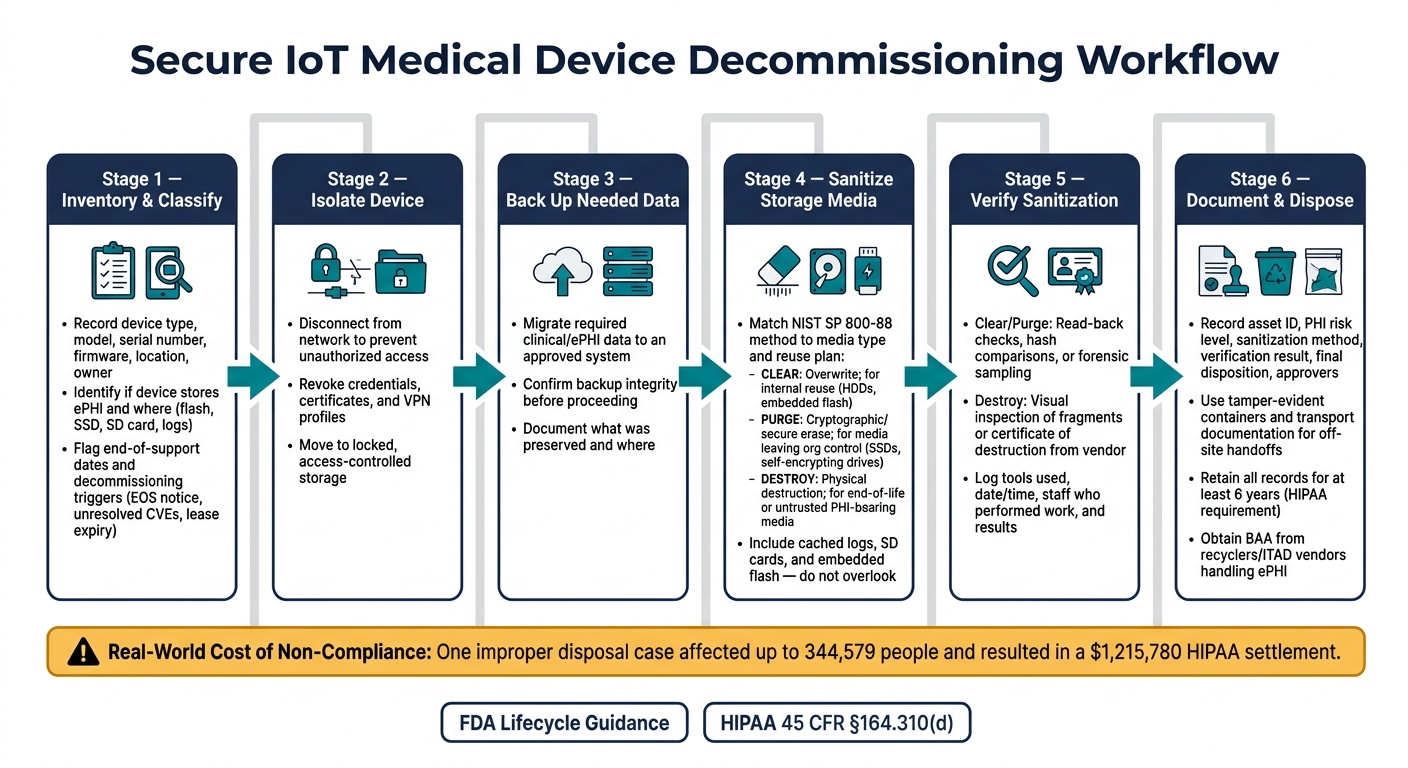
IoT Medical Device Decommissioning Workflow: FDA & HIPAA Compliance Steps
Retiring an IoT device that touched ePHI is a governed security event, not routine disposal. The next move is execution: inventory, isolate, sanitize, verify, and document. This workflow gives IT, security, clinical engineering, and compliance teams one shared sequence they can use again and again.
Inventory, classification, and decommissioning triggers
Start with the inventory. Record the device type, model, serial number, firmware, location, ownership, support status, and whether the device stores ePHI.[17][18]
For ePHI, go a step further and note what data is stored and where it lives - flash, SSD, SD card, logs, or volatile memory.[13][9][17] That matters because media type and data location drive the sanitization method. If you don't know where the data sits, you're guessing.
Policy should also spell out the events that trigger decommissioning. Common examples include manufacturer end-of-life or end-of-support notices, devices with unresolved critical vulnerabilities, lease expirations, clinical replacement with newer technology, and regulatory changes that leave older devices out of compliance.[17][18] Devices nearing end-of-support or carrying unresolved critical vulnerabilities should be flagged for retirement review.[17][18]
That inventory is what decides the sanitization path.
Sanitization methods: clear, purge, and destroy
Once a device is marked for decommissioning, the right sanitization method depends on the media inside the device, the sensitivity of the data, and whether the device will be reused.[13][23][25]
The table below maps each NIST SP 800-88 method to common healthcare IoT situations:
| Sanitization method | Description | Applicable media types | Typical healthcare use case | Relative operational impact |
|---|---|---|---|---|
| Clear | Overwrite or securely reset the media while keeping it usable.[13][9][17] | HDDs, some SSDs, embedded flash with vendor reset tools, and some gateways or bedside devices.[13][9][17] | Wiping PHI from devices that will be reused internally where threat exposure is controlled.[17][18] | Low to moderate |
| Purge | Use cryptographic erase or secure erase to make recovery infeasible.[13][9][17] | Self-encrypting drives, SSDs with secure erase, HDDs with ATA Secure Erase, and some flash media.[13][9][17] | Preparing drives or modules for return to the manufacturer, third-party maintenance, or resale where media leaves organizational control but reuse is intended.[17][18] | Moderate |
| Destroy | Physically render the media unusable.[13][9][16][17] | Almost all electronic media, including HDDs, SSDs, flash, tapes, optical discs, SD cards, USB sticks, and entire small devices.[13][9][16][17] | Final disposal of end-of-life devices, defective or untrusted media, or PHI-bearing components where maximum assurance is required and reuse is unnecessary.[6][14][16][18] | High: permanent media loss; often requires third-party services and added cost. |
For embedded flash and SD cards in bedside devices or gateways, first check whether the hardware supports cryptographic erase, block erase, or another approved purge method.[13][24] If it doesn't, physical destruction is usually the safer default for PHI-bearing media.[13][9][17]
Don't overlook cached logs on gateways and bedside devices. They need to be included in sanitization procedures and cleared or purged using the same risk-based approach.[13][9][17]
Disposition, verification, and record retention
Before sanitization starts, back up needed ePHI, isolate the device, and revoke credentials, certificates, and VPN profiles.[6][15][17][18]
After sanitization, record the result before the device moves to final handling. Then verify the outcome.[17] For clear and purge, that can mean read-back checks, hash comparisons, or forensic sampling to confirm PHI is no longer accessible.[17] For destroy, verification usually means visual inspection of media fragments or a certificate of destruction from a third-party vendor.[16][17][18] Some policies also call for sampling a subset of devices after sanitization with forensic tools to confirm data remanence stays within acceptable risk thresholds.[17]
The table below ties each workflow step to FDA and HIPAA concerns:
| Workflow step | FDA-related consideration | HIPAA-related requirement |
|---|---|---|
| Isolate device from network | Prevent unauthorized access during retirement or transfer | Protect confidentiality and limit access to ePHI-bearing systems |
| Migrate or back up needed data | Preserve needed clinical data before disposal or reuse | Protect privacy through migration to another system or total destruction of data[22] |
| Remove credentials and trust artifacts | Revoke access and support integrity checks before reuse | Reduce unauthorized access risk and support device and media controls |
| Sanitize storage media | Apply Clear, Purge, or Destroy based on media type and reuse plan | Ensure PHI cannot be retrieved; follow NIST SP 800-88[22][13] |
| Verify sanitization | Confirm the outcome with logs or certificates | Maintain evidence for compliance and audit readiness[19][20][21] |
| Final disposition | Return to the manufacturer, reuse, recycle, or destroy under controlled conditions | Maintain chain of custody and disposal records for PHI-bearing media[20][21][22] |
Each completed step should leave a record behind: device identifiers, sanitization method used, tools or commands run, date and time, staff who performed the work, verification results, and any exceptions or issues.[13][9][16][17] Those logs are the first thing regulators, risk committees, and incident-response teams will ask for.[17][18]
sbb-itb-535baee
Governance, documentation, and vendor accountability
Policies, chain of custody, and audit evidence
Once sanitization and verification are done, the next job is proving the device was handled the right way. Under HIPAA, organizations need written policies for receiving, moving, reusing, and disposing of hardware and media that may contain ePHI. They also need to keep those records for at least six years.[8][6][30]
Each decommissioning record should spell out the basics that matter during a review: asset ID, PHI risk level, the trigger for decommissioning, sanitization method, tools used, verification result, final disposition, key dates, and approvers. That record should be confirmed before the device is released, resold, returned, or disposed of.[22][27][29]
Storage and handoff controls matter just as much. Decommissioned devices should stay in locked, access-controlled storage until sanitization or pickup. Every internal and external handoff should be logged with the recipient's name, role, and organization. If a device leaves the building, use tamper-evident containers, seal IDs, and transport documentation. If something goes off-script, log the exception and the corrective action taken.[29] That paper trail only works if manufacturers, service providers, and recyclers follow it too.
FDA cybersecurity quality management guidance also treats decommissioning as part of the device lifecycle. In plain terms, records should show that risks were identified, controlled, and reviewed through end of life.[3][26][4]
Manufacturer, service provider, and recycler responsibilities
Manufacturers, service providers, and recyclers don't all own the same part of the process. Each group has its own job.
Manufacturers should share end-of-support and end-of-life details, along with approved sanitization instructions for sensitive data and software.[4]
Refurbishers, disposal vendors, and recyclers that handle devices containing ePHI will often qualify as business associates. That means a BAA should be in place before they receive the device. The BAA should define permitted PHI use, sanitization and destruction standards, breach notification timing, and audit rights.[6][22][28][29]
The table below shows who is responsible for what during decommissioning and which rules apply.
| Stakeholder | Key decommissioning responsibilities | Applicable framework |
|---|---|---|
| Device/IoT manufacturers | Publish end-of-support/end-of-life notices; provide approved sanitization procedures; maintain vulnerability monitoring and patching until end of support; support risk transfer when devices remain in service post-support. | FDA (primary); HIPAA where they host ePHI |
| Healthcare delivery organizations | Maintain inventories; define decommissioning policies; classify devices by PHI exposure; authorize and document sanitization and disposition; manage chain of custody; retain audit evidence; coordinate with manufacturers and vendors. | HIPAA (covered entity obligations); FDA guidance for device safety and cybersecurity |
| IT/security service providers | Execute sanitization per approved methods; maintain access logs; document tools and verification results; flag exceptions. | Both, depending on PHI access and BAA scope |
| Recyclers/ITAD vendors | Provide per-device certificates of destruction referencing serial numbers and methods; maintain transport security; operate under BAAs. | HIPAA (business associate) |
Using Censinet to support decommissioning risk management
Centralized risk records can make approvals and audit response much faster. Censinet RiskOps™ brings device, vendor, and end-of-support data into one place, helping HDOs trigger reviews, track approvals, and keep decommissioning evidence ready for audit.
Key takeaways and gaps to watch
What healthcare leaders should prioritize now
Decommissioning is a lifecycle cybersecurity and privacy control. If you treat it like a basic asset disposal job, you miss the bigger risk.
Residual PHI, stored credentials, device settings, and network trust relationships can stay behind unless each device is properly inventoried, sanitized, verified, and documented before it leaves service.
The top priorities are simple on paper:
- Know which devices you have
- Know when each device loses manufacturer support
- Have a documented sanitization process ready before that date
End-of-support dates should be tracked the same way you track any other security risk signal, because that's what they are. FDA premarket guidance now requires manufacturers to submit software component end-of-support dates as part of cybersecurity documentation.[31] That gives healthcare delivery organizations a clearer way to plan retirements ahead of time instead of scrambling after the fact.
Independent verification and vendor contract terms matter too. Every decommissioning workflow should include either an independent review or an automated check to confirm sanitization worked. And every service agreement with a service provider or recycler should clearly define PHI handling, data destruction, device return or disposal, and what happens if the chain of custody breaks.
Research and practice gaps to watch
Some day-to-day problems still don't have neat answers. Proprietary embedded storage is one of the toughest. Some healthcare IoT devices use storage designs that aren't fully documented, which makes it hard to tell whether a factory reset actually removes all recoverable data. When manufacturer guidance is missing or vague, organizations are left making judgment calls.
Mixed legacy fleets make this harder. Many health systems run older devices next to newer connected equipment, and that inconsistency gets in the way of standardization. A decommissioning policy that fits one device type may fall apart with another.
There is also a gap around maturity metrics. Many organizations have written policies, but far fewer have measurable controls that prove each retired device was sanitized and verified in practice. Closing that gap will take better device-level metadata from manufacturers, more automation in sanitization checks, and clearer benchmarks for what a mature decommissioning program looks like in a clinical setting.
FAQs
Does a factory reset fully remove ePHI from an IoT device?
No. A factory reset does not fully remove electronic Protected Health Information (ePHI) from an IoT device. In many cases, data, network credentials, and device settings can still be recovered.
To meet HIPAA and FDA guidelines, organizations need to make that data unrecoverable. That usually means using approved data-wiping utilities, cryptographic erasure, or physical destruction methods such as shredding or incineration.
When do I need a BAA for device disposal or recycling?
You need a Business Associate Agreement (BAA) any time a third-party vendor helps dispose of or recycle devices that contain protected health information (PHI).
Here’s why that matters: your organization is still responsible for PHI on decommissioned devices. The BAA makes the vendor legally required to protect that data during the disposal or recycling process.
You should also get a signed Certificate of Destruction. That document confirms the hardware or storage media was permanently sanitized or destroyed.
How do I choose between clear, purge, and destroy?
Choose the sanitization method based on data sensitivity and the device’s future use, following NIST 800-88 guidelines.
- Clear: Use this for internal reassignment when the device stays under your secure control.
- Purge: Use this when a device is leaving your control, such as during a sale, donation, or lease return.
- Destroy: Use this for failed devices, highly sensitive data, or media that software can’t sanitize.
