
Ending a vendor contract does not end your PHI risk. In U.S. healthcare, third-party vendor risk breaches went from 74 in 2018 to 254 in 2023, making up 35% of all breaches that year.
If I were handling a vendor exit, I’d focus on four things right away:
- Review the BAA and contract first so I know what must be returned, kept, or destroyed
- Map every place PHI may exist - not just the main app, but backups, logs, test systems, APIs, and subcontractors
- Move or destroy data with proof using encrypted transfer, record checks, and written destruction records
- Shut off every access path and watch for leftover connections for 30 to 90 days as part of your continuous monitoring strategy
This matters most during EHR moves, SaaS shutdowns, analytics exits, and device platform replacements, where PHI often stays behind in side systems long after the main cutover.
In simple terms: plan first, transfer data safely, verify deletion, remove access, and keep records for every step. That’s how I’d reduce data exposure, support care continuity, and stay aligned with HIPAA at termination.
1. Build a termination data protection plan before access changes begin
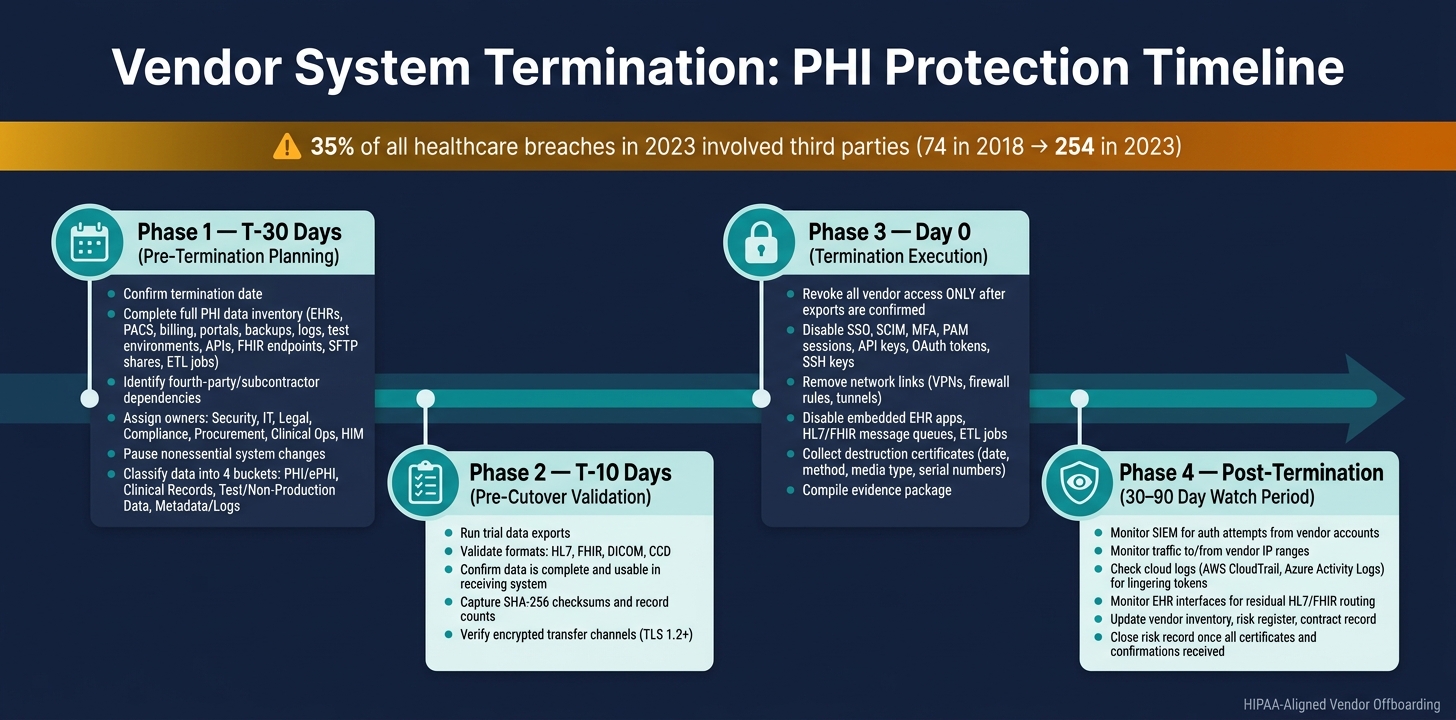
Vendor Termination Data Protection Timeline: T-30 to Post-Exit
Build the plan before any access changes start. In many cases, PHI gets exposed when a team cuts access first and only later tries to map where the data moves.
A smart first move is to pause nonessential changes in any system that touches PHI. That helps stop new, undocumented data flows from showing up in the middle of the termination process. It also keeps your inventory accurate from day one. That inventory then becomes the control list for export, destruction, and shutdown.
Inventory data, systems, and fourth-party dependencies
Your inventory needs to go further than most teams think. Start with the main systems - EHRs, PACS, billing platforms, patient portals, and telehealth tools - then dig deeper. PHI can sit in temporary files, VM snapshots, cache, audit logs, backup tapes, and test environments. It can also show up in cloud storage buckets, HL7 message feeds, FHIR endpoints, DICOM archives, SFTP file shares, and ETL jobs that feed data warehouses.
Don’t stop at the vendor. Include fourth parties too. Ask the vendor for an updated subcontractor list, then check it against your firewall rules, API configurations, and interface engine settings. That extra step can surface connections that never made it into the official paperwork. From there, identify which subcontractors hold PHI and which ones must provide return, destruction, or deletion attestation.
Classify data and map return, retention, or destruction requirements
Classify data into four buckets:
- PHI/ePHI
- Clinical records in the designated record set
- Test and non-production data
- Metadata or logs
Each bucket comes with different duties.
Clinical records - such as operative notes, discharge summaries, radiology reports, and DICOM images - must line up with medical record retention laws and your organization’s policies. These records are usually retained or migrated, not destroyed.
Test data needs a close look. If it is not de-identified or synthetic, treat it as full PHI. Logs need the same level of care. Audit logs and access logs often contain patient identifiers and MRNs, so they should also be handled as PHI. Many organizations keep them for a set period to meet compliance documentation needs. Map each category to one action: return/export, retain, or destroy.
Set a termination timeline and assign owners
Use a four-phase timeline. At T-30, confirm the termination date, finish the full inventory, and assign owners across security, IT, legal, compliance, procurement, clinical operations, and health information management using a collaborative risk exchange. At T-10, run trial exports and check that data formats - HL7, FHIR, DICOM, and CCD - are complete and usable in the receiving system. On Day 0, revoke access only after exports are confirmed. Use the post-termination window to collect destruction certificates, verify residual connections, and close the risk record.
Every task needs a named owner and a deadline. If no one owns a step, it’s easy for it to slip - especially tasks like getting proof that a subcontractor deleted its copy of PHI. Use these dates to make sure exports happen before access shutdowns. This timeline gives the export, destruction, and access-revocation work a clear order.
sbb-itb-535baee
2. Execute secure data return, migration, and verified destruction
Once the inventory is done and each owner is named, treat data exit as a controlled process with proof at every step. Use the data map and retention rules to decide what gets moved, what gets kept, and what must be destroyed.
Export and transfer data in secure, usable formats
Use encrypted channels for every export. For API transfers, use TLS 1.2+; for file-based transfers or removable media, use file-level encryption, with decryption keys managed by the receiving side.[8][9]
Before and after each transfer, capture SHA-256 checksums, record counts, and a reconciliation report that shows there are no missing or duplicate records.[12] If the counts don’t match when the data arrives, stop there and reconcile the transfer before anything else happens.
Use open formats or the formats spelled out in the contract so your EHR or archive system can ingest the data without a mess later.[7][10] Every transfer should also include a chain-of-custody log with the source, destination, data owner, handler, transfer timestamp, and any transformations applied.[11] That log becomes part of the evidence package and can settle disputes over completeness or accuracy.
Verify destruction across primary systems, backups, logs, and test environments
Deleting data from the live application is not the same as destroying it. A vendor may remove data from a production database while copies still sit in backups, analytics stores, audit logs, development environments, and staging environments.
Ask the vendor for its backup retention cycle and the date of the last restorable backup. If immediate destruction is not technically possible, the vendor must keep HIPAA-aligned safeguards in place until those copies age out or are securely removed. That includes continued encryption, access limits, and contract terms that limit use.[2][1]
Match the destruction method to the media type:
- Overwrite or clear for some storage
- Cryptographic erase for encrypted SSDs and flash media
- Degaussing for compatible magnetic media
- Physical destruction for end-of-life media[6][5]
Require a written certificate of destruction that lists the date, method, media type, quantity, serial numbers where available, and the responsible party.[5][3] Keep the export manifest, reconciliation report, and destruction certificate together. Record all of that before you remove the final vendor connections.
Choose the right data disposition model for each data set
Pick the disposition model based on operational need, retention duty, and the third-party risk left behind.
| Disposition model | Best use case | Advantages | Disadvantages | Regulatory considerations |
|---|---|---|---|---|
| Return Only | Data needed for clinical, legal, or operational use | Preserves access and usability; protects active records | Leaves copies at the vendor unless tightly controlled; needs strong receipt validation | BAA should require return at termination where feasible; vendor should retain no copies unless explicitly allowed |
| Destruction Only | Data with no business or legal purpose | Cuts residual exposure; simpler end-state | Risky if scope is incomplete; must cover backups, logs, replicas, and test environments | Methods must render PHI unusable, unreadable, or indecipherable |
| Return plus Verified Destruction | Most healthcare offboarding cases where the covered entity needs its copy but wants vendor copies removed | Strong audit trail; balances continuity and risk reduction | Takes more coordination; returned data must be reconciled against destroyed copies | Best aligned with BAA termination language and audit expectations |
For most healthcare terminations, Return plus Verified Destruction is the default choice. Destruction Only fits temporary or unused data. Return Only works when records must remain accessible and any vendor-held copies can still be kept under tight control.
After data return and destruction are done, move to access revocation and integration shutdown.
3. Revoke vendor access and shut down every integration path
Once data return and destruction are on record, the next move is simple: close every path the vendor still has into your systems. That includes user accounts, shared credentials, service accounts, APIs, network links, and embedded tools. Start with identity access. Then work through machine-to-machine connections.
Remove user, admin, and privileged access
Begin at the identity provider. Disable SSO assignments, turn off SCIM provisioning, and revoke active refresh tokens. After that, remove access in every system the vendor used, including EHR platforms, analytics tools, admin consoles, and remote support portals.
Shared accounts need extra care. Rotate credentials so any saved passwords stop working. For privileged access, end active PAM sessions and remove admin role assignments before disabling the account.
Make sure you capture timestamped IAM logs and service desk tickets for account disablement, SSO removal, and group changes.
Disable APIs, service accounts, network connections, and embedded apps
This is where offboarding often slips. Non-human identities tend to stick around longer than anyone expects. Before you revoke anything, build an inventory of every machine credential tied to the vendor: API keys, OAuth tokens, SSH keys, service accounts, certificates, and webhooks. Then map each one to the system it connects to and the business function it supports.
Revoke API keys and OAuth tokens at the gateway or application level. Then check gateway logs to confirm no successful calls are still coming through. Remove SSH keys from servers. Disable service accounts and remove role assignments. Run test authentications and confirm they fail.
For network connections like site-to-site VPNs, dedicated tunnels, and firewall openings, remove the configs and update rules to block vendor IP ranges. Then verify that traffic has stopped.
Do the same for embedded apps and data flows inside the EHR. Disable SMART on FHIR apps and clinical plugins in the EHR configuration. Turn off scheduled exports and ETL jobs. Stop any message queues routing HL7 or FHIR data to vendor endpoints. Check the logs and confirm no deliveries continue.
Map each access type to a termination control
Use the matrix below to assign each access type, shutdown step, and evidence owner.
| Access type | Required shutdown steps | Proof | Internal owner |
|---|---|---|---|
| Human identities | Disable vendor accounts; remove from groups and SSO; revoke MFA devices | Timestamped IAM logs; SSO assignment reports; deprovisioning tickets | IAM / IT Security |
| Privileged/admin access | Remove admin roles; terminate active PAM sessions; rotate shared credentials | PAM logs; role assignment exports; change tickets | Security / PAM team |
| Service accounts | Disable accounts; remove permissions; rotate or delete secrets | IAM logs; secret management export; failed test authentications | Application / Security |
| APIs and OAuth tokens | Revoke API keys and tokens; disable client apps; update gateway rules | API gateway logs; config screenshots; connection test results | Integration / Security |
| Network links | Disable vendor VPN accounts; remove tunnels; update firewall rules | Firewall/VPN logs; network configs; change tickets | Network Security |
| Endpoint agents | Uninstall or disable vendor agents from servers and endpoints | Endpoint management reports; agent inventory before/after | Endpoint / Server Ops |
| Embedded apps | Remove EHR plugins and clinical tools from workflow and system config | EHR config exports; interface engine logs; post-change log review | EHR / Clinical IT |
| Physical access | Disable vendor badges; remove from visitor systems; update access lists | Badge system logs; visitor management records; facilities tickets | Facilities / Security |
Assign every row to a real owner before the termination window opens. It sounds basic, but this is the step that keeps items from slipping through the cracks when the cutover gets busy.
4. Validate completion, document evidence, and monitor residual risk
After access is shut down, the job changes. You're no longer carrying out the offboarding process. You're checking that it actually worked.
Once access is revoked, you need proof. That means hard evidence, updated records, and a short watch period after exit.
Collect the evidence package and update the risk record
Ask for evidence, not promises. A complete termination evidence package should include:
- Termination notices - formal confirmation that the relationship ended
- Data export manifests - counts, hashes, and validation results
- Destruction certificates - method, date, operator, device serial number, and chain-of-custody for physical media
- IAM and PAM change logs - timestamped records showing disabled accounts, tokens, and credentials [14][15]
- Integration shutdown records - confirmation that vendor-facing connections were disabled [15][19]
- Backup retention confirmations - the last restorable backup date and the planned deletion schedule [16]
- Exception approvals - any data kept for legal hold or billing disputes, with formal risk approval and a set end date
Once the package is complete, update the vendor inventory, risk register, contract record, and asset inventory with the termination date and disposition details [20][21][18].
Monitor for residual connections or unauthorized data flows
Even after the evidence file is done, keep watching for any connection that could still move PHI.
Use a 30–90 day post-termination watch period. If the vendor handled large PHI volumes or the setup included complex integrations, extend that window [13]. Use SIEM to monitor:
- authentication attempts from vendor accounts
- traffic to or from vendor IP ranges
- API calls that should have stopped
Cloud logs such as AWS CloudTrail and Azure Activity Logs can show lingering tokens or scheduled tasks that are still calling vendor endpoints. EHR interface monitoring can catch HL7 or FHIR messages that are still routing to a terminated vendor's systems [4][17].
If you find residual activity, move fast. Contain the connection, assess PHI exposure, and bring in privacy and compliance to review HIPAA breach-notification duties. This is critical given that over half of healthcare vendors have experienced a breach involving PHI. Then document the gap, the corrective action, and the lesson learned in the vendor risk record.
Conclusion: A documented termination process protects PHI and care continuity
Proof of termination is what makes offboarding defensible: an evidence package, updated records, and active post-exit monitoring.
For healthcare organizations managing many vendor relationships, Censinet RiskOps™ brings termination workflows into one place and keeps auditable vendor records from onboarding through post-exit monitoring.
FAQs
What should we do first before a vendor shutdown?
First, review your vendor contracts and Business Associate Agreements (BAAs) for any gaps in security obligations, especially for vendors that handle PHI and core clinical systems.
Make sure the agreements clearly spell out requirements for data return, encryption, and secure destruction of PHI, including backups and logs. At the same time, get legal, compliance, security, and procurement on the same page with a transition plan that keeps clinical operations running during offboarding.
How do we prove PHI was deleted?
Obtain a formal written certificate of destruction from the vendor. This document serves as legal proof that the PHI was permanently destroyed using accepted industry methods.
For electronic media, the certificate should list the manufacturer, model, serial number, asset ID, and the sanitization method used, such as NIST 800-88. Keep the certificate with destruction logs and disposal risk assessments for at least six years.
How long should we monitor after termination?
After terminating a vendor system, healthcare organizations should keep watching for a while. The goal is simple: spot any unauthorized access attempts or leftover weak points, like user permissions that weren’t fully turned off during offboarding.
There isn’t one fixed timeframe that works for everyone. Still, two time markers matter:
- Keep complete offboarding records for at least six years to meet audit compliance needs.
- Plan for vendor support during the immediate offboarding phase for 30 to 90 days so clinical systems keep working as expected.
That post-termination watch period can make a big difference. A system may look fully shut down on paper, but in practice, old access paths, missed accounts, or half-removed connections can stick around longer than anyone wants.
