
If I had to sum this up in one line, it would be this: a vendor name is not a risk review. A five-minute front-door check helps me spot which vendors touch PHI, connect to clinical systems, use remote access, depend on outside parties, or added AI since the last review. Then Censinet’s Assessor Agent drafts the first pass, maps gaps into CAP items, and sends each issue to the right team - with humans approving every recommendation.
Here’s what matters most:
- Most vendor records are too thin, failing to address healthcare supply chain security challenges. They show contract details, not risk details.
- High-risk changes can happen mid-contract. Annual reviews may miss new AI features, new data use, or new system connections.
- Five short questions can sort vendors fast. I can tell who needs a deep review, who needs a normal review, and who can move through with less friction using a HIPAA-compliant vendor risk management framework.
- The agent cuts manual review time. Censinet says teams save 3.5 hours per vendor review.
- People still make the call. AI drafts the work; analysts review and approve it.
- Issues go to the team that owns them. Security, privacy, legal, business owners, and risk leaders each get the findings tied to their role.
A simple way to look at it:
| Step | What I’m looking for | What happens next |
|---|---|---|
| Fast triage | PHI, integrations, AI use, outage impact, evidence age | Vendor is sorted by review path |
| Agent review | SOC 2, pen tests, questionnaires, product changes | Draft summary and CAP items are created |
| Human approval | Accuracy, gaps, escalation need | Findings are approved or sent back |
| Routing | Security, privacy, legal, business impact | Right reviewer gets the right issue |
Bottom line: if I wait for a yearly review, I may find risk too late. A short intake review plus agent-assisted drafting helps me find the vendors that need attention before they become the next breach, outage, or care disruption.
Healthcare Third-Party Risk Management: Compliance & Cybersecurity
sbb-itb-535baee
Why hidden vendor risk stays buried in healthcare organizations
Hidden vendor risk often stays buried because intake workflows ask the wrong questions. Low-cost vendors with little scrutiny move through intake with ease, while high-profile reviews eat up most of the team's time. Those are the cases a five-minute review should catch first.
The problem gets worse across departments. Procurement, legal, and IT often work in separate systems, with no shared view of a vendor's full footprint. When those systems don't connect, risky vendors can slip through because no one sees the whole picture.
First-pass signals that should trigger immediate scrutiny
A first-pass screen should look for a few signals right away:
| Signal | Why It's Missed | Healthcare Consequence |
|---|---|---|
| Subprocessor or fourth-party reliance | Buried in SOC 2 appendices or contract language | Supply chain exposure; HIPAA Business Associate breach risk |
| Always-on remote access | Treated as routine vendor maintenance | Primary ransomware entry point into hospital operations |
| EHR or clinical system integration | Standard IT intake may not flag medical devices | Direct patient safety risk and care delivery disruption |
| Persistent access scope changes | Mid-cycle updates fall outside annual review windows | Expanded network exposure without reassessment |
These signals usually don't show up in a standard inventory record. Someone has to ask the right questions during intake, and most intake forms simply aren't built to bring them to the surface.
What late discovery costs the organization
When a high-risk vendor issue shows up late, costs stack up fast. Audit readiness takes a hit because evidence is incomplete or out of date. Open control gaps stay unresolved longer, which increases compliance exposure.
In healthcare, the stakes are even higher. If a vendor with deep clinical system access suffers a breach, the damage doesn't stop at a HIPAA notification obligation. It can also lead to downtime that disrupts care and affects patients directly. That's why the next step needs to be a fast, targeted review, not a deeper manual assessment of every vendor.
What the five-minute vendor review is designed to surface
The five-minute vendor review is a fast triage step. It helps teams decide if a vendor needs immediate scrutiny, a standard review, or a streamlined path.
The goal is simple: catch risk before intake quietly turns into approval. That means surfacing vendors already moving through the pipeline that could become the next high-risk exposure. Those answers then flow into the Assessor Agent workflow that comes next.
Five questions that quickly reveal vendor exposure
Five questions drive the triage. Each one looks for a type of exposure that a standard intake form often misses:
- What does the vendor do? - Product type and AI features show inherent risk.
- What does it connect to? - Integration details show network access and lateral movement risk, especially for vendors that touch clinical or medical device environments.
- What data does it handle? - PHI status, data volume, and whether data feeds AI training models shape HIPAA and privacy exposure.
- How much patient-care disruption would an outage cause? - Impact mapping shows patient safety risk and whether the vendor is tied to mission-critical care delivery.
- What evidence is current enough to trust? - SOC 2 age, pen test dates, and corrective action history show control maturity and whether a streamlined review makes sense.
The Assessor Agent then summarizes the evidence so reviewers can judge control maturity without reading every document.
The next step is turning those signals into a review path.
How triage turns vendor details into review priority
The answers to those five questions decide the path. Inherent risk, evidence quality, fourth-party exposure, and likely patient-care impact all shape where a vendor lands: immediate deep-dive, standard review, or streamlined processing.
| Review Question | Risk Signal Revealed | Resulting Review Action |
|---|---|---|
| What does the vendor do? | Systemic risk; shadow AI exposure | Determine if vendor is Critical or Standard |
| What does it connect to? | Network exposure; lateral movement risk | Route to Security/IT for technical deep-dive |
| What data does it handle? | HIPAA and privacy exposure | Trigger a Privacy Impact Assessment |
| Impact of outage or breach? | Patient safety; operational resilience | Prioritize for Business Continuity Planning |
| What evidence is current enough to trust? | Control gaps; evidence recency | Determine if streamlined review is sufficient |
Analysts approve every AI-generated recommendation, while automation handles the manual review steps. That saves an average of 3.5 hours per vendor review [1]. From there, findings go to the right reviewers.
Inside the Censinet Assessor Agent workflow
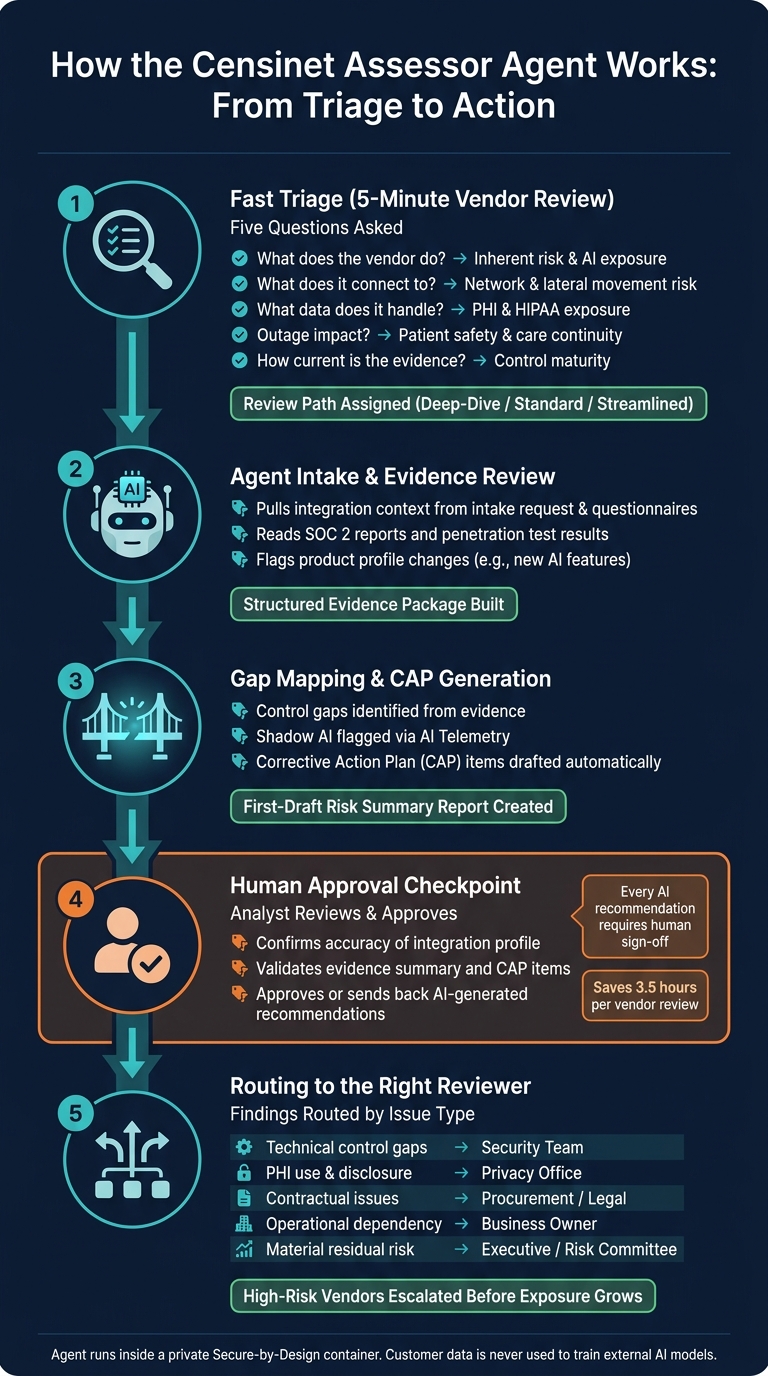
Censinet 5-Minute Vendor Risk Triage: From Intake to Action
Once triage picks a review path, the Assessor Agent takes on the manual work while analysts keep the final say.
From intake details to a drafted risk summary
The process starts with the intake request. The Assessor Agent pulls integration points from that request and from any vendor questionnaires already submitted. It uses that information to build a structured intake profile before manual review slows things down.
Next, it reviews uploaded evidence like SOC 2 reports and penetration test results, then pulls out the findings that matter most. That intake package becomes the evidence base for the draft risk summary.
As it goes through the evidence, the agent maps gaps into CAP items. It also flags changes in a vendor's product profile since the last review. That matters when a vendor adds AI features after an earlier assessment, which helps surface shadow AI and manage third-party AI risk.
Once the evidence is processed and the findings are mapped, the agent compiles everything into a first-draft Risk Summary Report. A human reviewer then checks that draft and gives final approval. It isn't treated as a finished product. It's a structured starting point that would otherwise take hours to assemble by hand.
Where automation does the work and where humans stay in control
Automation handles the reading and the first draft. Humans handle validation and approval. Every AI-generated recommendation needs analyst sign-off before it can move ahead.
| Input | Agent Action | Human Checkpoint | Output |
|---|---|---|---|
| Intake request & questionnaires | Auto-captures integration context | Human reviewer confirms accuracy and escalation | Integration profile |
| SOC 2 reports & pen tests | Summarizes evidence and flags gaps | Human reviewer confirms accuracy and escalation | Evidence summary |
| Completed questionnaire | Identifies gaps and generates CAP items | Human reviewer confirms accuracy and escalation | CAP items |
| Vendor product profiles | Classifies AI capabilities via AI Telemetry | Human reviewer confirms accuracy and escalation | AI risk inventory |
| Aggregated assessment data | Drafts first-pass Risk Summary Report | Human reviewer confirms accuracy and escalation | Final risk summary |
One detail matters here: the Assessor Agent runs inside a private Secure-by-Design container. Customer data is never used to train external AI models or shared outside the platform [1]. Those findings then move into scoring and routing.
How high-risk vendors are prioritized, routed, and managed after triage
Once triage sets priority, the process moves from screening to routing. At that point, the draft pushes the vendor into a human-reviewed decision path.
Risk score versus risk decision in vendor review
A risk score helps teams compare vendors and decide who needs attention first. A risk decision answers a different question: what should the organization do next?
Put simply, the score sorts priority. The decision sets the response.
The Assessor Agent turns uploaded evidence into summary reports and CAP findings for the next reviewer. That gives the next person a clearer starting point instead of forcing them to dig through raw documents line by line.
Routing findings to the right reviewers
From there, each signal goes to the reviewer who can act on it. Censinet routes findings by issue type, so the right team gets the right issue without extra handoffs. If AI Telemetry flags a new capability, the vendor goes back into review because its exposure has changed [1].
| Signal | Likely Significance | Responsible Reviewer | Next Step |
|---|---|---|---|
| Technical control gaps | High (Security/Breach Risk) | Security Team | Validate evidence; initiate CAP |
| PHI use and disclosure | High (Regulatory/HIPAA) | Privacy Office | Review BAA; confirm data flow |
| Contractual non-compliance | Medium (Legal/Financial) | Procurement / Legal | Renegotiate terms; enforce SLAs |
| Operational dependency | High (Business Continuity) | Business Owner | Confirm disaster recovery plans |
| Material residual risk | Critical (Safety/Financial) | Executive/Risk Committee | Review exception or defer onboarding |
Conclusion: Finding high-risk vendors earlier with a faster front-door review
This is the point where hidden risk turns into assigned action. Instead of sitting in a queue, high-risk vendors show up earlier, move to the right reviewers faster, and get attention before exposure grows.
FAQs
Which vendors should get a deep review first?
Start with Tier 1 vendors. These are the vendors with high volumes of ePHI access, persistent system access, or a direct effect on patient safety, such as EHRs, telehealth platforms, and medical devices.
Then move up any vendors that:
- handle PHI
- have an unknown risk status
- show high-risk signals, like missing BAAs, broad admin access, or gaps in logging and encryption evidence
- rely on downstream vendors that touch PHI
- recently added AI capabilities
This helps you focus first on the vendors most likely to create serious exposure if something goes wrong.
How does the five-minute review reduce manual work?
The five-minute review cuts manual work by using AI to handle the repetitive, document-heavy parts of vendor risk assessments. Instead of digging through files by hand, the Assessor Agent reviews and summarizes evidence such as SOC 2 reports, questionnaires, policies, and penetration test results.
It also flags missing artifacts, contradictions, and key risk signals, then sorts findings by severity for human review. That way, teams can spend their time on material issues and final approvals instead of manual data gathering.
What does human approval look like in the workflow?
Human approval is the last required step. It keeps experts in charge of safety-sensitive decisions and final risk ratings.
After AI produces draft findings, reviewers check each one by hand. They verify that the finding fits the clinical use case, decide whether more evidence is needed, review any compensating controls, and rule on exceptions.
The final call - approve, conditionally approve with a remediation plan, or reject - comes from the risk, security, or privacy office. That decision is then recorded in an audit trail.
