
The short answer: the ransom is usually not the main cost. In healthcare, the bigger bill often comes from downtime, restore work, lost billing, staff overtime, legal help, patient notices, and insurance fallout.
If I had to sum up the article in a few lines, I’d put it like this:
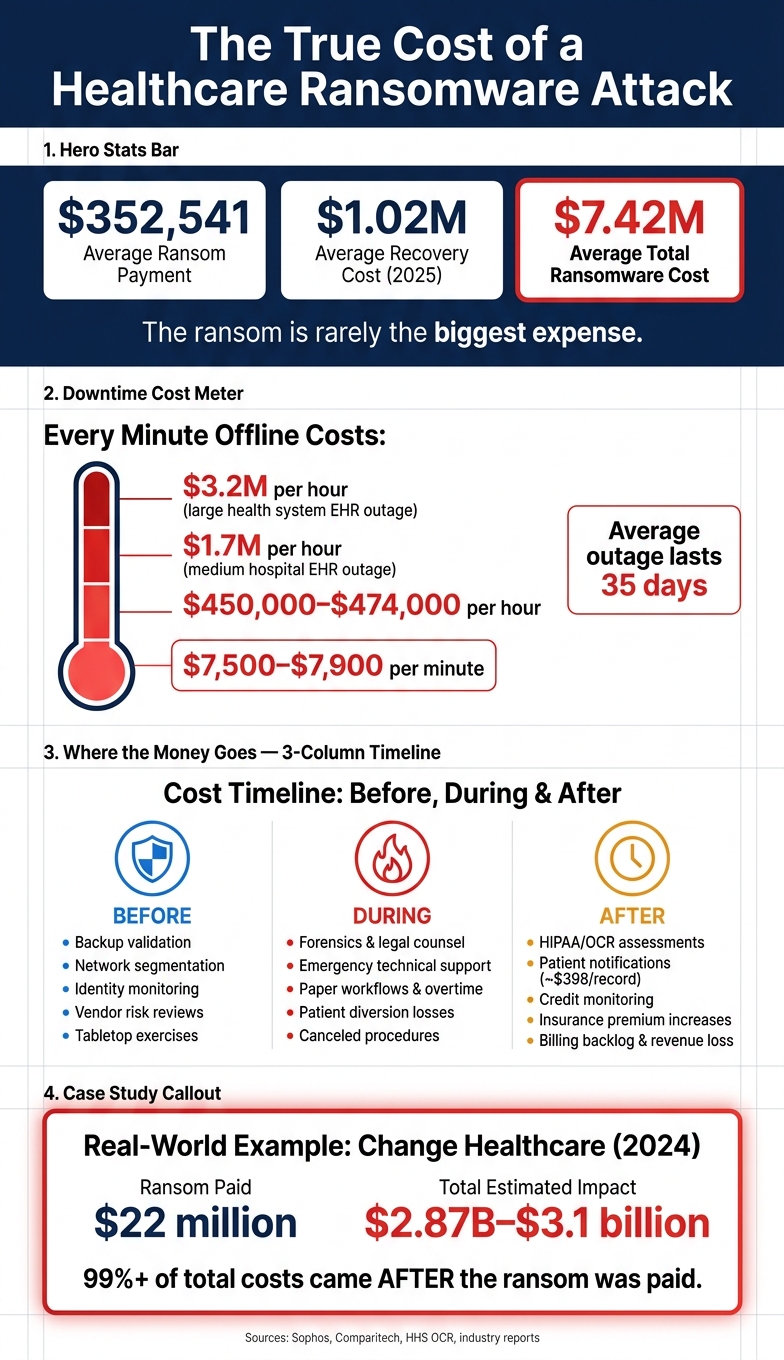
- Average recovery cost hit $1.02 million in 2025
- Average ransom payment was $352,541
- Average total healthcare ransomware cost reached $7.42 million
- Downtime can run about $7,500 to $7,900 per minute
- A large health system can lose up to $3.2 million per hour during an EHR outage
- Supply-chain events made up nearly 40% of healthcare ransomware cases in the first half of 2026
That’s the core point. Healthcare money doesn’t just go to the attacker. It goes to the response in the first few days, the outage while staff work on paper, and the long clean-up that can last for months.
What stood out to me most is how the loss spreads across the whole incident timeline:
- Before the attack: backup testing, network separation, access controls, vendor checks, and response drills
- During the attack: forensics, legal support, system isolation, paper workflows, canceled care, and delayed claims
- After systems come back: data checks, manual record cleanup, breach notices, OCR work, credit monitoring, and higher cyber insurance costs
A single case makes this plain. The Change Healthcare attack involved a ransom of about $22 million, but the total hit was estimated at $2.87 billion to $3.1 billion in 2024. So if you budget only for the ransom, you’re missing where most of the money goes.
Here’s the plain takeaway: the best way to cut ransomware cost is to cut downtime. That means testing restore order, protecting identity systems, limiting attacker movement, and making sure your team and vendors know who does what when systems fail.
The True Cost of a Healthcare Ransomware Attack (2025)
The REAL Cost of Ransomware
sbb-itb-535baee
Where Healthcare Money Actually Goes During a Ransomware Event
Once a ransomware attack lands, the costs usually break into three big areas: response, downtime, and recovery.
| Expense Bucket | When It Appears | What Drives the Cost |
|---|---|---|
| Direct Response | First 24–72 hours | Ransom, forensics, legal counsel, emergency technical support |
| Operational Losses | Immediately and ongoing | Canceled procedures, patient diversion and transfer losses, staff overtime, manual workflows |
| Long-Tail Costs | Months to years | HIPAA assessments, OCR inquiries, notifications, credit monitoring, premium increases |
That’s where most of the money goes. Some of it hits right away. Some of it keeps piling up for months.
Direct Response Costs: Ransom, Forensics, Legal, and Emergency Technical Support
Direct costs start within hours of detection. Incident-response retainers kick in, outside legal counsel gets involved, and forensic teams begin breach scoping and malware analysis. Crisis communications support often comes next.
This is the first wave of spending, and it tends to move fast. The organization is trying to figure out what happened, what systems were hit, whether data was exposed, and how to contain the damage.
Operational Losses: Downtime, Manual Workflows, Diversion, and Delayed Revenue
Downtime is usually the biggest cost driver. Hospital downtime runs $7,500 to $7,900 per minute - roughly $450,000 to $474,000 per hour [1]. Once EHR systems go down, clinical throughput can drop hard. Procedures get canceled. Pharmacy, lab, and imaging teams switch back to paper workflows.
When Ascension was hit in May 2024, clinical staff were forced onto manual paper workarounds [1]. The average disruption lasts 35 days [2]. At more than $450,000 per hour, that total can spiral in a hurry.
And the damage doesn’t stop at patient care. Revenue takes a hit too. Delayed claims and billing backlogs keep growing even after parts of clinical operations come back online. So even when the hospital looks like it’s recovering on the surface, the financial strain is still spreading behind the scenes.
Even after clinical systems recover, billing, notifications, and regulatory work keep the bill growing.
Long-Tail Costs: Notifications, Insurance Effects, and Regulatory Remediation
Long-tail costs keep going after restoration. HIPAA breach assessments, Office for Civil Rights (OCR) inquiry support, patient notifications, and credit monitoring services can continue for months. At nearly $398 per compromised record [1], notification costs alone can climb fast for large health systems.
For vendors, the pattern looks similar. Customer notifications, contract penalties, and support costs can keep adding pressure well after systems are restored.
Insurance can add another blow. After a major claim, an organization may face higher premiums or lower coverage limits at renewal [1]. Regulatory remediation, including HIPAA assessments and OCR inquiries, adds yet another layer of expense that can stick around long after the outage ends.
The best way to cut these losses is to shorten downtime before the attack starts.
Before the Attack: Readiness Costs That Reduce the Largest Losses
Preparedness is a recurring operating cost, but it can cut the losses that hurt most later: downtime and restoration. And because those two areas drive the biggest financial damage, even small gains can make the spend worth it. Put simply, money spent before an attack can trim the most expensive part of the next stage: containment and restoration.
Backup Validation and Recovery Sequencing for Clinical Systems
Immutable or offline backups are needed. But by themselves, they don't solve the hard part.
The bigger question is whether your team can bring systems back in the right order when time is tight. Clinical systems don't stand alone. EHR, PACS, lab, pharmacy, and identity systems all rely on each other. If identity services are still down, restoring the EHR first can burn hours at up to $3.2 million per hour for a large health system [1].
Kettering Health's 2025 Epic restoration shows why restore order has to be tested [1]. It's one thing to have backups. It's another to prove you can use them when people are under pressure and every minute costs money.
Regular restore testing matters more than backup creation alone. It shortens downtime and lowers the pressure to pay just to move recovery along. That sequencing work is what keeps restoration from turning into a long, expensive outage.
Segmentation, Privileged Access Controls, and Identity Monitoring
Network segmentation limits how far an attacker can move. That means fewer systems get hit, fewer systems need restoration, and recovery costs stay lower. When clinical, administrative, identity, backup, and medical-device environments are split apart, a breach in one area is less likely to knock out everything else.
Privileged accounts sit near the center of many ransomware attacks. If attackers get into backup infrastructure or identity systems, they may shut down recovery paths altogether. That's where a few core controls do a lot of heavy lifting:
- Phishing-resistant MFA
- Least-privilege access policies
- Ongoing privileged-account monitoring
- Fast credential revocation
Together, these steps help stop escalation before it spreads. They don't just guard data. They help preserve the organization's ability to recover at all.
Vendor Risk Reviews, Incident-Response Retainers, and Tabletop Exercises
Third-party access is one of the biggest cost drivers in healthcare ransomware. Supply-chain incidents - billing platforms, imaging services, transcription vendors - accounted for nearly 40% of total healthcare ransomware events in the first half of 2026 [3].
That number shows the problem plainly. A hospital might tighten its own controls and still get dragged into an outage through a vendor. Remote-management tools, subcontractor dependencies, and vague contract terms around incident response can all slow containment and push costs higher.
Pre-negotiated incident-response retainers help teams get outside support faster. Tabletop exercises help too, especially when they include IT, legal, clinical operations, and key vendors. A written plan is fine on paper. A rehearsed response is what helps people make fast calls when systems are down and costs are piling up.
Decision delays add to hourly downtime costs fast. Teams that have practiced together tend to move with less confusion once containment and restoration start.
During and After the Attack: Why Downtime and Restoration Usually Cost More Than the Ransom
Containment and Clinical Continuity Under Degraded Operations
Once ransomware is found, the meter starts running fast. Teams isolate infected systems to stop spread. That step is necessary, but it also cuts clinicians off from the systems they use to deliver care.
So what happens next? Staff move to paper charting and manual workflows. That sounds simple on paper, but in a hospital it turns into overtime, delays, and a lot of extra coordination. And if containment drags on, the cost goes far beyond lost revenue. Every hour offline adds staffing, forensic, and support expenses.
Ascension's multi-state paper workflows show how fast disruption turns into a cost center. And once containment slows down, restoration usually slows down too.
| Phase | Primary Cost Drivers | Accumulating Expenses |
|---|---|---|
| Containment | System isolation, emergency technical support | Forensic labor, overtime |
| Investigation | Forensic specialists, evidence preservation | Legal counsel fees |
| Clinical Continuity | Paper-based workflows, overtime | Revenue loss from diverted patients and canceled procedures |
| Communications | Regulatory notices | Compliance work |
After containment begins, the main cost burden shifts to restoring the systems that keep care delivery and revenue moving.
Restoration Priorities Across EHR, Imaging, Lab, Pharmacy, Identity, and Billing
Restoration is not just about speed. Order matters just as much. Bring back the wrong system first, and you lose time while creating new access issues.
Identity systems come first - Active Directory and IAM platforms. If identity is still down, users can't log in, and other systems stay stuck. It's the front door. If that door is locked, nothing else matters.
After identity is back, the EHR becomes the top financial priority. An EHR outage can cost a medium-sized hospital up to $1.7 million per hour and a large health system up to $3.2 million per hour [1]. Pharmacy and lab sit close behind because manual workarounds slow care and add risk. Billing and revenue cycle usually come later, but that doesn't make them cheap. Claims backlogs can drag out cash-flow problems long after the outage ends.
Restoration order shapes the length and cost of the outage.
| System Priority | Restoration Rationale | Financial/Clinical Impact of Delay |
|---|---|---|
| 1. Identity (AD/IAM) | Required for all logins | Blocks all other system restorations |
| 2. EHR (Epic/Cerner) | Central clinical platform; highest outage cost | $1.7M–$3.2M loss per hour [1] |
| 3. Pharmacy & Lab | Medication and diagnostic flow | High clinical risk; manual reconciliation errors |
| 4. Imaging (PACS) | Delays ED and surgery decisions | Delayed procedures and ED bottlenecks |
| 5. Medical Devices | Connected monitors and infusion pumps | Direct impact on bedside care |
| 6. Billing/Revenue Cycle | Extends cash-flow disruption | Long-tail revenue loss |
Before any restored system goes back into clinical use, teams have to check data integrity. That's not optional. On top of that, data captured by hand during downtime must be reconciled before operations can settle into a normal rhythm again.
Post-Recovery Obligations That Continue After Systems Are Restored
Getting systems back online does not stop the spending. OCR documentation work, state breach notification deadlines, and insurance claims documentation can keep legal and compliance teams busy for months. Then there's the insurance side: renewal costs may climb if the incident affects premiums.
The average technical recovery cost in healthcare was $1.02 million in 2025 [1]. Reimaging, replacement, and validation add yet another layer of cost after the downtime period is over.
Conclusion: Prioritize Controls by the Losses They Prevent
Look at the full incident timeline and one thing stands out: the ransom is often the smallest part of the cost. The biggest expenses usually come later, when downtime drags on, systems need to be rebuilt, and teams are stuck dealing with cleanup for weeks or months. Response costs, business interruption, and long-tail remediation are where the financial hit piles up.
That’s why controls like immutable backups, network segmentation, identity monitoring, and clear downtime procedures matter so much. They don’t just help with security on paper. They cut losses in direct, practical ways. Put simply, readiness spending is a cost-control strategy, not overhead.
Third-party risk management is harder to handle when every team is working from a different spreadsheet, inbox, or ticket queue. A centralized vendor-risk workflow gives teams one place to track exposure, evidence, and remediation across the supply chain.
The main idea is straightforward: prioritize controls based on the losses they can prevent, not just on what’s easiest to buy or simplest to roll out.
FAQs
Why is downtime more expensive than the ransom?
Downtime often costs more than the ransom. The reason is simple: once systems go down, the damage spreads fast across operations and patient care, and those losses can pass the original demand in no time.
A ransom is usually a one-time payment. Downtime is different. It can halt billing and claims processing, force patient diversion, lead to canceled procedures, and push staff into costly manual workarounds.
And the hit doesn’t always stop there. A shutdown can also bring longer-term financial risk, such as regulatory penalties, contract liabilities, and lost patient trust.
Which systems should hospitals restore first after an attack?
Hospitals should restore transaction systems first so they can get core operations back online.
Then they can clean up stopgap workflows, fix data gaps caused by the outage, and phase out duplicate manual work. Track time to safe minimum operations and time to full restoration to verify that clinical and administrative functions are stable.
What pre-attack investments reduce ransomware costs the most?
Prioritize spending on the controls that cut downtime and help you recover faster: network segmentation, secure immutable off-site cloud backups, and strict privileged access controls.
Just as important, keep business continuity and disaster recovery playbooks current. Run incident response drills on a regular basis and test them, not just on paper. Keep reviewing third-party vendor risk, and map clinical workflows so you can spot dependency chokepoints early and fund the fixes that will matter most before an incident hits.
Related Blog Posts
- Healthcare Downtime Costs Hospitals $7,500 Per Minute on Average, Study Shows
- One in Three Hospitals Confirm Cyber Incidents Directly Impacted Patient Care in Benchmark Findings
- Ransomware Disrupts Clinical Workflows: Key Risks
- The Anatomy of a Healthcare Ransomware Attack and How Censinet Breaks the Chain.
