
If you handle PHI in the U.S., the short answer is simple: use AES-256 for data at rest, TLS 1.2 or 1.3 for data in transit, and keep keys in a separate HSM or KMS. If you do not encrypt, HIPAA expects a written risk decision and a matching safeguard. And if a device is lost, encryption can be the difference between a reportable breach and a non-event.
Here’s the article in plain English:
- HIPAA treats encryption as “addressable,” not optional. You must assess it, use it when it fits, or document why you used something else.
- PHI and ePHI show up in more places than most teams think: EHRs, billing tools, backups, portals, mobile apps, email, cloud storage, and removable drives.
- For stored PHI, the baseline is AES-256.
- Databases: database or volume encryption
- Files and exports: AES-GCM
- Full-disk encryption: XTS-AES
- Cloud storage: server-side encryption with customer-managed keys
- For moving PHI, the baseline is TLS 1.2+, with TLS 1.3 preferred.
- Turn off SSL, TLS 1.0, and TLS 1.1
- Block weak ciphers like 3DES, MD5, and SHA-1
- Use mTLS for internal service-to-service traffic when PHI is involved
- Endpoints are still a major weak spot. Lost laptops, phones, and USB drives have led to HIPAA settlements for years.
- Key control matters as much as the cipher.
- Use envelope encryption
- Keep KEKs in an HSM or FIPS-validated KMS
- Limit access by role
- Log key actions and keep records for 6 years
- Vendors need proof, not claims. Check the exact FIPS validation, module version, and key custody model.
- Medical devices, telehealth, cloud apps, and mobile care need the same rules. Do not assume a vendor handled encryption well just because they say they did.
- Safe harbor depends on setup. Encrypted ePHI may avoid breach notice only if the data is unreadable and the keys were not exposed.
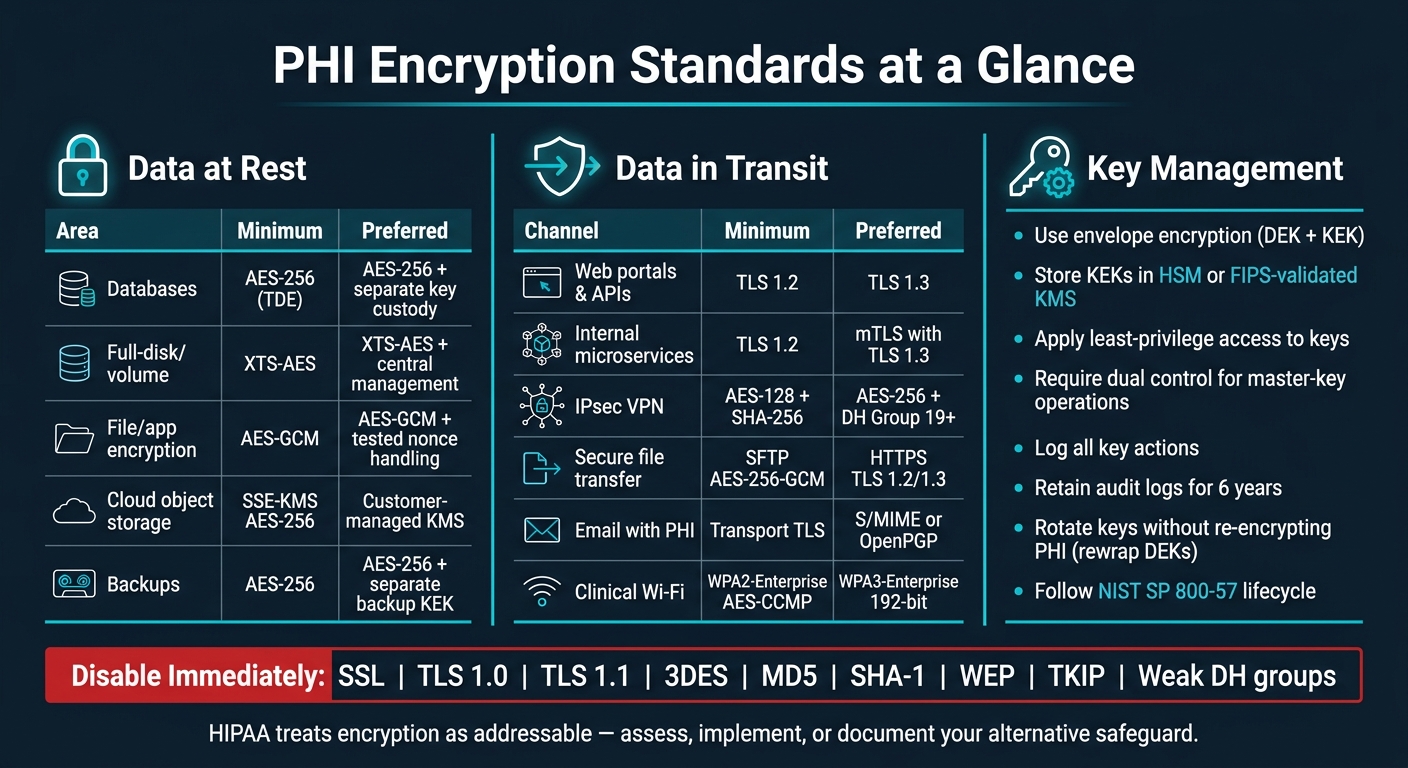
PHI Encryption Standards: At Rest vs. In Transit Quick Reference
HIPAA Requirements: Encryption at Rest and in Transit #HIPAA #cybersecurity #breach #data #it #phi
sbb-itb-535baee
Quick Comparison
| Area | Minimum | Preferred | What to check |
|---|---|---|---|
| PHI at rest | AES-256 | AES-256 with separate key custody | FIPS-validated crypto modules |
| Full-disk encryption | XTS-AES | XTS-AES with central management | Recovery key escrow, pre-boot controls |
| File/app encryption | AES-GCM | AES-GCM with tested nonce handling | No custom crypto code |
| Web/API traffic | TLS 1.2 | TLS 1.3 | Disable SSL, TLS 1.0/1.1, weak suites |
| Internal PHI traffic | TLS 1.2 | mTLS with TLS 1.3 | Treat internal networks as untrusted |
| VPNs | IPsec with AES + SHA-256 | Strong DH groups, tight policy | No MD5 or SHA-1 |
| Email with PHI | Transport TLS | S/MIME or OpenPGP for message-level encryption | MTA-STS where it fits |
| Clinical Wi‑Fi | WPA2-Enterprise with AES-CCMP | WPA3-Enterprise with 802.1X/EAP-TLS | PMF on, WEP/TKIP off |
| Key management | Separate keys from data | Envelope encryption with HSM/KMS | Rotation, dual control, audit logs |
Bottom line: this article shows how to apply those rules across storage, networks, devices, backups, cloud systems, and third-party vendors - then document each decision so your HIPAA record holds up if something goes wrong.
Encryption Standards for PHI at Rest
Stored PHI can leak in very ordinary ways: a stolen laptop, a lost backup drive, or cloud storage with the wrong settings, or third-party vendor risk. So the scope has to be broad. Databases, file shares, backups, endpoints, and portable media all need encryption - not just the main database.
Databases, File Storage, and Backups
Use each platform’s native database encryption for ePHI. For high-risk fields like Social Security numbers, MRNs, and behavioral health records, add column-level encryption too. Keep keys in a separate KMS or HSM, not inside the database.[3][11][12]
For cloud object storage such as AWS S3, Azure Blob, or Google Cloud Storage, turn on server-side encryption with customer-managed keys (SSE-KMS) using AES-256. Set encryption as the default for every bucket or container that may hold PHI. Backup data - database dumps, VM snapshots, file backups, and offsite archives - should be encrypted before export or offsite storage. Keys should be stored separately from the backup media, and restore steps should be tested on a regular basis. Organizations should also measure these recovery capabilities against cybersecurity benchmarks to ensure resilience.[9][10][11][12]
That same standard applies to endpoints that routinely cache PHI.
| Encryption Method | Typical Use Case | Strengths | Key Limitations |
|---|---|---|---|
| TDE (AES-256) | EHR/billing databases, lab and imaging DBs | Minimal app changes; encrypts data files and logs | Doesn't protect against misuse by valid DB accounts |
| Full-disk/volume encryption (XTS-AES) | On-prem file servers, workstations | Protects lost or stolen devices; relatively easy to deploy centrally | No granular file-level control once volume is mounted |
| File-level encryption (AES-GCM) | Exported PHI reports, imaging files, archives | Granular; good for sharing or archiving specific assets | Higher admin overhead; key management complexity |
| Object storage encryption (SSE-KMS, AES-256) | Cloud backups, EHR exports, imaging archives | Centralized KMS; strong audit trails; low overhead | Misconfigured permissions can still expose data |
Endpoints, Mobile Devices, and Portable Media
Lost or stolen devices are still a major source of exposure in U.S. healthcare. Any device that stores or accesses ePHI needs full-disk encryption.
On Windows, use BitLocker with AES-256-XTS and manage it centrally through Group Policy or Microsoft Intune. On macOS, use FileVault with AES-256, deployed through MDM or Jamf. Linux systems should use LUKS/dm-crypt volumes with AES-256-XTS. In each case, require pre-boot authentication with TPM plus PIN, password, or smart card, and keep recovery keys escrowed with clear records. For tablets and smartphones used in clinical work, use iOS Data Protection and Android file-based encryption, enforced through MDM with strong passcodes and remote wipe.
Removable media needs the same care. Use hardware-encrypted drives with AES-256 and PIN authentication, or software encryption such as BitLocker To Go. Unencrypted thumb drives should be blocked by policy, and retired media should go through secure destruction.
Algorithm Choices for Stored PHI
AES-256 is the baseline symmetric option for PHI at rest and is supported by FIPS-validated cryptographic modules.[4][5][14][15] Use AES-256 for stored PHI. For files and application data, use AES-GCM. For full-disk or volume encryption, use XTS-AES.[1][11][12]
One more point matters here: use FIPS-validated cryptographic libraries, not custom code. AES-GCM can fail if nonce handling is done wrong, and that can undercut the whole security model.[1][12]
Stored PHI is only part of the picture; the next control is encryption in transit. After data at rest is covered, apply that same level of care to PHI moving between systems.
Encryption Standards for PHI in Transit
PHI moves through networks, APIs, partner links, and wireless access points. That means each path needs the right protection. Start with public-facing apps, then apply the same standards to internal traffic, partner connections, and Wi-Fi.
Web Portals, APIs, and Internal Service Traffic
TLS 1.2 is the minimum floor. TLS 1.3 is the goal for patient portals, clinician web access, FHIR and REST APIs, and internal microservices that carry PHI.[2][26] SSL, TLS 1.0, and TLS 1.1 should be turned off on both clients and servers.[22][24]
If you need TLS 1.2 fallback, allow only ECDHE-based AEAD suites with AES-128 or AES-256. For higher-risk flows, lean toward AES-256.[19][20][21] TLS 1.3 cuts down the cipher-suite surface and uses modern ephemeral key exchange by default.[23][25] CBC, static RSA, SHA-1, and MD5 should all be blocked.[22][24]
Internal networks shouldn't get a free pass. Treat them as untrusted and encrypt all internal service traffic that involves PHI.[19] In Kubernetes or service-mesh setups, an mTLS service mesh helps enforce the same TLS rules across internal microservices.[19] And if you're dealing with HL7 feeds or batch transfers over non-HTTP channels, wrap them in VPN or SSH-based tunnels so the data stays encrypted while in motion.[2][19]
VPNs, Secure File Transfer, Email, and Clinical Wi-Fi
PHI also travels through remote access tools, file exchanges, email, and clinical wireless. If one path is weak, the whole setup can wobble.
For remote access and site-to-site links, use IPsec VPNs with AES-128 or AES-256, SHA-256 or stronger, and DH Group 19 or higher. For higher-risk links, prefer AES-256.[19][20] If your team uses TLS-based VPNs instead, make sure they negotiate only TLS 1.2 or 1.3 with strong cipher suites, and shut off legacy SSL and other weak options there too.[2][19]
For batch PHI exchange, such as claims files, imaging archives, and registry submissions, use SFTP with AES-256-GCM or AES-256-CTR and modern key exchange algorithms, or use HTTPS with TLS 1.2/1.3.[19][9] Disable older CBC modes with weak MACs, require mutual authentication for external partner flows, and log all transfers so you have a trail if a breach investigation starts.[19][9] For email that contains PHI, use S/MIME or OpenPGP for message-level encryption when transport TLS isn't dependable, and use transport-enforcement tools like MTA-STS where they apply.[20]
Clinical Wi-Fi is a big one because it often carries PHI from tablets, carts, and bedside devices. Use WPA3-Enterprise, ideally in 192-bit mode, for clinical Wi-Fi that carries ePHI. Enforce 802.1X/EAP-TLS, enable PMF, and disable WEP and TKIP.[16][17][18][20] It blocks offline dictionary attacks and uses certificate-based authentication instead of passwords. If some legacy WPA2 clients are still hanging around during migration, WPA3-Enterprise transition mode is acceptable. But AES-CCMP with 802.1X/EAP-TLS is the minimum floor.[17][20] Also, link-layer Wi-Fi encryption does not replace application-layer TLS.[16][18][20]
| Channel | Required Standard | Configuration Notes |
|---|---|---|
| Web portals & FHIR/REST APIs | TLS 1.2 (min) / TLS 1.3 (preferred) | Disable SSL/TLS 1.0/1.1; use ECDHE + AEAD; mTLS for service-to-service |
| Internal microservices | mTLS (TLS 1.2/1.3) | mTLS service mesh; restrict cipher suites |
| IPsec VPN | AES-128 or AES-256 + SHA-256 + DH Group 19+ | Avoid MD5/SHA-1; use strong DH groups |
| Secure file transfer (SFTP/HTTPS) | SFTP (AES-256-GCM) or HTTPS (TLS 1.2/1.3) | Disable CBC + weak MACs; require mutual auth for external partners; log all transfers |
| Email with PHI | TLS (transport) + S/MIME or OpenPGP (content) | Use MTA-STS for domain enforcement; S/MIME or PGP when transport TLS is not reliable |
| Clinical Wi-Fi | WPA3-Enterprise 192-bit + 802.1X/EAP-TLS | Enable PMF; disable WEP/TKIP; use transition mode for legacy clients; pair with app-layer TLS |
These controls only work if keys, certificates, and vendor access are kept under tight control.
Key Management, Governance, and Risk Validation
Encryption standards only work when the keys are under tight control. A strong cipher doesn't help much if the key is handled badly. That's why these controls matter: they govern the decrypt path behind every at-rest and in-transit standard above.
Key Generation, Storage, Rotation, and Recovery
Use envelope encryption. A DEK encrypts PHI, and a KEK wraps that DEK inside an HSM or a FIPS-validated KMS with customer-managed access. Store the encrypted DEK alongside the ciphertext in the database, object store, or backup.[13][27][26] That setup makes KEK rotation much easier, because you can rewrap DEKs instead of re-encrypting PHI.[27]
Key access should follow least privilege. Applications should only handle DEKs briefly in memory. Recovery and master-key operations should require dual control. Every key action should be logged, and audit logs should be kept for at least six years.[13][27] Your written key management policy should line up with NIST SP 800-57, which covers the full key lifecycle from generation through destruction.[29]
| PHI System | Recommended Approach | Risk If Misconfigured |
|---|---|---|
| EHR relational database | AES-256 envelope encryption; DEK per database or tenant; KEK in HSM/KMS | Large-scale exposure if keys sit with the database |
| Object storage (imaging, documents) | AES-256 server-side envelope encryption; DEK per bucket or dataset; KEK managed by cloud KMS | Mass breach if IAM policies allow broad decrypt access |
| Clinical backups | AES-256 with a separate backup-specific KEK | Separate backup KEK |
| Mobile and endpoint apps | Keys handled transiently in memory; avoid hard-coded keys or local config storage | Key exposure and broad compromise if keys are stored locally |
HIPAA Documentation and Third-Party Encryption Review
Once key custody is defined, the next job is proving it in policy, audit records, and vendor evidence.
HIPAA's Security Rule requires an accurate and thorough risk analysis of threats and vulnerabilities to ePHI, and HHS is explicit that organizations should decide whether and how to use encryption as part of ongoing risk management.[28] Document that analysis, update it when systems change, and keep it for six years.
In practice, your risk analysis, security policies, and implementation records should spell out the exact algorithm, mode, key size, and key custody arrangement for each PHI-bearing system. If you switch cloud providers, upgrade your EHR, or roll out new devices, those records need to change too. Vendor review needs the same level of care. Don't accept broad FIPS claims at face value. Check the exact certificate number, module version, and validation listing.[30][31] FIPS 140-3 applies to a specific module and configuration, not a vendor's whole platform.[30] Ask vendors for the algorithm, mode, key custody model, and whether keys are customer-managed or provider-managed.
Using Censinet to Manage Encryption Risk
At scale, encryption review turns into a workflow issue.
Censinet RiskOps™ can centralize encryption-control reviews across PHI systems, devices, cloud workloads, and vendors. Censinet AI™ can summarize evidence, capture integration details, and surface findings for triage. It can route critical findings to the right stakeholders for review and approval, while risk teams keep control over final risk decisions.
PHI Encryption in Practice and Key Takeaways
EHRs, Cloud Workloads, Mobile Care, and Medical Devices
The at-rest, in-transit, and key-management controls discussed earlier need to show up in the systems that actually handle PHI.
For EHR databases and data warehouses, that usually means AES-256 at the volume or database layer, field-level encryption for highly sensitive data, and encrypted backups.[8][33][34][35] For cloud-hosted PHI, the bar is similar: use customer-managed keys in a customer-managed KMS or HSM, and require TLS 1.2 or 1.3 for all traffic.[8][6][1][32]
Telehealth and mobile care add more places where PHI can leak if controls are loose. Session recordings and transcripts should be encrypted with separate keys and locked down with tighter access controls than the main EHR.[1][8] Mobile apps should keep on-device PHI to a minimum, use certificate pinning to cut man-in-the-middle risk, and auto-wipe local PHI after logout or inactivity.[22][26]
For connected medical devices, don't assume encryption is handled well just because a vendor says it is. Require vendor-validated encryption and document any clinical or technical limits. Ask for evidence that stored data, data in transit, and key handling are all encrypted and handled correctly. Organizations can streamline this process by using tools to automate security questionnaires and vendor assessments.
| PHI Environment | Storage Standard | Transit Standard | Key Custody |
|---|---|---|---|
| EHR database | AES-256 volume/database encryption plus field-level encryption for sensitive data | TLS 1.2+ between application tiers | Customer-managed keys in HSM/KMS |
| Cloud object storage | AES-256 encryption at rest | TLS 1.2 or 1.3 for all connections | Customer-managed KMS with rotation |
| Telehealth/session recordings | AES-256 with separate keys from the EHR | TLS 1.2+ | Tighter access controls than the primary EHR |
| Mobile apps and endpoints | AES-256 volume encryption; minimize on-device PHI | Certificate-pinned TLS | Local data wiped after logout or inactivity |
| Medical devices | Vendor-validated encryption for stored data | Encrypted communications channels | Vendor-engaged validation per device |
Once those controls are mapped to each environment, the next issue is breach resilience.
Breach Resilience and Conclusion
Strong encryption and tight key management matter most when something goes wrong. In a breach, they make PHI unreadable. Under HIPAA's Breach Notification Rule, encrypted ePHI whose keys were not compromised is not considered unsecured PHI, so breach notification may not be required.[5][36][37] That safe harbor is not automatic. It depends on encryption being set up the right way and on the keys staying under control. But when those basics are in place, the risk drop is meaningful.
The baseline is straightforward: use AES-256 at rest and TLS 1.2+ in transit, with TLS 1.3 preferred.[7][8][5] Turn off legacy protocols and weak cipher suites. TLS 1.0, TLS 1.1, and 3DES should not exist in a compliant environment. Check cryptographic modules. Review vendor risk evidence. Write down each decision, including the algorithm, mode, key size, and key custody model, and update that record when systems change.
Encryption also needs regular review. That includes internal systems, cloud services, and third parties. If there's a major change involving a system, cloud setup, or vendor, reassess encryption right away.
FAQs
Does HIPAA require encryption for all PHI?
Not always. Under HIPAA, encryption is an addressable safeguard, not a hard requirement. That means an organization has to look at its own setup, review the risks, and decide whether encryption makes sense and fits the situation.
If it chooses not to use encryption, it must document the reason and put an equivalent alternative control in place. In practice, those alternatives are hard to justify, so encryption is widely expected.
When is AES-256 not enough on its own?
AES-256 is strong. But it’s not enough when key management is weak.
That’s where things often fall apart. Encryption can fail when keys are stored alongside the data, shared with too many people or systems, or left unchanged for long periods.
It also doesn’t cover every use case. Some legacy systems can’t support AES-256 at all, which means teams need to document those limits and put compensating controls in place.
And one more thing: AES-256 does not replace asymmetric encryption for key exchange or digital signatures.
How do I prove a vendor’s encryption is compliant?
To prove a vendor’s encryption meets the mark, don’t stop at self-reported claims. Check whether they use FIPS-validated cryptographic modules and keep records that show reasonable and appropriate safeguards are in place.
You’ll also want to collect and keep:
- BAAs that spell out key management responsibilities
- Audit logs for key generation, storage, and rotation
- Certifications like SOC 2 or HITRUST
Censinet RiskOps™ can help keep this evidence in one place and support third-party risk assessments.
