
Bad healthcare sign-ins do more than slow people down - they can put patient care and PHI at risk. In this guide, I’d sum it up like this: if you want cross-platform authentication to work, you need one identity approach across staff, patients, apps, APIs, and devices - then match sign-in methods to each workflow.
Here’s the short version:
- Know the difference between identity proofing, authentication, and authorization
- Use the right standards for the right job: SAML, OAuth 2.0, OIDC, SMART on FHIR, and UDAP
- Give clinicians fast SSO on shared workstations, with step-up checks only for high-risk actions
- Use PKCE + OIDC for patients on portals and mobile apps
- Keep machine access separate from user logins with certificates, signed JWTs, and mTLS
- Fix common gaps like split identity stores, uneven session timeouts, legacy auth, weak logs, and MFA friction
- Build around one enterprise IdP, risk-based MFA, device trust, API controls, and logged break-glass access
- Review every vendor app the same way you review internal systems
- Track progress with hard numbers like MFA coverage, deprovisioning time, and audit trail quality
A few numbers make the case plain:
- Workstation SSO saved 49,056.8 clinician hours per year in one multi-hospital setting
- SSO programs cut desktop login time by 60%
- Compromised credentials appeared in about 38% of analyzed breaches
- Healthcare breach costs reached $9.8 million in 2024 and $7.42 million in 2025
Single Sign-On (SSO) Explained in 10 Minutes | SAML, OIDC & SCIM
sbb-itb-535baee
Quick Comparison
| Area | What matters most | Common fit |
|---|---|---|
| Workforce access | One sign-in across systems | SAML or OIDC with SSO |
| Patient login | Low-friction web/mobile sign-in | OAuth 2.0 + PKCE + OIDC |
| EHR app launch | Scoped FHIR access with context | SMART on FHIR |
| Org-to-org trust | Certificate-based registration | UDAP |
| API/service access | Non-user identity and token control | Client credentials, signed JWTs, mTLS |
| Connected devices | Per-device identity and revocation | X.509 certs, mTLS, 802.1X |
If I were putting this into one sentence, it would be this: good healthcare authentication should protect ePHI, fit clinical workflows, and leave a clear audit trail without turning every login into a blocker.
Standards and Protocols That Shape Healthcare Authentication
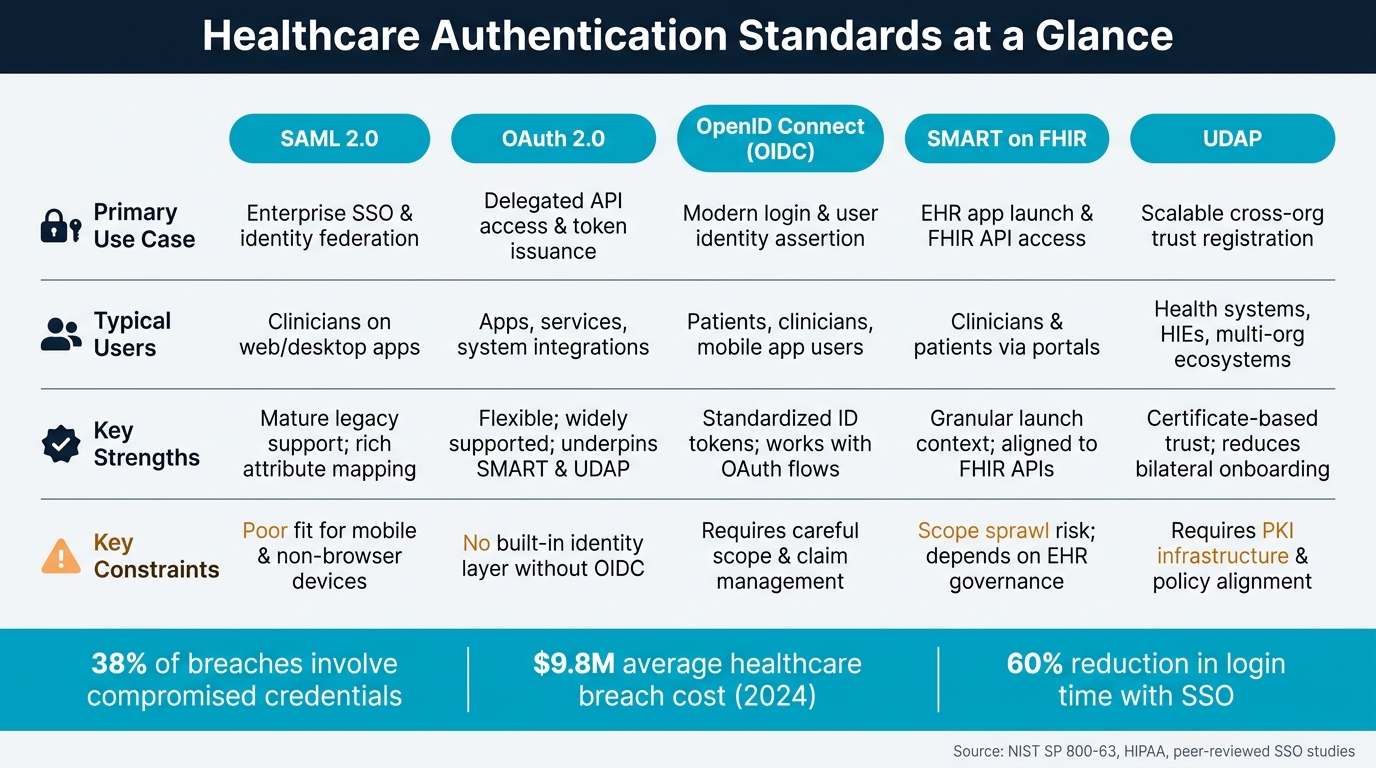
Healthcare Authentication Standards Compared: SAML, OAuth 2.0, OIDC, SMART on FHIR & UDAP
HIPAA, NIST, and Zero Trust in Healthcare Identity
HIPAA sets the floor for healthcare authentication. It calls for unique user IDs, automatic logoff, emergency access, integrity controls, authentication, and encryption for ePHI.[10][11][13][16] It also requires procedures to verify both users and systems. Since stolen or misused credentials are still one of the main ways breaches happen, many healthcare organizations add MFA on top of passwords for ePHI access.[28][29]
NIST SP 800-63 gives health systems a practical way to match sign-in strength to risk. It breaks assurance into three parts: Identity Assurance Levels (IAL), Authenticator Assurance Levels (AAL), and Federation Assurance Levels (FAL).[14][15][17] In many U.S. health systems, a common target is IAL2 for workforce identity proofing, AAL2 or AAL3 for EHR access, and FAL2 or FAL3 for federated tokens.[4][5]
Zero Trust, set out in NIST SP 800-207, drops the old idea that anything inside a hospital network should be trusted by default.[12][18] Each access request gets checked based on user identity, device health, and context. That approach also helps with HIPAA audit needs because it logs who accessed what, from where, and under which conditions.[8][30]
Taken together, these frameworks set the trust model. The protocols below are what make that model work in day-to-day systems.
SAML, OAuth 2.0, OpenID Connect, SMART on FHIR, and UDAP Explained
These protocols take healthcare identity from policy to day-to-day use across EHRs, patient portals, mobile apps, and APIs. The main thing is knowing what each one is built for. Get that wrong, and a simple workflow turns into a mess. Go too light, and a more complex setup can fall apart.
SAML 2.0 is still common for enterprise SSO and identity federation in clinical settings.[2][31] A clinician can sign in once at a shared workstation, and the identity provider sends a SAML assertion that other systems accept without another login. That's a good match for web and desktop setups tied to on-premises directories, especially when rich attribute mapping matters. But SAML is clunky for mobile apps and non-browser devices, where XML-heavy, redirect-based flows are harder to handle.[4][5]
OAuth 2.0 is built for delegated API access. Instead of handing over usernames and passwords, it issues scoped access tokens. That's why it sits underneath healthcare profiles like SMART on FHIR and UDAP.[19][20][22][23] OpenID Connect, or OIDC, adds an identity layer to OAuth 2.0 through ID tokens, which makes it a common choice for patient portals and mobile apps.[2][23][25][26]
SMART on FHIR spells out how apps launch from an EHR and ask for scoped access to FHIR APIs through OAuth 2.0 and OIDC.[6][7] It can pass patient and encounter context while limiting access with least-privilege scopes like patient/*.read and launch/patient.[20][23][26][27] If an app handles more sensitive actions, step-up authentication can be added. SMART can also use private_key_jwt, which avoids shared secrets.[21][22][24]
UDAP builds on OAuth 2.0 and SMART on FHIR by using certificates and signed software statements to create trust across organizations without one-off bilateral onboarding between every health system, vendor, and HIE.[6][9] That matters a lot in TEFCA-aligned networks and large HIE ecosystems, where many parties need to work together without a pile of custom trust setups.[6][9]
The table below shows where each standard fits.
Comparison Table: Core Healthcare Authentication Standards
| Standard / Protocol | Primary Use Case | Typical Users | Key Strengths | Common Deployment Constraints |
|---|---|---|---|---|
| SAML 2.0 | Enterprise SSO and identity federation | Clinicians on web/desktop apps | Mature legacy support; rich attribute mapping | Poor fit for mobile and non-browser device contexts; complex certificate management |
| OAuth 2.0 | Delegated API access and token issuance | Apps, services, system integrations | Flexible; widely supported; underpins SMART and UDAP | Authorization only - no built-in identity layer without OIDC |
| OpenID Connect (OIDC) | Modern login and user identity assertion | Patients, clinicians, mobile app users | Standardized ID tokens; works with OAuth flows | Requires careful scope and claim management across vendors |
| SMART on FHIR | EHR-connected app launch and FHIR API access | Clinicians, patients via portals | Granular launch context; aligned to FHIR APIs | Depends on EHR authorization and scope governance; scope sprawl risk |
| UDAP | Scalable trust registration across organizations | Health systems, HIEs, multi-org ecosystems | Certificate-based trust; reduces bilateral onboarding | Requires PKI infrastructure and organizational policy alignment |
How Cross-Platform Authentication Works Across Clinical, Patient, and Device Workflows
Cross-platform authentication changes based on the job at hand. Clinicians need fast SSO. Patients need a login flow that feels simple on a phone or laptop. Devices need machine identity, not a user sign-in. The standard only does its job if it matches the workflow it protects.
Clinician SSO, Shared Workstations, and Step-Up Authentication
For most clinical staff, the day starts with enterprise SSO across EHRs, PACS, telehealth, and other clinical tools. The aim is simple: one login that carries a verified identity across systems without asking for credentials again and again.
That speed matters. A peer-reviewed study across 55 hospitals in four countries found that SSO and access management deployment cut desktop login time by 60% and application access time by more than 50%, with an estimated 3.3 million clinician hours returned to patient care.[1][32]
Shared workstations change the picture a bit. Clinicians move from room to room, patient to patient, and device to device all day. Because of that, the system needs rapid session re-claim, short idle timeouts, and roaming sessions. Badge tap, proximity card, smart card, and tap-in/tap-out workflows tend to fit this setup well.
Step-up authentication should be used only when the action carries more risk. Good examples include prescribing, record export, remote access, or order changes. In other words, ask for more proof when the action calls for it, not on every single click.
Patient access works in a different way because the user is external, logs in less often, and usually uses a personal device.
Patient Portals, Mobile Apps, and SMART on FHIR Access
Patient portals and mobile apps should use low-friction login with PKCE, OIDC, and stronger MFA or passkeys when the risk level calls for it.[19][34][35]
For embedded clinical apps launched inside an EHR, SMART on FHIR launches inherit EHR context and request only the scopes needed.[19] That keeps access tight and avoids asking for more than the app needs.
Non-human access should use a separate trust path, not a user login flow. A service account or device should not be treated like a person with a password.
Comparison Table: Authentication Patterns by User and Channel
| Identity / Workflow | Preferred Pattern | Best Fit | Key Notes |
|---|---|---|---|
| Clinicians | SAML or OIDC federation with SSO | EHR, PACS, lab, telehealth, workforce apps | One login across all clinical systems; role-based claims |
| Clinicians on shared workstations | Badge tap, smart card, roaming session | Bedside care, nursing stations, round-based workflows | Short idle timeouts; session handoff without full re-login |
| Clinicians – high-risk actions | Step-up MFA (biometric, one-time code, hardware key) | Prescribing, record export, remote access | Triggered by action type, not every session |
| Patients (web/mobile) | OAuth 2.0 Authorization Code + PKCE with OIDC | Patient portals, mobile health apps | MFA or passkeys; consent flows; session timeouts |
| SMART embedded apps | SMART on FHIR launch + scoped OAuth tokens | EHR-embedded clinical tools | Least-privilege scopes; inherits EHR launch context |
| Services / APIs | Client credentials, signed JWTs, mTLS | Backend integrations, FHIR API-to-API calls | Machine identities need separate inventory, ownership, certificates, and revocation controls |
| Connected devices | Mutual TLS, X.509 device certificates, 802.1X | Medical IoT, infusion pumps, bedside monitors | Per-device identity across platforms; supports revocation and quarantine |
Key Challenges and Target Architecture for Healthcare Authentication
Common Failure Points: Fragmented Identity, Inconsistent Sessions, and MFA Friction
The issue isn't only password strength. It's the lack of consistent control across systems and day-to-day workflows.
The biggest weak spot is fragmented identity. Many healthcare groups still deal with separate directories, local EHR accounts, vendor IDs, and legacy NTLM/basic auth. That mix leads to duplicate accounts, uneven MFA enforcement, and orphaned access after role changes or termination.[43][47]
Session handling is another major problem. EHRs, portals, and mobile apps often use different session lifetimes, which leaves sessions active on shared workstations and exposes active tokens to hijacking.[39][41] If a session stays open on a shared device, the next clinician may document under the previous user's identity. That's a direct patient safety risk, and it creates a HIPAA access-control and audit problem.[41]
In fast-moving settings like the ED, OR, and ICU, MFA friction leads to predictable workarounds. Clinicians may share credentials, leave sessions open during handoffs, or keep approving prompts just to get back to work. That's classic push fatigue.[39][42] These behaviors don't come out of nowhere. They happen when authentication systems don't fit clinical workflows.
Those failure points lead directly to the architecture below.
Reference Architecture for Identity-First, Zero Trust Healthcare Access
A practical Zero Trust model for healthcare starts with one core idea: identity, not network location, determines access. Every access decision should depend on verified identity, device posture, and the sensitivity of the request.[43][44]
The target model below lines up controls for shared workstations, patient portals, EHR apps, and APIs.
Use one enterprise IdP, adaptive MFA, an API gateway, and device certificates. A centralized enterprise IdP should manage workforce, patient, and device identity across clinical systems.[47] On top of that, SSO gives clinicians one authenticated session that moves across systems. Pair that with badge-tap or biometric re-authentication built for shared workstations.[42]
Adaptive controls should increase or reduce MFA based on device trust, location, time, and action risk. A clinician signing in from a known on-campus device during a normal shift should get a fast, low-friction path. The same person trying to access sensitive workflows from a personal device or during off-hours should hit step-up MFA.[43][48]
An API gateway should sit in front of clinical APIs and enforce scoped app access, certificate-based vendor registration, and mutual TLS for machine-to-machine calls.[3][33][45][46]
Break-glass access should require explicit justification, immutable logging, and real-time alerts. It needs to stay clearly separate from normal access, not turn into a convenience shortcut. It should be treated as a controlled exception to standard authentication, not as a separate security subject.
Comparison Table: Challenges, Clinical Impacts, and Mitigations
The table below maps each failure to its clinical impact and mitigation.
| Challenge | Clinical / Compliance Impact | Mitigation |
|---|---|---|
| Fragmented identity stores (separate directories, local EHR accounts, vendor-managed IDs) | Orphaned accounts, inconsistent MFA enforcement, unauthorized access risk | Centralize under a single enterprise IdP; enforce lifecycle management (joiner/mover/leaver) across all systems[43][47] |
| Legacy protocols (NTLM, basic auth) | MFA bypass paths; credential stuffing and session hijacking can succeed even in protected environments[39] | Standardize on SAML, OAuth 2.0, and OpenID Connect; deprecate legacy auth on systems touching PHI |
| MFA friction on shared workstations | Credential sharing, sessions left active on shared workstations, push fatigue; erodes individual accountability and audit trails[39][42] | Deploy purpose-built clinical MFA with badge-tap or biometric re-authentication; align timeouts to shift handoff patterns |
| Inconsistent session token lifetimes | Wrong-patient documentation, orders recorded under the wrong identity, HIPAA access-control and audit issues[41] | Enforce consistent session policies; use short-lived tokens with silent refresh; prevent sessions left active on shared devices |
| Weak or missing audit trails | Hard to reconstruct who performed a given action; incident response and regulatory investigations take longer | Centralize logging with immutable records; correlate authentication events with access actions across all clinical systems |
| Unmonitored break-glass access | Emergency access can be used for convenience; no accountability for sensitive record access | Require explicit justification, immutable logging, and real-time alerts to compliance teams for every break-glass event |
| Unscoped API tokens | Third-party apps may access more data than needed | Enforce least-privilege scopes via SMART on FHIR; use UDAP for certificate-based vendor registration[3][45][46] |
| No device identity for connected devices | Devices are harder to authenticate consistently and revoke when compromised | Issue per-device X.509 certificates; enforce mutual TLS; maintain a device identity inventory with revocation controls |
Censinet RiskOps™ can help teams map each authentication gap to patient-safety risk, prioritize remediation, and track progress against NIST CSF 2.0 and HHS Cybersecurity Performance Goals.[36][37][38][40]
Governance, Risk Management, and Next Steps
Assessing Authentication Controls Across Vendors and Applications
Every third-party clinical application that touches ePHI adds risk. So it should go through the same review as an internal system.
That means checking each internal and vendor-hosted application against one shared control set: MFA support, federation with your enterprise IdP, scoped API authorization, audit log export, and account deprovisioning. Use that same checklist across the board. If you change the rules from one system to the next, gaps creep in fast. And those gaps matter. Compromised credentials show up in about 38% of analyzed breaches.[50]
For third-party applications, don't settle for marketing claims. Ask for proof: configuration documents, sample audit logs, session timeout settings, and clear details on how the vendor handles shared workstations, mobile access, emergency access, and identity provider integration.
Censinet RiskOps™ supports third-party and enterprise risk assessments for PHI, clinical applications, and medical devices. That gives teams a way to document control coverage and compare vendor posture using the same lens.
That control set should serve as your baseline for the next 12 months.
Implementation Priorities for the Next 12 Months
Start with a complete inventory of every application that stores, processes, or gives access to ePHI. For each one, document the login method and flag every exception.
Then use that inventory to plan remediation in a clear order:
- Baseline and risk-rank: Map current authentication methods to the inventory. Identify the highest-risk gaps, especially systems with no MFA, weak static credentials, or no centralized audit trail.
- Standardize protocols: Standardize on SAML, OAuth 2.0, and OpenID Connect.
- Close MFA gaps and improve logging: Prioritize MFA for the highest-risk users and applications. Improve audit log retention so teams can correlate logs across systems.
- Embed authentication requirements in procurement: Add authentication standards to vendor contracts and renewals. Require vendors to provide notice for major authentication changes.
As the work moves forward, track progress with metrics that mean something in day-to-day operations: higher MFA coverage, fewer exceptions, faster deprovisioning, and cleaner audit trails.
Once the roadmap is moving, the next step is simple: measure it against operational results.
Conclusion: What an Effective Cross-Platform Authentication Program Requires
Healthcare remains the costliest industry for data breaches, with average costs of $9.8M in 2024 and $7.42M in 2025.[49][51] Strong authentication cuts that risk.
The goal isn't just tighter security. It's access that protects ePHI without getting in the way of care.
That takes clear identity definitions across workforce, patient, and device populations. It also takes federation and API authorization built on SAML, OAuth 2.0, OpenID Connect, SMART on FHIR, and UDAP. MFA has to fit clinical workflows, not fight them. Zero Trust architecture should evaluate every access request based on verified identity and device posture. And governance has to cover both internal systems and third-party partners.
This work can't be treated as a one-time project. It has to run as a continuous program, with defined ownership, measurable metrics, and regular reviews tied to care delivery.
FAQs
What’s the difference between SAML, OIDC, SMART on FHIR, and UDAP?
They serve different roles in healthcare authentication and authorization.
- SAML 2.0: An established standard for enterprise single sign-on. It’s often used with legacy web apps that are still common in health systems.
- OIDC: A modern, API-friendly identity layer built on OAuth 2.0. It fits mobile apps and cloud-native platforms much better than older sign-on methods.
- SMART on FHIR: Builds on OAuth 2.0 and OIDC to secure clinical app integration with EHRs. In plain English, it helps apps connect to patient data in a controlled way.
- UDAP: Supports tiered OAuth for user authentication and secure business-to-business transactions. That makes it useful when both people and organizations need trusted access.
How can hospitals add MFA without slowing clinicians down?
Hospitals can add MFA without bogging clinicians down by choosing secure, low-friction options. Adaptive MFA ties the login step to the level of risk: routine work might need only a badge tap or biometric re-authentication, while higher-risk actions can trigger step-up MFA.
When you pair this with SSO and phishing-resistant FIDO2 security keys, clinicians can move between shared workstations with less friction. And for legacy systems, access proxies can apply these controls without code changes.
What should be prioritized first in a healthcare authentication rollout?
Start with a clear strategy before you roll anything out. Get executive backing early, then set up a cross-functional governance council with people from IT, clinical, compliance, legal, and HR.
Next, review both legacy and modern systems, map user roles, and spot identity data that lives in separate places. From there, define three core technical pillars: Trust Agreements, Identifier and Key Establishment, and a Federation Protocol.
