
In healthcare IT, backup scheduling is about patient care, not just data copies. If I miss backup targets, fail to test restores, or leave gaps in retention, a hospital can lose access to EHRs, imaging, med orders, and other systems that staff need right away.
Here’s the plain answer: I should set backup timing from each system’s RPO and RTO, automate jobs by policy, keep offline or immutable copies, verify backup integrity, and test restores on a fixed schedule. That matters because 96% of healthcare institutions saw at least one unexpected EHR downtime event in a three-year period, and 70% had outages longer than 8 hours. On top of that, healthcare ransomware events can lead to 17 to 19 days of downtime and about $1.86 million to $1.9 million per day in losses.
If I want a backup schedule that works, I focus on measuring what matters for cybersecurity across five areas:
-
Match backup frequency to system risk
- Tier 1 clinical systems may need replication or log backups every 5 to 15 minutes
- Lower-priority systems may be fine with nightly or weekly backups
-
Use the right backup mix
- Full, incremental, differential, snapshots, and log backups each serve a different recovery need
- For EHR and lab systems, application-consistent backups matter
-
Protect backup copies
- Follow 3-2-1 or 3-2-1-1-0
- Keep at least one copy immutable or offline
- Separate local recovery copies from offsite recovery copies
-
Monitor and test
- A “successful” job does not prove the restore will work
- I need alerts for missed jobs, stale backups, storage limits, and integrity failures
- Monthly restore tests for Tier 1 systems and quarterly multi-system recovery tests are a solid baseline
-
Treat backup scheduling as a risk control
- Track owners, schedules, retention, and last restore test
- Tie backup evidence to HIPAA contingency planning and NIST recovery controls
This guide boils the topic down to what I need to schedule, what I need to test, and what I need to track so backups can support care when systems go down.
After the Attack: The Critical Questions Every Hospital Must Answer
sbb-itb-535baee
Match Backup Frequency to RPO, RTO, and Clinical Workloads
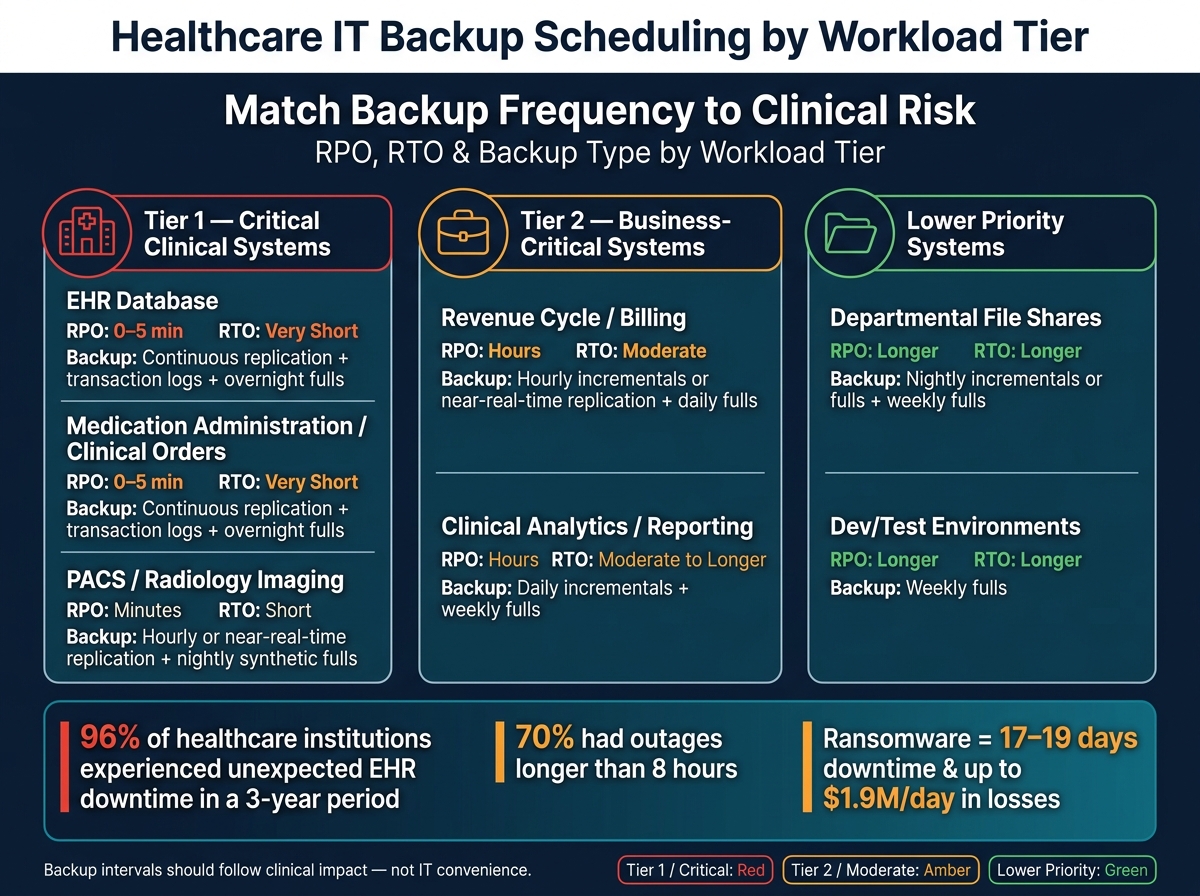
Healthcare IT Backup Scheduling: Tier-Based RPO, RTO & Frequency Guide
Turn RPO and RTO into backup timing for each workload. The first step is a business impact analysis: How much data loss can this system handle? How long can it stay down? Those answers won't be the same across the board. A high-volume EHR database has very different recovery needs than a departmental file share or a reporting platform.
As a starting point, Tier-1 systems often need continuous replication or transaction log backups every 5 to 15 minutes. Tier-2 systems may use hourly incrementals or near-real-time replication. Lower-priority systems usually back up nightly or weekly.[5][10][14]
The table below maps recovery targets to day-to-day backup schedules by workload.
| Workload | Clinical Priority | Typical RPO | Typical RTO | Backup Type Mix | Scheduling Window |
|---|---|---|---|---|---|
| EHR database | Tier 1 | 0–5 minutes | Very short | Continuous replication; transaction log backups; off-hours full backups | Logs 24/7; fulls overnight |
| Medication administration / clinical order management | Tier 1 | 0–5 minutes | Very short | Continuous replication; transaction log backups; off-hours full backups | Logs 24/7; fulls overnight |
| PACS / radiology imaging | Tier 1 | Minutes | Short | Hourly or near-real-time replication; nightly synthetic fulls | Overnight |
| Revenue cycle / billing systems | Tier 2 | Hours | Moderate | Hourly incrementals or near-real-time replication; daily fulls or synthetic fulls | Off-hours or overnight |
| Clinical analytics / reporting | Tier 2 | Hours | Moderate to longer | Daily incrementals; weekly fulls | Weekend overnight |
| Departmental file shares | Lower priority | Longer | Longer | Nightly incrementals or fulls; weekly fulls and daily incrementals depending on change rate | Overnight |
| Dev/test environments | Lower priority | Longer | Longer | Weekly fulls | Off-hours |
Then fine-tune each schedule based on data-change rate, clinical dependency, and downtime tolerance.
Set Schedules for Tier-1, Tier-2, and Lower-Priority Systems
Tier-1 systems need continuous replication or 5- to 15-minute log backups. Tier-2 systems use hourly incrementals or replication. Lower-priority systems run nightly or weekly.[5][10][14] The point is simple: backup intervals should follow the business impact of losing recent data, not whatever fits most easily on the IT calendar.
After that, pair each workload with the simplest backup mix that can meet its RPO and restore needs.
Choose the Right Mix of Backup Types
Pick the backup type that fits restore speed and storage limits. Full backups restore the fastest. Incrementals use less space. Differentials sit in the middle. Transaction logs help close the RPO gap.[10][13][14]
Snapshots are fast and handy for short-term recovery, but they shouldn't be the only line of defense - especially for clinical systems, where application consistency matters. Synthetic fulls can help here. The backup software builds a new full from existing incremental data instead of copying the whole dataset again. That cuts strain on production systems while keeping restore points current.[10][13]
Retention planning decides where those copies should live and how long they should stay there.
Apply the 3-2-1 and 3-2-1-1-0 Rules to Healthcare Retention Planning
For healthcare ePHI, the 3-2-1-1-0 rule adds one immutable or offline copy and zero verified errors after each cycle.[6][7][8][9][11][12][15] In practice, that means scheduling on-premises backups for fast local recovery, replicating offsite copies for disaster recovery, and creating immutable or air-gapped copies on a separate schedule tied straight to your backup cadence.
Healthcare providers are advised to test restores at least quarterly, with monthly validation recommended for hospitals and multi-site groups, plus a full disaster simulation each year.[16] When those tests are scheduled alongside backup jobs - not treated like a side task later on - the backup policy starts to work like an actual recovery plan.
Automate Backup Scheduling Without Disrupting Care Delivery
Once you've mapped workloads to tiers and set your RPO/RTO, the next step is simple: make the schedule run on its own without getting in the way of patient care. Automation turns backup and retention targets into repeatable controls. If those targets aren't enforced automatically, they're just plans on paper.
Use Policy-Based Automation for Consistency and Scale
Set backup behavior once in a central policy, then apply it to tagged workloads automatically. Tag a PHI-critical system, for example, and it should inherit the right schedule, retention, and security settings without anyone having to configure it by hand. A good policy defines frequency, backup type, retention, encryption, access controls, and immutability.
Policy is what turns recovery targets into repeatable job rules. And timing matters just as much as frequency. Full backups for busy databases should run overnight. Daytime incremental jobs should be throttled so they don't fight with charting, medication administration, or radiology reads for bandwidth, storage I/O, or CPU. Heavy jobs should also be staggered to avoid resource contention.
The table below shows common automation options and where each one fits best.
| Automation Approach | Application Awareness | Policy Depth | Scalability | Best-Fit Use Case |
|---|---|---|---|---|
| Backup software scheduler | High (with agents) | High | High | Multi-platform, policy-driven enterprise environments |
| OS task scheduler | None | Low | Low | Simple, single-system scripts; not recommended at scale |
| Hypervisor snapshots | Low (crash-consistent by default) | Moderate | Moderate | VM-level short-term recovery; not a standalone solution |
| Database-native backups | Very high | High | Moderate | Transactional systems requiring precise log management |
| Cloud-native policies | Moderate to high | High | Very high | Cloud-hosted workloads and object storage |
Security controls should live inside the policy itself, not get added later. RBAC should separate the people who set backup schedules from the people who run restores. MFA should be required on backup consoles and for any privileged action, like changing retention, deleting a job, or adjusting backup frequency for a Tier-1 system. An approval workflow before someone can change a critical backup policy adds one more barrier against human error and ransomware-driven tampering.
Ensure Application-Consistent Backups for Clinical Systems
Automation only helps if the backup is usable, especially for transactional systems. Crash-consistent snapshots can leave those systems in an unclean state. For an EHR database, lab information system, or radiology information system, that can mean long repair times and missed recovery objectives.
EHR, lab, and radiology systems need backups that restore cleanly without repair. Application-consistent backups coordinate with the application before the snapshot starts. Quiescing flushes buffers and commits or rolls back in-flight transactions before capture. On Windows-based clinical workloads, this usually happens through the Volume Shadow Copy Service (VSS). For database-backed EHR platforms, database-native coordination handles log flushing and transaction integrity directly.
Transaction log management is a big deal here. Capturing and managing logs continuously, or at each backup job, is what makes point-in-time recovery possible and supports short RPOs for EHR and lab systems. Application-aware backup modes can also truncate transaction logs after each run, which helps stop log growth from eating up storage without warning.
Use application-aware or VSS-based backups for transactional clinical workloads.
Schedule Immutable, Air-Gapped, and Tiered Storage Copies
Policy should also control where each copy goes and how long it stays protected. These copy types should be automated as part of the backup policy, not handled later as manual tasks. That's how retention rules become enforceable across a large estate.
Immutable copies block changes for a set retention period, enforced at the storage layer through WORM or object lock. Even a compromised admin account can't shorten or delete a locked backup. Cloud services like AWS Backup Vault Lock support compliance-mode locks that become permanent after a grace period of at least 72 hours, which gives administrators time to validate retention values before the lock becomes irrevocable.[17][18][19] A 30-day immutable retention window is a common baseline for healthcare workloads that need a guaranteed clean restore point.[20]
Air-gapped copies keep backup data isolated from the production network. In cloud setups, that often means a logically air-gapped data bunker account with separate KMS keys, strict resource policies, and MFA controls on key-deletion APIs. The goal is straightforward: make it much harder for a lateral movement attack to reach every backup copy.
Tiered storage helps control cost without giving up resilience. Recent recovery points stay on fast, hot storage for day-to-day restores. Older backups move automatically to warm, then cold storage based on age and access patterns. Those storage transitions should sit inside the same policy that runs backup and retention.
Monitor, Verify, and Test Backups on a Continuous Basis
Once backup automation is in place, the next step is proving it works. That means monitoring every scheduled backup, checking that the data is usable, and testing restores on a set cadence.
A backup schedule without daily review is just scheduled risk. In healthcare IT, three controls need to work together: alerting, verification, and restore testing. HIPAA requires documented backup testing and monitoring. Sophos found that 95% of healthcare organizations hit by ransomware had attackers target their backups - and in 66% of those attacks, backups were successfully compromised.[21][22]
Use the table below as a starting point for tier-based monitoring. These thresholds can drive alert rules and escalation paths.
| Metric | Tier 1 (EHR, PACS, Medication Administration) | Tier 2 (Ancillary Clinical, Business-Critical Systems) | Tier 3 (Lower-Priority Systems) |
|---|---|---|---|
| Backup success rate | Alert if 7-day rate drops below 99.5%; immediate escalation | Alert if below 98%; remediate within 24 hours | Alert if below 95%; remediate within 48 hours |
| Backup age | Alert if most recent backup exceeds 24 hours; critical if beyond RPO (e.g., >4–6 hours for core EHR) | Alert if age exceeds 48 hours | Alert if age exceeds 72 hours or defined RPO |
| RPO overrun | Alert on any drift >1 hour beyond target RPO | Alert if drift exceeds 4 hours beyond target | Alert if drift exceeds one full backup cycle |
| Integrity check failures | Immediate critical alert; escalate to on-call engineer and open incident ticket | Immediate alert; document and remediate | Immediate alert; standard remediation ticket |
| Restore success rate | Target ≥99% in scheduled tests; any failure triggers corrective action and re-test | Target ≥95%; failures resolved within 7 business days | Document failures; resolve within defined SLA |
| Failed-job remediation time | Alert if not remediated within 4 hours; escalate to operations leadership | Alert at 24 hours; follow-up ticketing required | Alert at 48 hours; log for audit and risk tracking |
Set Alerts for Missed Jobs, Stale Backups, and Storage Issues
Alerts should cover more than obvious job failures. Focus on machine-detectable conditions that point to hidden trouble.
A missed job is any scheduled backup for a Tier-1 system that does not start inside its defined backup window. That should trigger a critical alert right away.
Partial successes can be just as risky because they often slip by unnoticed. If the same job shows a warning or partial success status more than three times in a rolling seven-day period, escalate it. That pattern can point to excluded volumes, changed permissions, or a backup window that is too tight.
Storage capacity needs the same kind of discipline. A warning at 70% utilization gives the team time to act. A second alert at 80% sets a hard line before space pressure starts pushing backups outside RPO targets. Retention policy violations should also fire alerts. If a backup set is marked for early deletion when it should be kept for a defined retention period, that gap may not show up until a HIPAA audit or legal hold review.
Verify Backups Beyond Job Completion
Automated verification helps close the silent corruption gap. A job status of successful only tells you the backup process finished. It does not prove the data is intact or that recovery will work when you need it. That is what makes corrupted backups so dangerous in patient-care settings.
Use three checks together:
- Checksum validation such as SHA-256 after every write, plus periodic checks during retention. This helps catch bit-rot, storage faults, or transfer issues, especially for offsite and archive copies.
- Automated test mounts that start VM images or application backups in a sandbox and confirm basic function. That can mean OS boot, application startup, or, for clinical imaging, opening a sample PACS study.
- Database integrity checks such as DBCC checks, log chain validation, and consistency checks against restored copies of EHR and medication system databases. The goal is to confirm that transaction logs and full backups are logically consistent and can be restored in the right sequence.
Verification should feed straight into restore testing. If the backup checks out, the next question is simple: can you bring it back fast enough, and does it work?
Set a Restore Testing Cadence for Audits and Resilience
Restore testing matters because many backup problems show up only when recovery starts. In a JAMA study, only 20.6% of healthcare organizations attacked by ransomware between 2016 and 2021 were reportedly able to restore data from backups.[4]
For Tier-1 clinical systems - core EHR databases, medication administration systems, and major imaging systems - run at least one documented restore test every month. Restore to a non-production environment, then validate login, basic workflows, and data integrity. For example, confirm that a random sample of patient charts opens as expected.
Each quarter, run a broader recovery exercise that restores multiple connected systems together, such as the EHR, interface engine, and identity management stack. This is where cross-system dependencies show up. It is also where runbooks either hold together or fall apart.
AWS Well-Architected guidance recommends periodic restores to a new location to confirm that all data is available, not corrupted, accessible, and within defined RPO/RTO. It also calls for measuring actual restore time against RTO for each workload.[23][24][25][26]
Document the test plan, systems involved, backup set used, date, time, RTO achieved, and outcome. Those records support audit review and give the team a clean trail for remediation tracking. Failed tests and repeat exceptions should move into the risk workflow.
Govern Backup Scheduling as a Cyber Risk Management Control
Once backups are verified, the next move is governance. That means assigning ownership, tracking gaps, and linking recovery controls to formal risk management.
After backup jobs are monitored and restore-tested, backup scheduling should stop being treated like a background IT task. It should be handled as a formal cyber risk control. Track schedules, retention, and test results in the risk register so leadership can spot gaps and assign action.
Align Backup Controls with HIPAA and NIST Contingency Planning Requirements
HIPAA contingency planning requires a Data Backup Plan, Disaster Recovery Plan, and Emergency Mode Operation Plan for ePHI (45 CFR § 164.308(a)(7)).[1][32][33] HIPAA also requires retrievable exact copies of ePHI, restoration procedures, and emergency mode operations, with backup cadence based on criticality analysis.[27][2][28] NIST SP 800-34 and SP 800-53 back this up by treating backup scheduling, restore testing, and RPO/RTO governance as formal contingency controls, especially CP-2, CP-4, CP-9, and CP-10.[30][31][29][3]
The table below shows how backup controls map to the risks they reduce.
| Backup Control | Ransomware | Data Loss / Corruption | Clinical and Operational Downtime | Compliance Risk (HIPAA/NIST) |
|---|---|---|---|---|
| Immutable backup copies | Prevents encryption or deletion of backup data | Protects against overwrite or silent corruption | Supports clean recovery without paying ransom | Supports contingency planning requirements |
| Air-gapped / offsite backups | Isolates copies from network-based attacks | Provides a recovery source if primary storage fails | Reduces single points of failure for restore operations | Aligns with contingency planning guidance |
| Documented RPO/RTO and ePHI inventory | Tracks ownership, criticality, retention, and recovery priorities | Sets clear recovery targets | Aligns recovery timelines with clinical care needs | Supports governed contingency planning |
| Continuous monitoring and alerting | Detects backup failures before an attack exploits them | Catches stale or missed backups early | Reduces time to detect and remediate issues | Supports testing and revision procedures |
| Automated verification beyond job status | Identifies corrupted backups before recovery is needed | Confirms backup integrity | Helps prevent failed restores during incidents | Demonstrates effective integrity controls |
| Regular restore testing by workload tier | Proves backups can meet defined recovery targets | Confirms data is usable, not just present | Measures actual RTO against clinical requirements | Supports HIPAA testing and NIST contingency exercises |
| Emergency mode restore procedures | Maintains ePHI protection during active incidents | Preserves data access when primary systems are down | Keeps critical clinical workflows operational | Supports Emergency Mode Operation Plan requirements |
Use Centralized Risk Workflows to Track Backup-Related Findings
A centralized inventory of every system that stores or processes ePHI is the starting point for governed backup scheduling. Each record should include the backup schedule, retention, RPO/RTO, copy type, owner, and the last restore test result.[28] Without that, teams are piecing things together from spreadsheets, tickets, and memory, and that’s where trouble starts.
This kind of single source of truth helps risk, compliance, and IT teams judge resilience and find gaps before an auditor or attacker finds them first.
Censinet RiskOps™ can centralize backup schedules, restore-test results, and remediation tasks for clinical systems, devices, and vendors. When an assessment finds a gap, the platform sends a remediation task to the right owner, tracks progress, and records completion evidence. That gives leadership a real-time view of residual risk across the portfolio.
Conclusion: Build Backup Schedules That Are Measurable, Testable, and Risk-Aligned
Measured, tested backup schedules help support patient care when incidents hit. Build backup schedules from clinical RPO and RTO targets. Automate them with immutable copies, verify them on a continuous basis, test restores on a fixed cadence, and track gaps in a centralized risk workflow.
Treat every missed test, failed restore, or undocumented system as a risk finding that needs an owner and a due date.
FAQs
How do I set backup tiers for clinical systems?
Start with a Business Impact Analysis and an application criticality review. The goal is simple: rank systems by how much they affect patient safety, clinical operations, and compliance.
From there, assign tiers such as Tier 0 through Tier 3, and set RTO and RPO targets for each one.
Then connect each tier to a backup plan. That means backup frequency, recovery windows, and retention policies should match the tier.
In practice, Tier 0 and Tier 1 need the fastest recovery. Tier 2 and Tier 3 can usually run on daily or weekly backup cycles.
Are snapshots alone enough for healthcare backups?
No. Snapshots give you fast recovery points for virtualized clinical apps and EHR systems, but they can't stand alone.
A strong backup plan should follow the 3-2-1-1-0 rule. It should also include automated monitoring and regular testing to make sure backups are available, error-free, and usable in clinical settings.
How often should we test restores for EHR systems?
For critical EHR systems, annual testing isn't enough.
Use a tiered, risk-based schedule instead:
- Quarterly restore tests
- Full system restores twice a year
- Quarterly disaster recovery drills
You should also run unscheduled tests after major infrastructure changes, system upgrades, or vendor shifts.
On top of that, continuous automated sample testing can help support readiness.
