
5 Steps for Healthcare IoT Patch Management
Post Summary
Cybersecurity risks in healthcare IoT devices - like patient monitors, MRI scanners, and ventilators - are a growing concern. Around 14% of these devices run outdated systems, increasing the risk of cyberattacks that could compromise patient safety and sensitive data. A structured IoT patch management strategy is critical for reducing these risks and meeting regulatory requirements like HIPAA and FDA guidelines.
Here's a quick overview of the five steps to manage IoT patches effectively:
- Build an IoT Device Inventory: Document all devices, their locations, and key details (e.g., operating systems, firmware versions).
- Set Governance and Patch Policies: Establish a Patch Review Board and risk-based prioritization criteria.
- Identify Vulnerabilities: Use tools and advisories to map vulnerabilities to specific devices.
- Test and Deploy Patches: Validate updates in a controlled environment and schedule deployments to avoid disrupting patient care.
- Monitor and Improve: Track patch performance, document results, and refine processes over time.
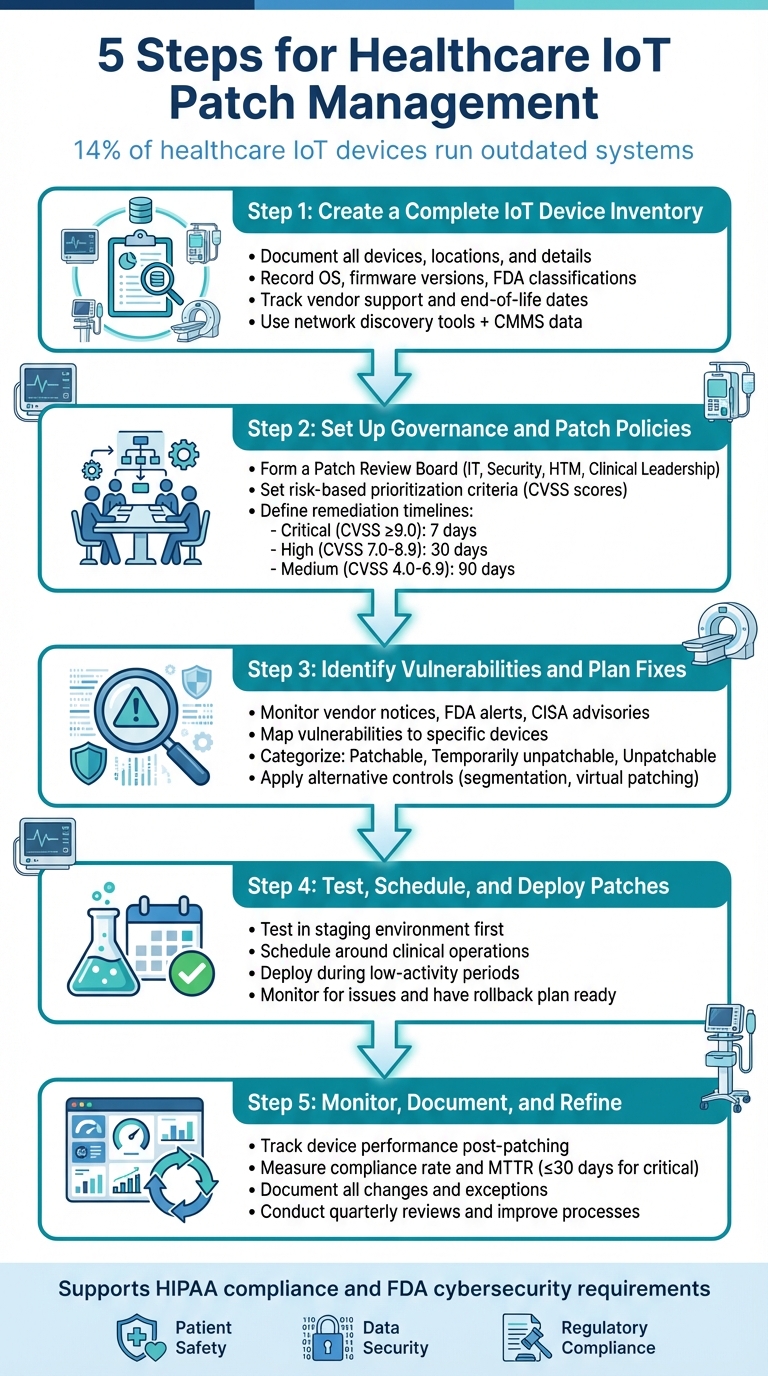
5-Step Healthcare IoT Patch Management Process
Step 1: Create a Complete IoT Device Inventory
Building an accurate inventory of your IoT devices is the backbone of any patch management strategy [2]. Without it, your security and clinical engineering teams can't effectively link known vulnerabilities to the devices in your network. This leaves critical gaps that could expose your systems to threats. Missing or outdated records can result in high-risk devices being overlooked during patching or maintenance [7]. For example, a healthcare security expert shared with Healthcare IT News that just one Microsoft "Patch Tuesday" included over 30 CVEs that could have been avoided by simply confirming there were no instances of Microsoft SQL Server in the environment [2]. Knowing what devices are present - and just as importantly, what are not - is essential for setting up effective patching policies, which is the focus of Step 2.
Record Critical Device Information
To manage vulnerabilities effectively, you need to document key information about each device. This includes details like the manufacturer, model, operating system (OS), firmware version, and physical location. These records help match vendor advisories with the right devices and confirm whether updates are needed or already applied. Knowing the physical location of devices (e.g., building, floor, or room) is also important for coordinating shutdowns with clinical staff. Additionally, record the device owner or responsible department for approval of changes.
Other critical data points include:
- FDA device classification (Class I, II, or III) and clinical criticality level, which indicate whether a device is life-supporting, diagnostic, or administrative. This helps prioritize patching based on risk.
- Connectivity details like IP and MAC addresses, VLAN assignments, and network segments. These are crucial for enabling segmentation or virtual patching when direct updates aren't feasible.
| Data Category | Specific Fields to Capture | Why It Matters for Patching |
|---|---|---|
| Identification | Manufacturer, model, serial number, asset tag | Links vulnerabilities and vendor advisories to specific devices [8] |
| Technical Details | Device type, OS, firmware/software version, IP, MAC, VLAN | Helps identify applicable patches and deployment methods [3] |
| Clinical Context | Location, department, owner, clinical use, criticality level, FDA class | Enables risk-based prioritization and safe scheduling [8] |
| Lifecycle & Support | Install date, warranty, EOL/EOS dates, support contract status | Flags legacy devices requiring compensating controls [8] |
| Security & Patch Status | Known vulnerabilities, last patch date, patch level, segmentation/controls | Supports compliance reporting and targeted remediation [8] |
Integrating data from multiple sources can make your inventory even more robust.
Use Tools and Cross-Team Collaboration
To create a reliable inventory, combine network discovery tools - which track connected medical, IoT, and OT devices - with data from your Computerized Maintenance Management System (CMMS) or biomed databases. These systems often include asset tags, service histories, and FDA classifications [3]. You can also pull information from Electronic Health Records (EHR) and clinical systems to identify devices involved in critical care pathways. Procurement and supply chain records are another valuable source for details on newly acquired equipment.
Collaboration across teams is key. IT and security teams should handle network discovery and vulnerability mapping, while clinical engineering or HTM teams provide insights into device lifecycles and clinical use. Procurement teams must ensure every new device is recorded before it connects to the network. Regular cross-functional reviews, such as monthly reconciliations, help keep the inventory accurate and up-to-date.
Platforms like Censinet RiskOps™ can centralize vendor and risk information for clinical applications and medical devices, streamlining decisions across teams. As Matt Christensen, Senior Director of GRC at Intermountain Health, explains:
"Healthcare is the most complex industry... You can't just take a tool and apply it to healthcare if it wasn't built specifically for healthcare" [1].
Track Vendor Support and End-of-Life Dates
A complete inventory isn't just about immediate patching - it also supports long-term risk management. Some devices can't be patched because they're past their end-of-support (EOS) or nearing end-of-life (EOL), meaning the manufacturer no longer provides updates [7]. Your inventory should include each device's support status, key dates like end-of-sale and end-of-software-support, and any conditions for receiving patches (e.g., requiring an active maintenance contract).
Tracking these details helps identify devices that need additional protections, such as network segmentation, virtual patching, or stricter access controls. For instance, if a network-connected imaging system is approaching its EOS date, it might be moved to a restricted VLAN and closely monitored while plans for its replacement are developed. Including EOS and EOL indicators in dashboards also helps leadership assess cybersecurity risks and budget for replacing aging devices, ensuring security is part of long-term technology planning.
Step 2: Set Up Governance and Patch Policies
Once you’ve completed a detailed inventory of your devices, the next step is to establish clear protocols for managing patches. A well-structured governance framework ensures patch management decisions are consistent, risk-aware, and aligned with critical priorities like patient safety and HIPAA compliance [9]. Without such a framework, patching efforts risk becoming chaotic and reactionary, potentially leaving vulnerabilities unaddressed while clinical teams face unplanned disruptions. This governance structure builds on your inventory, uniting technical, clinical, and compliance perspectives. In many cases, governance is part of a larger cybersecurity or enterprise risk management program, often reporting to committees like an information security steering committee, IT governance board, or clinical risk council [2][9].
Form a Patch Review Board
A Patch Review Board brings together key stakeholders to balance cybersecurity needs, clinical operations, and regulatory compliance. At a minimum, the board should include representatives from:
- IT and Security: This includes the CISO or their delegate, along with security operations and network architecture experts, to address vulnerability analysis and threat intelligence.
- HTM or Clinical Engineering: These members evaluate device-specific risks, vendor constraints, and maintenance schedules.
- Clinical Leadership: Nursing leaders, department heads, and the CMIO assess the potential impact on patient safety and workflow.
- Compliance or Privacy: These representatives ensure patching decisions align with HIPAA and state privacy laws, with input from risk management if available.
The board should meet biweekly and convene on an ad hoc basis for critical issues. A formal charter should define key details like quorum requirements, decision-making rights, escalation processes, and tie-breaking mechanisms. Clear workflows are essential to guide collaboration from the moment vulnerabilities are identified to their resolution. For example, IT and security teams log vulnerability alerts in a centralized system, HTM confirms which devices are affected by reviewing vendor advisories, and clinical leads evaluate how patches might affect patient care. The board then decides whether to apply a patch immediately, delay it with compensating controls (e.g., network segmentation or virtual patching), or replace the device altogether. Tools like Censinet RiskOps™ can help centralize vendor and risk data, streamlining these decisions by linking third-party risk assessments with internal patch management workflows [5][9].
Set Risk-Based Prioritization Criteria
After defining roles, it's essential to prioritize vulnerabilities using measurable risk factors. An effective risk model for healthcare IoT devices should consider:
- Vulnerability Severity: Use CVSS base scores (critical ≥ 9.0, high 7.0–8.9) and exploit data from sources like CISA or FBI alerts.
- Device Criticality: Focus on devices that directly impact patient care, such as ventilators, infusion pumps, and patient monitors, over non-clinical equipment.
- Network Exposure: Prioritize devices on internet-facing or flat networks over those on isolated, segmented networks.
- Compensating Controls: Evaluate whether existing protections, like virtual patching or intrusion prevention systems, reduce immediate risks.
These factors can be formalized into a multifactor risk score, aligned with service-level objectives:
| Risk Level | Criteria | Remediation Timeline |
|---|---|---|
| Critical | CVSS ≥ 9.0; actively exploited; affects life-sustaining or PHI-rich devices; or is on an exposed network segment | Patch or mitigate within 7 days, with same-day board review |
| High | CVSS 7.0–8.9; not yet exploited but with feasible attack vectors; affects clinically important or PHI-handling devices | Mitigate within 30 days |
| Medium | CVSS 4.0–6.9 or protected by strong segmentation/virtual patching | Remediate within 90 days |
| Low | CVSS < 4.0; minimal risk devices (no PHI, isolated networks) | Address during routine updates or as resources allow |
For each risk level, outline alternative measures if patches aren’t immediately available, such as updating firewall settings, implementing IPS rules, or restricting access. Document these measures to ensure consistency and accountability over time [2][3][6][9][10].
Write Formal Patch Policies
Formal policies are essential to turn governance decisions into actionable, repeatable processes. These policies should cover:
- Scanning Scope and Tools: Identify which networks and devices are included, specifying approved tools like passive network monitoring for sensitive devices and vendor-approved active scanning.
- Scanning Frequencies: Define whether scanning is continuous (or daily for passive discovery) and supplemented by weekly or monthly scans for less critical systems. Include provisions for rapid scans in response to urgent advisories.
- Vendor and HTM Coordination: Require HTM to validate scan settings based on vendor guidance and FDA regulations.
Policies should also set deployment timelines (e.g., 30 days for high-risk vulnerabilities affecting PHI) to reflect safeguards under the HIPAA Security Rule. Include documented justifications and compensating controls for any extended timelines. Additionally, provide rollback procedures to address potential device malfunctions or clinical issues caused by patches. Maintain an auditable record of all patch decisions, including cases where patches are deferred due to safety concerns or vendor limitations. Referencing frameworks like NIST CSF or CIS Benchmarks can further demonstrate diligence during investigations or accreditation reviews [2][9].
"Benchmarking against industry standards helps us advocate for the right resources and ensures we are leading where it matters" [1].
Step 3: Identify Vulnerabilities and Plan Fixes
Once governance is established, the next step is to pinpoint vulnerabilities and map out how to address them. This involves gathering data from various sources, linking issues to specific devices, and deciding on the best course of action based on each device's condition and risk level. A structured process ensures that urgent threats are tackled quickly, while also considering practical challenges like limited maintenance windows or vendor-imposed restrictions. This step lays the groundwork for organizing devices by how easily they can be fixed, ensuring every risk is handled appropriately.
Find and Analyze Vulnerabilities
To uncover vulnerabilities, you’ll need to pull data from both external and internal sources. External sources include vendor security notices, recall announcements, FDA safety communications for medical devices, CISA advisories, and databases like the National Vulnerability Database (NVD) or MITRE CVE. On the internal side, tools such as network-based and agentless vulnerability scans, configuration baselines, and specialized IoT security platforms can provide critical insights [3].
Consolidate all this information into a centralized system, like a ticketing or governance, risk, and compliance (GRC) tool. Assign a specific team member - usually from the vulnerability management team - to oversee this process and schedule regular reviews (at least weekly). For critical advisories, faster review cycles are essential. Platforms like Censinet RiskOps™ can automate the mapping of vulnerabilities to specific device models and their business owners, cutting down on manual work.
To match vulnerabilities to devices effectively, use the normalized inventory created in Step 1. Cross-reference vulnerability feeds and advisories with key details such as the device manufacturer, model, and firmware or OS version. This often involves obtaining a software bill of materials (SBOM) or similar data from vendors, then enriching it with business context - like whether the device handles protected health information (PHI) and falls under HIPAA regulations. Pattern-based rules can also help, such as linking a Windows IoT Enterprise CVE to all devices running that OS version [9].
Assessing the impact of vulnerabilities requires blending technical severity with clinical and regulatory considerations. On the technical side, factors include the CVSS score, exploitability (e.g., known exploits, network exposure, or authentication requirements), and potential outcomes like remote code execution or denial-of-service attacks. Clinically, devices critical to patient care - like infusion pumps or monitors - carry higher risks. Regulatory and privacy concerns, such as storing or transmitting PHI under HIPAA, also play a role. Many organizations rely on a multifactor risk score that combines these elements to prioritize fixes [3].
Group and Prioritize Devices
Once vulnerabilities are mapped and analyzed, categorize devices based on how ready they are for remediation:
- Patchable devices: These devices have vendor-supported updates available, are within their service life, and have a clear update process (e.g., Windows IoT-based nurse workstations or imaging viewers with approved patches).
- Temporarily unpatchable devices: These devices have a patch available but face delays due to operational constraints, such as MRI scanners in constant use or devices awaiting clinical validation of the patch.
- Unpatchable devices: These are end-of-life devices with no vendor support, obsolete operating systems, or restrictions that prevent updates (e.g., legacy ventilators or retired telemetry systems).
Each category should be recorded in the inventory, guiding the next steps - whether that’s direct patching, scheduling updates, or applying alternative security measures. Assigning a composite risk score that includes vulnerability severity, exploit availability, network exposure, device importance, and PHI sensitivity helps prioritize actions. Devices with high-severity vulnerabilities in critical care settings should be addressed first, with remediation efforts grouped into waves that align with existing maintenance schedules to maximize efficiency.
For devices that can’t be patched right away, alternative controls are essential.
Apply Alternative Security Measures
When immediate patching isn’t an option, alternative security controls can help mitigate risks. Network segmentation is a key strategy, isolating vulnerable devices on dedicated VLANs to restrict their access to the Internet or sensitive systems while enforcing minimal communication privileges. Virtual patching, often through next-generation firewalls or intrusion prevention systems, can block exploitation attempts at the network level, offering short-term protection for devices that are difficult to patch. Additionally, configuration hardening - such as disabling unused services, enforcing strong authentication, and applying baseline standards - further reduces risks [3].
The choice of controls should be informed by a quick risk assessment. Devices with a high impact on patient safety but limited external connectivity may benefit most from network isolation and strict access controls. Meanwhile, devices requiring broader communication might rely on more targeted virtual patching and continuous monitoring. For instance, some hospitals have used a step-by-step risk management process - starting with asset visibility and risk assessment, followed by virtual patching - to block network-level attacks while scheduling software updates [3]. These measures work alongside the governance and patch policies already in place.
Platforms like Censinet RiskOps™ can streamline this process by centralizing risk and configuration data, linking vendor advisories to affected devices, and integrating third-party risk assessments with internal workflows to simplify the selection of alternative controls [1].
sbb-itb-535baee
Step 4: Test, Schedule, and Deploy Patches
Building on the vulnerability analysis from Step 3, it’s time to validate patches in a controlled environment. The goal is to apply updates in a way that minimizes risks while ensuring device safety and compliance, all without disrupting patient care [6].
Test Patches Before Deployment
Before rolling out patches to production devices, testing them in a controlled environment is critical. Set up a staging area that mirrors your network, device models, firmware versions, and clinical workflows. Use representative devices, like infusion pumps or monitors, to simulate real-world conditions. This allows you to check connectivity, alarm functionality, data flows, and overall performance without jeopardizing patient safety.
Start by reviewing vendor instructions and release notes to ensure compatibility with your systems. Confirm supported operating systems, firmware requirements, and any rollback steps. During testing, focus on boot-up processes, clinical functions, alarm behavior, and interoperability with other systems. Conduct security checks to verify that the vulnerability is resolved and that no unintended services or ports are exposed. If resources are limited, prioritize testing for high-risk devices, such as those used in critical care.
Once lab testing is complete, pilot the patch on a small group of low-risk devices. Closely monitor for any issues and gather feedback from clinicians and biomedical engineers about usability and performance. Document the results and any decisions to proceed or halt before expanding to a full rollout. Tools like Censinet RiskOps™ can simplify this process by integrating device inventories, vendor data, and patch statuses, helping you stay organized and compliant.
Schedule Deployments Around Clinical Operations
Timing is everything when patching healthcare IoT devices. Collaborate with IT, clinical engineering, and clinical leaders to schedule maintenance windows that align with operational needs. Aim to perform updates during low-activity periods, such as overnight hours, between surgical blocks, or during scheduled maintenance. This ensures devices are available when patient demand is highest, and any downtime is planned and manageable.
For equipment tied to specific procedures - like imaging machines or operating room tools - coordinate with department heads to identify case-free windows. Avoid non-urgent patches during high-demand periods, like flu season, trauma surges, or major system upgrades. In cases where critical vulnerabilities require immediate attention, plan off-hours deployments with contingency support. Communicate clearly with unit managers and clinicians about the affected devices, timing, expected duration, and backup options to maintain trust and avoid surprises.
The urgency of a patch depends on both technical and clinical factors. Consider the severity of the vulnerability, the criticality of the device, its location (e.g., ICU versus outpatient), network exposure, and any existing controls like segmentation or virtual patching.
Deploy Patches Securely
When it’s time to deploy, ensure updates are authenticated and verified using digital signatures or checksums. Always follow manufacturer-recommended methods and avoid risky practices like using USB drives or consumer-grade file-sharing tools. Limit update access to authorized personnel, enforce a least-privilege policy, and require multifactor authentication. Log all administrative actions for accountability and traceability.
During rollouts, use network segmentation and virtual patching to protect devices that are difficult to update. After deployment, monitor devices in near-real time to track availability, error logs, performance metrics, and clinical integration. Create clear channels for clinicians and biomedical staff to report any patch-related issues, such as connectivity problems, slow interfaces, or alarm malfunctions.
Define rollback procedures in advance based on vendor recommendations so teams can quickly revert to a stable version if patient safety or compliance is at risk. Use monitoring tools to detect unusual behaviors or network anomalies after the update. Document any issues, rollbacks, or lessons learned to continually improve your patch management process.
Step 5: Monitor, Document, and Refine the Process
Deploying patches is just the beginning. To ensure the long-term success of your patch management program, it’s essential to monitor performance, document outcomes, and refine your processes. This ongoing effort keeps your program aligned with clinical priorities and security objectives. By building on strong governance and secure deployment practices, consistent monitoring and thorough documentation help maintain a responsive and efficient IoT patch management system.
Monitor Device Performance After Patching
Once patches are deployed, closely monitor devices for any signs of trouble. Watch for issues like unexpected reboots, connectivity problems, delays in data transmission, failed transactions, or unusual spikes in resource usage (e.g., CPU, memory, or network activity). Leverage tools like SIEM and network monitoring systems to track anomalies through device logs and telemetry.
Set up SIEM alerts to flag deviations from normal device behavior. For instance, configure alerts to detect unusual traffic patterns, port changes, repeated authentication failures, or sudden drops in data flow. Use time-synchronized logs in U.S. time zones to better correlate events with the patching schedule. Create specific alerts for recurring installation errors, devices going offline, or newly discovered vulnerabilities. Ensure these alerts are promptly shared with both security and clinical engineering teams for quick action.
Coordinate monitoring with clinical workflows. Pay extra attention to critical bedside devices during high-demand periods and work with unit managers to report anomalies quickly. Establish clear communication channels so clinicians and biomedical staff can easily report issues like connectivity disruptions, slow interfaces, or malfunctioning alarms - before they affect patient care.
Once device performance stabilizes, shift your focus to assessing compliance and the overall effectiveness of your program.
Track Compliance and Program Performance
To evaluate how well your patch management program is performing, track key metrics such as:
- Patch compliance rate: (Number of patched devices ÷ Total in-scope devices) × 100%
- Mean time to remediate (MTTR): Aim for ≤30 days for critical issues
- Unpatched critical vulnerabilities: Count those exceeding 30 days [9]
Other valuable metrics include the percentage of devices still under vendor support versus those that are end-of-life, and the rate of patch-related incidents per quarter.
Segment these metrics by factors like device type, clinical importance, and risk level. For example, use separate dashboards to track life-sustaining devices (e.g., ventilators and infusion pumps), diagnostic equipment (e.g., MRI and CT scanners), and general-purpose IoT systems (e.g., building controls). This helps identify where patient safety and data security risks are concentrated.
Present your findings through concise executive scorecards with red/amber/green indicators and trend lines, such as quarterly improvements in compliance or MTTR. These summaries support board-level oversight, budget requests, and compliance with HIPAA and Joint Commission requirements.
For each patch cycle, document key details like:
- Approval records (who approved changes, what was modified, when, and why)
- Devices and models affected, along with vendor patch identifiers
- Vulnerabilities addressed (CVE IDs)
- Test results and rollback plans
- Downtime windows and clinical impacts
- Exceptions or deferrals, with risk acceptance rationale
- Validation that patient data integrity and availability were maintained
Store this information in centralized systems like a risk register, CMMS/ITSM tools, or specialized risk platforms. This ensures readiness for internal audits, regulatory inquiries, and board-level reporting.
Comprehensive documentation also lays the groundwork for refining processes over time.
Improve Processes Over Time
Refining your patch management program requires regular reviews and feedback loops. Schedule monthly operational reviews and quarterly governance meetings to analyze metrics, incidents, and exceptions. Bring together teams from information security, clinical engineering, IT, compliance, and clinical leadership - especially from high-impact areas like ICUs and radiology. Investigate delays in patching and review any deployment-related incidents. Use these insights to update policies, adjust maintenance windows, refine testing procedures, and improve training.
Platforms like Censinet RiskOps can centralize asset inventories, vulnerability data, patch statuses, and risk scores. This makes it easier to identify recurring issues, such as vendors or device families that consistently lag on updates. By integrating with tools like vulnerability scanners, CMMS/ITSM systems, and network controls, these platforms correlate exploitability, clinical importance, and business impact. This enables prioritization based on actual risks. Over time, trend analysis - such as reductions in high-risk vulnerabilities or shorter exposure windows - can show whether your process changes are making a difference.
"Benchmarking against industry standards helps us advocate for the right resources and ensures we are leading where it matters." - Brian Sterud, CIO, Faith Regional Health [1]
Comparing your performance against peer organizations can highlight areas where your patch compliance or MTTR falls behind, signaling opportunities for improvement.
For devices that cannot be patched, adopt alternative strategies like network segmentation, virtual patching, stricter access controls, and enhanced monitoring. Approximately 14% of connected medical devices run on unsupported or outdated operating systems and cannot be patched [4]. Log these devices as risk exceptions, documenting clinical justifications, interim safeguards, and plans for replacement or remediation. Keep these records in a central risk register to ensure transparency during audits.
Persistent non-compliance by certain vendors or service lines should trigger escalation to senior leadership or the patch review board. This may lead to changes in procurement policies, updated service-level agreements with vendors, or capital investments to replace high-risk legacy systems.
Finally, reinforce responsibilities and improve incident response through role-specific training and clear communication plans. Standardized change notices, streamlined reporting channels, and concise weekly summaries of updates help embed patch management into daily routines. Conduct tabletop exercises and post-mortem reviews of patch-related incidents to refine your runbooks and ensure your monitoring, documentation, and improvement efforts remain consistent and auditable.
Conclusion
The five steps outlined in this guide - building an inventory, setting up governance, identifying and addressing vulnerabilities, testing and deploying patches, and continuous monitoring - form the backbone of a proactive IoT patch management strategy. These actions work together to provide better visibility, stronger control, and ongoing improvement, reducing the chances of breaches and limiting the fallout from incidents. By tackling vulnerabilities within defined service-level agreements (like fixing high-risk issues within 30 days) and documenting exceptions along with alternative controls, this approach not only supports HIPAA Security Rule compliance but also aligns with FDA expectations for postmarket cybersecurity. Beyond minimizing risks, this method enhances vendor management and ensures smoother operations.
Effective IoT patch management also ties directly to vendor risk management and business continuity. Many IoT and medical devices rely on manufacturers for patches, security updates, and end-of-life support, making vendor responsiveness a critical component of success. With an accurate inventory and a risk-based prioritization system, your team can quickly pinpoint affected devices during major vulnerability events, apply patches or implement segmentation in a controlled way, and prevent unexpected disruptions to patient care or operations.
Censinet RiskOps™ simplifies this process by centralizing asset inventories, vendor risk assessments, and remediation workflows. Designed specifically for healthcare, the platform integrates with configuration management databases and security tools, linking vendor and product risk scores to the specific assets in use. This centralized approach strengthens the integration of patch management into your broader cybersecurity efforts. For example, Tower Health leveraged Censinet RiskOps to shift three full-time employees away from manual risk assessment tasks, enabling the team to complete more assessments with just two full-time staff members.
A robust IoT patch management program is not a one-time effort - it’s an ongoing commitment to reducing cyber risks, safeguarding patient data, and ensuring clinical resilience. By embedding these steps into your cybersecurity strategy, you can stay ahead of emerging threats, meet regulatory requirements, and protect the integrity of patient care.
FAQs
Why is it important to maintain an inventory of IoT devices in healthcare?
Keeping track of IoT devices in healthcare is crucial for protecting sensitive information and maintaining strong cybersecurity. A comprehensive inventory offers a clear view of all connected devices, enabling healthcare organizations to spot weaknesses, address security gaps, and apply updates or patches promptly.
This kind of proactive management minimizes the chances of cyberattacks and helps organizations stay compliant with healthcare regulations. When you know exactly which devices are in operation, it becomes easier to monitor and safeguard them, ensuring patient data and essential systems remain secure.
What’s the best way for healthcare facilities to decide which IoT device vulnerabilities to fix first?
Healthcare facilities need to prioritize addressing vulnerabilities that present the greatest risk. When evaluating these risks, it's crucial to consider a few key factors: how easily the vulnerability could be exploited, its potential to jeopardize patient safety, and the device's role in essential operations.
A solution like Censinet RiskOps™ can simplify this process. It assists in assessing vulnerabilities, setting priorities for fixes, and ensuring compliance - all while helping to minimize risks to both patients and operational efficiency.
What can be done if a healthcare IoT device can't be patched right away?
If a healthcare IoT device can't be patched right away, there are practical steps you can take to reduce risk and protect security. One of the most effective measures is network segmentation, which keeps the device separate from critical systems, limiting potential damage.
You can also use compensating controls like enhanced monitoring or intrusion detection systems to quickly spot and respond to any suspicious activity.
Another important step is tightening physical security to prevent unauthorized access to the device. If possible, you might also consider disabling or restricting the device's functionality temporarily to reduce its exposure until the patch is ready. These actions help safeguard both patient safety and sensitive data while you work to resolve the patching delay.

