
Access control is a cornerstone of HIPAA compliance, ensuring only authorized individuals can access electronic protected health information (ePHI). Here's what you need to know to build an effective strategy:
- Regulatory Requirements: The HIPAA Security Rule (45 CFR § 164.312) mandates safeguards like unique user IDs, emergency access procedures, automatic logoff, and encryption. Some are required, while others are "addressable" but still necessary if deemed reasonable.
- Key Practices:
- Limit access to the minimum necessary data for job duties.
- Use Role-Based Access Control (RBAC) to assign permissions based on job roles.
- Implement Multi-Factor Authentication (MFA) and audit logs to verify users and track activity.
- Risk Mitigation: Insider threats contribute to 39% of healthcare breaches. Regular audits, clear role definitions, and monitoring can minimize risks.
- Third-Party Vendors: Manage third-party vendor risk and access carefully with defined expiration dates and regular reviews of permissions.
Role-Based Access Control (RBAC) Explained: How It Works and Why It Matters for Security
sbb-itb-535baee
HIPAA Access Control Requirements
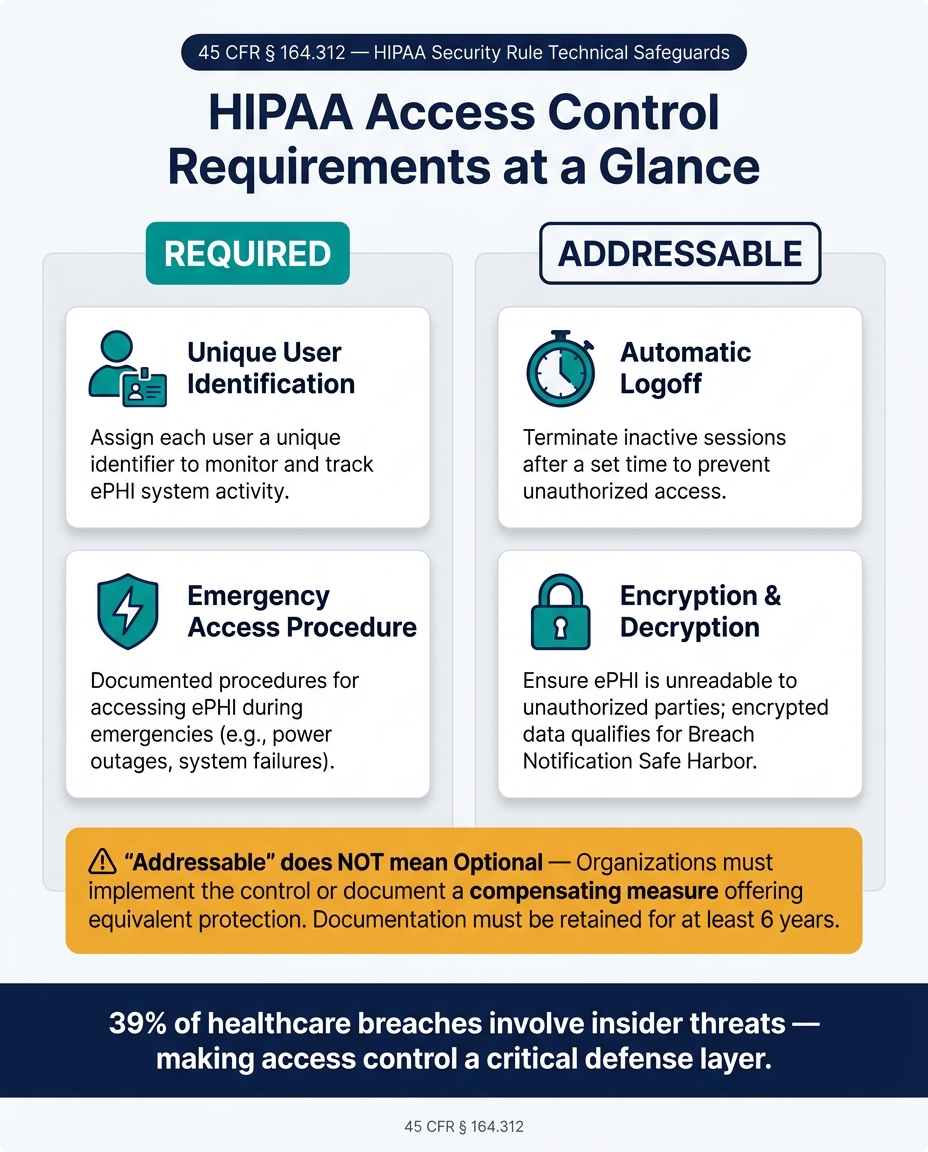
HIPAA Access Control Requirements: Required vs. Addressable Specifications
The HIPAA Security Rule's Technical Safeguards section (45 CFR § 164.312(a)) mandates that covered entities and their business associates implement technical policies to ensure that access to electronic protected health information (ePHI) is limited to authorized users and software. [3] To achieve this, four specific implementation specifications outline the practical steps required.
Core Access Control Specifications
| Specification | Status | What It Requires |
|---|---|---|
| Unique User Identification | Required | Assign each user a unique identifier to monitor and track their activities within ePHI systems. |
| Emergency Access Procedure | Required | Develop documented procedures for accessing ePHI during emergencies, such as power outages or system failures. |
| Automatic Logoff | Addressable | Configure systems to terminate inactive sessions after a specified time to prevent unauthorized access. |
| Encryption and Decryption | Addressable | Ensure ePHI is unreadable to unauthorized parties while allowing authorized users to decrypt it. |
Many healthcare organizations rely on Role-Based Access Control (RBAC) to meet these requirements. RBAC assigns access based on job roles rather than individuals, streamlining the implementation of the "minimum necessary" standard across the organization.
Required vs. Addressable Specifications
It’s important to clarify that "addressable" does not mean optional.
"Addressable never means optional. It means you must implement the control as reasonable and appropriate, or document a compensating measure that achieves an equivalent level of protection based on risk." - Kevin Henry, HIPAA Expert, AccountableHQ [4]
Required specifications must be followed exactly as written. Addressable specifications, on the other hand, allow for flexibility. Organizations can adapt these controls to fit their specific size, environment, and risk profile. However, if a control is deemed not feasible, you must document your reasoning and implement an alternative that offers equivalent protection. This documentation must be kept for at least six years. [5]
For instance, the automatic logoff standard might require shorter timeouts on shared workstations in public areas, while secured clinical offices could allow longer timeouts. Both approaches are acceptable, provided they are supported by a risk analysis.
"If a particular implementation specification is not reasonable and appropriate, entities must document why, and implement equivalent alternative measures if reasonable and appropriate." - HHS [1]
Encryption deserves special attention. While it is an addressable specification, following NIST standards for encryption offers a "safe harbor" under the Breach Notification Rule. Data encrypted to these standards isn’t considered "unsecured PHI", which can significantly reduce breach reporting obligations. [1]
Once these technical safeguards are in place, the next steps involve verifying user identities and monitoring system activity.
Authentication and Audit Controls
Building on safeguards like encryption, two additional controls help ensure comprehensive protection:
Person or Entity Authentication (45 CFR § 164.312(d)) requires verifying that anyone requesting access to ePHI is who they claim to be. Multi-factor authentication (MFA) is the most effective way to meet this requirement. Advanced options like FIDO2 security keys or authenticator apps are more secure than SMS-based codes, particularly for administrators and remote users. [2]
Audit Controls (45 CFR § 164.312(b)) are mechanisms designed to record and examine activities in systems that handle ePHI. [2] Effective audit logs should capture details such as user ID, patient ID, actions taken, outcomes, and source IP addresses. Centralizing these logs in a Security Information and Event Management (SIEM) system and applying behavioral analytics can help detect suspicious patterns - like repeated failed logins or large-scale data exports - before they escalate into breaches.
"Audit trails show who accessed which PHI, what actions they took, and when. Strong Audit Log Integrity enables fast investigations, deters misuse, supports compliance evidence, and provides early warning of suspicious activity." - Accountable HQ [2]
To maintain the integrity of audit logs, administrators must not have the ability to delete or alter their own activity records. Logs should be stored on immutable media, and cryptographic hashing can be used to detect any unauthorized modifications. [2]
How to Design an Access Control Strategy
Creating an effective access control strategy isn’t just about picking the right technology. It starts with understanding who needs access, what they need access to, and why they need it. From there, the technical solutions can take shape.
Mapping ePHI Data Flows and User Groups
The first step is to inventory all ePHI repositories and understand how users interact with them. This includes not just primary systems but also exported reports, emailed results, and cloud backups. Essentially, anywhere ePHI is stored, transmitted, or accessed needs to be accounted for.
Once the data flow is clear, focus on mapping out access needs. It’s more efficient to group users by job roles - like nurses, billing staff, or IT administrators - rather than assigning permissions individually. For each group, analyze the specific tasks they perform and the minimum ePHI required to complete those tasks.
"The minimum necessary standard requires you to limit PHI access to the smallest amount needed to perform a task. In practice, this means designing PHI access limitations into systems, workflows, and reports rather than relying on individual discretion." - Kevin Henry, Accountable HQ [6]
Access should also be scoped further by criteria like location, department, or patient panel. For example, a nurse in one clinic shouldn’t have automatic access to records from another clinic. Assigning role owners - individuals responsible for reviewing and validating group memberships regularly - helps prevent "role creep", where users accumulate unnecessary permissions over time.
| Step | Action | Objective |
|---|---|---|
| Task Analysis | List actions and required ePHI elements | Identify minimum necessary data per role |
| Role Design | Group by job families (e.g., Nurse) | Create manageable, reusable access groups |
| Data Mapping | Use data dictionaries to tag sensitivity | Align technical controls with data risk |
| Scoping | Apply site or department filters | Limit access to relevant patient data |
| Governance | Assign role owners and review cycles | Prevent role creep and unauthorized access |
Adopting a default-deny policy ensures that users only gain access to what’s explicitly permitted. With user groups clearly defined, the next step is selecting an appropriate access control model.
Choosing an Access Control Model
Once roles are established, picking the right access control model becomes simpler. Role-Based Access Control (RBAC) is a popular choice in healthcare because it ties specific actions - like viewing or editing records - to predefined job roles. Many EHR platforms and enterprise systems support RBAC, making it a straightforward option for enforcing least-privilege access.
That said, RBAC alone may not cover every situation. For example, a physician working across multiple facilities or a nurse accessing records remotely introduces variables that static roles can’t handle. This is where Attribute-Based Access Control (ABAC) comes in. ABAC adds an extra layer by evaluating real-time attributes, such as the user’s location, device security, or time of access, before granting permissions.
A hybrid approach often works best. RBAC sets the foundation for day-to-day access, while ABAC adds flexibility for higher-risk scenarios, like remote logins or administrative actions. Together, these models ensure both control and adaptability. The chosen model also influences technical tools, such as Single Sign-On (SSO) and Multi-Factor Authentication (MFA).
Applying Technical Safeguards
With the strategy in place, it’s time to implement technical controls. Start with Single Sign-On (SSO), which centralizes authentication. This makes it easier to revoke access across systems when an employee leaves.
Multi-Factor Authentication (MFA) is non-negotiable. Proposed HIPAA Security Rule amendments set for late 2024 aim to make MFA mandatory for all ePHI access. This reflects the growing need to protect against phishing and credential-stuffing attacks [7]. Additionally, any web-based ePHI transmission must use TLS 1.2 or higher to safeguard data in transit [7].
Other key safeguards include enabling automatic logoff on shared workstations to prevent unauthorized access and maintaining up-to-date permissions through Joiner-Mover-Leaver (JML) workflows. For legacy systems that lack granular role controls or MFA support, compensating measures - like network segmentation or manual approval processes - can provide equivalent protection.
Platforms like Censinet RiskOps™ can help healthcare organizations manage access control strategies efficiently, ensuring they stay aligned with HIPAA requirements while keeping systems secure.
Implementing and Maintaining Access Controls
Identity Management and Authentication
Setting up access controls is just the beginning; keeping them effective over time is equally important. It all starts with a formal identity lifecycle process that manages every stage of a user's journey: onboarding new users (Joiners), adjusting access for role changes (Movers), and revoking permissions when someone leaves (Leavers).
A Role Matrix can help map job roles to specific system permissions, ensuring clarity and consistency:
| Role | ePHI Database | Cloud Console | HR System |
|---|---|---|---|
| Physician | Read/Write (Patient Records) | No access | Self-service only |
| IT Admin | Read/Write (Break-glass only) | Full Admin | Self-service only |
| Billing Clerk | Read-only (Financial data) | No access | Self-service only |
| HR Manager | No access | No access | Full Admin |
For privileged accounts, adopt Just-In-Time (JIT) access, which grants elevated permissions only for a specific task and timeframe, then automatically revokes them. This aligns with HIPAA’s focus on limiting access to authorized activities. Additionally, follow NIST SP 800-63B guidelines: require passwords of 12–15 characters and avoid mandatory rotations unless a breach occurs [8].
Another key practice is Separation of Duties (SoD): the person requesting access should not be the one approving it. This simple rule significantly reduces insider threats [8].
Once these identity processes are in place, continuous monitoring of access becomes essential to maintain security and compliance.
Access Monitoring and Audit Practices
HIPAA mandates logging access events, but logging alone isn't enough - analyzing these logs is critical. Use a ticketing system, like Jira or ServiceNow, to channel all access requests and create a permanent audit trail [8].
Focus on quarterly reviews for high-risk accounts and systems containing sensitive ePHI. For employees transitioning roles, enforce a remove-before-add policy: revoke old permissions before granting new ones to prevent unnecessary access accumulation.
To stay prepared for audits, maintain an audit packet for each critical ePHI system. This ensures you can provide evidence immediately when requested, saving time and avoiding last-minute scrambles.
"If reviewers cannot reconstruct who accessed PHI and why, the control environment is too weak to support defensible compliance." - Mr NHI, Member Moderator, NHIMG [9]
Managing Third-Party Vendor Access
Managing access for third-party vendors is just as important as internal controls. One common oversight is delayed offboarding, where business associates or subcontractors retain access long after their projects end [9]. To address this, assign each third-party identity a business sponsor, set a defined end date for access, and include them in regular access reviews.
Non-human identities (NHIs), such as service accounts, API keys, and automated workflows, require the same level of oversight. The statistics are alarming: 91.6% of API keys remain active five days after a potential compromise is reported, and only 20% of organizations have formal processes for offboarding these keys [9]. These gaps are prime targets for attackers.
"HIPAA is an access governance framework as much as a privacy framework. The article's real message is that regulated PHI fails when identity controls do not constrain use, disclosure, and traceability." - Mr NHI, Member Moderator, NHIMG [9]
For healthcare organizations managing numerous vendors, tools like Censinet RiskOps™ can streamline third-party risk assessments. These platforms provide workflows to evaluate vendor access to ePHI and ensure every access path is monitored. Tracking who accessed systems, which records were viewed, and how sessions ended creates the traceability needed for defensible compliance. Strong third-party access controls are critical to meeting HIPAA requirements effectively.
Conclusion and Key Takeaways
Creating HIPAA-compliant access controls isn't something you can check off a list and forget - it requires constant attention and adjustment. The steps outlined in this guide, such as mapping ePHI data flows, choosing the right access model, enforcing least privilege, and managing third-party identities, all emphasize one critical point: access control fails without ongoing governance. It's worth noting that access control is the most frequently tested area during HIPAA audits [8]. Auditors don’t just want to see policies - they want proof that your technical environment aligns with them.
"If you can't show how access is controlled from start to finish, you will struggle to demonstrate compliance even if your technical controls are strong." [10]
A solid access control strategy requires continuous monitoring to maintain security. Regular reviews, such as quarterly access audits, help catch privilege creep before it becomes a problem. Termination audits ensure that former employees no longer have access, while service account audits verify that APIs and bots don’t accumulate unchecked privileges. By synchronizing role mapping, least privilege enforcement, and vendor management, you transform access control from a static set of rules into an active, defensible program.
For healthcare organizations with complex vendor relationships, tools like Censinet RiskOps™ can simplify this process. These platforms centralize tasks like maintaining an ePHI systems access register, automating evidence collection, and keeping audit-ready documentation up to date. This eliminates the manual scramble when an OCR audit request comes through.
Effective access control relies on clear role definitions, strict least privilege enforcement, consistent lifecycle management, and ongoing oversight. Mastering these elements is the key to maintaining HIPAA compliance over the long term.
FAQs
How do I decide if an “addressable” HIPAA access control is required for my organization?
Determining whether an “addressable” HIPAA access control is necessary involves evaluating factors like your organization’s size, complexity, technical capabilities, and risk analysis. If you find that implementing the control is practical, it should be put in place. If it’s not, you’ll need to document your reasoning thoroughly and adopt a suitable alternative that still meets HIPAA’s standards.
What’s the best way to prevent privilege creep as employees change roles?
To keep privilege creep in check, establish workflows that immediately update access when someone's role changes. This means removing outdated permissions and assigning the correct ones for the new role. Utilize tools like change tickets and audit logs to track these adjustments for accountability. Additionally, perform regular permission reviews to ensure access aligns with current job responsibilities. These practices not only support compliance but also safeguard sensitive data.
How can I control and audit third-party vendor access to ePHI without slowing operations?
To keep third-party vendor access to ePHI secure and in check, it’s important to use advanced tools and strategies. Start by implementing privileged access management (PAM) and role-based access control (RBAC) to ensure vendors only have access to what they absolutely need. These measures help enforce the principle of least privilege and make activity tracking easier.
Automating identity and access management (IAM) is another critical step. It allows for regular reviews of access permissions and ensures timely deprovisioning when access is no longer required. On top of that, automated tools for real-time monitoring and audits can help catch unusual activity, maintain compliance, and simplify operational workflows.
