
Checklist for MFA Implementation in Healthcare Clouds
Post Summary
Multi-factor authentication (MFA) is now a mandatory security measure for healthcare organizations using cloud environments. With the rise in cyberattacks targeting sensitive healthcare data like Protected Health Information (PHI), MFA provides an extra layer of protection to prevent breaches - even if passwords are compromised. Beyond security, it ensures compliance with updated 2026 HIPAA regulations, which require MFA for accessing electronic PHI (ePHI).
Key Steps for Implementing MFA in Healthcare Clouds:
- Risk Assessment: Identify all cloud access points handling PHI (e.g., EHRs, clinical apps) and classify them by risk level.
- Regulatory Compliance: Ensure MFA methods meet HIPAA requirements, focusing on phishing-resistant options like FIDO2 keys or authenticator apps.
- Vendor Evaluation: Choose MFA solutions that integrate well with healthcare workflows and are user-friendly for clinical staff.
- Technical Deployment: Use a centralized Identity and Access Management (IAM) system with Single Sign-On (SSO) to simplify access.
- User Training: Provide clear guidance on enrollment, recovery options, and security best practices. This helps in creating a culture of cybersecurity across the organization.
- Post-Deployment Monitoring: Regularly review audit logs, track MFA enrollment rates, and update policies to address new risks.
Why It Matters:
- 60% of healthcare breaches involve compromised credentials.
- The average cost of a breach in 2024 was $10.93 million.
- HIPAA penalties for non-compliance can escalate if MFA isn’t implemented properly.
By following these steps, healthcare organizations can reduce security risks, maintain compliance, and protect patient trust.
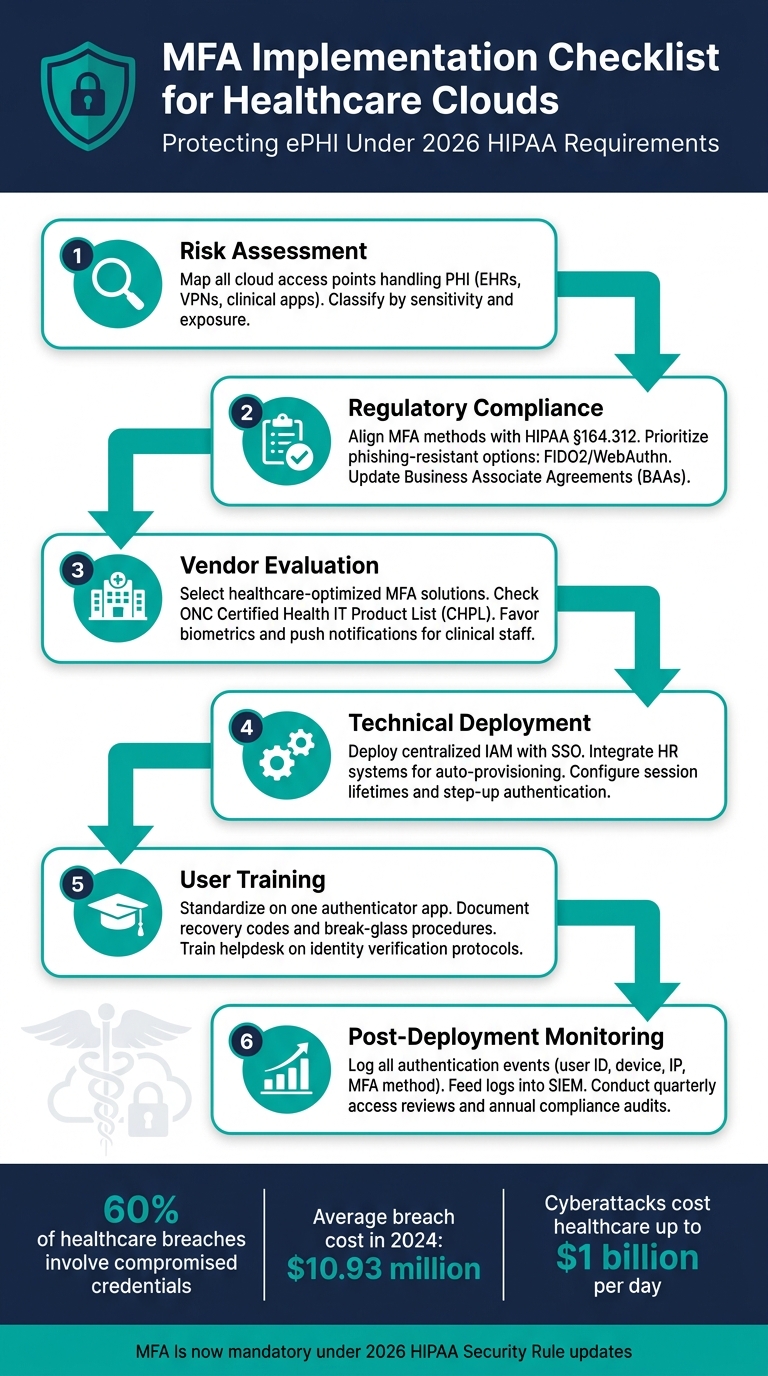
MFA Implementation Checklist for Healthcare Clouds
Healthcare Security 101: MFA Could Save Your Organization - HIPAA Certify
sbb-itb-535baee
Pre-Implementation Assessment and Planning
Before setting up MFA, it's crucial to identify potential risk areas. This step ensures no system goes unprotected, workflows remain smooth, and compliance standards are met. The effort you put into this initial phase forms the backbone of your MFA strategy. A detailed risk assessment will help you shape an approach tailored to your needs.
Conducting a Risk Assessment
Start by mapping all cloud access points that handle ePHI - this includes EHRs, clinical apps, administrative portals, VPNs, and cloud storage. Classify these access points based on their sensitivity and exposure. It's essential that MFA integrates seamlessly into clinical workflows to avoid interruptions in care delivery. Evaluate each access point for vulnerabilities and consider how MFA might impact daily operations. [2]
"The implementation of MFA can mitigate the risk of data breaches and cyberattacks." This is a critical component of measuring what matters for cybersecurity in healthcare, focusing on patient safety and care continuity. - Ping Identity [2]
The stakes are high: cyberattacks cost healthcare providers up to $1 billion per day, making healthcare the most targeted industry by cybercriminals. [2] A comprehensive risk assessment isn't just a box to check - it's the cornerstone of your MFA strategy. This mapping process directly feeds into the adaptive measures you'll develop in the next stages.
Understanding Regulatory Compliance
Under the 2026 HIPAA Security Rule updates, MFA is now required for all interactive workforce access to ePHI. [3] This falls under the Technical Safeguards outlined in §164.312, which cover identity assurance, session management, and continuous monitoring.
"The 2026 HIPAA Security Rule updates make multi-factor authentication (MFA) mandatory for interactive workforce access to electronic protected health information (ePHI)." - Kevin Henry, HIPAA Specialist [3]
Your plan must address all compliance requirements, including the use of phishing-resistant authentication factors such as FIDO2/WebAuthn for privileged or remote access. SMS-based one-time passwords are no longer considered primary methods but rather a backup solution. [3] Additionally, review and update your Business Associate Agreements (BAAs) with cloud vendors to ensure they meet the same MFA and encryption standards required of your organization. [3]
If any access points are exempted from MFA, you must formally document compensating controls. Failure to document these exceptions could lead to "willful neglect" penalties from the Office for Civil Rights (OCR), with fines scaling based on the level of responsibility. [3] These compliance considerations set the stage for configuring MFA and evaluating vendors.
Resource and Vendor Evaluation
Bring together IT security teams, clinical informatics experts, compliance officers, and department leaders to define clear roles for the MFA rollout. When selecting an MFA vendor, focus on solutions designed for healthcare environments and user-friendly for non-technical staff. In fast-paced clinical settings, biometrics and push notifications often see better adoption rates than hardware tokens. [2] Also, check the ONC Certified Health IT Product List (CHPL) to confirm whether Health IT Modules support MFA under § 170.315(d) - a step that's easy to overlook but essential. [4]
Using Censinet RiskOps™ for Pre-Implementation Planning
A thorough pre-MFA risk assessment requires consolidating asset inventories, vendor questionnaires, compliance documents, and input from stakeholders. Censinet RiskOps™ is specifically designed to streamline this process.
This platform simplifies third-party and enterprise risk assessments, enabling healthcare delivery organizations (HDOs) to centralize risks related to PHI, clinical applications, and cloud services. With its Censinet AI™ feature, it can speed up vendor evidence reviews and automatically summarize documentation, helping your team evaluate whether an MFA vendor meets security and compliance standards. This allows you to move from assessment to decision-making faster, without compromising on thoroughness.
Building a Risk-Based MFA Strategy
Transforming your risk assessment and compliance findings into a practical, risk-based MFA strategy is essential. Not all access points carry the same level of risk, and not every user requires the same verification process. A risk-based approach allows you to apply security measures where they’re most needed - without unnecessarily disrupting clinical workflows. This ensures that MFA targets the areas with the highest risk, while maintaining operational efficiency.
Categorizing Access Points by Risk Level
Think of each cloud access point as a door that needs a lock suited to its level of risk. Several factors determine the level of risk, including user privilege, exposure to PHI (Protected Health Information), network location, device trust, and the potential impact of the action being performed.
| Risk Level | Access Point Example | Required MFA Control |
|---|---|---|
| Critical | Remote Admin Access, EHR Mass Export | Phishing-resistant (FIDO2, Smartcard) |
| High | Remote Clinical Access (VPN), Cloud PHI Apps | Push Notification, Authenticator App |
| Medium | Internal Clinical Workstation (Trusted Network) | Proximity Badge, Biometrics, or SSO Session |
| Low | Internal Non-PHI Systems (e.g., Cafeteria Menu) | Password or Single Factor (Optional MFA) |
One key concept to implement is step-up authentication. For example, when a user attempts a high-risk action - like exporting a large volume of PHI or modifying access control policies - the system should prompt them for additional verification. This approach ensures security without unnecessarily disrupting workflows [1].
Choosing the Right Authentication Factors
Authentication methods fall into three main categories: knowledge-based (passwords, PINs), possession-based (hardware tokens, authenticator apps, SMS), and inherence-based (biometrics). However, not all of these are suitable for healthcare environments. For instance, passwords alone are insufficient for accessing PHI [1]. Instead, authentication methods should align with the previously defined risk levels, ensuring appropriate protection for each access point.
For administrators and privileged users, FIDO2 security keys or smartcards provide strong, phishing-resistant protection, reducing the risk of credential theft [5]. In fast-paced environments like emergency departments, NFC-enabled hardware tokens offer a quick "tap-and-go" option that doesn’t slow down care delivery [5]. For general staff using smartphones, app-based OTPs or push notifications offer a cost-effective solution.
"Passwords alone aren't enough. And the fix, while it may seem technical, is very human. We need to make access both secure and usable." - Mona Sata, Senior Content Architect, AuthX [6]
SMS and voice-based verification, while familiar, should only be used as a last-resort option for emergency scenarios. These methods are vulnerable to threats like SIM swapping and number porting [5]. Biometrics, though convenient, come with challenges - fingerprints and facial scans can’t be revoked if compromised, and they require careful handling to meet data protection standards [5].
Setting Up Adaptive MFA Policies
Adaptive MFA continuously monitors signals like IP addresses, device health, access times, and user behavior to decide when additional verification is necessary. Always enforce MFA for external access, but use "don’t ask again" features for trusted devices to balance security with usability. To combat MFA fatigue, require number matching in push notifications. Finally, ensure audit logs capture all access events, including details like the source IP and device ID, to support compliance investigations [1].
Technical Deployment of MFA in Healthcare Clouds
When implementing a risk-based MFA strategy in healthcare, the technical deployment must integrate smoothly into existing cloud workflows. Clinical staff work in fast-paced environments where delays caused by login issues can directly impact patient care. Therefore, MFA systems need to function without disrupting these critical workflows.
Integrating MFA with Existing Cloud Platforms
The foundation of your deployment should be a centralized Identity and Access Management (IAM) platform. This allows MFA to be enforced through Single Sign-On (SSO) across all cloud applications. For example, a nurse starting their shift can authenticate once and gain access to essential tools like electronic health records (EHR), scheduling systems, and other approved apps - eliminating the need for repeated logins.
To further streamline security, integrate HR systems with IAM. This ensures that role changes, account revocations, and other updates happen automatically, reducing the risk of orphaned accounts. Additionally, configure session lifetimes to balance ease of use with security.
"Adopt phishing-resistant factors for admins and remote users - such as FIDO2 security keys or authenticator app approvals." - Kevin Henry, HIPAA Specialist, Accountable
By combining these approaches, user enrollment becomes more seamless, and the system is better prepared for robust testing and deployment.
User Enrollment and Training
A smooth and secure user enrollment process is critical. From the start, provide clear recovery procedures to address potential issues. Standardizing on a single authenticator app, like Microsoft Authenticator or FreeOTP+, can simplify both user training and IT support.
Document recovery options, such as one-time recovery codes and "break-glass" access paths, to address lockouts while maintaining security. Helpdesk staff should follow strict identity verification protocols before approving any MFA resets, reducing the risk of social engineering attacks.
Tracking enrollment rates is another key step. If a specific department has low enrollment, it may indicate training gaps or device compatibility problems that need to be addressed.
Testing and Validation Before Full Rollout
Before deploying MFA across the organization, validate its functionality at all critical access points. Ensure MFA is enforced for EHR systems, VPNs, remote access points, and any cloud applications handling protected health information (PHI). Conduct vulnerability scans and configuration reviews to identify potential gaps, and schedule follow-ups after any significant changes to the system.
The table below highlights key areas to focus on during testing:
| Category | Testing Focus | Goal |
|---|---|---|
| Access Points | EHR, VPN, cloud apps, privileged accounts | Confirm MFA coverage across all PHI-related systems |
| Recovery Procedures | Recovery codes, temporary bypass, helpdesk verification | Ensure resilience against lockouts and social engineering |
| Technical Standards | TLS 1.2, AES-256 | Protect credentials during transmission and storage |
| User Experience | Session lifetimes, "don't ask again" settings | Balance clinical productivity with security measures |
| Emergency Access | Break-glass procedures, time-bound elevation | Ensure secure and auditable access during emergencies |
Once testing is complete, conduct tabletop exercises to simulate scenarios like credential theft or ransomware attacks. This helps evaluate the system's resilience and ensures that adaptive MFA policies respond effectively to emerging threats. For systems or user groups that cannot support MFA, document these exceptions, assess their risks, and obtain board-level approval with an annual review process in place.
Post-Deployment Monitoring and Ongoing Upkeep
Rolling out MFA isn’t a “set it and forget it” process. Cyber threats constantly evolve, staff responsibilities shift, and compliance standards grow stricter. Your MFA strategy needs to adapt to these changes.
Audit Logging and Compliance Tracking
Every authentication attempt should leave a clear, detailed record. Logs should include critical details like user IDs, roles, device trust levels, source IP addresses, patient identifiers, and the MFA methods used. These details make logs invaluable during investigations or audits.
"Log what matters, with context. Create audit controls that capture who accessed which PHI, what they did, when, where, and why." - Kevin Henry, HIPAA Specialist [1]
To safeguard log integrity, store audit trails on write-once or tamper-evident media and use cryptographic hashing to detect unauthorized changes. Feeding these logs into a SIEM (Security Information and Event Management) system can help automate alerts and apply behavioral analytics. Look for red flags like unusual spikes in MFA failures, improbable travel, or mass access to PHI - these could signal a breach.
Here’s a quick breakdown of the key metrics to monitor regularly:
| Metric Category | Key Performance Indicators |
|---|---|
| Enrollment | MFA enrollment rate by user group; % of cloud systems with MFA enforced |
| Security Events | MFA failure rate; anomalous/blocked sign-in attempts; improbable travel alerts |
| Operational | Time to revoke access for terminated users; dormant account rate |
| Compliance | Log coverage %; access certification completion rate; audit log integrity checks |
With the 2025 HHS Notice of Proposed Rulemaking (NPRM) suggesting compliance audits as often as every 12 months [7], maintaining clean, complete, and tamper-proof logs is crucial. These logs can also serve as the backbone of a strong incident response plan, which we’ll dive into next.
Incident Response and Access Recovery Planning
A solid response plan is essential for handling authentication failures or suspected breaches. Implement break-glass procedures that are time-limited, fully logged, and reviewed after each use. To ensure uninterrupted access, maintain redundant Identity Provider (IdP) regions and a stockpile of hardware tokens.
Work closely with vendors and partners to define incident notification timelines and protocols for sharing logs. Under HIPAA, breaches involving unsecured PHI must be reported to regulators and affected individuals within 60 days of discovery [1]. Having these workflows clearly documented and ready to go can save precious time.
Regular tabletop drills and red-team exercises are key to testing your recovery processes. These hands-on simulations often reveal weaknesses that aren’t apparent in documentation alone.
By analyzing incidents and updating policies based on lessons learned, you can strengthen your MFA program over time.
Scheduled Reviews and Policy Updates
The MFA policies you implemented a year ago might not align with today’s risks. Conduct quarterly reviews to remove unused entitlements and promptly revoke access when roles change. Dormant and orphaned accounts are a hidden risk and should be addressed regularly.
Regulations are also evolving. Updates to the HIPAA Security Rule for 2025–2026 are expected to make MFA an explicit requirement rather than an optional safeguard [7]. Organizations that treat MFA as a dynamic, ongoing program will be better prepared to meet these changes without scrambling to catch up.
Conclusion: Building a Reliable MFA Program for Healthcare Clouds
This checklist has walked you through the essential steps - from assessing risks to monitoring after deployment - for creating a strong MFA program. Success depends on careful planning, precise implementation, and regular upkeep. By following the outlined phases, healthcare organizations can drastically lower the risk of credential-based attacks. Considering that 60% of healthcare data breaches involve compromised credentials [8], the importance of a well-executed MFA program cannot be overstated.
With the average cost of a breach reaching $10.93 million in 2024 [8] and regulatory demands becoming stricter, keeping your MFA program up to date is no longer optional. Changes to the HIPAA Security Rule are trending toward explicitly requiring MFA, and organizations that stay ahead by adapting to new threats, staff turnover, and compliance updates will be better equipped to meet these challenges.
Censinet RiskOps™ offers valuable support for maintaining a strong MFA program. Beyond helping with initial planning, it simplifies vendor risk assessments, allows you to compare your cybersecurity efforts with industry standards, and provides detailed, auditable records that align with HHS OCR requirements. For healthcare organizations managing intricate third-party networks, this level of oversight ensures you can identify and address vendor-related MFA weaknesses before they escalate into bigger issues. Combining structured processes with effective tools strengthens your overall security framework.
FAQs
Which cloud systems must have MFA for HIPAA compliance?
Cloud systems that deal with electronic protected health information (ePHI) are required to implement multi-factor authentication (MFA) to comply with HIPAA regulations. This applies to a wide range of platforms and tools, including:
- Cloud consoles
- Electronic health records (EHR) and electronic medical records (EMR) systems
- Databases
- Internal tools like email and web applications
- Remote access points, such as VPNs and patient portals
By enforcing MFA, these systems add an essential layer of security to protect sensitive health information against unauthorized access.
What’s the best phishing-resistant MFA option for clinicians?
The best way to protect clinicians from phishing attacks is by using FIDO2 security keys. These keys rely on public/private key cryptography, which makes them highly secure and resistant to phishing attempts. With FIDO2 security keys, healthcare professionals can safely access cloud-based healthcare systems without worrying about compromised credentials.
How do we handle MFA exceptions and emergency “break-glass” access?
Managing exceptions for multi-factor authentication (MFA) and setting up emergency "break-glass" access demands careful planning and strict oversight. Exceptions - like those needed for lost devices or travel - should have clear limits, such as a maximum duration of 14 days, and must be formally requested through a documented process.
For emergency access, it's essential to have a system that allows authorized personnel to bypass MFA temporarily during critical situations. However, this access should be tightly controlled, with all actions carefully monitored and recorded. Using automated tracking tools can help maintain compliance, enhance accountability, and strengthen security, especially in sensitive environments like healthcare cloud systems.

