
Ultimate Guide to Medical Device Installation Security
Post Summary
Securing medical devices during installation is one of the most critical steps in ensuring patient safety and protecting sensitive data. Poor practices - like leaving default passwords unchanged or failing to isolate devices on secure networks - can lead to breaches, regulatory penalties, or even disruptions in patient care. This guide explains how to prevent these risks with a structured approach, from pre-installation planning to post-installation monitoring.
Key Takeaways:
- Why It Matters: Improper installation increases risks like data breaches, HIPAA violations, and patient harm.
- Common Mistakes: Using default credentials, poor network segmentation, and ignoring security settings.
- Best Practices:
- Plan ahead with clear roles, risk assessments, and security checklists.
- Harden devices by changing passwords, disabling unnecessary features, and enabling encryption.
- Use network segmentation to isolate devices and monitor traffic for unusual activity.
- Verify security post-installation and integrate devices into ongoing monitoring systems.
Medical devices are often targeted due to their access to patient data and critical clinical functions. Following these steps ensures a safer, more secure deployment process and reduces long-term risks.
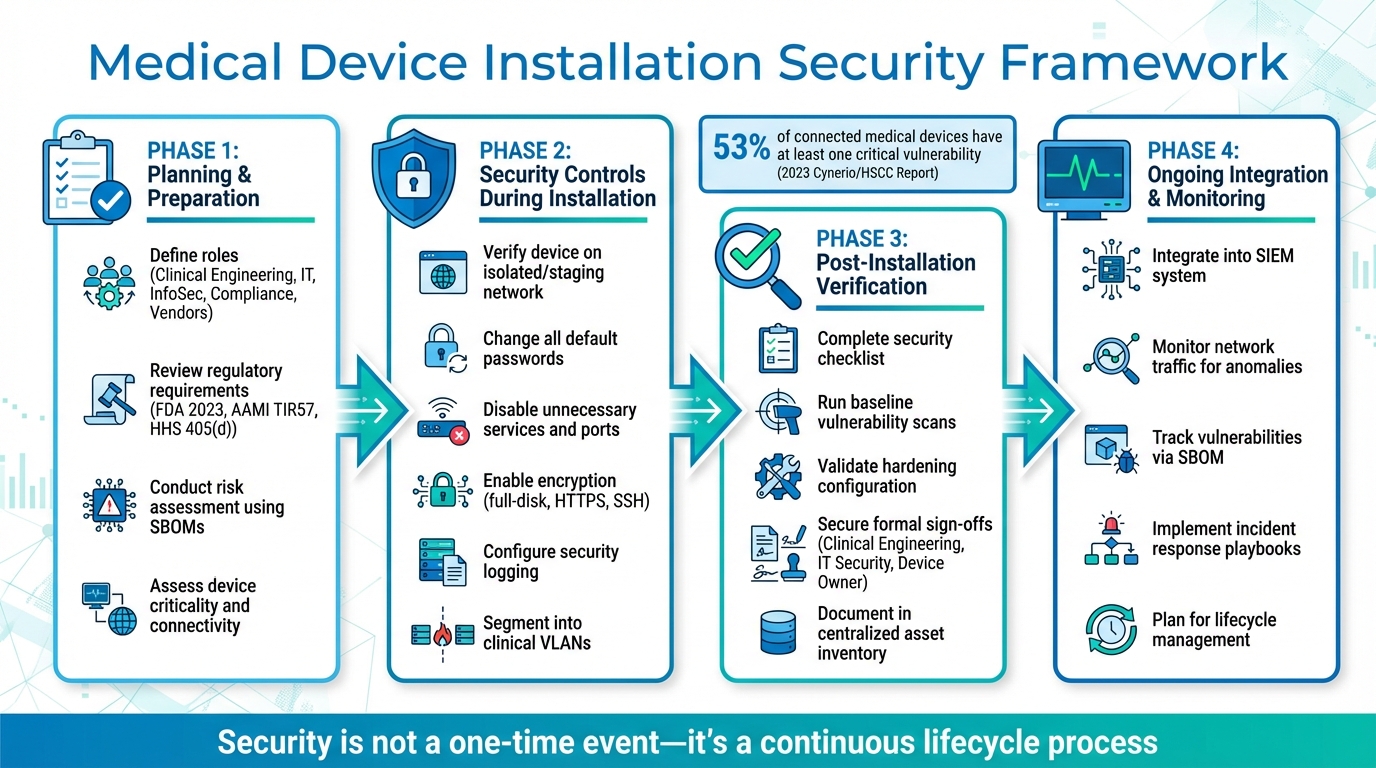
Medical Device Installation Security: 4-Phase Implementation Framework
Planning and Preparation Before Installation
Securing medical device installations begins well before the equipment even arrives. This phase is all about protecting patient data, maintaining smooth clinical operations, and complying with regulatory standards. It involves close collaboration across departments, a thorough review of manufacturer-provided documentation, and a structured risk assessment to uncover potential vulnerabilities. Laying this groundwork ensures that roles are clearly defined and strong security measures are in place when installation begins.
Roles and Responsibilities
Getting a medical device securely installed requires a well-coordinated effort among several key teams: clinical engineering, IT, information security, compliance, and the vendor. Each group plays a unique role:
- Clinical Engineering: Manages the device lifecycle, ensuring it follows manufacturer guidelines and receives proper maintenance.
- IT and Network Teams: Handle network segmentation, assign IP addresses, set up VLANs, and integrate the device into the existing infrastructure without introducing security gaps.
- Information Security: Defines security requirements, reviews risk assessments, validates hardening baselines, and approves any exceptions to standard controls.
- Privacy and Compliance Teams: Ensure that all handling of protected health information (PHI) complies with HIPAA and organizational policies.
- Vendors: Provide essential cybersecurity documentation - like software bills of materials (SBOMs), required ports and services, and hardening guidance - while disclosing known vulnerabilities and supporting secure remote access.
Additionally, executive or service-line leadership takes on the role of risk owner, deciding whether to accept or reject any residual risks before moving forward with the installation.
Many organizations streamline this process by establishing a medical device security governance committee. These committees review new acquisitions and major changes using tools like standardized intake forms, pre-installation security checklists, and change-management tickets. Security sign-off is required before a device connects to the production network. James Case, VP & CISO at Baptist Health, highlighted the benefits of this approach:
"Not only did we get rid of spreadsheets, but we have that larger community [of hospitals] to partner and work with."
Platforms like Censinet RiskOps™ further simplify collaboration by offering a shared workspace where stakeholders can assess risks, review remediation plans, and track approval statuses for devices prior to installation.
Regulatory Requirements and Standards
When planning for installation, healthcare organizations in the U.S. must navigate several regulatory standards. For instance, the FDA’s 2023 guidance, "Cybersecurity in Medical Devices: Quality System Considerations and Content of Premarket Submissions", ties cybersecurity directly to quality system regulations. It treats security controls as a core part of a device’s safety and effectiveness. The guidance encourages manufacturers to provide SBOMs, threat models, and other security documentation for review before installation.
Additional frameworks include AAMI TIR57, which connects cybersecurity risks to patient safety and offers guidance on risk assessments and control selection, and HHS 405(d), which outlines best practices for network segmentation, access control, and incident response in healthcare settings. As Brian Sterud, CIO at Faith Regional Health, noted:
"Benchmarking against industry standards helps us advocate for the right resources and ensures we are leading where it matters."
Healthcare organizations should also consult the Medical Device and Health IT Joint Security Plan, which provides lifecycle guidance and outlines shared responsibilities. These can be adapted into internal checklists and templates for pre-installation reviews.
Risk Assessment Before Installation
Conducting a detailed risk assessment before connecting a device to the network is critical. This process identifies potential threats, vulnerabilities, and impacts. Start by listing the device’s assets, evaluating threats like ransomware or unauthorized access, and analyzing vulnerabilities using SBOMs and external databases. Assess the device’s inherent risk based on factors like connectivity, criticality, and exposure. Then, map manufacturer-recommended controls to your organization’s capabilities and identify additional measures, such as segmentation or stronger authentication.
Key data sources for this process include:
- SBOMs: To identify third-party components and check for known vulnerabilities or unsupported software.
- Device Labeling and Security Guides: Covering ports, services, firewall rules, and logging capabilities.
- Manufacturer Disclosures: Including vulnerability reports and patch schedules.
- Internal Documentation: Detailing asset classifications and network architecture.
Cross-reference the SBOM with vulnerability databases to detect known issues and review security advisories from the manufacturer. Vulnerability scanning should only be done in controlled lab or pre-production environments, following manufacturer guidance. If vulnerabilities are found, triage them using a structured risk analysis method like AAMI TIR57. This helps determine the severity, necessary mitigations, and whether the residual risk is acceptable before deployment.
Devices with higher risks - such as those that are life-sustaining, externally accessible, or handle large volumes of PHI - require stricter security measures. This might include tighter segmentation, granular access controls, and enhanced monitoring. As Matt Christensen, Sr. Director GRC at Intermountain Health, explained:
"Healthcare is the most complex industry... You can't just take a tool and apply it to healthcare if it wasn't built specifically for healthcare."
Purpose-built platforms can help healthcare organizations centralize vendor security questionnaires, SBOMs, and supporting evidence. They also automate risk scoring based on organizational policies and track remediation tasks and approvals, reducing manual effort and ensuring consistency across large device inventories.
Security Controls During Installation
After planning and assessing risks, the installation phase demands strict security protocols to turn plans into active safeguards. The FDA's 2023 final guidance emphasizes that cybersecurity is directly tied to product quality and patient safety. As a result, secure configuration and installation are now regulatory requirements for manufacturers and healthcare delivery organizations alike [6].
Secure Installation Process
The installation phase builds on pre-installation planning by putting security measures into action. It starts with verification. Before installation, ensure the device matches the approved purchase order, check the security documentation, and confirm the model and firmware version align with your approved list. Connect the device to a staging or isolated network - never directly to the production environment. This controlled setup allows you to apply validated patches, conduct security checks, and configure the baseline settings without disrupting clinical operations.
Next comes formal approval. Before connecting the device to the production network, secure sign-offs from biomedical engineering, IT/network security, and the device owner. Many healthcare organizations in the U.S. use governance platforms like Censinet RiskOps to document these approvals and maintain a thorough risk and control history for each asset. Once approved, deploy the device to its designated network segment, apply firewall rules, and enable monitoring. Within 30 days, review logs and alerts to identify any anomalies.
Device Hardening and Configuration
Before the device goes live, change all default or shared passwords. The Global Digital Health Partnership guidance emphasizes that manufacturers must avoid universal default passwords and require password changes during setup. Assign unique credentials for each device, enforce strong password policies, and implement protections against brute-force attacks on authentication interfaces.
Disable all unnecessary services, ports, and accounts. Remove vendor backdoor or demo accounts, and restrict physical interfaces like USB ports. Use role-based access controls to limit administrative functions to technical staff while ensuring clinicians have only the access they need. Configure session timeouts and automatic logoffs wherever applicable.
Encryption and logging are also critical. Enable full-disk encryption and secure all interfaces with protocols like HTTPS, SFTP, SSH, or secure DICOM. Configure security logs to capture key events - such as authentication failures, configuration changes, and connectivity issues - and forward these logs to a central SIEM (Security Information and Event Management) system for analysis and alerting. Synchronize device time with trusted NTP servers to ensure accurate forensic data.
These hardening measures lay the groundwork for the network segmentation strategy described next.
Network Segmentation and Deployment
After hardening the device, proper network segmentation completes the installation security controls. This involves placing medical devices into dedicated clinical VLANs or zones based on their function, criticality, and risk. This separation keeps them isolated from general IT networks and internet-facing segments. Network teams should assign devices to predefined VLANs (e.g., for imaging, infusion pumps, or monitoring) and enforce access control lists or firewall rules that restrict traffic to essential ports and destinations, such as PACS, EMR, time servers, and vendor update servers.
Secure management interfaces by limiting access to administrative networks. Sensitive or outdated devices should be isolated behind firewalls or software-defined perimeters to restrict lateral movement. Clinical devices should not have direct internet access; any required vendor connectivity must go through VPNs or controlled jump hosts. For remote vendor access, enforce VPNs with multi-factor authentication, just-in-time access, and detailed session logging.
Monitor all network traffic associated with medical devices using anomaly detection tools. Watch for unusual behaviors, such as large data transfers or connections to unknown IP addresses, and ensure these trigger alerts for the security team. By integrating device and network logs into a centralized monitoring platform, you can continuously profile and benchmark device behavior, supporting both security operations and compliance requirements.
Post-Installation Verification and Integration
Once devices are securely installed, it's crucial to verify their setup to ensure they remain secure and compliant throughout their use.
Security Testing and Acceptance
Before a medical device is used with patients, it must pass a formal security review. Start with a post-installation security checklist to confirm key details like the device's model, serial number, firmware version, and SBOM (Software Bill of Materials) reference. Ensure all default passwords are replaced with unique credentials, and verify that protections like account lockout and rate limiting are in place to prevent brute-force attacks. Check that data encryption is active - both in transit and at rest - and confirm that logging is enabled and forwarding to your SIEM or syslog server.
During maintenance windows, perform baseline vulnerability scans using vendor-approved tools designed for the specific device. Validate the configuration against the manufacturer's hardening guide and any relevant regulatory best practices. Document the results, and secure formal sign-off from clinical engineering, IT security, and the device owner before putting the device into production. If there are exceptions or risks identified, ensure these are documented along with a clear plan for remediation. Once all tests confirm the device's security, record the configuration details for future risk management efforts.
Documentation and Asset Management
Every installed device should be logged in a centralized asset inventory to support risk management, compliance, and incident response. Include essential details such as the device's unique asset ID, type, model, serial number, physical location (building, floor, room), and the department or owner responsible for it. Record software and firmware versions, the date of the last update, and key network and configuration details. Also, include vendor information like support status (e.g., active or end-of-support), maintenance contract details, and update channels.
Link each device to its risk record and SBOM so you can quickly identify affected assets when new vulnerability alerts arise. Keep thorough installation documentation, noting any deviations from the vendor's recommended configuration, security test results, and any unresolved risks. Many U.S. healthcare organizations align this documentation with frameworks like the Medical Device and Health IT Joint Security Plan (JSP) to meet regulatory and accreditation standards. This level of documentation lays the groundwork for effective ongoing monitoring.
Integration into Security Monitoring Systems
With comprehensive documentation in place, devices can be seamlessly integrated into the organization's security monitoring systems. Assign each device to its designated IoMT or medical VLAN, ensuring its traffic is visible to network detection and response tools. Use SPAN ports or network taps to monitor network behavior for unusual activity, such as unexpected outbound connections or lateral movement. Forward device logs - including authentication events, configuration changes, alarms, and security alerts - to your SIEM, and set up device-specific correlation rules and dashboards for critical systems like imaging equipment, infusion pumps, and life-support devices.
Integrate devices into vulnerability management and risk platforms to track newly disclosed vulnerabilities. Use SBOMs and the NVD (National Vulnerability Database) to flag risks, and prioritize remediation based on factors like patient safety, device criticality, exploitability, and clinical workflow impact. Platforms like Censinet RiskOps™ help healthcare organizations centralize risk management for medical devices and vendors, automate assessments, and track remediation efforts over time. These tools also allow organizations to benchmark their cybersecurity posture against industry standards and regulatory requirements across PHI, clinical applications, and medical devices.
Finally, embed devices into incident response workflows by creating playbooks that outline steps for isolating a compromised device (e.g., network quarantine), escalating to clinical leadership, and coordinating with the vendor. Regularly test these playbooks through tabletop exercises involving security teams, clinical engineers, and clinical staff to ensure everyone is prepared to respond effectively when incidents occur.
sbb-itb-535baee
Special Installation Scenarios and Lifecycle Considerations
Setting up medical devices often involves additional steps when dealing with older equipment, enabling remote access, or planning for eventual decommissioning.
Installing Legacy Devices
Legacy medical devices can pose cybersecurity challenges. These devices often run outdated operating systems, have fixed credentials that can’t be changed, lack encryption, and are unable to receive timely security updates.
To safeguard legacy devices, isolate them on dedicated VLANs with strict firewall rules and use jump servers for administrative access [3]. Physically secure these devices by disabling unused USB ports and other unnecessary interfaces, which are common entry points for attacks. Implement network-based intrusion detection specifically for the legacy segment, and enforce stricter change-control procedures and vendor access protocols. Document all security measures and residual risks in your asset inventory and risk register. Where feasible, deploy external security gateways or proxies to add TLS encryption, authentication, and detailed logging [4].
The IMDRF recommends replacing devices that can no longer be adequately protected against current cyber threats rather than relying on insufficient compensating controls [8].
Remote Connectivity and Vendor Access
Modern medical devices often require remote access for maintenance, troubleshooting, or updates, typically through vendor connections. These connections must be secured as part of the installation process, not improvised during emergencies [4].
Use a least-privilege approach for remote access by routing vendor connections through controlled VPNs or zero-trust gateways. Terminate sessions on hardened jump hosts within segmented networks, enforce multi-factor authentication for all users, and apply strict role-based access controls [4][5]. Ensure every remote session is logged, and for high-risk actions, recorded and integrated into your SIEM [2]. Access should be time-limited to scheduled maintenance windows, and vendor accounts should be deactivated immediately when contracts or personnel change. For cloud-connected devices, confirm that PHI is encrypted both in transit (using TLS 1.2 or higher) and at rest. Outbound connections should be restricted to approved endpoints through egress firewall rules, and business associate agreements must address cloud service security requirements [7].
Tools like Censinet RiskOps™ can assist healthcare organizations in evaluating vendor remote access practices, tracking risks across device portfolios, and maintaining visibility into third-party cybersecurity throughout the device lifecycle.
These measures also tie into the need for a secure strategy when retiring devices, as discussed below.
Planning for Device Decommissioning
Planning for secure decommissioning should start early, not be left until the end of a device’s life. Maintain a detailed inventory of each device, including its model, serial number, operating system, software versions, physical location, owner, vendor contacts, support status, network configuration, and methods of PHI storage [2]. Include the manufacturer’s recommended methods for secure data erasure or destruction [3].
Develop standard operating procedures for decommissioning. These should cover formal approval, removal from clinical use, secure data erasure using vendor-recommended or NIST-aligned methods (or physical destruction, if needed), removal from directories and monitoring systems, and documentation of the chain-of-custody for devices returned to vendors or recyclers [9]. These steps should comply with HIPAA requirements for disposing of electronic protected health information and align with your organization's records retention policies.
Record end-of-support and end-of-life dates during installation to plan for timely replacements [4]. Platforms like Censinet RiskOps™ help healthcare organizations manage device lifecycles, monitor vulnerabilities, and coordinate remediation efforts among clinical engineering, IT, and vendors, ensuring that decommissioning is handled securely and efficiently.
Conclusion
Ensuring the security of medical device installations isn't a one-and-done task - it’s an ongoing process that demands planning, implementation, and constant monitoring throughout the device's lifecycle. Treating installation as a single event leaves room for vulnerabilities. To mitigate risks, it’s critical to establish clear roles and responsibilities before devices even arrive, conduct thorough risk assessments to guide segmentation and hardening strategies, implement security controls during installation (like changing default credentials and enabling encryption), and confirm these measures through formal acceptance testing.
Once devices are operational, continuous monitoring and timely patch management are essential to keep vulnerabilities in check. According to a 2023 Cynerio/HSCC report, 53% of connected medical devices and other IoT devices in hospitals have at least one critical vulnerability[9]. Addressing special scenarios - such as legacy devices that can’t be patched, remote vendor access, and secure decommissioning - requires well-thought-out strategies from the start, not last-minute fixes during emergencies. This proactive approach lays the groundwork for effective risk management.
Integrated platforms, like Censinet RiskOps™, streamline this complexity for healthcare organizations. These platforms facilitate third-party risk assessments during procurement, track device risks and remediation efforts throughout the lifecycle, and offer benchmarking against industry standards to support resource allocation. As Terry Grogan, CISO at Tower Health, shared:
"Censinet RiskOps allowed 3 FTEs to go back to their real jobs! Now we do a lot more risk assessments with only 2 FTEs required."[1]
By centralizing risk data, automating workflows, and unifying device security management, platforms like Censinet RiskOps™ make it easier to stay ahead of potential threats.
The stakes are high - financial, regulatory, and, most importantly, patient safety. Breaches in U.S. hospitals can cost millions due to investigations, legal fees, and operational disruptions[9]. The FDA has now incorporated cybersecurity into quality systems and premarket submissions, while international standards emphasize security as a responsibility spanning the entire product lifecycle.
Ultimately, securing medical devices is a collaborative effort involving manufacturers, clinical engineering, IT, and security teams. By embedding security at every stage of the lifecycle and leveraging integrated platforms for oversight, healthcare organizations can protect patient safety, safeguard sensitive patient data, and meet evolving regulatory demands. This comprehensive approach ensures both compliance and the trust of those relying on these critical devices.
FAQs
How can I ensure medical devices are secure during installation?
Securing medical devices during installation is critical to safeguarding patient data and ensuring the devices operate safely. Here’s how healthcare organizations can strengthen their defenses:
- Conduct a thorough risk assessment to uncover vulnerabilities before devices go live.
- Implement secure configurations that align with the unique needs of healthcare settings.
- Keep firmware and software up to date to patch known security flaws.
- Place devices on dedicated networks to minimize the risk of unauthorized access.
- Enable strong authentication mechanisms and enforce strict access controls for device management.
- Monitor device activity continuously to detect and respond to unusual or suspicious behavior.
To manage risks effectively and maintain compliance, healthcare providers can explore cybersecurity solutions specifically designed to address the challenges of the medical industry.
What role does network segmentation play in securing medical devices?
Network segmentation plays a crucial role in safeguarding medical devices by breaking a network into smaller, isolated sections. This setup helps limit unauthorized access and stops cyber threats - such as malware - from spreading throughout the entire system. By containing potential dangers, it strengthens the security of devices and ensures patient safety.
For healthcare organizations, this strategy is essential for protecting sensitive patient information and maintaining the reliable operation of medical devices in clinical settings.
Why is it important to perform a risk assessment before installing medical devices?
Before installing medical devices, performing a thorough risk assessment is crucial. This step helps uncover potential vulnerabilities and ensures the right security measures are in place. It’s not just about protecting sensitive patient information - it’s also about complying with healthcare regulations and preventing cyber threats that could compromise device functionality or patient safety.
Taking a proactive approach to risk management allows healthcare organizations to reduce disruptions, streamline operations, and create a secure environment for delivering top-notch patient care.

