
Patch management is a critical part of protecting healthcare systems and ensuring compliance with HIPAA regulations. While HIPAA does not explicitly mention patch management, its Security Rule mandates safeguards to protect electronic protected health information (ePHI) from vulnerabilities. Unpatched systems can expose sensitive data to cyberattacks, disrupt operations, and lead to regulatory penalties.
Key Takeaways:
- HIPAA Security Rule: Requires safeguards under administrative, physical, and technical categories to protect ePHI.
- Patch Management Steps: Includes evaluation, testing, approval, deployment, and verification.
- Documentation: Essential for audits; maintain detailed records of patching activities for at least six years.
- Automation Tools: Platforms like Censinet RiskOps™ can streamline patching, inventory tracking, and compliance reporting.
- Best Practices: Regular vulnerability scans, risk-based patch schedules, and integration with incident response plans are essential for reducing risks.
By implementing a structured patch management process and maintaining thorough documentation, healthcare organizations can safeguard patient data and stay compliant with HIPAA standards.
Meet the 15‑day HIPAA patch mandate | Automate and save $913K with ManageEngine Endpoint Central
sbb-itb-535baee
HIPAA Security Rule Requirements for Patch Management
The HIPAA Security Rule, established on February 20, 2003, sets nationwide standards for safeguarding electronic protected health information (ePHI) [6][7]. This rule applies to covered entities and business associates, requiring them to secure all ePHI they handle, such as medical records and treatment details [7]. While patch management isn't explicitly mentioned in the rule, it falls under the mandate to guard against reasonably anticipated threats, including software vulnerabilities [7]. The rule’s technology-neutral stance avoids prescribing specific tools, allowing organizations flexibility in how they meet these requirements. Additionally, on January 6, 2025, HHS proposed a new rule, "HIPAA Security Rule to Strengthen the Cybersecurity of Electronic Protected Health Information", to address modern cybersecurity challenges [6]. Below, we explore the three safeguard categories and how patch management supports compliance.
The 3 Key HIPAA Safeguards
HIPAA outlines three safeguard categories - administrative, physical, and technical - to protect ePHI [6]. Each plays a unique role in securing sensitive data, and patch management contributes to all three.
- Administrative safeguards focus on policies and procedures. These include conducting HIPAA risk analyses (45 C.F.R. § 164.308(a)(1)(i)(A)), implementing risk management plans (45 C.F.R. § 164.308(a)(1)(i)(B)), and performing regular security evaluations (45 C.F.R. § 164.308(a)(8)). A documented patch management policy ensures that vulnerabilities are consistently identified, assessed, and resolved.
- Physical safeguards protect the physical infrastructure where ePHI is stored. While patch management primarily targets software, it indirectly supports physical security by securing systems that manage building access or surveillance equipment.
- Technical safeguards directly benefit from patch management. These include access controls, audit controls, integrity controls, and transmission security. Unpatched software can weaken these protections, making timely updates essential. For example, keeping systems updated aligns with the requirement to maintain current security measures (45 C.F.R. § 164.308(a)(5)(ii)(B)).
This structure highlights the integral role patch management plays in meeting HIPAA security requirements.
How Patch Management Meets HIPAA Standards
Timely patching is critical for preserving the confidentiality, integrity, and availability of ePHI. By quickly addressing software vulnerabilities, organizations reduce the risk of unauthorized access or data breaches.
NIST Special Publication 800-66 Revision 2, finalized in July 2022, offers a detailed framework for aligning technical controls with HIPAA standards [7]. It emphasizes automated patch deployment as a key strategy. Additionally, the HHS recommends tools like the Security Risk Assessment Tool to help smaller practices identify and address vulnerabilities [6]. Following guidance from NIST SP 800-66 and HHS ensures healthcare organizations are prepared to handle emerging threats [6][7].
"The Security Rule requires implementation of appropriate administrative, physical, and technical safeguards to ensure the confidentiality, integrity, and availability of electronic protected health information."
– HHS.gov [6]
Steps for HIPAA-Compliant Patch Management
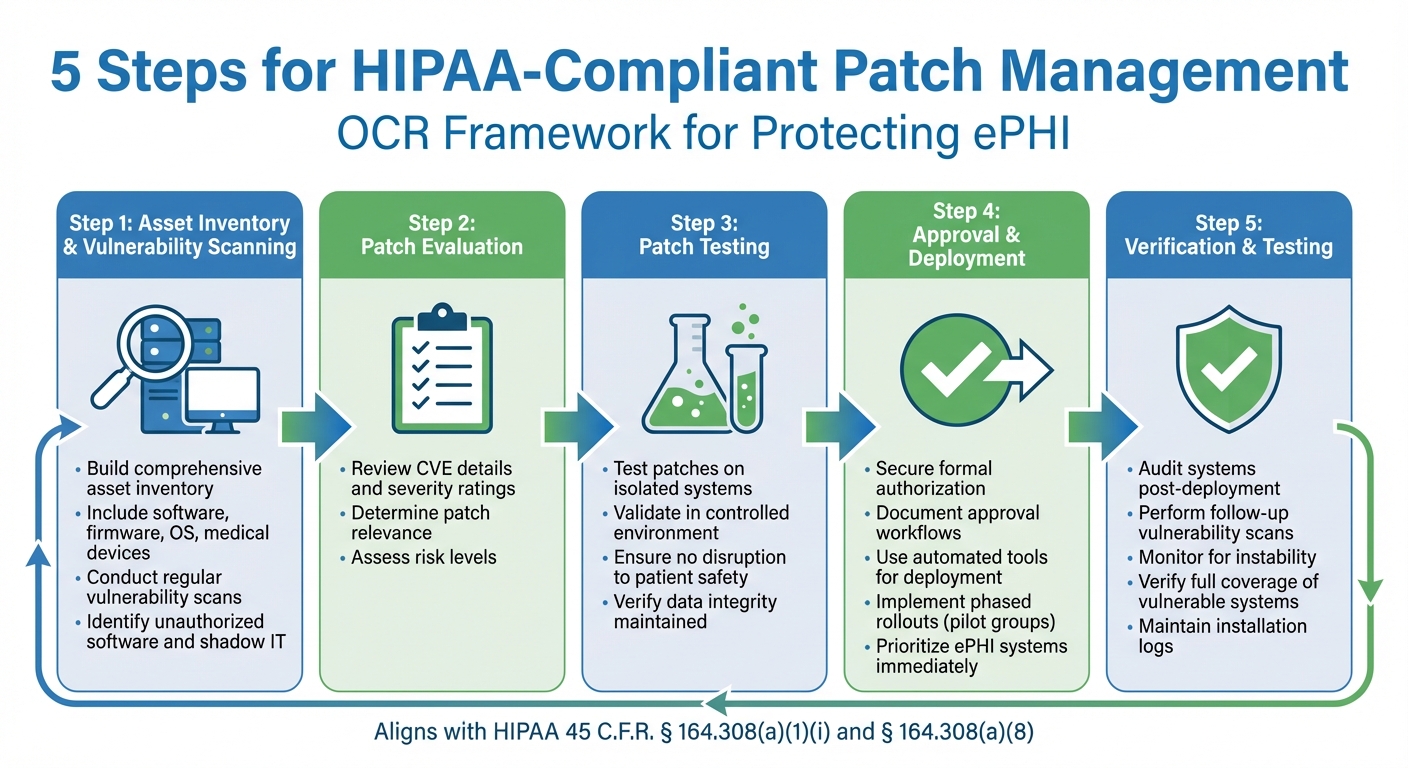
5-Step HIPAA-Compliant Patch Management Process for Healthcare Organizations
To protect electronic protected health information (ePHI) and maintain smooth operations, it's crucial to have a well-organized patch management process. The Office for Civil Rights (OCR) outlines a five-step framework to guide this process: Evaluation, Patch Testing, Approval, Deployment, and Verification and Testing [1][2]. These steps align with HIPAA regulations, including 45 C.F.R. § 164.308(a)(1)(i) for security management and 45 C.F.R. § 164.308(a)(8) for evaluation standards [3].
Asset Inventory and Vulnerability Scanning
The first step in effective patch management is building a thorough inventory of all assets. This should cover software, firmware, operating systems, and medical devices across your organization [3].
Regular vulnerability scans are equally important. These scans help you uncover unauthorized software, shadow IT, and exploitable weaknesses. By identifying vulnerabilities quickly, you can take immediate steps to reduce risks. Once your assets and vulnerabilities are mapped out, the next step is to evaluate and test the necessary patches.
Patch Evaluation and Testing
When vulnerabilities are identified, determine which patches are relevant by reviewing Common Vulnerabilities and Exposures (CVE) details and severity ratings [1][2]. Before deploying patches broadly, test them on isolated systems. This ensures that no unexpected issues arise that could compromise patient safety or disrupt data integrity [1][2]. By validating patches in a controlled environment, you reduce the risk of interruptions to clinical operations. Once testing is complete, move forward with formal approval and deployment.
Approval, Deployment, and Verification
After successful testing, secure formal authorization through documented approval workflows before deploying patches to live systems [1][2]. Use automated tools and phased rollouts, such as pilot groups, to ensure deployments are controlled and minimize disruptions [1]. Platforms like Censinet RiskOps™ (https://censinet.com) can help centralize workflows and maintain detailed audit trails. High-priority assets that handle ePHI should be patched immediately.
Once patches are deployed, verify their success. This includes auditing systems, performing follow-up vulnerability scans, and monitoring for any signs of instability [1][2]. Key success indicators include full coverage of vulnerable systems, elimination of exploitable weaknesses, and maintaining logs of all successful installations. These actions demonstrate that risks to ePHI have been effectively mitigated.
Documenting Patch Management for HIPAA Audits
Once you’ve established a structured patch management workflow, thorough documentation becomes a critical step for proving compliance during HIPAA audits. Detailed records set apart a compliant patch management program. Auditors look for documented patch policies, evidence of timely deployments, historical patching records, and clear compliance tracking to ensure there are no HIPAA violations [4].
Creating and Maintaining Audit Trails
Audit trails should capture every phase of the patch management process. This includes dates for identifying vulnerabilities, results from patch evaluations, testing outcomes, approval decisions, deployment timestamps, verification logs, and any system changes or incidents following deployment [1][3]. These records align with the HIPAA Security Rule, specifically 45 C.F.R. § 164.308(a)(1)(ii)(B) for risk management and § 164.308(a)(8) for periodic evaluations.
To keep things organized, store documentation chronologically by asset or vulnerability type in secure, searchable digital systems. It’s helpful to categorize records by stages like evaluation, testing, deployment, and verification. The Office for Civil Rights (OCR) stresses that tamper-proof logs are essential, as they must hold up under forensic review during breach investigations [1][3][8].
Staff training is equally important. Employees need to know how to document patch management activities correctly. HIPAA regulations, under 45 C.F.R. § 164.308(a)(5)(i) and § 164.530(b)(1), require that your workforce understands how to log activities, report anomalies, and follow protocols for approvals and verifications [1][3]. Timely and accurate logging is critical - missing or incomplete records can lead to audit failures. For example, the 2018 Anthem breach, which exposed 78.8 million records, highlighted the risks of poor documentation, as missing verification logs contributed to the compliance failure [1][3]. Automated tools, discussed below, can help simplify and streamline these processes.
Using Tools to Simplify Documentation
While manual processes are foundational, automation can significantly enhance the consistency and efficiency of audit documentation. Centralized reporting systems are particularly useful for creating audit-ready documentation. These tools can track patch history, current status, device details, and overall compliance, offering exactly the type of information auditors typically require [4].
Platforms like Censinet RiskOps™ (https://censinet.com) can automate patch management workflows and maintain detailed audit trails without relying on manual inputs. Policy-based automation ensures consistent patching practices and automatically generates evidence of compliance [4]. Additionally, centralized dashboards provide real-time visibility into patching across all endpoints, including remote devices. These dashboards can flag failed installations and highlight which systems are fully patched [4].
With the upcoming 2025 HIPAA updates mandating vulnerability scans every six months and annual penetration testing [5], automated tools become even more critical. They can efficiently track these activities and produce the necessary documentation to demonstrate compliance during audits.
Best Practices for Healthcare IT Patch Management
Regular Monitoring and Scheduled Updates
Daily vulnerability scans across all systems - software, firmware, and medical devices - are key to identifying risks like unauthorized systems and shadow IT. Pair these scans with comprehensive inventory checks and configuration audits to maintain a clear understanding of your IT environment. To stay compliant with HIPAA, adopt a risk-based schedule for patching:
- Zero-day exploits: Deploy critical patches within 48 hours.
- High-risk vulnerabilities: Address within 14 days.
- Medium-risk issues: Resolve within 30 days.
- Low-risk updates: Schedule during quarterly maintenance windows.
Keep logs for a minimum of six years and set up alerts to flag unusual post-patch changes. These steps not only protect the confidentiality and integrity of electronic protected health information (ePHI) but also ensure your systems are ready for a swift response to incidents.
Connecting Patch Management with Incident Response
Integrate patch management into your incident response plan to streamline breach remediation. For example, triggers for patch deployment can be embedded into your response procedures. At the same time, maintain clear rollback protocols and audit trails to ensure accountability. Communication plans for clinicians during system downtime are essential, as are regular tests of patch effectiveness through simulated breach scenarios. These exercises confirm that no hidden vulnerabilities remain after patches are applied.
Using Technology for Risk Management
Leverage automation tools to simplify patch management and support HIPAA compliance. Tools like Censinet RiskOps™ (https://censinet.com) can automate asset inventory, vulnerability scanning, and patch deployment. With features like centralized audit trails, secure version tracking, and real-time updates, these tools ensure patches are applied promptly and accurately. They also generate detailed remediation reports, which are crucial for meeting HIPAA's semi-annual vulnerability scan and annual penetration testing requirements. Automation can cut vulnerabilities by up to 85%, making it a powerful ally in risk management.
Conclusion
Under HIPAA's Security Rule (45 C.F.R. § 164.308(a)(1)(i)(A), (a)(1)(i)(B), (a)(5)(ii)(B), and (a)(8)), healthcare organizations are required to address vulnerabilities swiftly to safeguard ePHI. The Office for Civil Rights highlighted in its June 2018 cybersecurity newsletter that neglecting to patch software, operating systems, and medical devices can lead to exploitable weaknesses, opening the door to cyberattacks [3].
A proper patch management program goes beyond simply applying updates. It involves creating documented policies, maintaining audit trails for at least six years, and providing evidence of timely patch deployment to demonstrate compliance with HIPAA's risk reduction standards.
Incorporating patch management into your incident response plan is essential. Staff training plays a critical role - employees should understand update protocols and know how to report anomalies promptly. Meanwhile, technical teams must act quickly to address vulnerabilities, ensuring issues are resolved before they escalate into breaches. This collaborative approach not only fixes current problems but also helps prevent future incidents.
Technology can elevate patch management into a more strategic process. Tools like Censinet RiskOps™ (https://censinet.com) simplify asset tracking, vulnerability scanning, and patch deployment. They also centralize audit trails and generate compliance reports, making it easier for healthcare organizations to meet technical safeguard requirements. By automating these tasks, such platforms free up IT teams to focus on their primary mission - supporting patient care.
FAQs
What counts as a HIPAA-compliant patch timeline?
A typical timeline for a HIPAA-compliant patch involves prioritizing critical vulnerabilities, especially those on internet-facing systems that access ePHI, within 7–15 days. High-risk vulnerabilities should be addressed within 30 days, while medium and low-risk issues can usually wait for routine maintenance schedules. These timelines should reflect the risk level and align with your organization's policies to maintain compliance effectively.
How can we patch medical devices without disrupting patient care?
To update medical devices without interrupting patient care, it's essential to take a thoughtful, risk-based approach. Start by evaluating the risk level and clinical importance of each device to decide which patches should be prioritized. Before deployment, test patches in simulated environments to ensure they work as intended. Plan updates during scheduled maintenance periods and collaborate closely with clinical teams to reduce any potential disruptions.
For devices that can't be patched, focus on network controls. Use strategies like segmentation and access restrictions to safeguard both the device's functionality and security. This way, patient safety remains a top priority while addressing vulnerabilities.
What patch records will OCR ask for in an audit?
OCR might ask for various records when investigating breaches. These can include breach investigations, risk assessments, incident reports, and breach notifications. Additionally, they may require documentation showing the safeguards in place, such as evidence of patches applied and vulnerability management activities undertaken to meet compliance requirements.
