
How to Encrypt ePHI in Cloud Systems
Post Summary
HIPAA classifies ePHI encryption as an addressable specification under Section 164.312(a)(2)(iv) for data at rest and Section 164.312(e)(2)(ii) for data in transit. Addressable does not mean optional — organizations must evaluate whether encryption is a reasonable safeguard, and if they choose not to implement it, must document why and adopt an equivalent alternative. In practice, finding an alternative that matches encryption's level of protection is nearly impossible, making encryption the de facto standard. The HITECH Act Safe Harbor rule provides that ePHI encrypted to NIST standards is not considered reportable in a breach because it is rendered unusable, unreadable, or indecipherable — making encryption a direct breach liability reduction mechanism.
For ePHI at rest, NIST recommends AES-128 or AES-256, with AES-256 now preferred by most healthcare organizations aligning with zero-trust security models. For ePHI in transit, TLS 1.2 or higher is required with explicit disabling of SSL, TLS 1.0, and TLS 1.1. Safe Harbor protection requires compliance with NIST Special Publication 800-111 for data at rest or 800-52, 800-77, or 800-113 for data in transit. FIPS 140-2 validated encryption modules are required to meet federal standards. Cipher suites must disable weak algorithms including RC4, DES, 3DES, NULL, and EXPORT, and prioritize AES-256-GCM or CHACHA20-POLY1305 for transit encryption.
A BAA must be in place before any cloud provider accesses ePHI, even when the provider uses a no-view encryption model where they hold no decryption keys. The BAA must specify required encryption standards — AES-256 for data at rest, TLS 1.2 or higher for transit, and FIPS 140-2 or FIPS 140-3 validated cryptographic modules. It must clarify key control arrangements — whether Bring Your Own Key or Hold Your Own Key — and establish key rotation schedules. Breach notification timelines should be negotiated to 24 to 72 hours rather than HIPAA's 60-day maximum. Subcontractor compliance requirements must be explicitly included, along with provisions for secure ePHI return or destruction and audit rights to review the provider's encryption policies and records.
AWS Key Management Service generates AES-256 keys stored in HSMs that never leave hardware in plaintext, using AES-GCM. Google Cloud KMS supports Customer-Managed Encryption Keys in AES-256 Galois Counter Mode with software, multi-tenant HSM, or single-tenant HSM protection options. Microsoft Azure Key Vault and Managed HSM provide similar functionality with RSA keys of 2,048 to 4,096 bits, and Azure encrypts all data at rest with platform-managed keys by default. For HIPAA compliance, customer-managed keys are preferred as they enable controlled key rotation, access policy enforcement, audit log maintenance, and crypto-shredding through key deletion. Backups must be encrypted at the same standard as production data, and project liens or minimum destruction windows of 30 days should be applied to prevent accidental key deletion.
TLS 1.2 must be enforced as the baseline with TLS 1.3 as the target, while TLS 1.0, TLS 1.1, and all SSL versions must be explicitly disabled. Forward secrecy must be implemented using ephemeral key exchange methods — ECDHE or DHE — ensuring past sessions remain secure even if long-term keys are compromised. Certificates must be signed by a trusted Certificate Authority using at least 2,048-bit RSA or 256-bit ECC with SHA-256. OCSP stapling should be enabled for certificate revocation checks. All TLS negotiation parameters must be logged for HIPAA audit purposes. Client devices must validate certificates and reject invalid or self-signed ones to prevent man-in-the-middle attacks. OpenSSL or SSL Labs should be used for routine endpoint scanning to confirm compliance.
Censinet RiskOps™ automates risk assessment workflows and compliance monitoring for healthcare organizations managing complex vendor networks, clinical systems, and medical devices. The platform simplifies verification that cloud vendors, Business Associates, and third-party tools meet required encryption standards and HIPAA technical safeguards. Automated workflows track compliance status across the vendor portfolio, flag deficiencies including missing BAAs or outdated cryptographic standards, and generate audit-ready documentation. For organizations managing hundreds of vendor relationships, RiskOps replaces the manual effort of verifying encryption compliance vendor by vendor with continuous, automated oversight that scales to the full scope of the organization's third-party environment.
Encryption is the backbone of protecting electronic protected health information (ePHI) in cloud systems. Here's what you need to know:
Encrypting ePHI in the cloud isn't just about meeting regulations - it's about safeguarding patient trust and minimizing risks. Let’s break down how to do it.
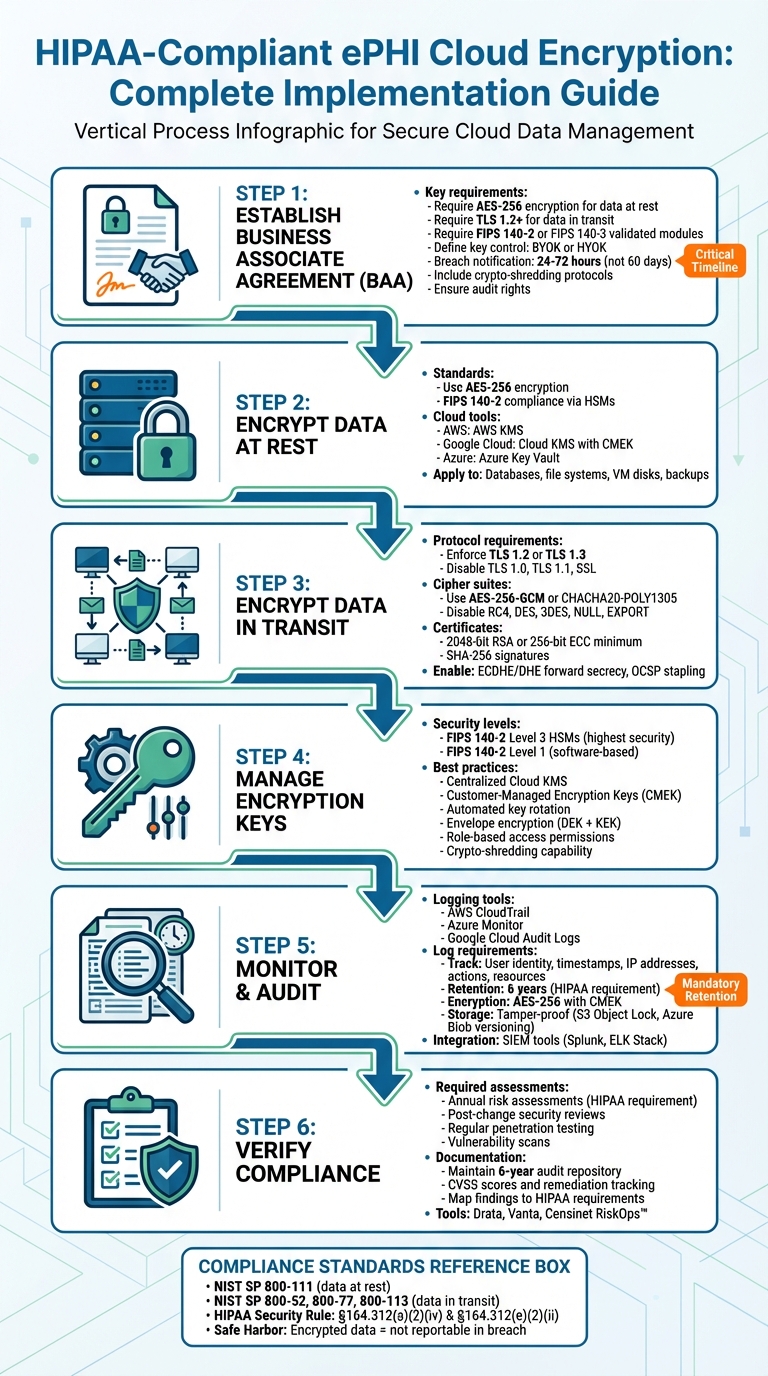
HIPAA-Compliant ePHI Cloud Encryption Implementation Checklist
HIPAA Requirements: Encryption at Rest and in Transit #HIPAA #cybersecurity #breach #data #it #phi
sbb-itb-535baee
HIPAA Encryption Requirements Explained
When working in cloud environments, meeting HIPAA encryption requirements is essential for safeguarding electronic protected health information (ePHI). The HIPAA Security Rule highlights encryption in two key sections: Section 164.312(a)(2)(iv) for ePHI at rest and Section 164.312(e)(2)(ii) for ePHI in transit. While encryption is classified as "addressable" rather than "required", this doesn’t mean it’s optional. Organizations must evaluate whether encryption is a reasonable safeguard in their specific environment. If encryption isn’t implemented, they must document why and adopt an equivalent safeguard. However, finding an alternative that matches encryption’s level of protection is nearly impossible, making it the go-to solution as of 2026 [5]. This framework underscores the importance of robust protection measures throughout the data lifecycle.
With ransomware attacks against healthcare delivery organizations reaching new heights in 2026, the Office for Civil Rights (OCR) has consistently penalized organizations that fail to implement proper encryption - especially in cases involving stolen or lost mobile devices. Additionally, under the HITECH Act's Safe Harbor rule, ePHI encrypted to NIST standards is not considered reportable in a breach because the data is rendered "unusable, unreadable, or indecipherable" [5].
Encryption at Rest vs. Encryption in Transit
Encryption at rest safeguards ePHI stored on servers, databases, hard drives, and backup systems. It protects against risks like physical theft, unauthorized access to storage media, and breaches where attackers gain access to file systems. For instance, if a laptop containing patient records is stolen or if cloud storage is compromised, encryption at rest ensures the data remains secure and inaccessible without the proper decryption keys.
Encryption in transit protects ePHI as it moves across networks - whether through the internet, between cloud services, or within internal networks. HIPAA requires encrypting all network traffic containing ePHI, regardless of whether it’s on internal or external networks, to mitigate risks like man-in-the-middle attacks and data interception [5]. These safeguards align with NIST standards for encryption practices.
2026 HIPAA Encryption Standards
The National Institute of Standards and Technology (NIST) provides the technical benchmarks for encryption under HIPAA. For data at rest, NIST recommends using AES-128 or AES-256 encryption algorithms. Many healthcare organizations now prefer AES-256, aligning with the zero-trust security models that have become widespread in 2026 [5].
For data in transit, NIST advises using TLS 1.2 or higher and explicitly requires disabling outdated protocols like SSL, TLS 1.0, and TLS 1.1, which are known to have vulnerabilities. To qualify for Safe Harbor protection, encryption must comply with NIST Special Publication 800-111 for data at rest or 800-52, 800-77, or 800-113 for data in transit. Additionally, using FIPS 140-2 validated encryption modules ensures compliance with federal standards and strengthens an organization’s overall security approach.
Setting Up a Business Associate Agreement (BAA)
Before allowing a cloud provider access to electronic protected health information (ePHI), ensure you have a signed Business Associate Agreement (BAA) in place. Even if the provider employs a "no-view" encryption model - where data is stored in an encrypted format and the provider lacks access to the decryption keys - HIPAA mandates the existence of a BAA [7]. This agreement serves as a legal framework, detailing how the provider will manage, secure, and encrypt patient data.
A BAA grants the cloud provider the ability to handle PHI while adhering to HIPAA regulations. It outlines permissible uses, required safeguards, subcontractor compliance standards, breach reporting responsibilities, and protocols for returning or securely destroying PHI.
Be specific about encryption standards in your BAA. For example, require AES-256 encryption for data at rest, TLS 1.2 or higher for data in transit, and ensure the use of cryptographic modules validated under FIPS 140-2 or FIPS 140-3. Clarify who controls the encryption keys - whether it's Bring Your Own Key (BYOK) or Hold Your Own Key (HYOK) - and establish clear schedules for key rotation [7].
It's wise to negotiate breach notification timelines that are shorter than HIPAA's 60-day maximum. Aim for a window of 24 to 72 hours to ensure quicker responses [6]. Additionally, include clauses requiring subcontractors to adhere to the same encryption and security measures.
Specify how ePHI should be securely returned or destroyed. Many organizations opt for "crypto-shredding", which involves destroying encryption keys to make the data unrecoverable. Also, include audit rights in the BAA to review the provider’s encryption policies and records [7]. For added clarity, map each BAA requirement to a specific technical control and assign a designated owner [6].
Once your BAA is finalized and includes detailed encryption and key management guidelines, you can move forward with configuring encryption for data at rest.
How to Encrypt Data at Rest
To protect electronic protected health information (ePHI), ensure encryption is configured for all relevant areas, such as databases, file systems, medical devices, virtual machine disks, and backups. This process should align with a signed Business Associate Agreement (BAA) and established encryption standards. Major cloud providers like AWS, Google Cloud, and Microsoft Azure rely on AES-256 encryption as the standard for safeguarding data at rest. They also support FIPS 140-2 compliance through hardware security modules (HSMs) [8][9].
Choosing Encryption Tools
Each cloud provider offers built-in tools for encryption. For example:
For HIPAA compliance, it’s best to use customer-managed keys (CMEK or CMK). These allow you to control key rotation, set access policies, and maintain audit logs. Additionally, they enable crypto-shredding by deleting keys, making the data permanently unreadable. If you’re using Google Cloud, enforce HSM-backed keys for FIPS 140-2 Level 3 validation by applying the constraints/cloudkms.allowedProtectionLevels policy to block software-backed keys [10].
Once you’ve chosen your encryption tools, configure them to secure both storage and backup environments.
Setting Up Encryption for Storage and Backups
Cloud providers use envelope encryption, where a Data Encryption Key (DEK) secures the ePHI, and a Key Encryption Key (KEK) protects the DEK [8][9]. Here’s how to set it up:
Backups should be encrypted with the same level of security as production data to meet HIPAA standards. On Google Cloud, snapshots inherit encryption settings from the original disk, but CMEK cannot be applied retroactively. Instead, create a snapshot, then a new disk from it [8]. In Azure, deleting or revoking a key will disable related virtual machines and halt disk I/O within an hour [9].
To avoid accidental deletion of encryption keys, apply project liens in Google Cloud and set a minimum destruction window of 30 days. This ensures there’s time to recover from potential key loss [10].
How to Encrypt Data in Transit
Once you've secured data at rest, the next priority is protecting ePHI (electronic Protected Health Information) during transmission.
To encrypt ePHI in transit, enforce TLS 1.2 or TLS 1.3 while disabling outdated protocols like TLS 1.0 and TLS 1.1 [11].
But encryption doesn't stop with protocol selection. Strengthen your defenses by configuring secure cipher suites and enabling integrity controls. Disable weak ciphers such as RC4, DES, 3DES, NULL, and EXPORT. Instead, prioritize AES-256-GCM or CHACHA20-POLY1305, which offer stronger resistance to modern cryptographic attacks. Also, make sure your certificates are signed by a trusted Certificate Authority (CA) using at least 2048-bit RSA or 256-bit ECC with SHA-256 (or better) for signatures [11].
As noted by industry experts:
"TLS should use ephemeral keys like ECDHE or DHE to protect past sessions even if keys are compromised. This aligns with HIPAA's addressable encryption implementation specifications."
Setting Up TLS Protocols
Start by auditing all endpoints, including outbound services, load balancers, and APIs, to ensure they reject legacy protocols and weak cipher suites. Enforce TLS 1.2 as the baseline, but aim for TLS 1.3 for optimal security by disabling older versions [11].
To enhance protection, implement forward secrecy using ephemeral key exchange methods like ECDHE or DHE. This ensures that even if long-term encryption keys are compromised, past sessions remain secure. Additionally, enable OCSP stapling to streamline certificate revocation checks without compromising user privacy. Disable insecure features such as renegotiation and session resumption. It’s also critical to log all TLS negotiation parameters - these logs can be vital during HIPAA audits. Use tools like OpenSSL or SSL Labs to routinely scan endpoints and confirm compliance [11].
These steps help establish a strong foundation for securing encrypted data in transit.
Securing Endpoints
Client devices must validate certificates and reject any that are invalid or self-signed to prevent man-in-the-middle attacks. Ensure endpoints only support approved TLS versions and cipher suites. Maintain consistent encryption policies across all devices - whether workstations, mobile devices, or IoT medical equipment - to eliminate weak links in your security chain. This cohesive approach reduces vulnerabilities and ensures data remains protected during transmission.
Managing Encryption Keys
Encryption is only as effective as the way you manage its keys. Even with strong encryption protecting data at rest and in transit, poor key management can leave ePHI vulnerable. To mitigate this, healthcare organizations should focus on centralized control, automated key rotation, and the use of FIPS-validated cryptographic modules that meet HIPAA's technical safeguards.
For top-tier security, FIPS 140-2 Level 3 Hardware Security Modules (HSMs) are ideal. These modules generate hardware keys in isolated environments, ensuring they remain separate from other cloud resources. For less demanding encryption needs, FIPS 140-2 Level 1 modules can handle software-based keys and default cloud provider encryption effectively. The choice between these options depends on your security requirements and budget, as pricing varies by security level [12]. With these tools in place, centralized key controls become the next critical step.
Using Centralized Key Management
A Cloud Key Management Service (KMS) simplifies encryption key management by offering a single interface to handle keys across various cloud resources - storage, compute, databases, and more. This centralized system often relies on Customer-Managed Encryption Keys (CMEK), giving organizations strict control over who can access encryption keys. Many setups use envelope encryption, where Data Encryption Keys (DEKs) protect ePHI and are themselves encrypted by Key Encryption Keys (KEKs) stored in FIPS-validated modules.
For stricter data residency requirements, Cloud External Key Management (EKM) allows keys to remain outside the cloud while still integrating with cloud services. This requires external managers validated at FIPS 140-2 Level 2 or 3. Tools like Autokey can automate processes, reducing human error, while organization-wide policies enforcing FIPS-validated keys across resources add another layer of security. For maximum isolation, single-tenant HSMs with two-factor authentication are recommended.
Rotating and Securing Keys
Centralized management makes key rotation more straightforward - an essential practice to minimize risks if a key is compromised. Modern KMS platforms often support automatic rotation for symmetric keys, though asymmetric or imported keys may still require manual updates. Keeping detailed access logs is critical for HIPAA compliance, as these logs track administrative actions and data access events.
To meet stringent data disposal requirements, healthcare providers can implement crypto-shredding. This involves deleting specific key versions to render the associated ePHI permanently unreadable. Additionally, restricting key access through role-based permissions ensures that only authorized personnel can create, rotate, or delete keys. Regular reviews of access logs further strengthen security, aligning key management practices with measuring what matters for cybersecurity in the organization's broader security strategy.
Monitoring and Verifying Compliance
Encryption is a key part of HIPAA compliance, but it’s not enough on its own. To truly protect ePHI, healthcare organizations need continuous monitoring and regular verification. Without proper audit trails and security assessments, you risk overlooking unauthorized access attempts that could compromise sensitive data. Implementing automated logging and routine security checks is essential to meet HIPAA safeguard requirements and to demonstrate compliance.
Setting Up Audit Logs and Monitoring
Using your cloud provider's built-in logging tools - like AWS CloudTrail, Azure Monitor, or Google Cloud Audit Logs - is a smart way to track all ePHI-related activities. These logs should capture critical details, such as user identity, timestamps, IP addresses, action types, and affected resources. This level of detail is crucial for audits and investigating potential breaches [1][4].
HIPAA requires that audit logs be retained for six years. To meet this requirement, set up automated retention policies using tools like AWS S3 Lifecycle rules or Azure Retention Policies. Store these logs in separate, access-controlled buckets with tamper-proof features like Amazon S3 Object Lock or Azure Blob Storage versioning. For added security, encrypt the logs at rest using AES-256 with customer-managed keys (CMEK) and ensure encryption during transit with TLS 1.2 or higher [1][4].
To stay ahead of potential threats, integrate your logs with SIEM tools such as Splunk or the ELK Stack. These tools can automatically detect anomalies and send alerts to your security team, enabling a quick response before small issues turn into major incidents.
Running Security Assessments
Audit logs are just one piece of the puzzle. Regular security assessments are also necessary to maintain compliance. HIPAA requires annual risk assessments, as well as additional reviews after significant system changes - like switching cloud providers or adopting new encryption methods [13]. Conduct regular penetration tests and vulnerability scans to identify gaps in areas like encryption, key management, and access controls. Summarize your findings in detailed reports that include CVSS scores, remediation progress, and evidence mapped to HIPAA requirements [3][4].
Keep these reports in an audit-ready repository for six years. Platforms like Drata or Vanta can help you maintain continuous compliance by providing compliance dashboards and tracking remediation efforts. For organizations with extensive third-party relationships, tools like Censinet RiskOps™ simplify risk assessments by automating workflows and managing compliance across vendors, clinical systems, and medical devices.
Finally, remember that HIPAA requires you to justify your security measures as "reasonable and appropriate." If a breach occurs, encryption alone won’t protect you unless you can prove that your encryption keys were secure. This makes thorough documentation and proactive security measures essential [3][4].
Conclusion
Encrypting ePHI in cloud systems is a fundamental step for meeting HIPAA compliance. Encryption converts sensitive data into "unreadable gibberish" [1][2], making it inaccessible to unauthorized individuals. But relying on encryption alone isn’t enough. A well-rounded approach, including encryption both at rest and in transit, effective key management, continuous monitoring, and regular security assessments, is critical.
To put this into action, start by securing a solid Business Associate Agreement (BAA) with your cloud provider. Use AES-256 encryption for data at rest and TLS 1.2 or higher for data in transit. Centralized key management, with regular key rotation, helps reduce vulnerabilities. HIPAA mandates "reasonable and appropriate" safeguards, which means your measures must evolve to counter new threats.
Maintaining compliance is an ongoing effort, not a one-time task. Common mistakes include failing to rotate encryption keys regularly, using outdated TLS protocols, overlooking third-party tools' compliance with cryptography standards, and skipping routine risk assessments [1][4]. Continuous monitoring and proactive assessments are essential to avoid these pitfalls and reduce the risk of hefty penalties.
For organizations managing complex vendor networks, solutions like Censinet RiskOps™ can simplify compliance by automating risk assessments and tracking remediation efforts. The goal is to maintain audit-ready documentation that demonstrates your encryption and key management practices.
Ultimately, safeguarding ePHI in the cloud requires a combination of strong technical controls and vigilant oversight to keep pace with HIPAA’s evolving requirements.
FAQs
Does encrypting ePHI eliminate HIPAA breach reporting?
Encrypting ePHI (electronic protected health information) adds a layer of security, but it doesn’t remove the obligation to follow HIPAA’s breach reporting rules. If there’s a breach involving unsecured ePHI, it must still be reported within 60 days of discovery. While encryption helps safeguard sensitive data, it doesn’t exempt organizations from complying with these mandatory reporting requirements.
Who should control the encryption keys in the cloud?
Healthcare organizations must take charge of managing their encryption keys in the cloud to safeguard electronic Protected Health Information (ePHI). While cloud providers handle infrastructure security, the responsibility for encryption key management falls on the organizations themselves to block unauthorized access.
To bolster data security and maintain HIPAA compliance, organizations should consider approaches like Customer-Managed Keys (CMK) or hybrid solutions such as Bring Your Own Key (BYOK). These methods give organizations greater control over their encryption processes, ensuring sensitive data remains protected.
How do I prove my cloud encryption is HIPAA-compliant?
To ensure HIPAA-compliant cloud encryption, it’s crucial to follow established encryption standards. For data at rest, use AES-256 encryption, and for data in transit, implement TLS protocols. Keep detailed records of your encryption methods, key management practices, and compliance with NIST and FIPS 140-2 guidelines.
Regularly conduct risk assessments, maintain audit logs, and verify proper configuration settings to safeguard compliance. Tools like Censinet RiskOps™ can simplify the process by tracking compliance and offering clear evidence of your adherence to these requirements.
Related Blog Posts
- Best Practices for Cloud PHI Encryption at Rest
- How HIPAA Encryption Protects Cloud Data
- How AES Protects PHI in Cloud Systems
- HIPAA Compliance for AI Model Encryption
{"@context":"https://schema.org","@type":"FAQPage","mainEntity":[{"@type":"Question","name":"Does encrypting ePHI eliminate HIPAA breach reporting?","acceptedAnswer":{"@type":"Answer","text":"<p>Encrypting <strong>ePHI</strong> (electronic protected health information) adds a layer of security, but it doesn’t remove the obligation to follow HIPAA’s breach reporting rules. If there’s a breach involving <strong>unsecured ePHI</strong>, it must still be reported within 60 days of discovery. While encryption helps safeguard sensitive data, it doesn’t exempt organizations from complying with these mandatory reporting requirements.</p>"}},{"@type":"Question","name":"Who should control the encryption keys in the cloud?","acceptedAnswer":{"@type":"Answer","text":"<p>Healthcare organizations must take charge of managing their encryption keys in the cloud to safeguard electronic Protected Health Information (ePHI). While cloud providers handle infrastructure security, the responsibility for encryption key management falls on the organizations themselves to block unauthorized access.</p> <p>To bolster data security and maintain HIPAA compliance, organizations should consider approaches like <strong>Customer-Managed Keys (CMK)</strong> or hybrid solutions such as <strong>Bring Your Own Key (BYOK)</strong>. These methods give organizations greater control over their encryption processes, ensuring sensitive data remains protected.</p>"}},{"@type":"Question","name":"How do I prove my cloud encryption is HIPAA-compliant?","acceptedAnswer":{"@type":"Answer","text":"<p>To ensure HIPAA-compliant cloud encryption, it’s crucial to follow established encryption standards. For data at rest, use <strong>AES-256 encryption</strong>, and for data in transit, implement <strong>TLS protocols</strong>. Keep detailed records of your encryption methods, key management practices, and compliance with <strong>NIST</strong> and <strong>FIPS 140-2</strong> guidelines.</p> <p>Regularly conduct <strong>risk assessments</strong>, maintain <strong>audit logs</strong>, and verify proper configuration settings to safeguard compliance. Tools like <strong>Censinet RiskOps™</strong> can simplify the process by tracking compliance and offering clear evidence of your adherence to these requirements.</p>"}}]}
Key Points:
What is HIPAA's encryption framework for ePHI in cloud systems and what makes it effectively mandatory despite its addressable classification?
- Addressable means justify or implement — not optional — HIPAA's addressable classification for encryption under Sections 164.312(a)(2)(iv) and 164.312(e)(2)(ii) requires organizations to evaluate whether encryption is a reasonable and appropriate safeguard for their specific environment. If they determine it is not, they must document a legitimate justification and implement an equivalent alternative. No equivalent alternative to encryption has been accepted by regulators in practice, making encryption the de facto required standard.
- OCR enforcement treats encryption absence as a sanctionable failure — The OCR has consistently penalized organizations that fail to implement encryption, particularly in cases involving stolen or lost mobile devices containing ePHI. With ransomware attacks against healthcare delivery organizations reaching new heights in 2026, the OCR's enforcement posture on encryption failures has intensified rather than relaxed.
- HITECH Safe Harbor provides direct breach liability protection — Under the HITECH Act Safe Harbor rule, ePHI that is encrypted to NIST standards at the time of a breach is not considered a reportable breach because the data is rendered unusable, unreadable, or indecipherable. This Safe Harbor provision transforms encryption from a compliance checkbox into a direct financial and legal liability reduction mechanism — the difference between a reportable breach with notification obligations and a non-reportable security incident.
- "Reasonable and appropriate" requires documented justification — HIPAA's requirement that safeguards be "reasonable and appropriate" means that if a breach occurs, encryption alone will not protect an organization unless it can also demonstrate that encryption keys were properly secured and managed. Encryption without sound key management does not satisfy the reasonable and appropriate standard.
- Encryption applies to all network traffic containing ePHI — HIPAA requires encrypting all network traffic containing ePHI regardless of whether it traverses internal or external networks. The common assumption that internal network traffic does not require encryption is incorrect — man-in-the-middle attacks and lateral movement within compromised internal networks represent real threats that internal-only encryption exemptions leave unaddressed.
- NIST publications provide the Safe Harbor technical benchmarks — To qualify for Safe Harbor protection, encryption must comply with NIST SP 800-111 for data at rest or NIST SP 800-52, 800-77, or 800-113 for data in transit. FIPS 140-2 validated encryption modules are required to meet federal standards. These are not aspirational recommendations — they are the technical specifications that determine whether encrypted data qualifies for Safe Harbor protection.
How should healthcare organizations configure encryption for ePHI at rest across AWS, Google Cloud, and Azure to meet HIPAA and NIST standards?
- AES-256 as the current healthcare standard for data at rest — While NIST supports both AES-128 and AES-256 for data at rest, AES-256 has become the preference for healthcare organizations aligning with zero-trust security architectures that have become widespread in 2026. The additional key length provides stronger resistance to brute-force attacks and future computational threats.
- Platform-specific KMS tools provide FIPS-validated key management — AWS KMS generates AES-256 keys stored in HSMs that never leave hardware in plaintext, using AES-GCM. Google Cloud KMS supports CMEK in AES-256 GCM with software, multi-tenant HSM, and single-tenant HSM protection levels. Azure Key Vault and Managed HSM generate RSA keys from 2,048 to 4,096 bits with FIPS 140-2 validation. All three platforms encrypt data at rest by default, but HIPAA compliance requires customer-managed keys for the access control, auditability, and crypto-shredding capabilities that platform-managed keys cannot provide.
- Customer-managed keys enable crypto-shredding for ePHI disposal — Customer-Managed Encryption Keys allow organizations to fulfill HIPAA's data disposal requirements through crypto-shredding — deleting specific key versions to render associated ePHI permanently unreadable without physical data deletion. This is particularly valuable for cloud storage where physical media destruction is not possible and contractual data deletion obligations must be verifiably satisfied.
- Envelope encryption architecture separates data and key protection — Major cloud providers implement envelope encryption in which a Data Encryption Key secures the ePHI and a Key Encryption Key protects the DEK. The KEK is stored in a FIPS-validated module while the DEK is stored alongside the encrypted data. This architecture means that compromising the data store alone does not expose ePHI — the KEK must also be compromised.
- Backup encryption must match production data standards — HIPAA encryption standards apply equally to backup data as to production data. On Google Cloud, snapshots inherit encryption settings from the source disk but CMEK cannot be applied retroactively — organizations must create new snapshots from existing ones to apply CMEK. In Azure, deleting or revoking a key disables related virtual machines and halts disk I/O within an hour, underscoring the operational consequences of key lifecycle management decisions.
- Project liens and minimum destruction windows protect against accidental key deletion — Applying project liens in Google Cloud and configuring minimum key destruction windows of 30 days provides recovery time in the event of accidental key deletion — a protection that is critical given that unrecoverable key deletion renders associated ePHI permanently inaccessible, creating a potential data loss event with its own HIPAA implications.
What TLS configuration and endpoint security practices does HIPAA require for ePHI in transit in cloud environments?
- TLS 1.2 as the mandatory baseline, TLS 1.3 as the target — TLS 1.2 must be enforced across all endpoints handling ePHI in transit — including APIs, load balancers, outbound services, and database connections — while TLS 1.0, TLS 1.1, and all SSL versions must be explicitly disabled. TLS 1.3 provides stronger security through reduced handshake complexity and mandatory forward secrecy and should be the target configuration wherever system compatibility permits.
- Forward secrecy through ephemeral key exchange — Implementing forward secrecy using ECDHE or DHE ephemeral key exchange ensures that even if long-term encryption keys are compromised in the future, past recorded sessions cannot be decrypted. This protection is particularly relevant for healthcare organizations whose encrypted data may be collected by adversaries today and targeted for future decryption as computing capabilities evolve.
- Cipher suite selection eliminates known-vulnerable algorithms — Cipher suites must explicitly disable RC4, DES, 3DES, NULL, and EXPORT algorithms, all of which are known to have exploitable vulnerabilities. AES-256-GCM and CHACHA20-POLY1305 should be prioritized as they provide strong authenticated encryption with good performance characteristics across both server and mobile device environments.
- Certificate validation requirements — Certificates must be signed by a trusted Certificate Authority using at minimum 2,048-bit RSA or 256-bit ECC keys with SHA-256 signature hashing. Client devices must be configured to validate server certificates and reject invalid, expired, or self-signed certificates — the misconfiguration that most commonly enables man-in-the-middle attacks against healthcare systems handling ePHI.
- TLS negotiation logging as a HIPAA audit requirement — All TLS negotiation parameters must be logged for HIPAA audit purposes. These logs document the encryption standards applied to each ePHI transmission and provide the evidence that auditors and investigators require to verify that transmission-level encryption was operating correctly at the time of a potential breach.
- Routine endpoint scanning with OpenSSL or SSL Labs — Encryption configuration drift — endpoints that revert to weaker TLS versions or cipher suites through software updates, misconfigurations, or new system deployments — is a persistent compliance risk. Routine scanning using OpenSSL or SSL Labs at regular intervals identifies configuration drift before it becomes an audit finding or a breach vector.
What key management architecture does HIPAA compliance require and how should healthcare organizations structure HSM, KMS, and rotation practices?
- FIPS 140-2 Level 3 HSMs for maximum key security — FIPS 140-2 Level 3 Hardware Security Modules generate keys in hardware-isolated environments, ensuring that plaintext key material never leaves the HSM boundary. This provides the strongest available protection against key extraction attacks and is the recommended architecture for organizations managing large volumes of sensitive ePHI. Level 1 modules handling software-based keys are appropriate for less sensitive encryption contexts.
- Centralized KMS as the single control plane for encryption keys — A centralized Cloud Key Management Service provides a single interface for managing encryption keys across all cloud resources — storage, compute, databases, and medical device integrations. Centralizing key management eliminates the fragmented key stores that create audit gaps, enables consistent access policy enforcement, and provides the unified audit logging that HIPAA requires.
- CMEK vs. BYOK vs. HYOK for key control architecture — Customer-Managed Encryption Keys provide key control within the cloud provider's infrastructure. Bring Your Own Key allows organizations to import externally generated keys into the cloud KMS. Hold Your Own Key through Cloud External Key Management maintains keys entirely outside the cloud provider's environment, requiring an external key manager validated at FIPS 140-2 Level 2 or 3. HYOK provides the strongest separation between the cloud provider and the encryption keys but introduces latency and operational complexity.
- Automatic key rotation for symmetric keys — Modern KMS platforms support automatic rotation for symmetric keys, eliminating the manual rotation cycle that creates compliance gaps when rotation deadlines are missed. Asymmetric or imported keys may require manual rotation procedures with explicit scheduling and documentation. Key rotation events must be logged and preserved for the six-year HIPAA retention period.
- Role-based key access permissions as a least-privilege control — Access to create, rotate, use, or delete encryption keys must be restricted through role-based permissions to the smallest set of authorized personnel necessary. Regular access log reviews identify privilege drift, unauthorized key access attempts, and administrative actions that may indicate insider threats or compromised credentials.
- Crypto-shredding as the ePHI disposal method of record — Deleting specific key versions renders the associated ePHI permanently unreadable without requiring physical media destruction, satisfying HIPAA's data disposal requirements in cloud environments where physical destruction is not possible. Crypto-shredding must be documented with key deletion timestamps and confirmation that all copies of the relevant key version have been destroyed.
What audit logging, monitoring, and security assessment practices does HIPAA require for cloud ePHI encryption compliance?
- Cloud-native audit logging capturing all ePHI-related activity — AWS CloudTrail, Azure Monitor, and Google Cloud Audit Logs provide the infrastructure for capturing all ePHI-related activity with the detail HIPAA requires: user identity, timestamps, IP addresses, action types, and affected resources. These logs form the evidentiary foundation for breach investigations and compliance audits.
- Six-year log retention with tamper-proof storage — HIPAA requires audit log retention for six years. Logs must be stored in separate, access-controlled storage with tamper-proof features — Amazon S3 Object Lock, Azure Blob Storage versioning, or equivalent mechanisms — to prevent deletion or modification. Logs themselves must be encrypted at rest using AES-256 with CMEK and protected in transit with TLS 1.2 or higher.
- SIEM integration for real-time anomaly detection — Integrating cloud audit logs with SIEM tools such as Splunk or the ELK Stack enables automated anomaly detection and real-time alerting when access patterns suggest unauthorized activity, credential compromise, or unusual data movement. Early detection through SIEM integration converts audit logs from a retrospective forensic tool into an active threat detection capability.
- Annual risk assessments supplemented by change-triggered reviews — HIPAA requires annual risk assessments and additional reviews following significant system changes — including cloud provider migrations, new encryption method adoptions, or major infrastructure updates. These assessments must cover encryption configuration, key management practices, and access controls, with findings documented in reports that include CVSS scores, remediation progress, and evidence mapped to specific HIPAA requirements.
- Penetration testing and vulnerability scanning as ongoing compliance activities — Regular penetration tests and vulnerability scans identify gaps in encryption implementation, key management, and access controls that configuration reviews alone cannot surface. Findings must be summarized in detailed reports retained in an audit-ready repository for six years alongside all other HIPAA compliance documentation.
- Reasonable and appropriate documentation as the compliance anchor — HIPAA requires organizations to justify their security measures as reasonable and appropriate for their specific environment. This documentation requirement means that encryption implementation alone is insufficient — organizations must also maintain documentation demonstrating that key management was sound, that assessments were conducted, and that identified gaps were remediated. If a breach occurs, this documentation determines whether the organization can demonstrate due diligence or faces enhanced penalty exposure.
How does Censinet RiskOps™ support ePHI encryption compliance for healthcare organizations managing complex vendor and clinical system environments?
- Automated vendor encryption compliance verification — Healthcare organizations managing hundreds of cloud vendors, Business Associates, and third-party tools cannot manually verify encryption compliance for each relationship. Censinet RiskOps™ automates the verification that vendors meet required encryption standards and HIPAA technical safeguards, flagging deficiencies including missing BAAs, outdated cryptographic standards, and non-compliant key management practices.
- Risk assessment automation reducing review time to under a day — Delta-based reassessments that focus only on changes in vendor security posture rather than full reviews from scratch reduce vendor reassessment times to under a day on average, enabling continuous compliance monitoring rather than the periodic snapshots that leave compliance gaps between annual reviews.
- Real-time alerts for missing BAAs and encryption-related compliance gaps — Automated real-time alerts notify security teams when Business Associate Agreements are missing, when vendor encryption certifications lapse, or when known vulnerabilities affecting cryptographic libraries appear in the vendor portfolio — providing continuous oversight that manual monitoring cannot sustain.
- Compliance documentation generation for HIPAA audit readiness — Censinet RiskOps™ generates audit-ready documentation across the vendor portfolio, providing the evidence of ongoing compliance monitoring that HIPAA's reasonable and appropriate standard requires. This documentation supports both routine compliance audits and breach investigation responses by demonstrating that third-party encryption compliance was actively managed rather than assumed.
- Medical device encryption oversight integration — Medical devices connected to cloud systems introduce encryption compliance requirements that extend beyond software vendor management. Censinet RiskOps™ integrates medical device risk assessment within the same platform as vendor and enterprise risk management, providing unified oversight of encryption compliance across the full scope of ePHI-handling systems.
- Scalable compliance management across complex vendor networks — For organizations managing extensive third-party relationships across clinical applications, cloud infrastructure, and medical device vendors, Censinet RiskOps™ provides the scalability that manual compliance tracking cannot achieve — maintaining continuous encryption compliance oversight across the full vendor portfolio without proportional increases in compliance team headcount.

