
How to Manage Encryption Keys for Cloud PHI Storage
Post Summary
Protecting patient data in the cloud starts with encryption, but managing encryption keys is just as important. Poor key management can lead to data breaches, lost access, and hefty HIPAA penalties. Here's what you need to know:
- HIPAA Compliance: Encryption isn't mandatory but is the industry standard for protecting electronic Protected Health Information (PHI). Proper key management ensures compliance with technical safeguards.
- Key Risks: Lost or compromised keys can expose PHI or make it permanently inaccessible. Storing keys with the data they encrypt or failing to rotate them weakens security.
- Key Management Options: Choose between cloud-based Key Management Systems (KMS) for convenience or Hardware Security Modules (HSMs) for stricter security needs. A hybrid approach can balance scalability and control.
- Key Lifecycle Best Practices:
- Generate keys securely using FIPS-validated systems.
- Rotate keys regularly (e.g., every 90–180 days for data encryption keys).
- Enforce strict access controls with role-based permissions.
- Retire keys safely by disabling them before destruction.
- Disaster Recovery: Store key backups separately and test recovery plans annually to ensure encrypted PHI remains accessible in emergencies.
Encryption key management is critical for safeguarding cloud-based PHI, maintaining compliance, and avoiding operational disruptions. By following these practices, healthcare organizations can effectively secure sensitive patient data.
Encryption and Key Management Basics
What Encryption Keys Are and Why They Matter
Encryption keys are randomly generated strings that play a critical role in securing data. When Protected Health Information (PHI) is encrypted, these keys convert the data into an unreadable format. To access the original data, you need the correct key. Without it, the encrypted information remains locked away.
In cloud environments, encryption keys are essential for safeguarding PHI both at rest and in transit. For example, when a patient record is stored in the cloud, encryption at rest ensures that even if someone gains unauthorized access to the physical storage, they can't read the data. Similarly, encryption in transit protects the same record while it moves between a hospital's system and a cloud application, preventing interception during transmission.
The effectiveness of encryption hinges on how well the keys are protected. If keys are stored alongside the data or backups are neglected, the risk of exposure or permanent data loss increases. This is why key management is just as important as the encryption process itself.
With a solid grasp of encryption keys, healthcare organizations can now focus on the specific standards required to secure PHI.
Healthcare Encryption Standards
Understanding encryption keys is just the beginning. Choosing the right encryption standards is vital to meeting HIPAA's technical safeguard requirements for protecting PHI. For data at rest, AES-256 (Advanced Encryption Standard with 256-bit keys) is the go-to protocol. Its long keys make brute-force attacks nearly impossible. Most cloud providers already support AES-256 for storing PHI, making it a reliable choice.
When it comes to data in transit, TLS 1.2 or higher (Transport Layer Security) is the recommended protocol. TLS establishes an encrypted connection between systems, ensuring PHI remains secure during transmission and is safe from eavesdropping. While HIPAA doesn't specify particular encryption algorithms, using outdated methods like SSL or TLS 1.0 exposes organizations to unnecessary risks and fails to meet the "reasonable and appropriate" standard outlined in the Security Rule.
Key management also ties directly into HIPAA's Breach Notification Rule. If encrypted PHI is stolen but the encryption keys remain secure and separate, the incident might not qualify as a reportable breach. However, this exemption only applies if encryption is properly implemented - using approved algorithms, maintaining strict key separation, and adhering to documented key management practices. Organizations that cut corners on key management lose this protection, leaving themselves open to mandatory breach notifications, investigations by the Office for Civil Rights (OCR), and potential penalties.
sbb-itb-535baee
Encryption Key Management Explained Simply
Selecting a Key Management Approach
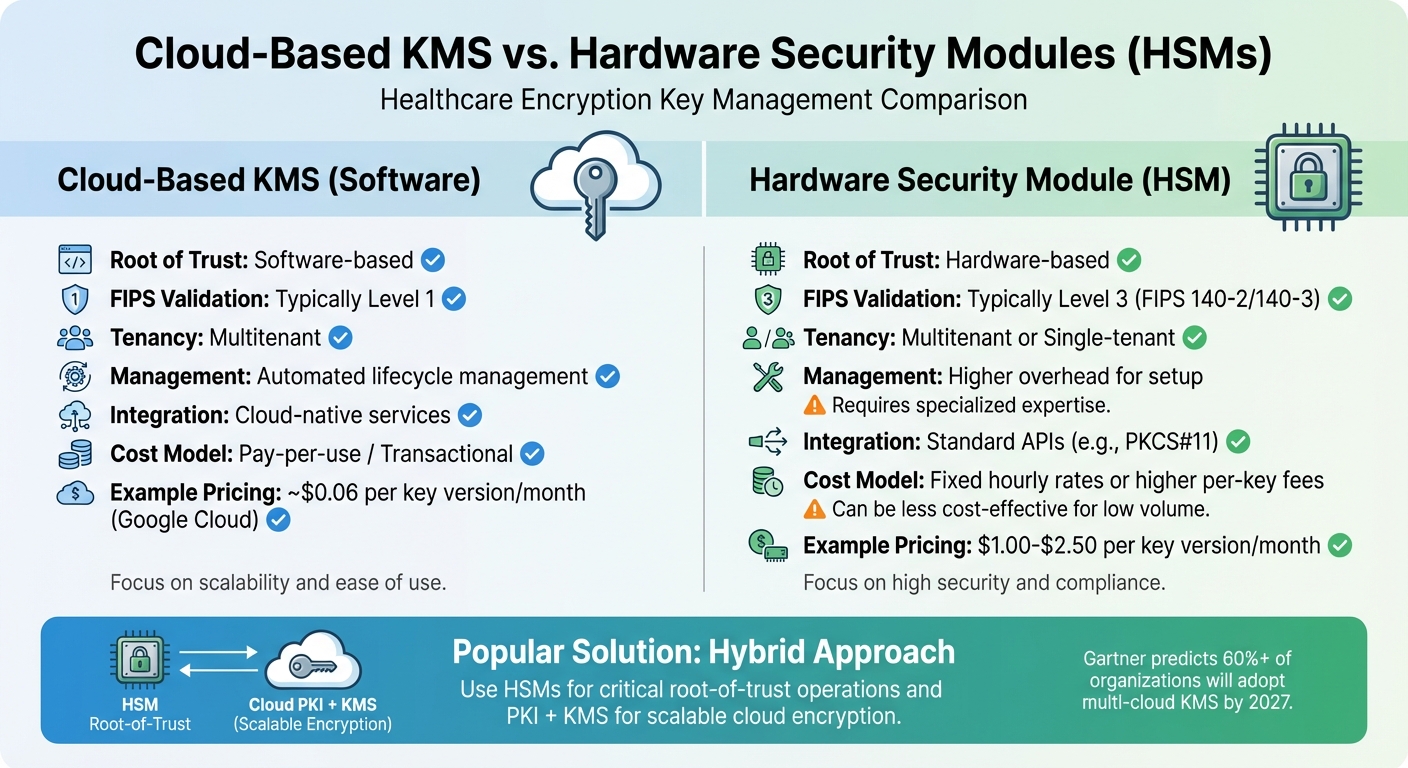
Cloud KMS vs HSM: Key Management Comparison for Healthcare PHI
When it comes to encryption, choosing the right key management strategy is crucial for meeting compliance and ensuring security. For healthcare organizations storing PHI in the cloud, this decision is especially important. The main considerations boil down to two key choices: whether to rely on cloud-based software or dedicated hardware, and whether to centralize or distribute key management. These decisions directly influence your organization's security, compliance, and efficiency.
Cloud-Based Key Management Systems (KMS) vs. Hardware Security Modules (HSMs)
The key difference between these two lies in where the root of trust resides. Cloud-based KMS solutions rely on software managed by the cloud provider, while HSMs store keys in hardware that often meets stricter security certifications. Your choice may depend on regulatory requirements.
Cloud-based KMS options, like Azure Key Vault Standard and Google Cloud's default encryption, often meet FIPS 140-2 Level 1 validation, which is sufficient for many PHI-related tasks [1][3]. However, if your organization deals with payment card data alongside PHI or has stricter internal risk standards, you'll likely need FIPS 140-2 Level 3 validation, which is offered by HSMs. For instance, Azure Key Vault Premium meets FIPS 140-3 Level 3 standards [1].
As Sander Temme from Fortanix explains, "Cloud HSM is preferred when FIPS 140-2 Level 3 compliance and strict data residency requirements are non-negotiable" [4].
Cost is another factor to weigh. Cloud-based KMS typically operates on a transactional pricing model - Google Cloud, for example, charges approximately $0.06 per key version per month, while HSM-backed keys range from $1.00 to $2.50 per key version monthly [3]. Dedicated HSMs, on the other hand, often charge fixed hourly rates [1]. Operationally, KMS automates key lifecycle tasks like generation and rotation, whereas HSMs may require additional setup to ensure high availability.
| Feature | Cloud-Based KMS (Software) | Hardware Security Module (HSM) |
|---|---|---|
| Root of Trust | Software-based | Hardware-based |
| FIPS Validation | Typically Level 1 | Typically Level 3 |
| Tenancy | Multitenant | Multitenant or Single-tenant |
| Management | Automated lifecycle management | Higher overhead for setup |
| Integration | Cloud-native services | Standard APIs (e.g., PKCS#11) |
| Cost Model | Pay-per-use / Transactional | Fixed hourly rates or higher per-key fees |
A hybrid approach is gaining popularity. Many healthcare organizations use HSMs for critical "root-of-trust" operations and PKI, while leveraging KMS for scalable encryption across cloud environments [4]. This method balances security and scalability, aligning with Gartner's prediction that over 60% of organizations will adopt multi-cloud KMS by 2027 [4].
Next, consider whether a centralized or distributed model aligns better with your operational and compliance needs.
Centralized vs. Distributed Key Management
Once you've chosen the medium, the next step is deciding on the organizational structure for key management. Centralized key management consolidates all key-related tasks - generation, storage, and auditing - into a single security project or vault. This setup simplifies audits and strengthens HIPAA compliance by enforcing consistent security policies. It also allows for a clear separation of duties: cryptographic officers manage the keys, while service accounts use them for encryption and decryption tasks [2].
In contrast, distributed key management places keys closer to the resources they secure. This approach offers speed and simplicity for smaller teams but makes it harder to maintain consistent policies across multiple locations or applications. Distributed setups can incorporate techniques like key sharding and threshold cryptography to reduce single points of failure. This model is often favored in multi-cloud environments to limit the impact of a breach at any one provider.
For most healthcare organizations, centralized management is the more practical choice. It reduces operational complexity and simplifies compliance audits. If you go this route, consider implementing project liens to prevent accidental deletion of key management projects - losing these keys could lead to irreversible data loss [2]. You’ll also need to decide on key granularity: using one key per resource offers tighter security but adds costs and complexity, while sharing keys across applications is easier to manage but increases risk if a key is compromised [2].
The shift toward centralized key management is reflected in market trends. The global Key Management as a Service market is projected to grow from $16.27 billion in 2024 to $142.83 billion by 2032 [5].
Rob Westervelt, Research Director at IDC, emphasizes, "Centralized key management is the linchpin for data privacy and sovereignty in the era of multicloud" [5].
Managing Keys Through Their Lifecycle
After choosing your key management strategy, the next step is managing keys effectively throughout their entire lifecycle. From creation to retirement, each phase demands specific security measures to safeguard PHI and ensure compliance.
Key Generation and Secure Storage
Generate keys within a trusted HSM or FIPS-validated KMS, using approved random number generators. When key material is generated by cloud providers, it stays within the secure boundaries of the KMS, minimizing exposure risks.
Adopt an envelope encryption hierarchy. This structure uses a Master Root Key (stored in an HSM) to secure Key Encryption Keys (KEKs), which in turn protect Data Encryption Keys (DEKs) that encrypt PHI. Use AES-256 encryption with authenticated modes, such as AES-GCM, for data at rest.
Store keys separately from PHI resources, and implement project liens to avoid accidental deletion. Role separation is critical: assign the roles/cloudkms.admin role to cryptographic officers who manage keys, while granting roles/cloudkms.cryptoKeyEncrypterDecrypter only to service agents - never to individual users. As NIST SP 800-152 highlights:
"Maintain separate identities and permissions for those who administer your encryption keys and those who use them" [2].
Access Control and Key Rotation
Once your keys are securely generated, focus on controlling access and setting up regular rotations.
Role-Based Access Control (RBAC) is crucial for managing keys. Restrict permissions to only what’s needed for each task, avoiding basic roles in favor of predefined, granular ones. For privileged tasks, use JIT elevation to eliminate persistent admin rights [6].
Require phishing-resistant MFA, such as FIDO2/WebAuthn security keys, for administrators handling cryptographic keys or PHI.
Automate key rotation to minimize human error and maintain compliance. Recommended rotation schedules vary by key type:
- Data Encryption Key (DEK): Rotate every 90–180 days.
- Key Encryption Key (KEK): Rotate every 6–12 months.
- Master Root Key: Rotate every 12–24 months.
- Session Keys (TLS): Rotate per session.
When a key rotates, the new version becomes the primary for encryption, while older versions remain available for decryption [2]. For example, Google Cloud Autokey defaults to a one-year rotation period for HSM-protected keys [2]. Keep in mind that rotating a symmetric key doesn’t re-encrypt data encrypted by older versions - it simply ensures new data uses the updated key version [2].
Use organization policy constraints, such as constraints/cloudkms.minimumDestroyScheduledDuration, to prevent administrators from setting destruction periods shorter than 30 days [2]. Enable administrative activity logs for all key operations and use the Cloud KMS inventory API to track which keys protect specific resources [2].
Key Expiration and Retirement
Properly retiring keys is critical to avoid data loss while maintaining compliance.
Audit current key usage to ensure no active systems rely on the key [7]. This step is crucial because destroying a key version permanently erases its cryptographic material. Any PHI encrypted with that version becomes inaccessible unless re-encrypted beforehand [7].
"Destroying a key version means that the key material is permanently deleted... data that was encrypted with the key version can't be decrypted." - Google Cloud Documentation [7]
Follow the "disable before destroy" principle. Start by disabling the key version, which blocks its use but allows restoration if needed [7]. A 30-day disable period serves as a validation window, during which you can monitor logs for "Access Denied" errors. If no errors occur, it’s likely safe to proceed with destruction [7].
"We recommend disabling key versions prior to scheduling them for destruction as part of your procedures for ensuring that the key can be safely destroyed." - Google Cloud Documentation [7]
Before scheduling destruction, re-encrypt all resources protected by the retiring key with a new, active key version. Check the key’s usage against data retention policies - PHI often has strict retention requirements, and keys must remain accessible as long as the data they protect is required by law [7].
Most cloud providers, including Cloud KMS, offer a 30-day "scheduled for destruction" period before key material is permanently deleted, giving administrators a safety window to cancel the operation [2][7]. Note that key material may take up to 45 days after the scheduled destruction date to be fully removed from active systems and backups [7]. If retiring a key to end its use entirely, disable automatic rotation to prevent new versions from being created [7].
These practices help ensure compliance with HIPAA and other healthcare regulations while protecting sensitive data from disruptions to clinical applications.
Maintaining Compliance and Monitoring
Once your encryption keys are securely managed throughout their lifecycle, the next step is ensuring they align with compliance requirements and are continuously monitored. According to HIPAA's Security Rule, covered entities must maintain a written contingency plan that includes both data backup and disaster recovery procedures. This plan should explicitly document how encryption keys are managed [8].
Auditing and Logging Key Operations
To maintain a secure environment, enable logging for every key-related action. This includes tracking operations like creation, rotation, access, and deletion. These logs should be stored separately to facilitate forensic analysis if needed. Each log entry should detail which keys were accessed, the time of access, and the specific operations performed. This level of detail helps identify and respond to unauthorized or suspicious activity quickly.
If you're using a cloud provider or third-party service for encryption key management, ensure they’ve signed a Business Associate Agreement (BAA) to meet HIPAA requirements [8]. Beyond logging, it’s equally important to have a solid recovery plan in place for encryption keys to avoid disruptions.
Disaster Recovery for Encryption Keys
Even with robust auditing, ensuring encryption keys are accessible during emergencies is critical. Losing encryption keys can lead to disastrous outcomes - encrypted PHI backups would become permanently inaccessible without them. To reduce this risk, store encryption keys and their backups in separate geographic locations. Many cloud-native Key Management Services simplify this by automatically replicating keys across multiple availability zones or regions, providing built-in redundancy.
Establish "break glass" procedures for emergency key access. These procedures should outline how to retrieve encryption keys if primary administrators are unavailable or systems are compromised during a security incident. To prevent a single point of failure, assign these responsibilities to personnel separate from those managing the encryption keys. Use immutable storage for both PHI backups and key metadata to protect against ransomware attacks that could target recovery assets [8].
Finally, to ensure your disaster recovery plan is effective, conduct full restoration drills annually. These drills should include retrieving encryption keys and testing the restoration of encrypted data. Solutions like those provided by Censinet can simplify and streamline these processes, helping maintain both security and compliance in cloud-based PHI storage [8].
Conclusion
Managing encryption keys for cloud-based PHI storage is all about finding the right balance between security, compliance, and operational efficiency. Whether you opt for a cloud-native KMS or an HSM, the choice should align with your security requirements, budget, and technical capabilities. Once you've made your selection, it's crucial to establish clear policies for key generation, rotation, access control, and retirement to ensure keys remain secure throughout their lifecycle.
HIPAA's Security Rule emphasizes the importance of detailed documentation for encryption and key management practices. Enabling detailed logging of all key-related operations and storing audit trails separately can help healthcare organizations detect unauthorized access attempts and demonstrate compliance during audits.
Strong encryption key management plays a direct role in safeguarding patient data. By rendering compromised PHI unusable, it not only protects sensitive information but also helps maintain patient trust while shielding organizations from the financial and reputational fallout of data breaches.
Beyond security, effective key management also supports operational continuity during emergencies. With well-documented disaster recovery plans and "break glass" protocols, healthcare providers can ensure uninterrupted access to critical PHI when it's needed most. Regular restoration drills further reinforce preparedness, ensuring these procedures are reliable in real-world scenarios.
To strengthen your cybersecurity framework, consider integrating risk management solutions like Censinet. These tools streamline third-party and enterprise risk assessments while helping manage vulnerabilities in medical devices and supply chains. By combining robust key management practices with comprehensive risk management, organizations can build a resilient system that not only protects patient data but also ensures the seamless delivery of care.
FAQs
Who should own and control encryption keys for cloud PHI?
Healthcare organizations must maintain ownership and control of encryption keys when storing Protected Health Information (PHI) in the cloud. While cloud providers handle the security of their infrastructure, retaining control of encryption keys ensures that organizations can protect sensitive patient data and comply with regulatory requirements effectively.
How do I decide between KMS, HSM, or a hybrid approach?
When deciding between a Key Management Service (KMS), a Hardware Security Module (HSM), or a hybrid approach, it’s all about matching the solution to your specific security requirements, compliance demands, and operational priorities.
- KMS: This option is straightforward to manage, works seamlessly with cloud platforms, and often includes features like automated key rotation for convenience.
- HSM: Provides a stronger level of protection with dedicated hardware and meets strict standards like FIPS 140-2 for regulatory compliance.
- Hybrid: Offers the best of both worlds - combining the ease of KMS with the robust security of HSM. This setup works well for organizations handling sensitive data or operating under stringent regulatory frameworks.
Each approach has its strengths, so the choice depends on balancing ease of use, security, and compliance.
What’s the safest way to back up and recover encryption keys?
When it comes to backing up and recovering encryption keys for cloud PHI (Protected Health Information) storage, safety is all about separation and secure management. Keep encryption keys stored separately from the encrypted data to reduce risks. Use tools like hardware security modules (HSMs) or key management systems (KMS) to handle keys securely.
Key practices include:
- Regular Key Rotation: Change keys periodically to limit exposure in case of a breach.
- Strict Access Controls: Ensure only authorized personnel can access the keys.
- Secure Backup Storage: Store backup keys in encrypted environments to add an extra layer of protection.
- Audit Logs for Recovery: Maintain detailed logs of recovery processes and restrict access to ensure accountability.
By combining these measures, you can safeguard encryption keys and maintain the integrity of sensitive data.

