
Multi-factor authentication (MFA) is now required for securing cloud-based patient health information (PHI) under HIPAA. As of 2025, the Department of Health and Human Services (HHS) mandates MFA for all healthcare entities accessing electronic PHI (ePHI). This update addresses the growing risks of credential theft, which accounted for a significant portion of the 133 million healthcare records breached in 2023.
Key takeaways:
The 2025 rule change eliminates "addressable" safeguards, making MFA a strict requirement for HIPAA compliance. Organizations must implement MFA alongside encryption, audit logs, and robust vendor oversight to meet these standards.
New HIPAA Requirements in 2026: Are You Ready for What’s Coming?
sbb-itb-535baee
HIPAA Security Rule: Access Control and MFA Requirements
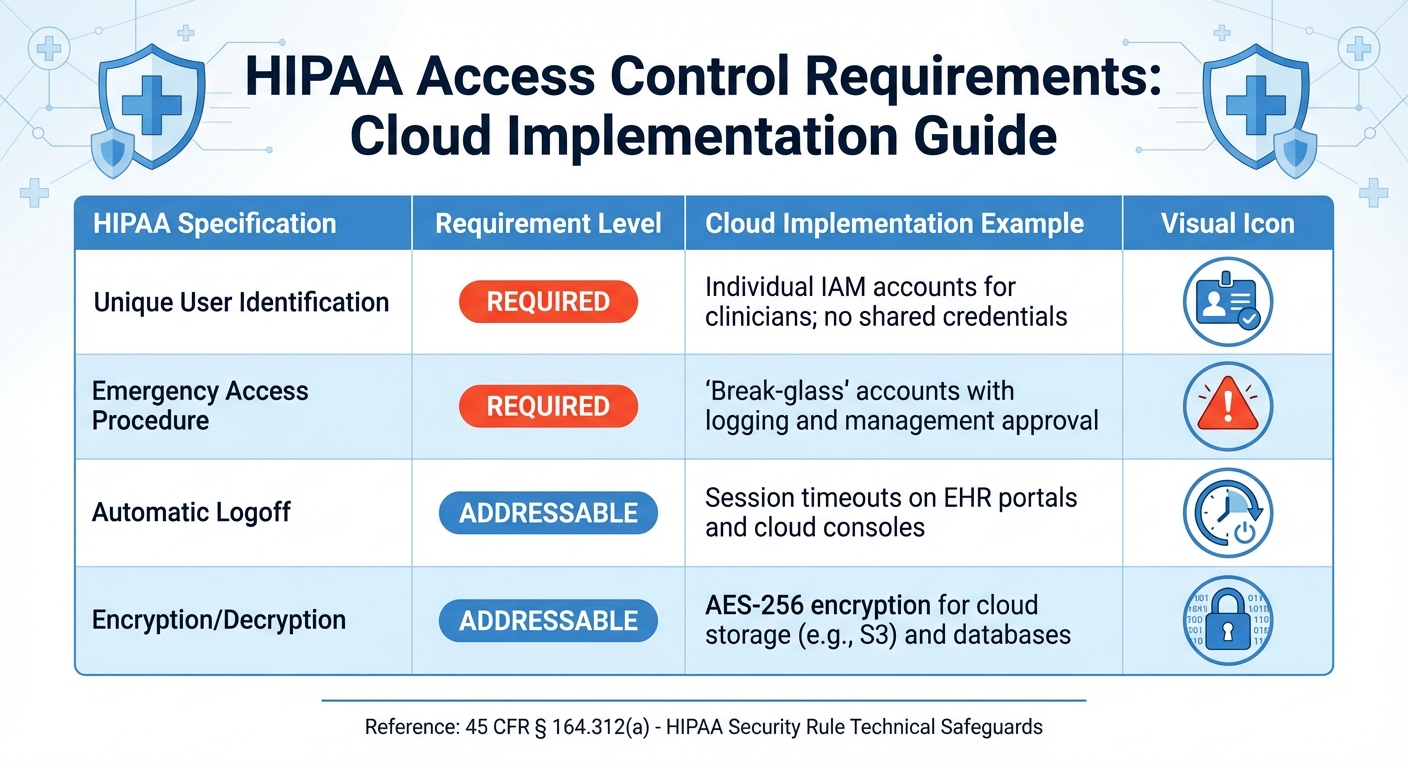
HIPAA Access Control Requirements and Cloud Implementation Examples
HIPAA Access Control Requirements
The HIPAA Security Rule outlines technical safeguards under 45 CFR § 164.312(a), which are designed to ensure that only authorized individuals and software can access electronic protected health information (ePHI) [5]. In cloud environments, these safeguards follow a shared responsibility model: major cloud providers handle hardware-level security, while healthcare organizations must oversee application-level access and manage sensitive data tagging.
HIPAA identifies two mandatory implementation specifications: Unique User Identification, which assigns each user a distinct identifier to track their activity, and Emergency Access Procedure, which ensures documented methods for accessing ePHI during emergencies. Additionally, there are addressable specifications like Automatic Logoff, which terminates inactive sessions, and Encryption/Decryption, which protects data during storage and transmission in the cloud [5].
The Person or Entity Authentication standard (45 CFR § 164.312(d)) forms the foundation for multi-factor authentication (MFA). This standard requires organizations to verify the identity of anyone accessing ePHI [2][6]. While the Security Rule does not explicitly mention MFA, its principles naturally align with layered authentication methods.
HIPAA Specification
Requirement Level
Cloud Implementation Example
Unique User Identification
Required
Individual IAM accounts for clinicians; no shared credentials.
Emergency Access Procedure
Required
"Break-glass" accounts with logging and management approval.
Automatic Logoff
Addressable
Session timeouts on EHR portals and cloud consoles.
Encryption/Decryption
Addressable
AES-256 encryption for cloud storage (e.g., S3) and databases.
Healthcare organizations often use Role-Based Access Control (RBAC) to enforce the principle of "minimum necessary" access, granting permissions based on job roles. This strategy works hand-in-hand with MFA, which adds detailed authentication logs. Audit Controls (45 CFR § 164.312(b)) complement these measures by requiring systems to track and examine all activity involving ePHI [5].
MFA builds on these access controls by adding crucial layers of protection.
How MFA Strengthens HIPAA Compliance
MFA enhances HIPAA's authentication requirements by moving beyond single-factor passwords to a multi-layered verification process. It requires at least two independent factors: something you know (like a password), something you have (such as a security token or smartphone), or something you are (biometric data). This approach directly addresses the risks of credential theft, a common cause of healthcare data breaches.
"In today's threat landscape, auditors consider MFA a baseline, 'reasonable and appropriate' control. Furthermore, the 2025 HHS Notice of Proposed Rulemaking (NPRM) seeks to officially eliminate 'addressable' loopholes, making MFA a strictly mandatory, explicit requirement for all healthcare entities." - Datawiza
The regulatory environment shifted significantly in 2025 when the Department of Health and Human Services (HHS) proposed removing the "addressable" classification for authentication controls. This marked the first major update to the Security Rule in over a decade [2]. The Office for Civil Rights (OCR) now frequently flags the lack of MFA - especially for remote or privileged access - as a compliance failure during breach investigations, often leading to heavy penalties.
MFA also supports audit readiness by creating detailed logs that include timestamps, device information, and second-factor details. These logs help organizations meet both the Person or Entity Authentication standard and Audit Controls requirements. In cloud environments, MFA mitigates risks like phishing, ransomware, and unauthorized access to sensitive records by ensuring that stolen passwords alone are insufficient for entry [2][6].
Organizations increasingly adopt phishing-resistant methods like FIDO2/WebAuthn security keys and verified push notifications with number matching, which are more secure than SMS-based codes. Some also implement "step-up" MFA, which requires additional verification for high-risk actions, such as exporting large datasets or accessing records from unusual locations [2][4]. For older healthcare applications that lack built-in MFA, access proxies or gateways can introduce modern authentication protocols without requiring significant code changes [2].
Next, we’ll look at how these MFA measures align with vendor and business associate responsibilities.
MFA Requirements for Cloud PHI Storage
Protecting cloud environments that store electronic protected health information (ePHI) requires a multi-layered security approach. Multi-factor authentication (MFA), when combined with encryption and audit controls, plays a critical role in meeting HIPAA's technical safeguards. The 2025 HHS Notice of Proposed Rulemaking introduces a major change by removing the "addressable" classification for authentication controls. This means MFA and encryption will no longer be optional but mandatory baseline requirements [2].
"The NPRM aims to close this loophole, meaning MFA and encryption will become rigid, baseline requirements." - Datawiza
To comply, organizations must enforce MFA across three key access categories:
Given the ongoing risks of password reuse across platforms, relying solely on single-factor authentication is no longer sufficient for safeguarding sensitive patient data [3]. The proposed 2025 NPRM also emphasizes the importance of annual OCR compliance audits, making it essential for covered entities to document and provide technical proof of MFA enforcement [2]. To meet these requirements, organizations must integrate MFA with other security measures, as detailed below.
Combining MFA with Encryption and Audit Controls
MFA, encryption, and audit logs form a powerful trio for securing cloud-stored PHI. MFA verifies the identity of users accessing the data, while encryption protects the data itself - whether it's at rest or in transit. Together, these measures create a layered defense strategy that aligns with HIPAA's security standards [2].
Authentication logs are another critical piece of the puzzle. These logs should record MFA challenges, including both successful and failed attempts, as well as any unusual login activity. To meet HIPAA’s Audit Controls requirement (45 CFR § 164.312(b)), these logs must be secured with strict access controls and retained for at least six years [1]. Using immutable storage solutions ensures that these records remain tamper-proof and reliable for compliance purposes.
"Having the ability to have detailed audit trails of all access to core databases, saved in immutable infrastructure, is a security and compliance person's Holy Grail." - Vivek D., SVP Engineering
For cloud systems, step-up MFA adds an extra layer of verification for high-risk actions, such as downloading medical records or accessing systems from unusual locations. This approach ensures that stronger authentication is applied only when necessary, balancing security with user convenience [2].
Hackers often exploit vulnerabilities in third-party vendors and managed service providers, making it crucial to enforce MFA for external collaborators. Centralizing MFA policies at the Identity Provider (IdP) level or using an access proxy can help maintain consistent security standards and logging across applications.
MFA Implementation Best Practices for Cloud Systems
Effective MFA implementation is essential for protecting both access and data integrity in cloud systems. Start by securing privileged accounts, such as those used for EHR/EMR admin consoles, cloud infrastructure management, and security tools like SIEM platforms. These accounts are high-value targets for attackers and should use robust authentication methods, such as FIDO2 hardware keys, instead of less secure options like SMS codes [2].
Next, integrate cloud applications with a central Identity Provider using protocols like SAML or OIDC. This approach simplifies the enforcement of MFA policies and streamlines audit reporting. For legacy systems that don’t natively support MFA, consider deploying an access proxy or gateway to add an authentication layer without modifying the application’s code [2].
"StrongDM has saved my team time by not having to create one-off users for each database and has allowed us to standardize our access control patterns." - Kellen A., Infrastructure Engineer
Maintain a detailed inventory of all systems where MFA is enforced, including the specific authentication methods used. This documentation is invaluable during audits and helps identify any gaps in coverage. For systems temporarily exempt from MFA, create an exception register that includes approvals, review dates, and compensating measures like network segmentation [2].
Finally, conduct a Security Risk Analysis to evaluate where MFA technologies should be deployed. This analysis not only ensures compliance but also demonstrates that your organization has thoughtfully addressed its unique risks. Be sure to cover all locations where ePHI is stored or transmitted, such as cloud storage buckets, databases, and data pipelines [1].
Vendor and Business Associate MFA Compliance Obligations
Under the HIPAA Security Rule (45 CFR § 164.312), Business Associates (BAs) and third-party vendors are required to implement technical safeguards to protect electronic Protected Health Information (ePHI). This includes enforcing Multi-Factor Authentication (MFA) across all access points, such as Managed Service Provider (MSP) portals, remote support tools, and vendor support systems [1][2].
The 2025 HHS Notice of Proposed Rulemaking introduces a major shift in compliance expectations. By removing the "addressable" classification for authentication controls, MFA will become a mandatory baseline for all healthcare entities and their partners by 2026. This eliminates the argument that MFA is optional based on risk assessments [2]. The change highlights the importance of strict third-party risk management and clear contractual agreements. With the Office for Civil Rights (OCR) proposing annual compliance audits, covered entities must ensure their vendors have implemented strong access controls, including MFA for all remote and privileged access [2].
Vendor access to ePHI must meet the same technical safeguard standards as internal systems, reinforcing a multi-layered security approach. Business Associate Agreements (BAAs) form the backbone of these requirements. General language is no longer enough - contracts must detail where MFA applies, specify acceptable authentication methods (e.g., FIDO2 keys for admins or authenticator apps for standard users), and ensure subcontractors follow the same standards through downstream BAAs. Given that violations involving Business Associates are among the most penalized under HIPAA, with fines ranging from $100 to $50,000 per violation, precise and explicit contractual terms are critical [7].
Healthcare organizations must also maintain technical documentation proving vendor MFA implementation. This includes a detailed map of each ePHI system, its enforcement points, and the MFA methods in place [1][2].
Verifying Vendor MFA Compliance
To verify that vendors have implemented MFA, request technical evidence that authentication controls are active, often by using automated tools to streamline security questionnaires. Start by asking for a detailed map of each ePHI system, outlining enforcement points and MFA methods. This should cover all vendor access points, including VPNs, direct application logins, and administrative consoles [2].
Obtain screenshots or video demonstrations of the MFA process for various user types, especially privileged accounts that can modify system settings or access large amounts of patient data. If a vendor uses access proxies to add MFA to older systems, ask for documentation explaining how the proxy enforces additional verification steps [2].
Authentication logs provide another layer of validation. These logs should detail MFA challenges, outcomes (successes and failures), and any unusual sign-in attempts from unexpected locations or devices. Storing these logs in tamper-proof infrastructure is key, and they should be retained for at least six years [2]. Vivek D., SVP of Engineering at StrongDM, emphasizes the importance of this approach:
"From a compliance point of view, I have no users in my data layer. I can go with my head high to any healthcare organization in the world and tell them the data layer security is on par with and above most stringent regulatory requirements." – Vivek D., SVP Engineering, StrongDM
For high-risk vendors managing sensitive clinical data or infrastructure services, annual third-party audits - such as SOC 2 Type II or HITRUST certifications - can independently confirm that MFA and other security measures are in place. These practices should also extend to cloud provider contracts.
MFA Requirements in Cloud Provider Contracts
Cloud provider contracts and BAAs must include specific MFA requirements. Instead of vague references to "appropriate safeguards", contracts should clearly mandate MFA for all remote access, privileged administrative tasks, and direct access to databases or storage systems containing ePHI. Authentication should follow NIST guidelines, requiring at least two distinct factors [7].
Since cloud providers often rely on subcontractors, it’s essential to require that vendors ensure their subcontractors comply with the same MFA and security requirements through downstream BAAs. Contracts should grant the right to request evidence of these agreements and verify that subcontractors have implemented the necessary controls [7].
Appropriate Safeguards
Must specify administrative, physical, and technical safeguards (e.g., MFA)
Subcontractor Compliance
Downstream vendors must meet the same security standards
Breach Notification
Must report unauthorized PHI access (e.g., MFA bypass) within a set timeframe
Security Rule Compliance
Requires the BA to implement technical safeguards for ePHI
Access to Records
BA must provide internal practices and MFA logs to HHS for audits
Covered entities can use audit and verification rights to confirm vendor security claims. Contracts should allow for requests of technical evidence, authentication logs, and security assessments.
Define specific timeframes for breach notifications to avoid "unreasonable delay." A standard timeframe is 5 to 10 business days for reporting incidents such as unauthorized access or successful MFA bypasses [7]. Additionally, implement a system to track BAA and contract expirations (e.g., 90/60/30-day alerts) to ensure vendors don’t access PHI without updated agreements. Upon termination, require written certification of PHI destruction using NIST-compliant data sanitization methods, confirming permanent deletion and revocation of MFA-protected access [7].
Using Risk Management Platforms for MFA Oversight
Centralized risk management platforms have become essential for overseeing multi-factor authentication (MFA) compliance, especially as vendor compliance obligations grow more complex. Managing MFA compliance across multiple vendors requires a streamlined approach, particularly with mandatory annual compliance audits. These platforms simplify the process by tracking MFA enforcement, documenting vendor security measures, and generating audit-ready reports - all tasks that manual oversight struggles to handle effectively in today’s fast-paced environment [2].
By automating vendor assessments, these platforms ensure MFA implementation is monitored across various systems while maintaining the documentation needed for OCR audits. Instead of chasing vendors for screenshots or authentication logs, organizations can rely on centralized evidence collection and audit trails to confirm compliance.
Third-Party Risk Assessments with Censinet RiskOps™
Censinet RiskOps™ takes vendor compliance management a step further by offering robust tools for MFA oversight. Healthcare organizations can use this platform to automate third-party risk assessments, ensuring vendor MFA compliance is thoroughly evaluated. The platform standardizes the review of vendor security controls, including authentication methods, access management policies, and technical safeguards for electronic protected health information (ePHI). This eliminates the need for manual checks of each vendor’s security documentation.
With Censinet AI™, vendors can quickly complete security questionnaires, while the platform automatically summarizes the provided evidence, highlights critical integration details, and identifies fourth-party risk exposures. This automation speeds up the assessment process without compromising oversight, as risk teams can configure rules and review processes to stay in control of decision-making.
For managed service providers (MSPs) and support portals, Censinet RiskOps™ continuously monitors MFA enforcement [2]. Acting as a centralized hub, the platform provides visibility into vendor-related policies, risks, and tasks, seamlessly integrating automated assessments into ongoing monitoring and reporting.
Automating MFA Compliance Tracking and Reporting
Automation shifts MFA oversight from a one-off task to a continuous monitoring process. Censinet RiskOps™ produces the audit-ready materials required for OCR reviews, such as system mappings, authentication logs, and policy enforcement exports [2]. This ensures organizations are always prepared for audits without scrambling to gather evidence.
The platform’s automated alerts and real-time monitoring help organizations respond quickly to issues like anomalous sign-ins [2]. For legacy healthcare systems that rely on access proxies to enforce MFA, the platform tracks these controls to ensure they remain active without requiring constant manual checks [2].
Written MFA policies, ePHI system inventories, and defined user populations
Conditional access policy exports, system-to-MFA mappings, and test reports
Authentication logs (success/failure), log retention settings, and anomalous sign-in alerts
Exception register with approvals and compensating control records
Censinet RiskOps™ also manages an exception register, documenting formal approvals and periodic reviews for any deviations from standard MFA policies. This is critical for OCR audits, as exceptions must be justified and well-documented. As Datawiza emphasizes:
"Attempting to justify password-only access to ePHI is practically impossible during an audit"
.
With automated tracking, every exception is accounted for, reviewed, and approved, closing compliance gaps that could otherwise result in penalties.
Common MFA Compliance Challenges and Solutions
Overcoming Technical and Operational Obstacles
When it comes to implementing MFA, healthcare organizations often face persistent challenges that make compliance tricky. One of the biggest hurdles is legacy system incompatibility. Many healthcare systems still rely on older web applications and on-premise setups that don’t support modern identity protocols like SAML or OIDC [2][3]. To address this, organizations can use access proxies to enforce MFA at the system’s edge, avoiding the need to modify outdated code [2].
Another issue is fragmented environments, where security measures are inconsistent across cloud, on-premise, and hybrid infrastructures [3]. The solution? Centralized identity management. By using a single Identity Provider (IdP) like Active Directory, Okta, or Entra ID, organizations can enforce consistent policies and maintain a unified audit trail [2][3].
Then there’s user friction, which is especially problematic in clinical settings. Extra authentication steps can disrupt workflows, leading to risky workarounds like credential sharing [3]. A practical solution is combining Single Sign-On (SSO) with step-up MFA. This approach only requires additional verification for high-risk actions, like accessing medical records or modifying billing information, while routine tasks remain seamless [2][3]. This balance is crucial, especially considering the widespread habit of password reuse.
Here’s a quick look at common challenges and their solutions:
Challenge
Practical Solution
Use an access proxy or gateway to add MFA without altering existing code
Implement SSO and step-up MFA for sensitive actions
Deploy centralized access management with automated, immutable logging
Enforce MFA for all remote access points, like VPNs or VDIs, regardless of location
Use tools with native connectors for popular IdPs, such as Entra ID or Okta
With these strategies, organizations can reduce technical and operational roadblocks while improving security and compliance.
Maintaining Audit Readiness and Avoiding Penalties
Recent mandates from HHS have made continuous audit readiness a non-negotiable priority. The 2025 HHS Notice of Proposed Rulemaking (NPRM) suggests that OCR compliance audits could happen as often as every 12 months [2]. This makes thorough and ongoing documentation essential. Start by creating a detailed mapping of all ePHI systems, showing where MFA is enforced and the specific methods used [2]. Pair this with conditional access policy exports and authentication logs to build a solid foundation for audit readiness.
One major pitfall is insufficient audit trails. Even if MFA is technically implemented, lacking detailed logs can undermine compliance efforts. Organizations should opt for MFA solutions that automatically generate immutable logs of all authentication events - both successful and failed attempts - and retain these logs for the required six years under HIPAA [1][3]. As Vivek D., SVP of Engineering, aptly put it:
"Having the ability to have detailed audit trails of all access to core databases, saved in immutable infrastructure, is a security and compliance person's Holy Grail"
Datawiza also cautions:
"If you suffer a breach and only had single-factor authentication... the Office for Civil Rights (OCR) will likely deem your safeguards insufficient and levy heavy fines"
With the NPRM aiming to close loopholes and make MFA mandatory, relying on password-only access to ePHI is no longer defensible. To stay compliant, maintain a formal exception register. This document should outline any MFA gaps, approved justifications, compensating controls, and scheduled review dates. Actively managing these exceptions ensures no deviation goes unaddressed.
Conclusion
MFA plays a crucial role in safeguarding cloud-based PHI, as highlighted throughout this discussion. With the updated HIPAA Security Rule making MFA mandatory for healthcare cloud PHI by May 2026, organizations must prioritize its implementation [2][8].
The urgency is undeniable: credential-based attacks are the top cause of healthcare data breaches, and MFA blocks over 99% of these attacks [1][9]. Considering that the average cost of a healthcare data breach has soared to $10.93 million - more than twice the cross-industry average of $4.4 million - strong access controls are not just about compliance; they’re essential for financial protection [9]. As Medcurity aptly states:
"In an OCR investigation, undocumented security is effectively the same as absent security"
To stay ahead, continuous risk management is non-negotiable. The 2025 HHS NPRM requires organizations to maintain audit-ready documentation, including MFA mappings, authentication logs, and exception registers. Achieving this involves annual risk assessments, frequent vulnerability scans, and stringent oversight of third-party vendor security [2][8]. Tools like Censinet RiskOps™ can simplify ongoing compliance efforts, ensuring organizations remain prepared and secure.
FAQs
When is MFA required for HIPAA cloud ePHI?
Multi-factor authentication (MFA) will soon be a requirement for all systems accessing electronic protected health information (ePHI). This change comes with the upcoming update to the HIPAA Security Rule, which is anticipated to take effect in late 2025 or early 2026. The goal is to strengthen the protection of ePHI by ensuring organizations implement MFA as an added layer of security.
What MFA methods are acceptable under HIPAA?
HIPAA mandates that organizations put technical safeguards in place, including access controls and authentication mechanisms like multi-factor authentication (MFA). These measures are considered reasonable and appropriate based on a thorough risk analysis. Proposed updates to HIPAA may go further, potentially requiring MFA explicitly, with only a few exceptions.
To stay compliant and protect protected health information (PHI) in cloud environments, organizations should carefully assess their specific risks. This evaluation will help determine how MFA can be integrated effectively into their overall compliance strategy.
What audit evidence demonstrates MFA compliance?
Multi-factor authentication (MFA) compliance relies on thorough documentation and verification. Key evidence includes:
These materials must align with HIPAA audit logs and related compliance requirements to meet regulatory standards.
