
Password Policies for HIPAA Compliance
Post Summary
Healthcare organizations must prioritize strong password policies to protect sensitive patient data and comply with HIPAA regulations. Passwords are a critical defense for electronic protected health information (ePHI), especially as digital access to medical records continues to grow.
Key takeaways for HIPAA-compliant password policies:
- Strong Passwords: Use passphrases of at least 15 characters, focusing on length over complexity.
- Avoid Frequent Resets: Only require password changes after security incidents, not on a fixed schedule.
- Credential Screening: Check passwords against breached databases to reduce risks.
- Multi-Factor Authentication (MFA): Add an extra layer of security for accessing ePHI.
- Role-Based Access Control: Limit access to only what each user needs for their job.
HIPAA regulations (45 CFR § 164.308 and § 164.312) require organizations to create, change, and safeguard passwords while aligning with industry standards like NIST SP 800-63B. This ensures compliance and strengthens defenses against common threats like phishing and credential stuffing. Tools like password managers and risk assessment platforms can help streamline implementation and monitoring.
How To Ensure HIPAA Compliance With a Password Manager
sbb-itb-535baee
Regulatory Framework for Password Policies
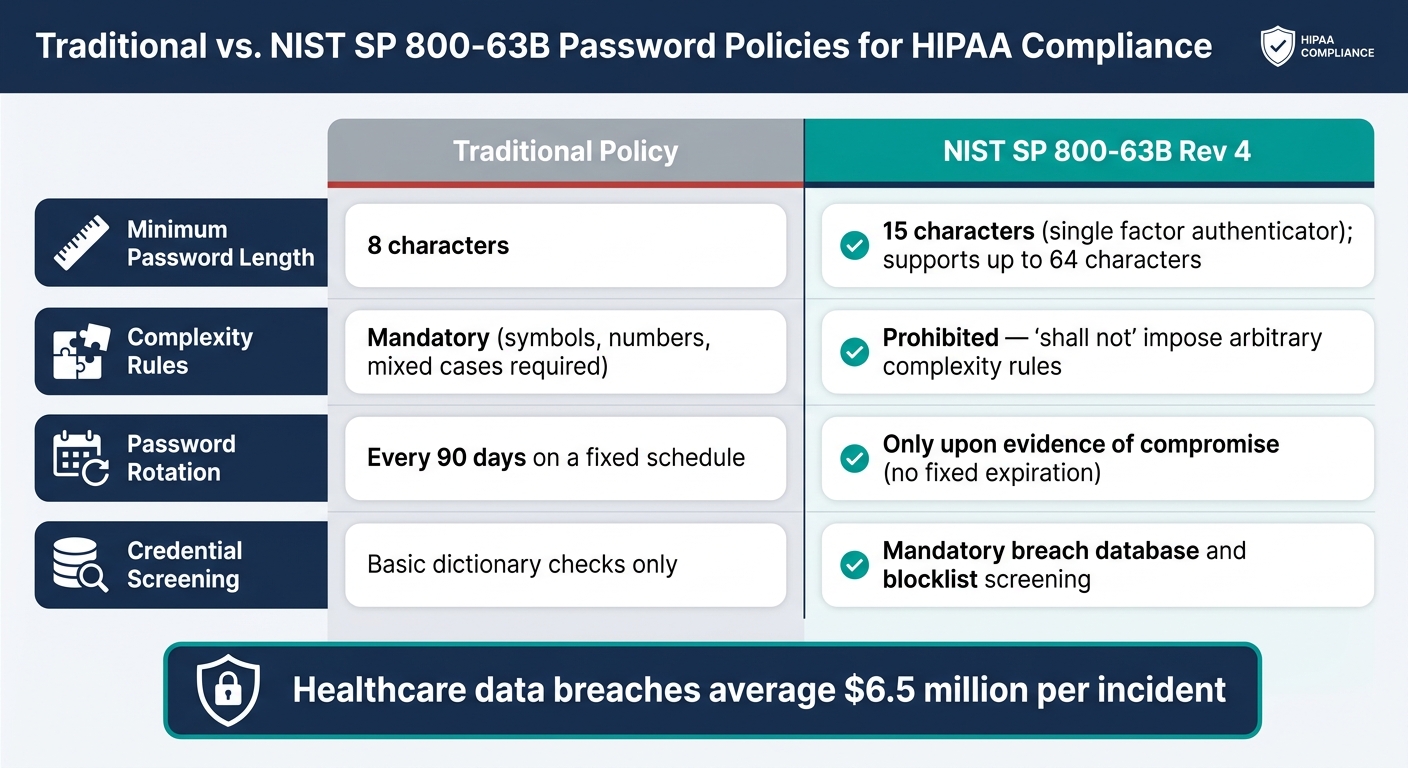
Traditional vs. NIST SP 800-63B Password Policies for HIPAA Compliance
Key HIPAA Security Rule Requirements
The HIPAA Security Rule mandates that organizations adopt "reasonable and appropriate" measures to safeguard electronic protected health information (ePHI). This requires robust cyber risk management in healthcare to ensure all technical controls remain effective against evolving threats. Instead of prescribing exact technical specifications, it sets a performance-based standard, focusing on what needs protection rather than dictating how to protect it. This approach allows for the adoption of technical benchmarks like those outlined by NIST.
In terms of password management, HIPAA addresses this under 45 CFR § 164.308(a)(4)(ii)(D) as an addressable administrative safeguard. On the technical side, three key requirements - unique user identification, authentication, and role-based access control - are outlined in 45 CFR § 164.312. These ensure that every user is uniquely identifiable, verifiable, and granted access strictly based on their role.
The HHS Office for Civil Rights (OCR) evaluates password policies during audits or breach investigations, using industry best practices like NIST SP 800-63B as a benchmark. This makes it critical for organizations to maintain thorough documentation of their password policies and audit logs, which must be retained for six years [3].
NIST SP 800-63B Password Recommendations

NIST SP 800-63B provides the technical guidance needed to address HIPAA’s non-specific requirements, helping organizations establish safeguards that are both "reasonable" and effective. The latest update, Revision 4 (released August 2025), introduces a more user-friendly approach to password security by focusing on backend protections rather than overly complex user requirements.
One of the most significant updates in Revision 4 is the new minimum password length: 15 characters when a password serves as the sole authenticator [4]. Systems must also support passwords up to 64 characters to allow for long passphrases [4]. Importantly, the guidance prohibits arbitrary complexity rules, such as requiring a mix of symbols, numbers, and uppercase letters, beyond basic length and blocklist checks [4].
Why the shift? NIST found that complexity rules often lead users to create predictable passwords. As they observed:
"users tend to choose weaker memorized secrets when they know that they will have to change them in the near future" [1]
Additionally, NIST advises against mandatory 90-day password resets unless there is evidence of compromise [1][3]. Instead, they recommend measures like mandatory blocklist screening to ensure new passwords are not part of known-breached databases or include commonly used terms, such as the organization's name [2][4].
Other key technical safeguards include account lockouts after 3–5 failed login attempts and secure storage practices, such as using salted, iterative hashing methods like AES-256 [3]. Together, these measures form the foundation of a modern password policy that aligns with HIPAA.
The table below highlights the differences between traditional password policies and the updated NIST SP 800-63B recommendations:
| Feature | Traditional Policy | NIST SP 800-63B Rev 4 |
|---|---|---|
| Minimum Length | 8 characters | 15 characters (single factor) |
| Complexity Rules | Mandatory (symbols, numbers, cases) | Prohibited ("shall not" impose) |
| Password Rotation | Every 90 days | Only upon evidence of compromise |
| Credential Screening | Basic dictionary checks | Mandatory breach/blocklist screening |
Adam Kehler, Director of Healthcare Cybersecurity Services at Online Business Systems, explains:
"Following an industry standard will not itself guarantee compliance, but it can help demonstrate that an organization is implementing 'reasonable and appropriate' controls" [5]
Core Elements of a HIPAA-Compliant Password Policy
To meet HIPAA and NIST standards, password policies must focus on secure creation, regular updates, and robust defenses against cyber threats.
Password Creation Guidelines
A strong password policy starts with prioritizing length over unnecessary complexity. Current best practices recommend passphrases - a combination of unrelated words like "raccoon-doorknob-spacecraft" - instead of predictable patterns such as "Password123!". Healthcare organizations typically require passwords to be at least 15 characters long. Systems should also allow all printable characters, including spaces, to support passphrases, while disabling password hints to avoid accidental information exposure.
But creating secure passwords is just the first step. Proper management of password updates is equally important.
Password Change and Lifecycle Management
The traditional practice of forcing password resets every 90 days is outdated. This approach often leads to users making small, predictable changes to their old passwords, weakening overall security.
Instead, password changes should be tied to specific security events, such as data breaches, phishing attempts, or unusual login activity. Employees should be educated on avoiding recycled passwords or minor tweaks during updates. Pairing this strategy with a HIPAA-compliant password manager can simplify the process, helping users maintain strong, unique passwords without the burden of memorizing them. This not only reduces frustration but also improves security by making credentials harder to exploit in targeted attacks.
Proactive password management can also help guard against common cyber threats.
Protecting Passwords Against Common Threats
Healthcare organizations face three major threats to credential security: phishing, brute-force attacks, and credential stuffing. Each requires tailored defenses:
| Threat | Recommended Defense | HIPAA Alignment |
|---|---|---|
| Phishing | Multi-Factor Authentication (MFA) | Meets HIPAA Technical Safeguards and NIST 800-63B authentication requirements |
| Brute Force | Use of 15+ character passphrases; account lockout limits | Aligns with NIST 800-63B access control best practices under HIPAA § 164.312 |
| Credential Stuffing | Screen passwords against breached credential databases | Complies with NIST 800-63B blocklist standards and HIPAA risk-based analysis |
Credential stuffing, which exploits stolen credentials from data breaches, poses a significant risk in healthcare. Automated tools that screen passwords against known breaches have become a critical line of defense.
It's also essential to ensure that passwords are never stored in plaintext. Instead, they should be protected using encryption and salting techniques. Even if a database is compromised, these methods help safeguard credentials. Additionally, encrypting electronic protected health information (ePHI) both at rest (e.g., using AES-256) and in transit (e.g., via TLS 1.2+) can help organizations qualify for the "safe harbor" provision under HIPAA § 164.312(a)(2)(iv), reducing liability in case of a breach.
Aligning Password Policies with Clinical Workflows
Password policies only work when clinicians can realistically follow them. In fast-paced clinical environments, overly strict rules can push staff toward unsafe practices like sharing credentials or using weak passwords. The challenge is to create policies that safeguard electronic protected health information (ePHI) without disrupting medical workflows.
Role-Based Access Control and Least Privilege
Balancing security with the realities of clinical work means tailoring access controls to specific roles. Role-based access control (RBAC) ensures that users only get access to what they need for their job. For example, a billing specialist doesn’t need the same level of access as an ICU nurse. Permissions should align with the minimum necessary for each role [3]. Regularly reviewing and updating these permissions ensures they stay relevant as job responsibilities change. For tasks requiring higher access, just-in-time access grants temporary permissions only when needed, reducing the risk of long-term security vulnerabilities [3].
"The principle of minimum necessary access must be technically enforced, not just stated in policy." - Agency Insights [3]
Multi-Factor Authentication (MFA) as a Security Layer
Strong passwords aren’t enough on their own, especially in healthcare settings. Multi-factor authentication (MFA) adds another layer of security by requiring a second form of verification, like a mobile device, alongside the password. HIPAA mandates MFA for remote access to clinical systems and strongly advises it for all ePHI access [3][1]. With 73.6% of hospital staff admitting to using a colleague’s password [7], MFA helps mitigate risks by ensuring that a stolen or shared password alone isn’t enough to breach the system.
Reducing Clinician Security Fatigue
When clinicians face too many security hurdles, they may resort to shortcuts like reusing passwords. Single sign-on (SSO) minimizes the need for repeated logins during a shift, making it easier to maintain strong, unique passwords. Pairing SSO with enterprise password managers further simplifies secure access across multiple systems. Additionally, session timeouts - an addressable HIPAA safeguard - should be tailored to the setting. For instance, public-facing kiosks might require shorter timeouts, while private offices can allow longer ones [3]. Tools like Censinet RiskOps™ can help align password policies with the demands of clinical workflows, ensuring that security measures don’t slow down critical decision-making.
Implementing and Monitoring Password Policies
A password policy is only as effective as the effort behind it. Creating one that stands the test of time involves understanding your organization's risks, evaluating how the policy performs, and ensuring vendors stick to the same standards.
Risk-Based Policy Design
HIPAA doesn’t provide a universal template for password policies. Instead, it emphasizes that security measures must be "reasonable and appropriate" for each organization [1][6]. This means you need to tailor password policies to fit your organization's unique risk profile. For example, a small clinic's needs will differ significantly from those of a large hospital system.
Start with a documented risk analysis. Identify where your electronic protected health information (ePHI) is stored, assess how sensitive the data is, and pinpoint where stronger authentication measures are needed. This often involves asking third-party risk assessment questions to ensure external partners meet these same standards. This approach ensures that password controls are neither excessive nor too weak [1].
Tools like Censinet RiskOps™ can help streamline this process. They allow organizations to conduct structured risk assessments across various systems, making it easier to prioritize areas requiring stricter password controls.
Once your policy is built around these risks, the next step is monitoring its performance to ensure it remains effective.
Tracking Policy Effectiveness Over Time
A risk-based design is just the beginning - ongoing monitoring is what keeps your password policies effective. Regularly reviewing audit logs and conducting credential screenings are essential practices. Audit logs from enterprise password management tools can reveal user activity and flag unusual access patterns [1].
In addition to audit logs, it’s important to screen Active Directory for compromised or commonly reused credentials. This provides a real-time snapshot of how many accounts might be vulnerable [6][7].
"Authentication deficiencies topped the list as the most critical concern, with issues around generic password use, the writing down of passwords around the workspace, and unencrypted emailing of credentials." - ClearWater CyberIntelligence Institute [6]
Don’t overlook physical vulnerabilities either. Conduct regular workspace audits to check for things like sticky notes with passwords left near terminals. These low-tech risks are often ignored but remain surprisingly frequent.
Managing Vendor and Third-Party Password Compliance
Your internal policies only address part of the risk. Business Associates - such as billing companies, data storage providers, and medical equipment vendors handling ePHI - must also comply with HIPAA password requirements [7]. Ensure every vendor with system access has a signed Business Associate Agreement (BAA) and can prove their password practices align with compliance standards [1].
Vendors should follow HIPAA-compliant frameworks, verified through audits and BAAs [6]. Just as with internal policies, vendor compliance strengthens your overall security posture. Platforms like Censinet RiskOps™ can simplify vendor risk assessments, helping document third-party password compliance. This is especially critical given that healthcare organizations, on average, have 13 exposed databases per company [6].
Conclusion: Key Takeaways for HIPAA-Compliant Password Policies
Password policies are more than just a compliance requirement - they're a critical safeguard for patient data. With healthcare data breaches averaging nearly $6.5 million per incident [6], the stakes couldn't be higher.
Recent research emphasizes that modern password security focuses on length over complexity and avoids outdated practices like forced password changes. Policies aligned with NIST SP 800-63B recommend passphrases of 15+ characters, eliminate unnecessary expiration cycles, and include proactive checks for compromised credentials. These measures not only enhance security but are also more practical for clinicians to use compared to older methods.
"The Security Rule is designed to be flexible, scalable, and technology neutral, enabling a regulated entity to implement policies... appropriate for the entity's particular size, organizational structure, and risks." - HHS [8]
Balancing security with usability is key. When password policies are too cumbersome, clinicians may resort to workarounds, which can create vulnerabilities. Combining strong password standards with MFA, role-based access controls, and workforce training helps bridge the gap between well-intentioned policies and real-world application.
It's also essential to extend these standards to vendors and business associates who handle ePHI. This means conducting documented assessments, securing signed BAAs, and performing ongoing compliance checks. Tools like Censinet RiskOps™ can simplify this process by helping healthcare organizations manage both internal and third-party password compliance as part of a broader risk management strategy. What might seem overwhelming can be turned into a structured and repeatable process with the right approach.
FAQs
How do I justify a HIPAA password policy during an OCR audit?
To demonstrate compliance with HIPAA's administrative safeguards under 45 CFR §164.308(a)(5)(d), your password policy documentation needs to be thorough and precise. This section of HIPAA emphasizes the importance of procedures that protect electronic protected health information (ePHI) from unauthorized access.
Here’s what to include in your documentation:
- Procedures for Password Creation and Updates: Clearly outline how passwords are created and updated. Emphasize the use of strong passwords that include a mix of uppercase and lowercase letters, numbers, and special characters. Specify the frequency of required password changes, such as every 60 or 90 days.
- Safeguarding Passwords: Explain how passwords are stored and protected. For example, passwords should never be written down in accessible locations or shared. If your system uses encryption or hashing for password storage, include those details.
- Preventing Unauthorized Access: Highlight how your policy addresses potential threats. This could include locking accounts after a certain number of failed login attempts or requiring multi-factor authentication (MFA).
- Alignment with Best Practices: Reference widely accepted password management guidelines, such as those from the National Institute of Standards and Technology (NIST). These best practices reinforce the robustness of your policy and demonstrate that it’s designed to mitigate risks effectively.
By documenting these procedures, you showcase how your password policy aligns with HIPAA standards and actively reduces the risk of breaches. Having clear and detailed records ensures you’re prepared to justify your approach during an OCR audit.
What’s the best way to roll out MFA without slowing clinicians down?
To introduce MFA without interrupting clinicians' workflows, focus on applying it at key access points. These include privileged accounts, cloud management consoles, or remote access systems like VPNs and patient portals. For older systems that can't natively support MFA, consider using access gateways to enforce it without requiring changes to the applications themselves.
Integrating MFA smoothly into daily operations is crucial. Features like single sign-on (SSO) or adaptive authentication - where MFA activates only in high-risk situations - can help maintain compliance while keeping processes efficient and user-friendly.
How can we enforce strong passwords across vendors and business associates?
To ensure vendors and business associates maintain strong password practices in line with HIPAA requirements, it’s essential to implement clear password policies. These policies should cover key areas like password complexity, regular updates, and protective measures.
Here’s how you can strengthen password security:
- Set complexity standards: Require passwords to include a mix of uppercase and lowercase letters, numbers, and special characters.
- Use password managers: These tools help securely store and generate strong, unique passwords.
- Enforce expiration policies: Mandate regular password changes to reduce risks.
- Block breached passwords: Prevent the use of passwords known to be compromised in data breaches.
- Enable multi-factor authentication (MFA): Add an extra layer of security by requiring a second verification step.
Additionally, regular training sessions and periodic security assessments are crucial. These efforts help ensure ongoing compliance and protect against unauthorized access to sensitive protected health information (PHI).

